
The core difference really boils down to this: Shopify is a polished, all-in-one ecommerce service designed to get you selling fast. On the other hand, WordPress paired with the WooCommerce plugin is an open-source giant that gives you total control, which is perfect for businesses built around content.
So, are you looking for simplicity or complete creative freedom? That’s the real question.
Shopify vs WordPress At a Glance
Before we get into the nitty-gritty of payment gateways, SEO, and what this all really costs, let's start with a bird's-eye view. This isn't about which platform is "better" in a vacuum. It’s about finding the right tool for your specific goals, your comfort with technology, and your vision for growth.
I like to use a simple analogy: building a house.
Shopify is like buying a premium home in a managed community. You get fantastic security, all the maintenance is handled for you, and the amenities are ready on day one. The catch? You can only customize things within the community's rules.
WordPress is like being given a plot of land and a full set of professional tools. You can build whatever you want—a skyscraper, a cozy bungalow, a modern masterpiece. But you’re on the hook for everything: the foundation, the plumbing, the security system, and all the upkeep.
This fundamental difference shapes everything from how quickly you can launch to the true cost you'll pay over time. The table below breaks down these core distinctions to give you a quick first look.
Shopify vs WordPress At a Glance
| Feature | Shopify | WordPress (with WooCommerce) |
|---|---|---|
| Ideal User | Beginners, dropshippers, and anyone who wants a fast, simple launch. | Content-focused brands, businesses needing deep customization, and users comfortable with some tech. |
| Core Purpose | A dedicated, hosted platform built from the ground up to sell products. | A flexible content management system (CMS) that becomes an online store by adding the WooCommerce plugin. |
| Ease of Use | Incredibly user-friendly with a guided setup. You don't need to know any code for the basics. | A steeper learning curve. You'll manage your own hosting, plugins, themes, and security updates. |
| Pricing Model | A clear monthly subscription fee, plus transaction fees if you don't use Shopify Payments. | No software fee, but costs for hosting, a domain, and premium themes/plugins can add up. |
| Maintenance | Fully managed. Shopify takes care of hosting, security, and all software updates for you. | Self-managed. You’re responsible for finding a host and handling all security and software updates yourself. |
| Flexibility | Very flexible within its own ecosystem. Customize with apps and by editing themes. | Virtually limitless flexibility. You have full control over the code, design, and every feature. |
This table should give you an initial gut feeling for which platform aligns better with your needs. Now, let's dig deeper into the specifics that will truly shape your experience.
Understanding Their Core Platform Philosophies
To really get to the bottom of the Shopify vs. WordPress debate, you have to understand that they aren't just two different tools. They represent two completely different ways of thinking about how to build and run an online store. One is a guided, all-in-one service, and the other is a powerful, open toolkit that gives you total freedom.
Shopify is a Software as a Service (SaaS) platform. The best analogy is leasing a pristine, move-in-ready retail space in a premium shopping mall. The mall management (Shopify) takes care of all the boring-but-critical stuff like security, maintenance, and keeping the lights on. Your job is to set up your products, decorate the space, and start making sales.
It’s a model built for simplicity and getting you up and running fast. You never have to think about web hosting, security patches, or server updates because it’s all bundled into your monthly subscription.
Shopify: The Curated Ecosystem
Shopify is what you’d call a "closed" ecosystem, designed from the ground up specifically for ecommerce. Everything just works together, right out of the box—from payment gateways to the apps in its marketplace. This tight integration means you run into far fewer technical glitches or compatibility headaches, which is a huge relief if you're not a developer.
The flip side of all that convenience is control. You can absolutely personalize your store with Shopify's approved themes and apps, but you can’t get under the hood and change the core platform. You're building on their land, so you play by their rules.
Shopify is betting that most entrepreneurs would rather spend their time on product design and marketing, not on managing website infrastructure. It's designed to be the quickest, most straightforward path from a great idea to your first customer.
WordPress: The Open-Source Powerhouse
WordPress, on the other hand, is an open-source Content Management System (CMS). "Open-source" is a fancy way of saying the software itself is free, and the code is available for anyone to see, change, and build upon. When you add the free WooCommerce plugin, it transforms from a simple website builder into a full-blown ecommerce machine.
This approach hands you complete and total freedom. You pick your own hosting company, you can edit every line of code, and you can customize literally anything you can imagine. This is like buying your own plot of land and building your store from the foundation up. There are no limits to what you can create. For a deeper dive, it's worth checking out the benefits of using WordPress.
Of course, with great freedom comes great responsibility. You are the one in charge of everything: security, updates, backups, and making sure your site runs fast. This hands-on nature is a major consideration when you're figuring out how to choose a CMS, as it definitely requires more technical know-how.
This incredible flexibility is exactly why WordPress has seen such massive adoption. It’s not just a platform; it's a movement. Its market share has exploded from 27.3% of all websites in 2017 to a projected 43.5% by early 2025. That dominance means you have a gigantic community and an ecosystem of over 60,000 plugins at your fingertips, letting you build a store that does exactly what you need it to do.
Comparing the True Costs of Building Your Store

When you're trying to decide between Shopify and WordPress, the price tag you see upfront is never the whole story. The real number you need to focus on is the total cost of ownership—that’s everything combined, from monthly fees and one-time purchases to all the little "hidden" costs that pop up as you grow. Getting this right is crucial for making a smart financial decision.
Shopify is built on a predictable subscription model. The pricing is clean and simple, which is a huge relief for new business owners trying to nail down a monthly budget.
But that simplicity doesn't mean it's always cheaper. While your base subscription is fixed, your total bill will creep up with transaction fees and the apps you'll inevitably need to run your business the way you want to.
Breaking Down Shopify Costs
Shopify’s pricing looks simple on the surface with its monthly plans, but your final invoice will have a few more line items. Here’s what you actually need to budget for:
- Monthly Subscription: This is your core cost. You'll choose from plans like Basic, Shopify, and Advanced, each offering different features and better transaction rates as you go up.
- Transaction Fees: This is a big one. If you don't use Shopify Payments and opt for another gateway like PayPal or Stripe, Shopify will take an extra cut of every single sale. This fee ranges from 0.5% to 2%, depending on your plan.
- App Subscriptions: Need advanced product options, subscription billing, or better email marketing? You’ll be heading to the Shopify App Store. These paid apps can easily add another $20 to over $200 per month to your bill.
For a brand new store, the predictability is Shopify's biggest selling point. You know exactly what your bill will be each month, which makes financial planning a whole lot easier and avoids surprise invoices for technical help.
The Variable Costs of WordPress and WooCommerce
WordPress with WooCommerce is a completely different ballgame. The software itself is free, but you’re on the hook for building and maintaining the entire machine your store runs on. This means your costs are variable—they can start low but can also climb as your needs get more complex.
The real power of the WordPress and WooCommerce ecosystem is that you're in total control of your spending. You can start lean with a budget-friendly setup and only invest in premium tools when your growth actually justifies it.
This "à la carte" approach gives you amazing control, but it also means you become a manager of different vendors and expenses. It can get complicated. To see how all these pieces fit together, check out our in-depth guide on the cost of an ecommerce website.
Here are the main expenses you'll run into with a WooCommerce store:
- Web Hosting: This will be your largest recurring cost. You can start with cheap shared hosting for $5-$25/month, but as traffic grows, you'll need to upgrade to managed WordPress or dedicated servers, which can run $100-$500+ per month.
- Domain Name: A simple yearly fee, usually around $15-$20.
- Premium Themes and Plugins: You can find free options, but any serious store will invest in premium tools. A good theme might cost $60-$120 as a one-time purchase, while essential plugins often cost $50 to $300 each, many with annual renewal fees.
- Developer Fees: If you’re not a tech person, you’ll eventually need to hire a developer for setup, custom tweaks, or fixing things that break. This cost can be anything from a few hundred dollars for a quick job to thousands for a custom build.
Comparing Two Real-World Scenarios
Let's look at how these costs actually play out for two different types of businesses.
Scenario 1: The Startup Dropshipper
A new dropshipping store needs to launch fast with as little upfront cash as possible.
- Shopify: The Basic Shopify plan has everything they need right away. With a couple of essential apps, the predictable monthly cost lets them pour their energy into marketing, not worrying about site maintenance.
- WordPress: It's possible to start cheaper here with budget hosting, but then you have to deal with integrating dropshipping tools, locking down security, and managing updates. It adds complexity and the risk of a big bill if something goes wrong.
Scenario 2: The Established Brand with Complex Needs
A growing brand sells products with tons of variations and needs a custom inventory system.
- Shopify: This business would probably be on Shopify Plus and paying for a handful of expensive apps to get the custom features they need. Their total monthly bill could easily be in the thousands, but it would still be a predictable expense.
- WordPress: This is where WordPress really comes into its own. The brand can hire a developer to build a one-time custom solution that fits their operations perfectly, completely avoiding those recurring app fees. The initial investment will be higher, no doubt, but the long-term cost of ownership could end up being way lower.
Ecommerce Power and Flexibility: Where the Real Differences Lie
When we get down to brass tacks, the choice between Shopify and WordPress comes down to how each platform handles the core engine of your business: selling stuff. How you manage products, process checkouts, and run promotions is what makes or breaks an online store. This is where the trade-off between a polished, ready-to-go service and a flexible, do-it-yourself toolkit becomes painfully clear.
Shopify is built from the ground up to do one thing exceptionally well: make the standard online selling process as smooth as humanly possible. Think of it as a finely tuned machine, ready to start making you money from day one.
WordPress with WooCommerce, on the other hand, is like getting a powerful engine in a box. You get all the high-performance parts you need to build a sales machine perfectly suited to your specific business model, but you’re the one who has to put it all together.
Shopify’s Out-of-the-Box Selling Strengths
The magic of Shopify is that the most critical, revenue-driving features are already baked right in. You don’t have to go hunting for plugins to handle the basics of selling online; it’s all there, ready to go.
This all-in-one approach is why you see so many high-growth brands flocking to Shopify. In the broader e-commerce market, Shopify holds a 26.2% market share, edging out WooCommerce's 20.1% as of 2025. But when you look at the top one million high-traffic sites, Shopify's lead becomes a chasm, powering giants like Gymshark and Allbirds.
Here are a few of the core features that come standard:
- A World-Class Checkout: Shopify's checkout is legendary for a reason—it’s fast, reliable, and relentlessly optimized for conversions. Features like Shop Pay let customers save their details, turning a clunky process into a one-click purchase that dramatically cuts down on abandoned carts.
- Abandoned Cart Recovery: This isn’t an expensive add-on; it’s a standard feature on all plans. The platform can automatically email shoppers who leave items behind, helping you claw back lost sales without lifting a finger.
- Multi-Channel Selling: Shopify gets that your customers aren't just on your website. It makes it incredibly simple to sync your products and sell directly on Instagram, Facebook, TikTok, and even in physical stores with Shopify POS.
Shopify’s entire philosophy is to perfect the 80% of e-commerce features that 80% of businesses will ever need. It’s designed to eliminate decision fatigue by giving you a proven, high-performance runway for getting sales off the ground quickly.
WooCommerce and Its Unmatched Customization
WooCommerce doesn't even try to compete with Shopify on simplicity. Its real power lies in its infinite flexibility, a direct result of being built on the open-source WordPress platform. If you can dream up a unique sales feature or workflow, chances are you can build it with WooCommerce.
This is the platform you turn to when "standard" just won't cut it for your business. The open-source nature of WordPress means a massive community of developers has created a plugin for just about everything, and if they haven't, you can build it yourself.
This is where WooCommerce truly shines—when your business has complex, non-negotiable requirements. For instance, if you have intricate shipping rules, like restricting certain items to specific states or offering hyper-local delivery options, you have total control. The sheer number of specialized shipping restriction plugins for WooCommerce shows how the ecosystem can solve niche problems that a closed platform simply can't.
Think about these kinds of situations where WooCommerce is the clear winner:
- Complex Product Configurations: Selling highly customizable products with dozens of options, conditional logic, and unique add-ons? WooCommerce lets you build a product page that can handle any level of complexity you throw at it.
- Custom Pricing and Membership Rules: If you need to set up B2B wholesale pricing, create tiered discounts for members, or build a "request a quote" system, WooCommerce gives you the raw tools to build those rules from scratch.
- Unlimited Third-Party Integrations: Because you have full access to the underlying code, you can integrate with any system you want—whether it’s a niche inventory management platform, an obscure payment gateway, or your company's own proprietary software.
SEO and Content: Where the Real Battle Is Won
If organic traffic is a big part of your growth plan, this is where the Shopify vs. WordPress debate gets really interesting. Both platforms can absolutely get you to the top of Google, but they come at it from completely different angles. One gives you simplicity, the other gives you total control.
Shopify's SEO: Solid and Straightforward
Shopify gives you a great starting point for SEO, especially if you're new to the game. It takes care of a lot of the technical stuff right out of the box, like generating sitemaps and handling SSL certificates. This frees you up to focus on what matters most early on: solid keyword research, compelling product descriptions, and writing good blog content.
But that simplicity has its trade-offs. The most notorious limitation is Shopify's rigid URL structure. You can't change the fact that all your blog posts live under a /blogs/news/ path, and all your products are stuck in a /products/ folder. For most stores, this is no big deal. But for a business building a complex site architecture to dominate specific niches, it can be a real headache.
WordPress: The Content and SEO Powerhouse
This is where WordPress, at its core a content management system, really shines. Because it's open-source, you get complete, granular control over every last detail of your site's SEO.
With WordPress and WooCommerce, you can design the exact URL structure you envision. You can create unique content formats—think case studies, in-depth tutorials, or resource libraries—and build out sophisticated content hubs without being boxed in.
For any brand that leads with content—where expertise and authority drive sales—WordPress offers a massive strategic advantage. It's built to be a powerful content marketing engine in a way that Shopify’s more structured system just can't replicate.
Plus, the plugin ecosystem hands you the keys to the entire technical SEO kingdom. Incredible tools like Yoast SEO or Rank Math let you dial in settings that are simply off-limits on Shopify.
- Advanced Schema Markup: You can implement incredibly detailed structured data for products, articles, or even local business info to make your search results really stand out.
- Redirect Management: Easily control every single 301 redirect, which is absolutely critical when you're migrating a site or reorganizing content without killing your search rankings.
- Direct File Access: For the pros, you can directly edit files like robots.txt and .htaccess to give precise instructions to search engine crawlers.
The Content Marketing Edge
Look, both platforms have a blog. But WordPress was built to be a blog. It’s a far more powerful and flexible environment for creating and managing content. You can build complex page layouts, weave in advanced content types, and run a high-volume editorial calendar with ease. Shopify's blog is perfectly fine for basic announcements and articles, but it just doesn't have the muscle for a serious content marketing operation.
So, how do you choose? It really comes down to your business model. If you're focused on selling products and your content needs are straightforward, Shopify's SEO toolkit is more than enough to get the job done. But if your entire growth strategy is built on organic search, thought leadership, and becoming a content powerhouse, WordPress gives you the raw power and flexibility you need to win.
For an even deeper dive, check out our guide on the best ecommerce platform for SEO.
Making the Right Choice for Your Business Model
Theory is great, but let's get real. The "best" platform isn't about a feature checklist; it’s about what fits your business goals, your technical skills, and your vision for growth. We'll move past the generic pros and cons and dive into four common business scenarios to see where the Shopify vs. WordPress debate lands in the real world.
Every business model has different priorities—whether it’s lightning-fast launch speed, rock-bottom costs, or deep customization. Looking at these distinct situations will show you which platform’s philosophy—Shopify’s managed simplicity or WordPress’s endless flexibility—is the right one for you.
Scenario One: The Fast-Launch Dropshipping Store
For a new dropshipping venture, speed is the name of the game. You need to test product ideas fast and start making sales with as little upfront cash and technical hassle as possible.
Recommendation: Shopify is the hands-down winner here.
Its all-in-one setup cuts out almost all the technical headaches. You can connect to suppliers like CJdropshipping or Zendrop through the app store in minutes, pull in products, and have a polished-looking store live the same day. The predictable monthly fees and included hosting let you focus 100% on marketing and sales, not server updates and security patches.
Scenario Two: The Content Creator Selling Digital Products
Picture a blogger, podcaster, or YouTuber with a dedicated following. They're ready to monetize that audience by selling digital products like ebooks, design templates, or online courses. Their entire business is built on content, and the store is just another part of that content machine.
Recommendation: WordPress with WooCommerce gives you a serious strategic edge.
Since the business is already content-first, WordPress is a much stronger and more flexible home for your blog, resource libraries, and sales pages. You can use plugins like Easy Digital Downloads or MemberPress to seamlessly integrate complex features like gated content and membership levels—things that are much trickier to pull off with a standard Shopify setup. For an authority-driven brand, the ability to create one cohesive content and commerce experience makes WordPress the clear frontrunner.
This flowchart can help you visualize how your SEO needs—from basic setup to advanced control—should influence your decision.
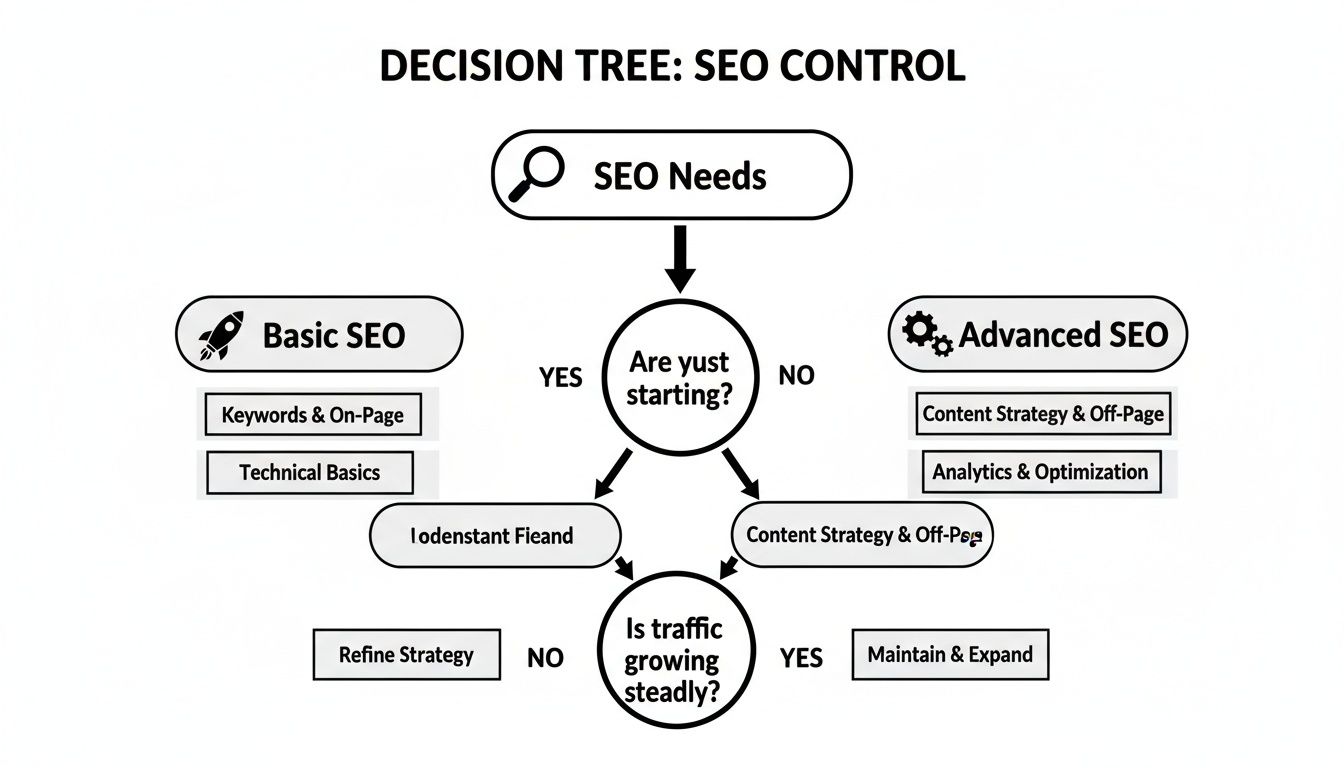
As you can see, Shopify gets you off the ground quickly with solid SEO fundamentals. But for a deep, content-led strategy, WordPress provides the advanced toolkit you’ll eventually need.
Scenario Three: The Local Retailer Moving Online
A local boutique has a great physical shop and wants to bring its business online. They need a straightforward way to manage inventory that stays in sync between their brick-and-mortar store and their new website. Simplicity and reliability are everything.
Recommendation: Shopify is the perfect fit.
The Shopify POS (Point of Sale) system was built for exactly this. It creates one unified system for both in-person and online sales. Your inventory, customer profiles, and sales reports are all in one dashboard, which makes running the business so much easier. This kind of seamless integration is a core benefit of Shopify’s tightly controlled ecosystem and is far more complicated to build with a mix of WordPress plugins.
Scenario Four: The B2B Company with Custom Needs
Think about a B2B wholesaler that needs a private, password-protected storefront. They need different pricing tiers for different customer groups and a "request a quote" button instead of a standard "buy now" checkout. Their sales process is unique and demands a highly tailored solution.
Recommendation: WordPress with WooCommerce is the only real choice for this level of customization.
This is where the open-source power of WordPress truly shines. As of April 2025, WordPress dominates the market, powering an incredible 61.3% of all websites that use a content management system. For comparison, Shopify holds just 6.7% of that market. This massive footprint gives you access to an unparalleled ecosystem of over 60,000 plugins and thousands of themes, allowing for incredibly deep customization without building from the ground up.
A skilled developer can create custom pricing rules, integrate with a proprietary inventory system, and build a completely unique user experience designed specifically for B2B clients. You can discover more insights about WordPress's market dominance and see what that means for its massive ecosystem.
Frequently Asked Questions
Even after digging into a detailed Shopify vs. WordPress comparison, you probably still have a few practical questions kicking around. Let's tackle the common ones we hear from business owners to clear up any lingering doubts and help you lock in your decision.
These are the real-world concerns that pop up, from what it takes to switch platforms to the long-term SEO game and knowing when it's time to call in a pro.
Which Platform Is Better for SEO Long-Term?
This is a classic "it depends" situation, but the answer really hinges on your business model. For most straightforward e-commerce stores, Shopify provides a solid and reliable SEO foundation that's more than enough to get the job done. Its simplicity is actually a bonus here—it lets you focus on creating great content and optimizing your products instead of getting bogged down in technical weeds.
On the other hand, if your business is built on content first—think a massive blog that drives all your traffic—then WordPress offers a much higher ceiling for advanced SEO. Because it's open-source, you get total control over every little technical detail, from custom URL structures to intricate schema markup. That kind of granular control is a huge advantage for anyone building a complex content hub or a really sophisticated site architecture.
When it comes to Shopify vs. WordPress for SEO, think of it like this: Shopify gives you a simple, powerful engine that's easy to drive. WordPress gives you a custom-built race car—you can do more with it, but you have to know how to tune it.
Can I Migrate from WordPress to Shopify or Vice Versa?
Absolutely. Migrating between the two is very common, but don't underestimate the complexity. It’s a major project that demands careful planning. You’re not just moving products and customer data; you have to transfer order history, content pages, and all your blog posts. More importantly, you need a bulletproof 301 redirect strategy to preserve your hard-earned SEO rankings by telling search engines where every old page now lives.
There are apps and plugins that claim to handle the data transfer, but for any store with a bit of history, we strongly recommend hiring an experienced developer or agency. A botched migration can be disastrous, leading to lost data, a terrible customer experience, and a nosedive in your search engine traffic.
When Should I Hire a Developer?
You’ll probably need a developer at different stages depending on which platform you go with.
- For Shopify: You'll likely call a developer when you want to make custom theme modifications, build a unique feature with a private app, or connect your store to a third-party system that doesn’t have a standard integration.
- For WordPress: You'll almost certainly need a developer right from the start for the initial setup. They're also essential for configuring complex plugins, handling ongoing security, optimizing performance, and fixing the inevitable issues that crop up after updates.
The main difference is that with Shopify, you hire a developer for enhancements. With WordPress, you often need one for essential setup and maintenance.
Trying to navigate a platform migration or a custom build on your own can feel like a massive headache. The team at OneNine specializes in both Shopify and WordPress development, making sure your e-commerce platform is built right and managed for sustainable growth. If you need an expert in your corner, reach out to our team today.


