
Choosing the right Content Management System (CMS) isn't about finding the "best" platform—it's about finding the right platform for you. It all comes down to a simple framework: figure out your goals first, then find a system that helps you meet them.
Too many people get bogged down comparing feature lists. Instead, start with a crystal-clear picture of what your business actually needs to manage content, run marketing campaigns, and drive sales. This way, you end up with a tool that actually helps you grow, not one that just gets in the way.
Start Here Before You Compare Any Platforms

The single biggest mistake I see companies make is diving straight into a bake-off between platforms. It’s tempting to immediately start comparing WordPress to Webflow, but without knowing what you’re solving for, you’re just looking at features in a vacuum. This is how you end up with a system that’s either way too complicated and expensive or one you’ll outgrow in a year.
Before you even glance at a single CMS logo, take a step back and truly understand what a content management system (CMS) is and the job it needs to do. Think of it as the command center for your entire digital presence. It’s so much more than a blog; it's the engine running every customer interaction.
Define Your Strategic Goals First
Your business strategy should always dictate your technology choices, never the other way around. Instead of asking, "Which CMS should I get?" start by answering a few foundational questions:
- What's the main job of our website? Is it primarily for generating leads? Selling products? Building a brand community? Or is it a media hub meant to publish high-volume content?
- Who are we talking to? A B2B audience might need a resource library with gated whitepapers, while a B2C ecommerce brand needs beautiful product galleries and a dead-simple checkout process.
- How does our team actually work? Think about who creates, edits, and publishes content. A large marketing department needs granular user roles and approval workflows. A solo founder just needs something fast and intuitive.
Writing down the answers gives you a clear roadmap. To get this right from the start, we built a comprehensive website brief template that walks you through every key requirement. Seriously, don't skip this step.
A CMS isn't just software; it's a long-term business partner. Choosing one based on flashy features instead of core needs is like hiring someone for a key role without even looking at their resume. You might get lucky, but it’s a huge gamble.
By defining your requirements first, you’re essentially creating a custom scorecard. It makes the rest of the process so much easier, allowing you to objectively weigh each option and see how it truly stacks up against your unique operational, marketing, and growth needs. This turns an overwhelming decision into a smart, strategic one.
Quick CMS Selection Framework
To help you get started, here’s a quick way to narrow down the field based on your primary goals. Use this table to point you in the right direction.
| If Your Main Goal Is… | And You Prioritize… | Look at This CMS Type | Common Examples |
|---|---|---|---|
| High-Volume Content Publishing | SEO, flexibility, and a large ecosystem of plugins. | Open-Source CMS | WordPress, Drupal |
| Selling Products Online | Integrated inventory, payments, and marketing tools. | SaaS Ecommerce Platform | Shopify, BigCommerce |
| Building a Custom Web Experience | Design freedom, animations, and visual development. | Visual/No-Code CMS | Webflow, Editor X |
| Lead Generation and Marketing | All-in-one CRM, email, and marketing automation. | Integrated Marketing Platform | HubSpot CMS |
| Powering Multiple Apps/Sites | Content delivery to any channel (web, mobile, etc.). | Headless CMS | Contentful, Sanity |
This framework isn't exhaustive, but it provides a solid starting point. Your answers to the strategic questions above will help you identify which of these categories—and the specific platforms within them—is the best fit for where your business is headed.
First, Figure Out What Your Website Actually Needs
Before you even think about looking at a single CMS demo, you need a crystal-clear blueprint of what you're trying to build. Going in without a detailed list of requirements is like going to the grocery store hungry without a list—you’ll get distracted by shiny features, end up with a cart full of stuff you don’t need, and somehow forget the milk.
This isn’t just a quick wish list. It’s about digging deep into your business operations, your marketing funnels, and your sales process and mapping them directly to what your website must do. This document will become your single source of truth, the yardstick you'll use to measure every potential platform.
Pinpoint Your Core Functional Needs
Let's start with the basics. What jobs does your website have to do every single day? Set aside the brand visuals for a minute and focus purely on the practical, non-negotiable features that keep the lights on.
Think about it in real-world terms:
- A local yoga studio absolutely needs a way to let clients book and pay for classes. That means the CMS has to play nice with a scheduling tool, display an interactive calendar, and handle payments smoothly.
- A B2B software company lives and dies by lead generation. Their site needs powerful forms, the ability to lock content behind a download (like a whitepaper), and a direct, no-fuss integration with their CRM to pass those leads to sales.
- A non-profit is focused on fundraising and community. Their CMS has to securely process donations, manage volunteer sign-up lists, and handle event registrations without a hitch.
See how specific that is? Vague statements like "it needs to be easy to use" are useless at this stage. You have to define what "easy" means for your team.
Map Your Content Workflow and Who Does What
How does a blog post, a new landing page, or a product update actually get made in your organization? The answer to that question will tell you a ton about the kind of CMS you need. A platform that's perfect for a one-person show will quickly grind a ten-person marketing team to a halt.
Get your team together and ask some direct questions:
- Who is actually creating the content? Are they developers who love code, or marketers who need a simple drag-and-drop editor?
- What does our approval process look like? Does a draft need to be reviewed by a manager and then a compliance officer before it can go live? You might need a CMS with built-in stages like "Draft," "Pending Review," and "Approved."
- Do we need different levels of access? Maybe a freelance writer should only be able to create new blog posts, while an editor can approve and publish content across the entire site.
A CMS that fights your team's natural workflow is a recipe for frustration. Every awkward click and confusing step is a little tax on your team's productivity, and it adds up fast. The goal is to find a system that makes publishing content feel effortless, not like pulling teeth.
A marketing-focused platform like HubSpot CMS is built with these collaborative workflows in mind. On the other hand, a simpler system might give every user the keys to the kingdom, which can be a huge security risk and an operational nightmare as your team grows.
Get Technical and List Your Integrations
Finally, it's time to look under the hood. Your website isn’t an island—it's connected to a dozen other tools that run your business. Forgetting to account for these connections is one of the most common and expensive mistakes I see people make.
You need to create a definitive list of every single third-party tool your website has to talk to. This isn't a "nice-to-have" list; these are often the deal-breakers.
Your integration checklist might look something like this:
- Marketing Automation: Do you use Mailchimp, HubSpot, or ActiveCampaign?
- Analytics: Where do you track performance? Google Analytics, Hotjar, or maybe a customer data platform (CDP)?
- Sales: Your CRM is critical. Does it need to connect to Salesforce, Pipedrive, or something else?
- E-commerce: What about payment gateways like Stripe or PayPal? Shipping providers?
- Customer Support: Live chat tools like Intercom or a full help desk system?
Writing all this down gives you an incredibly powerful filter. As you start looking at different platforms, you can instantly rule out any CMS that can’t support your essential business tools. This simple step will save you from a world of headaches and costly custom development work down the road.
Evaluate the Most Important CMS Criteria
Once you’ve mapped out what your website needs to do, it’s time to start looking at actual platforms. This is where the rubber meets the road—you'll move past the marketing hype and see how different Content Management Systems stack up against your specific, real-world needs.
Think of it as a methodical process. You’re scoring each option against a consistent set of criteria that actually matter to your business. This keeps you from being swayed by a slick sales demo or a pretty interface, ensuring your choice is based on solid data. It’s the difference between picking a CMS that just works now and one that will support you for years to come.
This decision tree can be a great starting point, helping you quickly narrow down the type of CMS that fits your general goals.
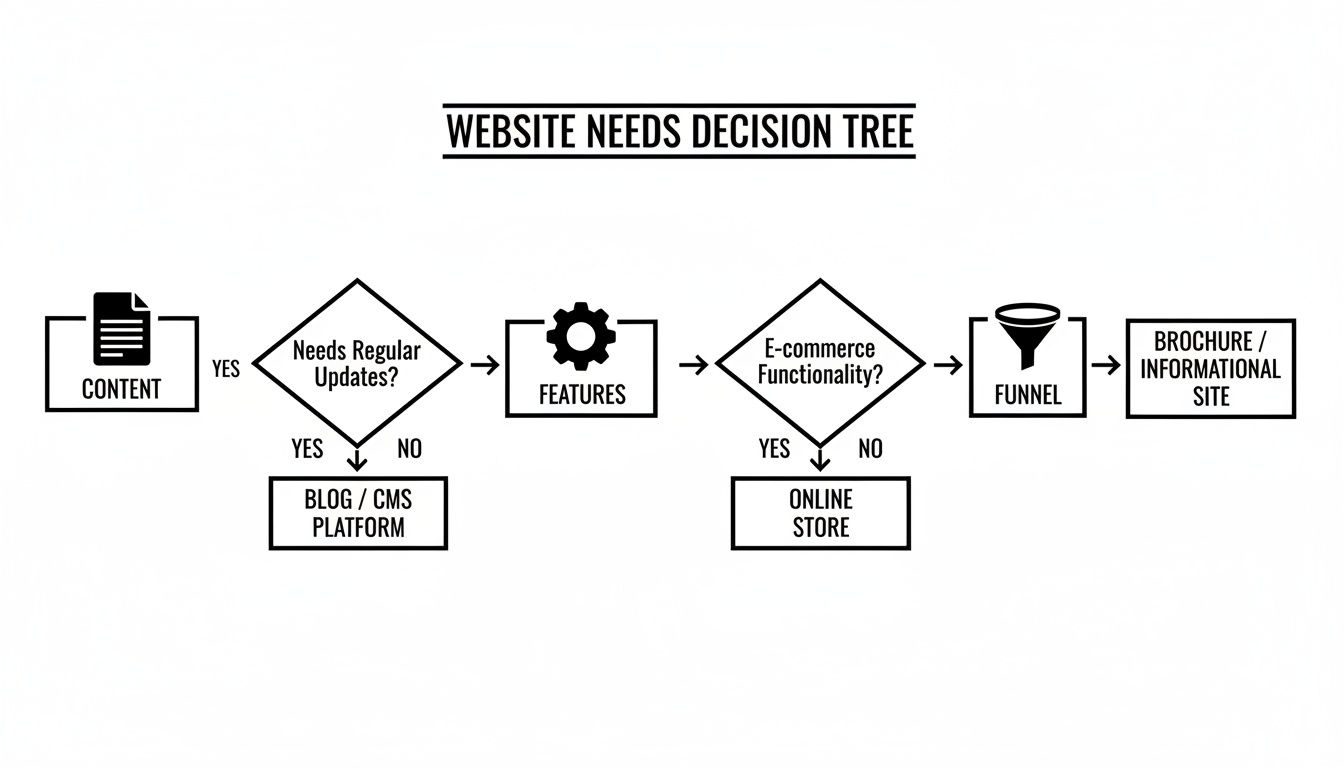
As you can see, the path you take depends heavily on whether you’re focused on e-commerce, simple content publishing, or something in between.
Look Beyond the Sticker Price at Total Cost of Ownership
The advertised monthly fee for a CMS is just the tip of the iceberg. The real number to watch is the Total Cost of Ownership (TCO), which accounts for all the hidden and ongoing expenses you’ll face. I've seen "free" open-source platforms end up costing far more than a paid SaaS solution because of custom development and specialized maintenance.
When you’re calculating TCO, you need to ask a few tough questions:
- Hosting & Infrastructure: Is hosting included, or do I need to find (and pay for) my own? What about SSL certificates, CDNs, and server maintenance?
- Development & Customization: Will we need a developer to build the site, tweak the theme, or connect our key tools? What's their hourly rate?
- Plugins & Apps: Which essential features will require paid add-ons or apps? What do those subscriptions cost annually?
- Maintenance & Support: Is support included? If not, what will it cost to have an agency on retainer for updates, security patches, and troubleshooting?
A simple SaaS platform might look more expensive upfront, but with hosting, security, and support baked in, its TCO is often much more predictable.
Ensure Your CMS Can Scale with Your Ambitions
Scalability isn't just about handling more traffic—though that's a huge part of it. It’s about whether the platform can grow in complexity as your business evolves. A CMS that’s perfect for a five-page brochure site will absolutely buckle under the weight of an e-commerce store with thousands of products and international fulfillment.
Performance is tied directly to this. A slow website will kill your conversions and sink your SEO rankings. Your CMS needs to be built on a modern tech stack that can serve pages in a flash, no matter where your users are. For businesses on a high-growth trajectory, exploring flexible architectures is a must. You can learn more about one popular approach in our guide on what is headless CMS.
Choosing a CMS is like picking a vehicle. If you're just driving around town, a small car is perfect. But if you plan on hauling heavy loads across the country, you're going to need a powerful truck. Don't buy the car when you know a truck is in your future.
Prioritize Ease of Use for Your Team
The most powerful CMS in the world is useless if your team hates using it. The day-to-day experience for your marketers, writers, and editors is a massive factor. A clunky, confusing backend creates bottlenecks, discourages content updates, and leads to a stale, underperforming website.
When you're testing out a platform, think about the people who will be in it every day:
- For Marketers: How easily can they spin up a new landing page without calling a developer? Can they quickly change text, swap images, or add a form?
- For Content Writers: Is the editor clean and distraction-free? Does it make embedding media like videos and images simple?
- For Developers: Is the code accessible? Is the documentation actually helpful? A developer-friendly platform makes any customization work faster and cheaper.
Scrutinize Security and Compliance Features
In an era of constant cyber threats, website security is completely non-negotiable. A single breach can destroy customer trust, lead to massive fines, and knock your site offline for days.
Different platforms handle this very differently. SaaS solutions like Shopify or Webflow manage security for you, automatically applying patches and monitoring for threats. With open-source platforms like WordPress, that responsibility falls squarely on your shoulders. You’re in charge of updating the core software, themes, and plugins, plus implementing your own security measures like a web application firewall (WAF).
Evaluate Native SEO and Integration Capabilities
Your CMS should be your biggest SEO asset, not an obstacle. Modern SEO is highly technical, and a good CMS gives you direct control over crucial elements like title tags, meta descriptions, canonicals, and schema markup. It should also produce clean, crawlable code and be optimized for speed right out of the box.
Just as important is how well the platform plays with your other tools. An API (Application Programming Interface) is what allows your CMS to "talk" to your CRM, email platform, and analytics software. Look for a CMS with a well-documented API and a healthy marketplace of pre-built integrations. This will save you a fortune in custom development work down the line. Seeing a direct comparison can be really helpful here, like this detailed comparison of Shopify and WordPress.
To help you get started, we've created a simple scorecard. You can use it to objectively rate your top contenders against these core criteria.
CMS Evaluation Scorecard
| Criteria | WordPress Score (1-5) | Shopify Score (1-5) | Webflow Score (1-5) | Your Score (1-5) |
|---|---|---|---|---|
| Total Cost of Ownership | ||||
| Scalability & Performance | ||||
| Ease of Use (for your team) | ||||
| Security & Compliance | ||||
| SEO Capabilities | ||||
| Integrations & API | ||||
| Content Workflows | ||||
| Total Score |
This exercise isn't about finding a "perfect" score, but about identifying the platform that best aligns with what you value most. A lower score in one area might be perfectly acceptable if the platform excels in the criteria that are mission-critical for you.
Finally, don’t underestimate the power of a large community. As the dominant player, WordPress powers a staggering 43.6% of all websites and holds 63.5% of the CMS market share. That massive user base means you’ll never be short on support forums, plugins, or developers who know the platform inside and out. It’s an ecosystem with unparalleled resources for whatever you need to do next.
Match the Right CMS to Your Business Model
On paper, most CMS platforms look pretty similar. It’s only when you start mapping their features to your actual business needs that the right choice becomes clear. The perfect platform for a blogger would be a disaster for an online retailer, and vice-versa.
So, let's get practical and look at which platforms are a natural fit for different kinds of businesses.
It helps to understand the bigger picture, too. The global CMS market is on a tear, expected to jump from $47.41 billion to $117.55 billion by 2032, with e-commerce being a huge driver of that growth. You can read more about the trends shaping the CMS market to see where things are headed. Choosing a platform isn't just a technical decision; it's a financial one that needs to support your growth.
Ultimately, this isn’t about finding a single "best" CMS. It’s about finding the best CMS for you.
For Content-Heavy Websites and Publications
If your business is built on content—we’re talking blogs, online magazines, or extensive resource hubs—your world revolves around three things: powerful SEO, flexible content creation, and a smooth editorial workflow.
This is the home turf of WordPress. Its real magic isn’t just its user-friendly editor but its legendary flexibility. With an enormous ecosystem of plugins for everything from advanced SEO with Yoast to creating custom content types, you can build just about any publishing machine you can dream up.
- Real-World Scenario: Imagine a B2B tech company building out a resource center. They need to publish case studies, a regular blog, and downloadable whitepapers. WordPress lets them create unique templates and fields for each of those content types, manage a team of writers with different permissions, and relentlessly optimize every single page for search engines.
For E-Commerce Stores and Retail Brands
When your main goal is selling products, your needs are completely different. You need a platform that thinks like a retailer, with built-in tools for inventory, payments, shipping, and taxes. This is where a dedicated e-commerce platform like Shopify is the undisputed king.
Shopify takes the technical headaches out of running an online store. Critical features like abandoned cart recovery, discount code creation, and product variants are all baked right in. The app store is there to fill in any gaps, letting you add things like customer loyalty programs or subscription billing in just a few clicks.
- Real-World Scenario: A new direct-to-consumer brand is launching a line of coffee beans. Using Shopify, they can spin up a beautiful, mobile-ready storefront in a weekend. They can manage their inventory across their website and Instagram from a single dashboard and see which products are selling best with simple, clear analytics.
Choosing an e-commerce platform is less about managing a website and more about managing an entire retail operation. The right CMS should streamline logistics, not just publish product pages.
For Service-Based Businesses and Lead Generation
If you’re a consultant, an agency, or any other service business, your website has one primary job: turn visitors into leads. That means your CMS has to be exceptional at building landing pages that convert, capturing lead info through forms, and plugging directly into your CRM.
While you can rig this up on almost any platform, a system like HubSpot CMS was built from the ground up for exactly this purpose. It tightly integrates your website with a full suite of marketing automation and sales tools. This means you can see a lead's entire journey in one place, from the first blog post they read to the moment they sign a contract.
- Real-World Scenario: A financial advisory firm needs a steady stream of qualified leads. With HubSpot CMS, they can create different landing pages for different services, A/B test their headlines, and build forms that automatically add new contacts to their sales pipeline, tagging them based on their interests.
For Design-Focused Portfolios and Brands
When your brand’s visual identity is paramount, you need a CMS that gets out of the way and gives you total creative control. For design studios, photographers, or luxury brands, the website is the product. This is where a visual-first platform like Webflow really shines.
Webflow essentially gives a designer the power of a front-end developer. You can build complex, custom animations, pixel-perfect layouts, and unique interactions directly in a visual interface—no coding required. It delivers the best of both worlds: complete design freedom on the front end and a robust, easy-to-use CMS on the back end.
Plan for Migration, Maintenance, and Growth

It’s easy to think that once you've picked a CMS, the hard part is over. But really, that decision is just the beginning of a long-term relationship. The platform you choose today dictates what your team can accomplish tomorrow and how easily your business can scale in the years ahead.
Thinking about the future now is the best way to avoid a costly do-over down the road. This means planning for three things that are often overlooked: the immediate headache of migration, the day-to-day reality of maintenance, and your vision for future growth.
Navigating the Complexities of a Website Migration
If you already have a website, moving to a new CMS isn't just a simple copy-and-paste job. It’s a delicate operation. I've seen perfectly good SEO rankings tank overnight because a migration was handled poorly. Broken links, lost data, and a terrible user experience are all real risks.
A successful migration needs a meticulous plan. You have to map every single piece of content from the old site to its new home, making sure no product page or blog post gets left behind. Critically, you need a rock-solid 301 redirect strategy to point all your old URLs to the new ones. This tells search engines where to find your content and preserves the domain authority you've worked so hard to build.
To make sure you don't miss a single step, we put together a comprehensive website migration checklist that walks you through everything from pre-launch checks to post-launch monitoring.
The Unseen Work of Ongoing Website Maintenance
Once your new site is live, the work isn't done—it just changes. A website is a living thing, and it needs regular care to stay secure, fast, and functional. So many businesses underestimate the time and expertise this requires.
Proper website maintenance is a constant cycle of essential tasks:
- Security Monitoring: Keeping an eye out for vulnerabilities, applying security patches, and managing user permissions to lock things down.
- Performance Optimization: Checking site speed, compressing images, and fine-tuning caching so your site loads quickly for every visitor.
- Software Updates: This is a big one. You have to keep the CMS core, themes, and any plugins updated. It’s non-negotiable for security and stability.
- Regular Backups: Setting up automated backups is your safety net. If something goes wrong, you can restore your site in minutes, not days.
The "set it and forget it" mindset is one of the most dangerous assumptions you can make about a website. Neglected maintenance is the number one cause of security breaches, slow performance, and broken features—all of which hit your bottom line.
This is exactly why many businesses partner with an agency like OneNine. Instead of your team wrestling with technical updates they're not trained for, you can hand it all off to experts. We keep your digital foundation solid so you can focus on running your business.
Future-Proofing Your CMS Choice
Finally, the CMS you pick today has to work for the business you want to be tomorrow. Your goals will get bigger, your marketing will evolve, and your website has to keep up without needing a total rebuild every couple of years.
Look at the platform's product roadmap. Is the company actively investing in new features and improving the core tech? A stagnant CMS is a major red flag—it will eventually fall behind on security, performance, and modern functionality.
Also, check out the community and ecosystem around the platform. A big, active community—like you see with platforms like WordPress or Shopify—is a huge asset. It means more third-party apps, more developers available to hire, and a massive library of tutorials and forums when you need help. Your CMS should be a launchpad for growth, not a cage.
Answering Your Lingering CMS Questions
You've got the framework, you've done the research, but a few questions are probably still bouncing around your head. It happens every time. This is the final gut-check moment where a few key distinctions can make all the difference. Let's clear up the most common points of confusion we see with our clients.
Open-Source vs. SaaS vs. Headless: What's the Real Difference?
Getting the architecture right is crucial. It dictates who’s responsible for what and how much technical muscle you’ll need on your team. These three models are built for very different purposes.
- Open-Source (like WordPress): Think of this as being handed the blueprints and raw materials to build a house. The core software is free, but you are 100% responsible for everything else—finding the land (hosting), installing locks (security), and fixing the roof when it leaks (maintenance). It’s the ultimate in flexibility, but it’s not for the faint of heart.
- SaaS or "Software as a Service" (like Shopify): This is like leasing a fully-furnished apartment in a managed building. You pay a monthly fee, and the landlord handles all the infrastructure, security, and upkeep. It's incredibly convenient and easy to get started, but you can’t exactly knock down walls or do major renovations.
- Headless CMS (like Contentful): This is a completely different beast. It separates your content (the "body") from how it’s displayed (the "head"). It’s a content warehouse for developers who need to push that content out to a website, a mobile app, a smart-watch, and maybe even a smart-fridge, all from one place.
A headless CMS gives you total freedom on the front-end, but you have to actually build that front-end from scratch. It demands serious development resources.
The right choice here isn't about which is "better." It's about what fits your team's skills and your company's ambition. A local bakery will thrive on the simplicity of SaaS, while a media company with a dedicated dev team will love the power of a headless architecture.
How Much Does a New CMS Really Cost?
The price tag you see on the website is just the beginning. To avoid any nasty surprises, you need to think in terms of Total Cost of Ownership (TCO). This includes every single dollar you’ll spend over the course of a year.
An open-source platform like WordPress might look like a bargain at first glance, but the costs are hiding in plain sight. You’ll need to budget for:
- Hosting: This can be anything from $10 a month for a basic plan to over $300 a month for high-traffic sites.
- Premium Themes & Plugins: Good ones aren't free. Expect to pay $50 to $200 each for powerful tools.
- Developer Help: Unless you’re a developer yourself, you’ll eventually need one. Rates typically run between $50 and $150 per hour.
SaaS platforms like Shopify are more straightforward. Plans often start around $30 per month and scale up to $2,000+ for enterprise-level tools, and that’s before you factor in transaction fees. Always map out every potential cost before you sign on the dotted line.
Should We Just Build a Custom CMS?
Let me be blunt: building a custom CMS should almost always be your last resort. It's a massive undertaking. You should only even consider going down this road if your business has incredibly unique workflows or strict compliance needs that no existing platform can handle.
For instance, a healthcare company with specific HIPAA data handling requirements might justify a custom build. But for more than 95% of businesses, a mainstream platform like WordPress or Shopify can be customized to do exactly what you need—for a fraction of the cost and with far less risk. Before you even think about building from scratch, make absolutely sure you've exhausted every possibility with the proven, well-supported platforms on the market.
Feeling clear on your choice but need a skilled team to manage the migration, design, and day-to-day upkeep? That's what we do at OneNine. We take the technical headaches out of managing your website so you can get back to running your business. Let's build something great together at https://onenine.com.


