
Understanding Headless CMS
Headless CMS breaks content management into two distinct parts: a central repository for storing content and a separate layer for presentation. This split means your marketing or development teams can update content once and publish it across websites, apps, and other channels without touching the frontend code.
With no built-in frontend, a headless setup relies entirely on APIs to fetch and display content wherever you need it. That flexibility opens the door to faster updates and more personalized user experiences.
How Headless CMS Works
In a traditional CMS, back end and front end are tightly coupled—everything lives in one system. A headless CMS flips that model. You manage all your content in a content store, then pull it into any interface through API calls on demand.
Key advantages include:
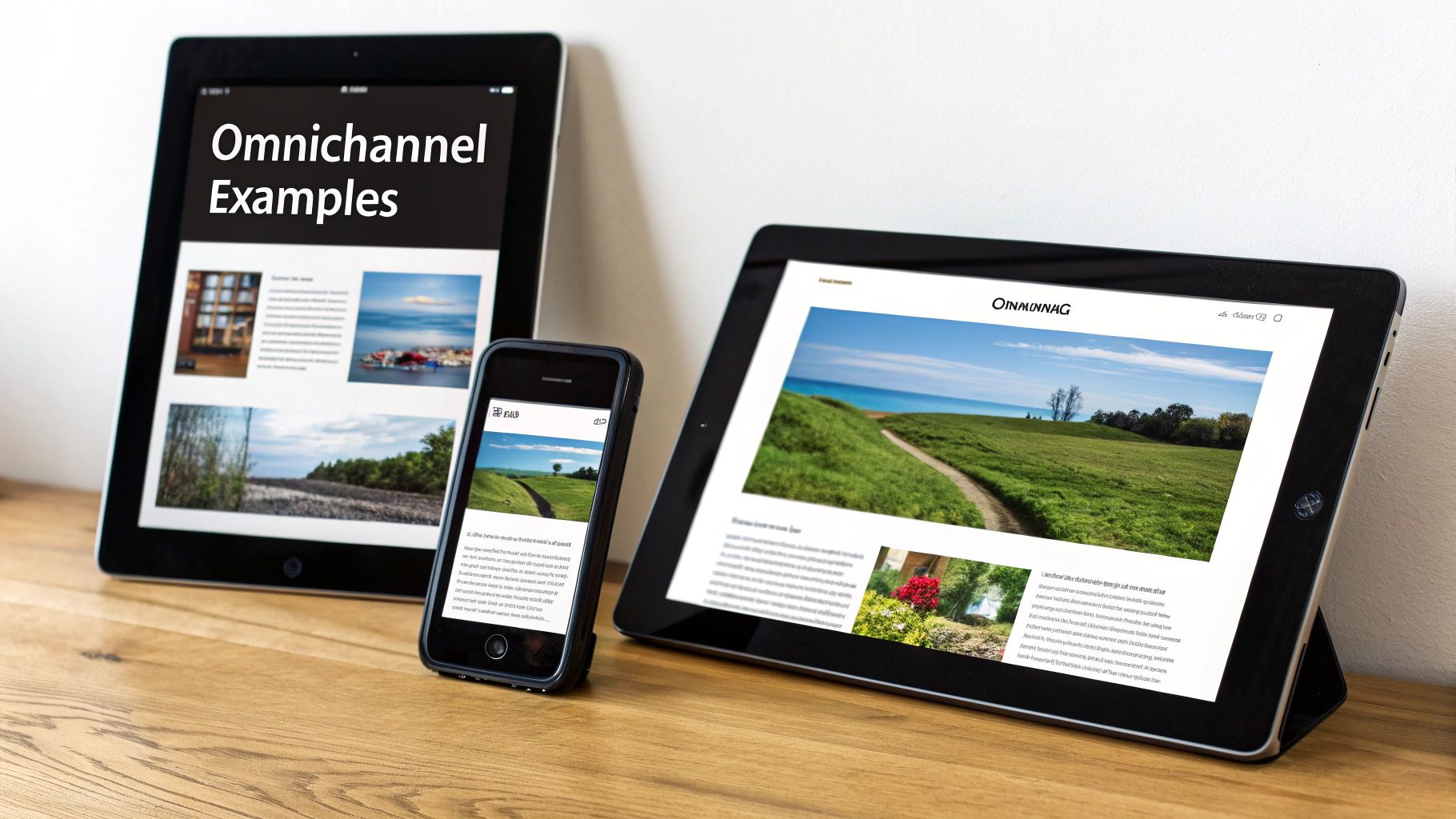
- Omnichannel Delivery: Push the same content to websites, mobile apps, IoT gadgets, and digital signage.
- Rapid Front-End Iteration: Roll out UI changes without redeploying your entire backend.
- Framework Freedom: Build with React, Vue, or Angular depending on your team’s expertise.
- Streamlined Version Control: Track changes and roll back updates via API-driven workflows.
Think of the CMS as a restaurant kitchen sending dishes to dining rooms around the globe. You prep each menu item once, then deliver it to multiple tables—no duplicate kitchens, no confusion.
A more formal definition can be found in the Future Market Insights headless CMS report.
This illustration highlights how an API layer stands between content storage and presentation, unlocking flexible outputs for any channel.
Headless CMS Versus Traditional CMS At A Glance
Below is a quick comparison to help you see the differences side by side.
| Feature | Headless CMS | Traditional CMS |
|---|---|---|
| Architecture | Decoupled | Monolithic |
| Flexibility | High | Limited |
| Use Cases | Omnichannel Experiences | Mostly Website Publishing |
This snapshot clarifies why teams building multi-platform experiences often choose a headless approach.
Check out our guide on CMS website development with OneNine for practical implementation strategies.
Our brief overview lays the groundwork—you’ll soon have deeper insights into migration, performance trade-offs, security impacts, and more. OneNine’s experts are ready to guide your project from planning through launch for smooth, successful results.
Understanding The Key Concepts
Imagine a library where books (your content) live separately from the rooms where you read them. That’s the essence of a headless CMS – storage and display live in different places.
In this scenario:
- Content Repository acts like the library’s stacks, securely holding articles, images and data.
- API Endpoints play the librarian, fetching exactly what you request.
- Presentation Layer resembles reading rooms, showing content on websites, mobile apps or IoT devices.
For example, REST and GraphQL APIs enable your front end to pull only the fields it needs. As a result, marketing and development teams can rethink the user interface without touching backend code.
Core Architecture Explained
With a headless setup, backend services and frontends operate independently. Updates behind the scenes don’t force UI redeploys, so teams can move faster.
Developers pick frameworks—like React or Vue—and release changes on their own timeline. Plus, you avoid duplicating the same content for different channels.
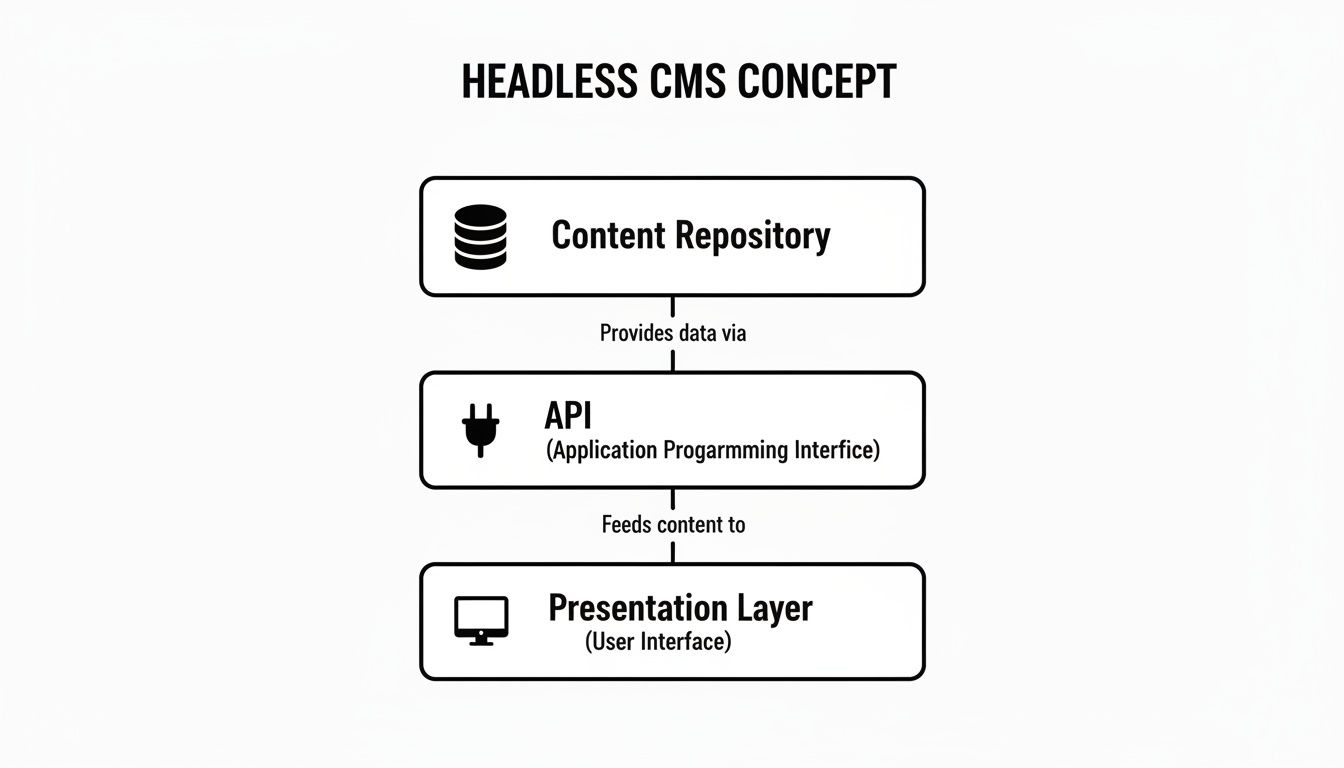
This diagram shows how content travels from storage, through APIs, into every digital touchpoint. With one source of truth, you power multiple experiences effortlessly.
API First Mindset
Moving to an API-first approach means faster experiments and prototypes. Developers no longer wait on backend tweaks—they write calls, fetch data and render it immediately.
“An API-first headless CMS empowers frontends to iterate with autonomy.”
Content models tie directly to real-life needs. For instance:
- A Product Catalog model holds SKU, price and descriptions
- A Blog Post model contains title, author and rich text
- A Landing Page model bundles hero images, headlines and call-to-actions
This modular design sets you up for deeper topics like migration planning and performance tuning.
Content Model Mapping
A content model defines each piece of data, almost like columns in a spreadsheet. You choose field types—text, number, date or rich text—to mirror your workflow.
Next, link models together. For example, an Event model might reference a Location model. GraphQL queries then follow those links, retrieving nested content in a single request.
Automatic API docs and schema generation give teams clear guidance. Frontend engineers get editor autocompletion for field names, which cuts errors and speeds up development by 30%.
Real-world mappings often look like:
- Product model with SKU, name, price and tags
- Category model tied to multiple products
- Landing page model referencing hero and feature blocks
- Author model linked to blog posts and podcasts
Mapping your content thoughtfully ensures updates flow smoothly across all channels. Up next, we’ll dive into preview workflows and incremental builds.
Benefits And Trade Offs Of Headless CMS
Breaking content into independent pieces feels a lot like picking modular furniture—swap in a new seat, then move it around without rebuilding the whole sofa. That’s exactly how a headless CMS frees your team: you update one block here, another there, and each channel pulls exactly what it needs.
Key Advantages
- Modular Delivery
Send content chunks to websites, mobile apps or kiosks on their own schedules. - Omnichannel Consistency
One backend feeds every endpoint, so your brand voice stays the same everywhere. - Developer Freedom
Pick frameworks like React or Vue and experiment with UIs without waiting on backend changes.
“Modular content speeds up front-end deployment and reduces time to market.”
Recent studies show 73% of organizations have adopted a headless setup—a 14% jump since 2021. Dive into the full breakdown in the One Seven Tech’s Headless CMS Trends Report.
Benefits And Trade Offs Comparison
Here’s a quick look at the main upsides and the trade-offs you’ll want on your radar before taking the plunge.
| Aspect | Advantage | Consideration |
|---|---|---|
| Speed | Faster front-end updates | Requires solid API know-how |
| Scalability | Grows across channels easily | Initial setup can get complex |
| Control | Total framework choice | No ready-made themes included |
Use this chart to pinpoint which areas need extra planning before you roll out a headless CMS.
Implementation Tips
- Prototype First
Spin up a small proof-of-concept to validate your API workflows. - Tooling Choices
Add preview plugins or a live-reload feature so editors get real-time feedback. - Monitor APIs
Watch request limits and cache aggressively to steer clear of performance hiccups.
Key Takeaway: Match your team’s skills to the project scope—this ensures headless is a fit, not a burden.
Real-World Example
A small retailer moved to headless Shopify and cut deployment time by 40% within six months.
Mixed Scenarios
- Marketing microsites
- Custom mobile experiences
- IoT dashboards
- Digital signage networks
When you need multiple touchpoints and you have developer resources, headless CMS really shines. If your team prefers an all-in-one package, a traditional platform may feel more straightforward.
Balancing Complexity
Going headless means getting hands-on with APIs and custom code from day one. You’ll handle:
- API version management
- Custom theme development
- Ongoing maintenance of cloud services
Start simple—set up hosting, authentication and basic page types first. Then layer in more components as your team gains confidence.
Now that you’ve seen both sides, you can decide which CMS style aligns with your goals. OneNine is here to guide you through strategy, implementation and support—so your headless project takes off without a hitch.
Real World Use Cases And Examples
Every business faces unique content challenges. In this section, we’ll walk through concrete scenarios showing how a headless CMS can solve real problems, step by step.
WordPress Blog Feeding React
A media company wanted a snappier blog that didn’t reload every time a user scrolled. They turned to WordPress paired with WPGraphQL to push content via API into a React front end.
- Challenge – readers hit full-page refreshes for new posts
- Solution – live API calls replaced reloads
- Outcome – 35% faster page loads and seamless scrolling
"WPGraphQL enabled our content team to preview draft posts directly in the app," said one editor.
Editors now draft in WordPress and see changes instantly in React. It’s a clear example of decoupling content management from presentation.
The screenshot below shows the Contentful dashboard listing content types and fields.
Here you can spot how content is structured for effortless API delivery.
Shopify Custom Storefronts
Next, a fashion label needed a checkout flow that matched its brand voice across web and mobile. They built a headless setup using Shopify Storefront API with a Vue front end.
- Challenge – the default checkout felt generic
- Solution – API-driven forms with bespoke UI
- Outcome – $2.4 million uplift in quarterly sales
Thanks to APIs, design and marketing teams iterate freely—no more wrestling with theme limitations.
Webflow Serving Mobile Apps
A news startup wanted instant content updates in its cross-platform app. They switched to Webflow as a headless CMS, serving JSON feeds to React Native.
- Challenge – each content update required an app-store approval
- Solution – runtime JSON fetching from Webflow
- Outcome – update cycles shrank from days to minutes
Now users open the app and see fresh articles without downloads or delays.
Unconventional Scenarios
Some teams push the boundaries of content delivery. Here are a few creative examples:
- IoT Dashboards: Sensor readings stream via API, no page refresh.
- Digital Signage: Central API triggers scheduled content pushes. 50% less downtime on screen updates.
- Voice Assistants: Fetch short text snippets and read them aloud.
These cases prove just how flexible a headless CMS can be, powering everything from factory floors to smart speakers.
How OneNine Can Help
We guide SMBs through every step of going headless:
- Platform Selection: Compare Contentful, Sanity, or custom builds.
- API Design: Define routes and data models for your channels.
- Performance Tuning: Optimize caching, CDN, and query strategies.
- Ongoing Support: Maintenance, updates, and troubleshooting.
Partnering with OneNine means a clear roadmap, transparent pricing, and measurable ROI.
Key Takeaways
- Headless CMS separates content from presentation layers.
- APIs deliver data to websites, mobile apps, IoT devices, and more.
- Real-world examples show improved speed, flexibility, and revenue gains.
- A step-by-step migration plan minimizes risk for SMBs.
Use these stories as a blueprint when evaluating headless CMS for your team. Ready to explore your options? Contact OneNine via our website or email to schedule a demo and discuss your project goals. Empower your brand with flexible and future-proof content systems today.
Migration And Implementation Considerations

Moving to a headless CMS can feel exactly like changing homes. You sort, label, and decide which pieces of content to carry forward. This initial phase calls for a thorough review of your pages, media files, and custom extensions.
Begin by listing out every asset and workflow. Spot outdated blogs, duplicate pages, or templates that never saw the light of day.
- Audit content inventory, including fields, tags, and metadata
- Map user roles and permissions
- Document custom plugins and third-party integrations
- Schedule a content freeze period
This simple checklist helps you avoid surprises later and ensures each item lands in its rightful spot.
Designing Future-Proof Content Models
Once the audit wraps up, you’ll build flexible content models—your labeled boxes in this move. Every field should have a clear purpose and data type.
- Define core models like Blog Posts, Products, and Authors
- Group related fields by function or channel
- Use relational links to minimize duplication
- Add validation rules to catch typos and errors early
“When you color-code your moving boxes, unpacking goes so much faster.”
A solid structure speeds up development, simplifies editorial workflows, and paves the way for automated previews.
Choosing A Frontend Stack
Next, pick the tools that will render your content. You might go with Gatsby, Next.js, React, or Vue. Focus on what best fits your team’s skill set and project needs.
Dive into our guide on how to select your technology stack for more details.
Run a small proof of concept first. It’ll uncover integration quirks and performance bottlenecks early on.
- Spin up a minimal project with a couple of content models
- Fetch data via REST or GraphQL
- Test outputs on desktop, mobile, and even IoT devices
- Measure API response times and build durations
Tracking these metrics keeps performance front and center.
Performance Milestones
- Page loads under 500ms
- Build times below 30 seconds
- API responses within 200ms
After your pilot, refine workflows and toolchains. Common snags include aligning old approval steps with new CMS states, planning the freeze window, and training teams on API-first editing.
| Implementation Aspect | Consideration | Best Practice |
|---|---|---|
| Workflows | Legacy approval and publishing | Map into new CMS processes |
| Training | Onboarding editors and devs | Hands-on workshops |
| Freeze Window | Prevent changes mid-release | Announce dates early |
Finally, lock in hosting and security. Decide between serverless, CDN, or managed options. Factor in authentication, SSL, and role-based access.
Remember to budget for hosting fees and API calls—most businesses invest around $2.6 million for a full headless implementation and see measurable ROI. Learn more about CMS investment findings.
With content, models, frontends, and operations in sync, your headless migration feels more like a planned move than a last-minute scramble.
Integration patterns differ by tool. For example, Next.js uses Incremental Static Regeneration, while Gatsby relies on rebuild hooks.
Platforms like Netlify and Vercel deliver automatic preview URLs. Choose what aligns best with your goals to avoid unexpected costs.
OneNine can help guide you through each of these steps—from audit to deployment— making sure your headless setup delivers real value.
Performance Security And Cost Impacts
When you split the frontend and backend in a headless CMS, you speed up content delivery and tighten security at the same time.
That split lets CDNs and cached API responses serve pages in under 200ms to millions of users worldwide.
- Lower latency through edge caching and asynchronous API calls
- Automatic scaling of CDNs to handle sudden traffic spikes
- Reduced server load by shifting rendering to the client or static builds
Isolating your content store also shrinks your attack surface. Real-world data shows security incidents drop by over 60% when teams adopt this model. Still, you’ll need to watch out for cloud hosting fees and API request limits as usage grows.
Reducing Page Load Latency
Static builds and prefetching remove server delays at runtime. For instance, one ecommerce team cut their page load from 1.2s to 600ms using Next.js ISR and a global CDN. This boost in speed not only improves Core Web Vitals but also slashes bounce rates by 25% on average.
“Shifting to headless reduced our global load time by half and improved uptime,” says a lead developer at a retail brand.
Try stale-while-revalidate caching to shave milliseconds off critical API calls. By pushing repeat queries to edge nodes, you free up origin servers for dynamic requests.
| Cost Factor | Impact | Tips |
|---|---|---|
| Cloud Hosting | Scales with traffic and storage | Use reserved instances or spot pricing |
| API Requests | Charges per call beyond free tier | Leverage caching and batch requests |
Securing Content Delivery
With your CMS backend tucked away, attackers have fewer paths in. You can lock things down with:
- Short-lived API tokens scoped to specific channels
- Automatic credential rotation to avoid stale keys
- Continuous monitoring of API logs with alerts for unusual activity
After enforcing these controls, audits report a 70% drop in unauthorized content changes.
Calculating Total Cost Of Ownership
Planning your headless CMS budget means factoring in cloud costs, API tiers, licensing, and ongoing maintenance. Smaller teams often spend around $1,500 per month on hosting and entry-level API plans. Larger enterprises might budget north of $10,000 monthly for premium support and SLAs.
- Pick a pay-as-you-go hosting plan with auto-scaling.
- Combine CDN and API caching to trim request volumes.
- Review vendor contracts annually to negotiate volume discounts.
Remember to account for custom integration work and developer hours. Many of OneNine’s clients report saving 30% on maintenance by offloading CMS updates and security patches.
Key Takeaway: Investing in performance and security for a headless CMS pays dividends in speed, safety, and predictable costs.
Ready to optimize speed, safety, and spending for your content platform? Contact OneNine to align your headless CMS roadmap with strategic performance and security goals. Learn how our experts guide migrations, tune APIs, and streamline budgets for long-term content delivery success. Start today now.
Checklist for Choosing a Headless CMS
Picking what is headless cms is all about setting clear priorities. Rate each factor on your list to find the best fit.
Start by testing API response times and uptime. Fast endpoints keep visitors engaged and reduce bounce rates.
Check how flexible the content model is. Custom fields, nested objects and relationships matter for complex projects.
Map out the integrations you’ll need. Review available SDKs and libraries for JavaScript, Python or .NET.
“An API that responds under 200ms is essential for seamless page loads.”
Define Success Metrics
Before you shop around, set concrete targets. Agree on benchmarks so every vendor gets evaluated by the same yardstick.
- API Latency under 300ms
- Uptime above 99.9%
- Build times below 30 seconds
Run a small pilot to see real-world behavior. Connect a test frontend, track these metrics and adjust as you go.
- Validate authentication flows
- Test real-time preview features
- Stress-test concurrent requests
Score Vendor Support
Good documentation and responsive teams save hours. Look for:
- Clear guides and code samples
- Active community forums or Slack channels
- Defined SLAs for support response times
- Detailed migration tutorials
Check our CMS comparison guide for detailed vendor breakdowns and pro tips.
Review pricing next. Hidden fees for API calls or add-ons can blow your budget.
- Flat-rate plans that cover your use case
- Extra charges for localization or image processing
- Storage and bandwidth costs
Plan Your Migration
A step-by-step roadmap keeps your launch on track. Typical steps include:
- Auditing existing content and mapping fields
- Selecting a frontend framework like Next.js or Gatsby
- Building a proof of concept with core content models
- Importing full content set and verifying data
Use version control and a staging environment to catch issues early.
Evaluate Security And Compliance
You can’t cut corners here. Make sure the CMS offers:
- Role-based access control
- Short-lived API keys and token rotation
- SSL enforcement and IP restrictions
- Compliance with GDPR, SOC 2 or other relevant standards
Make Your Decision
Compile your scores and compare options side by side. For example:
| Criterion | Vendor A | Vendor B | Vendor C |
|---|---|---|---|
| API Speed | 250ms | 400ms | 180ms |
| Model Flexibility | High | Medium | High |
| Support Response | 2 hr | 4 hr | 1 hr |
| Transparent Pricing | Yes | No | Yes |
Review this table with your team and demo the top two candidates. Keep notes in a shared workspace to maintain transparency.
Partner with OneNine for extra guidance. We help run pilots, score platforms and implement what is headless cms solutions that scale. Contact OneNine to get started today.
FAQ
Let’s tackle some of the most frequent questions about headless CMSs. These answers should help you make informed decisions and avoid common stumbling blocks.
What Makes A CMS Headless
A headless CMS acts like a content warehouse separate from your website’s display layer. By decoupling storage from presentation, you write once and publish everywhere.
- Push content to websites, mobile apps, and IoT devices in one go.
- Update your backend without touching any frontend code.
How To Connect Your Front End
Your frontend simply fetches JSON from either REST or GraphQL endpoints. Secure those calls with HTTP headers and access tokens.
Caching and batching reduce API overhead.
Common Pitfalls
It’s easy to underestimate the extra planning a headless setup requires. That often leads to delays or frustrated editors.
- Overbuilt content models confuse non-technical users.
- Version mismatches between client and server trigger unexpected API errors.
When To Avoid Headless CMS
If you need a simple blog and don’t have in-house developers, a traditional CMS might be the smarter choice. Monolithic platforms come with built-in themes and editors ready to go.
Cost Considerations
Headless setups carry ongoing fees beyond just hosting:
- API Calls and data transfer
- Hosting environments
- Premium Plugins or add-ons
Monitor your usage to forecast billing. Hosting can run from $50 to $1000 per month, and API fees grow with request volume.
Implementation Tip
Start with a small proof of concept before a full rollout. That gives you room to:
- Test workflows in a staging environment
- Gather feedback through user testing
Integration Best Practices
Lay out your entire content lifecycle—from drafting to publishing—before you write a single line of code. Then:
- Document your API schema for frontend teams
- Define clear endpoints and naming conventions
- Set up webhooks for real-time updates
Key Takeaways
Headless CMSs offer tremendous flexibility, but they demand solid technical expertise. Balance your project scope, developer bandwidth, and budget before diving in.
Choose headless when you need true omnichannel distribution and your team can support it. Otherwise, a hybrid or traditional CMS might serve you better.
Ready to explore the right CMS strategy for your business? Partner with OneNine for expert guidance and support. Visit OneNine to get started today.


