

The cost of an ecommerce website isn't one-size-fits-all. You could be looking at anything from a few hundred dollars for a simple DIY store to well over $25,000 for a custom-built powerhouse from a top agency.
Think of it like building a physical shop. The final price tag depends entirely on the size, location, and bells and whistles you need to attract and serve your customers.
Ecommerce Website Costs at a Glance
Before we get into the weeds of hosting fees and development hours, let's look at the big picture. Understanding the different paths you can take makes budgeting a whole lot easier. Each approach strikes a different balance between cost, control, and the amount of work you'll have to put in.
Here’s a simple way to think about it:
-
DIY Platforms (like Shopify or Wix): This is like renting a booth at a busy market. You get a great spot with built-in traffic and all the basic utilities for a predictable monthly fee. It's fast, affordable, and perfect for getting your business off the ground without a huge initial investment.
-
Hiring a Freelancer: This is more like leasing a standard retail space and bringing in a contractor to customize it. You have way more control over the design and layout than a market stall, but you're relying on one pro's expertise to get it done right.
-
Partnering with an Agency: This is the equivalent of designing and building a flagship store from the ground up. You get a whole team—architects, builders, designers—all working to create a completely unique and high-performing space. It's the priciest option, but it gives you total control and strategic support.
This image breaks down these three tiers, giving you a clear idea of the starting costs for each path.
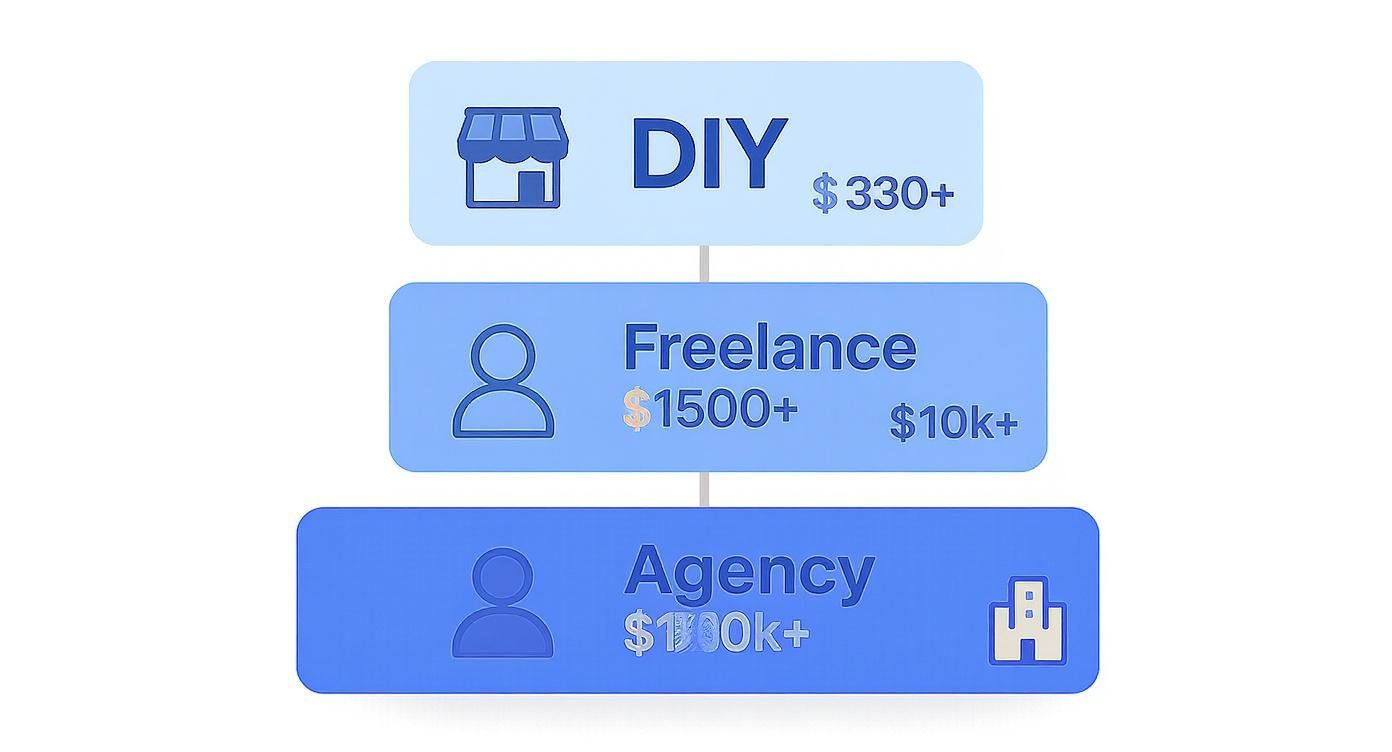
As you can see, the investment climbs as you move from do-it-yourself tools to professional services. That price jump reflects the deeper expertise and custom work involved at each level.
Typical Price Ranges and What to Expect
To give you a better idea of what to budget, here's a look at the initial build costs you can expect for a new ecommerce store.
Estimated Ecommerce Website Initial Build Costs
| Approach | Typical Cost Range | Best For | Timeline |
|---|---|---|---|
| DIY / Template | $300 – $1,500 | Startups, small businesses, or those testing an idea on a tight budget. | 1-4 Weeks |
| Freelancer | $1,500 – $5,000 | Businesses needing a professional, semi-custom site without a huge budget. | 4-8 Weeks |
| Agency | $10,000 – $25,000+ | Established businesses, high-volume stores, or brands needing deep customization. | 8-16+ Weeks |
These figures show just how much your choice of partner—or lack thereof—influences the initial investment.
For example, a simple DIY store using a platform like WordPress with Elementor or a basic Shopify plan could cost between $300 to $1,000 for your first year. If you hire a freelancer for a more polished setup, you're likely looking at the $1,500 to $5,000 range for a solid, professional-looking store.
For businesses that need a truly comprehensive solution, agencies typically charge anywhere from $10,000 to over $250,000 for large-scale, enterprise projects. You can get a more detailed look at these pricing models in this in-depth ecommerce cost guide.
Breaking Down Your Initial Build and Setup Costs
Getting an online store off the ground is a lot like opening a physical shop. Before you can "open the doors," you have to cover the one-time costs for building the place out. This initial investment covers everything from your digital curb appeal—the look and feel of your site—to the back-end machinery that keeps orders and payments running smoothly.
The first big cost to consider is web design. This is your store's visual identity. It's the layout, the colors, the whole vibe. Just like with a brick-and-mortar store, you can go for something affordable and functional, or you can commission a completely custom, immersive experience.
This is a key fork in the road, and your choice between a pre-made theme and a fully custom design will have the biggest impact on your upfront costs.
Themes Versus Custom Design
Going with a pre-made theme or template is the fastest and most budget-friendly way to get started. Think of it like picking a layout from a catalog of professionally designed, pre-built storefronts. These themes are already mobile-friendly and look great right out of the box, typically costing a one-time fee of $0 to $200. They're a fantastic starting point, especially for new businesses.
Custom web design, on the other hand, is like hiring an architect and an interior designer to build your dream store from scratch. A design agency or freelancer will work with you to create a unique user interface (UI) and user experience (UX) that’s built specifically for your brand and your customers. This involves a much deeper process with wireframes, mockups, and strategy, with costs ranging anywhere from $2,000 to $20,000+.
A study found it takes only 50 milliseconds for a visitor to form an opinion about your website, and that first impression is almost entirely based on design. Great design isn't a luxury; it's a fundamental part of building trust.
Development and Functionality Costs
Once you have a design, the next step is development—the technical work of actually building the site and making sure it all works. This means coding everything from your product pages to the checkout flow. If you're using a theme on a platform like Shopify, most of this is handled for you. But if you need custom features, you'll need a developer.
Here’s where development costs usually pop up:
- Payment Gateway Integration: You absolutely need a way to securely accept payments. Connecting to processors like Stripe, PayPal, or Shopify Payments is a must. Most platforms make this easy, but custom integrations will add to your bill.
- Shipping and Tax Calculators: Setting up live shipping rates and automatically calculating sales tax often means plugging into services from carriers like UPS or software like TaxJar.
- Third-Party App Setup: You’ll likely want to add apps for email marketing, customer reviews, or inventory management. While many have free plans, getting them to work perfectly with a custom-built site might require a developer's help.
The price tag for custom development can be all over the map. A few small tweaks might only run a few hundred dollars. But building complex, custom features—like a unique product customizer or a specialized subscription system—could easily cost $5,000 to $20,000, depending on the project's scope.
These one-time setup costs are the foundation of your online business. Budgeting for them properly ensures you launch a professional, secure, and user-friendly store that’s ready to start winning over customers from day one.
Choosing Your Ecommerce Platform
Your ecommerce platform is the engine of your online store. This is one of the first, and biggest, decisions you'll make, and it directly shapes both your initial setup costs and the money you'll spend down the road.
Think of it like setting up a physical shop. You could lease a spot in a modern, fully-serviced shopping mall where security, maintenance, and foot traffic are all handled for you. Or, you could buy a plot of land and build your dream store from the ground up, giving you total creative control but also total responsibility.
Let's walk through the main options to see which one fits your business best.
SaaS Platforms: The All-In-One Solution
Software-as-a-Service (SaaS) platforms like Shopify and BigCommerce are your "shopping mall" option. They’ve become incredibly popular for a reason: they bundle everything you need—hosting, security, and a full set of sales tools—into a single monthly subscription.
- Predictable Costs: You pay a flat monthly fee, which makes budgeting a breeze.
- Ease of Use: These platforms are built for people who aren't coders. With drag-and-drop editors and clear dashboards, you can get a store running fast.
- Built-in Support: If something breaks, there’s a dedicated support team ready to help you out.
This approach is perfect for getting started quickly without a massive upfront investment. It's a fantastic path for businesses that want to focus on selling products, not on managing servers.
Open-Source Platforms: The Path to Ultimate Control
Then you have the "build-your-own" approach with open-source platforms like WooCommerce, which is a plugin for WordPress. The core software itself is free, which sounds great on the surface. But the real cost comes from everything you have to add yourself.
You’re on the hook for finding and paying for hosting, security certificates, and any premium themes or plugins you need to get the features you want. It definitely requires more technical confidence (or a developer on hand), but the payoff is unmatched flexibility. You can build and customize anything you can imagine, without being boxed in by a platform's rules.
No matter which platform you go with, a big piece of the puzzle is choosing the best payment gateway for ecommerce, as the fees and features can really impact your bottom line.
Headless Commerce: The Future of Customization
For established brands that need ultimate control over the customer experience, headless commerce is the high-end option. This approach basically separates your storefront (the "head" that customers see) from the back-end engine that handles products, orders, and payments.
This lets developers build incredibly fast, unique shopping experiences using modern tech, while still plugging into a powerful ecommerce system. It offers complete creative freedom but also comes with the highest development costs. Headless is typically best for high-growth businesses that need a truly custom solution, not for someone just starting out.
For a deeper dive into these options, you can check out our guide on the https://onenine.com/best-ecommerce-platforms-for-small-business/.
Ecommerce Platform Cost and Feature Comparison
So, how do you choose? It really comes down to your budget, how comfortable you are with technology, and where you see your business going. This table breaks down the key differences to help you decide.
| Platform | Pricing Model | Typical Monthly Cost | Key Advantage | Best For |
|---|---|---|---|---|
| Shopify | Monthly Subscription (SaaS) | $29 – $299+ | All-in-one simplicity and ease of use. | Beginners and businesses of all sizes wanting a quick, reliable launch. |
| WooCommerce | Open-Source (Self-Hosted) | $15 – $100+ (Hosting, etc.) | Unmatched flexibility and customization. | Businesses with technical skills or development resources who want full control. |
| BigCommerce | Monthly Subscription (SaaS) | $29 – $299+ | Strong native features with no transaction fees. | Growing businesses that need robust, built-in functionality. |
| Headless | Custom/Enterprise | $1,000+ | Complete design freedom and superior performance. | Large-scale enterprises with dedicated development teams. |
In the end, think of your platform as the engine for your business. A SaaS solution gets you on the road quickly and reliably. An open-source or headless approach lets you build a completely custom vehicle from the ground up. The best choice is the one that matches your resources and ambition.
What About Ongoing and Hidden Costs?
Getting your ecommerce site live is a huge win, but it’s just the start of your investment. Think of it like opening a physical shop—after the grand opening, you've still got rent, utilities, and security to cover. The same goes for your online store; these ongoing costs are what keep the digital doors open and the business running smoothly.
Some of these expenses are predictable monthly bills, while others can pop up and catch you off guard if you aren't prepared. Factoring these into your budget from the get-go is the only way to get a real picture of your store's long-term profitability.
Let's break down the most common costs you'll see after launch.
Core Operational Costs
First, let's cover the absolute essentials—the "utilities" of your online store. These are the foundational services that keep your site live, secure, and available to customers 24/7. Without them, you don't have a business.
- Web Hosting: If you aren't on an all-in-one platform like Shopify, you'll need to pay for hosting. This is basically the "rent" for your website's little piece of the internet.
- Domain Name Renewal: Your domain is your address (like YourStore.com). You have to renew it every year, which usually runs $15 to $30 per year.
- SSL Certificate: This is what puts the little padlock in your customer's browser bar, encrypting their data and building trust. It's often bundled with hosting, but a standalone certificate is a recurring cost.
These are the bare minimums. With global ecommerce sales topping $5.7 trillion in 2023, the tech needed to support all that shopping has gotten more sophisticated. Hosting can range from a few bucks a month to over $100 for high-traffic sites, and a dedicated SSL might set you back $40 to $100 annually.
Transaction and Software Fees
Beyond keeping the lights on, the very act of selling costs money. Every time a customer clicks "buy," a tiny slice of that sale goes to the different services that make the transaction possible and your store work better.
Payment gateway fees are a big one. Services like Stripe or PayPal handle the credit card processing and typically charge a percentage plus a small fixed fee for every single sale, often somewhere between 1% and 3%. It sounds tiny, but for a store doing serious volume, this adds up fast.
A sneaky cost that catches a lot of store owners is "app bloat." It's so easy to keep adding apps for marketing, reviews, or loyalty programs, and each one comes with its own monthly subscription. Do a regular audit and make sure you're only paying for tools that are actually making you money.
And don't forget, many of the powerful features that make a store great come from premium apps and plugins.
- Email Marketing Platforms: Tools like Klaviyo or Mailchimp charge monthly fees that scale up with your number of subscribers.
- SEO and Analytics Tools: Advanced software for tracking your search rankings and understanding your traffic comes with a subscription.
- Customer Support Software: Live chat or helpdesk tools usually have a recurring monthly or annual fee.
And speaking of support, it's a major ongoing expense. Looking into top outsourced help desk services is a smart way to manage these costs as you grow.
Maintenance and Growth Investments
Here's the thing about a great ecommerce website: it's never really "done." It needs constant attention to stay secure, functional, and ahead of the competition. Letting maintenance slide is like letting the roof leak in your physical shop—it looks bad and eventually drives customers away.
Ongoing website maintenance is non-negotiable. This means regularly updating software, running security scans to block hackers, and creating backups just in case things go wrong. Our guide on what website maintenance includes walks you through everything involved.
Finally, you have to set aside a budget for marketing and advertising. A beautiful store is completely useless if nobody knows it exists. This budget covers everything from your social media ads and Google Shopping campaigns to content creation. It’s not just a cost—it’s the fuel for your growth.
Choosing Your Build Path: DIY vs. Agency
So, you know what you want to sell, but how are you going to build the website? This decision is just as important as your product choice. The path you take directly shapes your final cost, your launch timeline, and how much control you have over the end result.
Think of it like getting a new suit. You can buy one off the rack (DIY), get an off-the-rack suit tailored for a perfect fit (template), or have one custom-made from scratch (agency). Each option has its place, and the right one depends entirely on your budget, timeline, and needs.
Let's break down the three main paths.
The DIY Approach with Website Builders
Going the Do-It-Yourself route is the most wallet-friendly option, hands down. It's a fantastic choice for startups, small side hustles, or anyone just dipping their toes in the water to test a business idea. With platforms like Shopify or Wix, you're the one in the driver's seat. You’ll pick a theme, upload your products, and set everything up yourself.
You get total control. Want to change a banner at 2 a.m.? Go for it. The trade-off is your time. You have to be willing to roll up your sleeves and learn the platform, from figuring out shipping rules to fixing little design quirks.
- Best For: Entrepreneurs with more time than money, who are tech-savvy and enjoy a hands-on project.
- Cost Impact: The lowest upfront cost. You're mainly looking at a monthly subscription and maybe a one-time fee for a premium theme.
- Key Trade-Off: You're trading your own time and sweat equity for a smaller financial investment.
Using Pre-Made Templates: A Middle Ground
The next level up is a hybrid approach: start with a great pre-made template, but hire a pro to customize it. This often hits the sweet spot between cost and a high-end, professional finish. You avoid the hefty price tag of a fully custom design by building on a solid foundation that's already been created.
A freelancer or a small agency can take a high-quality template and tweak it to perfectly match your brand. This usually means customizing colors and fonts, shifting layout sections around, and adding any specific apps you need. It’s the sartorial equivalent of buying a great suit off the rack and having a tailor alter it to fit you perfectly. You end up with a polished website for a fraction of the cost of a bespoke build.
Your website’s design is your digital handshake. With 94% of first impressions being design-related, starting with a professionally designed template gives you a massive head start in building trust with customers, even if you're on a tight budget.
Hiring a Freelancer or Agency for a Custom Build
When you have very specific needs, a unique brand identity, or you're an established business ready to scale, hiring an expert is the way to go. This is where you bring in a professional freelancer or a full agency to build your store from the ground up, tailored exactly to your business goals.
An agency brings a whole team to the table—strategists, designers, developers, project managers—who handle everything. It’s a strategic, seamless process that results in a unique, high-performing website. Yes, it's the most expensive option, but it saves you an enormous amount of time and gives you access to expertise that helps you avoid common pitfalls. This is the ultimate "done-for-you" path, freeing you up to focus on what you do best: running your business.
How to Budget for Long-Term Success

It’s easy to fall into the trap of seeing your website as a one-and-done expense. But a successful online store isn't a cost—it's an investment, and it should deliver returns far greater than what you initially put in. The smartest budget isn't about finding the rock-bottom cheapest price; it's about putting your money where it will actually fuel growth.
That means you have to think strategically from the very beginning. Instead of getting distracted by every cool feature you see on other sites, start by drawing a hard line between your absolute needs and your wants. This simple step is the key to managing the initial cost of an ecommerce website without cutting corners on the stuff that really matters to your customers.
Prioritize Must-Have Features First
To keep your upfront spending in check, pour your budget into the features that directly build trust and drive sales. Everything else is secondary and can wait.
-
Must-Haves: These are the non-negotiables. We're talking about things like secure payment gateways, a design that works flawlessly on mobile, clean product pages, and a checkout process so simple your grandma could use it. Your store simply won't function without them.
-
Nice-to-Haves: These are the bells and whistles that improve the experience but aren't essential for your grand opening. Think customer loyalty programs, fancy product recommendation engines, or a beautifully integrated blog. You can always roll these out later as you start making money.
Launching with a lean, powerful core lets you get your products in front of customers faster. You can start generating revenue right away, and that income can fund the next wave of improvements.
Your budget should be a living document, not a static number set in stone. Plan for a phased approach, investing in new features and optimizations as your business proves what works and what your customers truly value.
Plan for Future Growth
The last thing you want is to build a store you outgrow in a year. Planning for scale from day one will save you the massive headache and expense of a complete rebuild later on. This means picking a platform and a design that won't buckle under more traffic, more products, and more features as your business takes off.
If you want a clearer idea of how different features add up, a good web page cost calculator can help you map out the potential expenses.
Finally, remember that a website is only a good investment if it gets results. Once you launch, you need to track your return on investment (ROI). Keep a close eye on your conversion rate (what percentage of visitors actually buy something) and your customer lifetime value (CLV). These numbers will tell you if your website is just an expense or if it's the powerful growth engine it's supposed to be.
Frequently Asked Questions
Figuring out the budget for an online store can feel like a moving target. Let's clear up some of the most common questions business owners have when they start crunching the numbers.
What Is the Total Cost of an Ecommerce Website?
The honest answer? It depends entirely on what you need. A simple, do-it-yourself store can get started for as little as $30 per month, while a fully custom site built by an agency can easily run $25,000 or more.
The biggest factors are the platform you choose, the complexity of the design, and any special features you need. A small business can absolutely launch a great-looking, functional store for under $1,500 for the first year. That usually covers a subscription to a platform like Shopify, a nice theme, and a handful of essential apps.
How Much Should a Small Business Pay for a Website?
For most small businesses, a budget between $500 and $5,000 for the initial setup is a realistic range. This spectrum covers everything from a well-executed DIY site on the lower end to a store professionally built by a freelancer on the higher end.
After the launch, you'll be looking at ongoing costs. A monthly platform fee of $30 to $100 is a sustainable expense for most. The key is to find a balance between your upfront investment and long-term needs, so you don't have to start over from scratch in a year.
Can I Build an Ecommerce Website for Free?
You can build one for free, but you can't actually sell anything until you upgrade to a paid plan. Platforms like Wix or the WooCommerce plugin for WordPress let you design and set up your entire store without spending a dime.
However, the moment you need to accept payments from customers, you'll have to subscribe to a paid plan. This is what unlocks the payment gateways and other critical sales features. So, think of it as "build for free, pay to play."
The most affordable way to get a fully functional store up and running is almost always with a basic plan from a hosted platform. Shopify's Basic plan, for example, starts at around $29/month and bundles hosting, security, and payment processing into one predictable cost.
Is Shopify Cheaper Than Building My Own Website?
For the vast majority of businesses, yes, starting with Shopify is much cheaper than building a custom website from the ground up. A custom project means hiring developers, which can cost thousands of dollars just for the initial design, coding, and setup.
Shopify takes care of all the technical headaches—hosting, security, payment systems—and wraps them into a simple monthly fee. This makes your initial investment much smaller and your monthly costs predictable, which is perfect for anyone who wants to get online fast without a massive upfront expense.
Ready to build an ecommerce website that drives results without breaking the bank? The team at OneNine specializes in creating and managing high-performing websites tailored to your business goals. Get in touch with us today to start your project.


