The whole Wix versus WordPress debate really boils down to one simple trade-off: streamlined simplicity versus limitless control. Are you looking to get a great-looking site online fast with zero fuss, or do you need a platform that can grow and adapt to any future business goal you can dream up?
Answering that question is the key to picking the right tool for the job.
Choosing Your Platform: Wix vs. WordPress
Making the right call between Wix’s all-in-one, guided experience and WordPress’s open-source powerhouse is a foundational decision for your business. There’s no single "best" platform—only the one that truly fits your goals, your comfort level with technology, and where you see your business heading down the road.
Forget generic pro/con lists. This guide is about giving you a practical framework to make a smart decision. Let's start with a quick-glance table to frame the main differences.
Wix vs WordPress Quick Decision Matrix
This table cuts right to the chase, comparing the platforms on the criteria that matter most to business owners and marketers.
| Criterion | Wix | WordPress |
|---|---|---|
| Ease of Use | Perfect for beginners; true drag-and-drop. | Has a learning curve; requires some setup. |
| Design Control | Structured but surprisingly powerful editor. | Virtually unlimited with themes and builders. |
| Cost Structure | Predictable, all-inclusive monthly plans. | Highly variable (hosting, plugins, themes). |
| Best For | Small businesses, portfolios, beginners. | Blogs, complex sites, growing businesses. |
Think of it this way: Wix holds your hand, while WordPress gives you the keys to the entire workshop. Neither is inherently better, but one is likely a much better fit for you right now.
This flowchart maps out the decision based on what you value most: getting set up easily or having total control over every detail.
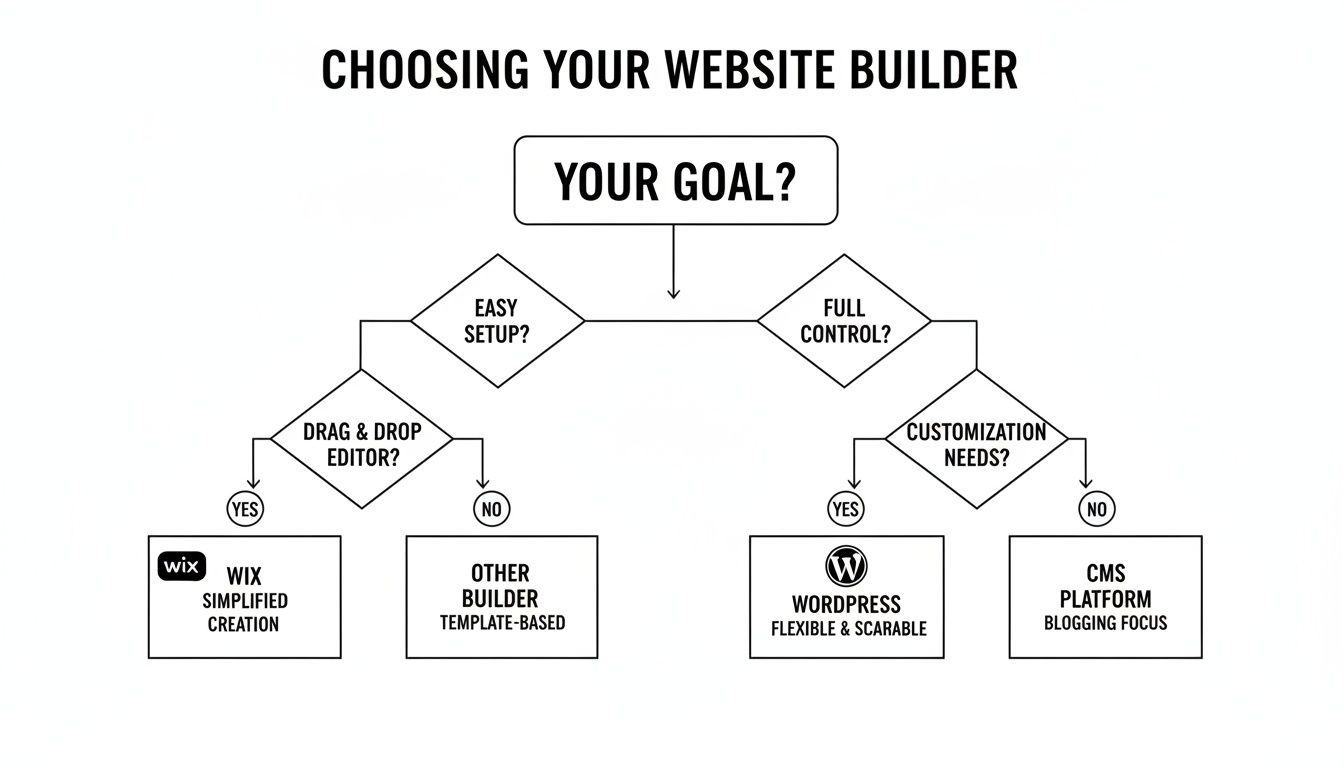
As the visual shows, your primary driver—be it pure simplicity or ultimate flexibility—is the most critical factor in this choice.
Market Share and Platform Philosophy
The numbers tell a pretty clear story about market preference. WordPress is the undisputed giant, powering an incredible 42.8% of all websites on the internet. That gives it a 60.0% share of the content management system (CMS) market.
By comparison, Wix powers a respectable 4.2% of all websites. These stats show just how deeply embedded WordPress is as the default choice for everyone from individual creators to massive global companies.
This difference isn't an accident; it's a direct result of their core philosophies. Wix offers a closed, curated ecosystem. They handle the hosting, security, and updates for you in one neat package. It's a "what you see is what you get" deal.
WordPress, on the other hand, is open-source. It provides the foundation, and you have complete freedom—and responsibility—to build whatever you want on top of it. You choose your hosting, your security plugins, and every single feature. To dig deeper into these fundamental differences, you can explore our guide on how to choose a CMS.
Comparing Ease of Use and Learning Curve

How a platform feels right out of the box often dictates your entire relationship with it. This is where Wix and WordPress show their biggest difference. It really boils down to a choice between getting something beautiful online today versus building a foundation for total control down the line.
The Wix Experience: Guided and Intuitive
Wix is built for one thing above all else: simplicity. Its main draw is a true drag-and-drop editor that genuinely lets anyone—and I mean anyone—build a professional-looking website in just a few hours.
From the second you sign up, Wix walks you through the process. You can pick from hundreds of slick templates or even let its AI tool build a starter site for you after answering a few simple questions.
The editor itself feels like putting together a PowerPoint slide. You click on a text box, an image, or a button and just drag it exactly where you want it to go. That direct, visual control removes almost all the technical headaches from the design process.
Wix's philosophy is simple: get the tech out of the way so you can focus on your brand and content. It's a completely managed, all-in-one system where they handle the hosting, security, and updates for you.
This approach has paid off. Wix is the fastest-growing major CMS out there, with a staggering 32.6% year-over-year market share growth, largely because it's the perfect fit for small businesses that just need to get online quickly. You can see more data on the growth of website platforms on landbase.com.
If this kind of all-in-one simplicity sounds appealing, it's worth checking out some of the other best no-code website builders to see how they stack up.
The WordPress Learning Curve: Power with a Prerequisite
WordPress, on the other hand, asks a bit more from you upfront. It’s not rocket science, but it does require a different mindset. Because it’s a self-hosted platform, getting started involves more than just creating an account.
You’re in the driver's seat, which means you're responsible for a few things:
- Choosing a hosting provider: This is the service that will store your website's files and make them accessible online.
- Installing the WordPress software: Most hosts have a "one-click" install button now, but it's still a separate step you need to take.
- Getting familiar with the dashboard: The WordPress backend is incredibly powerful, but it’s not as immediately visual as Wix. You'll have separate menus for posts, pages, plugins, and themes.
Once you're set up, creating pages is pretty straightforward thanks to the Block Editor. It lets you build your content using "blocks" for things like paragraphs, images, and embedded videos. While it’s a huge improvement over the old editor, it’s not the free-form canvas that Wix offers. You're building within the structure defined by your theme.
The trade-off is obvious. WordPress requires you to invest a little time to understand how themes, plugins, and the core software all work together. But that initial learning is what unlocks its legendary flexibility and power. For a lot of businesses, that small investment is well worth it for a platform that can grow with them indefinitely.
A Tale of Two Philosophies: Design Control and Customization
Beyond the initial setup, a platform's real worth is measured by the creative freedom it gives you. Both Wix and WordPress promise the world when it comes to design, but they get you there in fundamentally different ways. This isn't just about picking a template; it's about two opposing views on how a website should be built and changed over time.
Wix offers a powerful, guided design experience. WordPress, on the other hand, is all about limitless potential, thanks to its open-source roots.
Wix: Structured Creativity in a Curated World
The Wix editor is where the magic happens. It’s a true pixel-perfect, drag-and-drop environment that feels incredibly direct and intuitive. You see an element, you grab it, and you put it exactly where you want it. No code required.
But this freedom comes within a carefully constructed sandbox. You’re building on the Wix platform, using Wix tools. You get over 800 professionally designed templates to kick things off, but once you pick one, you're more or less locked into its core structure. A major redesign often means starting over with a new site, though you can transfer your content and domain.
The trade-off with Wix is straightforward: you get an incredibly easy and polished design experience in exchange for operating within a closed ecosystem. For a lot of businesses, this is exactly what they need.
Need more features? The Wix App Market has over 800 vetted apps that integrate smoothly without breaking your site. For those who need to go deeper, Velo by Wix lets developers build custom applications with code, but that's a step beyond the platform's main no-code appeal.
WordPress: Endless Possibilities with Themes and Plugins
WordPress gives you a different kind of freedom—one that’s practically infinite. Your design options aren’t dictated by a single editor but by a colossal ecosystem of themes and plugins. With literally thousands of themes out there, you can find a starting point for any business or style you can dream up.
And unlike Wix, your theme isn’t a life sentence. You can completely change your site's look and feel by installing a new theme anytime, all without losing your pages or posts. This flexibility is a huge win for businesses that plan to evolve or rebrand down the road.
The real design muscle in WordPress comes from page builder plugins. Tools like Elementor or Divi can transform the basic editor into a visual, drag-and-drop interface that not only competes with Wix's editor but often surpasses it in power and features.
Real-World Test: Adding a Client Booking System
Let’s get practical. Imagine you're a consultant who needs a sophisticated booking system with different appointment types, automated reminders, and payment processing.
On Wix: You’d go to the App Market and grab an app like Wix Bookings. It’s a solid tool that integrates perfectly and handles most standard needs right out of the box. You can have it up and running fast with zero technical headaches. The catch? If you need a very specific feature, like an integration with a niche calendar tool it doesn't support, you might be out of luck unless you hire a Velo developer.
On WordPress: Your options are wide open. You could pick from dozens of specialized booking plugins, each with its own unique strengths. You could find one that connects to almost any third-party tool, offers granular reporting, or lets you build completely custom booking forms. This highlights the core strength of WordPress: if you have a unique business need, there's almost always a plugin for that.
Evaluating SEO Capabilities and Performance
When you get down to Wix vs. WordPress, the SEO debate is where a lot of outdated myths pop up. Let's clear the air: you can absolutely rank on the first page of Google with either platform. The real difference isn't about if you can rank, but how you get there.
Wix offers a guided, all-in-one system, while WordPress hands you a massive toolkit for granular control.
For years, Wix got a bad rap for SEO, but that’s ancient history. Today, it comes with a strong, built-in foundation that handles most technical SEO essentials right out of the box. This is a game-changer for small business owners who don't have time to become SEO experts. Wix manages the technical backend, so things like mobile-friendliness, SSL certificates, and site speed are largely taken care of for you.
Wix SEO: A Guided Foundation
The standout feature for anyone new to this is the Wix SEO Wiz. Think of it as a personalized checklist that walks you through the basics of on-page optimization. It helps you find keywords, craft meta descriptions, and hook your site up to Google Search Console, all from within the Wix dashboard.
This guided process takes the guesswork out of the equation. It makes sure even total beginners cover the critical first steps, helping a new site get indexed and visible with minimal fuss.
Wix provides a solid SEO floor, ensuring every user meets a baseline of best practices without needing to install a single plugin. It prioritizes simplicity and accessibility, making good SEO achievable for everyone.
The trade-off for this simplicity is less control over the more advanced technical details. While Wix has come a long way—adding features like custom URLs, structured data markup, and bulk 301 redirects—it’s still a more closed ecosystem than its open-source competitor.
WordPress SEO: Unmatched Control and Depth
WordPress operates on a completely different philosophy. The core software itself is SEO-friendly, but its true power is unlocked through its legendary plugin ecosystem. Tools like Yoast SEO or Rank Math can turn a standard WordPress site into an SEO powerhouse, giving you precise control over nearly every element search engines care about.
With a good WordPress SEO plugin, you can easily:
- Fine-tune on-page elements: Get real-time feedback on keyword density, readability, and meta tags while you're writing.
- Implement advanced schema: Add detailed structured data for articles, recipes, products, or local business info to earn those rich snippets in search results.
- Manage technical SEO: Take full command over your
robots.txtfile, generate complex XML sitemaps, and manage intricate redirect strategies without breaking a sweat.
This is exactly why SEO professionals and agencies lean heavily toward WordPress. It gives you the tools to build a dominant search presence by capitalizing on every tiny optimization opportunity. The catch, of course, is that with great power comes a steeper learning curve and the responsibility to get the configuration right.
Ultimately, while both platforms have the tools you need, the quality of your content is what truly moves the needle. To get the most out of either platform, it's essential to learn how to write SEO articles that consistently rank. A great content strategy is the one thing no platform can do for you.
Understanding The Real Cost And Future Growth
When you're looking at Wix versus WordPress, the price you see on the box is just the beginning. The smart move is to think about the Total Cost of Ownership (TCO) and how well the platform can grow with you over the next three to five years. This gives you the real picture of the financial commitment and what’s possible down the road.
Wix makes budgeting simple. Their all-in-one subscription plans give you a clear, fixed price you can count on every month or year. This price bundles your hosting, security, and customer support into a single payment, which is a huge relief for small businesses trying to avoid surprise bills.
But that simplicity comes with its own costs. As your business grows, you'll likely need more advanced tools, like a sophisticated booking system or a customer loyalty program. That means adding premium apps from the Wix App Market, and those individual subscriptions can quickly start to inflate your predictable monthly payment.
The Hidden Costs of WordPress
WordPress itself is famous for being "free" to download. But that's a bit like getting a free engine—you still have to buy the rest of the car, plus gas and insurance, to actually get anywhere. The real cost of a WordPress site is piecing together all the necessary parts yourself.
You’re in control of your budget, but you’ll have to account for these variable costs:
- Web Hosting: This is non-negotiable. It can run from a few dollars a month for basic shared hosting to hundreds for a high-performance managed plan. Don't skimp here; good hosting is essential for speed and security.
- Premium Themes: While free themes are available, most serious businesses invest $50 to $200 in a premium theme. This gets you better design, more features, and professional support.
- Premium Plugins: Key functions like top-tier security, performance caching, or powerful eCommerce tools often require paid plugins. These can cost anywhere from $50 to $300 per year, each.
- Developer Help: If you hit a technical wall or need a custom feature built, you might have to hire a developer. This can be a major unplanned expense if you're not careful.
The real difference in cost comes down to this: With Wix, you’re paying for convenience and a predictable package. With WordPress, you’re paying for total control and the flexibility to build exactly what you want, but you have to manage the budget yourself.
To see how these numbers add up in the real world, check out our guide on the average cost of a small business website design.
To make this clearer, let's map out what a three-year investment might look like for a typical small business website on both platforms.
Estimated 3-Year Total Cost of Ownership
| Cost Component | Wix (Business Plan) | WordPress (Self-Hosted) |
|---|---|---|
| Platform Subscription/Hosting | $1,080 ($30/mo x 36) | $720 ($20/mo x 36) |
| Domain Name | $0 (Free for 1st year) | $60 ($20/yr x 3) |
| Theme | $0 (Included) | $80 (One-time purchase) |
| Premium eCommerce Plugin | $0 (Included) | $900 ($300/yr x 3 for a robust plugin) |
| Premium SEO Plugin | $0 (Included) | $300 ($100/yr x 3) |
| Security/Backup Plugin | $0 (Included) | $300 ($100/yr x 3) |
| Developer/Agency Support | $0 – $500 (If needed) | $500 – $2,000+ (For setup/customizations) |
| Estimated 3-Year Total | $1,080 – $1,580 | $2,860 – $4,360+ |
This table shows how WordPress's initial "free" price tag can quickly be overtaken by the costs of building a custom, high-functioning site. Wix keeps things bundled and predictable, while WordPress offers a "pay-as-you-grow" model that requires more upfront and ongoing investment for premium features.
Thinking About Long-Term Growth
Scalability isn't just about handling more website traffic. It's about whether your platform can adapt as your business strategy evolves. This is where the choice between Wix and WordPress becomes crucial for any ambitious company.
Wix offers plenty of room to grow within its ecosystem. You can easily upgrade your plan, add more advanced eCommerce tools, and connect to hundreds of apps. For many small and mid-sized businesses, this is all the scalability they will ever need to succeed.
But WordPress offers a fundamentally different kind of scalability: one without limits. Since it's open-source, you have total freedom. If your hosting plan can't keep up with your traffic, you can move your entire site to a more powerful server without having to rebuild anything. You also maintain 100% ownership of your data, which is a huge deal for long-term business intelligence and control.
This freedom also applies to functionality. Need to integrate with a custom, enterprise-level CRM? Want to build a one-of-a-kind membership platform? With WordPress, its vast plugin library and the ability to write custom code means that if you can dream it, you can build it. This is why businesses with plans for significant, complex growth almost always lean toward the unrestricted power of WordPress.
We Build Winning Websites, No Matter the Platform
Picking between Wix and WordPress is a big decision, but it’s only the first step. The real magic happens when you turn that platform into a genuine business asset—a website that actually grows your bottom line. At OneNine, that's exactly what we do. We're the strategic partner you need to get the absolute most out of your site, whichever one you choose.
We’re fluent in both WordPress and Wix, so our advice is always unbiased and focused entirely on your goals. We won’t nudge you toward one or the other; we help you pick the right tool for the job and then build something great with it.
Getting the Most Out of WordPress
For businesses that need the raw power and total flexibility of WordPress, we handle the technical heavy lifting so you can focus on the results. We transform the open-source platform into a secure, fast, and reliable engine for your business.
Our WordPress services include:
- Custom Development: We build bespoke features and integrations that you just can't get from an off-the-shelf plugin. Your site will work exactly the way your business does.
- Performance Optimization: Forget basic caching. We dig deep into your hosting, database, and code to deliver lightning-fast load times that improve user experience and rankings.
- Proactive Security Management: We lock down your website with robust security measures, constant monitoring, and timely updates to keep your digital asset safe from threats.
Taking Your Wix Site to the Next Level
If Wix is the right choice for its simplicity and all-in-one approach, we make sure you leverage every bit of its powerful ecosystem. We go far beyond the standard templates to create a professional, feature-rich site that truly stands out.
A great website isn't about the platform—it's about the strategy and skill behind it. Our role is to be the expert partner that ensures your investment, whether in Wix or WordPress, delivers a tangible return.
With our Wix expertise, we can help with:
- Professional Design and Setup: We create stunning, custom designs that capture your brand's essence and ensure all your business tools are configured correctly from the start.
- Advanced Velo Development: Need something the standard App Market can’t do? Our developers use Velo by Wix to build custom applications and sophisticated interactive features that push the boundaries of the platform.
In the end, our mission is the same regardless of the platform: to build more than just a website. We create a powerful digital tool designed specifically to help you hit your business goals.
Ready to make a confident decision and get a website built for success? Schedule a free consultation with us today for a personalized recommendation.
Wix vs. WordPress: Your Questions Answered
When you're weighing Wix against WordPress, a few common questions always seem to pop up. Let's break down the answers to help you choose with confidence.
Which Is Better for Ecommerce, Wix or WordPress?
Honestly, it all comes down to your ambition. If you're running a smaller business with a pretty straightforward product list, Wix eCommerce is a fantastic, no-fuss way to get started. Everything you need is built-in, letting you get your shop live without pulling your hair out over technical details.
But if you're planning to scale big, WordPress paired with the WooCommerce plugin is the undisputed champion. It's built for growth, handling thousands of products, endless payment options, and complex integrations with marketing and inventory systems. If serious, long-term ecommerce is on your roadmap, WordPress gives you a much higher ceiling.
Can I Move from Wix to WordPress Later On?
Yes, but it's not a simple click-and-drag. Think of it less as a "move" and more as a "rebuild." Wix is a closed system, so you can't just export your site and import it into WordPress. The process involves manually transferring your content—pages, posts, images—and then completely redesigning your site from the ground up on WordPress.
This is why your initial choice is so important. If you even think you might need the power and flexibility of WordPress down the line, starting there from the beginning will save you a ton of headaches and money. A full migration is a significant project.
Key Takeaway: Switching from Wix to WordPress is a manual rebuild, not a simple migration. It's smarter to choose the platform you'll need in two years, not just the one that's easiest today.
Is WordPress Less Secure Than Wix?
Not necessarily, but the approach to security is completely different.
With Wix, security is a hands-off experience for you. It's a closed platform, so they manage all the updates, threat monitoring, and security patches behind the scenes. You don't have to think about it.
WordPress puts the security responsibility squarely on your shoulders. This doesn't make it insecure; it just means you're in charge. A WordPress site can be rock-solid if you take the right steps: choose a quality hosting provider, keep your themes and plugins updated, and use a good security plugin. The real difference is control—Wix handles it for you, while WordPress empowers you to manage it yourself.
Picking the right platform is the first step, but a great website is all about expert execution. At OneNine, we build high-performing digital assets on both Wix and WordPress, ensuring your site is built for security, speed, and growth. Learn how we can help you succeed.


