

When you get right down to it, the Shopify vs. Wix vs. Squarespace debate really boils down to your core purpose. If your goal is to build a serious, scalable online store, Shopify is hands-down the leader. For small businesses that need maximum creative flexibility, Wix is tough to beat. And if you're a creative professional whose brand hinges on stunning visuals, Squarespace is your champion.
Choosing The Right Platform: A Quick Guide
Picking between these three powerhouses can feel like a huge decision, and it is. The platform you choose will shape everything from how your site looks and functions to how easily you can grow your business in the future. Before we get into the nitty-gritty details, let's start with a high-level look at who each platform is designed for.
This flowchart makes the initial choice much simpler by focusing on what matters most to you: pure e-commerce power, total creative control, or impeccable design.
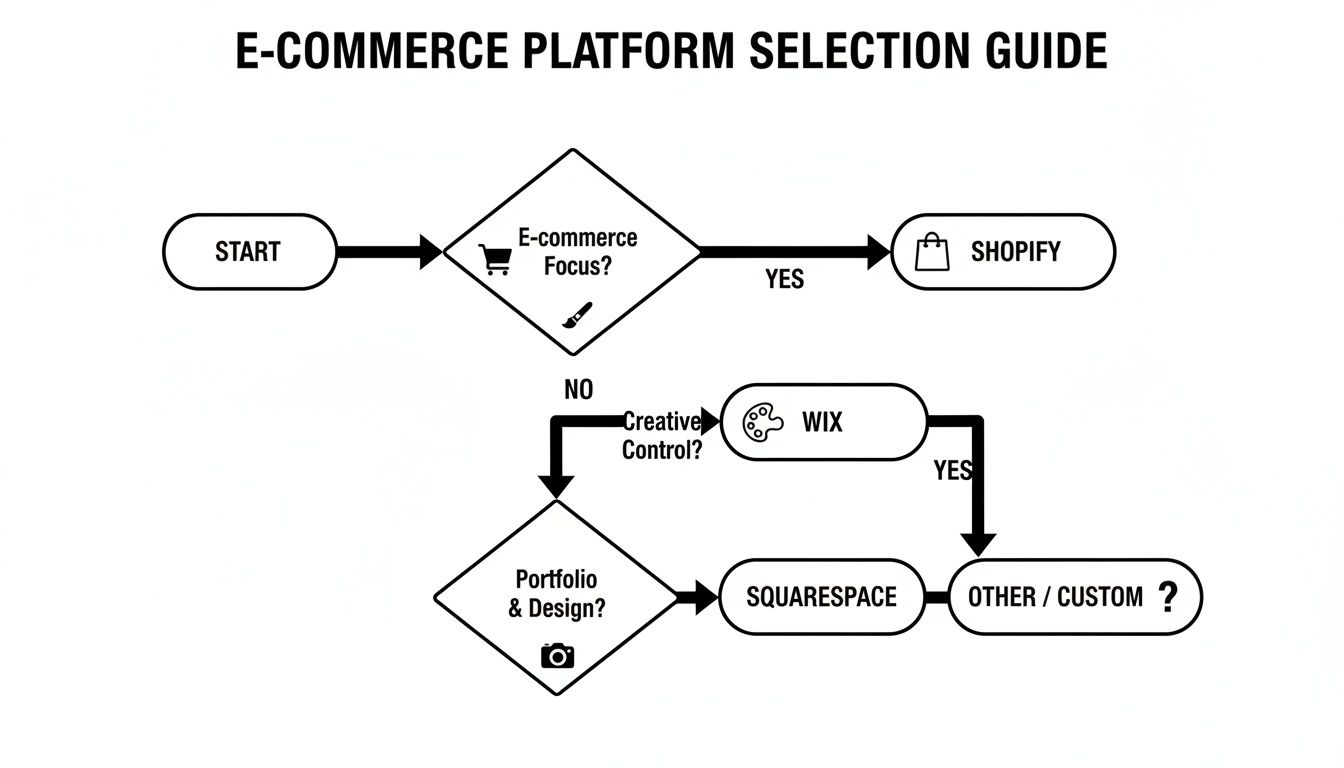
As the guide illustrates, the best path forward really depends on your main priority. Are you here to sell products above all else, or is creating a unique, portfolio-style website the most important thing?
Platform Comparison At A Glance
To give you a quick snapshot, here’s a table that breaks down the ideal user and core strengths for each platform. Think of this as your cheat sheet before we dive deeper into the comparisons.
| Platform | Best For | Key Strength | E-commerce Entry Price |
|---|---|---|---|
| Shopify | Growth-focused online stores and retail | Scalable, powerful e-commerce tools | $29/month (Basic) |
| Wix | Small businesses, freelancers, and restaurants | Ultimate creative freedom, ease of use | $29/month (Core) |
| Squarespace | Creatives, photographers, and bloggers | Award-winning design and templates | $23/month (Business) |
The real takeaway here is to match the platform's DNA with your long-term vision. Getting this wrong from the start can lead to a lot of headaches and even a costly migration down the road.
Getting this initial orientation right is the first, most important step. For a wider look at the market, this guide on the best e-commerce platforms for small businesses offers some great perspective. And while the prices above are a good starting point, remember there's more to the story; our full breakdown on the cost of an ecommerce website can help you budget properly.
Understanding the Big Picture: Market Position and Core Philosophies
Before we dive into a feature-by-feature breakdown, it’s crucial to understand where Shopify, Wix, and Squarespace fit in the wider market. Their market share and who they cater to tell you everything about their core philosophies. Getting this context right from the start helps explain why each platform shines in some areas and comes up short in others.

The numbers themselves tell a fascinating story. As of 2024, Shopify is the undisputed king of e-commerce, holding a massive 10.32% of the global market. That puts it miles ahead of Wix and Squarespace, who are playing a different game entirely. With roughly 3 million active stores in the U.S. alone, Shopify’s scale shows its commitment to being a commerce-first machine. You can dig deeper into these numbers with CMS market share trends from Search Engine Journal.
This market dominance isn't just a vanity metric; it directly translates into a deeper, more mature set of tools for anyone serious about selling. Shopify isn't just about helping you build a website—it’s about giving you a complete retail operating system.
Shopify: The E-commerce Powerhouse
Everything about Shopify is built for one purpose: to help you sell stuff. Its entire market position is based on serving businesses that need to manage inventory, scale their operations, and sell across multiple channels.
Because of this intense focus on commerce, its design and content features are always secondary to driving conversions. It's built for businesses that see their website as a sales engine first and a creative portfolio second.
Key Takeaway: Shopify’s market leadership comes from its relentless focus on e-commerce. Its massive ecosystem of apps, developers, and integrated services is all geared toward helping merchants sell more, making it the go-to for ambitious online stores.
Wix: The All-in-One Business Hub
Wix has successfully carved out its own space by appealing to small businesses, freelancers, and entrepreneurs who need more than just an online store. It's built to be the central hub for their entire online presence.
The platform bundles a highly flexible website builder with a whole suite of business management tools, such as:
- Wix Bookings for scheduling appointments.
- Wix Restaurants for managing online orders and reservations.
- Wix Events for selling tickets and coordinating events.
This "all-in-one" approach makes it a magnet for users who want a versatile, user-friendly platform without needing the heavy-duty e-commerce specialization that Shopify offers. While its e-commerce features are perfectly capable, they’re just one piece of a much larger puzzle.
Squarespace: The Design-First Creator Tool
Squarespace, on the other hand, courts a more specific crowd: creatives, artists, and brand-forward businesses. Its entire reputation is built on stunning, award-winning design templates and a polished, intuitive editor.
It puts aesthetics and ease of use front and center, making it the top choice for building gorgeous portfolios, blogs, and boutique stores where the visual experience is everything. While it has e-commerce functionality, its real strength is in helping you create a visually striking online presence with almost no effort. This makes it perfect for businesses where the brand's look and feel are just as important as the products on the shelf.
Getting Started: Which Platform Is Genuinely Easiest?
How fast can you get from an idea in your head to a real, live website that looks great? A lot of that comes down to how intuitive the platform feels from the moment you sign up. When you look at Shopify, Wix, and Squarespace, you'll find each has a very different idea of what "easy" means, and the right one for you depends on what you're trying to build.
Wix: The Creative Playground
Wix has built its reputation on being the go-to for complete beginners, and for good reason. Its classic editor is a true drag-and-drop system. You can literally click on any element—a text box, an image, a button—and drag it anywhere on the page. For creative types who want total pixel-perfect control, this is a dream come true.
But what if you don't know where to start? That's where the Wix Artificial Design Intelligence (ADI) tool comes in. It asks you a few simple questions about your business and style, and poof—it builds a surprisingly complete website for you in just a few minutes. You can then jump in and tweak it to your heart's content. It’s the fastest path from zero to a functioning website.
Squarespace: The Guided Designer
Squarespace takes a more structured approach, which many people find less intimidating than Wix's blank canvas. Instead of letting you put anything anywhere, Squarespace uses a section-based editor. You build your pages by adding and arranging pre-designed, professionally crafted blocks for things like photo galleries, contact forms, or testimonials.
This grid-like system acts as a set of guardrails. It’s actually pretty hard to make an ugly website with Squarespace because good design principles are built right into the editor. This ensures your site always looks clean, organized, and perfectly responsive on mobile devices without you having to think about it.
The Bottom Line: Squarespace is all about balancing creative freedom with foolproof design. If you want a website that looks like a professional designed it without the risk of messing up the layout, this is your platform.
The whole process feels very guided. You pick a gorgeous template, and the editor walks you through customizing each section. The learning curve is smooth and predictable.
Shopify: The E-commerce Cockpit
Shopify’s dashboard feels completely different because it's not trying to be a general website builder first. It's an e-commerce machine, a command center for your business. The entire user experience is built around one thing: selling.
When you first log in, you land on a dashboard that gives you a clear checklist to get your store running:
- Add your first product
- Connect a payment processor
- Figure out shipping rates
- Customize your store’s theme
While Shopify has an editor for changing your storefront's appearance, it's far more constrained than what you'll find on Wix or Squarespace. The focus is laser-sharp on optimizing product pages, collection layouts, and the checkout flow. For a business owner, this is incredibly efficient. For someone just wanting a creative portfolio, it can feel like trying to fly a 747 when you just need a scooter.
So, which is truly the easiest? It really depends on what you're trying to do.
- Wix is easiest for total creative control and getting a site up instantly with its ADI.
- Squarespace is easiest for getting a polished, professional-looking site without any design stress.
- Shopify is easiest for quickly setting up a serious online store and managing the business behind it.
A Deep Dive into E-commerce Capabilities
This is where the real differences emerge in the Shopify vs. Wix vs. Squarespace showdown. All three platforms let you sell online, but their e-commerce engines are fundamentally built for different types of businesses. Picking the right one boils down to one simple question: how big do you plan to grow your retail operation?
Shopify isn't a website builder that happens to have e-commerce; it’s a full-blown retail operating system, built from the ground up for selling. On the other hand, Wix and Squarespace are fantastic website builders that have bolted on impressive e-commerce features over the years. That core difference in their DNA influences everything from inventory management to selling across different channels.

Core Product And Inventory Management
On the surface, all three platforms handle the basics well—product listings, variants like size and color, and stock counts. But once you dig in, Shopify pulls away from the pack with its sheer depth and scalability. It’s truly designed for businesses that need to manage hundreds, if not thousands, of products, often across multiple physical locations.
Shopify’s inventory system is a powerhouse, offering built-in tools like:
- Purchase Orders: You can create and track orders with your suppliers right from the Shopify dashboard.
- Stock Transfers: Need to move inventory between warehouses or retail stores? It’s a native feature.
- Low Stock Reports: Get automated alerts so you never run out of your best-sellers.
Wix and Squarespace provide perfectly capable inventory tools for small to mid-sized stores. You can track stock levels, set up alerts, and manage product options without any trouble. What they lack are the advanced, enterprise-grade features that Shopify includes right out of the box, which can be a deal-breaker for high-volume sellers.
Key Insight: If your business has complex inventory, multiple physical locations, or serious growth ambitions, Shopify is the only real choice here. Its backend is built to act like a true retail management system, not just a simple website storefront.
Payment Gateways And Transaction Fees
Getting paid is obviously critical, and how each platform handles it can have a real impact on your bottom line. All three offer their own integrated payment solutions—Shopify Payments, Wix Payments, and Squarespace Payments—which are almost always the easiest and cheapest way to go.
Here's the breakdown of how they stack up:
- Shopify: Use Shopify Payments and you won't pay any extra transaction fees—just the standard credit card processing rate. If you insist on using an external gateway like PayPal or Stripe, Shopify will tack on an additional fee of 0.5% to 2% per sale, depending on your plan.
- Wix: Wix Payments works similarly, helping you avoid extra fees. The platform is also quite flexible, supporting numerous third-party gateways without penalizing you for using them.
- Squarespace: This is where you need to be careful. On its entry-level "Business" plan, Squarespace hits you with a 3% transaction fee on every sale, in addition to the standard processing fees. You have to upgrade to one of their "Commerce" plans to get that fee waived.
That 3% fee on Squarespace's starter plan can really add up and eat into your profit margins, essentially forcing growing stores into a more expensive plan. For a more detailed look at what each platform offers, take a look at our guide on the best website builders for online stores.
To make it even clearer, let's look at the essential e-commerce features side-by-side.
Feature Breakdown E-commerce Essentials
| Feature | Shopify | Wix | Squarespace |
|---|---|---|---|
| Transaction Fees | 0% with Shopify Payments | 0% with Wix Payments | 3% on Business plan; 0% on Commerce plans |
| Product Variants | Up to 100 variants per product | Up to 6 options, 1,000 variants total | Up to 6 options, 250 variants total |
| Inventory Locations | 4 to 1,000 locations depending on plan | Single location only | Single location only |
| Abandoned Cart Recovery | Included on all plans | Included on all plans | Commerce plans only |
| Point of Sale (POS) | Industry-leading POS hardware & software | Basic POS available | Basic POS available via Square |
| Shipping | Best-in-class discounts & carrier integrations | Good carrier integrations & real-time rates | Solid features, including real-time rates |
This table really highlights how Shopify is built for scale, especially when it comes to inventory and physical retail.
Multi-Channel Selling And Integrations
Today’s customers don't just shop on websites; they buy products wherever they hang out online. This is another area where Shopify's commerce-first approach gives it a major edge. It has deep, native integrations with platforms like Facebook, Instagram, and TikTok, making in-app social commerce a seamless experience.
Shopify also connects directly with major online marketplaces like Amazon and Walmart, letting you manage all your listings and inventory from one central hub.
Wix and Squarespace have stepped up their game with social selling integrations, particularly with Instagram. They work perfectly well for businesses that primarily focus on direct website sales and a couple of key social channels. However, if you're aiming for a true omnichannel retail strategy, you might find their capabilities a bit limiting compared to Shopify. And remember, no matter which platform you go with, optimizing product photography is non-negotiable for driving sales on every channel.
Selling Different Product Types
The ability to sell more than just physical items is a must for many businesses today. Here's how the platforms handle different product types:
- Digital Products: All three platforms make it easy to sell digital goods like ebooks, music files, and design templates.
- Subscriptions: Shopify, Wix, and Squarespace all support recurring payments for subscription boxes or memberships. Shopify’s functionality here is generally more powerful, thanks to a huge ecosystem of apps designed to manage complex subscription models.
- Services and Appointments: This is where Wix and Squarespace have a clear advantage. With dedicated tools like Wix Bookings and Squarespace Acuity Scheduling, they are perfectly tailored for service-based businesses that need to manage client appointments, classes, or consultations. While you can do this on Shopify, it almost always requires a third-party app.
Design Customization and Flexibility
Your website’s design is your digital storefront. It’s the first thing a potential customer sees, and in the Shopify vs. Wix vs. Squarespace showdown, each platform has a completely different take on how you should build it. The right choice really hinges on how much control you want versus how much guidance you need.
Wix is all about absolute creative freedom. Its defining feature is a pixel-perfect, drag-and-drop editor that feels more like using a graphic design program than a website builder. You can literally place any element anywhere on the page, giving you a level of control that’s a dream for creatives who want a truly unique site without writing code.
Of course, that much freedom can be a double-edged sword. If you don't have a good eye for design, it's pretty easy to end up with a cluttered or inconsistent mess. For those who feel a bit overwhelmed, the Wix ADI (Artificial Design Intelligence) can whip up a site for you, but the classic editor is where the platform’s true flexibility shines.
Squarespace: The Curated Design Experience
Squarespace takes the opposite approach, focusing on making professional design accessible to everyone. It uses a structured, section-based editor that gives you a solid framework to build within. You don’t just drag things anywhere; instead, you add and arrange well-designed content blocks inside a grid.
Think of it as helpful guardrails that make it genuinely difficult to create an ugly website. Squarespace's award-winning templates are modern, mobile-responsive, and visually stunning from the get-go, making them a fantastic choice for artists, photographers, and any business where a polished aesthetic is key.
Key Differentiator: If Wix gives you a blank canvas and a box of paints, Squarespace gives you a professional blueprint and high-quality materials. One is about limitless creativity, while the other is about guaranteeing a polished result.
The trade-off for this curated experience is less granular control when compared to Wix. You’re working within the template's structure, which is great for consistency but can feel a bit restrictive if you have a highly specific or unconventional layout in mind.
Shopify: Commerce-Focused Customization
Shopify's design philosophy is built around a single, powerful goal: driving sales. Its themes aren't just there to look pretty; they are meticulously engineered to convert visitors into customers. The platform offers a curated mix of free and premium themes, all optimized for mobile shopping and speedy load times—two things that are absolutely critical for e-commerce success.
You can customize a Shopify store on two different levels. For most users, the theme editor provides simple, direct options for changing colors, fonts, and section layouts without touching a single line of code. This is usually more than enough to build a professional, on-brand storefront.
For those who need to go deeper, Shopify’s secret weapon is its templating language, Liquid. This is where the platform's true power is unlocked for anyone with technical skills or the budget to hire a developer. Liquid gives you complete control over every pixel of a theme's code, allowing for unique features and complex layouts that go way beyond what the standard editor can do. This technical depth is something Wix and Squarespace just weren’t built for. Our guide on the best no-code website builders covers platforms that stick to ease of use over this kind of technical firepower.
Ultimately, your choice boils down to what you value most:
- Wix: Your best bet for total creative freedom and unique, non-standard layouts.
- Squarespace: The ideal choice for stunning, professional designs with minimal effort.
- Shopify: The perfect platform for conversion-focused storefronts with the option for deep technical customization.
Comparing SEO Apps and Performance
A beautiful website doesn't do you much good if customers can't find it. When you line up Shopify, Wix, and Squarespace, their approaches to search engine optimization (SEO) and site performance show some critical differences that can directly affect your ranking on Google. All three give you the essential tools, but how deep you can go with them varies quite a bit.

On a basic level, every platform lets you manage the on-page SEO fundamentals. You can easily edit meta titles, meta descriptions, URL slugs, and image alt text no matter which one you choose. They also all generate sitemaps automatically and support basic schema markup to help search engines make sense of your content.
But the real divide appears once you need to move past these basics and put a more advanced SEO strategy into play.
Native SEO Toolsets and Guidance
Wix and Squarespace have really focused on building strong, integrated SEO features aimed at beginners. They've built guided checklists and prompts right into the dashboard that walk you through the whole process, making it approachable even if you've never touched SEO before.
- Wix SEO Wiz: This feature acts like a personal SEO coach. It creates a customized plan for your site with a step-by-step checklist to get you connected to Google Search Console and optimize your pages.
- Squarespace SEO Checklist: In a similar vein, Squarespace provides a comprehensive checklist to make sure you've covered all the essential optimization tasks for your content.
Shopify takes a more direct, less hand-holding approach. While it nails all the essentials, it assumes you have a bit more know-how. Its real power isn't in guided wizards but in providing a technically solid foundation that you can build on with powerful apps.
Key Insight: If you're new to SEO, the guided experience from Wix and Squarespace is a huge plus. Shopify gives you a rock-solid base but expects you to bring your own strategy or use apps to fill in the gaps.
The App Marketplace Advantage
This is where Shopify really pulls ahead for any business serious about growth. The Shopify App Store is a massive ecosystem with thousands of specialized apps, including a huge selection purely for SEO. These apps let you add advanced features that just aren't available natively on Wix or Squarespace.
For instance, with Shopify apps, you can easily handle advanced tasks like:
- Advanced Schema Markup: Add incredibly detailed structured data for products, reviews, and FAQs to help you earn those eye-catching rich snippets in search results.
- Image Optimization: Automatically compress and resize all your images for faster load times without losing visual quality.
- Broken Link Detection: Regularly scan your site for 404 errors and set up redirects to protect your site’s authority.
Wix and Squarespace have their own app markets, but they're much smaller and don't offer the same depth of specialized SEO tools. Their built-in features are great for most small businesses, but you might find yourself hitting a wall when you need more granular control or automation.
Performance and Hosting Infrastructure
Site speed is a well-known Google ranking factor, and your platform's hosting plays a huge role here. All three are fully hosted, so you never have to worry about managing servers. They all use Content Delivery Networks (CDNs) as well, which helps your site load quickly for visitors anywhere in the world.
That said, Shopify was built from the ground up for high-volume commerce, and its global infrastructure is fine-tuned for speed and reliability. This becomes absolutely critical during high-traffic events like a Black Friday sale. While Wix and Squarespace also deliver excellent performance, Shopify's entire architecture is engineered for the intense demands of e-commerce at scale. This often gives it a slight but meaningful edge in load times, which can make a real difference for your SEO.
Frequently Asked Questions
Picking between Shopify, Wix, and Squarespace always brings up a few key questions. I've heard these from countless business owners, so let's clear up some of the most common ones to help you figure out which platform really makes sense for you.
Which Platform Is Cheapest to Start an Online Store?
This is a bit of a trick question. While you might see lower starting prices on general plans from Wix or Squarespace, the "cheapest" option for an actual online store isn't always so clear-cut.
If you're just selling a few items on the side, Wix or Squarespace can definitely feel more affordable at the beginning. But if you're serious about e-commerce, you have to look at the bigger picture. Shopify's base plan is priced for growth and comes packed with e-commerce tools right out of the box.
The real kicker is transaction fees. If you use Shopify Payments, you won't get hit with extra charges. On other platforms, using third-party payment gateways can add up. My advice? Always map out the cost of essential apps and payment fees to see what your true monthly spend will be.
Can I Switch Platforms Later if My Business Grows?
Yes, you can absolutely move your store later on, but don't underestimate the headache involved. A classic move we see all the time is businesses starting on Wix or Squarespace and then graduating to Shopify once they need more serious e-commerce muscle.
The migration itself means exporting all your product, customer, and order data and then importing it into your new home. The part that most people forget is that your website design, blog posts, and app setups don't come with you. You'll have to rebuild all of that from the ground up.
This is exactly why many businesses bring in pros for a migration. It protects your data, avoids painful downtime, and saves you from the technical nightmare of rebuilding your store piece by piece.
Which Platform Is Best for Blogging and Content Marketing?
All three have good blogging tools, but they're built for different kinds of creators. Squarespace has always been the darling of designers and artists for a reason—its blog templates are gorgeous, with a heavy emphasis on beautiful typography and big images. It's perfect if your content is highly visual.
Wix offers a lot of flexibility and has some great built-in SEO tools to help your content get found. Shopify’s blog is practical and gets the job done. It's seamlessly tied into your store, so dropping products into a post is a breeze, but it’s definitely not a powerhouse for content-heavy sites compared to the other two.
Do I Need to Know How to Code?
Nope, not at all. You can build a great site on any of these platforms without ever looking at a line of code.
Wix and Squarespace were made for people without technical skills, giving you intuitive drag-and-drop or section-based editors that make building a site feel easy. Shopify is also incredibly user-friendly for getting a store up and running. While you can dive into its templating language, Liquid, for deep customizations, you don't need it for any of the core functions.
Choosing the right platform is just the first step. Building a site that actually grows your business takes continuous work. Whether you're dreaming up a custom Shopify build or need a hand moving your store to a more powerful platform, OneNine has the expertise to make it happen. Learn how we can help you build and grow your online store.


