

The biggest difference between Google Sites and WordPress really boils down to this: Google Sites is all about simplicity and is completely free, making it a fantastic choice for basic, informational websites or internal company pages. On the other hand, WordPress delivers incredible power and scalability, positioning it as the clear winner for any project serious about growth, customization, and professional marketing.
Choosing the Right Website Platform
Picking between Google Sites and WordPress isn’t just a matter of comparing features. It’s about matching the platform’s fundamental purpose with your own long-term vision. One is a straightforward tool for quick and easy tasks, while the other is a powerful ecosystem built for just about anything you can imagine.
When Google Sites Makes Sense
Google Sites shines in very specific situations where getting something online quickly and easily is all that matters. I like to think of it as a digital whiteboard. It's perfect for:
- Internal Team Hubs: A central spot to gather project documents, calendars, and team updates, especially if you already live in Google Workspace.
- Simple Event Pages: Need to spin up a quick page for the company picnic or a short-lived marketing campaign? Google Sites gets it done in minutes.
- Educator and Student Portfolios: It’s a no-cost, simple way for teachers to share classroom resources or for students to create a basic online resume.
When You Need the Power of WordPress
WordPress is a different animal altogether. It’s an investment in a platform that can truly grow with your ambitions. It's no accident that WordPress powers around 61% of the CMS market—that kind of dominance comes from its sheer flexibility and massive community support. Because it's open-source, it’s always evolving, making it the go-to for any serious, public-facing website. You can dig deeper into its market share compared to rivals like Shopify and Wix in these recent industry reports.
Before we dive deeper, this quick table provides a bird's-eye view of how the two platforms stack up.
Google Sites vs WordPress at a Glance
| Criterion | Google Sites | WordPress |
|---|---|---|
| Best For | Internal sites, simple personal pages, temporary projects. | Blogs, business sites, e-commerce, any professional project. |
| Ease of Use | Extremely easy. Drag-and-drop interface. | Moderate learning curve, but highly intuitive once learned. |
| Cost | Completely free (with a Google account). | Software is free; requires paid hosting and a domain name. |
| Customization | Very limited. Basic templates and color schemes. | Nearly limitless. Thousands of themes and plugins. |
| SEO | Basic options. Lacks advanced tools. | Excellent. Powerful plugins like Yoast SEO for full control. |
| Extensibility | Limited to Google Workspace integrations. | Virtually endless via 59,000+ free plugins. |
As you can see, the choice depends heavily on what you need to accomplish. Each has its place, but they serve very different masters.
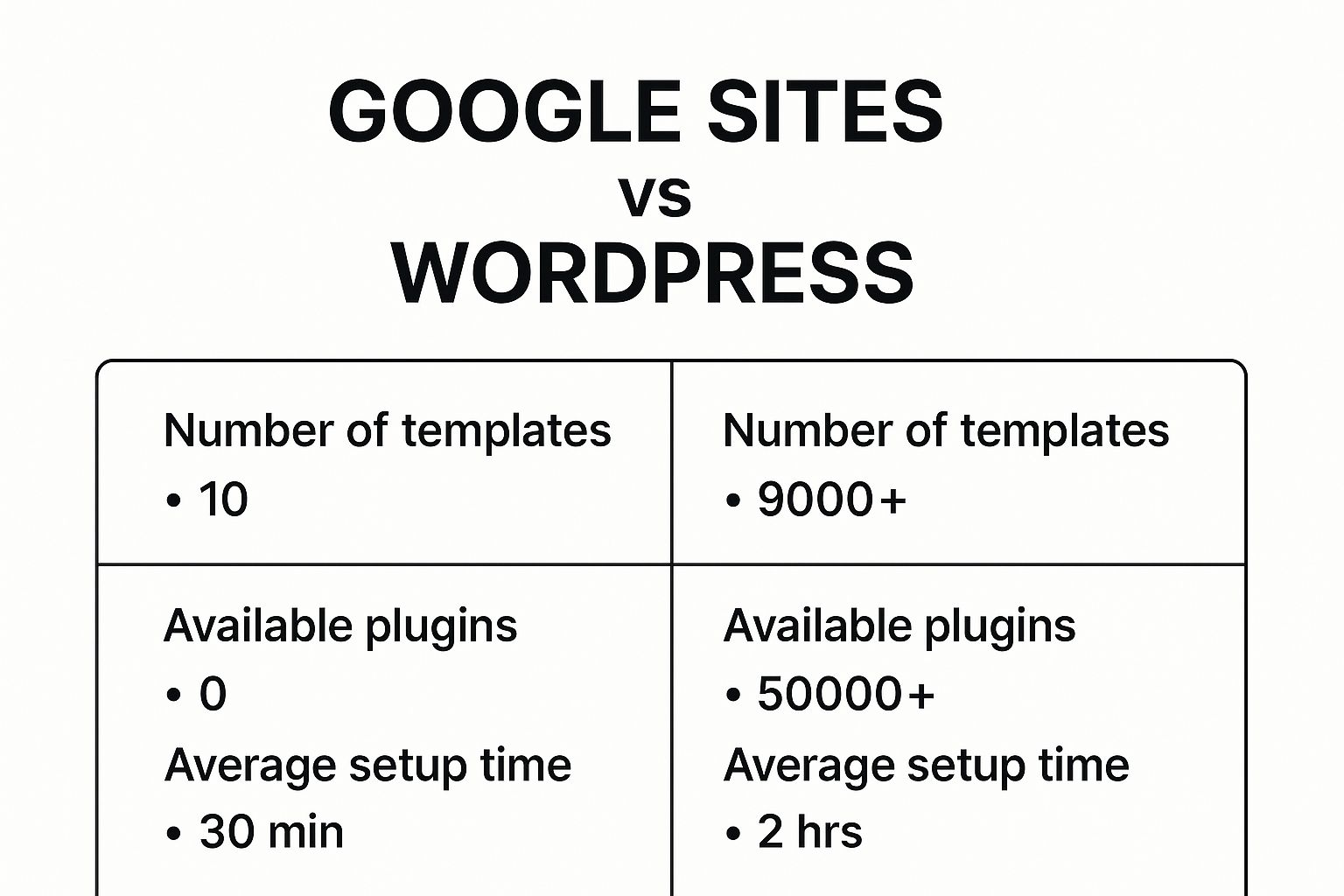
The data really spells it out. You’re trading off lightning-fast setup with Google Sites for a nearly infinite pool of resources with WordPress. Ultimately, your decision rests on a simple question: do you need a simple tool for a single job, or a powerful, scalable foundation for your entire digital presence?
Comparing Customization and Design Freedom

The real difference between Google Sites and WordPress shows up the moment you start thinking about what you want to build. One platform gives you simple elegance within a well-defined box, while the other hands you a blank canvas with almost no creative limits. This is really the heart of the Google Sites vs WordPress decision for anyone who cares about unique branding and user experience.
Google Sites is all about getting something online quickly and easily. Its drag-and-drop editor is straightforward and intuitive. A good analogy is building high-quality flat-pack furniture; the pieces are solid and fit together perfectly, but you’re stuck with the parts and plans that came in the box.
This works beautifully for a lot of projects. A teacher can whip up a class portal, embedding a Google Calendar for assignments and a Drive folder for handouts. An event manager can launch a clean, simple page for a conference without touching a line of code. You get a functional, professional-looking site that just works.
Key Insight: Google Sites is built for functional simplicity, not creative expression. It’s fantastic for clean, utility-focused websites that plug right into Google Workspace, but it was never meant for custom branding or one-of-a-kind layouts.
The design guardrails become obvious when you try to color outside the lines. You can pick from a small selection of themes and tweak colors and fonts, but you can’t fundamentally change the page structure or add complex design elements. This controlled environment means you can't really mess things up, but it also means you can't build something truly unique.
The WordPress Ecosystem of Limitless Design
WordPress is playing a completely different game. It uses a layered approach to design that works for total beginners and seasoned developers alike. At its core, WordPress gives you complete control over how your site looks and feels.
This power comes from two main sources: themes and plugins. Unlike the handful of templates in Google Sites, WordPress has thousands of free and premium themes that act as the design foundation for your site. These aren't just skins; they are full-blown design frameworks that you can customize even further.
The real magic, though, happens when you pair a theme with a page builder plugin like Elementor or Beaver Builder. These tools turn the standard WordPress editor into a visual, drag-and-drop design powerhouse. Suddenly, you're controlling every pixel, creating complex layouts with multiple columns, and adding dynamic effects—all without writing code.
This is where the comparison gets pretty lopsided. While Google Sites has basic "gadgets," WordPress has a gigantic, constantly growing library of plugins that can do almost anything you can imagine.
- For Functionality: Need an advanced booking system, an interactive map, or a multi-step contact form? There’s a plugin for that.
- For Design: Want to add animated headlines, parallax scrolling, or custom image galleries? Page builders make it easy.
- For Growth: Ready to add an online store or a private membership area? Plugins like WooCommerce can completely transform your site.
This massive ecosystem exists because of WordPress's incredible market dominance. As of 2025, WordPress powers a stunning 64.3% of all websites using a known content management system and runs on over 43% of all websites on the internet. This huge user base supports an entire economy of over 70,000 plugins and 30,000 themes, so you’re almost guaranteed to find a tool for whatever you need. You can see more data on its impressive growth in this detailed market share analysis.
Knowing how to install these add-ons is key to unlocking what WordPress can do. If you're just starting out, learning how to add plugins to a WordPress site is one of the first and most valuable skills you'll pick up. It's your ticket to near-limitless customization. When it comes down to it, if you want to build a unique, feature-packed website that truly reflects your brand and can grow with you, WordPress is the clear winner.
Evaluating User Experience and Learning Curve
When you’re weighing Google Sites against WordPress, the daily experience and initial learning curve are probably the biggest differences you'll notice. One is built for speed and simplicity right out of the box. The other asks for a bit more upfront learning but gives you much more power in return.
Your choice really comes down to what you value more: getting a simple site live in minutes, or investing a little time to build something with long-term flexibility.
Google Sites is designed to be completely intuitive. If you’ve ever put together a presentation in Google Slides, you already have all the skills you need. There’s practically no learning curve, which means an absolute beginner can have a site published in less than an hour.
The editor is a pure WYSIWYG ("What You See Is What You Get") experience. You just click, type, and drag elements into place. This straightforward approach is perfect for anyone who isn't a "tech person" and just needs a functional site online fast, with zero fuss.
Google Sites: An Effortless Start
Getting started with Google Sites is as easy as it sounds. You don’t have to install any software or worry about finding a web host.
- Step 1: Head over to Google Sites while logged into your Google account.
- Step 2: Pick a simple template or just start from scratch.
- Step 3: Use the menu on the right to add your content.
- Step 4: Hit the “Publish” button.
That’s it. This simplicity is its core strength. It's an incredibly efficient tool for whipping up a quick internal project site, a class homepage, or a temporary page for an event. You won't get lost in complex menus because there aren't any.
The WordPress Learning Curve: An Investment in Power
WordPress, on the other hand, sometimes gets a reputation for being "difficult." A better way to think of it is as an investment. It definitely takes more time to get comfortable with than Google Sites, but that initial time investment pays off massively in terms of control and what you can build.
The WordPress dashboard might look a bit intimidating at first glance, but it's quite logical once you know your way around. The key is to grasp a few core ideas that simply don't exist in the Google Sites world.
"We tried both Google sites and WordPress and ended up staying with WordPress. It is more complicated to manage and requires regular maintenance. But if a person takes care of the website, WordPress is better in terms of potential growth… the freedom and scalability are worth it." – Jiří Vaněk, User Testimonial
This user’s experience really nails it. The effort you put into understanding the platform is exactly what opens the door to future growth and customization.
Demystifying the WordPress Dashboard
Getting comfortable with WordPress is all about understanding a few key concepts and knowing where to find things.
Key Concepts to Master:
- Posts vs. Pages: Think of Posts as your blog entries—timely content organized by date and category. Pages are for your static, core content, like your "About" or "Contact" information.
- Themes: A theme controls the entire look and feel of your website. It's the visual blueprint for your design, from colors and fonts to the overall layout.
- Plugins: Plugins are like apps for your website. They add new functionality. Need a contact form, an online store, or an event calendar? There's a plugin for that.
- The Settings Menu: This is your site's main control panel. Here, you'll manage everything from your site's name and URL structure to how comments are handled.
Once these pieces click into place, using WordPress feels natural. While Google Sites offers one simple path, WordPress gives you a full toolkit. Learning how to use those tools is the first step toward building something powerful and unique, making the learning curve a worthwhile tradeoff for any serious website.
Analyzing the True Cost of Ownership
When you're weighing Google Sites against WordPress, money is often one of the first things that comes to mind. The cost difference isn't just a small gap—it's a fundamental distinction between the two platforms. With Google Sites, the conversation is short and sweet. With WordPress, it’s a bit more involved.
The biggest draw for Google Sites is, without a doubt, its price. It's completely free. If you have a standard Google account, you can build and launch a website without opening your wallet. Google handles the hosting, so you don't have to worry about server fees or software costs.
The only time you might spend money is on a custom domain name. Your site works just fine with the default sites.google.com/view/yoursite address, but a custom domain like yourbusiness.com looks far more professional. This is an optional add-on that typically runs about $12-$15 per year. For most users, that's the only potential expense.
Deconstructing the Costs of WordPress
WordPress tells a different story. The core software is open-source and 100% free to download and use, which often causes confusion. It’s a bit like getting a high-performance car engine for free—you still need to buy the car frame, the wheels, and the gas to actually drive it anywhere.
To get a professional WordPress site online, you'll need to budget for a few essential components:
- Web Hosting: This is the plot of land on the internet where your website files live. A decent shared hosting plan, which is perfect for most new websites, will cost anywhere from $3 to $15 a month.
- Domain Name: Just like with Google Sites, you need to purchase an address for your site. This is a small but necessary annual fee.
- Premium Themes & Plugins: While there are thousands of great free themes and plugins, businesses often invest in premium tools to get the exact look or functionality they need. A premium theme might be a one-time purchase of $50-$80, and specialized plugins for things like e-commerce or advanced contact forms can add to the cost.
These expenses can really add up depending on your ambitions. If you want to dig deeper into what a custom build might run, our guide on how much a website costs breaks down all the potential expenses in detail.
Key Takeaway: The "free" part of WordPress is just the software itself. The real cost comes from essential services like hosting and a domain, plus the premium tools you'll likely want for a polished, functional site.
A Practical Budget Forecast
Let's put some real numbers to this to see how it plays out. The table below gives a realistic estimate of what a small business could expect to spend in the first year to get a basic, professional website up and running on each platform.
Estimated First-Year Website Costs
| Cost Item | Google Sites | WordPress (Self-Hosted) |
|---|---|---|
| Platform Fee | $0 | $0 |
| Domain Name | ~$15 / year | ~$15 / year |
| Web Hosting | Included (Free) | ~$100 / year (for a quality shared plan) |
| Premium Theme | N/A | ~$60 (one-time) |
| Essential Plugins | N/A | $0 – $150+ / year |
| First-Year Estimate | ~$15 | ~$175 – $325+ |
The numbers don't lie. If your budget is close to zero, Google Sites is the clear winner.
But for any serious business, that initial investment in WordPress is what buys you control, power, and the ability to scale. It’s a foundational cost that paves the way for future growth in a way Google Sites simply can't match.
Comparing SEO and Marketing Potential

A website is useless if no one can find it. This is where the Google Sites vs. WordPress debate gets really serious, especially for anyone who needs their site to generate traffic and leads. How well a platform handles Search Engine Optimization (SEO) and marketing is what separates a simple online brochure from a genuine business asset.
Google Sites offers the absolute basics for SEO. You can change your page titles and write a site description, and that’s about it. After those two steps, you've hit a wall. For any business in a competitive space, this is a massive handicap right out of the gate.
You have no way to manage crucial technical SEO details. Forget about editing your sitemap, adding custom schema markup to help Google understand your content better, or creating clean, keyword-focused URLs. These limitations make it nearly impossible to run a proper SEO strategy.
The WordPress Advantage for Search Engine Visibility
WordPress, on the other hand, is an SEO powerhouse. It was built with search engines in mind, but its true potential is unleashed when you add a dedicated SEO plugin like Yoast SEO or Rank Math. These tools give you an incredible amount of control over how your site appears to Google.
With WordPress, you get full command over all the on-page factors that actually move the needle in search rankings:
- Detailed Meta Control: You can write custom meta titles and descriptions for every single page and post, which is key to convincing users to click on your link in the search results.
- Full Schema Markup: Easily add structured data to get those eye-catching "rich snippets" in Google, like star ratings for products, event information, or FAQ dropdowns.
- Sitemap Management: Your XML sitemap is automatically generated and updated, and you can customize it to make sure search engines crawl and index your most important pages.
- Crawlability Directives: You can use canonical tags to fix duplicate content issues and tell search engine crawlers exactly what to do with robots.txt and noindex tags.
Key Insight: WordPress wasn't just built with SEO in mind; it was engineered to dominate it. It gives you the granular control needed to compete, analyze, and optimize for search visibility in a way Google Sites simply can't.
This level of control is essential for any business that depends on organic search traffic for growth. Even the most stunning https://onenine.com/website-design-small-businesses/ will fail if it's invisible on Google. If you want to rank for valuable keywords, WordPress is your only real choice here.
Content Marketing and Blogging Capabilities
Beyond just the technical side of SEO, content marketing is the engine of modern digital strategy. This is another area where the two platforms are in completely different leagues. WordPress started its life as a blogging platform, and that legacy is still its greatest strength. It offers a powerful, intuitive system for creating, managing, and promoting content.
The editor is robust, and features like categories and tags let you build a well-organized and easy-to-navigate content library. You can schedule posts for the future, create unique post types, and connect your blog to all your other marketing channels.
Google Sites doesn't really have a blog. The best you can do is create individual new pages and then manually link to them from a main "blog" page. It’s a clunky, inefficient workaround that lacks all the essential features you'd need for a real content strategy, like an RSS feed, comment sections, or author archives.
When it comes to marketing your site, the choice is clear. Google Sites is a closed box with very limited potential. WordPress is an open, endlessly expandable platform built to help you grow your audience. To see how these SEO efforts fit into a bigger picture, check out this comprehensive guide to digital marketing.
Making Your Final Decision
So, how do you choose between Google Sites and WordPress? The truth is, there's no single "best" platform. The right choice comes down to what you're trying to accomplish. It’s less about picking a winner and more about matching the tool to the job at hand.
Think of it this way: one is like a simple, reliable Phillips head screwdriver, perfect for a specific task. The other is a full-blown power tool kit with every attachment you could ever need. Let's look at a few real-world situations to see where each one truly shines.
When Google Sites Is The Perfect Fit
Google Sites is all about simplicity and speed, with the unbeatable price tag of free. It's the clear winner when your main goal is to get information online quickly for a specific audience, without worrying about bells and whistles. If your project sounds like one of these, you can stop looking.
- Internal Company Wiki: Your team needs a central place to find HR policies, project roadmaps, and company news. Here, seamless integration with Google Drive is far more valuable than public SEO.
- A Teacher's Classroom Hub: An educator needs a straightforward site to post assignments, share the syllabus, and link to resources for students. The primary drivers are ease of use and a zero budget.
- A Simple Student Portfolio: A student needs a clean online space to showcase a handful of projects for a class or a first job application. The aim is a digital resume, not an elaborate personal brand.
- A Temporary Event Page: Your club is hosting a fundraiser and needs a basic landing page with the date, a map, and a schedule. The site is temporary and doesn't need complex features.
The Bottom Line on Google Sites: If you just need to organize and share information with a specific group of people and have no budget, Google Sites is the most practical choice you can make.
When You Absolutely Need WordPress
When your website is a critical business asset—built for growth, marketing, and generating revenue—WordPress is the only serious contender. Its raw power and limitless flexibility are essential for any project with big ambitions.
- A Blogger Who Wants to Earn Money: You plan to build a real audience, rank on search engines for tough keywords, and make money from ads or by selling your own products. The powerful SEO and content tools in WordPress are non-negotiable for this.
- A Small Business That Needs Leads: Your website must work for you 24/7, attracting new customers and turning them into leads through professional landing pages and contact forms. You need total control over your marketing message and design.
- An E-commerce Store for a Creator: You want to sell your art, merchandise, or services directly to your audience. The robust e-commerce power you get from a plugin like WooCommerce is essential for handling payments, inventory, and shipping.
- A Scalable Corporate Website: A larger business needs a secure, fully custom marketing platform. The ability to integrate with CRMs, analytics, and other business software is paramount, and WordPress is built for this.
At the end of the day, it all comes down to your goals. Google Sites is for getting a simple job done. WordPress is for building something that will last and grow.
Answering Your Lingering Questions
You've seen the side-by-side comparison, but a few practical questions always pop up when making the final call between Google Sites and WordPress. Let's tackle those head-on so you can move forward with confidence.
What if I Start with Google Sites and Want to Switch to WordPress Later?
You can, but I’ll be honest—it’s a pain. There’s no magic "migrate" button to move your content over. You're looking at a completely manual job: copying and pasting every single bit of text and re-uploading every image, one page at a time.
If you have even a small inkling that you'll eventually need the horsepower of WordPress, do yourself a massive favor and start there. Building on Google Sites first often means creating a huge, tedious project for your team down the road.
Is WordPress a Secure Platform?
Absolutely, but security is a two-way street. The core WordPress software is solid and constantly updated by a dedicated security team. The real-world security of your site, however, comes down to how you manage it.
Think of it like this: your site's safety really depends on three key things:
- Your Hosting: A quality web host acts as your first line of defense with server-level security.
- Your Add-ons: Stick to reputable themes and plugins from trusted developers. Poorly coded add-ons are a common entry point for hackers.
- Your Habits: Keeping WordPress, your themes, and your plugins updated is the single most important thing you can do. It's like locking your doors at night—a simple, crucial step.
Does Google Give Google Sites a Boost in Search Rankings?
This is a persistent myth, but the answer is a firm no. Google's algorithm rewards quality and relevance, not the platform you use. A well-built, content-rich WordPress site will easily outrank a slapped-together Google Site every single time.
SEO isn't about the tool you use; it's about how you use it. Success comes from great content, solid technical health, and earning quality backlinks. The right platform just makes achieving those things easier.
Since WordPress offers a far more powerful SEO toolkit, it gives you a much better shot at ranking well. But Google doesn't play favorites with its own products in search results.
Can I Sell Products on Google Sites?
You can, in the most basic sense of the word. It's possible to embed a "Buy Now" button from PayPal, but that's where it ends. Google Sites has zero built-in e-commerce features. You get no shopping cart, no inventory tracking, and no customer accounts.
For anyone who is actually serious about selling online, this is a non-starter. The clear winner here is WordPress paired with the WooCommerce plugin. It’s the gold standard for a reason, giving you a full-fledged, scalable online store that can grow with you.
Your website is your most important digital asset. At OneNine, we specialize in building and managing high-performing websites that drive results. Whether you need a powerful WordPress site or expert maintenance, we're here to help. Learn more about our services and let us be your partner in digital success.


