

Trying to pin down a firm price for a new website can be frustrating. You'll see figures ranging from a seemingly simple $2,000 to $15,000 for a basic business site, while more complex e-commerce or custom-built platforms can easily jump past $25,000. The honest answer is that the final cost really depends on what you need, the features involved, and who you hire to do the work.
How Much Should a Website Cost to Build?
Figuring out the right budget for a new website can feel like you're trying to hit a moving target. Prices swing wildly, from a few hundred bucks for a DIY weekend project to tens of thousands for a site built by a professional agency.
The reality is, there's no magic number. The cost is a direct reflection of your business goals, the complexity of the features you need, and the level of expertise you bring in to help. Let's demystify those numbers and break down the typical cost ranges so you can find the right approach for your business.
Comparing Costs by Website Type
The single biggest factor driving the price is the type of website you're building. A simple "digital brochure" site for a local plumber has a completely different set of needs than a national e-commerce store juggling thousands of products and customer accounts.
This chart gives you a ballpark idea of the cost ranges for three common types of projects.
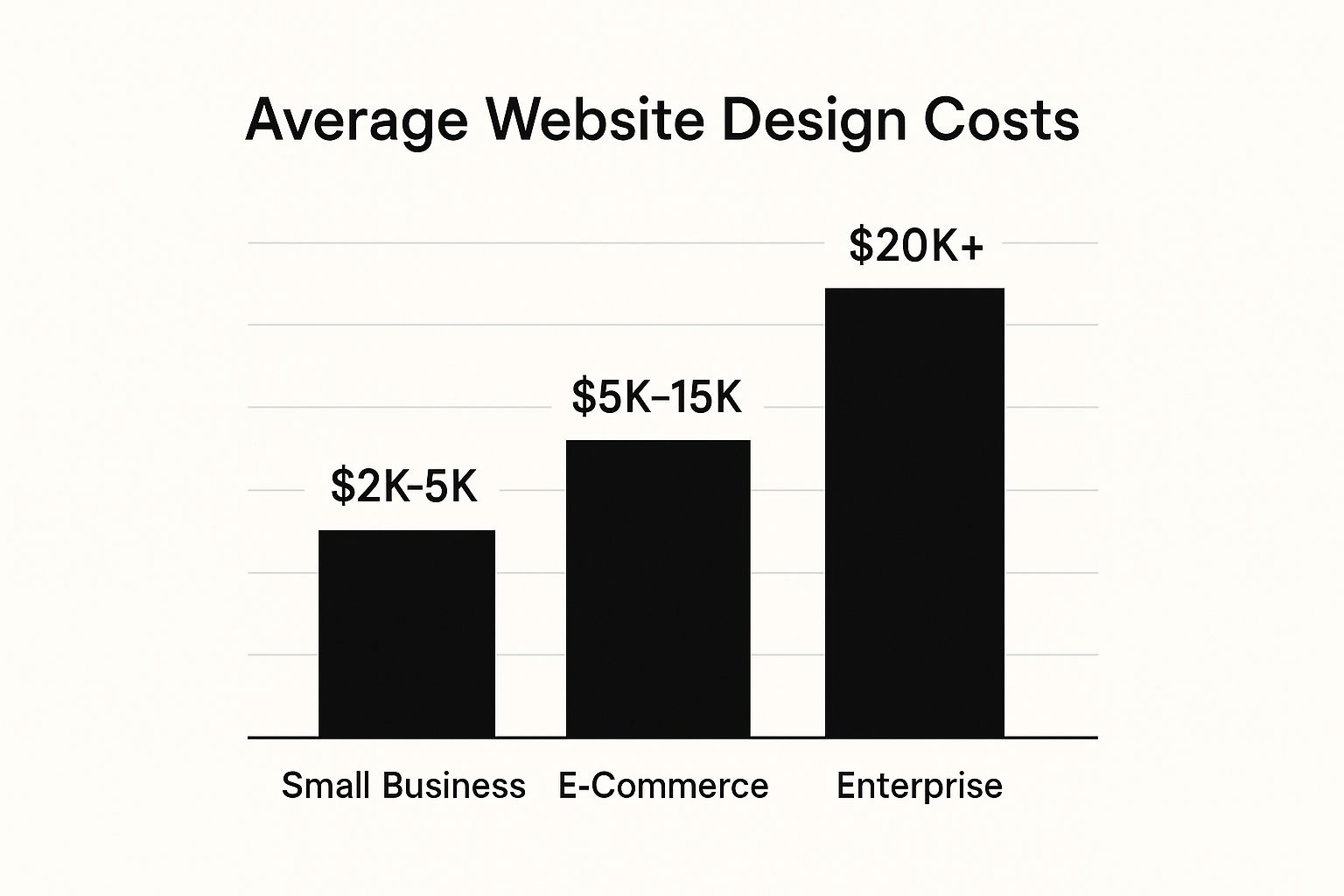
As you can see, the price tag climbs pretty steeply as you add more functionality. It’s a big leap from a basic small business site to a feature-packed enterprise platform. For a more detailed look at what's behind these numbers, you can check out our complete guide on website development cost.
Breaking Down the Price by Approach
After you know what you're building, the next big question is who is building it. Are you rolling up your sleeves and doing it yourself? Hiring a talented freelancer? Or are you partnering with a full-service agency? Each path comes with its own trade-offs in terms of time, effort, and, of course, money.
To give you a clearer picture, we've put together a table that compares the most common approaches. This should help you see how the different options stack up.
Estimated Website Design Cost by Approach
| Approach | Typical Cost Range (Per Project) | Best For | Key Considerations |
|---|---|---|---|
| DIY (Website Builders) | $100 – $500 | Solopreneurs, hobbyists, or those with very tight budgets. | Requires your time and a willingness to learn the platform. Limited customization. |
| Freelancer | $1,000 – $10,000 | Small to medium businesses needing a professional but straightforward site. | Quality can vary. You'll need to manage the project and find the right person. |
| Web Design Agency | $10,000 – $100,000+ | Established businesses, e-commerce stores, and complex projects. | Highest cost, but you get a full team of experts (strategy, design, development). |
Ultimately, the right choice boils down to your specific situation. A DIY site is great for getting started, but an agency provides the horsepower for growth. There's no wrong answer—just the one that fits your resources and ambitions.
The Core Factors That Drive Website Costs
Trying to understand what goes into the website design cost is a lot like planning to build a house. You know you need walls and a roof, but the final price tag depends on whether you're building a cozy one-bedroom bungalow or a sprawling custom mansion. The size, materials, and special features all add up.
Similarly, the biggest drivers of your website's cost are its scope, design complexity, and any custom functionality you need. A simple five-page "brochure" website with a few stock photos is one thing. A 50-page e-commerce powerhouse with thousands of products is something else entirely. Getting a handle on these core factors is the first step to setting a realistic budget.
Project Scope: The Blueprint For Your Budget
Your project's scope has the most direct impact on the price. Think of it as the architectural blueprint. The larger and more detailed that blueprint is, the more time and resources it’s going to take to build.
A big piece of this is the sheer number of unique pages. A designer isn't just making one page; they're creating distinct layouts for your homepage, about page, contact form, and all your different service or product pages. Every new page template adds to the workload and, you guessed it, the cost.
Be careful of "scope creep." This is when new requests and features start getting added on halfway through the project, and it's a surefire way to blow your budget. Knowing how to prevent scope creep is essential for keeping things on track.
Key Takeaway: A crystal-clear scope, agreed upon from the start, is your best defense against surprise expenses. It gets you and your designer on the same page about exactly what will be delivered.
UI/UX Design: The Interior Design And Architecture
If the scope is the blueprint, then User Interface (UI) and User Experience (UX) are the architecture and interior design. They’re what make your website feel like a place people actually want to be. UI is the visual stuff—colors, fonts, buttons. UX is all about how intuitive and pleasant the site is to navigate.
Don't underestimate this. A frustrating user experience is a business killer. Research shows that a staggering 88% of online consumers are less likely to return to a website after a bad experience. That makes quality UI/UX a critical investment, not just a nice-to-have.
This part of the process usually involves a few key steps:
- Wireframing: Creating simple, black-and-white layouts to plan where everything goes.
- Mockups: Designing full-color, pixel-perfect visuals of what the final site will look like.
- Prototyping: Building clickable models to test how the site feels before any code is written.
- Responsive Design: Making sure the site looks and works great on any device, from a giant monitor to a tiny smartphone screen.
This thoughtful design process ensures your site doesn't just look good, but actively helps visitors accomplish their goals, whether that’s buying a product or getting in touch.
Custom Features: The High-End Appliances
Think of custom features as the specialized, high-end appliances in your new house. A basic site has the standard pages, but adding custom functionality is what turns it into a true business machine. These features are almost always the most complex and expensive part of a web project.
What kind of features are we talking about?
- E-commerce: The whole setup for selling products online—shopping carts, payment gateways, and inventory tracking.
- Booking Systems: Integrated calendars and scheduling tools for consultants, salons, or any service business.
- Membership Portals: User accounts and private content for courses, communities, or subscription services.
- Custom Calculators or Quizzes: Interactive tools that engage your visitors and offer them real value.
Building these requires specialized development skills, which naturally drives up the website design cost. For perspective, a basic design project often lands in the $6,500 to $15,000 range. But if you're redesigning a large site with over 150 pages and complex features, that budget can quickly jump to between $36,000 and $75,000.
Choosing Your Path: DIY vs. Freelancer vs. Agency

Once you’ve got a handle on what your website needs to do, your next big decision is who will actually build it. This choice is one of the biggest factors determining your final website design cost, and it will set the tone for the entire project. You really have three main options: going the Do-It-Yourself (DIY) route, hiring a freelancer, or bringing in a full-service agency.
I like to compare it to building furniture. You could buy a flat-pack kit and assemble it yourself (DIY). You could hire a skilled carpenter to put it together for you (freelancer). Or, you could commission a custom furniture maker to design, build, and install a piece that’s perfect for your room (agency). Each path gets you a chair, but the cost, your involvement, and the final result will be worlds apart.
The DIY Approach: For the Empowered Solopreneur
The DIY path is easily the most budget-friendly way to get online, thanks to fantastic website builders like Squarespace, Wix, or WordPress paired with a great theme. This route puts you firmly in the driver's seat, letting you launch a site for just a few hundred dollars. It's a fantastic option for brand-new businesses, hobbyists, or anyone who has more time than money to spare.
The catch? That low cost is paid for with your own time and sweat. There’s always a learning curve, and what looks simple at first can quickly eat up your evenings and weekends. While today's builders are more intuitive than ever, getting a truly professional, unique look often takes a good eye for design and a healthy dose of patience.
The DIY Trade-Off: You save the most money, but you "pay" with your time. It’s ideal for simple projects where the budget is your number one concern and you're ready to learn the ropes.
Hiring a Freelancer: The Skilled Specialist
For many small and medium-sized businesses, hiring a freelance web designer is the sweet spot. A good freelancer brings professional skills to the table and can deliver a polished, custom-feeling site for a fraction of what an agency would charge. You can expect project costs to land somewhere between $1,000 to $10,000.
With a freelancer, you're talking directly to the person doing the work, which keeps communication clear and personal. The flip side is that you're hiring a one-person show. You’ll likely be the project manager, and their availability can sometimes become a bottleneck. Finding and vetting the right person is absolutely key to success.
If this sounds like the right fit, our guide on how to choose a website designer offers a simple checklist to help you find the perfect person for your project.
Partnering with an Agency: The Strategic Team
Working with a web design agency is the premium option, giving you a comprehensive, team-based approach. Agencies bring strategists, designers, developers, and project managers all under one roof. This is the best path for established companies, complex e-commerce platforms, or any project that needs deep strategic thinking that goes way beyond just the look and feel.
An agency essentially takes full ownership of the project, from the initial discovery and strategy sessions all the way through to launch and ongoing support. This hands-off experience comes with the highest price tag, usually starting around $10,000 and can easily climb past $50,000 for sophisticated builds. You're paying for a proven process, a deep bench of expertise, and a true strategic partner focused on your business goals.
Making the Right Choice for Your Business
So, how do you decide? It's a strategic choice that needs to balance your budget, your timeline, and your long-term ambitions. Here’s a quick breakdown to see which path aligns best with where you are right now.
| Approach | Best For | Key Advantage | Main Drawback |
|---|---|---|---|
| DIY | Solopreneurs & tight budgets | Lowest cost and total control. | Time-consuming with a steep learning curve. |
| Freelancer | Small to medium businesses | A great balance of cost and quality with specialized skills. | You manage the project; success depends on one person. |
| Agency | Established & growing businesses | A full team of experts and a comprehensive strategy. | The highest investment in terms of cost. |
Ultimately, the best path is the one that fits your current reality while setting you up for the future. A startup might launch with a DIY site and then graduate to a freelancer or agency as it grows. The important thing is to make an intentional choice that works for your business today.
Why Smart Design Is a Powerful Business Investment
It’s easy to look at a website design quote and see just another business expense. But that's a classic mistake, and a costly one at that. Your website isn't just a line item on a budget; it's your single most important marketing asset. Think of it as your best employee—the one who works 24/7 as your top salesperson, your front-desk receptionist, and your lead brand ambassador, all without ever taking a coffee break.
Let’s use a real-world analogy. Imagine your business is a physical store. If you walked in and the lights were flickering, the aisles were a mess, and you couldn't find a price tag on anything, you'd walk right back out. Your website is exactly the same. A confusing layout, painfully slow load times, or a design that just looks cheap will send potential customers running to your competitors before you can say "click."
The First Impression Is the Only Impression
You get one shot to make a first impression online, and it happens faster than you can blink. The second someone lands on your homepage, they're making a snap judgment about your entire company. Are you legit? Are you professional? Do you look like someone they can trust with their money? A great website answers all those questions with a resounding "Yes."
This isn't just a hunch; the data backs it up. It takes a visitor a mere 0.5 seconds to form an opinion about your site. Visuals are everything. A staggering 38% of people will simply leave a website if they find the layout unattractive. When you consider that almost half of all users see a company's design as the number one factor in deciding its credibility, that first half-second is pure gold. You can dive deeper into these stats by reviewing the full research on user behavior.
A professional design isn't just about aesthetics. It's about building the instant trust you need to turn a curious browser into a loyal customer.
From Cost Center to Revenue Generator
A well-designed website does more than just sit there looking good; it's built to do a job. Its primary goal is to guide visitors toward a specific action, whether that’s buying a product, filling out a form, or signing up for your email list. We call this conversion, and smart design is the engine that drives it. Every single element—from the color of a "Buy Now" button to where you place a headline—is a calculated decision to make that journey as frictionless as possible.
When your site is intuitive and easy to use, the results speak for themselves:
- Higher Conversion Rates: When people can easily find what they need, more of them will take the action you want. This means more leads, more sales, and more money in the bank.
- Improved Customer Loyalty: A great online experience builds confidence and makes people want to come back. On the flip side, a whopping 88% of online consumers say they are less likely to return to a site after a bad experience.
- Stronger Brand Reputation: A polished, professional website signals a polished, professional business. It shows you care about quality and helps you stand out in a crowded market.
A well-designed website isn't about spending money; it's about making money. It's a strategic asset that actively works to grow your business, delivering a measurable return on your investment over time.
Once you shift your mindset, the website design cost stops feeling like an obstacle. Instead, it becomes a clear and powerful investment in your company’s future—one that pays for itself through better credibility, happier customers, and a healthier bottom line.
Uncovering the Hidden Costs of Owning a Website
The initial price tag for your website is really just the down payment. Too many business owners get a nasty surprise when the recurring bills start showing up. Thinking of your website as a one-and-done purchase is like buying a car and forgetting you'll need to pay for gas, insurance, and regular oil changes.
To avoid these financial shocks, you need to look beyond the launch day and plan for the total cost of ownership. Let's pull back the curtain on these "hidden" fees so you can build a realistic long-term budget and keep your digital investment healthy for years to come.
The Essential Recurring Costs
Let's start with the basics. No matter what kind of site you have, there are a few non-negotiable charges you'll pay every year or month just to stay online.
Think of these as the rent and electricity for your digital storefront. They're the absolute baseline for your operational budget.
Here’s a breakdown of the core expenses you can’t avoid:
- Domain Name Renewal: This is your website's address (like
yourbusiness.com). You pay a fee, typically $15-$50 per year, to keep it registered to you. - Web Hosting: This is the service that rents you space on a server to store your website's files. Costs can be as low as $10 per month for simple shared hosting or climb above $100 per month for high-performance managed hosting.
- SSL Certificate: This little security feature encrypts data and gives visitors the padlock icon in their browser. Many hosts include a free one, but if you need a more advanced version, it could run you $50-$200 annually.
As your site grows, managing these operational expenses becomes even more important. It's worth looking into cloud cost optimization strategies to keep your long-term spending in check, especially if you anticipate a lot of traffic.
Budgeting for Maintenance and Security
A website isn't a static brochure; it's a living piece of software that needs regular care to work properly. When you neglect maintenance, you open the door to security breaches, slow load times, and broken features. It's a non-negotiable part of protecting your investment.
"Your website is never finished. It is always a work in progress. You’ll improve it, tweak it, experiment with it, and hopefully take pride in how it showcases your work."
This ongoing work is what keeps your site safe from hackers and working smoothly on modern browsers. Key maintenance tasks include:
- Software Updates: Keeping your CMS (like WordPress), plugins, and themes up-to-date to patch security vulnerabilities.
- Regular Backups: Saving copies of your site's files and database so you can restore it if something goes wrong.
- Security Monitoring: Actively scanning for malware, spam, and suspicious activity.
To give you a clearer picture of these ongoing expenses, here is a table outlining what you can generally expect.
Typical Ongoing Website Maintenance Costs
| Expense Item | Typical Frequency | Estimated Annual Cost | Purpose |
|---|---|---|---|
| Domain Name | Annual | $15 – $50 | Secures your unique web address. |
| Hosting | Monthly/Annual | $120 – $1,200+ | Keeps your website's files accessible online. |
| SSL Certificate | Annual | $0 – $200 | Encrypts data for visitor security (often free with hosting). |
| Maintenance Plan | Monthly/Annual | $600 – $3,000+ | Covers updates, security scans, backups, and support. |
| Plugin/Theme Licenses | Annual | $50 – $500+ | Pays for ongoing updates and support for premium tools. |
While you can handle some of these tasks yourself, many businesses prefer the peace of mind that comes with a professional maintenance plan. For a deeper dive into what’s included, our guide on https://onenine.com/website-maintenance-cost/ breaks down the specifics.
Planning for Future Growth and Upgrades
Your business isn't going to stand still, and your website shouldn't either. The features that serve you well today might not cut it a year from now. Smart budgeting means setting aside funds for future improvements.
This proactive approach ensures your site doesn't become a digital dinosaur. It allows you to invest in new tools and features that can actually drive growth.
Here are a few potential costs to keep on your radar:
- Premium Plugin Licenses: Many of the most powerful features come from plugins that require an annual subscription, often ranging from $50 to $300 per plugin.
- Adding New Features: Think you might want to add an online store, a booking calendar, or a customer login area down the road? Each of these is a mini-project with its own cost.
- Content and SEO Services: A great website is useless if no one can find it. You may need to invest in ongoing content creation or SEO to attract traffic.
- Minor Redesigns: Every few years, you’ll likely want to give your site a visual refresh to keep it looking modern and aligned with your brand.
Tackling Your Big Website Cost Questions
Alright, let's get down to the brass tacks. You've seen the big-picture factors, but now you're probably wrestling with the specific questions that pop up when the budget spreadsheet is open. What's realistic? What's a red flag?
Let’s clear the air and answer some of the most common questions business owners ask about website costs.
Can I Really Get a Professional Website for Under $1000?
Yes, you absolutely can, but you have to be smart about it and keep your expectations in check. Getting a site for under $1,000 usually means choosing one of two routes: doing it yourself with a premium builder like Squarespace (trading money for your own time) or hiring a junior freelancer for a simple, no-frills build.
For this budget, you're looking at a clean, 3-5 page "brochure" site built from a template. Think of it as a sharp, digital business card. You'll need to supply all the content—the words, photos, and your logo. It’s a great starting point, but don't expect custom features or e-commerce at this price.
How Much Does E-commerce Add to the Cost?
This is where the investment really starts to climb, and for good reason. Adding e-commerce isn't just about putting a "Buy Now" button on a page; it's like building a fully functional digital storefront from the ground up, complete with security, inventory systems, and payment processing.
For a basic online store using a platform like Shopify or a straightforward WooCommerce setup on WordPress, you can expect to add $1,000 to $5,000 to your project's base cost.
But the price tag grows quickly with complexity. If you need things like:
- A massive, detailed product catalog
- Custom shipping rules or tax calculations
- Multiple payment options for customers
- Inventory tracking across different warehouses or stores
Then, the e-commerce portion alone can push the total website cost up by $5,000 to $25,000 or more. That price reflects the serious development, tight security, and meticulous setup required to manage transactions safely and reliably.
What's the Difference Between an Estimate and a Quote?
Knowing the difference here is crucial for keeping your budget—and your sanity—intact. People often use these terms interchangeably, but in the world of project management, they are worlds apart.
An estimate is a ballpark guess. A designer gives you one early on, often before they know all the project details, just to see if you're in the same financial ballpark. It’s not binding; it's a rough forecast.
A quote (or a proposal) is a firm, formal, and binding offer. It comes after you’ve had a detailed discovery call and hammered out your specific needs. A good quote locks in the exact scope of work, a list of what you'll get, a timeline, and a fixed price for that specific project. Always, always get a detailed quote before signing anything. It’s your best protection against scope creep and surprise bills.
Should I Pay for My Website All at Once?
Absolutely not. The industry standard is designed to protect both you and the agency by linking payments to progress. Paying 100% upfront is a huge red flag—it leaves you with no leverage if the project stalls or the final product isn't what you agreed on.
The most common setup is milestone-based payments. For most projects, this looks something like this:
- 50% Deposit: Paid upfront to officially book the project and get the work started.
- 50% Final Payment: Paid when the project is finished, right before your new site goes live.
For larger, more involved projects that take several months, the payments might be broken down even further into three or four installments. These are usually tied to major milestones like "design approval," "development complete," or "content loaded." This keeps things fair and ensures you're only paying for work as it's successfully delivered.
At OneNine, we believe a great partnership is built on transparency and real results. Whether you're just starting out or ready to grow, our experts are here to guide you through the web design process with clear pricing and a solid strategy. Let's build a website that doesn't just look amazing—it works for your business. Learn more about how OneNine can become your partner in digital success.


