
A slow website is more than just a minor inconvenience—it's actively hurting your business. Most of the time, the sluggishness boils down to a few usual suspects: unoptimized images that are way too big, bloated code from clunky themes or too many plugins, and a cheap web hosting plan that just can't keep up. Together, these issues create a digital traffic jam that sends potential customers running before they even see what you have to offer.
A Slow Website Is a Silent Business Killer

We've all been there. You click a link, and… nothing. Just a blank white screen staring back at you. Now, put yourself in your customer's shoes. That's what they're feeling when your site takes forever to load. Every second of waiting is an opportunity for them to hit the "back" button and find a competitor who gets it right. This isn't just a tech issue; it's a business problem that quietly drains your revenue and chips away at your brand's credibility.
Website speed is the bedrock of a good user experience. A snappy, responsive site sends a clear message: you respect your visitor's time. On the flip side, a slow site suggests you're disorganized or don't care, shattering trust before you even get a chance to earn it.
The Real Cost of Every Extra Second
The damage from slow load times is both immediate and easy to measure. Picture a potential client trying to pull up your services on their phone during a quick coffee break. The data is stark: 53% of mobile users will leave a site if it doesn't load in three seconds. When page load time creeps up from just one to three seconds, the chance of that person bouncing—leaving without interacting—spikes by 32%. This isn't a small hiccup; it's a direct shot to your sales. You can dig into more of these eye-opening website load time statistics to see just how much speed matters.
In the world of user experience, speed is the new currency. A fast website builds immediate trust and keeps users engaged, while a slow one sends them straight to your competitors.
To help you get started, here's a quick look at the most common issues that drag websites down.
Quick Diagnosis of Common Speed Killers
This table summarizes the most frequent reasons your website might be slow, giving you an immediate overview of potential problems to investigate.
| Problem Area | Common Symptom | Quick Fix Suggestion |
|---|---|---|
| Images | The page loads text first, then images slowly pop in. | Use an image compression tool or plugin. |
| Hosting | The entire site feels sluggish, even on simple pages. | Consider upgrading to a better hosting plan. |
| Plugins/Themes | The admin dashboard is slow; the site broke after an update. | Deactivate plugins one-by-one to find the culprit. |
| External Scripts | Your site waits for something else (e.g., ads) to load. | Defer loading of non-essential scripts. |
This guide is here to help you fight back against a slow site. We're skipping the overly technical jargon to give you practical advice you can actually use.
You’ll learn how to:
- Diagnose the problem: Use free and powerful tools to get a real measurement of your site's speed.
- Pinpoint the culprits: Figure out what’s really causing the slowdown, from oversized images to a bad hosting setup.
- Apply effective solutions: Follow a simple, prioritized checklist to tackle the biggest issues first for the greatest impact.
By the time you're done, you won't just know why your website is slow—you'll have a clear plan to make it faster, improve your visitors' experience, and protect your bottom line.
How to Accurately Measure Your Website Speed
Before you start frantically disabling plugins or complaining to your hosting provider, you need to get a clear picture of what’s actually happening. Guessing at the problem is a bit like trying to navigate a new city without a map—you’ll get lost fast. To fix a slow website, you first have to measure it accurately, and thankfully, there are some fantastic free tools that can help.
These tools don’t just give you a simple "fast" or "slow" grade. They act more like a mechanic's diagnostic computer, plugging into your site and generating a detailed report that pinpoints the exact bottlenecks. This data is what separates fumbling in the dark from making smart, targeted fixes.
Choosing Your Speed Testing Tools
Two of the most trusted tools out there are Google PageSpeed Insights and GTmetrix. Both do a great job of analyzing your site and breaking down its performance into metrics you can actually understand. I generally recommend starting with PageSpeed Insights, simply because its metrics are the same ones Google uses to evaluate your site for SEO. What Google sees matters.
When you run a test, you'll see a report that gives you an overall performance score and highlights key issues, giving you an immediate starting point for your investigation.
To get started, you just pop your website’s URL into the tool and hit "Analyze." It then simulates loading your page on both a mobile phone and a desktop computer, spitting out a report that can look a little intimidating at first. The secret is knowing which numbers to focus on.
A quick pro-tip: Don't get hung up on chasing a perfect 100 score. Focus on improving the specific user-focused metrics that the report flags as poor. Getting into the green zone (90+) is great, but you’ll see huge improvements in user experience just by moving from red to orange.
Understanding the Most Important Metrics
Instead of drowning in technical jargon, let's look at the key metrics through a simple analogy. Think of loading your website like a customer's experience at a restaurant.
Time to First Byte (TTFB): This is how long it takes for your server to give the browser anything back after it asks for your site. In our restaurant, this is the time between you sitting down and the waiter finally coming over to say hello. A long TTFB means the kitchen (your server) is slow to even acknowledge the order.
Largest Contentful Paint (LCP): This measures how long it takes for the main event—the largest image or block of text—to appear on the screen. This is your main course arriving at the table. If the LCP is slow, your visitors are just staring at a blank screen, wondering where their food is.
Cumulative Layout Shift (CLS): This one tracks visual stability. You know when you try to click a button on a page, and right at that moment, an ad loads and pushes it down? That's a layout shift, and it’s incredibly frustrating. A high CLS score is like the tables and chairs in our restaurant constantly moving around while you're trying to eat.
By focusing on these core metrics, you get a much clearer idea of how real people experience your website's speed. Improving these specific areas will give you the biggest bang for your buck in performance gains.
If you want to go a level deeper, you can learn more about all the crucial website performance indicators that both search engines and users pay attention to. Think of these diagnostic tools as your first, most important step in turning a sluggish site into a fast, user-friendly experience.
The Most Common Culprits Behind a Slow Website
Now that you know how to measure your website's performance, it’s time to pull back the curtain and figure out why it’s so slow. Speed issues rarely come from one single, obvious problem. Instead, it's usually a death-by-a-thousand-cuts situation—a combination of factors, each adding a little bit of drag until the whole thing feels sluggish.
Think of your website like a restaurant kitchen during the dinner rush. If just one station is slow—maybe the grill chef is behind—it creates a bottleneck that delays every single order. Pinpointing these specific bottlenecks is the key to getting your site back up to speed.
Let's break down the usual suspects.
Unoptimized and Oversized Images
This is, without a doubt, the number one performance killer on the web. Learning how to optimize images for web is a fantastic starting point for any business owner because it's such a common—and fixable—problem.
Imagine trying to email a full-resolution photo album to a friend. The file would be massive, take forever to upload, and clog up their inbox. That’s exactly what you’re doing to your visitors when you upload raw, uncompressed images straight from your camera or a stock photo site.
Every single image on your page requires the browser to go and fetch it from your server. Bigger files take longer to make that trip, leading to that frustrating experience where the text loads but the images slowly pop in one by one.
To fix this, you need to focus on two things:
- Compression: Use a tool like TinyPNG or a WordPress plugin like Smush. They can drastically shrink an image’s file size without any noticeable drop in quality.
- Correct Sizing: Never use a giant 3000px wide image in a space that’s only 500px wide. Resize your images to the right dimensions before you upload them.
Bloated Code and Excessive Plugins
If your website is the kitchen, your theme and plugins are the chefs and their gadgets. A clean, well-coded theme is like an efficient head chef. The problem is, many flashy themes come packed with dozens of features you'll never use, creating bloated code that slows everything down.
And then there are plugins. They add extra functionality, which is great—until you have too many. Each plugin adds its own code and scripts that have to be loaded. Some are lightweight and efficient, but others are like bringing a giant, complicated food processor into the kitchen for a task a simple knife could handle.
This is a classic issue on WordPress sites. It’s so easy to keep adding plugins for small features, but each one adds to the overall weight of the site. A single poorly coded plugin can bring your site to a crawl all by itself.
Poor Web Hosting Performance
Your web host is the physical building where your restaurant is located. If it’s in a bad neighborhood with shaky infrastructure, it doesn’t matter how great your chefs are—the whole experience will suffer. Shared hosting, the most common and cheapest option, is like sharing one kitchen with a dozen other restaurants.
If one of your "neighbors" suddenly gets a massive rush of customers, they can hog all the server resources—the stovetops, the ovens, the prep space—leaving you with nothing. This leads to a slow Time to First Byte (TTFB), which means your server is taking forever just to start responding to a visitor's request.
A slow server is the foundation of a slow website. You can optimize images and code all day, but if your hosting plan can't keep up with your traffic, you'll always be fighting an uphill battle for speed.
Upgrading your hosting plan to a Virtual Private Server (VPS) or managed hosting is like moving your restaurant into its own building. You get dedicated resources, which means a consistently faster and more reliable experience for your visitors.
Not Using a Content Delivery Network
A Content Delivery Network, or CDN, is one of the most effective ways to speed up your site for a global audience. Without one, every visitor—whether they're next door or across the world—has to fetch your website's files from your one single server location.
Think of your server as your main warehouse. If a customer in another country places an order, you have to ship it all the way from that one location. A CDN, on the other hand, is like having a network of smaller warehouses all over the globe.
A CDN stores copies (or "caches") of your site's files like images, CSS, and JavaScript on servers worldwide. When a visitor from London hits your site, the content is delivered from a server in Europe, not from your main server in Los Angeles. This drastically cuts down the physical distance the data has to travel, making your site load much, much faster.
Ignoring Mobile Performance
In today's world, ignoring mobile is a cardinal sin. Your website's slowness might just be a failure to think mobile-first. The top 100 global sites have an average mobile load time of a painful 8.6 seconds, a far cry from the sub-second goal we all aim for. Desktops do better at 2.5 seconds, but that gap is costly because mobile users are twice as sensitive to delays.
This neglect directly hurts your SEO, as Google prioritizes mobile speed, and first-page results average a blistering 1.65 seconds. The data doesn't lie: an increase in load time from 1 to 6 seconds can cause your bounce rate to jump by a staggering 106%, crushing your conversions. You can dig into these benchmarks in this in-depth analysis on website load speeds.
Tackling these common culprits is the first major step toward a faster, more effective website that actually helps your business grow.
Your Actionable Checklist for a Faster Website
Knowing why your website is slow is one thing; actually fixing it is another. Instead of getting bogged down in a sea of technical jargon, this checklist is all about getting the biggest performance wins with the least amount of heartburn. Think of it as your game plan for turning those diagnostic reports into real-world speed.
We'll start with the stuff that gives you the most bang for your buck—the fixes that often solve the most common speed bottlenecks. For each step, I’ll break down what it is and how to get it done on popular platforms like WordPress or Shopify.
First, it helps to know where the problems usually hide. This flowchart breaks down the three main culprits behind a slow site.
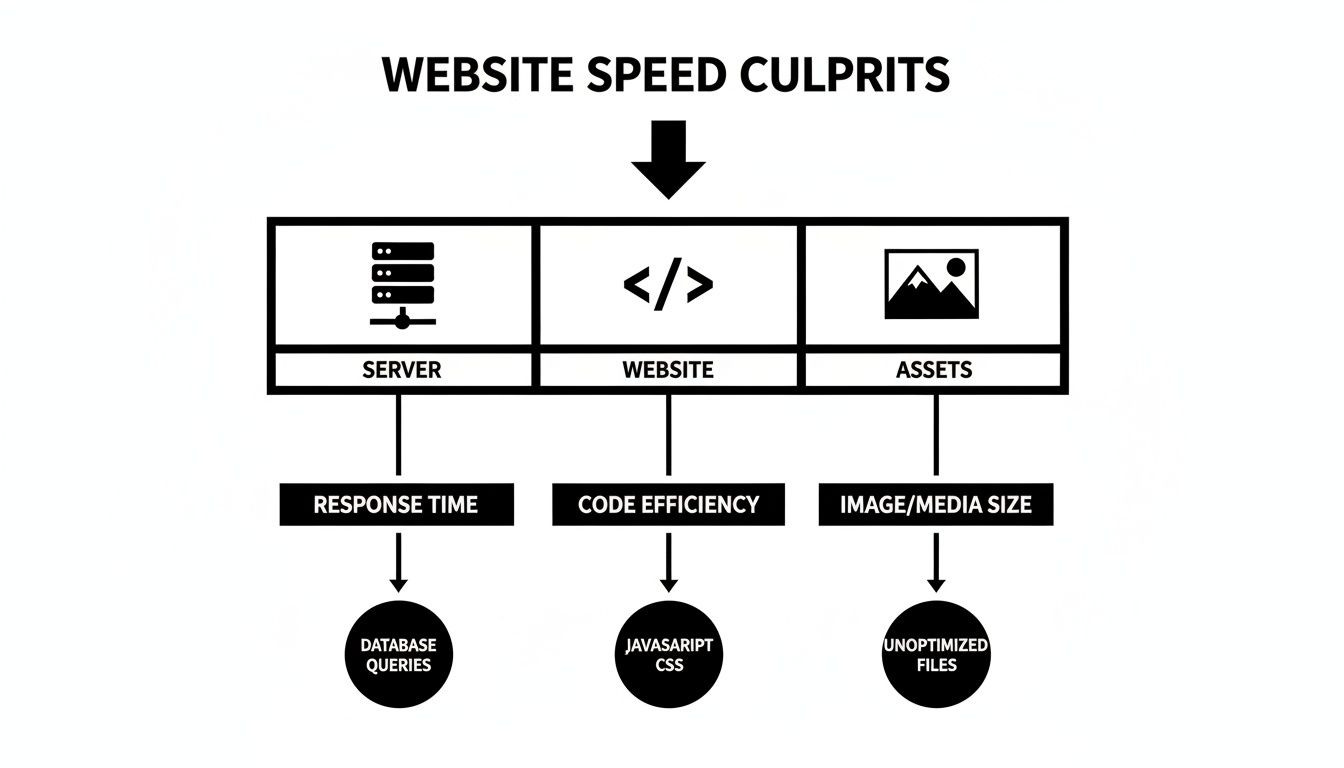
As you can see, performance issues can pop up anywhere from your server foundation to your website’s code or the images and files it loads. A real fix means looking at all three layers.
Step 1: Compress Your Images
If I had to bet on one thing slowing down your site, it would be your images. Large, unoptimized images are by far the most common speed killer I see. Compressing them shrinks the file size—often dramatically—without making them look blurry or pixelated. Smaller files mean faster downloads for your visitors. It’s that simple.
- What It Is: Shrinking the file size of your photos and graphics.
- How to Do It: Before you upload anything, run your images through a free online tool like TinyPNG. If you’re on WordPress, grab a plugin like Smush or ShortPixel; they’ll automatically compress your entire media library for you. Shopify users can find similar magic with apps like Crush.pics.
Step 2: Enable Browser Caching
Browser caching is like giving your visitor’s computer a little memory of your site. It tells their browser to save a copy of your logo, stylesheets, and other files that don’t change very often. The next time they visit, their browser doesn't have to download everything all over again. It just grabs the saved copies.
- What It Is: Storing parts of your website on a visitor's computer to speed up their next visit.
- How to Do It: For WordPress sites, caching plugins like W3 Total Cache or WP Rocket handle this with just a few clicks. Most good web hosts and CDNs also have caching settings you can flip on easily.
By enabling browser caching, you're essentially telling repeat visitors, "Hey, you already have most of what you need; let's just grab what's new." This simple step dramatically reduces load times for your loyal audience.
Step 3: Clean Up Your Plugins and Apps
Every single plugin or app you install adds more code to your site. More code means more for a visitor’s browser to load and process. While some are essential, many are just dead weight, slowing you down for a feature you used once six months ago. It's time for a little spring cleaning.
- What It Is: Finding and deleting unnecessary or poorly-coded plugins and apps that add bloat.
- How to Do It: Go through your list of installed plugins (in WordPress) or apps (in Shopify). If you don't recognize it or don't use it, deactivate and delete it. Be ruthless. If your site suddenly got slow right after you installed something new, you’ve probably found your culprit.
Step 4: Minify Your Code
Your website’s code (HTML, CSS, and JavaScript) is full of extra stuff that helps developers read it—things like spaces, comments, and line breaks. Browsers don't need any of that. Minification is the process of stripping all that extra fluff out, making the files smaller and faster for the browser to read.
- What It Is: Removing all the unnecessary characters from your website's code files.
- How to Do It: This sounds technical, but it's usually not. Caching plugins like WP Rocket often have a one-click option to minify your code. If you use a CDN like Cloudflare, its "Auto Minify" feature does the job for you automatically. It’s a safe and easy technical win.
High-Impact Speed Fixes You Can Implement Today
To help you decide where to start, here’s a quick rundown of these fixes, comparing how much of a speed boost you can expect versus how much work it takes to get it done.
| Optimization Tactic | Potential Speed Gain | Implementation Effort | Best For |
|---|---|---|---|
| Image Compression | High | Low | All websites, especially those with lots of visuals (e.g., portfolios, e-commerce). |
| Browser Caching | High | Low | Sites that want to improve the experience for repeat visitors and build an audience. |
| Plugin Cleanup | Medium | Low | Older WordPress sites that have accumulated a lot of plugins over the years. |
| Code Minification | Medium | Low | Any site looking for an easy, hands-off technical performance boost. |
Focusing on these four steps will solve the vast majority of common speed issues. Start here, and you’ll be well on your way to a faster site that keeps your visitors—and Google—happy.
How Your Hosting and Server Performance Impact Speed
Think of your website's hosting plan as the foundation of a house. You can build a beautiful, perfectly designed home, but if it's sitting on a shaky, unstable plot of land, nothing else matters. The same is true for your website—a cheap, overcrowded hosting plan can sabotage all your other optimization efforts.
Your server is the engine that makes your entire site run. Every time someone visits your site, their browser pings your server, which then has to find and send back all the files needed to load the page. If that engine is weak, you'll get a slow start every single time.
Choosing the Right Home for Your Website
Let's stick with that housing analogy. Picking a hosting plan is a lot like choosing where to live, with each option offering a different level of performance.
Shared Hosting: This is like living in a massive apartment complex. You’re sharing everything—the power, the water, the parking lot—with hundreds of other tenants. If your neighbor decides to throw a huge party (a big traffic spike), the whole building feels the strain. It's the most affordable option, but it can be noisy and unpredictable.
VPS (Virtual Private Server) Hosting: Think of this as owning a townhouse. You’re still on the same block as your neighbors, but you have your own dedicated space and resources. Their party won't dim your lights. This gives you far more consistent and reliable performance.
Dedicated Server: This is your own private house on its own land. Every resource is yours and yours alone. It delivers the best possible performance and security, but it also comes with the highest price tag.
When you're looking at hosting plans, the type of storage matters a lot. For instance, understanding solid-state drives (SSDs) is key, as they read data much faster than old-school hard drives. A server with an SSD can find and deliver your website's files in a flash, giving you a serious speed boost.
How Hosting Directly Affects Speed Metrics
Your choice of hosting has a direct and measurable impact on your site's Time to First Byte (TTFB). This metric tells you how long it takes for your server to send back the very first piece of data after a browser requests it. A high TTFB is a dead giveaway that your server is struggling.
Poor server response is often the culprit behind high bounce rates. In fact, a staggering 40% of users will abandon a page if the images take too long to load. With only 38% of sites globally passing Google's Core Web Vitals, a fast server is a major competitive advantage. For a closer look at this, you can learn more about how hosting affects page load speed in our detailed guide.
A fast server is non-negotiable for a fast website. You can optimize every image and line of code, but if your hosting plan is the bottleneck, you'll always be stuck in the slow lane.
Supercharging Delivery with a CDN
A Content Delivery Network (CDN) works hand-in-hand with your server to speed things up even more. Imagine a CDN as a global network of warehouses for your website's files.
Instead of shipping everything from one central location, a CDN stores copies of your site's assets (like images, videos, and scripts) in data centers around the world.
When someone from another country visits your site, the content is delivered from the warehouse closest to them. This drastically cuts down the physical distance the data has to travel, making your site feel incredibly fast for everyone, no matter where they are.
When It's Time to Call in a Performance Expert
You've done everything right. You compressed your images, deactivated unnecessary plugins, and set up caching. But after all that work, you’re still watching that little loading icon spin. What gives?
Sometimes, the real reason your website is slow is buried deep in its code or server setup, far beyond the reach of the usual DIY fixes. This is where you hit a wall, and trying to push through on your own just leads to more frustration and wasted time.
Think of it like a persistent rattle in your car’s engine. You’ve checked the oil and topped off the fluids—the easy stuff—but the noise is still there. At some point, you have to take it to a mechanic with specialized tools who can diagnose the real problem. A web performance expert is that mechanic for your website.
Signs You Need Professional Help
It’s time to call for backup when you're facing stubborn issues that don't respond to the common solutions. These are the tell-tale signs that the problem is more than skin-deep.
You should think about hiring an expert if:
- Your TTFB is consistently high, even though you’re paying for a good hosting plan. This often points to a tricky server-side problem or a database that's struggling.
- You've run out of plugins to delete, but your site is still sluggish. The culprit could be hiding in your theme's code or a conflict between different parts of your site.
- Your site suffers from random slowdowns that you can't seem to replicate. An expert can set up advanced monitoring to catch the issue red-handed.
A performance expert doesn’t just slap on a few quick fixes. They perform a deep diagnosis of your site's architecture to find the foundational cracks that basic optimizations can't patch over.
Bringing in a specialist isn’t giving up; it’s a smart business move to protect your investment. A professional has the experience to pinpoint problems with precision, saving you countless hours and preventing lost revenue from a slow site. They move past the guesswork and build a long-term strategy to make sure your website stays a fast, reliable asset.
To see what that deep-dive process looks like, you can learn more about comprehensive website audit services and how they uncover those hidden performance killers. It's often the quickest way to get a real, lasting solution.
Got Questions About Website Speed? We've Got Answers.
We've covered a lot of ground on diagnosing and fixing a slow website, but you might still have a few questions rattling around. Let's tackle some of the most common ones we hear from business owners just like you.
Think of this as a quick-reference guide to help solidify what you've learned and keep your site running smoothly for the long haul.
How Often Should I Check My Website Speed?
It's a lot like a regular health check-up for your site. For most businesses, running a performance test at least once per quarter is a great rhythm to get into. This gives you a solid baseline and helps you spot any negative trends before they become serious problems.
That said, you should always run a test after making any big changes. This means testing after you:
- Install a new plugin or app
- Change your website’s theme
- Roll out a major new feature or add a bunch of new content
If you run a high-traffic site, especially an e-commerce store where every millisecond counts, checking monthly is a much better idea. Staying on top of it means you'll catch slowdowns before they ever affect your customers or your search rankings.
Can Too Many Ads Slow Down My Website?
Yes, they absolutely can. In fact, they're a very common culprit. Every ad on your page has to be loaded, and this usually involves your site making calls to external ad networks. Each one of these is another request that adds to your total load time.
Think of it like a traffic jam on the information superhighway. Your website's content might be ready and waiting, but your visitor's browser is stuck in line, waiting for responses from a dozen different ad servers. The result? A frustratingly slow experience for the user.
To combat this, be strategic about the number of ads you place on a single page. More importantly, make sure your ad scripts use asynchronous loading. This tells the browser to load your main content first, so your visitors can start reading or shopping without waiting for every single ad to pop up.
Will Switching to a Faster Theme Help?
It can be a complete game-changer. Your theme is the architectural blueprint for your site. So many themes look amazing on the surface but are secretly bloated with clunky code, excessive JavaScript, and features you'll never use. All that baggage drags your performance down from day one.
Switching to a well-coded, lightweight theme is often one of the single biggest improvements you can make. Here’s a pro tip: before you install a new theme, take its demo URL and run it through a tool like Google PageSpeed Insights. This gives you a real, unbiased look at its performance potential before you commit. A fast theme gives you a strong foundation to build on.
If you've gone through the checklist, tried these fixes, and are still scratching your head wondering "why is my website so slow," it might be time to call in a specialist. The team at OneNine lives and breathes this stuff. We do deep-dive performance audits to find the real root causes of a slow site and get it running at its absolute best.


