
If you want a solid timeline for your web development project, you need a rock-solid process to back it up. From my experience, most professional business websites take about 3 to 4 weeks to go from an idea scribbled on a napkin to a fully launched site. This isn't just a random number; it's based on a structured path that keeps things on track and prevents nasty surprises.
Think of it as building a house. You don't just start throwing up walls. You need a blueprint, a foundation, and a clear plan for plumbing and electrical before you even think about painting. It’s the same with a website.
Laying the Groundwork for Your Timeline

Before you can nail down a launch date, you have to get a handle on what it actually takes to build a website from the ground up. It’s far more than just coding. The whole thing is a sequence of deliberate stages, and each one builds on the last. If you rush or skip a phase, you're just asking for trouble down the line.
Everything kicks off with Discovery and Planning. This is where you pour the concrete foundation. It’s all about asking the right questions: What are the business goals? Who are we building this for? What specific features does it absolutely need to have? Getting all of this documented is your best defense against scope creep later.
If you need a hand structuring all this initial info, check out this super helpful website brief template. It's a great starting point.
From Blueprint to Visual Design
With a clear strategy in hand, it’s time to move into the UI/UX Design phase. This is the fun part where the site's personality starts to emerge.
Designers don't just jump into making things look pretty. They start with low-fidelity wireframes—think of them as simple, skeletal blueprints—to map out how users will navigate the site. After a few rounds of feedback, these basic layouts evolve into high-fidelity mockups that look exactly like the final product.
The Nuts and Bolts of Development
Once everyone signs off on the visuals, the real construction begins. The Development phase is where the design gets turned into a functional website. This work typically splits into two parallel tracks:
- Front-End Development: This is all the stuff you can see and interact with. Coders use languages like HTML, CSS, and JavaScript to build the user-facing parts of the site.
- Back-End Development: This is the engine room. It involves setting up the server, database, and all the behind-the-scenes logic that makes the website work.
Here’s a pro tip: Never, ever skimp on testing time. I’ve seen projects get completely derailed because they treated Quality Assurance (QA) as an afterthought. You have to rigorously test for bugs, make sure the site works on different browsers, and confirm it looks great on every device, from a giant monitor to a tiny smartphone.
Finally, you hit the Deployment and Launch stage. This is the big moment where the site is moved to a live server and made public for the world to see. It’s not just a flip of a switch, though. It involves a final round of checks to make sure everything is perfect.
In 2025, a streamlined approach looks something like this: week one for planning, weeks two and three for the heavy lifting of development, and the final week for feedback and testing. This clear roadmap makes it much easier to understand why each stage takes the time it does and helps everyone stay on the same page.
What Really Shapes Your Project Timeline?
Ever wonder why one website can launch in four weeks, while another that looks almost identical takes six months? The answer goes way deeper than just the number of pages. It’s all about the moving parts humming along behind the scenes that can seriously stretch your web development project timeline.
The biggest factor, hands down, is the project's scope and overall complexity. Think about it: a simple, five-page marketing site built from a template is a completely different beast than a custom e-commerce platform. The e-commerce site needs to juggle thousands of products, secure payment gateways, and manage user accounts. Every single one of those unique features adds time to the clock.
Watch Out for Scope and Feature Creep
Every "little" request adds up. That custom user login you wanted? Or that third-party API integration? Each one needs its own cycle of development, testing, and tweaking. These additions can pile up fast, pushing your original deadline further and further away.
This is where the infamous "scope creep" sneaks in and throws projects off the rails. Out of all the things that can delay a project, learning about preventing scope creep effectively is one of the most important skills an agency can master. It's all about defining exactly what you’re building from the start and sticking to that plan.
A project without a rock-solid scope is like taking a road trip without a map. You'll get somewhere eventually, but it's guaranteed to take longer and cost more than you ever imagined.
The Classic Triangle: Time, Cost, and Quality
Ultimately, managing a project comes down to a constant balancing act between three things: scope, cost, and time. This is often visualized as the project management triangle.
Just like the diagram shows, if you decide to expand the scope by adding more features, you have to be prepared to give on either time or cost. You simply can't change one without affecting the others.
Even with a skilled team, your own feedback plays a huge role. A dedicated development partner can definitely speed things up, but if you're slow to provide approvals or content, you'll create bottlenecks that even the most efficient team can't work around.
Real-World Timelines for Different Websites
Alright, let's move from theory to reality. What does a web development project timeline actually look like in practice? The single most important thing you can do for a smooth project is set clear expectations from the get-go, and that starts with knowing what you're in for.
Building a simple landing page is a world away from creating a full-blown e-commerce platform. The time, effort, and resources required just don't compare.
For something straightforward like a promotional landing page or a simple portfolio, you're often looking at a quick turnaround—maybe 1-2 weeks. But for a small business website with multiple pages (think "About Us," "Services," and a contact form), a more realistic timeline is 4-6 weeks. These projects involve custom branding and lead-capture functionality that just takes more time. If you want to dive deeper into how complexity impacts schedules, there are some great insights on website development duration on ramotion.com.
Standard E-Commerce Store Timelines
Now, an e-commerce website is a whole different beast. You're not just putting information on a page; you're building a digital storefront. That means dealing with secure payments, managing product catalogs, and handling customer accounts. It’s a significant step up.
For a standard e-commerce store with all the essential features, you should budget for 8-12 weeks, and honestly, it can often take longer. This timeline has to cover everything from designing high-converting product pages to fine-tuning the entire checkout process.
From my experience, the biggest time-sink with e-commerce isn't just writing the code—it's the painstaking setup. You have to integrate payment gateways, configure complex shipping rules, and handle customer data securely. Rushing through that stuff is a recipe for disaster.
As you might guess, the bulk of the work is spent on building the actual features. This infographic gives a pretty standard breakdown of where the hours go during the development phase.
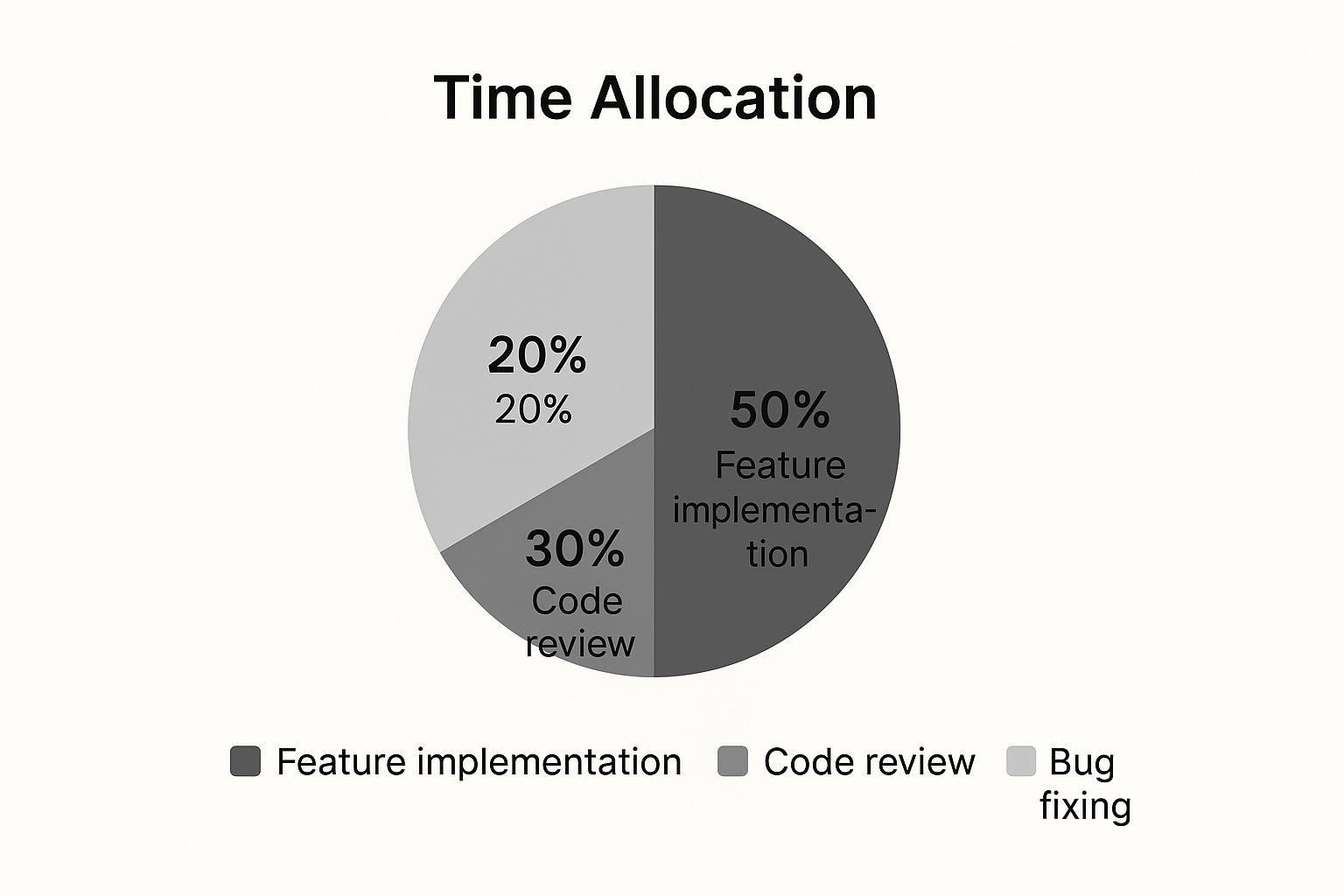
As you can see, half the time is spent on pure feature implementation. The other 50% is dedicated to making sure everything works correctly through code reviews and bug fixes. It’s a necessary split to ensure a quality final product.
To give you a clearer picture, here’s a quick comparison of what you can expect for different types of projects.
Estimated Timeline by Website Type
| Website Type | Typical Timeline | Key Features |
|---|---|---|
| Landing Page | 1–2 Weeks | Single page, call-to-action (CTA), contact form, responsive design. |
| Small Business Website | 4–6 Weeks | 5-10 pages, custom branding, CMS integration, basic SEO setup. |
| E-commerce Store | 8–12+ Weeks | Product catalog, shopping cart, secure payments, user accounts, order management. |
| Web Application | 12–24+ Weeks | Custom user flows, database integration, user authentication, third-party APIs. |
These are just estimates, of course. A project's final timeline always depends on the specific features, the complexity of the design, and how quickly feedback is provided.
What to Expect When Building a Web Application

When your project evolves from a simple website into a full-fledged web application, you're entering a whole new ballgame. A standard site is mostly about presenting information, like a digital brochure. A web app, on the other hand, is an interactive tool designed to do something—think of a project management dashboard or an online booking system.
This leap in complexity brings a lot of time-consuming tasks to the table. We’re not just arranging content on a page anymore; we’re engineering an entire system from the ground up. This means building a custom back-end, designing a database to handle all the user data, and setting up secure authentication to keep everything safe.
Each of these pieces has to be carefully planned and executed. The specific website development technologies we choose also have a huge impact on how quickly everything comes together.
The Features That Really Add Time
A web app's timeline is ultimately defined by its features. Even things that seem simple on the surface can add weeks, or even months, to your web development project timeline.
Here are a few common examples that require significant development hours:
- Third-Party API Integrations: Need to pull in data from another service or let users log in with Google? That's an API integration.
- Custom User Roles: Building different levels of access, like an admin who can see everything versus a regular user with limited permissions.
- Real-Time Features: Anything that happens live without a page refresh, such as instant messaging or live notifications.
- Complex Data Processing: If the app needs to crunch numbers for custom reports or analytics, that requires building custom algorithms.
The main thing to remember is that web applications are fundamentally more complex. They solve real user problems through functionality, which demands a much deeper development effort than a content-focused website.
So, what does this look like in practice? In 2025, industry data shows the average timeline to build a web application is around 4.5 months. Simpler apps might get done in 3.5 months, but it’s not uncommon for larger, more intricate projects to take 7-10 months. If you want to discover more insights about web app timelines on designveloper.com, that's a great resource to get a grounded perspective on the commitment involved.
How to Keep Your Web Project on Schedule
https://www.youtube.com/embed/6Am5LL8EgjM
It’s one thing to have a project timeline, but it’s another thing entirely to stick to it. From my experience, the single best way to keep a project from going off the rails is to create an exhaustive project brief and scope document before a single line of code is written.
Think of this document as your project's constitution. It clearly defines every feature, function, and deliverable, giving you something solid to refer back to.
This level of upfront planning is your best defense against the dreaded scope creep. When everyone has agreed on what's being built from day one, it’s much easier to say "no" (or "not right now") to those last-minute additions that always threaten to derail your schedule. We've put together a full guide on how to prevent scope creep if you want to dig deeper.
Setting a Realistic Pace
Once your plan is locked in, the focus shifts to communication and setting achievable goals. Don't just look at the final deadline. Break the entire project down into smaller, manageable phases, each with its own firm due date. This approach makes the overall web development project timeline feel much less intimidating and creates natural checkpoints to track your progress.
While you're building, your team also needs to keep an eye on the technical details that impact performance. Things like implementing good file size reduction techniques for web developers can ensure the final website is fast and lean, preventing performance-tuning delays later on.
My number one rule? Always build a buffer into your schedule. I aim for about 15-20% of the total project time. Unforeseen problems are a guarantee—a third-party API will break, a key person will get sick, or a tricky bug will pop up. That buffer is your safety net.
Finally, you don't always have to launch everything at once. Consider a phased approach. Go live with the core, most essential functionality first. This gets your product into the hands of real users faster, which means you can start gathering valuable feedback while your team works on the next batch of features. It’s a fantastic way to minimize risk and keep the project’s momentum going strong.
Frequently Asked Questions About Web Development Timelines
When you're diving into a web development project, the timeline can feel like a bit of a mystery. Over the years, I've noticed the same questions come up again and again. Let's clear the air on a few of them so you know exactly what to expect.
A question I hear almost every time is, "How can we make this go faster?" The honest answer isn't about cutting corners; it's about being prepared. The single best way to speed things up is to have all your content, branding, and core features decided before we write the first line of code.
Seriously, it makes a huge difference. Also, opting for a high-quality, pre-built template instead of a ground-up custom design can easily cut weeks from the schedule.
What's the Biggest Reason Projects Get Delayed?
Hands down, the number one project killer is scope creep. This is what happens when new ideas and "just one more thing" requests start trickling in after the plan is already set. Each change, no matter how small it seems, creates a ripple effect, forcing us to stop, re-evaluate, and rejig the entire schedule.
The second-biggest delay? Slow feedback. If it takes days to get a simple design approval or the content we need, the project hits a wall. Progress just stops dead in its tracks.
If there's one secret to keeping a project on schedule, it's this: finalize the scope from the get-go and provide quick, clear feedback. Nailing these two things will sidestep the vast majority of delays I've ever seen.
Is Website Maintenance Part of the Initial Timeline?
This is a common point of confusion, so it's worth clarifying. No, ongoing maintenance is not part of the initial development timeline. The project timeline we agree on covers everything from the first discovery call right up to the moment your new website goes live.
Think of it like building a new car. The project is the design and assembly. Maintenance is the oil changes and tune-ups you get afterward to keep it running smoothly.
A maintenance plan is a separate, ongoing service that kicks in after launch. It handles all the critical stuff that keeps your site healthy and secure, like:
- Security scans and monitoring
- Software and plugin updates
- Regular site backups
We set this up as a separate agreement to ensure your investment stays protected long after the launch party.
At OneNine, our goal is to make the whole process straightforward, from building your site to keeping it running perfectly. See how we can help at https://onenine.com.


