
So, how much does a small business website really cost? The honest answer is it can range from $150 a year for a simple do-it-yourself site to well over $10,000 for a custom project built by a professional agency.
Where your business lands on that spectrum depends entirely on what you need, how complex the design is, and who you choose to build it.
Your Guide to Website Costs
Trying to pin down the cost of a new website can feel a lot like estimating a construction project without a blueprint. You know you need a building, but are you picturing a simple log cabin or a sprawling skyscraper? The final price tag will look drastically different.
Think of this guide as your blueprint. We're going to walk through every potential expense, from the absolute must-haves to the fancy custom features that can really set you apart.
Let's break down your main options:
- DIY Website Builders: This is like assembling IKEA furniture. It's budget-friendly and gives you total control, but it demands your time and might not have that high-end, professionally built finish.
- Freelance Developers: This is like hiring a master carpenter. You get custom work and specialized expertise for a specific job, striking a great balance between quality and cost.
- Web Design Agencies: This is like bringing in an architectural firm. They manage the entire project—from initial strategy and design to the final build and launch. You get a premium, all-in-one solution.
A First Look at the Numbers
As of 2024, you can get a basic DIY website up and running for as little as $16 per month. On the other end, a professionally built site typically falls between $500 and $5,000 for the initial setup. That wide gap really highlights the difference between using a pre-made template and creating a truly unique online presence from scratch.
To give you a clearer picture, let's compare these three paths side-by-side.
Website Cost Comparison at a Glance
| Method | Initial Cost | Monthly Cost | Best For |
|---|---|---|---|
| DIY Builder | $0 – $300 | $16 – $50 | Startups, freelancers, and businesses on a tight budget needing a simple online presence quickly. |
| Freelancer | $500 – $5,000+ | $50 – $200 | Small to medium businesses needing a custom design and specific features without the agency price tag. |
| Agency | $5,000 – $25,000+ | $200 – $1,000+ | Established businesses looking for a comprehensive, strategic approach with ongoing support and marketing integration. |
Each option offers a different balance of cost, customization, and hands-on effort. The right choice really depends on your budget, your technical comfort level, and your long-term business goals.
The chart below gives a great visual breakdown of where your money typically goes—both for the one-time build and the ongoing costs to keep it live.
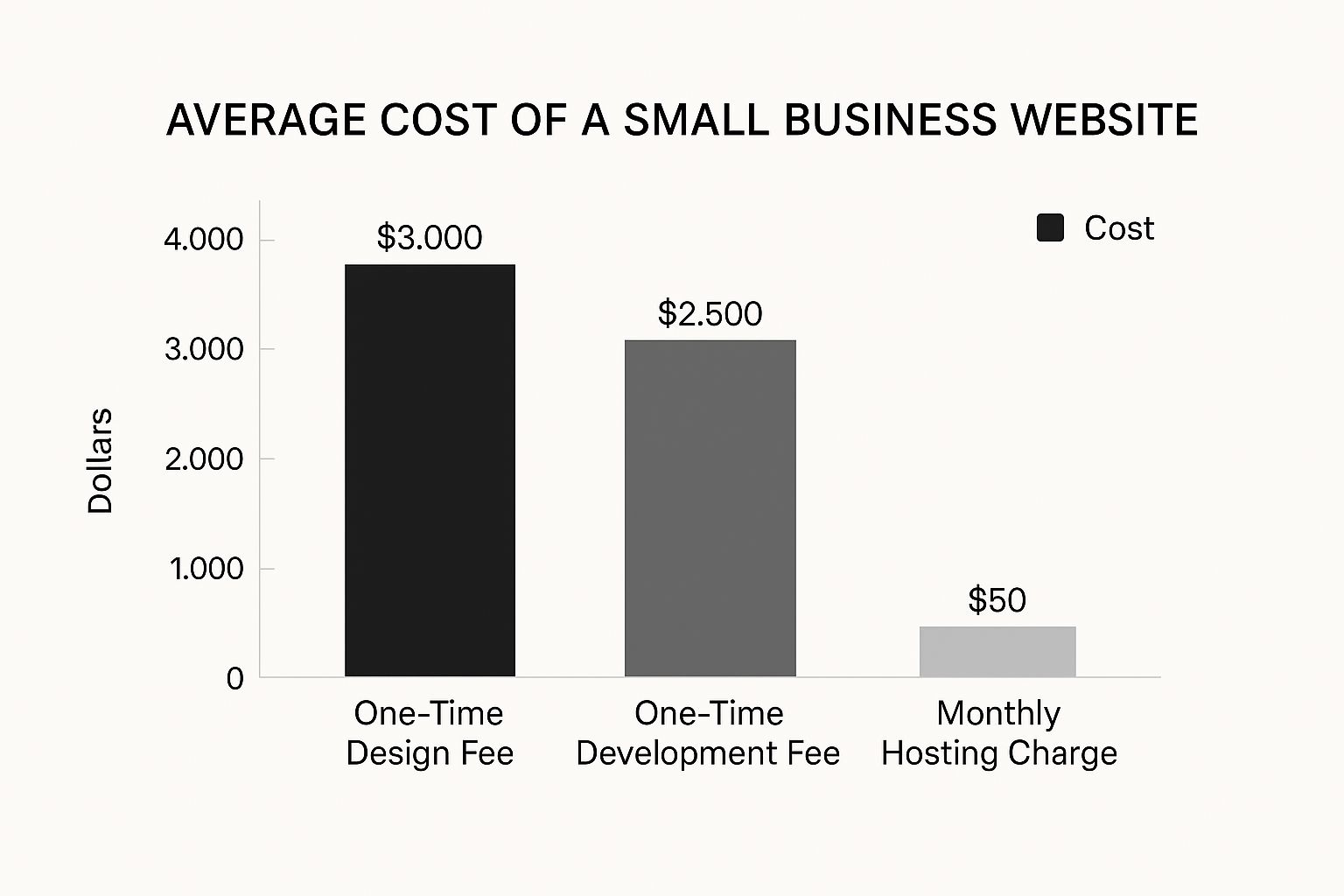
As you can see, the initial design and development costs are usually the biggest upfront investment. Things like hosting are smaller, but they're recurring operational costs you need to plan for.
Getting a handle on these different pieces is the first real step toward building a realistic budget. For an even more detailed breakdown of these numbers, you can explore this resource on the average cost to build a website.
Understanding Your Core Website Expenses

Before you even start thinking about flashy designs or cool features, every single website needs a few basics to exist. It helps to think of it like setting up a brick-and-mortar shop. You need a street address, a plot of land to build on, and a lock for the front door.
These are the absolute non-negotiables for your online presence. Getting a handle on these core expenses is the first step in figuring out the real small business website cost. Let's break down what they are and what you can expect to pay.
Domain Name: Your Digital Address
Your domain name is simply your website's address online—think yourbusiness.com. It's how people find you and a huge part of your brand. A great domain is catchy, easy to type, and tied directly to what you do.
A domain name isn't just a technical requirement; it's a branding asset. Choosing the right one can significantly impact how easily customers remember and find your business online.
Web Hosting: Your Plot of Land
If the domain is your address, web hosting is the piece of digital land where your website actually lives. When someone types your domain into their browser, they're connecting to a server that holds all your website's files—the text, the images, everything. No hosting, no website. Simple as that.
All the technical stuff behind the scenes can get complicated fast. That's why solid website hosting and maintenance services are so valuable. They keep your site running smoothly, securely, and online for your visitors 24/7.
Security (SSL Certificate): Your Digital Lock
Ever notice the little padlock icon and the "s" in https:// in your browser's address bar? That's an SSL (Secure Sockets Layer) certificate at work. It encrypts the connection between your site and your visitors, keeping sensitive information like passwords and credit card details safe from prying eyes.
These days, an SSL certificate isn't optional. It's essential for building trust with customers and even helps with your Google ranking.
Estimated Costs For Core Essentials
So, what’s the damage for these foundational pieces? The price tag can swing quite a bit depending on what you need.
- Domain Names: A standard
.comdomain will typically set you back $10 to $20 a year. But if you're after a premium name with hot keywords, the price can skyrocket to $100 or even over $1,000 annually. - Web Hosting: You can get started with basic shared hosting for as little as $2–$20 per month. For websites with a lot of traffic, you'll need more power, and options like VPS or dedicated servers can range from $50 to $200+ a month.
- SSL Certificates: The good news is that many hosting plans now throw in a free SSL certificate. If you need something more robust, especially for an e-commerce site, a premium certificate could cost up to $300 annually.
Remember, these are just the starting blocks. Other elements, like stock photos, can also add to your budget, so it's worth exploring cost-effective AI stock photo alternatives to keep expenses in check. Nailing these core costs gives you a solid foundation to build the rest of your website on.
Choosing Your Path to Design and Development
Alright, you’ve got a handle on the basic costs. Now comes the biggest decision of all, the one that will have the most dramatic impact on your total small business website cost: who is actually going to build this thing?
This is the single largest variable you’ll face. Think of it like deciding how to furnish a new house. You could go to IKEA, buy all the flat-pack furniture, and spend your weekends assembling it yourself. Or, you could hire a skilled local carpenter to build a few custom, standout pieces. Then there's the option of bringing in a full-service interior design firm to manage the entire project, from the floor plan to the final throw pillows.
Each approach gets you a furnished home, but the cost, your time commitment, and the final look will be worlds apart. Let's break down the three main paths you can take for your website.
The Do-It-Yourself Route With Website Builders
Jumping into the driver's seat and building the site yourself is easily the most budget-friendly option. This is where platforms like Squarespace, Wix, or Shopify shine. They give you total control with drag-and-drop tools and a library of pre-made templates.
This path is a fantastic choice if you’re just starting out and have more time on your hands than cash. The trade-off? It demands a serious time commitment and a willingness to learn on the fly. While these builders are designed to be user-friendly, you can still hit technical or creative walls, and your site might end up looking a lot like others using the same template.
Collaborating With a Freelance Developer
Hiring a freelancer is like bringing in a specialist to handle the tricky parts. You get professional-grade design and coding skills without having to pay for the overhead that comes with a big agency. This is often the perfect middle ground—you get a custom, quality website for a more manageable price.
A talented freelancer can craft a unique site that’s built specifically for your business, offering way more flexibility than a DIY template. The main challenge here is finding the right person. Their rates can vary wildly depending on experience and where they're based, and you’ll need to be prepared to manage the project and provide crystal-clear direction.
Working with a freelancer can be incredibly effective, but success often hinges on clear communication. A well-defined project scope is your best tool for keeping the budget and timeline on track.
Partnering With a Web Design Agency
Going with a web design agency is the all-inclusive, premium experience. You’re not just hiring one person; you’re getting a whole team of experts—strategists, designers, developers, and project managers—who will handle every last detail. They don't just build a website; they develop a complete online strategy tied directly to your business goals.
This is the ideal path for established businesses that need a high-performance, completely custom website and have the budget to support it. An agency brings reliability, deep expertise, and ongoing support to the table, but that top-tier service definitely comes with the highest price tag.
Comparing Website Development Options
To make this choice a bit clearer, let's look at how these three options stack up against each other. The table below breaks down the key differences in cost, time, and control.
| Factor | DIY Website Builder | Freelance Developer | Web Design Agency |
|---|---|---|---|
| Initial Cost | Lowest ($0 – $500) | Medium ($1,000 – $10,000) | Highest ($5,000 – $25,000+) |
| Time Investment | High (Your own time) | Medium (Project management) | Low (Strategic input) |
| Customization | Limited (Template-based) | High (Custom code/design) | Highest (Full strategy & build) |
| Control | Total (You do everything) | Collaborative (Shared decisions) | Strategic (Expert-led) |
| Best For | New businesses, solopreneurs, and tight budgets | Growing businesses needing a custom look and features | Established companies needing a strategic, high-end solution |
Ultimately, there’s no single "best" answer here. The right path for you comes down to a realistic look at your budget, your timeline, how comfortable you are with technology, and what you want your business to become. By understanding these trade-offs, you can make a smart decision that sets your business up for success both now and in the future.
Budgeting for Hidden and Ongoing Website Costs
Launching your website isn't the finish line—it's just the starting gun. So many business owners get caught off guard by the recurring costs that pop up after the initial build. The truth is, that first big payment is only one piece of the total small business website cost.
It helps to think of your website like a new car. The sticker price is the big, upfront expense, but you wouldn’t forget to budget for gas, insurance, and regular oil changes, right? Your website needs that same kind of ongoing care to keep it running smoothly and turning visitors into customers.
Beyond the Initial Build
The moment your site goes live, a new set of costs kicks in. These aren’t one-time fees but the essential subscriptions and services that keep your site secure, fast, and functional. Skipping them is like never taking your car to the mechanic; sooner or later, something is going to break.
Here's what those ongoing expenses typically look like:
- Premium Plugins and Software: Many of the best features on a website, like advanced contact forms or e-commerce tools, come from plugins. The most powerful and reliable ones usually require an annual subscription to keep working.
- Security and Backups: Protecting your website from hackers and data loss is non-negotiable. This often means paying for a security monitoring service, a firewall, or a premium backup tool so you can restore your site in a worst-case scenario.
- Technical Support: Unless you’re a web developer, you'll eventually need an expert to fix a bug, update tricky code, or troubleshoot a weird glitch. This help can come in the form of an hourly rate or a predictable monthly retainer.
For many businesses, these ongoing maintenance costs can range from $500 to over $30,000 annually. This wide range covers everything from basic security patches to dedicated technical support. Looking at the complete picture makes the true cost of ownership much clearer.
Factoring in Growth and Marketing
A website should never be a static brochure. If you want it to actually grow your business, you have to keep investing in it. This is where many of the "hidden" costs lie—the ones that go beyond simple upkeep and into active marketing.
One of the biggest ongoing needs is fresh content. To show up in Google searches and give people a reason to come back, you have to consistently publish blog posts, refresh your service pages, and add new case studies or photos. Learning about effective content creation strategies is key to making this investment pay off.
Don't forget to budget for these other crucial growth activities:
- Search Engine Optimization (SEO): If you want new customers to find you online, ongoing SEO work is essential. This investment helps you climb the search rankings and pull in valuable organic traffic.
- Content and Marketing Updates: Think about writing regular blog articles, creating new landing pages for your ad campaigns, or even shooting short videos.
- Analytics and Reporting Tools: To know what’s working, you'll need tools to track your website traffic and user behavior. These subscriptions are vital for making smart business decisions.
When you plan for these recurring expenses from day one, you avoid nasty budget surprises down the road. More importantly, you ensure your website remains a powerful asset that delivers a great return on your investment for years to come.
What About Special Features and Custom Functions?

A simple website that just tells people who you are and what you do is a fantastic starting point. But what happens when you need your site to do more? The moment your website goes from being a digital brochure to an active part of your business operations, the costs will naturally go up.
This is where the investment in custom development really starts to pay off.
Think of it this way: a basic website is like a simple storefront with a sign out front. Custom functions are the equivalent of adding a cash register, a private consultation room, or an automated appointment booker. Each new piece serves a specific business need, requires more specialized work to build, and, of course, that's reflected in the price.
E-commerce Functionality
If you want to sell products directly from your site, you'll need e-commerce functionality. This is probably the most common (and significant) upgrade, turning your website into a real sales engine. And setting up an online store involves a lot more than just uploading a few product photos.
Here's what drives the cost for an e-commerce setup:
- Payment Gateway Integration: This means securely connecting your site to services like Stripe, PayPal, or Square so you can actually take people's money.
- Product Page Design: You need well-designed templates for your products that are easy for customers to browse and encourage them to click "add to cart."
- Shopping Cart and Checkout: This is huge. You need an intuitive, secure, and frustration-free checkout process to keep customers from giving up at the last second.
- Inventory Management: You'll want a system that automatically tracks your stock levels as orders come in.
Depending on how many products you have and how complex you need the store to be, adding basic e-commerce can cost anywhere from $2,000 to $25,000.
A smooth checkout is non-negotiable. Research consistently shows that about 18% of online shoppers will ditch their cart if the checkout process is too long or confusing. A small investment here can directly boost your sales.
Other Custom Business Tools
Beyond just selling products, your website can be built to handle all sorts of business tasks, saving you time and making life easier for your customers. These custom tools can automate your workflow and create new ways for clients to engage with you.
For instance, a massage therapist needs an integrated booking system that syncs with their personal calendar. A real estate agent could use a custom mortgage calculator to help buyers. A business coach might want a private, members-only section of their site with exclusive content.
Here are a few examples of other common custom features and what you might expect to pay:
- Booking and Scheduling Systems: To let clients book appointments directly on your site, you're likely looking at an additional $1,500 to $7,000.
- Membership Portals: Building a secure login area for members-only content can range from $3,000 to $15,000+.
- Custom Calculators or Quoting Tools: Interactive tools, like a pricing estimator for a cleaning service, could run between $2,000 and $10,000.
Each one of these features requires a skilled developer to make sure it works perfectly and is secure. While they add to the upfront cost, the return on investment from automating manual work and improving your customer's experience is often well worth it.
How to Create a Realistic Website Budget
Alright, now that you have a good sense of the costs involved, it's time to put together a budget that actually works for your business. Creating a smart financial plan isn't about plucking a number out of thin air. It's about making deliberate choices that directly support your business goals and turning those abstract costs into a clear plan of action.
First things first: what do you actually need this website to do? Seriously, what is its primary job? Is it there to bring in leads for your consulting practice? Or are you planning to sell handmade goods directly to customers? How you answer that one question will steer every other decision you make.
Think about it—a website for a local coffee shop that just needs to show its menu and hours has wildly different needs than a complex e-commerce site that has to manage inventory and shipping. Get crystal clear on your main objective from the start.
Define Your Must-Haves and Nice-to-Haves
Once your primary goal is locked in, you can start sorting features into two simple buckets: things you need now and things that can wait. This is the secret to managing your initial small business website cost without cutting corners on what truly matters.
Grab a pen and paper (or open a new doc) and make two lists:
- Must-Haves: These are the absolute, non-negotiable features your site needs to function on day one. For a freelance writer, this probably means a portfolio page, a contact form, and a page outlining their services.
- Nice-to-Haves: This is your wish list. These are the cool features you’d love to add down the road as your business expands, like an online booking calendar or a private client area.
Doing this little exercise forces you to prioritize your spending and keeps you from getting bogged down with fancy features you don't need yet. It's always a better strategy to launch a lean, effective site and then build on it over time. If you want a more detailed breakdown of what specific features might cost, you can get an instant estimate with this handy website cost calculator.
Think of your initial website launch as building the foundation and frame of a house. You need it to be solid and functional. The custom finishes and landscaping—your nice-to-have features—can always be added in phase two.
By focusing on your goals and prioritizing your features, you can put together a budget that's both realistic and strategic. This approach sets you up to make sure your website is a powerful investment right from the get-go.
Frequently Asked Questions
How Can I Lower My Website Costs?
The best way to keep your initial small business website cost in check is to be strategic. Instead of diving into a fully custom design, think about starting with a high-quality premium template. This alone can save you a significant chunk on upfront design fees.
Launch with just the essentials. What does your site absolutely need to do on day one? Focus on that. You can always add the fancy stuff—like a booking system or a members-only area—down the road as your business grows and starts bringing in more cash. Taking it one step at a time makes the whole investment feel a lot less intimidating.
How Long Does It Take to Build a Website?
That really depends on the path you take. If you’re going the DIY route with a platform like Squarespace or Wix, you could honestly have a simple site up and running in a weekend.
But if you’re hiring a freelancer or an agency for a custom build, it’s a different story. A custom project is a much bigger undertaking and usually takes anywhere from 4 to 16 weeks. The final timeline hinges on things like how complex the design is, how many unique features you need, and how quickly you can get feedback and content back to your development team.
Is a Free Website a Good Idea?
I get why they’re tempting, but free websites almost always have hidden costs—not in money, but in professionalism. They usually force you to have their ads on your site and stick you with an unprofessional web address (think something like yourbusiness.wixsite.com).
A free website might feel like a win, but investing even a little bit into your own domain name and hosting is one of the smartest moves you can make. It builds instant credibility and gives you complete control over your brand's home online.
Ready to build a website that fits your budget and grows with your business? The experts at OneNine are here to help. Visit our website to get started.


