Trying to decide between Shopify and Webflow? It’s a common crossroads, and the right answer really comes down to one question: what’s the heart of your business?
If you’re all about moving products with a powerful, scalable, and straightforward e-commerce system, Shopify is almost certainly your platform. But, if your business thrives on a distinct brand identity, flawless design, and rich content marketing, then Webflow gives you the creative power you can't get anywhere else.
A Quick Verdict for Business Owners

This isn’t about which platform is “better” in a vacuum. It’s about which one fits your business model like a glove. Here’s a simple way to think about it: Shopify is a complete e-commerce machine that happens to have a website builder. Webflow, on the other hand, is a world-class visual design tool that added e-commerce capabilities.
Your choice really depends on what leads your strategy: product sales or brand experience.
Shopify was born and bred for commerce. Every single feature, from inventory management and payment processing to its enormous app store, is built to help you list, sell, and ship products with minimal friction. This is why it’s the go-to for direct-to-consumer brands with large inventories, dropshippers, and anyone who needs a robust online store that just works.
Webflow, however, is for the creators. It gives you absolute freedom over your site’s design and interaction without forcing you to write code. This is perfect for brands where a unique user experience is the main event. If your store is an extension of a compelling brand story, Webflow provides the blank canvas to build it exactly to your vision. It's a critical point to consider when looking at the best website builders for online stores.
Key Takeaway: Go with Shopify if you need a powerful, out-of-the-box sales engine to drive your business. Choose Webflow if your advantage lies in a unique, custom-designed brand experience and a content-forward website.
To give you a clearer picture, let's break down the core differences in a quick comparison.
Shopify vs Webflow Key Differences at a Glance
This table lays out the fundamental strengths and weaknesses of each platform, helping you see at a glance which one aligns better with your goals.
| Attribute | Shopify | Webflow |
|---|---|---|
| Primary Strength | All-in-one e-commerce engine | Design flexibility & customization |
| Ideal User | Merchants, retailers, DTC brands | Designers, marketers, brand-first businesses |
| Ease of Use | Very beginner-friendly setup | Steeper learning curve (design-focused) |
| E-commerce | Native, powerful, and extensive | Capable but less feature-rich natively |
| Design Control | Theme-based, good customization | Pixel-perfect, total visual control |
| App Ecosystem | Massive app store for any function | Curated integrations, requires more custom work |
| Cost Structure | Monthly fee + transaction fees + app costs | Monthly fee + e-commerce plan + workspace plan |
Ultimately, this table highlights the core trade-off: Shopify offers unparalleled e-commerce functionality out of the box, while Webflow delivers unmatched creative freedom.
Comparing Their Core Design Philosophies
To really get to the heart of the Shopify vs. Webflow debate, you have to look past the feature lists. You need to understand their DNA. Each platform was built for a completely different reason, and that fundamental purpose shapes everything—from how you build your site to what it can ultimately do for your business.
Shopify is an ecommerce operating system, plain and simple. Its entire reason for being is to make selling stuff online as straightforward as possible. The website builder is just one piece of a much larger, commerce-focused machine built for speed and scale.
Shopify: The Commerce Engine
Shopify's approach is all about getting you to a sale. It gives you a clear, guided path to get your store up and running because its entire architecture is fine-tuned for transactions. This philosophy shows up in a few key ways:
- Product-First Workflow: The first thing you do in Shopify is add products, set up payments, and figure out shipping. The design of your website is built around that commercial foundation, not the other way around.
- Theme-Based Guardrails: Themes are more than just templates; they're professionally designed, conversion-optimized frameworks. This structure keeps you from making design mistakes that could hurt sales, which is a lifesaver for many businesses.
- App-Driven Expansion: Need a feature Shopify doesn't have? There’s an app for that. The massive app store is how you add things like loyalty programs or advanced inventory tools, cementing Shopify's role as a central hub for all things commerce.
This laser focus on commerce is why it dominates the market. Shopify currently powers over 4.6 million active websites and holds a solid 6.7% of the global CMS market share. Its dedicated approach has made it the go-to for high-volume stores and the second most popular CMS in the world, right behind WordPress. You can dig into its market position and growth in recent industry reports.
The Bottom Line for Shopify: The platform is engineered to create the most efficient path from a product page to a completed order. It trades some creative freedom for rock-solid operational stability.
Webflow: The Creative Canvas
Webflow started from the opposite end of the spectrum. It was born as a visual design tool to let people build completely custom, professional websites without having to code. It was made for designers and marketers who felt boxed in by templates. Ecommerce came later, built right on top of this incredibly flexible, design-first foundation.
You can feel this creative-first philosophy everywhere in the platform. Webflow doesn't hand you a store; it gives you a blank canvas and a set of pro-level tools to build whatever you can dream up—including a store.
- Design-First Workflow: You begin with a blank page or a basic wireframe. The entire structure, layout, and feel of the site are in your hands, and you integrate ecommerce functions into your unique design as you go.
- Total Visual Control: Webflow basically gives you a visual interface for HTML and CSS. This means you can get pixel-perfect precision and create complex animations that are just impossible to pull off with a Shopify theme.
- Content and Brand Storytelling: At its core, Webflow is a powerful CMS. This makes it exceptional for building content-heavy sites where the brand’s story and the products are woven together seamlessly.
Ultimately, the choice between Shopify and Webflow is about matching your main goal to the right philosophy. If your business lives and dies by sales volume and operational efficiency, Shopify is your workhorse. If your edge comes from a unique brand experience and a custom-designed storefront, Webflow is your canvas.
Feature Deep Dive for Your Business
Alright, let's move beyond the big picture and get into the weeds. The choice between Shopify and Webflow really boils down to the tools you'll be using every single day. These features can either be a launchpad for your business or a constant source of friction, so it pays to know what you’re signing up for.
We’re going to look at this from five angles that matter most to a growing business: pure ecommerce muscle, design freedom, how easy they are to actually use, their SEO and content tools, and the app ecosystems that bolt on extra power.
Ecommerce Capabilities
When it comes to the nuts and bolts of selling online, Shopify is the undisputed heavyweight. It was built from the ground up for ecommerce, and you can feel that focus in every corner of the platform. It's packed with native features designed to handle the entire sales process without breaking a sweat.
Shopify’s core toolkit includes:
- Integrated Inventory Management: This isn't just a simple product list. You can track stock across multiple warehouses, manage complex product variations, and get automatic low-stock alerts. It's built to scale.
- Comprehensive Shipping Tools: You get immediate access to discounted rates from major carriers like USPS and DHL, can print labels in bulk, and offer customers real-time shipping quotes right at checkout.
- Point of Sale (POS) System: For anyone with a brick-and-mortar presence, Shopify POS is a game-changer. It syncs your online and physical store data—inventory, sales, customers—in real time.
Webflow Ecommerce, on the other hand, is much more streamlined. It gives you the essentials to get products up for sale, manage your orders, and handle basic shipping. It works, but it doesn't have the sheer depth of Shopify’s native tools. Need advanced inventory tracking or complex shipping logic? You'll be reaching for third-party integrations to fill the gaps.
Key Insight: If your business lives and breathes product sales—especially with a large catalog, tricky shipping needs, or physical stores—Shopify is your all-in-one powerhouse. If your products are simpler and your main goal is a stunning, brand-forward site, Webflow has what you need.
Design and Customization
This is where the script flips entirely. For total creative control, Webflow is in a league of its own. It's less of a website builder and more of a visual development environment that lets you build professional, bespoke websites without having to write code from scratch.
What you get with Webflow:
- A Visual Canvas: You’re not just tweaking a template; you're building with HTML and CSS on a visual canvas. This means pixel-perfect designs that are truly one-of-a-kind.
- Advanced Animations and Interactions: Want to create those slick, scroll-based animations and interactive elements that make a brand feel premium? It’s a native feature in Webflow, not an afterthought.
- Total Responsive Control: You can meticulously fine-tune your design for every single screen size—desktop, tablet, and multiple mobile views—to ensure a perfect experience everywhere.
Shopify's approach is theme-based. You start with a pre-built template and customize it. While the themes are high-quality and you can change a lot, you're still working within the "box" of that theme's code. To break out of it for a truly unique look, you’ll likely need to hire a developer. For many businesses, a great Shopify theme is plenty. But if you're curious how it compares to other theme-based platforms, our guide on Shopify vs WooCommerce vs BigCommerce provides more context.
Ease of Use
This is a tricky one because "easy" depends on who you are.
For someone brand new to websites and ecommerce, Shopify is far and away the easier platform to start with. Its dashboard is clean and logical. It walks you through adding products, connecting payment gateways, and launching your store. The learning curve is gentle because Shopify handles all the scary technical stuff behind the scenes.
Webflow has a much steeper learning curve, particularly if you don't have a background in web design. It gives you raw power, but with that comes responsibility. You need to understand basic web concepts like the box model, CSS classes, and positioning to really make it sing. Think of it as a professional tool for designers, not a simple drag-and-drop builder for beginners.
SEO and Content Management
Both platforms give you a solid SEO foundation, but their philosophies differ.
Webflow offers incredible granular control right away. You can customize every part of your URL structure, fine-tune meta tags on any page, and build custom schema markup without needing an app. Its CMS is also a powerhouse, built for creating custom content types beyond a simple blog, which is perfect for content-rich websites.
Shopify's SEO tools are very effective, especially for ecommerce. It automatically handles things like structured data for your products, helping them show up nicely in Google. However, to get the same level of granular control as Webflow, you'll often need to install an app from their store. Its blog is solid and works for most businesses, but it can't match the flexibility of Webflow's CMS.
Apps and Integrations
Here, Shopify’s strength is overwhelming. The Shopify App Store is a universe unto itself, with over 8,000 apps that can add almost any feature you can dream up. From sophisticated marketing automation and loyalty programs to niche shipping calculators, the ecosystem is a core reason people choose Shopify.
Webflow has a growing library of integrations and connects beautifully with automation tools like Zapier, opening the door to thousands of other apps. However, its native app marketplace is smaller and less mature. Both platforms understand the role of CRM in e-commerce and offer integrations, but the experience is different. With Shopify, you'll likely find several polished, plug-and-play solutions for any given task; with Webflow, you might need a more hands-on approach to connect your tools.
Pricing and True Cost of Ownership

When you’re looking at Shopify versus Webflow, the price on the box is never the full story. To figure out what you'll really spend, you have to dig into the true cost of ownership—all the little (and not-so-little) expenses needed to get your store running the way you want.
Shopify’s pricing looks simple at first glance, with its Basic, Shopify, and Advanced monthly plans. But the costs quickly start to stack up. Your final monthly bill is almost always a mix of your subscription fee, transaction fees, and the cost of any apps you've installed.
Webflow’s pricing is a bit more piecemeal. You usually have to bundle a Site Plan (for hosting) with an Ecommerce Plan (to enable selling). And if you have a team working on the site, you'll need to add a Workspace Plan on top of that, creating multiple layers of monthly fees.
Shopify Transaction and App Costs
With Shopify, transaction fees can be a major ongoing expense. If you don't use their in-house Shopify Payments, you'll get hit with an extra fee on every single sale—anywhere from 0.5% to 2%. This is on top of what your payment processor is already charging you. For a store that’s starting to see real growth, that can easily turn into hundreds or even thousands of dollars each month.
The Shopify App Store is another huge factor. It’s an incredible resource, but many of the apps you’ll need for things like subscriptions, loyalty programs, or advanced SEO come with their own monthly price tags. It's pretty common for a successful store to be spending $100 to $500+ per month just on apps to get the necessary functionality.
Key Insight: Shopify’s true cost isn't just the plan price; it's the plan plus a slice of your revenue (from transaction fees) and a variable monthly cost for apps. This model can get surprisingly expensive as your business scales.
Webflow Development and Plan Limits
Webflow’s model is different. It sidesteps extra transaction fees if you use Stripe, but its "hidden" costs are baked into its plan limitations. For instance, the Ecommerce Standard plan caps you at a $50,000 annual sales volume. The moment you cross that threshold, you have to upgrade to a more expensive plan, even if you don't need any of its other features.
And while Webflow gives you amazing design freedom, that freedom can come at a price. If you need highly custom functionality, you'll likely have to write custom code or hire a developer. This can be a significant one-time or ongoing expense, especially if you don't have a technical team. Where Shopify often has an app for that, Webflow might require a more hands-on—and potentially more costly—solution.
For another angle on platform costs, check out our in-depth look at Shopify vs WordPress for ecommerce, which provides more context on how these financial models compare. In the end, it really comes down to whether you’d rather pay for predictable monthly app fees or budget for potential development work.
Which Platform Wins for Your Business Model?
Alright, let's cut through the theory. The best platform isn't the one with the longest feature list—it's the one built to make your specific business model thrive. We need to move past a simple feature-for-feature showdown and look at how these tools perform in the real world.
Choosing between Shopify and Webflow isn't a one-size-fits-all deal. The platform that’s perfect for a creative agency could easily become a bottleneck for a fast-growing DTC brand. Getting this right from the start is crucial.
For the Direct-to-Consumer (DTC) Brand
If your business is all about selling physical products at scale, Shopify is your operational workhorse. DTC brands juggling growing product catalogs need an engine that tames complexity, and Shopify’s native tools are built for exactly that.
Picture yourself managing 50+ SKUs, each with different sizes and colors. Shopify’s inventory system handles this effortlessly, tracking stock across multiple warehouses and even helping automate reorders. Its built-in shipping tools give you access to discounted rates and let you print labels in bulk, which directly boosts your bottom line and makes fulfillment a whole lot smoother.
The Verdict: Shopify is the clear winner for most DTC brands. Its entire ecosystem is designed to get products from your warehouse to your customer’s doorstep as efficiently as possible, from inventory and shipping to its massive app store full of marketing and subscription tools.
For Creative Agencies and Freelancers
When your business is building custom websites for clients, Webflow is in a league of its own. It’s not just a website builder; it’s a professional-grade tool designed from the ground up for client services.
Webflow’s clean code output, white-labeling, and client billing features let you deliver a truly premium, non-templated product. You can build pixel-perfect designs that bring a client's unique brand to life, something that’s often a real struggle within Shopify's theme-based world. Handing off a beautiful site with an intuitive editor for the client to manage content is a huge win.
For the Content-Driven Business
Does your business run on high-quality content? If blogs, courses, or in-depth guides are how you attract customers and sell, then Webflow’s powerful Content Management System (CMS) gives it a major edge.
With Webflow’s CMS, you aren't stuck with just a "blog post" template. You can design completely custom structures for case studies, team member profiles, or resource libraries, letting you weave your products into your content naturally. For businesses where the brand story is just as important as the product, this kind of flexibility is a game-changer.
Though smaller, Webflow has carved out a fast-growing niche for these design-forward, content-heavy sites. The platform powers around 493,226 active sites, and its e-commerce user base is growing by 25.73% year-over-year as more brands realize the power of this content-first approach.
For the Brick-and-Mortar Retailer Expanding Online
For a traditional retailer moving into the digital space, Shopify’s integrated ecosystem is simply unmatched. The key here is Shopify POS (Point of Sale), a system that unifies your in-store and online operations into one clean backend.
This means your inventory, sales, and customer data are all synced up in real time. When a product sells in your physical shop, it's instantly updated online, which prevents overselling and saves you from a world of administrative headaches. Webflow doesn't offer anything like this out of the box, making Shopify the go-to choice for any retailer with a physical footprint.
To get a wider perspective on the ecommerce landscape, this comparison between Magento and Shopify offers some great insights into how different platforms serve different needs. Understanding where each one fits can really help clarify your decision.
So, Which One Is It? Making the Final Call
Alright, let's get down to brass tacks. Choosing between Shopify and Webflow really boils down to being honest about what you need your website to do. Forget the noise and feature lists for a second. Let’s ask the right questions to point you in the right direction.
This decision tree cuts right to the heart of it. Where you land depends entirely on your main goal.
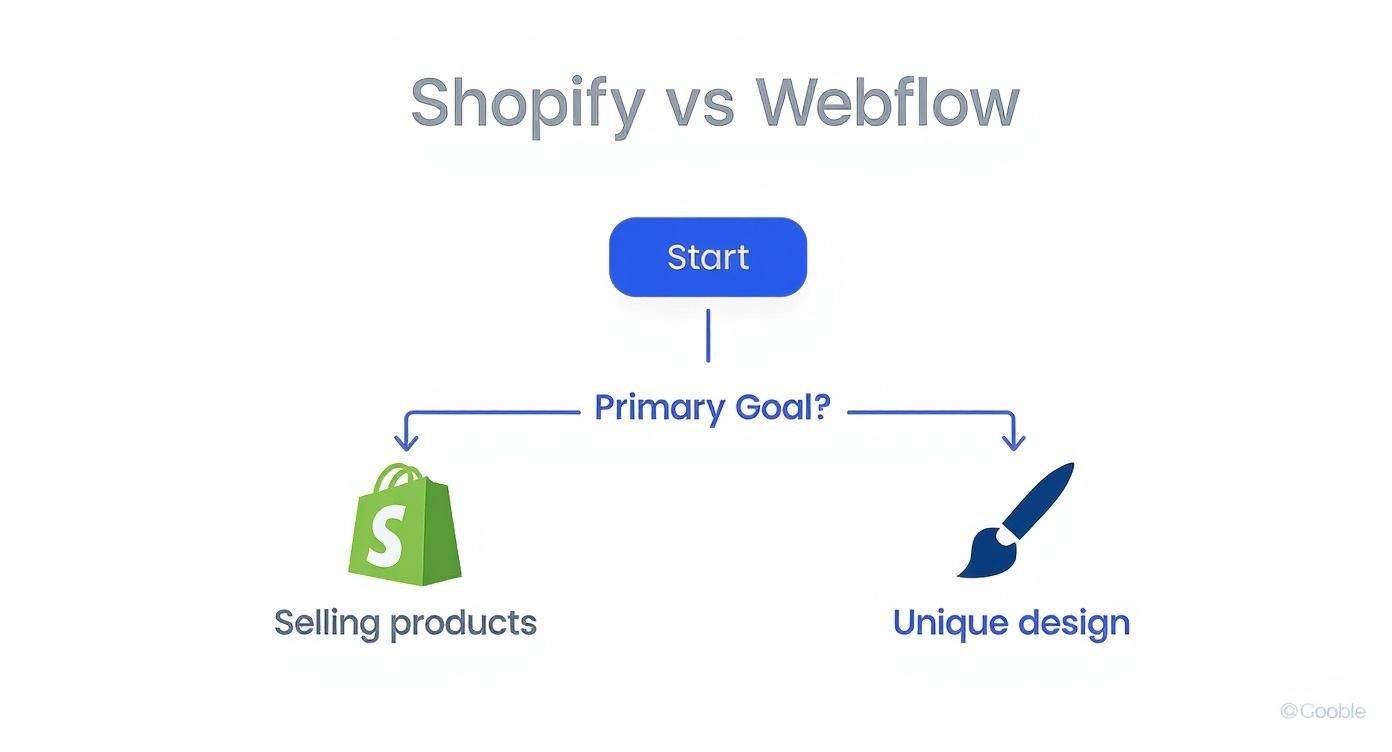
As you can see, the path becomes pretty clear once you define what matters most: straightforward sales or a standout brand experience.
Your Decision-Making Checklist
Before you sign on the dotted line, run through these questions. There are no wrong answers here—only what’s right for your business.
- What's job #1 for this site? If it’s moving a high volume of products, you need a platform built for commerce from the ground up. That’s a huge clue.
- How important is a one-of-a-kind design? If your brand's unique look and feel is what sets you apart, then creative freedom isn't a "nice-to-have"—it's a must-have.
- Who is going to run this thing? Be realistic about your team's technical comfort level. A platform with a steeper learning curve might mean hiring help or spending significant time on training.
- What’s my real budget long-term? Look beyond the monthly subscription. You have to account for transaction fees, app costs, and any other tools you’ll need to make it all work.
These two platforms really do serve different masters. Shopify is a behemoth, powering over 4.6 million active sites because it's an absolute workhorse for e-commerce. Webflow, on the other hand, is the choice for those who want to blend high-end design with capable, if less extensive, e-commerce features. You can dig into more market share data on yaguara.co to see just how they stack up.
The Final Takeaway: Go with Shopify when you need a powerful, no-fuss commerce engine that's ready to sell from day one. Pick Webflow when your top priority is creating an unforgettable digital experience where every pixel is a deliberate choice. Your answers to the questions above should make the decision feel less like a guess and more like a strategy.
Frequently Asked Questions
After weighing all the features, a few questions always seem to pop up. Let's tackle them head-on so you can make your final call with confidence.
Which Platform Is Better For SEO?
This is a classic "it depends" situation. Both platforms can get you to the top of the search results, but they get you there in different ways.
In the Shopify vs. Webflow race, Webflow hands you the keys to technical SEO right out of the box. You get full, granular control over things like URL structures, canonical tags, and schema markup without needing to install a single app. It’s built for those who want to fine-tune every last detail themselves.
Shopify, on the other hand, takes a different approach by automating a lot of the heavy lifting, especially for ecommerce. It automatically handles critical elements like product schema, which is a massive time-saver. For more advanced tweaks, you’ll dip into its incredible app store. So, the real question is: do you want total manual control from the start, or do you prefer a powerful, app-driven ecosystem?
Can I Move My Store From Shopify To Webflow?
Yes, you absolutely can, but don't expect a simple "export/import" button. Migrating from Shopify to Webflow is a significant project. It involves carefully exporting your products, customer lists, and order histories, then meticulously reformatting and mapping all that data to fit Webflow's unique structure.
The two platforms organize data in fundamentally different ways. This means a manual or semi-automated migration is almost always necessary to make sure nothing gets lost or broken in translation. Many businesses choose to bring in an expert to handle the move and sidestep any costly operational hiccups.
Is Webflow Truly A No-Code Tool?
This is where a lot of people get tripped up. Webflow is a no-code tool, meaning you don't have to write code to build a website. However, it's not a simple drag-and-drop builder like Squarespace.
Think of it as a professional visual development environment. To really make it sing, you need to understand the fundamentals of how the web works—concepts like the box model, CSS classes, and responsive design principles are essential. It's a tool that empowers designers with the capabilities of code, without them ever having to type a single line. This is why it has a much steeper learning curve than Shopify.
Deciphering the nuances between Shopify and Webflow takes real-world experience. At OneNine, we live and breathe both platforms. We offer custom design, development, and management to give your business the exact digital foundation it needs to thrive. Let's build your ideal website together.


