
If you're looking to build marketing campaigns that actually convert, creating your landing pages with WordPress is one of the smartest moves you can make. Its incredible flexibility means you can whip up everything from a simple email opt-in form to a multi-step sales funnel, and you often won't have to touch a single line of code.
Why Use WordPress for Your Landing Pages?
Before we jump into the "how-to," let's talk about the "why." A lot of people still pigeonhole WordPress as just a blogging tool, but it's grown into a serious marketing powerhouse. Its real magic lies in the complete control it gives you over your entire online presence—which is exactly what you need to craft a killer landing page.
This isn't like being stuck with a rigid template on some third-party platform. With WordPress, you have the freedom to build a page that perfectly mirrors your brand, speaks directly to your audience, and is laser-focused on your campaign goals.
Total Flexibility and Control
The biggest reason to go with WordPress is, without a doubt, its flexibility. You're in the driver's seat. You can build a landing page that is:
- Completely Custom: Use themes and page builders to get the exact design, layout, and feel you’re going for.
- Easy to Scale: Need to run multiple campaigns? You can duplicate and tweak pages in minutes for different ads, audiences, or A/B tests.
- Perfectly Integrated: Thanks to thousands of plugins, you can connect your page to pretty much any marketing tool you can think of, from email services like Mailchimp to CRMs like HubSpot.
This is the WordPress dashboard—the command center for millions of sites. It's your gateway to all the customization options you'll need.
From here, you can manage everything from your content and design to the plugins that power your page's functionality.
A Massive Ecosystem of Tools
The fact that WordPress is so dominant means you have a massive ecosystem of tools ready to go. This huge selection of themes and plugins lets you add powerful features with just a few clicks—think countdown timers, exit-intent pop-ups, or sophisticated forms. You're not just building a page; you're engineering a conversion machine.
The WordPress community is always building something new. If you can dream up a feature for your landing page, chances are a plugin for it already exists.
This vast support network is a huge part of its appeal. It's no surprise that over 541 million websites—that’s 43.4% of the entire internet—run on WordPress. That market share leaves competitors in the dust and cements its place as the top choice for building effective landing pages in WordPress. You can dig deeper into these WordPress statistics to see just how popular it is.
Picking the Right Tools for Your WordPress Landing Page
Before you can build a killer landing page, you need the right set of tools. Let's be honest, the number of WordPress plugins out there can make your head spin. But don't get overwhelmed. The best choice really comes down to what you need to accomplish, your budget, and how comfortable you are with the tech. This decision is the foundation of your entire campaign.
Think about it like this: are you whipping up a simple page for a one-time webinar? Or are you architecting a whole sales funnel that needs to work perfectly for the long haul? The answer will point you toward either a flexible page builder or a plugin built specifically for landing pages.
Page Builders vs. Dedicated Landing Page Plugins
General page builders like Elementor or Divi are incredibly powerful. They’re designed to give you control over your entire website, not just landing pages. If you're already using one and want to keep your toolkit lean, this is a solid route to take.
On the flip side, you have dedicated tools like SeedProd that are hyper-focused on one thing: getting conversions. These plugins often come packed with features that general builders don't have out of the box, like built-in A/B testing, maintenance modes, and huge libraries of templates proven to turn visitors into leads.
- Page Builders (like Elementor or Divi): Great if you want a single, do-it-all tool for your whole site. They give you total creative freedom but might mean you have to piece together conversion features yourself.
- Dedicated Plugins (like SeedProd or Thrive Architect): Perfect for marketers who live and breathe conversion rates. They cut right to the chase with high-converting templates and built-in marketing tools.
So, if you’re a startup bootstrapping your first product launch, a free page builder is a fantastic way to get started. But if you’re a marketing agency running multiple campaigns for clients, the streamlined workflow and specialized features of a premium landing page plugin will pay for themselves in no time.
What Really Matters When You're Choosing
When you're comparing your options, try to look past the shiny feature lists. A plugin with 100 features you'll never touch is far less valuable than one with 10 that directly help you hit your goals.
For example, if you plan on optimizing your page based on data, a builder with native A/B testing is a must-have. Not a design pro? Then a plugin with a massive library of professional, ready-to-go templates is going to be your best friend, saving you hours of frustration.
This chart drives the point home. It shows just how much better a focused landing page can perform compared to a standard page on your website, and the right tools make that optimization possible.
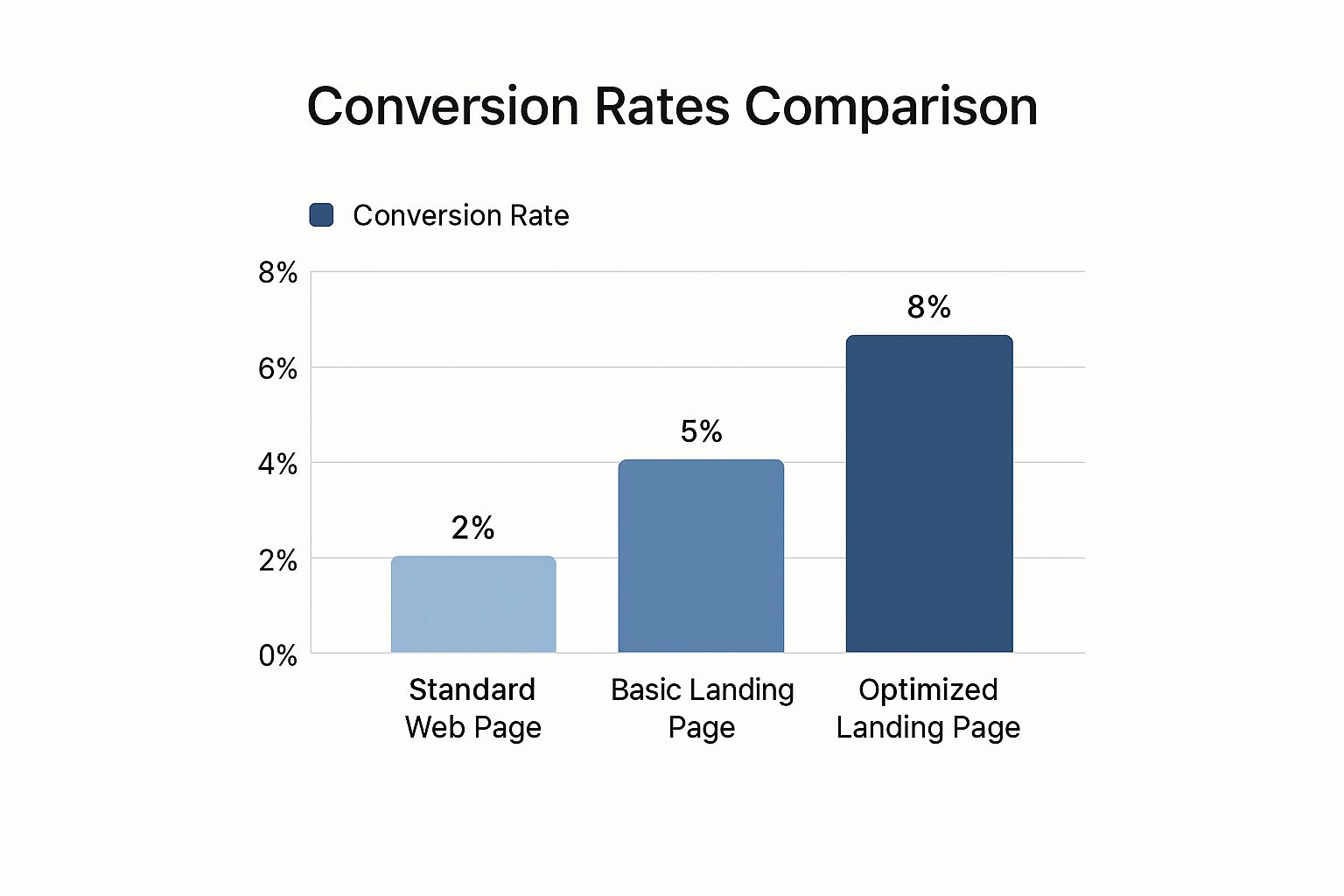
The numbers speak for themselves. A properly optimized landing page can see conversion rates up to 400% higher than a generic page. That’s the real value of picking the right tool for the job.
Comparing Popular WordPress Landing Page Builders
To help you decide, here's a quick breakdown of some of the top players in the game. This table compares them based on what they do best, their standout features, and how they're priced, so you can find the perfect fit for your project.
| Tool | Best For | Key Features | Pricing Model |
|---|---|---|---|
| SeedProd | Marketers & business owners who want an all-in-one conversion toolkit without the bloat. | Drag-and-drop builder, landing page-specific blocks, coming soon/maintenance modes, and a massive template library. | Freemium (Free version available, paid plans offer more features) |
| Elementor | Designers & developers who need total design control over their entire website. | Powerful visual editor, huge library of widgets, theme builder, and a large third-party add-on ecosystem. | Freemium (A very capable free version, with a Pro version for advanced features) |
| Thrive Architect | Conversion-focused marketers who want to build complex sales funnels and integrate with other marketing tools. | A/B testing, lead generation forms, content-focused templates, and tight integration with the Thrive Suite. | Premium (Part of the Thrive Suite subscription) |
| Divi | Users who want a combined theme and page builder for a seamless, visually-driven website-building experience. | Front-end visual builder, built-in A/B testing, global modules, and hundreds of pre-made website packs. | Premium (Annual or lifetime subscription from Elegant Themes) |
Each of these tools can get the job done, but the best one is the one that aligns with your specific workflow and campaign goals.
The goal isn't just to build a page—it's to build a conversion machine. The right tool gets the tech out of your way so you can focus on the stuff that actually drives results: your strategy, your copy, and your offer.
At the end of the day, don’t get bogged down trying to find the "perfect" tool. Pick a well-regarded option that fits your current needs and budget, and just start building. You can always switch later if you need to. The most critical thing is to get your landing page live and in front of your audience.
Designing a Landing Page That Converts
It’s one thing to build a pretty landing page, but it's another thing entirely to build one that actually gets results. Having the right WordPress tools is a great start, but real success hinges on your design strategy. This is where we stop thinking about how to build the page and start focusing on why each element is there in the first place.
Every landing page that truly works follows a similar blueprint. It’s a proven formula that walks a visitor from casual interest to decisive action. And it all begins with a powerful headline that grabs them by the collar and speaks directly to their needs.

Crafting a Compelling Headline and Copy
Think of your headline as the first—and maybe only—impression you get to make. It absolutely has to be crystal clear, highlight a key benefit, and be interesting enough to stop someone from scrolling away. Ditch the vague, clever taglines. Just tell people what you do and what's in it for them.
For example, a headline like "The Future of Accounting" is forgettable. But "Automate Your Invoicing in 5 Minutes"? That solves a real problem and sets a clear expectation. This same direct approach should carry through all your copy. Stick to simple language, focus on benefits (not just features), and use short, easy-to-read paragraphs. For a more technical look at how structure impacts messaging, our guide at https://onenine.com/ultimate-guide-to-bootstrap-landing-page-development/ is a great resource.
Building Trust and Urgency
People buy from companies they trust. Since you can’t have a face-to-face conversation with every visitor, you need to build that credibility instantly. This is where trust signals become your best friend.
- Testimonials and Reviews: Nothing beats hearing from a happy customer. Add a quote, a name, and a photo for maximum impact.
- Case Studies: A quick summary of how you helped a client achieve a specific goal can be incredibly convincing.
- Trust Badges: Got security seals, industry awards, or logos of well-known partners? Show them off.
Once you’ve built that foundation of trust, a little urgency can be the push someone needs to act. Think about using countdown timers for special offers or showing low stock alerts. These are simple but effective ways to encourage people to make a decision now rather than later.
A landing page isn't a brochure; it's a focused conversation with a single goal. Every word, image, and button should contribute to achieving that one specific action.
The Irresistible Call to Action (CTA)
Your CTA is the grand finale. It’s the moment of truth. Make your button text specific and action-oriented. "Submit" is dull and uninspired. "Get Your Free Ebook Now" tells people exactly what they're getting. Use a color that contrasts with the rest of your page so the button stands out—it should be almost impossible to miss.
The data backs this up. In 2025, the average landing page conversion rate is hovering around 6.6%. What’s more, shorter, more focused pages are outperforming longer ones by a significant 13.5%. They just get straight to the point. And if you really want to move the needle, adding a video can boost conversions by as much as 86%.
Of course, the real secret to a high-converting landing page is never-ending improvement. You can even start optimizing your landing page with AI to analyze performance data and find opportunities to get better. This ongoing process of testing and tweaking is what turns a good landing page into a great one.
Optimizing for SEO and Page Speed
So, you’ve designed a stunning landing page. That’s great, but it’s only half the battle. If your target audience can't find it, all that hard work goes to waste. This is where search engine optimization (SEO) and page speed come into play—two critical factors that are easy to overlook when you're focused on design.
A slow, clunky page doesn't just frustrate potential customers; search engines like Google will actively penalize it. Let's make sure that doesn't happen.
On-Page SEO for Your WordPress Landing Page
The easiest way to get started is with a good SEO plugin. Tools like Yoast SEO or Rank Math are fantastic because they give you a simple checklist right in the WordPress editor. No more guessing games.
Your first move is to pick a focus keyword. This is the main phrase someone would type into Google to find what you're offering, like "small business accounting software" or "downloadable fitness planner."
Once you have your keyword, you’ll want to place it in a few key spots:
- SEO Title: This is the headline people see in the search results. Make it catchy and be sure to include your keyword.
- Meta Description: Think of this as a mini-ad for your page. It’s a short summary that appears under the title in search results, so make it persuasive.
- URL Slug: Keep your page’s web address short, sweet, and descriptive. Something like
yourwebsite.com/fitness-planneris perfect. - Headings: Use your H1 tag for the main headline on the page and sprinkle your keyword naturally in other subheadings (H2s, H3s) where it makes sense.
Think of on-page SEO as giving search engines a clear road map to your content. The better you label the streets and landmarks (your titles, headings, and keywords), the easier it is for them to understand what your page is about and show it to the right people.
Making Your Page Load in a Flash
Nobody waits for a slow website anymore. In fact, page speed is a massive ranking factor. A delay of just a couple of seconds can send your bounce rate through the roof.
The good news? You don't need to be a developer to make a real difference here.
The biggest culprit is almost always images. Huge, uncompressed photos will bring your page to a crawl. Before you upload anything, run your images through a tool like TinyPNG or install an optimization plugin that does it automatically. It makes a world of difference.
For a deeper dive into shaving off every possible millisecond, check out our guide on https://onenine.com/wordpress-website-speed-optimization/.
Getting your landing page live is just the beginning. The real magic happens when you start tracking what works and what doesn't. For more on that, take a look at this resource on understanding key metrics and reporting. Pairing solid SEO with a lightning-fast page is how you attract visitors and give them an experience that actually gets them to convert.
Scaling Your Success: Why One Landing Page Is Never Enough
So, you’ve built a solid landing page. Great. But if you really want to build a lead generation engine, it’s time to think bigger. The real magic happens when you move from a single page to a whole fleet of them, each one fine-tuned for a specific purpose.
This is how you go from just building pages to creating a scalable marketing funnel.
Think about your different marketing efforts. Are you running a PPC campaign with several ad groups? Each of those ad groups should point to its own dedicated landing page. This lets you perfectly match the headline, copy, and offer to the ad someone just clicked. That kind of consistency creates a smooth, persuasive experience that makes people feel they're in the right place.
The Real Reason More Pages Equal More Leads
It might sound like a lot of extra work, but the payoff is huge. Creating multiple, targeted landing pages is one of the most reliable ways to boost conversions.
Instead of funneling everyone to a one-size-fits-all page, you're speaking directly to different segments of your audience. This is where building landing pages in WordPress becomes a serious competitive advantage.
The data doesn’t lie. Some fascinating research shows that companies with 21 to 40 landing pages can see a massive 300% jump in conversions. For businesses that push it even further to over 40 pages, lead generation can skyrocket by more than 500%. If you're curious, you can dig into the full landing page research here.
It all boils down to one thing: relevance. The more relevant your page is to a visitor's specific need or search query, the higher your chances of converting them.
How to Create Variations Without Losing Your Mind
The thought of building dozens of pages from scratch is enough to make anyone's head spin. Thankfully, WordPress makes this incredibly manageable.
Most page builder plugins have a "Duplicate" or "Clone Page" function built right in. With one click, you can create a perfect copy of your best-performing landing page.
From there, it’s just a matter of making small, strategic tweaks for your new campaign:
- Swap the Headline: Make sure it perfectly matches the ad copy for a new ad group.
- Change the Hero Image: Pick a visual that speaks to a different audience segment.
- Adjust the CTA: Experiment with a new offer or different button text.
This approach lets you test new ideas and build out a library of targeted pages in a fraction of the time. You’re not reinventing the wheel—you’re just putting on different tires for different roads.
A single landing page is like a fishing net with one big hole. Multiple targeted pages are like having dozens of perfectly sized nets, each designed to catch a specific type of fish. You'll catch far more of what you're looking for.
Of course, even the world's best landing pages are useless without traffic. Once your pages are ready, the next step is getting them in front of the right people. For some practical ideas, check out our guide on how to promote your website effectively.
Common WordPress Landing Page Questions
Even with the best tools, building your first few landing pages can feel like navigating a minefield. You're bound to run into a few tricky questions. Let's walk through some of the most common hurdles I've seen people face, so you can build pages that actually work.
https://www.youtube.com/embed/FGlqxkpYVMs
Should My Landing Page Have Navigation?
This is probably the most frequent question I get, and the answer is almost always a hard no.
Think about it: your landing page has one job—to get the visitor to take a single, specific action. A navigation menu full of links to your homepage, blog, or contact page is just an open invitation for them to get distracted and wander off. It's the ultimate conversion killer.
Your landing page should be a dead end. The only way out is through your call to action.
Subdomain vs. Subfolder: Where Should It Live?
Another classic debate is where to actually host your landing pages. Do you put them on a subdomain like promo.yoursite.com, or in a subfolder like yoursite.com/promo?
For 99% of cases, a subfolder is the way to go, especially for your SEO. Search engines view subfolders as part of your main website, which means any authority or "link juice" your landing page earns helps boost your entire domain.
A subdomain is often treated by search engines as a completely separate website. Unless you have a very specific technical reason for it, stick with subfolders to keep all your SEO power under one roof.
"Help! My Form Isn't Working!"
Ah, the dreaded broken form. A visitor fills everything out, clicks "Submit," and… crickets. It’s a frustrating and expensive problem that can bring a campaign to a screeching halt.
If this happens to you, don't panic. Run through this quick troubleshooting checklist:
- Plugin Conflicts: This is the most common culprit. Another plugin is likely interfering with your form builder. The easiest way to check is to temporarily deactivate your other plugins one by one and see if the form starts working again.
- Email Glitches: Sometimes, your web host might be blocking the notification emails your form is trying to send. An easy and reliable fix is to install an SMTP plugin. It routes your website's emails through a proper email service (like SendGrid or Mailgun), which dramatically improves deliverability.
- API Key Typos: Are you trying to connect your form to an email marketing service like Mailchimp? Go back and double-check that your API keys are copied and pasted perfectly. A single misplaced character can break the entire integration.
These little technical snags can have a massive impact on your results. Taking the time to get the details right is what separates a landing page that flops from one that becomes a lead-generating machine.
At OneNine, we specialize in taking these technical headaches off your plate so you can get back to focusing on your business. If you need a hand building, optimizing, or maintaining your WordPress landing pages, our team is ready to jump in. Learn more about our services at https://onenine.com.


