

Building a secure website isn't about scrambling to install a security plugin after something goes wrong. It's a mindset. It means stepping back and creating a solid plan before you even launch, focusing on what you need to protect and who you need to protect it from.
Building Your Security Foundation Before You Launch
Most people dive straight into choosing a hosting plan or picking a theme. I get it, that's the exciting part. But those aren't the first steps. A truly secure website is built on a strategic foundation.
Think of it like building a house: you wouldn't start hammering up walls without a solid blueprint. Security works the same way. Before you write a single line of code or choose a template, you have to get crystal clear on what you're trying to protect. Without that clarity, your security efforts will be scattered and reactive, a bit like a guard protecting an empty room while the real valuables are being stolen next door.
First, What Are Your Most Valuable Assets?
Start by making a simple list of what’s truly valuable on your website. This isn’t just about financial data; it’s about anything that, if compromised, would hurt your business or your customers.
For most small businesses, this list includes a few key things:
- Customer Data: Names, email addresses, and phone numbers you collect through contact forms or newsletter sign-ups. This is a goldmine for attackers.
- Payment Information: If you run an e-commerce site, this is your crown jewel. Protecting credit card details and transaction data is non-negotiable.
- Intellectual Property: This could be anything from your unique blog content and case studies to proprietary business processes you describe on your site.
- Your Brand Reputation: Your website is your digital storefront. A hacked site can instantly shatter the trust you’ve spent years building.
Once you have this list, you can prioritize. For a local plumber, the client contact list is probably the most valuable asset. For an online store, it’s the payment processing system and customer order history.
Next, Understand the Real-World Threats You Face
After identifying what’s important, it’s time to think like an attacker. Don't worry, you don’t need to become a cybersecurity expert overnight. This is just a practical risk assessment, often called "threat modeling."
A classic mistake is trying to protect against every threat under the sun. The reality for most small businesses is that you're not a primary target for sophisticated, nation-state attacks. Your biggest risks are almost always automated bots scanning the internet for common, easy-to-exploit vulnerabilities.
For example, a marketing agency’s lead-gen site is most vulnerable to having its contact forms spammed or its client list stolen. An e-commerce store's biggest nightmare is a data breach that exposes customer credit card numbers. By focusing on these probable scenarios, you can put your time and money where they’ll actually make a difference.
This simple flowchart breaks down the planning process into three clear stages.
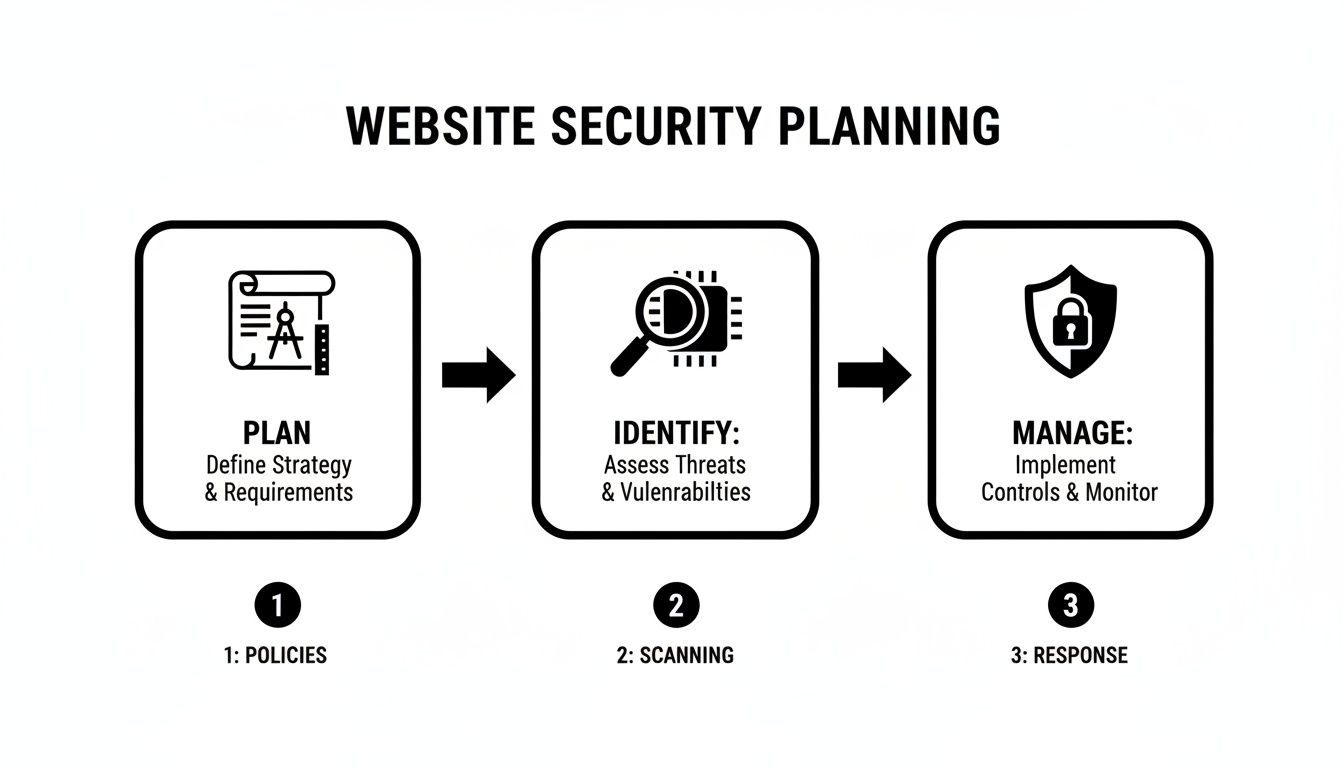
This Plan, Identify, and Manage flow shows exactly why strategy comes before technology. It ensures your security efforts are targeted and effective from day one.
Finally, a truly robust security foundation considers the entire lifecycle of your tech. When old hardware is eventually retired, you need to make sure sensitive data doesn't walk out the door with it. Using a thorough server decommissioning checklist is a great way to ensure that old equipment doesn’t become a future liability.
2. Lock Down Your Foundation: Secure Hosting and SSL
Your website's design might be the flashy storefront, but your web host is the actual foundation it's built on. Think of your hosting provider like the landlord for your digital property. A cheap landlord might ignore leaky pipes or broken locks, and a cheap web host can expose your business to all sorts of digital threats.
Chasing the lowest price for hosting is one of the most common—and dangerous—mistakes a business can make. Your website’s security is completely dependent on the security of its hosting environment. When you're just starting, that $3/month shared hosting plan looks mighty tempting, but you need to know what you’re really getting into.
Hosting Types Aren't Just About Price—They're About Risk
Not all hosting is created equal, and the security differences between them are huge. For most small and medium-sized businesses, the choice boils down to a few key options.
-
Shared Hosting: This is the budget option. Your website shares a server—and all its resources and potential vulnerabilities—with hundreds, sometimes thousands, of other sites. If your neighbor's site gets hacked, the infection can easily spread to yours. It’s a classic case of being guilty by association.
-
Virtual Private Server (VPS) Hosting: A VPS is like renting a condo instead of a single room in a hostel. You still share the main building (the physical server), but your space is walled off and isolated. This dramatically cuts down on the "bad neighbor" problem and gives you way more control over your own security.
-
Managed Hosting: For most business owners who aren't server administrators, this is the gold standard. With managed hosting (often tailored for platforms like WordPress), the provider takes care of all the tricky stuff: server maintenance, security patches, malware scans, and daily backups. It costs more, but you're paying to offload a massive security headache.
If you handle any kind of customer data, even a simple contact form, upgrading from shared hosting to at least a VPS is a non-negotiable first step.
How to Spot a Genuinely Secure Host
Beyond the server type, you need to vet the provider’s actual commitment to security. A good host is proud of its security measures and won't hide them in the fine print.
When you're shopping around, look for these specific features:
- A built-in Web Application Firewall (WAF)
- Proactive malware scanning and removal
- Automated daily backups with a simple one-click restore option
- DDoS (Distributed Denial of Service) protection
- Support for the latest, most secure versions of server software like PHP
Pro Tip: Before you sign up, open a chat with a potential host's sales or support team. Ask them directly about their security protocols. How they answer—or if they even can—will tell you everything you need to know.
From "Not Secure" to Trusted: The Power of SSL/HTTPS
Once you have a solid hosting foundation, it's time to secure the connection between your website and every person who visits it. This is what an SSL/TLS certificate does. It enables the HTTPS protocol, which encrypts all the data flowing between a user's browser and your server.
That little padlock you see in the browser's address bar isn't just a nice-to-have anymore. It's an absolute must.
Without HTTPS, everything submitted on your site—passwords, contact details, credit card numbers—is sent in plain text. It's like sending a postcard through the mail for anyone to read. Modern browsers like Chrome and Firefox now slap a big, scary "Not Secure" warning on any site without it, which is guaranteed to drive visitors away.
Thankfully, getting an SSL certificate is easier and cheaper than ever. Most quality hosts offer free certificates from Let's Encrypt, which are perfectly fine for most business websites. If you're running an e-commerce store or handling very sensitive information, a paid certificate can provide a higher level of validation and trust.
If you want to get into the weeds of how this technology works, you can learn more about what an SSL certificate is and how it protects your site. But the bottom line is simple: installing one is non-negotiable.
Hardening Your Website and Managing Human Error
So, you've picked a secure host and have that little padlock icon thanks to your SSL certificate. That's a fantastic start—it's like pouring a solid foundation for your house. But now you have to secure the house itself: the doors, windows, and everything inside.
For your website, this means hardening your content management system (CMS), plugins, and themes. This is all about proactively closing security gaps before someone with bad intentions finds them. Whether you're on WordPress, Shopify, or a custom-built site, it wasn't designed for maximum security out of the box. It was built for convenience. Your job is to tip the scales back toward security by shrinking your "attack surface"—all the potential entry points for a hacker.
Securing Your Website Platform
The first thing to do is tackle the low-hanging fruit. These are the simple, often-forgotten settings that automated bots are built to find and exploit.
A classic example is the default "admin" username on a new WordPress installation. Hackers know this and run scripts that try to guess the password for the "admin" account. By simply changing that username to something unique, you've already made their job much harder. It's a small change with a big impact.
After defaults, your next focus should be on third-party code, which for most of us means plugins and themes. Every single one you add is another potential door into your website. Be ruthless.
-
Vet Every Plugin: Before you click "install," do some digging. Is the developer reputable? Is the plugin updated regularly? Are there reviews mentioning security problems? An old, abandoned plugin is a ticking time bomb.
-
Delete Unused Code: Don't just deactivate plugins and themes you're not using—delete them. Inactive code sitting on your server can still be a backdoor if a vulnerability is discovered. Think of it as digital spring cleaning.
-
Limit Functionality: Do you really need a plugin for that? Sometimes, a few lines of code added directly to a theme file (like for your Google Analytics tracking code) can do the job without adding the risk of another plugin.
These small, deliberate actions work together to shrink your attack surface, making your site a far less appealing target for lazy hackers.
Turning Your Team into a Human Firewall
Here's the hard truth: you can have the most technically secure website in the world, and one clumsy mistake can bring it all down. Your biggest vulnerability isn't your code; it's the people using it. This isn't about placing blame—it's just a reality. Attackers target people because it's often the easiest way in.
Study after study shows that human error is the root cause of the vast majority of security breaches. For a small business where people wear multiple hats and security training isn't a priority, this risk is even higher. The good news is that you don't need a huge budget to fix this. You just need a smart approach centered on access control and awareness.
The numbers are stark: human error is implicated in up to 90% of all cyber incidents. For businesses using common platforms like WordPress or Shopify, this means a single weak password or a successful phishing attempt can bypass even the most secure server configurations. Acknowledging this, a significant 83% of IT professionals in small to mid-sized businesses now mandate multi-factor authentication (MFA) to create a vital second line of defense against human-centric attacks. Discover more insights on cyber security statistics and trends.
Implementing Strong Access Controls
The single most effective way to manage human risk is to live by the Principle of Least Privilege. It’s a simple idea: people should only have the absolute minimum level of access they need to do their job. Nothing more.
If your marketing intern just needs to write blog posts, they should have an "Editor" or "Author" role, not an "Administrator" account that can install plugins and change core settings. Every major CMS has built-in user roles for this very reason. Use them.
Here’s a quick-hit list to lock down user access:
-
Enforce Strong Password Policies: This means long, complex passwords that mix letters, numbers, and symbols. Even better, mandate the use of a password manager so no one is tempted to reuse the same password from their email or social media.
-
Activate Multi-Factor Authentication (MFA): Make MFA non-negotiable for all users, especially anyone with admin-level privileges. Requiring that second code from a phone app is one of the best ways to stop an attacker who has managed to steal a password.
-
Conduct Regular User Audits: Set a calendar reminder to do this quarterly. Go through the user list on your website and remove anyone who no longer works with you—former employees, old contractors, you name it. Every dormant account is a potential security hole.
By combining platform hardening with strict user controls, you create layers of defense. If one layer fails, another is there to catch you, keeping your business and your data safe.
Your Website's Ultimate Safety Net: A Bulletproof Backup and Recovery Plan
Let's be realistic: sooner or later, something will go wrong. It could be a simple human error, like someone accidentally deleting a critical file. Or it could be a full-blown security breach that brings your site down.
When that happens, even the best security measures can fail. At that moment, your last line of defense is your ability to recover quickly and cleanly. A solid backup and recovery strategy is what turns a potential catastrophe into a manageable hiccup, getting you back online with minimal drama.
Adopt the 3-2-1 Backup Rule
The gold standard for protecting your data has always been the 3-2-1 rule. It's a simple, memorable framework that builds redundancy into your strategy, ensuring you can always get your hands on a clean copy of your website.
Here’s the breakdown:
- Three Copies: Always have at least three copies of your data. This means your live site, plus two separate backups.
- Two Different Formats: Store your backup copies on two different kinds of media. For example, you might have one backup on your hosting provider's server and another in a cloud storage service like Amazon S3 or Google Drive.
- One Off-Site Copy: Keep at least one of those backup copies in a completely separate physical location. If a disaster takes out your hosting provider's data center, your off-site copy is safe and sound.
This approach covers you for a huge range of failure scenarios, from a corrupted database to a regional power outage. As you get started, it helps to understand the different types of backup for your business so you can choose the right methods.
Automate Your Website Backups
Relying on manual backups is a recipe for failure. It's just too easy to forget or put it off until it's too late. Automation is the only way to build a truly reliable backup system.
You need to make sure you're capturing both the files and the "brain" of your site. Every backup should include two key components:
- Website Files: This is everything that makes your site look and function the way it does—your CMS core (like WordPress), themes, plugins, images, and other uploaded media.
- The Database: This is the lifeblood of your site. It holds all your content, user info, settings, and e-commerce orders. For most sites, the database changes constantly and is the most critical piece to protect.
Good hosting providers usually offer automated daily backups, which is a fantastic start. On top of that, many CMS plugins for security or backups can be set to automatically push a copy of your site to an off-site location on a schedule you choose.
Ransomware has become brutally effective, now hitting 72.7% of organizations worldwide. Attackers have gotten smarter, too. A shocking 96% of ransomware attacks are now specifically designed to hunt down and encrypt your backups first. This means a simple, connected backup drive isn't enough anymore. Isolated, off-site copies are now a fundamental survival tactic.
Your Simple Disaster Recovery Checklist
A backup is completely useless if you don't know how to restore it. Worse, you might discover it’s corrupted right when you need it most. A disaster recovery plan turns your stored files into a functional tool.
Here are the four essential steps to take:
- Document Everything: Write down the exact, step-by-step process for restoring your site from a backup. Include login details for your hosting panel, cloud storage, and anything else needed.
- Assign Roles: Who is in charge of kicking off the recovery process? Designate a specific person (and a backup person) so everyone knows their role in an emergency.
- Test Your Backups Regularly: At least once a quarter, do a test restore on a staging server to avoid messing with your live site. This is the only way to know for sure that your backups actually work.
- Keep Backups Secure: Protect your backup files just as fiercely as your live site. Use strong passwords and MFA on any cloud accounts where you store them.
Don't skip the testing step—it's the one everyone ignores, but it’s the most important. A successful test gives you real peace of mind, knowing that if disaster strikes, you're genuinely ready. For more details, check out our guide on the essentials of website backups.
Keeping Your Guard Up: Proactive Security Monitoring
Getting your website live is a huge milestone, but it's just the start of the security story, not the end. The real work is in the day-to-day habits that keep your site safe long after the launch party. Thinking security is a one-time setup is like locking up your shop on day one and never checking the doors again.
True website security is an active, ongoing effort. It’s about shifting your mindset from reactive—panicking when something breaks—to proactive, where you’re constantly looking for and plugging holes before they become a problem.
Automate Your First Line of Defense
You can't stare at your website's activity logs 24/7, and you shouldn't have to. Thankfully, modern tools can do the heavy lifting for you. This is where security plugins and services become your best friends, acting as digital watchdogs that never sleep.
A good security tool automates the most tedious but critical monitoring tasks. When you’re choosing one, make sure it has a solid mix of these core features:
- Malware Scanning: These tools automatically comb through your site’s files and database, looking for malicious code by comparing it against a library of known threats.
- Firewall Management: A good Web Application Firewall (WAF) is like a bouncer for your website. It inspects incoming traffic and blocks shady requests before they even get a chance to knock on your server’s door.
- Login Protection: This is huge. Look for features like brute force protection, which blocks IP addresses after too many failed login attempts, and sends you alerts about suspicious activity.
For a WordPress site, for instance, getting a plugin like Wordfence or Sucuri installed and configured can be done in minutes. It's a quick win that sets up a powerful, automated defense.
The Undeniable Power of Consistent Updates
If you take away just one thing from this guide, let it be this: keep everything updated. Seriously. It's the single most effective security habit you can build. The vast majority of website hacks exploit old, known vulnerabilities in software—issues that have already been fixed with a simple patch.
Hackers run automated bots that do nothing but crawl the internet looking for sites running an old version of WordPress, a specific plugin, or a popular theme. When they get a hit, they pounce. Just by keeping your software current, you take yourself off their list of easy targets.
Your update routine needs to be non-negotiable. Treat it as a core business function, not some optional IT chore. A single missed update can be the one that leaves a critical backdoor wide open.
And this doesn’t just mean your main CMS software. Your update checklist should cover every piece of code on your site:
- Your Content Management System (CMS): The core engine running your site.
- All Plugins and Apps: Every single extension adds to your potential attack surface.
- Your Website Theme: Themes are software, too, and they’re just as vulnerable as plugins.
Set a recurring reminder—weekly is great, bi-weekly at a minimum—to check for and apply all updates. It’s a simple, five-minute task that pays off in a huge way. For a more detailed walkthrough, our guide on implementing website security monitoring goes much deeper.
The Future is Now: AI-Powered Security
While manual checks and regular updates are the foundation, the security game is getting smarter. The next frontier in proactive monitoring is artificial intelligence, and it’s completely changing how we approach threat detection. AI is helping us move beyond simple checklists and into intelligent, real-time analysis.
The AI cybersecurity market is projected to skyrocket past $133 billion by 2030, which tells you everything you need to know about where the industry is headed. We're already seeing that companies using AI and security automation save over $3 million per data breach—a powerful financial argument for getting on board.
For a small business, this doesn't mean you need to hire a data scientist. It means choosing security services that use AI to spot and block sophisticated attacks that traditional firewalls might miss. It’s about letting smart tech handle the complex pattern analysis so you can get back to running your business.
Frequently Asked Questions About Website Security
Let's be honest: website security is a complicated topic. It's easy to get lost in the technical jargon and feel like you're always one step behind the latest threats. To help clear things up, I've put together answers to a few of the most common questions I hear from business owners.
We'll skip the fluff and get straight to the practical side of things—what security really costs, what's actually possible, and the one thing you can do today that makes the biggest difference.
How Much Does It Cost to Make a Website Secure?
The real answer? It can range from practically free to thousands of dollars a month. The good news is that for most small businesses, you can build a very strong security foundation without breaking the bank.
In the beginning, you can get surprisingly far with free tools. Most quality web hosts now throw in a free SSL certificate from Let's Encrypt with their hosting plans. If you're using a platform like WordPress, many of the best security plugins have free versions that handle the essentials, like scanning for malware and protecting your login page.
Of course, costs can go up as your website becomes more critical to your business. Here’s where you might start spending money:
- Premium Web Application Firewall (WAF): Think of this as a dedicated security guard for your site, blocking sophisticated attacks before they can even touch your server.
- Professional Malware Removal: If the worst happens and your site gets hacked, paying a service to clean it up and patch the holes is money well spent.
- Managed Security Services: For bigger companies, it often makes sense to just hand the keys to a team of experts who handle monitoring and response 24/7.
The best approach is to treat security like any other business investment. Start with the basics and scale up your defenses as your website grows.
Can My Website Ever Be 100 Percent Secure?
This is a great question, and the blunt answer is no. Anything connected to the internet can never be 100% secure. But that's okay, because perfect, Fort Knox-level security isn't actually the goal.
The real aim is proactive risk management. It’s a lot like securing your house. You have good locks on the doors, an alarm system, and maybe a camera. None of those things make it impossible for someone to break in, but they make your house a much harder, less appealing target. The burglar will likely just move on to the easier house down the street.
The whole point is to create layers of defense. If one layer fails—say, an attacker guesses a weak password—another one, like two-factor authentication, is waiting to stop them. You just want to make breaking in so difficult and annoying that they give up.
What Is the Single Most Important Security Action?
If you do nothing else, do this: keep every single piece of your website's software updated, all the time.
This one habit is your most powerful weapon. The vast majority of website hacks aren't the result of some genius hacker finding a brand-new flaw. They're simple, automated attacks that exploit well-known security holes in outdated software—problems that have already been fixed in a newer version.
Hackers run bots that do nothing but scan the internet for sites running old versions of WordPress, a specific plugin, or a theme. When they find one, they hit it with a pre-made exploit. By simply keeping your site updated, you take yourself off their list of easy targets.
Your update routine must cover everything:
- Your Core CMS (WordPress core, Shopify apps, etc.)
- All Plugins and Extensions (This is where most vulnerabilities are found!)
- Your Website Theme
Seriously, don't treat this as a suggestion. A disciplined update process is the bedrock of good website security.
At OneNine, we know that keeping up with security can feel like a full-time job you didn't sign up for. Our team handles comprehensive website management—including all the security monitoring, maintenance, and updates—so you can stay focused on what you do best. Learn more about our website management services and get some peace of mind.


