
Ever seen that little padlock icon next to a website's address? That's an SSL certificate at work. Think of it as a digital passport for your website. It verifies your site’s identity to visitors and, more importantly, creates a secure, encrypted connection for everything that happens between their browser and your server.
This is what turns http:// into the much safer https://.
So, What Is an SSL Certificate, Really?
Beyond the padlock, an SSL certificate is a small data file that acts as a digital handshake. It cryptographically links your website’s identity to a set of encryption keys. When you install it on your web server, it fires up the secure protocol that protects all the data flowing back and forth.
Imagine sending a postcard versus a sealed, tamper-proof letter. Without SSL, your website's data—passwords, credit card numbers, personal details—is like that postcard. It’s sent as plain text, wide open for any snooper or cybercriminal to read along the way. With SSL, that data is sealed inside the envelope, kept private and secure.
To get a clearer picture, let's break down the essential pieces of an SSL certificate.
SSL Certificate at a Glance
| Component | What It Does | What You See |
|---|---|---|
| Authentication | Verifies your website is who it claims to be, preventing imposters. | The website's domain name is confirmed in the certificate details. |
| Encryption | Scrambles data into an unreadable code during transfer. | The https:// prefix in your browser's address bar. |
| Trust Signal | Provides visual proof to visitors that the connection is secure. | The padlock icon next to the website URL. |
This combination of authentication and encryption is what builds the trust needed for people to feel safe on your site.
The Two Pillars of Online Trust
At its core, an SSL certificate provides two critical functions that are non-negotiable for any website today:
- Authentication: It proves to your visitors they’ve landed on your actual website, not a clever fake set up by a scammer. This verification is handled by a trusted third-party organization called a Certificate Authority (CA).
- Encryption: It jumbles up all the transmitted data—from a simple contact form submission to sensitive payment information—into a completely unreadable format. If anyone manages to intercept it, all they'll see is gibberish.
Together, these functions send a powerful, instant signal to your audience: "This connection is secure. Your information is safe with us."
How an SSL Certificate Creates a Secure Connection
So, how does this digital passport actually work its magic? The whole process happens in a flash through a sequence called the SSL handshake. Think of it as a secret, secure conversation starter between a visitor’s browser and your website’s server.
It all begins the moment someone types in your web address and hits enter. Their browser sends a "hello" message to your server, basically asking, "Are you legit, and can we talk privately?" This is what kicks off the authentication.
Your server responds by showing its SSL certificate. The browser then gives this digital passport a thorough check to make sure it's valid, hasn't expired, and was issued by a trusted Certificate Authority (CA). If everything looks good, trust is established, and they can move on to the next step.
The Secret Handshake and Encryption Keys
Once the browser confirms your website's identity, the two agree on a secret code for their conversation. This is where asymmetric encryption comes into play, using a matched pair of keys—one public and one private.
- Public Key: This key is shared openly inside the SSL certificate. Anyone can use it to encrypt a message and send it to your server.
- Private Key: This key stays hidden on your server. It's the only key that can decrypt messages that were locked with the public key.
A good way to think about it is like a mailbox with an open slot. Anyone can drop a letter in (encrypt with the public key), but only you have the private key to unlock the box and read the messages.
This visual breaks down the basic steps of this digital handshake.
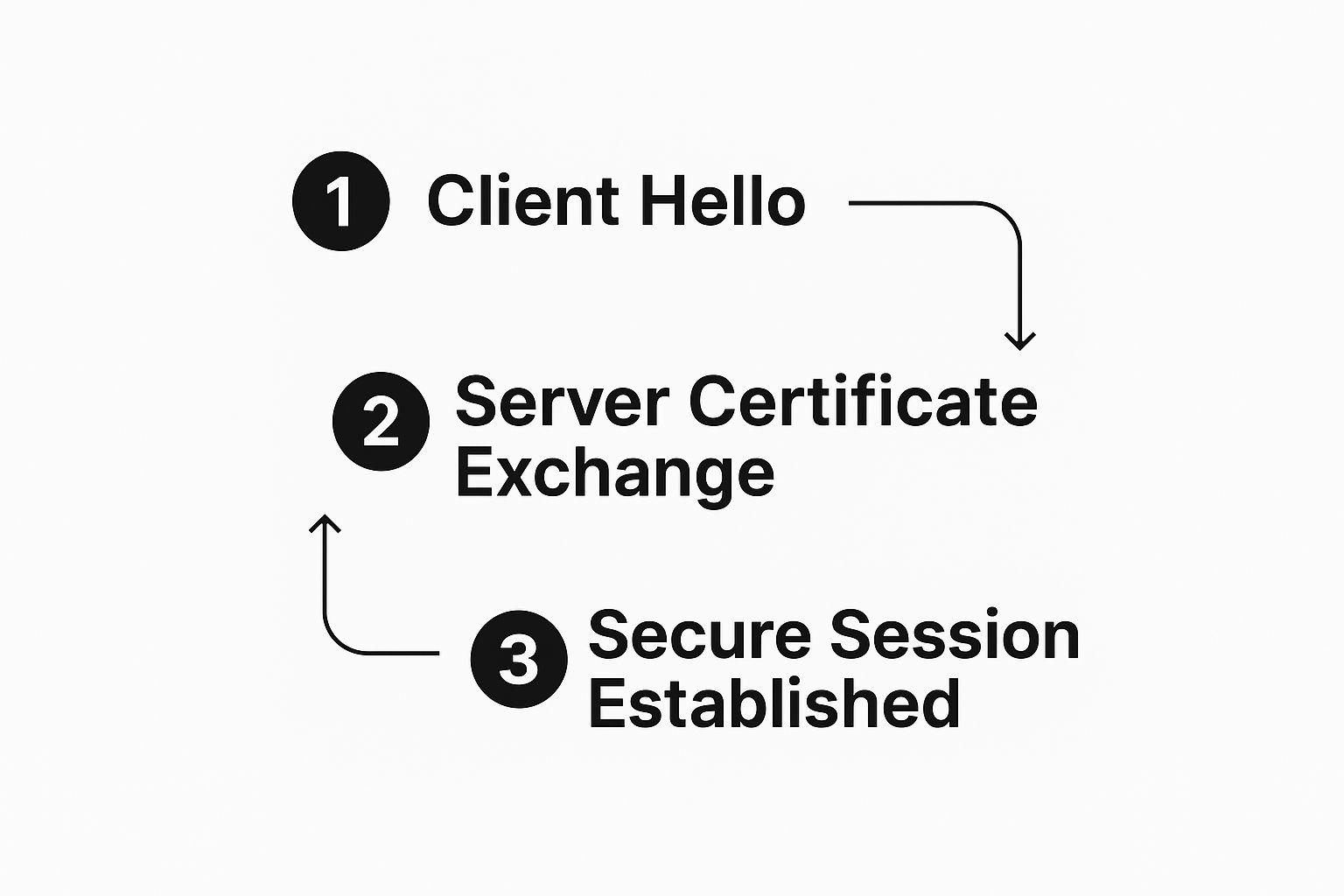
As you can see, the process starts with a simple greeting, moves to a verified certificate exchange, and finishes by creating a secure session where all data is protected.
Establishing the Secure Tunnel
After that initial exchange, the browser and server use these keys to create unique, temporary session keys. For the rest of the visit, they'll use symmetric encryption with these keys, which is a much faster and more efficient way to keep the conversation going.
A secure tunnel is now formed between the visitor and your website. Every piece of data—from login credentials to payment details—is scrambled into unreadable code before it leaves the browser and is only unscrambled once it safely reaches your server.
This whole process ensures that even if a cybercriminal managed to intercept the data, it would just look like a bunch of useless gibberish to them. To get a better grasp of how secure communication works at its core, you might want to learn more about end-to-end encryption and how it protects information from start to finish. This is the fundamental security that gives users the confidence to trust your site.
Why Your Website Absolutely Needs an SSL Certificate
It's one thing to understand the mechanics of an SSL certificate, but it's another thing entirely to grasp why your website's success really depends on having one. It all comes down to three things that form the bedrock of your online presence: rock-solid security, user trust, and a healthy boost in search rankings.

Think of it this way: without an SSL certificate, any information swapped between your visitors and your server is completely exposed. It’s like passing a sensitive note in a classroom—anyone can snatch it and read it. SSL encryption wraps that note in an unbreakable code, shielding things like passwords, credit card numbers, and personal details from prying eyes.
This isn't just a "nice-to-have" feature anymore; it's a fundamental part of running a safe website. For a more detailed look at this, our guide on https://onenine.com/how-to-create-secure-website/ walks you through all the essential practices.
Build Instant Trust with Visual Cues
We all make snap judgments online. When it comes to a website, one of the most powerful and instant signals of trustworthiness is that little padlock icon you see in the browser’s address bar, right next to the https://.
When people see those symbols, they instinctively relax. They know their connection is private and their data is safe, which has a huge impact on how they interact with your site.
A secure website makes visitors feel comfortable sticking around, exploring your content, and ultimately, confident enough to make a purchase or submit their information. On the flip side, a glaring "Not Secure" warning from a browser is the digital equivalent of a blaring alarm, sending potential customers scrambling for the exit.
The market reflects this growing need for digital trust. Valued at USD 234.5 million in 2025, the SSL certificate market is expected to more than double, reaching a projected USD 518.4 million by 2032. This boom shows just how non-negotiable encryption has become for businesses of all stripes.
Boost Your Search Engine Rankings
Search engines like Google have a simple mission: give users the safest, most relevant results. Because of that, they actively favor secure websites. In fact, back in 2014, Google made it official—HTTPS is a ranking signal.
What does that mean for you? If your site and a competitor's are neck-and-neck in terms of quality, the one with an active SSL certificate is more likely to snag the higher spot in search results. Securing your site isn’t just good for your users; it’s a critical piece of your visibility strategy.
Beyond just building confidence, having an SSL certificate is one of the foundational technical SEO principles. If you skip it, you're putting yourself at a real disadvantage. At the end of the day, an SSL certificate is a small investment with a big payoff in three key areas:
- Security: It keeps sensitive user data out of the wrong hands.
- Trust: It shows visitors your site is legitimate and cares about their safety.
- SEO: It gives you a leg up in search engine rankings.
Choosing the Right Type of SSL Certificate
Not all SSL certificates are created equal. Just like you wouldn't use a simple padlock to protect a bank vault, you don't use the same type of certificate for every website. The right choice really comes down to what you need to protect and how much trust you need to build with your visitors.
Making a smart decision starts with understanding the main differences between them. The biggest distinction is the validation level—basically, how thoroughly the Certificate Authority (CA) checks you out before handing over the certificate. Let's walk through the different types so you can figure out what's best for you.
The Three Levels of Validation
The easiest way to group SSL certificates is by how they're validated. This process can be as simple as an automated email check or as involved as a full-blown background check on your business.
1. Domain Validation (DV) Certificates
This is the entry-level certificate and by far the most common. A DV certificate simply proves you control the domain name. The CA typically sends an automated email to an address at that domain (like admin@yourdomain.com), and once you click the link, you're good to go.
Because the process is fast and automated—often taking just a few minutes—DV certificates are the most affordable. They're a great fit for blogs, personal portfolios, or any site that isn't collecting passwords, credit cards, or other sensitive data.
2. Organization Validation (OV) Certificates
This is the next step up the ladder. To get an OV certificate, the CA verifies that your organization is a real, legitimate entity. They'll check official business registration documents to make sure your company actually exists.
This extra step provides a higher level of assurance to your visitors, showing them there’s a verified business behind the website. OV certificates are a solid choice for business websites, non-profits, and other organizations that want to build more user trust.
3. Extended Validation (EV) Certificates
EV certificates represent the highest level of trust and security you can get. The background check here is incredibly thorough. The CA conducts a deep dive into your organization to confirm its legal, physical, and operational existence.
While EV certificates used to make the address bar turn green and display the company's name, modern browsers have changed that. Now, users can see the verified company information by clicking the padlock icon. These are the gold standard for e-commerce sites, banks, and any website that handles financial transactions or other high-stakes data.
The demand for both simple Domain Validation (DV) certificates and high-assurance Extended Validation (EV) certificates is on the rise. While DV offers quick, affordable encryption, EV provides the rigorous identity verification that many businesses need. You can see more market analysis on DataInsightsMarket.
Comparing SSL Certificate Validation Levels
To make it even clearer, here's a simple breakdown of how the three validation levels stack up against each other.
| Validation Type | Verification Process | Trust Indicator | Best For |
|---|---|---|---|
| Domain Validation (DV) | Automated check of domain control via email or DNS record. | Basic encryption padlock in the browser address bar. | Blogs, personal sites, and informational websites. |
| Organization Validation (OV) | Verifies domain control and basic business registration details. | Padlock plus organization details visible in certificate info. | Standard business websites, non-profits, and intranets. |
| Extended Validation (EV) | In-depth verification of legal, physical, and operational existence. | Padlock plus the verified organization's name in certificate details. | E-commerce, banking, and sites handling sensitive data. |
As you can see, the right choice depends entirely on the level of trust you need to establish with your audience.
Securing One Domain or Many?
After you've figured out the validation level you need, the next question is about scope: how many domains or subdomains do you need to cover?
-
Single Domain SSL: It does exactly what it says on the tin. This certificate secures one specific domain, like
www.yourwebsite.com. It won't cover any subdomains (likeblog.yourwebsite.com). -
Wildcard SSL: A Wildcard is a great way to secure a domain and all of its subdomains under a single certificate. It uses an asterisk (e.g.,
*.yourwebsite.com) to coverblog.yourwebsite.com,shop.yourwebsite.com, and any other subdomain you create. -
Multi-Domain SSL (SAN/UCC): If you run several different websites, this certificate is a lifesaver. It lets you secure multiple, completely different domain names—like
yourwebsite.com,another-site.net, andmy-new-brand.org—all with one certificate, simplifying management.
Ultimately, picking the right SSL is a balancing act. You have to weigh your budget against the sensitivity of the data you're protecting and the level of confidence you want to give your users. A personal blog will be perfectly fine with a basic DV certificate, but an online store will see a much greater benefit from the trust an EV certificate provides.
How to Get and Install Your SSL Certificate
Ready to get that padlock on your site? Getting an SSL certificate up and running might sound like a job for a developer, but it's become surprisingly simple. For most people, it's now a quick, automated task you can handle right from your hosting account.
The first step in the process is picking a Certificate Authority (CA). These are the trusted organizations that actually issue the certificates. You can go with a free CA like Let's Encrypt, which is a fantastic option for most blogs and small business sites. Or, you can choose a paid commercial CA if you need higher levels of validation or dedicated support.
Next, you have to generate something called a Certificate Signing Request (CSR) on your web server. Just think of the CSR as your official application form. It contains basic info like your domain name and the public key needed for encryption.
The Standard Installation Process
With your CSR in hand, you send it over to the CA you chose. They'll kick off their validation process, which varies depending on whether you're getting a DV, OV, or EV certificate. For a basic Domain Validation (DV) certificate, this can be as simple as clicking a link in an automated email.
Once they've confirmed you own the domain, the CA sends you the certificate files. The final piece of the puzzle is installing these files on your server. The exact steps can differ based on your server setup. If you're looking for a more detailed walkthrough, our guide on how to configure an SSL certificate has you covered.
This traditional route gives you a lot of control, but it does require some technical know-how. Thankfully, there’s a much easier way.
Pro Tip: Modern web hosts have completely changed the game. Many now bundle free SSL certificates with their plans and let you install them with a single click right from your control panel.
One-Click SSL Installation for Beginners
The vast majority of good web hosting companies now offer one-click SSL installations. This makes website security accessible to absolutely anyone, no matter their technical skill level.
This streamlined approach takes care of all the tricky steps—like generating the CSR, validating your domain, and installing the files—for you. It all happens automatically in the background.
Here's how it usually works:
- Log into your hosting account's control panel, which might be cPanel or a custom dashboard.
- Find the security or SSL section. You’re looking for something labeled "SSL/TLS Status" or "Let's Encrypt SSL."
- Choose the domain you want to secure and click "Install" or "Activate."
And that's it. Seriously. Your host handles the entire setup and even takes care of renewing the certificate automatically before it expires. This "set it and forget it" approach is why it's the most practical and popular choice for most website owners today. Your site stays secure without you having to lift a finger.
The Future of Web Security and Encryption
When it comes to website security, the goalposts are always moving. It's a journey, not a destination. While we’ve been talking about SSL this whole time, the technology has actually grown up and is now known as Transport Layer Security (TLS).
The name "SSL certificate" just stuck around because everyone knows it. But rest assured, when you get one today, you're getting the latest, most secure TLS encryption.
This evolution is part of a bigger industry-wide push to make the internet a safer place for everyone. One of the biggest trends driving this change is the move toward shorter and shorter certificate lifespans. Why? A shorter validity period means a smaller window of opportunity for attackers to exploit a compromised certificate.
Tighter Security Through Shorter Lifespans
This isn't some far-off idea; it's happening right now. The industry is actively pushing for shorter certificate lifecycles to beef up security across the board.
By 2025, most SSL certificates will have a maximum validity of just six months. By 2029, that's expected to shrink even further to only 47 days, making automated renewal an absolute necessity for anyone running a website. You can read more about these upcoming changes in SSL/TLS policies on electroiq.com.
This rapid shift means that staying on top of your certificate's lifecycle is more critical than ever. Luckily, getting a certificate isn't the headache it used to be. The rise of free Certificate Authorities and simple one-click installations from hosting providers has put powerful encryption within everyone's reach, and they often handle the renewal process for you.
Ultimately, understanding what an SSL certificate is means seeing its place in this constantly changing field. Installing one isn't just about ticking a box. It's about joining a global effort to build a more secure digital world. It's a foundational step that aligns with our full guide to website security best practices, ensuring your corner of the internet remains a trusted space for your visitors.
Still Have Questions? Let's Clear Things Up
Even with the basics down, a few common questions always seem to surface. Let's tackle those head-on to make sure you've got a complete picture of how SSL certificates work.
What Is the Difference Between SSL and TLS?
You'll often see the terms SSL and TLS used interchangeably, which can be confusing. Here's the simple breakdown: TLS (Transport Layer Security) is the new and improved version of the original SSL (Secure Sockets Layer) protocol.
For years, the internet has been running on the more secure TLS technology. But the old name stuck. So, when you buy an "SSL certificate" today, you're actually getting a modern TLS certificate with the strongest encryption available. Think of it like buying "Kleenex"—it's the brand name everyone knows, even if you're getting a different brand of tissue.
Can I Get an SSL Certificate for Free?
Yes, you absolutely can!
Organizations like Let's Encrypt have been game-changers, offering free Domain Validated (DV) certificates. These are perfect for blogs, personal portfolios, or small business sites that don't process sensitive information like credit card payments. They provide the same powerful encryption as paid certificates.
So why would anyone pay? Paid certificates often come with extra perks, like higher levels of validation (OV and EV) that verify your business identity, plus customer support and warranties. The right choice really boils down to how much trust and assurance your specific website needs to build with its visitors.
What Happens if My SSL Certificate Expires?
This is something you definitely want to avoid.
If your SSL certificate expires, visitors will be met with a prominent security warning in their browser, labeling your site as "Not Secure." This instantly damages user trust and can cause them to leave your site immediately.
Forgetting to renew is a critical mistake. That browser warning is a massive red flag for visitors, telling them their connection isn't private. Fortunately, most web hosts and certificate providers offer auto-renewal to prevent this from ever happening, so your site stays secure without any hiccups.
Need a hand keeping your site's security locked down and your SSL certificate current? At OneNine, we take the hassle out of website management so you can focus on what you do best. Learn more at https://onenine.com.


