
The choice between Google Sites and WordPress really boils down to one thing: priorities. Are you looking for something simple, fast, and completely free? That’s Google Sites. Or do you need a powerful, professional platform that can grow with you? That’s WordPress.
It’s about deciding between effortless setup and long-term ambition.
Choosing Your Website Platform
Picking the right platform is one of the first big decisions you'll make for your online presence, and it's a choice that can save you a lot of headaches later on. Google Sites and WordPress were built for very different people with very different goals.
Think of this as the quick-start guide to figuring out which one fits your needs. We'll get into the nitty-gritty details later, but for now, let’s get you pointed in the right direction. For an even deeper dive, our complete guide to https://onenine.com/google-sites-vs-wordpress/ covers everything.
Core Differences At a Glance
Sometimes seeing things side-by-side just makes it click. This table breaks down the most important differences you need to consider before committing to either platform.
| Criterion | Google Sites | WordPress |
|---|---|---|
| Best For | Internal projects, simple portfolios, temporary event pages | Businesses, blogs, e-commerce, professional websites |
| Ease of Use | Extremely simple, intuitive drag-and-drop interface | Moderate learning curve, but highly user-friendly |
| Cost | Completely free (optional custom domain cost) | Requires hosting & domain (starts ~$3/month) |
| Customization | Very limited; basic templates and color schemes | Nearly infinite via thousands of themes and plugins |
| SEO Potential | Basic on-page options, not ideal for ranking | Advanced control with powerful SEO plugins |
| Ownership | Hosted by Google; subject to their terms and policies | Self-hosted; you have 100% ownership and control |
After looking at the table, you should have a much clearer picture. Google Sites is the clear winner for simplicity and cost, while WordPress dominates in customization and professional potential. Seeing how other platforms compare can also be helpful; this Wix vs Squarespace vs WordPress comparison looks at similar factors that are worth considering.
The infographic below puts some numbers to these differences, showing things like market share and how quickly you can get a site up and running.
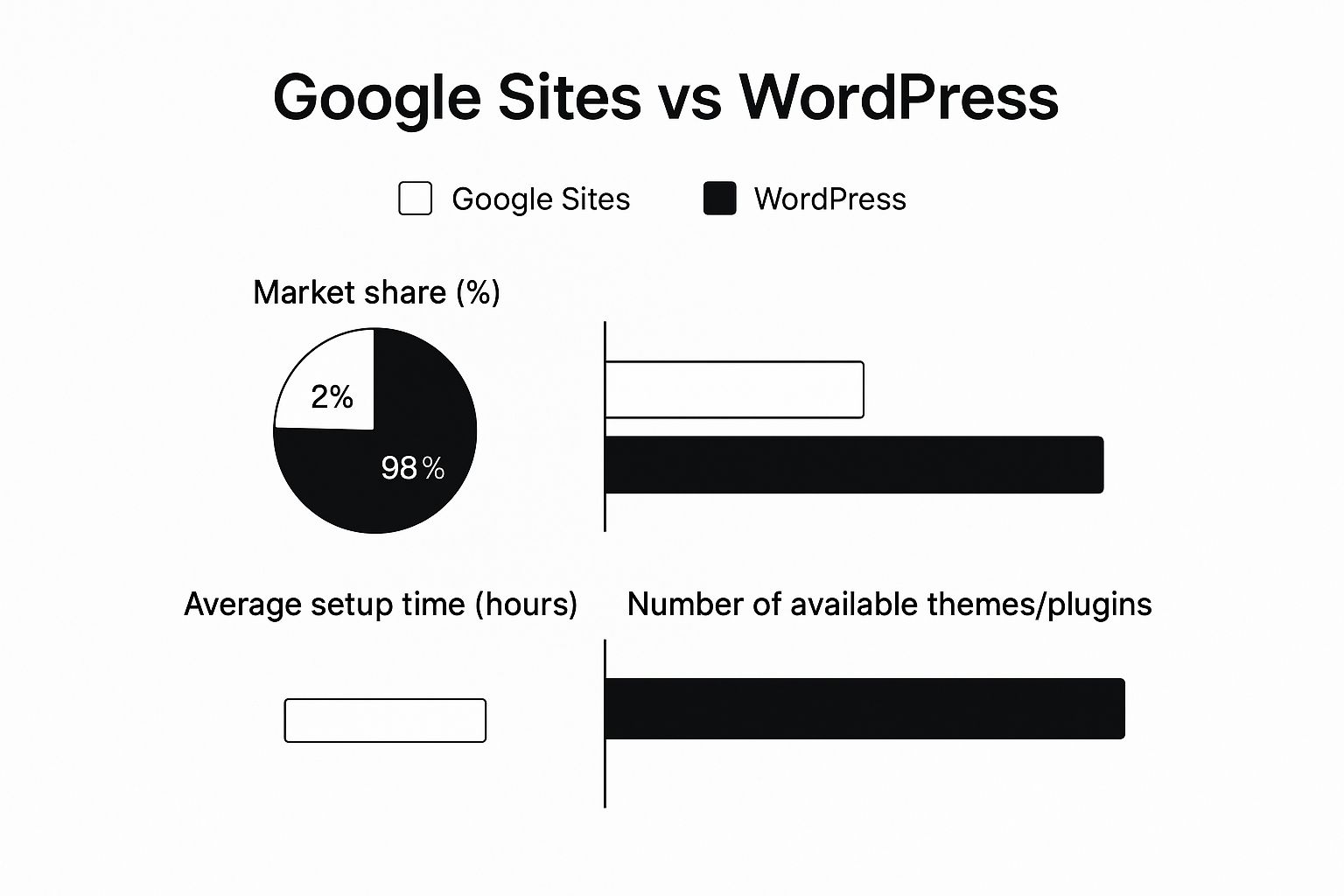
The data really highlights the contrast between the two. WordPress's massive market share is a direct result of its powerful, flexible ecosystem. On the other hand, Google Sites is all about getting something online, fast.
Understanding the Core Differences
Before we dive into a feature-by-feature breakdown, it's crucial to understand the fundamental philosophies behind Google Sites and WordPress. They weren't just built differently; they were built for entirely different reasons, and that context shapes everything about them.
Google Sites is what you'd call a closed-ecosystem website builder. Imagine it as a simple, self-contained toolkit. Everything you need is right there in the box, designed to work together perfectly with other Google products like Docs, Sheets, and Drive. The goal is to get you from zero to a functioning site as fast as humanly possible, with no technical skills needed.
What This Means for You
This closed system is all about simplicity. You get a clean drag-and-drop interface that’s incredibly easy to learn. But you have to play by Google's rules. This is fantastic for things like internal company wikis, quick event pages, or a basic personal portfolio where speed is more important than unique features.
The catch? You trade control for convenience. You can't add functionality that Google hasn't already built-in, and your design options are limited to their selection of templates and styles.
WordPress, on the other hand, is an open-source Content Management System (CMS). "Open-source" is the magic word here. It means the underlying code is public, and a massive global community of developers can build upon it, modify it, and extend it. This makes WordPress all about flexibility, ownership, and near-infinite customization.
The Power of Open Source
With WordPress, you aren't just using a tool—you're building on a platform. You have the freedom to take your website in any direction you can dream up. This is possible because of its gigantic ecosystem of themes for design and plugins for functionality.

When you put them side-by-side, the intended user for each becomes crystal clear. Google Sites is for the quick, simple, and often temporary project. WordPress is for literally everything else. It’s no accident that it powers an incredible 64.3% of all websites with a known CMS, largely thanks to its library of over 59,000 free plugins.
This is why learning how to install a plugin in WordPress is a game-changer. Each one adds a new power to your site, something that a closed system like Google Sites can never match. Your decision really boils down to a simple question: do you need a simple tool or a powerful, scalable platform?
Comparing Ease of Use and User Experience
When you pit Google Sites against WordPress on user-friendliness, you’re really looking at two different schools of thought. One is all about speed and simplicity, while the other offers a ton of power in exchange for a bit of a learning curve. Which one is right for you boils down to your technical comfort level and how much time you want to spend getting started.
Google Sites is made for the true beginner. The interface is a simple drag-and-drop system that feels natural if you've ever used Google Slides or Docs. You can genuinely have a clean, working site up and running in minutes, not hours. No code, no fuss.
This is its biggest selling point. Need to pop in a Google Doc, add a map, or embed a YouTube video? It's just a click away. For someone who needs a quick internal project page or a simple portfolio, this workflow is tough to beat.
The WordPress Learning Curve
WordPress, on the other hand, requires a little more setup. While most hosting providers have made installation a one-click affair, you still have to get your head around things like hosting, domains, and the WordPress dashboard itself. It’s a one-time hurdle, but it can feel like a big one for first-timers.
Once you’re past that initial setup, though, the day-to-day experience is much more user-friendly than it used to be. The modern Block Editor (often called Gutenberg) gives you a visual, block-based way to build pages and posts, which has really closed the gap with simpler website builders.
The real difference is in the setup versus daily use. WordPress has a slightly steeper climb to get started, but once you're going, the content creation tools are surprisingly visual and easy for everyday tasks.
Practical Workflow Scenarios
Let's look at how this plays out in the real world with two common tasks:
- Scenario 1: Creating a Quick Project Page: With Google Sites, you could create a new site, slap on a title, embed a project timeline from Google Sheets, and share the link with your team in under 10 minutes. It's all seamless and tied directly into the Google tools you already use.
- Scenario 2: Publishing an SEO-Optimized Blog Post: In WordPress, this takes more thought but gives you more control. You'd write your post in the Block Editor, add your images, and then use a plugin like Yoast SEO to nail your title, meta description, and keywords. The whole process is built to give you total control over how your content shows up on Google—something Google Sites just doesn't offer.
In the end, Google Sites provides an incredible "out-of-the-box" experience for simple sites with virtually no learning required. WordPress asks for a bit of your time upfront to learn the ropes, but it pays you back with a much more powerful and flexible platform for the long haul. Your choice really depends on what you value more: immediate simplicity or long-term capability.
Customization and Design: Where The Two Paths Split
When it comes to customization, the Google Sites vs. WordPress debate really heats up. This is where you see their fundamental philosophies in action. Google Sites gives you simplicity and control, while WordPress hands you the keys to a nearly infinite, open-source world.
Think of Google Sites as a high-end, prefabricated home. It's clean, well-designed, and everything works together flawlessly from the moment you move in. You can pick from a few themes, swap out colors, and choose your fonts, but you’re always working within the blueprint Google has laid out. It’s a great way to guarantee a good-looking site and avoid design blunders, but it does put a hard cap on how creative you can get.
The WordPress Universe: Build Anything You Can Imagine
WordPress, on the other hand, is like being given a plot of land along with a full set of architectural tools and blueprints. You start with the core software—the foundation—and from there, you can build literally anything you want using themes for the look and plugins for the features.
This is the real magic of WordPress. The sheer size of its ecosystem is what makes it the engine behind such a huge chunk of the web. As of 2025, WordPress powers a staggering 43.4% of all websites, and that dominance comes from its incredible flexibility. This is all thanks to a library of over 70,000 plugins and 30,000 themes that let you shape your site for any purpose. You can learn more about the scale of WordPress and see just how big its footprint is.
Putting Customization to the Test
Let’s look at a few real-world scenarios to see how this plays out as a website needs to grow:
- A Booking System for a Pro: A photographer needs a calendar where clients can see open slots, book a photoshoot, and pay the deposit. With WordPress, a plugin like Amelia or Bookly gets this done in under an hour. This just isn't an option on Google Sites.
- A Private Membership Area: A business coach wants to build a members-only section with premium video courses and downloads. A WordPress plugin like MemberPress can create a secure, fully-featured membership system. Google Sites has nothing that comes close.
- A Full-Fledged Online Store: A local shop wants to start selling its products online. By adding the WooCommerce plugin, a WordPress site becomes a robust e-commerce platform that handles inventory, shipping, and taxes. This is worlds away from what Google Sites is built for.
The official WordPress plugin directory gives you a taste of this limitless potential.
This image is just a tiny snapshot of the specialized tools available, from sophisticated SEO optimizers to social media dashboards. The bottom line is this: if you can dream up a feature for your website, a WordPress plugin for it probably already exists.
In the end, it really boils down to your ambition. Google Sites is fantastic for getting a clean, simple, and static web presence online quickly. WordPress is what you choose when you need a site that can evolve and grow with your vision, without ever running into a wall you can't build past.
Evaluating SEO and Marketing Potential
When you get down to it, the debate between Google Sites and WordPress for online visibility isn't just about a feature list—it's about a fundamental difference in what each tool was built to do. If getting traffic from search engines is even a minor goal for your project, this is probably the most important distinction to understand. A website's ability to rank on Google is a direct line to its success.
A Google Site can be indexed by search engines, and it does cover the bare-bones basics. You can change your page titles, write a meta description, and create custom URLs. That's enough to get your site to show up if someone types its exact name into Google, but that's about it. It gives you almost no tools to compete in a crowded space.
This is where you hit the platform's ceiling, and you hit it hard. Google Sites simply doesn't offer any advanced SEO controls.
- No Schema Markup: Forget about adding structured data. You can't tell Google your content is a recipe, a review, or an event, which can seriously limit how you show up in search results.
- No Sitemap Control: You have no say over your XML sitemap. This is a crucial file that tells search engines which of your pages are important and how to crawl them.
- Limited Integrations: There’s no way to connect your site to powerful SEO suites like Semrush or Ahrefs to track your performance or do any real keyword research.
WordPress: An SEO Powerhouse
WordPress, on the other hand, was practically built for visibility. The core software is already pretty search-engine-friendly out of the box, but its real magic lies in the massive ecosystem of plugins. Tools like Yoast SEO or Rank Math can turn a basic website into a finely-tuned marketing machine, giving you control over nearly every tiny detail.
With WordPress, you're not just hoping to be visible; you're actively optimizing to rank. We're talking about managing complex redirect strategies, optimizing every image for speed, and perfecting how your content looks when shared on social media to pull in traffic from everywhere.
The difference is simple: a Google Site can be found, but a WordPress site can be engineered to dominate search results. For any business, creator, or marketer who cares about organic growth, WordPress is the only real contender.
This level of control isn't just nice to have—it's essential if you're trying to rank for competitive keywords. You can analyze your content in real-time as you write, sniff out and fix technical SEO problems, and build a site structure that Google’s algorithms love. It's a strategic depth that a closed system like Google Sites can never offer, which makes the google website vs wordpress decision a no-brainer for anyone serious about marketing.
Breaking Down the True Cost of Each Platform
When you’re weighing Google Sites against WordPress, the price tag is often the first thing people look at. But "free" rarely tells the whole story. The real cost isn't just about the upfront price; it’s about what you get for your money and what you'll need down the road.
Google Sites is as straightforward as it gets: it's completely free. If you have a Google account, you can get a site online without spending a dime. The only thing you might pay for is a custom domain, which usually runs about $12-$15 a year. That's it. No hidden fees, no required add-ons.
WordPress: The Cost of Ownership
WordPress plays by a different set of rules. The core software is free and open-source, which is incredible, but to get a site live, you need to invest in a few key pieces. Think of these not as costs, but as payments for complete ownership and the freedom to grow.
Here’s what you'll need for a self-hosted WordPress site:
- Web Hosting: This is the plot of land on the internet where your website lives. Shared hosting is surprisingly affordable, often starting between $3 and $10 per month.
- Domain Name: This is your site's address. Many hosts will even throw in a free domain for the first year. After that, expect to pay around $15 per year.
- Premium Themes & Plugins (Optional): You can build a great site with free tools, but sometimes you need more power. A premium theme or plugin might cost a one-time fee of $59 or an annual license, but they often solve very specific problems.
For a serious project or small business, a solid WordPress site can be up and running for as little as $100 to $200 for the first year. It's a small price to pay for a professional platform that you own outright and can scale infinitely. That’s an advantage a closed system like Google Sites just can't offer.
To get a clearer sense of the numbers involved, our guide on the real website design cost breaks down the investment even further.
So, Which Platform Is Right for You?
Picking between Google Sites and WordPress really boils down to what you're trying to accomplish. This isn't just a technical choice; it's about matching the tool to your goals for the website. Let's look at who each platform is truly built for.
By framing the decision around real-world needs, you can cut through the noise and confidently choose the right path before investing your time and effort.
Who Should Choose Google Sites
Google Sites shines when your top priorities are speed and simplicity. It’s the perfect tool for getting a functional, no-frills site online in minutes, especially for internal or short-term projects where you just need to share information without any technical headaches.
Think about using Google Sites if you're:
- A teacher putting together a resource page for your class, embedding Google Docs, Slides, and a calendar.
- An employee creating an internal project wiki or team hub to keep everyone on the same page.
- An individual who needs a quick, simple portfolio for a job application or a single event.
Google Sites is all about utility. It’s for creating quick, functional, and often temporary digital spaces. It solves a specific problem incredibly well but isn't designed for growing a public-facing brand or business.
Who Should Choose WordPress
WordPress is the go-to platform for anyone building a serious, public-facing website meant to grow, engage an audience, and establish professional credibility. Its real power is its scalability—it can expand and adapt to whatever you dream up.
WordPress is your best bet if you are:
- A small business owner who needs a professional website to attract and convert customers.
- A blogger looking to build a dedicated audience and eventually monetize your content.
- An artist or creator wanting to sell your work directly to fans through an online store.
- Anyone for whom SEO and digital marketing are non-negotiable for success.
When you're weighing your options, it's also smart to look at the broader landscape of the best CMS for small business options to see how WordPress fits in. Its market dominance tells a powerful story. Back in 2014, when most of the web didn't use a CMS, WordPress already had a 21% market share. Today, it powers over 43% of all websites, a testament to its flexibility and power. You can explore more about this incredible growth on WordPress.com.
At the end of the day, the "Google website vs WordPress" decision is pretty clear-cut. Go with Google Sites for simple utility. Choose WordPress to build a lasting digital asset.
At OneNine, we live and breathe WordPress. We help businesses build, manage, and grow professional websites that get real results. If you're ready to create an online presence that works as hard as you do, we're here to help. Get in touch with us today to get started.


