At its core, ecommerce migration is the process of moving your online store from one platform to another. This isn't just a simple copy-paste job; it involves transferring all your critical data—products, customer information, order history, and more—to a new digital home.
Think of it like moving a thriving brick-and-mortar boutique. You wouldn't just throw everything in a truck and hope for the best. You'd carefully pack your inventory, notify your loyal customers of the new address, and set up the new space to be even better than the last. That's what a professional migration service does for your online business.
Why Businesses Need Ecommerce Migration Services
So, why would you even consider such a big move? It almost always comes down to one thing: growth.
The platform that got you started might not be the one that can take you to the next level. As your business expands, you might feel like the walls of your digital storefront are closing in. Maybe the checkout process is sluggish during peak traffic, your inventory management is a mess, or you can't add that cool new feature you’ve been eyeing because your platform just doesn't support it.
This is where migration services come in. They are the expert moving crew for your digital store. They handle the entire complex process, making sure you don't lose any precious data or sales momentum in the transition.
Key Signs You Have Outgrown Your Current Ecommerce Platform
Recognizing that your platform is holding you back is the first step. Many businesses experience similar growing pains right before they decide to make a switch.
This table breaks down the common symptoms, how they impact your business, and what a platform migration can solve.
| Symptom | Business Impact | Migration Solution |
|---|---|---|
| Slow Site Speed & Poor Performance | High cart abandonment rates, poor user experience, and lower search engine rankings. | A modern platform built for speed and scalability can handle higher traffic volumes without slowing down. |
| High Maintenance & Operating Costs | Profits are eaten up by expensive plugins, custom developer work, and constant bug fixes. | A new platform can reduce reliance on costly add-ons and provide more stable, out-of-the-box functionality. |
| Lack of Modern Features | Inability to integrate with new sales channels (like social commerce) or offer personalized shopping experiences. | Access to a richer app ecosystem and native features that support modern marketing and sales strategies. |
| Security Vulnerabilities | Outdated or poorly maintained platforms are prime targets for data breaches, risking customer trust and brand reputation. | Moving to a platform with robust, up-to-date security protocols protects your data and your customers. |
When you start hitting these walls, it's a clear signal that your current platform has become more of a liability than an asset.
An ecommerce migration isn't just a technical task; it's a strategic business decision. It's about trading a platform that limits you for one that empowers you to scale, innovate, and compete more effectively.
This push for better, more powerful online infrastructure is happening everywhere. The global market for cloud migration services, which includes this kind of ecommerce replatforming, is expected to explode from USD 21.6 billion in 2025 to over USD 251 billion by 2035. That's a massive jump, reflecting a growth rate of about 28% each year.
It's clear that businesses are realizing that their digital foundation is critical for success. You can discover more insights about the cloud migration market forecast to see just how big this trend is.
The Six Phases of a Successful Migration
Moving your ecommerce store isn't a one-and-done deal. It’s a process, and a good one is broken down into clear, logical steps. Think of it less like flipping a switch and more like a carefully planned move to a bigger, better house.
Professional ecommerce migration services follow a proven roadmap with six phases. This structured approach takes the chaos and guesswork out of the equation, making sure every detail is handled correctly from start to finish.
Phase 1: Discovery and Strategic Planning
This is the "why" phase. Before a single line of code is written, we need to get to the bottom of what you want to achieve. Are you tired of a slow, clunky website? Are platform fees eating into your profits? Or do you need better marketing tools to grow?
Your migration partner will sit down with you to map out the project, define what success looks like (KPIs), and help you choose the right platform for your goals. We'll take a hard look at your current setup, from your product catalog's complexity to all the third-party apps you rely on.
Phase 2: Data Mapping and Preparation
With a solid plan, the next step is all about your data—your products, your customers, and all that valuable order history. This phase is like labeling the moving boxes. We audit everything and create a "map" that shows exactly where each piece of data from your old store will go in the new one.
This is a critical step to prevent data from getting lost or jumbled. For example, a custom product field you created in WooCommerce has to be mapped perfectly to a corresponding metafield in Shopify. Careful prep here ensures nothing important gets left behind. For a deeper dive, our website migration checklist provides the ultimate guide for a successful transfer.
Phase 3: Design and Development
Now for the fun part: building your new storefront. While you could just copy your old design, most merchants see this as the perfect opportunity for an upgrade. A fresh design can dramatically improve the customer experience, make your site look great on mobile, and ultimately boost your conversion rates.
During this phase, developers will build out the theme and set up any special features or apps we identified in the planning stage. All this work happens in a safe "staging" environment, so your current store can keep running without any interruptions.
A migration isn't just about moving data; it's about building a better business. Each phase, from planning to launch, is an opportunity to refine processes, improve user experience, and set the stage for future growth.
This visual shows that familiar journey: you start noticing problems like a slow site, and platform migration becomes the clear path forward for growth.
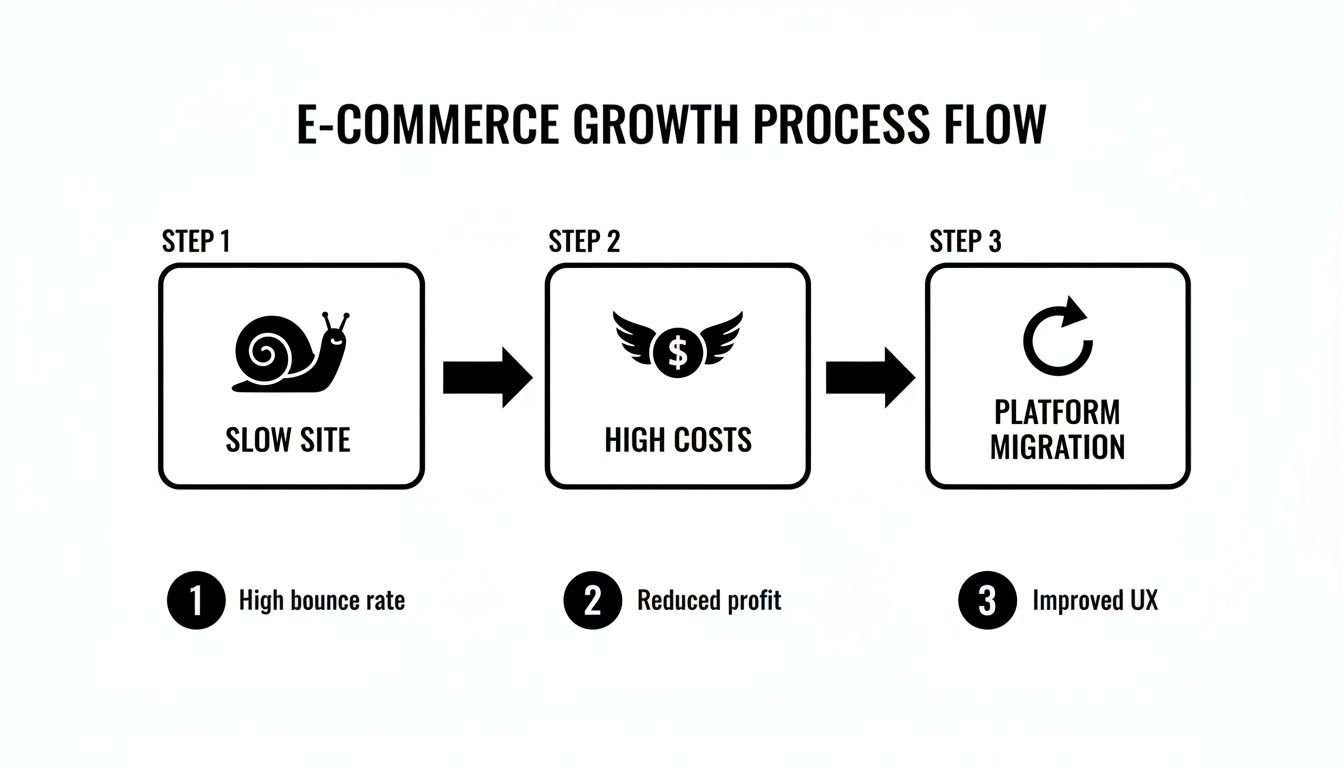
It highlights how moving platforms is a strategic solution when performance issues and high costs start holding your store back.
Phase 4: Rigorous Testing and Quality Assurance
Before your new site goes live, it has to get through a tough round of testing. This is one of the most important phases, where a quality assurance (QA) team tries to break everything. They hunt for bugs, test every link, and look for any weird inconsistencies.
The team runs a full gauntlet of tests:
- Functionality Testing: Do the cart, checkout, and payment options all work perfectly?
- Data Integrity Checks: Are all products, customers, and old orders showing up correctly?
- Cross-Browser and Device Compatibility: Does the site look and function great on Chrome, Safari, and Firefox, on both a desktop and a phone?
- Performance Testing: How fast do the pages load? We’re aiming for snappy.
Phase 5: The Go-Live Sequence
Once the new site has passed every test and you’ve given the final thumbs-up, it’s launch time. This is a carefully coordinated event, usually scheduled for a time when your store has the least amount of traffic—like the middle of the night—to avoid disrupting any customers.
The "go-live" moment is when we point your domain name to the new site. For your customers, the switch is seamless. One minute they're on the old site, the next they're on the new one, and they never even noticed a hiccup.
Phase 6: Post-Launch Optimization
The job isn’t done just because the site is live. For the first few weeks, your migration partner will be watching the new store like a hawk. We'll monitor performance, keep an eye out for any errors, and double-check that all your analytics and tracking codes are working as they should.
This final phase makes sure the transition is stable and sets you up for success. Any little issues that pop up are fixed right away, and your team gets the training they need to confidently run the new platform. If you're curious about the technical steps, this guide on how to migrate a WordPress site seamlessly offers a good look at a similar process.
A Look at Common Ecommerce Platform Migrations
Choosing a new ecommerce platform is a lot like moving your brick-and-mortar shop to a new location. Are you looking for a turnkey spot in a high-traffic mall, or do you need a custom-built warehouse with unique features? Each platform has its own architecture, strengths, and quirks. The migration process isn't just about packing up boxes of data; it's about making sure your business runs smoothly in its new digital home.
This is where the real expertise of ecommerce migration services comes in. A good partner understands the nuances of each platform, anticipating the roadblocks and ensuring that the essence of your business isn't lost in translation. They help you hit the ground running, taking full advantage of your new platform’s features from day one.

From WooCommerce to Shopify
This is probably the most well-trodden path in the ecommerce world. Businesses often make the leap from WooCommerce to Shopify when they're tired of managing server updates, security patches, and plugin conflicts. They're looking for a more stable, hands-off solution so they can get back to actually running their business.
The biggest puzzle to solve here is the plugins. A typical WooCommerce store might rely on a dozen or more plugins for critical functions. The core of the migration project involves finding the right Shopify App or native feature to replace each one.
- Key Consideration: The app ecosystem is your new best friend. You'll need to carefully vet Shopify apps to replicate things like your loyalty programs, complex product options, or subscription models.
- Data Nuances: Your products, customers, and orders will usually move over without much fuss. The tricky part is often the custom code and shortcodes embedded in WooCommerce product descriptions, which need to be cleaned up to display properly on Shopify.
- The Big Win: Once you're on Shopify, you'll spend far less time on technical maintenance. That newfound freedom means more time and energy for marketing, sales, and growing your brand.
Upgrading to a Custom Solution
For businesses with truly unique needs, moving to a custom-built platform is the ultimate power move. This is the path for large enterprises or innovative brands whose business models simply can't be squeezed into an off-the-shelf box. Think complex product configurators, highly specialized B2B portals, or one-of-a-kind integrations.
A custom migration isn’t just a platform switch; it's the creation of a proprietary asset. You're building a system designed from the ground up to fit your exact workflows, giving you a competitive edge that’s impossible for others to copy.
Here, the focus is less on "migrating" and more on "rebuilding." The process is intensive, demanding a detailed architectural plan and deep technical skill to build the new platform from scratch while ensuring the data structure maps perfectly. There's no template to follow, which makes having an experienced development partner absolutely critical.
Moving Between Hosted Platforms like Shopify and Webflow
Hopping between two hosted platforms—like Shopify, BigCommerce, or Webflow—comes with its own unique set of rules. You don't have to worry about servers, but you do have to play within the sandbox each platform provides.
For instance, a brand might move from Shopify to Webflow Commerce to get more design flexibility and better content management. Webflow’s visual designer is a creative dream, but its ecommerce app ecosystem isn't as vast as Shopify's. This is a classic trade-off.
A thorough feature audit is non-negotiable here. Before you make a move, you have to ensure every critical function, from your payment gateways to your shipping calculators, has a solid equivalent on the new platform. Choosing the right platform is a huge decision, and our ecommerce platform comparison can help you weigh the pros and cons to see what you'll gain—and what you might have to leave behind.
How to Mitigate Common Migration Risks
Let's be honest—the thought of moving your entire online store can be nerve-wracking. The fear of something breaking is the number one reason businesses put off a necessary migration. But here's the good news: with a solid plan, every one of those "what if" scenarios is completely manageable.
The biggest fears usually circle around three things: losing your hard-earned search engine rankings, losing precious business data, and watching your store go offline for an extended period. These are real concerns, but they all have straightforward, proven solutions.
Let’s break down how to tackle these risks head-on.
Protecting Your SEO Traffic
What’s the point of a shiny new website if your customers can’t find it on Google? A drop in search traffic is a serious risk, but it's also entirely preventable.
The secret weapon here is a comprehensive 301 redirect map. Think of it as leaving a forwarding address for every single page of your old site. This map tells search engines precisely where the new version of each product, category, and blog post lives, ensuring that all the SEO value you've built up over the years gets transferred over.
Without this, search engines see a bunch of dead ends, and your rankings can take a nosedive. A meticulous redirect strategy isn't just a good idea; it's non-negotiable.
Ensuring Data Integrity
Your customer lists, order history, and product catalogs are the heart of your business. The thought of losing any of that data is terrifying, but a careful, step-by-step process ensures nothing gets left behind.
It all comes down to one word: validation. Before anything is moved, a full data audit identifies every piece of information, from simple product SKUs to complex customer fields. This creates a blueprint for a perfect transfer.
Pro Tip: Always insist on a "test migration." This involves moving a small slice of your data to the new platform first. It’s your chance to poke around in a safe, offline environment and confirm that everything—products, customers, orders—looks exactly as it should.
This trial run is your ultimate safety net. It lets you catch and fix any mapping errors or glitches before the main event, giving you total confidence when it's time to move everything.
Preventing Downtime and Budget Creep
The days of taking your store offline for a migration are long gone. The entire new site is built and tested on a separate, private "staging" server while your current store continues to operate and take orders as usual.
The actual launch is just a quick switch, where your domain name is pointed to the new, fully vetted site. This is typically scheduled for your quietest time of day (like 2 AM on a Tuesday) to make the transition virtually invisible to your customers.
To help you keep everything on track, here's a quick checklist for managing the most common migration risks.
Migration Risk Mitigation Checklist
This table breaks down the most frequent migration headaches and gives you a clear strategy to prevent them before they start.
| Potential Risk | Primary Cause | Mitigation Strategy |
|---|---|---|
| SEO Ranking Drop | Broken links and lost "link juice" from old URLs. | Create a comprehensive 301 redirect map that maps every old URL to its new counterpart. |
| Data Loss or Corruption | Incompatible data fields or incomplete data mapping. | Conduct a full data audit upfront and perform a test migration with a sample data set. |
| Extended Downtime | Technical issues during the live launch process. | Build and test the new site on a staging server; schedule the launch during off-peak hours. |
| Budget Overruns | Unplanned features or changes added mid-project ("scope creep"). | Create a detailed Statement of Work (SOW) during the discovery phase and stick to it. |
| Security Vulnerabilities | Failure to configure the new platform securely. | Adhere to security best practices and ensure all payment gateways meet compliance standards. |
By proactively addressing these potential issues, you turn a high-stakes project into a smooth and predictable process. Don't forget about the technical side of security, either. To make sure your new setup handles customer payment data correctly, this PCI DSS compliance checklist is an invaluable resource.
Setting Realistic Migration Costs and Timelines
Let's get straight to the two questions every business owner asks: "How much is this going to cost?" and "How long will it take?" While there's no single price tag, the answers are far from a total mystery. The final cost and timeline for ecommerce migration services really boil down to three things: how much data you have, how custom your design is, and how many other tools you need to connect.
Think of it like moving your brick-and-mortar store. Moving a small boutique across the street is a simple weekend job. But moving a giant department store with a massive warehouse and specialized fixtures to a new, custom-built location? That's a whole different level of planning and effort.
Your online store is no different. A small shop with a few hundred products using a standard template is one thing. A massive enterprise site with 50,000 SKUs, intricate customer histories, and a dozen custom API connections is a much bigger undertaking.
What Really Drives the Price Tag?
Understanding the main cost drivers helps you build a realistic budget. It’s not just about paying for a new platform subscription; it's about the hours of skilled work required to rebuild your business engine without a hitch.
-
How Much Stuff You Have (Data Volume): The sheer amount of information you need to move—products, customer accounts, order history—is a huge factor. Moving 1,000 products is pretty straightforward. Migrating 100,000 products, each with unique variants, images, and custom data fields? That requires a serious plan and a ton of careful validation.
-
How Fancy You Want It (Design & Customization): If you're happy with a clean, pre-built theme, you’ll stay on the lower end of the cost spectrum. But if you're after a completely unique user experience with custom-coded page layouts and slick interactive features, you're adding significant design and development hours to the clock. We break down how these choices add up in our guide to the cost of an ecommerce website.
-
How Many Connections You Need (Integrations): Your store doesn't operate in a vacuum. It’s connected to tools for email marketing, accounting, inventory management, and customer support. Every single one of those connections has to be rebuilt on the new platform. Sometimes it's a simple click, but other times it requires custom code to get them talking to each other again, which adds to both the cost and the schedule.
So, How Long Does This Actually Take?
Every project has its own quirks, but we can give you some solid benchmarks to work with. These estimates assume you're working with a professional team that handles migrations day in and day out.
Think of a migration not as a cost, but as an investment in your company's future. Getting a clear handle on the timeline and budget lets you plan properly and gets your whole team on the same page from the start.
Here’s a rough guide to what you can expect:
| Business Size | Typical Product/Order Count | Estimated Timeline |
|---|---|---|
| Small Business | Under 1,000 products | 4-8 weeks |
| Medium Business | 1,000 – 10,000 products | 8-16 weeks |
| Enterprise Level | 10,000+ products, complex integrations | 16+ weeks |
Remember, these timelines cover the entire journey—from the first planning meeting all the way through to post-launch monitoring. Setting these expectations upfront is the best way to avoid stressful surprises and ensure your transition is as smooth as possible.
How to Choose the Right Migration Partner
Picking the right partner for your ecommerce migration services is probably the single most important decision you'll make in this whole process. The right partner isn't just a coder; they're a strategic guide, a technical whiz, and a project manager rolled into one. The wrong choice? Well, that can lead to blown budgets, missed deadlines, and a launch plagued by expensive mistakes.
Think of it like this: you wouldn't hire a general contractor who’s only ever built sheds to construct your dream house. You’d want someone with a portfolio of homes just like yours, a rock-solid process, and glowing references. Picking a migration agency demands that same level of care. You're putting the digital foundation of your business in their hands.
The pressure is on. With global e-commerce sales expected to surge toward USD 9 trillion by 2026, businesses have to keep their technology from falling behind. A platform migration isn't some rare, one-off project anymore; it's a strategic move businesses must make to stay in the game. You can see for yourself how fast global ecommerce is growing and why a modern tech stack is non-negotiable.
Vet Their Technical Expertise
First thing's first: your potential partner needs to know your old and new platforms inside and out. I'm not talking about general web development skills. They need to understand the weird quirks, the database structures, and all the little details that make each system unique.
Get straight to the point and ask them:
- Have you migrated stores from [Your Current Platform] to [Your New Platform] before?
- Can we see a portfolio of successful migrations that are similar to our store's size and complexity?
- How do you plan to handle our custom data, like special product fields or unique customer information?
You're looking for confident, specific answers. If they give you vague, hand-wavy responses, it’s a huge red flag. That’s a sign they might be learning how to do this on your project, and you'll be the one paying for their education.
A true migration expert won't just copy and paste your data. They'll restructure it to make the most of your new platform's features, setting you up for better performance and easier day-to-day management.
Evaluate Their Process and Communication
A seasoned agency will have a proven, documented process they can walk you through. They should be able to clearly explain their entire game plan, from the initial discovery and data mapping all the way to testing, launch day, and what happens afterward. Don't be afraid to ask for a sample project plan.
Just as crucial is how they communicate. You need to know exactly who your main point of contact is and how often you'll get updates. A great partner keeps you in the loop so you feel in control, not left wondering what's happening with your project.
Look for Post-Launch Support
The work doesn't stop the second your new site is live. In fact, that's when the real test begins. A trustworthy partner will stick around to monitor how things are running, squash any surprise bugs that pop up, and help your team get up to speed on the new system.
Make sure their proposal spells out exactly what their post-launch support includes and for how long. This final phase is what separates a good migration from a great one and ensures your new site is a long-term success.
Got Questions About Ecommerce Migrations? We've Got Answers.
It's completely normal to have a few lingering questions, even after you've mapped out a plan. Moving your entire online store is a big deal! Let's walk through some of the most common concerns we hear from business owners, so you can head into your project feeling confident.
Will Migrating Platforms Tank My SEO?
This is probably the number one question we get, and for good reason. The short answer? Not if it's done right. In fact, a professionally handled migration is a golden opportunity to improve your SEO.
The secret sauce is a rock-solid strategy. This means every single one of your old URLs is mapped to its new counterpart using 301 redirects. We also make sure all your precious metadata (page titles, descriptions, etc.) comes along for the ride and run a full technical SEO audit once the new site is live. This tells search engines, "Hey, we've moved, not disappeared."
Is a small, temporary dip in rankings possible while Google re-crawls everything? Sometimes. But an experienced partner works to make that dip as small and short-lived as possible. More often than not, businesses see a long-term boost thanks to the better performance and structure of their new platform.
"Think of a well-executed migration as an SEO upgrade, not a risk. It's your chance to clean up old technical baggage and build on a stronger foundation, often leading to better rankings than you started with."
What Data Can We Actually Bring Over to the New Store?
You can bring almost all of the data that keeps your business running. We're talking about your most important assets:
- Products: All the essentials, like names, SKUs, descriptions, images, and pricing.
- Customers: Your complete customer list with names, contact details, and addresses.
- Order History: Every last past transaction, which is crucial for good customer service and analyzing sales trends.
The main exception is customer passwords. For security reasons, passwords are encrypted and simply can't be moved from one system to another. Instead, your customers will get a friendly prompt to create a new password the first time they log in to the new site. We'll figure out exactly what can and can't be moved during the initial planning phase.
How Much Downtime Are We Talking About Here?
Ideally, almost none. The goal of a modern ecommerce migration service is to have the switchover happen so fast your customers won't even notice—often just a few minutes of downtime, if any at all.
How is this possible? Because the entire new store is built and tested on a private server, completely separate from your live site. Your current store keeps taking orders and serving customers as usual. When everything is perfect, we simply point your domain to the new site during your slowest time of day (like the middle of the night). It's a seamless transition that protects your sales and reputation.
Can I Just Keep My Old Website Design?
While you could try to make your new site look exactly like the old one, we usually advise against it. Think of it like moving into a new, custom-built house—why bring the old, worn-out furniture?
Each ecommerce platform has its own unique theme structure and features. Forcing an old design onto a new system is often clunky and prevents you from taking advantage of all the new tools you're paying for. Most merchants use the migration as a chance to launch a fresh, mobile-friendly design that actually converts better and gives customers a smoother experience. You can absolutely keep your branding consistent while building a storefront that performs at a much higher level.
Ready to make your move without the risk? The expert team at OneNine specializes in seamless, secure ecommerce migrations that protect your data and boost your growth. Let's build your new storefront together.


