
Picking an e-commerce platform is one of those big, foundational decisions that will steer your business for years. This guide is designed to cut through the noise. We'll go beyond basic feature lists and dig into what really matters when you’re comparing the heavyweights: Shopify, WooCommerce, and BigCommerce. We’ll look at the total cost of ownership, how easy it is to manage day-to-day, scalability for future growth, and the support from their app ecosystems.
Understanding Your Platform Options
Trying to pick the right e-commerce platform can feel like a monumental task, but it really comes down to one thing: matching a platform’s core strengths to your business. It’s not about finding the single "best" platform—it’s about finding the best one for you, considering your budget, technical comfort level, and where you want to go.
The market has plenty of options, but two giants really dominate the conversation. In 2025, Shopify and WooCommerce are the clear global leaders. Shopify holds a commanding 26.2% of the market share, while WooCommerce is right behind at 20.1%. It's interesting to note that for stores with higher traffic, Shopify's lead gets even bigger, which shows its strength for businesses on a growth trajectory. You can dive deeper into these numbers in this detailed report on ecommerce platform statistics.
But their dominance doesn’t mean they’re your only options. Contenders like BigCommerce have carved out a solid niche by focusing on specific business needs, like handling complex B2B sales or managing enormous product catalogs right out of the box.
Matching Platforms to Business Needs
To make this decision easier, start by thinking about your business profile. Are you a creative entrepreneur who just wants a beautiful storefront that’s simple to manage? Or are you a retailer planning for rapid growth and need powerful, built-in features to scale without headaches?
The best way to choose a platform is to tune out the noise from endless feature lists and focus on your day-to-day reality. A platform that saves you five hours a week on administrative work is often far more valuable than one with a dozen advanced features you'll never touch.
As you compare your options, pay close attention to the design tools and customization flexibility each one offers. Having a good grasp of the key elements of modern website design will help you see which platform can truly bring your brand’s vision to life. Each one takes a different approach to storefront customization, and that directly impacts both your brand’s look and your daily workflow.
To give you a head start, the table below provides a quick snapshot to match the top platforms with common business types. Use it to narrow your focus and zero in on the solution that truly fits your goals.
Quick Ecommerce Platform Recommendation Snapshot
This summary table is here to help you quickly identify the best platform for your primary business need.
| Platform | Best For | Key Strength | Ideal Business Size |
|---|---|---|---|
| Shopify | Creative Entrepreneurs & Startups | All-in-one simplicity and ease of use. | Small to Medium |
| WooCommerce | Content-First & DIY Brands | Unmatched customization and control. | Small to Large |
| BigCommerce | High-Growth & B2B Retailers | Powerful native features and scalability. | Medium to Enterprise |
Think of this table as a starting point. It helps frame the conversation so you can dive into the platform that makes the most sense for where your business is right now—and where you plan to take it.
How Easy Is Shopify to Use, Really?
When people talk about Shopify, the first word that usually comes up is "simple." And for good reason. The entire platform was built from the ground up to be an all-in-one solution for business owners who want to get selling quickly, without getting bogged down in technical details.
This commitment to a smooth user experience is what sets Shopify apart in most comparisons. As soon as you sign up, you’re greeted with a clean, logical dashboard that guides you through the essential steps. Adding products, checking orders, and seeing your sales analytics are always just a click away. It’s this intuitive design that flattens the learning curve, making it a fantastic starting point for first-time entrepreneurs.
Think about managing your products. You can add new items, write descriptions, pop in some photos, and set your prices all from one straightforward screen. This means you’re spending your valuable time on what actually grows your business—your products and your customers—not fighting with a complicated backend.
Built-In Tools That Make Running Your Store a Breeze
Shopify's simplicity goes beyond just a pretty interface. Its real power comes from a tightly integrated ecosystem of tools that work together seamlessly. Functions that would normally require hunting down and installing third-party apps on other platforms are already baked right in.
A perfect example of this is Shopify Payments. By including a native payment processor, Shopify eliminates the headache of applying for and connecting a separate merchant account. You can enable it with a click and start accepting all major credit cards almost instantly. That same process can take days, or even weeks, on other platforms.
Shipping is another area where this all-in-one approach is a game-changer. Shopify Shipping gives you everything you need right in your admin panel:
- Discounted Rates: You get instant access to pre-negotiated shipping rates with major carriers like USPS, UPS, and DHL Express.
- Label Printing: Forget copy-pasting addresses. You can buy and print shipping labels directly from the order screen.
- Bulk Fulfillment: Fulfilling a bunch of orders at once is simple, which is a massive time-saver as you grow.
Shopify’s core philosophy is clear: they handle the technical heavy lifting so you don't have to. By keeping inventory, payments, and shipping under one roof, they give business owners a huge advantage, especially those who value operational simplicity above all else.
This all-inclusive model also covers your store's hosting and security. You never have to think about finding a web host, dealing with server maintenance, or making sure your security patches are up to date. It’s all handled for you.
Breaking Down the Plans and True Costs
While Shopify’s pricing is straightforward, picking the right plan for your business stage is key. The platform offers three main tiers, each tailored for a different level of growth.
- Basic Plan: Perfect for new businesses just getting started. It has all the essentials you need to launch a professional online store.
- Shopify Plan: The best fit for growing businesses with steady sales. This plan comes with lower transaction fees and better reporting tools.
- Advanced Plan: Designed for scaling businesses that need the absolute lowest transaction fees and the most powerful analytics for deep performance insights.
The true value, however, isn't just the monthly subscription fee. It’s the total cost of ownership. Since so many essential features are included out of the box, you'll spend less on paid apps for core functions. On another platform, you might be paying separately for hosting, security, and a handful of plugins that Shopify includes as standard.
This makes Shopify’s plans surprisingly cost-effective, especially when you consider the time you save on technical setup and maintenance. And as your business grows, the comprehensive app store is always there to help you add more specialized features.
Understanding WooCommerce For Total Customization

While all-in-one platforms like Shopify are built for simplicity, WooCommerce is all about something else: unlimited control and customization. It’s not a standalone service. Instead, it’s a free, open-source plugin that turns any WordPress website into a full-featured online store. This one detail is what makes it a game-changer for a very specific kind of business.
If you already run a content-heavy WordPress site, WooCommerce lets you bolt on a storefront without having to start from scratch. That's a massive win for established bloggers, publishers, or brands that have spent years building an audience and now want to sell products. Commerce just becomes another part of your site, not a separate, disjointed experience.
But let's be clear about what "free" really means here. While the plugin itself doesn't cost a dime to download, getting a secure, high-performing store up and running will require some investment.
The Real Cost Of A WooCommerce Store
With WooCommerce, you aren't paying a monthly platform fee. The costs come from the individual pieces you need to assemble and manage a self-hosted website. Think of it as an à la carte menu—you get total flexibility, but you're also the chef.
Here are your essential costs:
- Web Hosting: You’ll need to buy hosting from a provider like Bluehost or SiteGround. Prices can range quite a bit depending on the traffic you expect.
- Domain Name: This is your store's address on the web, usually paid for once a year.
- Security: Most good hosting plans include a free SSL certificate, but you might need to pay for it. You’ll also want to consider premium security plugins for peace of mind.
- Premium Extensions: There are thousands of free plugins, but advanced tools for things like subscription boxes or complicated shipping rules often come from paid extensions.
Because you’re self-hosting, you’re on the hook for everything—performance, security, and maintenance. You’ll be the one running updates, making backups, and fixing things when they break. This means the learning curve is definitely steeper compared to a managed platform.
WooCommerce hands you the keys to the kingdom. This gives you complete freedom to build whatever you can imagine, but it also means you're responsible for maintaining the castle walls and making sure the lights stay on. It's the ultimate trade-off between power and convenience.
Unmatched Flexibility In Design And Function
The biggest draw for WooCommerce is its near-infinite potential for customization. Since it’s built right on top of WordPress, you’re tapping into a massive global ecosystem of themes and plugins that has been growing for over a decade. You can fine-tune every single pixel of your store's design and functionality.
If you’re aiming for a truly one-of-a-kind customer experience, this is your platform. You can create completely custom product pages, build a unique checkout flow, or integrate niche features that off-the-shelf solutions just don't support. For a great look at how this compares to the big players, this detailed Shopify vs. WooCommerce vs. BigCommerce guide breaks it down perfectly.
The Ideal WooCommerce User
So, who is WooCommerce really for? It’s a perfect fit for brands that don’t want to be boxed in by templates and standard features.
WooCommerce really hits its stride in these situations:
- Content-First Businesses: Think of a popular blog or online magazine that wants to add a shop without messing up its existing WordPress site.
- DIY Entrepreneurs with Some Tech Chops: If you're comfortable managing the back end of a website and want to avoid platform transaction fees (you'll still have payment processor fees), this is for you.
- Brands with Highly Specific Needs: Maybe you need a complex product builder or a specialized booking system. If it requires custom development, WooCommerce is often the best path forward.
Choosing WooCommerce is a strategic move. You're trading the plug-and-play convenience of an all-in-one solution for complete control over your store. It’s the right call for anyone who wants to build a truly distinct brand from the ground up, with absolutely no ceiling on their creative or functional vision.
Analyzing BigCommerce For Built-In Scalability

While some platforms champion simplicity and others infinite customization, BigCommerce has carved out a clear identity: it’s built for ambitious growth. This isn't a platform for casual hobbyists; it's engineered for serious retailers who are already operating at scale or have a concrete plan to get there. Its biggest strength is the sheer number of powerful features that come standard, right out of the box.
This "batteries-included" philosophy means you'll spend less time (and money) hunting for, installing, and managing third-party apps to handle essential business functions. You get access to tools from day one that other platforms would require expensive add-ons for. This is especially true for businesses with complex catalogs or those operating in the B2B sector, where this built-in power is a game-changer.
Core Features That Fuel Growth
What really sets BigCommerce apart is its suite of native tools designed to handle complexity without forcing you into a patchwork of plugins. It’s this focus on built-in capability that makes it such a compelling option.
Here are a few native features that really stand out:
- Advanced Product Filtering: This is a lifesaver for stores with large, complex inventories. Think auto parts or electronics. It lets customers drill down and find exactly what they need with detailed, custom filters, dramatically improving the user experience.
- Multi-Currency and Multi-Language Support: Selling internationally is baked right in. You can create localized shopping experiences for different regions, a feature that often costs a fortune in apps on competing platforms.
- Powerful SEO Tools: BigCommerce gives you direct control over your on-page SEO. You can easily edit URLs, metadata, and even your robots.txt file right from the dashboard.
These aren't just minor perks; they're part of the core product. This approach reduces your "app tax" and simplifies store management, freeing you up to think about strategy instead of wrestling with technical maintenance. It’s a platform designed for businesses that think big from the very beginning.
BigCommerce is for the merchant who wants powerful tools included in their subscription instead of building out functionality piece by piece. It's for the business that needs B2B-grade features and multi-channel capabilities without the app-dependency that plagues other platforms.
Scaling B2B and Multi-Channel Sales
When it comes to B2B and multi-channel selling, BigCommerce is in its element. Competing in a world where Amazon is projected to command a 37.6% market share in the US by 2025 requires efficient, sophisticated tools. You can find more data on this topic in this great breakdown of the ecommerce market landscape. BigCommerce delivers these tools natively, helping merchants punch above their weight.
Let’s walk through a real-world scenario. Picture a wholesaler selling industrial equipment. Using only BigCommerce's standard features, they can manage their entire B2B operation:
- Customer Groups: They can set up different tiers for buyers, like "Standard Wholesale" and "Premium Partner," and control what products and pricing each group sees.
- Price Lists: They can then assign unique price lists to each customer group, offering bulk discounts or contract pricing without needing a single app.
- Quote Management: A potential client wants to negotiate a large order? The built-in quote request tool lets them do it right on the storefront.
This entire, complex B2B workflow is handled right inside the BigCommerce dashboard. For a business with nuanced sales cycles, this integrated approach is invaluable. It saves a ton of time and money while giving their B2B clients a polished, professional buying experience.
Direct Ecommerce Platform Comparison Matrix
Alright, let's get to the heart of it. We've looked at these platforms individually, but now it's time to put them side-by-side. This is where we cut through the marketing fluff and compare Shopify, WooCommerce, and BigCommerce on the features that truly matter when you're in the trenches running a business.
Think of this as a focused, practical showdown. We’ll look at each category and give a clear verdict on who comes out on top, helping you see the trade-offs and choose the right tool for your specific situation.
Ease of Use and Daily Management
For any business owner, especially a new one, time is money. A platform that's easy to learn and manage daily means you spend less time wrestling with tech and more time talking to customers and selling products.
- Shopify: This is where Shopify really shines. It's the undisputed champ for user-friendliness. From its guided setup to the clean, intuitive dashboard, everything is designed for someone who isn't a professional developer. Adding products, checking orders, and understanding your analytics feels natural right from the get-go.
- BigCommerce: This one's more of a powerhouse, but that power comes with a steeper learning curve. The dashboard is loaded with advanced options and industry jargon that can feel a bit much for a beginner. It’s really built for seasoned merchants who want that deep, granular control over every aspect of their store.
- WooCommerce: This is the most hands-on of the bunch. Because it runs on WordPress, you're responsible for everything—hosting, security, and all the updates. While the WordPress interface is familiar to many, bolting on e-commerce functionality adds a significant layer of technical work.
Verdict: For pure, out-of-the-box simplicity and getting your store live fast, Shopify is the clear winner.
Design and Customization Flexibility
Your store's design is your digital handshake. It’s the first impression you make, so having the freedom to create a unique look and feel is non-negotiable.
- WooCommerce: If you can dream it, you can build it. As an open-source platform on WordPress, it offers virtually limitless customization. If you have the coding chops or the budget for a developer, you can change every single pixel of your store's design.
- Shopify: Strikes a fantastic balance. It has a huge library of polished, mobile-ready themes that are easy to tweak with its visual editor—no code required. But if you need to go deeper, you can still dive into the theme's code for more advanced changes.
- BigCommerce: Offers solid customization, but it can feel a bit more rigid than the other two. It has a great selection of themes, but making major structural changes often means calling in a developer and can be more complex.
Verdict: For absolute creative freedom, WooCommerce is in a league of its own. For the best blend of beautiful design and user-friendly customization, Shopify is an excellent choice.
The platform you choose directly impacts how reliably your store serves customers. While features are important, consistent uptime ensures you never lose a sale due to technical issues. This is a crucial element in any ecommerce platform comparison.
This chart shows the average uptime percentages for each platform, which is a key measure of their reliability.
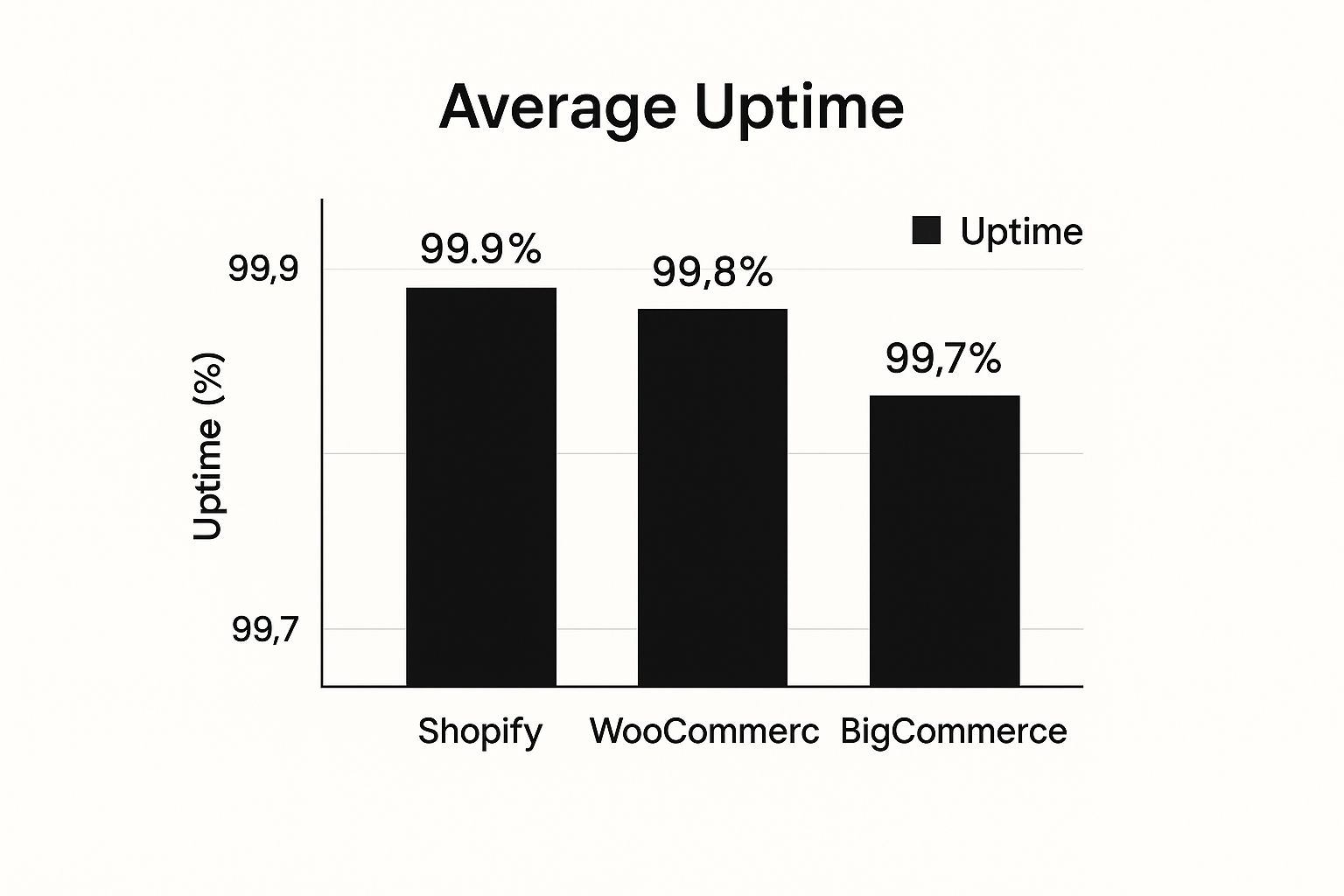
While all three are incredibly reliable, you can see that Shopify has a slight edge here. That's a direct benefit of its fully-managed, hosted infrastructure.
Payment Processing and Fees
Let's talk about getting paid. The payment gateways you can offer, the fees you'll pay, and how easy it is to set up all have a direct impact on your profit margins and how smoothly your business runs.
- Shopify: Has its own built-in solution, Shopify Payments. The big advantage? It removes Shopify's own transaction fees, so you only pay the standard credit card processing rates. It's also incredibly simple to activate, getting you ready to accept all major cards almost instantly.
- BigCommerce: This is a huge selling point for them—they charge zero platform transaction fees on every single plan. You get to choose from top gateways like PayPal, Stripe, and Adyen without being penalized for your choice.
- WooCommerce: Doesn't charge transaction fees either. However, you'll be subject to the fees of whatever payment gateway you choose to integrate (like Stripe or PayPal). Each one has to be installed and configured as a separate plugin.
Verdict: This one's a toss-up. Shopify wins on pure, dead-simple convenience. BigCommerce wins on offering fantastic flexibility with no extra platform fees.
App Ecosystems and Integrations
No single platform does everything perfectly right out of the box. A healthy app marketplace lets you plug in new features as your business grows—from email marketing to sophisticated inventory tools. This is especially vital for new stores needing to adapt on the fly. You can explore this further in our guide to the best ecommerce platform for small business to see how these ecosystems serve different needs.
- Shopify: Has the largest and most polished app store by a long shot, with over 8,000 apps. You can find a high-quality, well-supported app for pretty much anything you can imagine.
- WooCommerce: Gives you access to the entire WordPress plugin directory—over 60,000 options. The selection is massive, but the quality, security, and support can be all over the map. You have to do more homework to find the good ones.
- BigCommerce: Takes a different approach with a smaller, more curated marketplace. They focus on quality over quantity, ensuring their apps integrate well, especially with key enterprise-level software.
Verdict: For the ultimate combination of variety, quality, and reliability, Shopify's app ecosystem is unmatched.
Detailed Feature Comparison Matrix
To make things even clearer, here’s a direct, feature-by-feature breakdown. This table helps you quickly scan and compare the core capabilities of each platform in one place.
| Feature | Shopify | WooCommerce | BigCommerce |
|---|---|---|---|
| Hosting | Included | Self-Hosted | Included |
| Ease of Use | Excellent | Moderate (Requires technical skill) | Good (Steeper learning curve) |
| Transaction Fees | 0% with Shopify Payments | 0% (Gateway fees only) | 0% on all plans |
| Built-in Blogging | Yes, basic features | Yes, full WordPress capabilities | Yes, basic features |
| App Marketplace | 8,000+ Apps | 60,000+ Plugins | Curated, smaller selection |
| Multi-Channel Selling | Excellent | Good (Requires extensions) | Excellent (Built-in) |
| Customer Support | 24/7 Phone, Email, Chat | Community Forums, Ticket System | 24/7 Phone, Email, Chat |
| Point of Sale (POS) | Excellent (Shopify POS) | Good (Via extensions) | Good (Via integrations) |
As you can see, the "best" choice really comes down to your priorities. Shopify prioritizes all-in-one simplicity, WooCommerce offers ultimate control for those who want it, and BigCommerce packs in powerful features for serious sellers from day one.
Which Platform Is Right For Your Business Scenario?
Choosing an e-commerce platform isn't just about ticking off a feature list. It's really about matching a platform's strengths to your unique business model. What one person finds essential, another might never use.
Let's get practical and move past the generic advice. I’ll walk you through three common business types and recommend the platform that truly fits each one. This way, you can see how a platform's design philosophy actually helps you run your business day-to-day.
For The Creative Entrepreneur Selling Digital Products
If you’re an artist, course creator, or designer, your world revolves around digital goods. Think e-books, online courses, or maybe even exclusive content subscriptions. You need a storefront that’s not just functional but beautiful, reflecting your brand's unique personality. Most importantly, you can't afford to waste time on technical headaches.
- Top Recommendation: Shopify
- Why it works: Shopify just works, right out of the box. Its all-in-one approach means you won't be fighting with plugins or server issues. The interface is clean and lets you build a professional-looking site fast. Plus, its massive app store has battle-tested solutions like Digital Downloads or SendOwl for delivering your files securely. You get to focus on creating, not coding.
For The Dropshipper Focused On Fast Growth
Now, let's say you're a dropshipper. Your success depends on speed—finding hot products, testing them with ads, and scaling the winners before the trend dies. You need a platform that syncs flawlessly with suppliers, automates order fulfillment, and has powerful marketing tools to keep the traffic coming.
- Top Recommendation: Shopify
- Why it works: Shopify’s entire ecosystem feels like it was designed with dropshippers in mind. The deep integration with apps like DSers for AliExpress makes importing products and syncing orders completely automatic. This operational efficiency is the backbone of a successful dropshipping store, letting you handle a flood of orders without getting buried in manual work. Learning how to improve business efficiency is the name of the game here, and Shopify's workflow gives you a serious leg up.
The best platform for you can also depend heavily on where you sell. In the USA, Shopify dominates with a 27% market share, a pattern that holds true in the UK and Australia. But if you look at Germany, competitors like Ecwid have a surprisingly strong foothold. It's a great reminder that regional preferences really do matter. You can dig into these global ecommerce market share trends to get a better feel for your local market.
For The Established B2B Wholesaler
Finally, what if you're an established B2B business bringing your wholesale catalog online? Your needs are completely different. You’re juggling complex product catalogs, offering tiered pricing to different customer groups, and managing bulk orders and quotes. You don't need a simple storefront; you need a powerful commerce engine.
- Top Recommendation: BigCommerce
- Why it works: This is where BigCommerce really pulls ahead. Its most critical B2B features are built directly into the core platform, not tacked on as expensive apps. You can set up customer groups, assign unique price lists, and handle quote requests right from the dashboard. This native functionality creates a far more stable and affordable foundation for the complexities of B2B sales.
Frequently Asked Questions
Even after a detailed comparison, you probably still have a few questions rolling around in your head. That's completely normal. Let's tackle some of the most common ones we hear from business owners to help you finalize your decision with confidence.
Can I Switch Ecommerce Platforms Later?
The short answer is yes, you can. But it's a major undertaking. Moving your store isn't like switching email providers; it involves migrating all your products, customer data, and order history. It's a complex technical project that often requires specialized migration tools or hiring an expert to make sure nothing important gets lost along the way, especially your hard-won search engine rankings.
Because of the hassle and cost involved, you're far better off picking a platform that can grow with you. Think about where you want your business to be in five years. The platform that seems perfect today might not support the B2B features or international currencies you'll need tomorrow, forcing you into a messy and expensive migration.
The most expensive platform is often the one you have to leave. Investing a little more time upfront to pick a scalable solution will save you a world of headaches and money down the road.
What Are The Most Common Hidden Costs?
The monthly subscription fee is easy to spot, but it's the "hidden" costs that can really bust your budget. These expenses aren't always obvious when you're just comparing pricing pages.
Keep an eye out for these common budget-killers:
- Transaction Fees: Some platforms will charge you a percentage of every sale on top of what your payment processor (like Stripe or PayPal) takes. Platforms like BigCommerce and Shopify (if you use their native Shopify Payments) get rid of this extra fee.
- App Subscriptions: Need a good loyalty program, advanced product reviews, or a way to sell subscriptions? Chances are, you'll need a paid app for that. These monthly fees can add up fast, sometimes costing more than the platform itself.
- Theme Costs: A professionally designed theme can run you a one-time fee of $150 to $350. Free themes get you started, but a premium one is often essential for a polished look and more advanced functionality.
- Maintenance and Development: If you go with a self-hosted option like WooCommerce, you're on the hook for your own hosting, security, and any custom development. These are ongoing costs, not one-time expenses.
How Much Do SEO Capabilities Really Matter?
They matter immensely. For most online stores, strong organic search traffic is the most profitable and sustainable way to get new customers. Your platform's built-in SEO tools are the foundation of that success. If your platform holds you back on SEO, you're fighting an uphill battle from day one.
When you're doing your comparison, check if you can easily change fundamental things like URL structures, page titles, meta descriptions, and image alt text. You also want more advanced controls, like access to your robots.txt file and automatic sitemap generation. Choosing a platform with solid, native SEO features gives you the power to build a strong foundation for long-term growth.
Ready to build a powerful, effective website that drives results? The team at OneNine specializes in custom design, development, and strategic management to ensure your online presence is second to none. Get in touch with us today and let's create something exceptional together.


