

The core difference between Google Sites or WordPress really boils down to one thing: Google Sites gives you straightforward simplicity for free, while WordPress delivers powerful flexibility designed to grow with you. One is perfect for quick, functional projects, and the other is the industry standard for building a real, professional website.
Choosing Your Website Platform
Picking the right platform can feel like a huge decision, but it gets a lot easier when you think about your actual goals, how comfortable you are with technology, and where you see your project going long-term.
Google Sites shines when you just need something fast and easy. Think about an internal wiki for your team, a simple page for a family event, or a classroom project that needs to go live in minutes without costing a dime. It's a tool built for pure function, not flashy design.
On the other hand, WordPress is the engine you choose when you're serious about building an online presence. There's a reason it powers over 43% of all websites—it can adapt to just about any need. Whether you're launching a small business site, a personal blog, an online store, or a complex company portal, WordPress gives you the foundation to build without hitting a ceiling. It’s an investment in a digital asset that you truly own and control.
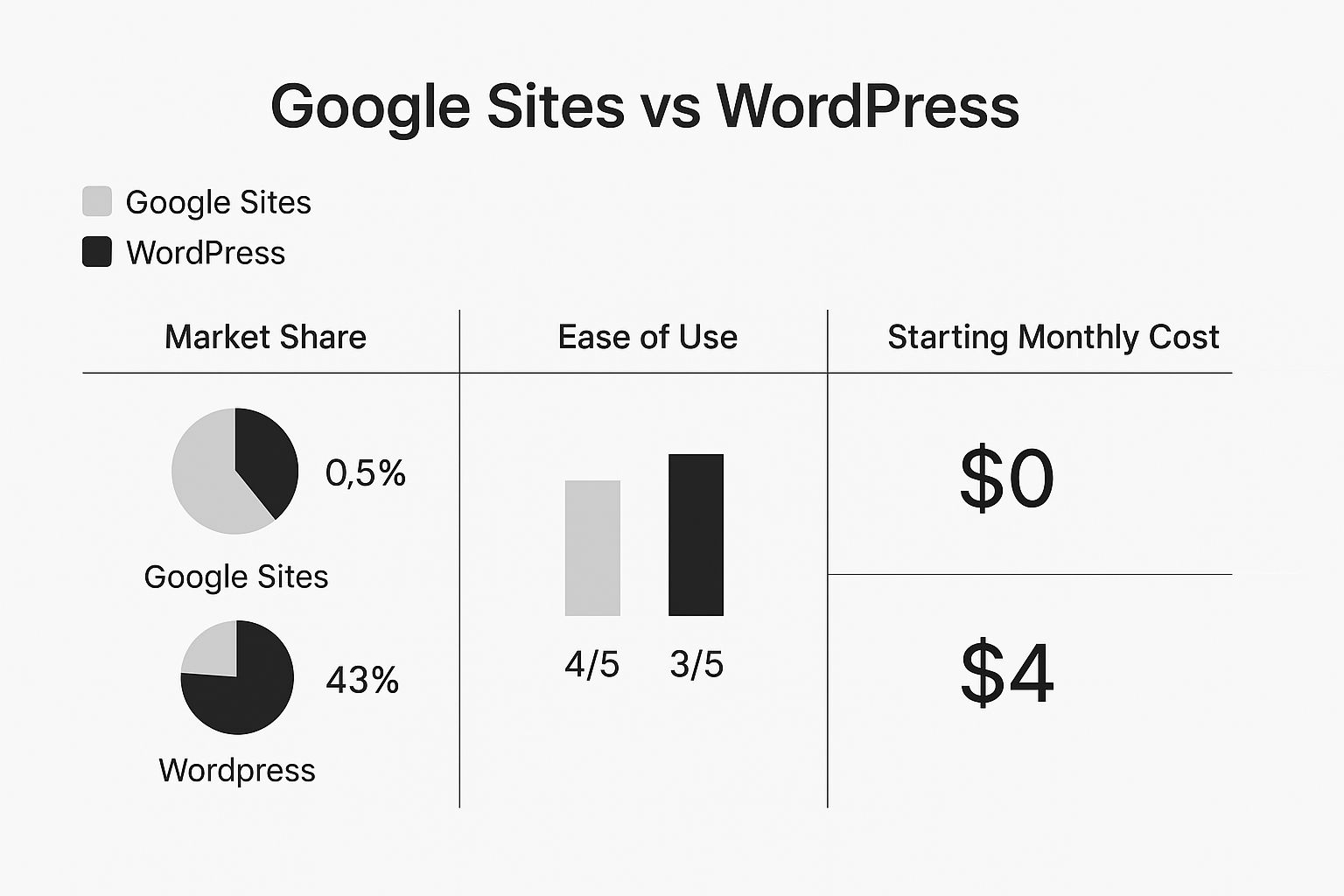
This really highlights the central trade-off. Google Sites is completely free and a bit simpler to start, but WordPress absolutely dominates the market because of its massive capabilities. Your choice hinges on whether you need no-cost simplicity right now or you're planning for long-term potential.
At a Glance: Google Sites vs. WordPress
To make the differences even clearer, here's a quick side-by-side comparison of the most important factors.
| Feature | Google Sites | WordPress |
|---|---|---|
| Best For | Internal Wikis, School Projects, Simple Personal Pages | Business Websites, Blogs, E-commerce, Portfolios |
| Ease of Use | Very Easy (Drag-and-Drop) | Moderate (Learning Curve) |
| Cost | Completely Free | Requires Hosting & Domain (Starts ~$3/mo) |
| Customization | Very Limited (Basic Templates & Colors) | Nearly Unlimited (Themes & Plugins) |
| Scalability | Low (Not designed for growth) | High (Grows with your needs) |
Ultimately, this table shows two very different tools for two very different jobs. Google Sites is the perfect free solution for contained, simple projects, whereas WordPress is the go-to for anyone building a website meant to be a core part of their business or brand.
Comparing Ease of Use and The Learning Curve
When you're trying to decide between Google Sites or WordPress, one of the biggest factors is how easy each one is to pick up and manage day-to-day. The learning curve for these two platforms couldn't be more different, and they're really built for two completely different types of users.
Getting Started With Google Sites
Google Sites is designed for one thing: simplicity. Seriously, if you've ever used a Google Doc or put together a Google Slides presentation, you already have all the skills you need.
The whole interface is visual. You just drag and drop elements like text boxes, images, or files straight from your Google Drive. There's almost no learning curve to speak of. You can literally go from a blank slate to a published site for an internal project or a quick event page in less than an hour. You don't have to think about hosting, databases, or updates—Google handles it all.

The WordPress Learning Path
WordPress, on the other hand, asks for a bit more from you upfront, but the payoff is huge. It has a steeper learning curve because you're in the driver's seat. Before you start, you’ll need to get familiar with a few core concepts that Google Sites just does for you:
- The Dashboard: This is your mission control. It's where you'll manage every piece of content, add new features, and tweak settings.
- Themes and Plugins: You’ll learn how to find, install, and set up themes (which control your site's look) and plugins (which add new functionality).
- Hosting: You're in charge of your own web hosting. This gives you total control but adds an extra step to get started.
That might sound intimidating, but the WordPress experience has gotten so much better over the years. The modern block editor (often called Gutenberg) gives you a drag-and-drop feel for building pages, which makes creating content much more intuitive. Plus, managed WordPress hosting services can handle most of the technical heavy lifting for you, making it way more accessible for beginners.
Here's the bottom line: Google Sites gives you instant simplicity by limiting your choices. WordPress offers you unlimited potential, but it requires a small investment of your time to learn the ropes.
For a deeper dive into how these platforms stack up across all features, our comprehensive Google Sites vs WordPress comparison provides a detailed breakdown.
WordPress has made its powerful tools more accessible than ever, but it still requires a willingness to learn. Google Sites is ready to go the second you open it, no training required.
Understanding Design and Customization Potential
When you're weighing Google Sites vs. WordPress, the design difference is like choosing between a high-quality prefab home and building one from the ground up. Both get you a roof over your head, but only one gives you complete creative control. Google Sites offers a clean, structured, and predictable design experience, which is fantastic for anyone who just wants to get a simple site online fast without fussing over branding.
The platform is very much "what you see is what you get." You pick from a small collection of simple themes, tweak some basic colors, and select from a handful of fonts. This built-in simplicity is intentional—it ensures anyone can make a professional-looking site without any design skill. The trade-off? Your site will inevitably look a lot like other Google Sites.

The WordPress Customization Ecosystem
WordPress, on the other hand, is a design playground built for nearly limitless customization. Because it's open-source, a massive global community of developers has spent years creating themes and plugins that can turn a blank canvas into virtually anything you can imagine. This ecosystem is what truly sets WordPress apart.
The sheer volume of options is staggering. As of 2025, WordPress powers over 564 million websites, and a big reason for that is its flexibility. You can choose from more than 30,000 themes and 70,000 plugins, allowing for a depth of customization that Google Sites simply can't touch. You can see more on the impressive scale of WordPress statistics here.
This flexibility means your online presence can be truly one-of-a-kind. If you need a specific layout, interactive features, or slick animations, there's almost certainly a theme or a plugin that can make it happen.
The core difference is this: Google Sites gives you guardrails to keep your design simple and clean. WordPress removes the guardrails, handing you the tools to build a custom digital experience that truly reflects your brand.
Real-World Design Scenarios
Let’s look at a few practical examples to see what this means for your project.
- For a small business: A local bakery could use a premium WordPress theme to build a visually stunning site with beautiful food photography, add an online ordering system with a plugin, and run a branded blog. With Google Sites, they could list their hours and show a map, but creating that unique brand feel or adding e-commerce would be a real struggle.
- For a creative professional: An artist can find a portfolio-specific WordPress theme to showcase their work in unique galleries, use video backgrounds, and create an immersive experience for visitors. You just can't achieve that level of visual polish with the limited layouts in Google Sites.
Ultimately, the choice comes down to what you need. If you want a quick, functional site, Google Sites is fine. But if your website is a critical part of your brand and marketing, you need a platform that supports a unique and compelling website design strategy. For that, WordPress is the undeniable winner.
Looking Ahead: Scalability and Future Growth
When you’re picking between Google Sites or WordPress, it's easy to get caught up in what you need right now. But the real test comes a year or two down the road. Will your website grow with you, or will it hold you back? This is where the two platforms couldn't be more different.
Google Sites is fantastic for self-contained, small-scale projects. Think internal team sites, a simple page for an event, or a basic portfolio. It does that job well. But its path for growth is a dead end. There's no built-in way to add serious features like e-commerce, a sophisticated multi-author blog, or a members-only section. When you need more power, you hit a wall, and the only option is to start over from scratch somewhere else.
The WordPress Growth Trajectory
WordPress, on the other hand, is built for the long haul. A simple five-page website today can become a sprawling, complex digital hub tomorrow—all without having to tear everything down and start again. Its entire structure, built on themes and plugins, is designed for evolution.
This inherent scalability is why WordPress is the engine behind so many serious online projects. It’s no accident that it powers over 40% of all websites globally, from one-person blogs to massive enterprise sites. Google Sites, in comparison, serves a much smaller, niche audience that prioritizes simplicity over potential. You can dig deeper into their market share differences on autopagerank.com.
If you have any inkling of selling online, the choice becomes even clearer. WordPress shines with its powerful e-commerce capabilities, especially with tools like WooCommerce integration. A simple informational site can transform into a full-blown online store that handles thousands of products and transactions.
The bottom line is this: WordPress is a platform you grow with, while Google Sites is a platform you will almost certainly grow out of. Your decision should be based on your ambitions, not just your immediate to-do list.
Future-Proofing Your Online Presence
Let’s get practical. Here are a few common growth scenarios where the platforms diverge sharply:
- Content Marketing: What if your blog becomes a hit? WordPress effortlessly handles thousands of posts, complex categories, and multiple authors.
- E-commerce: Decide to start selling? A plugin like WooCommerce adds enterprise-grade sales features to your existing site.
- Community Building: Want to create a community? You can add forums, membership portals, and even online courses to engage your audience directly.
This kind of forward-thinking is the cornerstone of smart website development for small business. It ensures the time and money you invest today will continue to deliver value as your vision expands. With WordPress, you’re ready for what's next. With Google Sites, you're locked into what's now.
Analyzing SEO and Online Visibility Capabilities
Let’s be honest: if you want people to find your website through a Google search, your choice of platform matters. A lot. When it comes to Google Sites vs. WordPress for search engine optimization (SEO), the difference is night and day. One gets you on the map, the other gives you the tools to actually compete.
Google Sites will get you the bare minimum. You can change your site title and use headings (H1, H2, etc.) to give your content some structure, which are basic SEO building blocks. And since it’s a Google product, your site will get indexed. But that’s pretty much where your control stops.

You won’t be able to customize your page URLs, write your own meta descriptions, or add alt text to images. These are all critical pieces for telling search engines what your content is about. Trying to rank for anything remotely competitive is going to be an uphill battle.
The WordPress SEO Advantage
In stark contrast, WordPress is an SEO powerhouse. If Google Sites gives you a locked toolbox, WordPress hands you the keys to the entire workshop. This is where you can really see its power for anyone serious about getting found online.
WordPress gives you total control over all the little details that add up to great SEO. With brilliant plugins like Yoast SEO or Rank Math, you get a step-by-step guide to optimizing every single page and post.
These tools make it easy to manage things like:
- Custom URLs: You can create clean, keyword-friendly URLs (sometimes called "slugs") for every piece of content.
- Meta Descriptions: You get to write the little summary that shows up in search results, helping to convince people to click on your link.
- XML Sitemaps: An organized map of your site is automatically created, making it easy for search engines to find and index everything you publish.
- Image Alt Tags: Add descriptions to your images, which helps with accessibility and gives you a chance to rank in image searches.
If organic traffic is a key goal for your project, WordPress isn't just a better choice—it's really the only viable one. The depth of its SEO controls is what allows you to actually compete in search results.
At the end of the day, a Google Site can exist on the internet, but a WordPress site can be built to thrive on it. The power to fine-tune every single aspect of your on-page SEO gives you a massive advantage that Google Sites just doesn't offer. If getting found is a priority, the choice is clear.
Breaking Down Costs and Long-Term Investment
https://www.youtube.com/embed/Wfct2HMB0-w
When you're weighing Google Sites vs. WordPress, money is one of the biggest factors separating the two. The way each platform handles costs really gets to the heart of what they're built for. One is all about no-cost simplicity, while the other is designed for building a real digital asset you can invest in for the long haul.
Google Sites is genuinely free. If you have a Google account, you can create and launch a website without spending a dime. There are no hidden fees for hosting, templates, or features. This makes it a fantastic choice for projects with zero budget, like an internal company portal, a quick event page, or a simple class project.
WordPress, on the other hand, works on a completely different model. The software itself is free and open-source, but getting a site live on the internet means you'll need to pay for a few essential pieces.
Understanding the WordPress Investment
The great thing about WordPress costs is that they're flexible. You can start small and scale up your spending as your site and your needs grow. Here’s a realistic look at what you can expect to pay:
- Domain Name: This is your site’s address, like
yoursite.com. A domain typically costs around $10–$20 per year. - Web Hosting: This is the engine that keeps your site running and accessible online. Shared hosting plans are very affordable, often starting at just $3–$15 per month.
- Themes and Plugins: You can find thousands of great free options. But for a more polished look or specific features, premium themes ($40–$80 one-time) and plugins ($20–$200+ per year) open up a world of possibilities.
This structure makes WordPress a strategic investment rather than just an expense. There's a reason it's so popular. As of 2025, WordPress powers a staggering 61.3% of the entire CMS market. That kind of dominance shows it's the platform people turn to when they're serious about their online presence. You can dig into more stats about WordPress's market dominance at Mobiloud.com.
The core financial choice is clear: Google Sites offers a zero-cost, limited tool, while WordPress provides an affordable, powerful asset that you own and can grow indefinitely.
For most businesses, creators, and professionals, that small initial investment in WordPress pays off massively down the road. It gives you complete control, endless customization, and the ability to scale. It’s the difference between borrowing a corner of the internet and owning your own piece of digital real estate.
So, Which One Should You Choose?
When it comes down to it, the right choice between Google Sites and WordPress really depends on what you need right now versus what you see for yourself down the road. The best platform for you is the one that lines up perfectly with your website's main goal.
If you just need something simple, fast, and free, Google Sites is hard to beat. It’s perfect for internal team wikis, a quick event page, a classroom project, or a no-fuss personal portfolio. When your top priorities are getting a site up in a matter of minutes without spending a dime or touching any code, Google Sites is the clear choice.
But for anything more serious—a business, a brand, a blog you want to grow—WordPress is in a different league. It's the go-to for small businesses, dedicated bloggers, online stores, and any professional who needs total command over their site's look, feel, and features.
Think of it this way: Google Sites is like renting a furnished room—it’s quick and easy for a short stay. WordPress is like buying a piece of land to build your own house; it's an investment in a digital asset that you own and can shape however you want.
Go with Google Sites if your project is small and you need simplicity and speed above all else. Choose WordPress when you're building a real, lasting online presence that you expect to grow with you.
Ready to build a professional, scalable website that grows with your business? The expert team at OneNine specializes in custom WordPress design and development. Let us help you create a powerful online presence. Learn more about our services.


