

Why Website Usability Testing Transforms Digital Success
A well-designed website is more than just attractive. It's a powerful tool for business growth. But what looks good in theory doesn't always work in practice. This gap between design and user experience is why website usability testing is so important for digital success. It bridges the gap between what you think users want and what they actually need. This isn't about small changes. It's about truly understanding how users interact with your site and using that knowledge to improve conversions, boost engagement, and drive revenue.
Bridging the Gap Between Assumptions and Reality
Many businesses rely on intuition and internal assumptions when designing websites. But even experienced design teams can misjudge user behavior. Usability testing provides a reality check with direct insights into how real users navigate your site. A navigation menu that seems intuitive to designers might confuse first-time visitors, leading to frustration and a higher bounce rate. Usability testing reveals these hidden problems.
The Measurable Impact of User-Centric Design
A user-centered approach isn't just about happy users. It translates into real business benefits. Studies show a strong link between positive user experiences and increased conversions. By fixing usability issues, businesses can significantly improve metrics like click-through rates, time spent on site, and sales. These improvements can be dramatic. Some companies report conversion increases of 60% after user-centered improvements. Plus, 81% of customers will pay more for a better user experience, proving that prioritizing usability is a wise investment. Surprisingly, only about 55% of companies conduct UX testing. Find more detailed statistics here. This means almost half of all organizations are missing valuable insights, potentially losing conversions and revenue.
Debunking the Myths of Intuition-Based Design
One persistent myth in web design is that intuition is enough. While experience and best practices are important, they can't replace direct user feedback. Website usability testing provides objective data, showing how users actually interact with your site. This data-driven approach empowers informed design decisions based on real behavior, not guesswork. This shift from assumption to evidence creates a website that resonates with your audience and achieves business objectives.
From Insights to Action: The Transformative Power of Testing
The power of website usability testing is its ability to turn raw data into actionable insights. By understanding user behavior, you can make targeted improvements that enhance the user experience and drive business growth. This isn't a one-time fix; it's an ongoing process. By embracing website usability testing, you’re building a sustainable engine for digital success.
The Hidden Costs of Poor Website Usability
A visually appealing website is important, but it's only half the battle. If users struggle to navigate, find information, or complete desired actions, your business will suffer. This section explores the financial ramifications of poor website usability and shows how seemingly small issues can significantly impact your bottom line.
The Impact on Key Metrics
Poor usability directly affects key performance indicators (KPIs). Confusing navigation can lead to increased bounce rates, meaning potential customers leave your site prematurely. A complicated checkout process can cause cart abandonment, where users add items to their cart but don't complete the purchase. This translates to lost revenue and missed opportunities. Poor website design also negatively affects customer lifetime value, as frustrated users are less likely to return.
Quantifying the Losses
The financial impact of poor usability can be substantial. User abandonment and poor aesthetics are closely linked. 52% of users say they wouldn't return to a website due to its visual appeal, and 88% of users will abandon a platform with persistent glitches or bugs. Even a 1-second delay in page response can decrease conversions by 7%. This figure has remained consistent across various industries and regions for the past decade.
These numbers highlight how even minor usability problems can have significant consequences. For example, Staples achieved a 500% increase in online revenue after a UX-focused site redesign. This demonstrates the profound impact of addressing both visual and functional usability. Historically, these findings have encouraged organizations to prioritize A/B testing, page speed optimization, and user research. Data shows that 85% of respondents believe user research improves product usability, and nearly 58% reported increased customer satisfaction due to such initiatives. For more statistics on UX, check out this resource: https://dovetail.com/ux/ux-statistics/. These losses impact not only immediate sales but also long-term growth and brand reputation.
Let's look at how some common usability problems can affect business metrics.
To illustrate this further, take a look at the table below:
| Usability Issue | Abandonment Rate Increase | Conversion Rate Decrease | Customer Satisfaction Impact |
|---|---|---|---|
| Confusing Navigation | 10-20% | 5-10% | Negative |
| Complicated Checkout Process | 15-25% | 10-15% | Very Negative |
| Slow Loading Times | 5-15% | 2-7% | Negative |
| Lack of Mobile Responsiveness | 10-20% | 5-10% | Negative |
| Poor Search Functionality | 5-15% | 2-7% | Negative |
This table showcases how specific usability issues can directly influence key business metrics. Addressing these issues can lead to significant improvements in website performance and customer satisfaction.
Visual Design and User Trust
Visual design plays a crucial role in user trust. A cluttered or unprofessional design can make users hesitant to share personal information or make purchases. Investing in professional web design that aligns with your brand and instills user confidence is essential. Documenting website usability testing is vital. Consider tools like Notion for creating a documentation website.
The ROI of Usability Improvements
While poor usability has clear costs, the return on investment (ROI) from usability improvements can be equally compelling. Simple changes, like simplifying the checkout or improving navigation, can significantly increase conversions and revenue. The infographic below illustrates the potential impact of website usability testing.
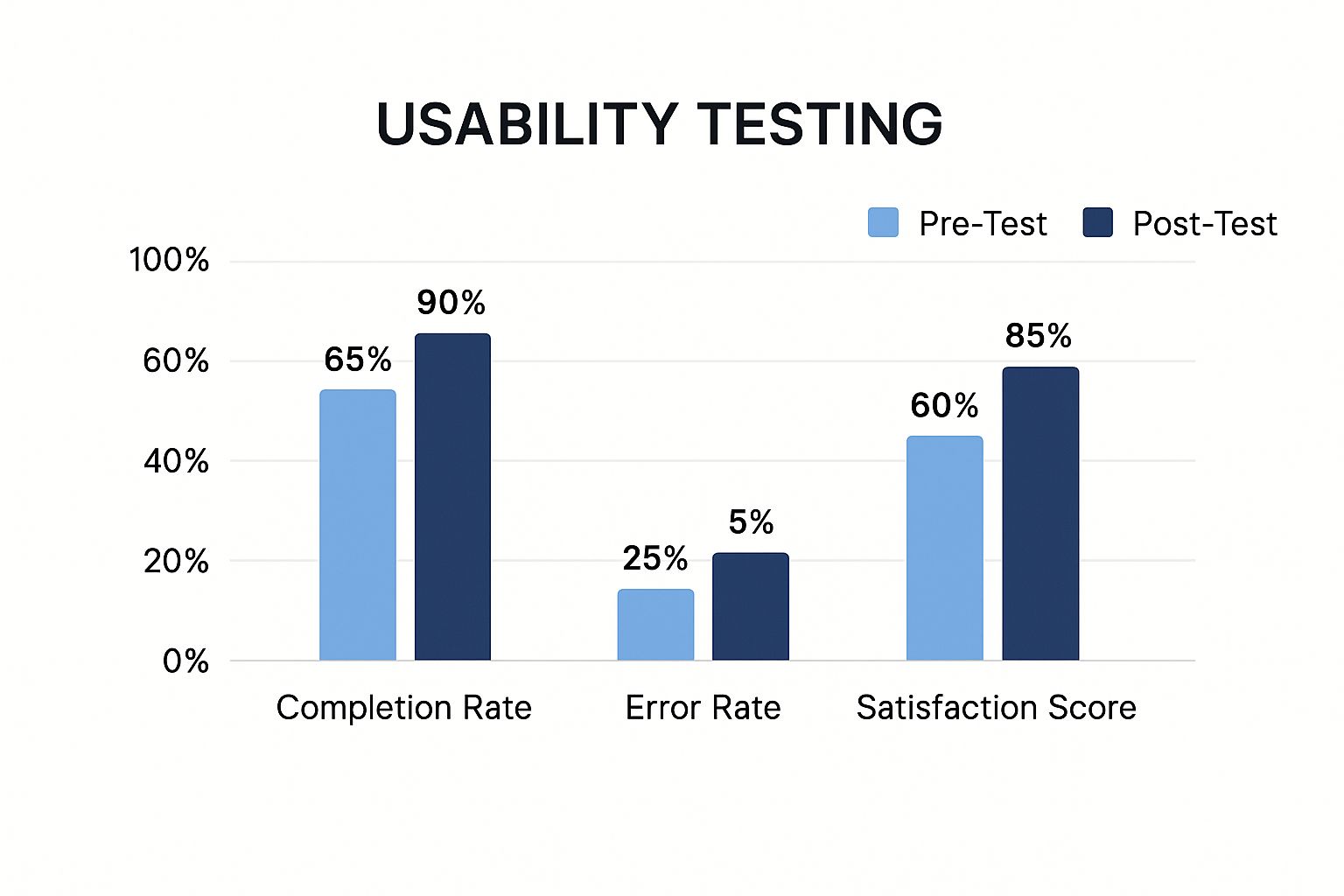
This infographic compares completion rates, error rates, and satisfaction scores before and after usability testing. Post-test results show marked improvements across all metrics, demonstrating the tangible benefits of investing in usability. This makes website usability testing a strategic investment for business success.
Website Usability Testing Methods That Actually Work

Figuring out the best way to test your website’s usability can be tricky. This section offers a practical guide to the most effective methods. We'll break down both qualitative and quantitative approaches, and explain how to use them for the best results.
Understanding Qualitative Vs. Quantitative Methods
Qualitative usability testing helps you understand why users behave in certain ways. It digs deep into user motivations, frustrations, and how they think about your website. Imagine it like interviewing users to uncover their thought processes.
Quantitative usability testing, on the other hand, focuses on measuring user behavior with hard data. This approach helps identify trends across a larger group of users. It's like using analytics to track things like task completion rates and error rates.
Key Qualitative Usability Testing Methods
-
Moderated User Testing: A researcher guides participants through tasks on your website, observing their behavior and asking questions. These sessions offer rich, detailed insights.
-
Unmoderated User Testing: Participants complete tasks independently without a moderator. This is often more affordable and allows for larger sample sizes, revealing common patterns.
-
Think-Aloud Protocols: Users verbalize their thoughts as they interact with your website, giving you a direct window into their decision-making process.
Key Quantitative Usability Testing Methods
-
A/B Testing: This method compares two versions of a webpage to see which performs better. By tracking metrics, A/B testing pinpoints design elements that boost conversions.
-
Heatmaps and Click Tracking: Heatmaps visually represent where users click and scroll. Click tracking shows which links and buttons get the most interaction. These tools reveal what grabs users' attention.
-
Web Analytics: Analyzing website traffic data shows how users navigate your site, where they enter and exit, and which pages are most popular. This data helps identify potential usability problems.
To help you choose the right testing method, we've put together a comparison table:
Let's take a look at a comparison of various usability testing methods:
Comparison of Website Usability Testing Methods
| Testing Method | Cost Level | Implementation Complexity | Type of Insights | Best For | Limitations |
|---|---|---|---|---|---|
| Moderated User Testing | High | Moderate | In-depth qualitative data on user behavior and motivations | Understanding user needs and pain points | Time-consuming and requires skilled moderators |
| Unmoderated User Testing | Low | Low | Quantitative data on user behavior patterns | Identifying common usability issues | Limited insights into user motivations |
| Think-Aloud Protocols | Moderate | Low | Qualitative data on user thought processes | Understanding user decision-making | Can be influenced by the act of verbalizing thoughts |
| A/B Testing | Low | Low | Quantitative data on the effectiveness of different design elements | Optimizing conversion rates | Requires careful planning and execution |
| Heatmaps and Click Tracking | Low | Low | Visual representation of user interaction | Identifying areas of interest and neglect | Limited insights into user motivations |
| Web Analytics | Low | Low | Quantitative data on website traffic and user navigation | Understanding overall website usage patterns | Can be difficult to isolate specific usability issues |
This table summarizes the key differences between each usability testing approach, highlighting the strengths and limitations of each. Consider your budget and what you want to learn when selecting methods.
Choosing the Right Method for Your Needs
The best approach often involves combining different methods. Start with moderated user testing to understand user needs, then use A/B testing to check if design changes are working. You might be interested in: How to master user testing for your websites. Consider factors like your budget, timeline, and specific research questions. Smaller businesses might choose unmoderated testing to save money, while larger companies might use both qualitative and quantitative methods for a more complete picture.
Practical Examples: Insights Gained and Problems Solved
-
A clothing retailer used heatmaps to discover that a "Sale" banner wasn't getting noticed. Redesigning the banner boosted click-through rates.
-
A software company used moderated user testing to find out why their navigation menu was confusing. Simplifying the menu improved user task completion.
-
An e-commerce site used A/B testing to compare two checkout processes. A streamlined, one-page checkout led to more sales.
By understanding the strengths and weaknesses of each method, you can create a testing strategy that reveals valuable insights and leads to real improvements for your website’s usability. Making these changes will make your site more user-friendly and effective.
Running Website Usability Tests That Reveal Truth
Moving beyond theory, let's explore the practical steps involved in conducting effective website usability testing. This process isn't about confirming what you think is true; it’s about uncovering actual user behavior. We'll examine how leading companies design objective tests to pinpoint real user pain points.
Designing Unbiased Test Scenarios
The foundation of successful website usability testing lies in creating scenarios that mirror real-life user goals. Instead of asking leading questions or setting up tasks that guide users toward a specific outcome, concentrate on natural interactions. For instance, if you're testing an e-commerce website, instead of instructing users to "buy a blue shirt," ask them to "find a gift for a friend's birthday." This open-ended approach allows for organic site exploration and reveals natural navigation and decision-making processes.
Recruiting Representative Participants
The value of your testing depends heavily on how well your participants represent your target audience. Recruiting users who reflect your ideal customer ensures your insights are relevant. Consider factors like demographics, technical skills, and previous experience with similar websites. Offering incentives encourages participation and helps ensure a diverse group of testers.
Crafting Neutral Task Instructions
Clear, unbiased task instructions are crucial for accurate results. Ambiguity can confuse users and skew your data. Use concise language, avoiding jargon or technical terms. It’s a good idea to pilot test your instructions with a small group before the main testing phase. This helps identify and refine any unclear wording.
Creating Natural Testing Environments
The testing environment should feel as natural as possible. This encourages authentic user behavior. Steer clear of sterile lab settings which can intimidate participants. If users typically access your website on mobile devices, let them do so during testing. For desktop users, ensure the testing environment reflects their usual setup.
Moderating Effectively Without Influencing Behavior
Moderating usability tests requires a delicate touch. You want to encourage users to think out loud and share their thoughts, but without guiding them toward particular answers. Avoid interrupting or correcting users, even if they make mistakes. Instead, ask open-ended questions like "What are you thinking right now?" or "Can you tell me more about that?" Observing and documenting user behavior without interference is key.
Overcoming Common Testing Challenges
Website usability testing presents some predictable challenges. Recruiting participants can be tough, particularly for niche audiences. The logistics of remote testing can be complex, demanding careful planning and coordination. Budget constraints might limit the number of participants or the tools you can use. However, by acknowledging these challenges and finding proactive solutions, you can maintain an effective testing process. Consider including a periodic expert-led website audit in your methodology for additional insights.
Tools, Incentives, and Documentation
The right tools can significantly streamline your testing process. Screen recording software, heatmap tools, and survey platforms can help you capture and analyze user behavior. Offering incentives, such as gift cards or discounts, can boost participation rates. Thorough documentation turns observations into actionable insights. Detailed reports, including user feedback, screen recordings, and data analysis, provide a clear roadmap for website improvements. For further information, check out this article on website navigation best practices.
Despite the proven benefits, many companies neglect website usability testing. Surprisingly, only 42% of companies use hotspots to identify user pain points, and nearly half don’t invest in user research at all. This is a concern, given that 50% of developers' time is spent fixing avoidable issues. The good news is that more companies are starting to realize the value of usability. Learn more about this trend. Companies that embrace usability testing report improved engagement (44% saw increased customer engagement after user research) and higher conversion rates – both essential for business growth.
Transforming Usability Data Into Revenue-Driving Actions
Website usability testing gives you a lot of raw data. But the real value comes from turning those observations into actions that improve your website and boost revenue. This section explores practical frameworks and real-world examples to show how leading companies translate usability data into tangible business results.
Categorizing and Prioritizing Usability Issues
Taking effective action starts with organization. Categorize usability issues based on their severity and how they impact the user experience. A simple framework uses these three key criteria:
- User Impact: How much does this issue affect the user's ability to achieve their goals?
- Implementation Effort: How much time and resources will it take to fix the problem?
- Business Value: What's the potential return on investment (ROI) of addressing this issue? For example, fixing a broken checkout button has a higher business value than changing a font color.
This framework provides a structured way to evaluate and prioritize findings from your website usability testing. This ensures you focus on the most impactful improvements first.
Identifying Patterns and Distinguishing Between Cosmetic and Critical Issues
Running multiple testing sessions often reveals recurring patterns. These patterns highlight systemic usability problems that need attention. For example, if several users have trouble with the same navigation element, it's a sign of a significant usability flaw.
But not all issues are equally important. It's important to distinguish between cosmetic imperfections and critical conversion barriers. A slightly misaligned image might be visually distracting, but it won't necessarily stop a user from buying something. On the other hand, a confusing call to action or a broken form could significantly impact conversions.
Creating Compelling Usability Reports
Data without context is meaningless. Turn raw data into compelling narratives that speak to different stakeholders. Executive summaries should focus on the high-level impact on business goals. Developer reports should detail specific technical recommendations.
Use visuals like charts and graphs to highlight key findings and make your reports more engaging. Quantifying the potential ROI of suggested improvements strengthens your recommendations and makes a stronger case for investment. You might be interested in: How to master website performance optimization.
Handling Conflicting User Feedback and Building Consensus
User feedback won't always align perfectly. Some users might prefer one design element while others prefer a different approach. This is where your analysis and prioritization framework become essential.
Use data to identify the most impactful improvements, even if they don't please every single user. Building consensus around improvement priorities involves open communication and collaboration across teams. Present your findings clearly, explain your reasoning, and be open to feedback. This collaborative approach helps everyone understand the reasons behind the proposed changes and work together toward a shared goal.
From Data to Action: Real-World Examples
-
An e-commerce company learned through website usability testing that users struggled to find product filters. Adding improved filters resulted in a 15% increase in sales.
-
A SaaS company found that their signup process was too long and complicated. Simplifying the signup flow led to a 20% increase in trial signups.
-
A media website noticed users weren't scrolling down to see important content. Redesigning the page layout and improving visual cues increased user engagement by 30%.
These examples show the tangible benefits of turning website usability testing data into actionable improvements. By continuously analyzing, iterating, and optimizing your website based on user feedback, you create a user-centered experience that drives business success.
Building a Culture of Continuous Website Usability Testing
Moving beyond one-off website usability testing is essential for long-term success. This section explores how to cultivate a culture of continuous improvement, ensuring your website remains competitive and user-friendly.
Integrating Usability Testing Throughout Development
Instead of a one-time event, consider usability testing an ongoing process integrated throughout your development lifecycle. From initial concept validation to post-launch refinements, regular testing provides invaluable feedback at every stage. This proactive approach helps identify and resolve usability issues before they affect your users.
For example, early testing can validate design choices and identify potential navigation issues. Post-launch testing can uncover opportunities for improvement and optimization.
Securing Leadership Buy-In and Overcoming Resistance
A culture of continuous testing requires organizational support, starting with leadership buy-in. Demonstrate the value of website usability testing by highlighting the potential return on investment (ROI). Present case studies of companies that have thrived through user-centered design.
Addressing internal resistance is also key. Educate teams on the benefits of testing and how it can enhance their work. Simplify the testing process to encourage participation.
Developing Testing Rhythms
Establish a regular cadence for website usability testing that aligns with your development cycles. This might involve weekly testing during active development and monthly testing for ongoing maintenance and optimization.
The goal is to create a consistent flow of feedback and improvement, ensuring your website continuously meets user needs. This is comparable to routine car maintenance – regular checks prevent larger problems down the line.
Cross-Functional Collaboration and Feedback Loops
Website usability testing shouldn't be isolated to one department. Build cross-functional teams that include designers, developers, marketers, and customer support representatives. This collaborative approach ensures a shared understanding of the user perspective and promotes working towards common goals.
Implement clear feedback loops to effectively communicate and act on testing insights. This could involve regular meetings, shared documents, and project management tools like Asana.
Scaling Your Testing Program
As your organization grows, your website usability testing program must scale accordingly. Develop strategies to accommodate increased website traffic and user complexity. This might involve using automated testing tools or establishing a dedicated user research team.
Consider segmenting your users and performing targeted testing for specific groups. This provides a more nuanced understanding of individual user needs and pain points.
Combining Usability Testing With Other Research Methods
Website usability testing is powerful on its own, but its effectiveness is amplified when combined with other research methods. User surveys, website analytics, and user interviews can provide valuable context and a deeper understanding of user behavior.
This comprehensive approach offers a more complete picture of your users, enabling informed decisions regarding website improvements. For instance, analytics might reveal high bounce rates on a particular page, while usability testing can pinpoint the reasons why users are leaving.
Building a culture of continuous website usability testing requires ongoing dedication. However, the benefits are significant. By prioritizing user needs and making data-driven decisions, you can create a website that is both user-friendly and effective in achieving your business goals.
The Future of Website Usability Testing
Website usability testing is constantly evolving. This section explores emerging tools and methodologies that are shaping how we understand user behavior, and what this means for your testing strategy. By understanding these trends, you can prepare for the future of website usability testing and stay ahead of the curve.
The Rise of AI and Machine Learning
Artificial intelligence (AI) and machine learning are transforming website usability testing. AI-powered tools can automate tasks like pattern recognition and predictive user behavior analysis. This automation frees up human researchers to focus on more complex aspects of the user experience. For example, AI can identify common patterns in user navigation, helping pinpoint areas of friction.
This doesn’t mean human oversight is obsolete. Instead, AI augments human capabilities, offering deeper insights and more efficient testing processes.
Biometric Measures: Deeper Insights Into User Experience
Advances in eye-tracking, emotion detection, and other biometric measures provide unprecedented insight into the user experience. Eye-tracking reveals where users focus their attention, while emotion detection tools offer clues about user feelings and reactions. These technologies provide a granular view of user engagement and reveal subconscious responses that traditional testing methods might miss.
This granular data can be incredibly valuable for optimizing website design and content, ensuring your website resonates with your target audience on a deeper level.
The Changing Landscape of User Interaction
Mobile-first design, voice interfaces, and omnichannel experiences are changing testing priorities and methodologies. Mobile-first usability testing is no longer optional—it's essential. Testing on various devices and screen sizes is crucial for delivering a consistent user experience.
With the rise of voice interfaces, usability testing must also adapt to this new way users interact with technology. This requires testing voice commands, conversational flow, and the overall voice user interface. Similarly, testing omnichannel experiences ensures seamless transitions between different touchpoints, creating a cohesive user journey.
Evaluating New Testing Technologies
The sheer number of website usability testing tools available can be overwhelming. When evaluating new technologies, consider the following:
- Relevance: Does the tool align with your specific testing needs and goals?
- Integration: How easily does it integrate with your existing tools and workflows?
- Cost-Effectiveness: Does the value provided justify the price?
Conduct thorough research, compare features, and consider pilot testing before committing to a new tool.
Adapting to Evolving User Expectations
User expectations around accessibility, personalization, and cross-device experiences are constantly evolving. Testing with users with disabilities is crucial for ensuring your website is inclusive and accessible to everyone. Personalization requires testing how users respond to tailored content and recommendations. Cross-device testing guarantees a smooth and consistent user experience across various devices and platforms.
By staying informed about these emerging trends and adapting your testing approach accordingly, you can future-proof your website usability testing strategy and continue delivering exceptional user experiences.
Partner with OneNine for Expert Website Usability Testing
OneNine provides expert website usability testing services that can help you identify and address critical user experience issues. Our team uses a combination of proven methodologies and cutting-edge tools to deliver actionable insights that drive results. We’ll help you create a website that not only looks great, but also performs exceptionally well. Learn more about how OneNine can help you achieve your website goals.


