
Think of a website maintenance package as your all-in-one insurance policy and tune-up service for your site. It’s a recurring service that handles all the behind-the-scenes technical work to keep your website healthy, fast, and secure.
This isn't about adding fancy new features every month. It’s about proactive care that prevents costly, stressful emergencies down the road.
Your Website Is a Car, Not a Brochure
It’s tempting to see your website as a static, finished product. You design it, you launch it, and you're done—like a printed brochure. But that's a huge and potentially expensive misunderstanding.
A modern website is much more like a car. It’s a complex machine with dozens of moving parts that all need to work together perfectly. To keep it running, you have to give it regular attention.
The "engine" of your site is its core software (like WordPress), along with all its plugins and themes. Just like your car needs regular oil changes and check-ups, your website’s software needs constant updates. These updates aren't just for show; they often contain critical patches for security holes that hackers are actively looking to exploit. A single outdated plugin can be the open window a thief uses to get inside.
The Dangers of Neglecting Your Digital Engine
If you never took your car to the mechanic, it might run fine for a while. But underneath the hood, small problems would start to build up, eventually leading to a major breakdown. The same is true for your website.
Ignoring regular maintenance exposes your business to some serious risks:
- Security Breaches: The vast majority of hacked websites are a result of outdated software. A breach can destroy your reputation, get you blacklisted by Google, and lead to stolen customer data.
- Slow Performance: Over time, databases get bloated and code gets clunky. Your site slows down. Kiss conversions goodbye—studies show that a page load delay of just two seconds can increase your bounce rate by a whopping 32%.
- Sudden Crashes: A botched update or a conflict between two plugins can take your entire site offline. Suddenly, you're losing sales and scrambling to find a developer for an expensive emergency fix.
A website maintenance package flips the script from reactive panic to proactive prevention. It’s the scheduled service that keeps your digital engine in peak condition, ensuring it’s a reliable business asset, not a ticking time bomb.
In the end, this kind of proactive care isn't a luxury—it's a core business necessity. A good website maintenance package is your plan to prevent these digital breakdowns. It protects your investment, keeps your online presence professional, and lets you focus on your business instead of worrying about your tech. Running a site without one is like driving a car with no insurance. You might be fine for a while, but you're one bad day away from a disaster.
What a Good Maintenance Package Actually Includes
A top-notch website maintenance package is much more than just an IT to-do list; it’s your game plan for protecting and growing your online presence. To really get what a good package includes, it helps to understand the basics of general web maintenance and support. Think of it as a bundle of essential services rolled into one managed plan, turning technical chores into real business wins like better security, faster speeds, and rock-solid reliability.
I like to compare it to the expert pit crew for your business's "race car." They handle the engine tune-ups (software updates), check the safety features (security), make sure you're running at top speed (performance), and have a spare tire ready just in case (backups). Each part of the service works together to prevent breakdowns and keep you ahead of the competition.
This map helps visualize how everything fits together, showing that software, security, and performance are all crucial for a healthy, functioning website.
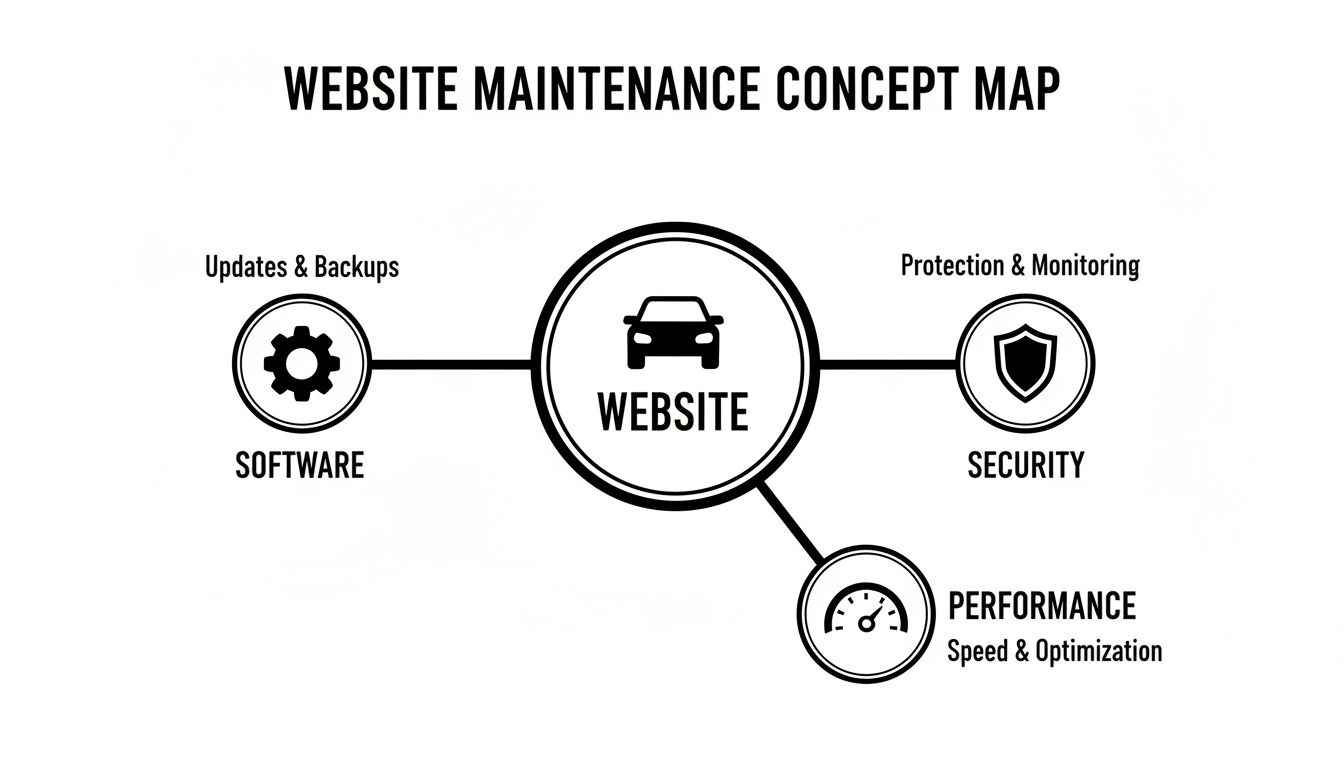
It’s clear these aren't just separate tasks but a connected system designed to keep your website a dependable asset for your business.
Let’s break down exactly what that looks like.
H3: Consistent Software and Plugin Updates
The absolute bedrock of any solid maintenance plan is keeping all your software up to date. Your website is a mix of code: the core system (like WordPress), your theme, and all the plugins that add special features. Developers are always releasing updates to fix bugs, add new capabilities, and, most importantly, patch security holes.
Putting off these updates is like leaving your front door wide open. In fact, a staggering 93% of WordPress security breaches are traced back to outdated plugins or themes. A good maintenance service makes sure every piece of software is updated quickly and safely. They'll often test updates on a "staging" copy of your site first to make sure nothing breaks before applying them to the live version.
This simple, proactive step stops technical glitches before they happen and shuts down security risks before hackers can exploit them.
H3: Proactive Security Monitoring and Malware Scanning
While updates are your first line of defense, a truly great package goes a step further with active security monitoring. This means using specialized tools to scan your site around the clock for malware, suspicious file changes, and hacking attempts.
A solid security setup almost always includes:
- Regular Malware Scans: Automated checks that comb through your site’s files looking for malicious code.
- Web Application Firewall (WAF): A digital bodyguard that blocks bad traffic and known threats before they can even reach your website.
- Brute-Force Login Protection: A system to stop bots from trying to guess your passwords over and over.
- Blacklist Monitoring: Alerts you if your site gets flagged as unsafe by Google, which can cripple your traffic.
A proper maintenance plan fundamentally changes your security approach from reactive to proactive. You’re not just cleaning up a mess after a hack; you have a system in place to prevent it from happening at all.
H3: Reliable Off-Site Website Backups
Even with the best security in place, things can still go wrong. A server might crash, a key file could be deleted by mistake, or a really determined hacker might find a way in. That’s when reliable backups become your ultimate safety net.
A good package doesn't just take backups; it manages them intelligently. This means backups are automatic and frequent—daily is the standard for most business websites. More importantly, these backups are stored "off-site" on a completely separate, secure server. This ensures that even if your main hosting account is compromised, your backup data is safe and ready for a quick restoration.
H3: Performance and Uptime Monitoring
Your website’s speed and availability have a direct impact on your revenue. Studies show that when a page’s load time goes from just one to three seconds, the chance of a visitor leaving jumps by 32%. A slow or offline website is literally telling potential customers to go somewhere else.
Performance optimization services tackle this head-on by:
- Monitoring Uptime: An automated system checks your site every few minutes to make sure it's online. If it goes down, your team gets an instant alert.
- Optimizing Load Speed: Using techniques like image compression, code cleanup, and database tuning to make your pages load faster.
- Managing Caching: Setting up a system that serves saved copies of your pages to visitors, which is much faster than generating them from scratch every time.
To see a more detailed list of services, our guide on what website maintenance includes offers a deeper dive. The value of these services is clear, with the global website maintenance market projected to reach USD 5.5 billion by 2025. That proves that investing in a professional website maintenance package is no longer a luxury—it’s a smart business practice.
How Website Maintenance Packages Are Priced

When you start shopping for a website maintenance package, the first thing you'll need to wrap your head around is the pricing. It’s the key to making a smart investment. As you gather quotes, you’ll find that agencies typically stick to one of three common models.
Think of it like choosing a mobile phone plan. There’s no single “best” option—the right one for you depends entirely on what your website needs and how much support you're looking for. Let’s walk through how these pricing structures work so you can pick the perfect fit for your business.
The Monthly Retainer Model
The most popular approach by far is the monthly retainer. This is basically a subscription service for your website's health. You pay a set fee every month, and in return, an agency takes care of a specific list of tasks like updates, backups, and security scans.
This model is all about consistency and preventing problems before they start. The biggest plus is predictable budgeting; you know exactly what the bill will be each month, which makes financial planning a breeze. It’s the perfect setup for any business that sees its website as a vital tool and wants an expert team keeping it in top shape without them having to micromanage.
A monthly retainer flips the script from reactive problem-solving to proactive care. You're investing in stability, making sure someone is always watching over your digital storefront.
The only real downside is that you might feel like you're overpaying during a quiet month with no issues. But that peace of mind is exactly what you're paying for.
Pay As You Go Hourly Rates
On the opposite side of the coin, you have the pay-as-you-go model. It’s as straightforward as it sounds: you pay an hourly rate for the exact time a technician spends working on your site. This is a great fit for very simple websites that rarely need attention or for one-off projects like a quick design tweak.
The main advantage here is flexibility. You only pay for work when you actually need it, which can be great for a tight budget. The catch, however, is that costs can become unpredictable. An emergency fix for a hacked site at an hourly rate will almost always cost you more in the long run than what you would have spent on preventative care.
Tiered Package Plans
Tiered packages are a smart hybrid of the other two models. Agencies bundle their services into different levels—think Basic, Pro, and Premium—each with a fixed monthly price. This gives you a clear roadmap for support, letting you scale up as your website and business grow.
Here’s what that typically looks like:
- Basic Tier: This covers the absolute essentials. You’ll get core software updates, daily backups, and security monitoring. It's the ideal starting point for a brand-new or small website.
- Pro Tier: You'll get everything in the Basic plan, plus things like performance optimization, uptime monitoring, and usually a couple of hours for small content changes each month.
- Enterprise/Premium Tier: This is for larger, more complex sites. It might include advanced security measures, e-commerce support, a dedicated account manager, and even 24/7 emergency help.
This structure offers the predictable cost of a retainer but with the clear, à la carte feel of a menu. It lets you find a website maintenance package that lines up perfectly with your needs and budget. For a deeper look at what to expect, check out our guide on how much website maintenance costs.
We've seen a huge shift where small and medium-sized businesses (SMBs) are now the primary customers for outsourced maintenance. This has pushed agencies to create these flexible, tiered plans. You'll often see lower-priced monthly packages aimed squarely at SMBs, while the more traditional, high-end retainers are reserved for large enterprise clients. Research on the website maintenance services market highlights this growing trend.
At the end of the day, picking the right pricing model is about protecting your website without breaking the bank. Once you understand these options, you can choose a plan that not only supports your business today but also sets you up for future growth.
Why Your Website Platform Matters for Maintenance
It’s tempting to think all website maintenance packages are created equal, but that's a dangerous assumption. Treating different website platforms as interchangeable is like asking a sedan mechanic to tune up a high-performance race car—the core principles might be similar, but the specific needs are worlds apart. The technology your site is built on directly dictates the kind of care it requires.
Any agency offering a generic, one-size-fits-all plan should be a major red flag. Every platform has its own unique architecture, common vulnerabilities, and maintenance routines. A provider who doesn’t tailor their services to your specific Content Management System (CMS) will almost certainly miss critical details, leaving your site slow, buggy, or worse, vulnerable.
The Nuances of WordPress Maintenance
As the world's most popular CMS, WordPress powers over 40% of all websites. Its greatest strength—a massive ecosystem of plugins and themes—is also its biggest maintenance headache. A legitimate WordPress care plan absolutely must focus on a few key areas.
- Plugin and Theme Management: Plugins are behind an estimated 93% of all WordPress security breaches, making diligent updates a must. This isn’t just about clicking "update"; it's about testing each update on a staging site first to ensure it doesn't break something else.
- Database Optimization: Over time, the WordPress database gets clogged with old post revisions, spam comments, and other junk data that can really slow things down. Regular cleanups are vital for keeping your site snappy.
- Core Software Updates: The WordPress core itself needs to be kept up-to-date. These updates patch security holes and ensure everything runs smoothly.
Simply put, ignoring these WordPress-specific tasks is asking for trouble.
Shopify and E-Commerce Platform Care
When you’re running an e-commerce store on a platform like Shopify, the maintenance priorities shift dramatically. Shopify is a hosted solution, meaning they handle the server security and core software updates for you. A good maintenance plan here is less about the server and more about what you control.
For a Shopify store, a maintenance provider is less of a system administrator and more of an integration specialist. Their job is to make sure all the apps, custom code, and third-party services you've plugged into the platform play nicely together.
This means monitoring third-party app integrations for conflicts, keeping custom theme code clean and error-free, and making sure your payment gateways are always securely connected. For any online store, a small hiccup in this ecosystem can translate directly into lost sales.
Custom and Modern Platform Needs
Platforms like Webflow or a completely custom-built website bring their own unique maintenance challenges. These sites often demand a higher level of technical expertise, with a focus on:
- Custom Code Integrity: If your site runs on hand-written code, you need someone to ensure it stays functional and secure, especially when other connected systems get updated.
- API and Integration Monitoring: Modern websites are often connected to a dozen different services through APIs. A maintenance plan has to ensure these digital handshakes remain stable and that data is flowing correctly.
- Hosting Environment Checks: With custom sites, the server environment itself becomes part of the maintenance checklist, requiring its own regular tune-ups and security checks.
Choosing the right platform is a huge decision, and knowing how they differ is crucial. Our detailed CMS comparison guide breaks down the pros and cons of each. At the end of the day, a quality website maintenance package is one that shows a deep understanding of your specific platform, giving your digital engine the specialized care it needs to run at its peak.
How to Choose the Right Maintenance Package for Your Business
Picking a website maintenance package can feel overwhelming, but it doesn't have to be. The key is to find a plan that fits your business like a glove. It’s less about hunting for the cheapest deal and more about finding the best value—a partner who will truly protect your digital investment.
Before you even glance at a pricing page, take a moment to look inward. A good decision starts with understanding exactly what you need. After all, you wouldn't buy a generic insurance policy for a custom-built home, and the same logic applies here.
Assess Your Website's Complexity
First things first, get a handle on your website’s technical landscape. A simple five-page brochure site has very different maintenance needs than a sprawling e-commerce store juggling thousands of products and payment gateways.
Think about these key factors:
- Platform: Are you running on a standard WordPress site, a Shopify store, or something completely custom-coded? Specialized platforms demand specialized expertise.
- Functionality: Does your site have moving parts like user accounts, booking systems, or membership portals? Every added feature is another piece of the puzzle that needs to be watched.
- Integrations: Is your website hooked into other tools like a CRM, email marketing platform, or inventory system? Those connections need to be kept stable and secure.
The more complex your site, the more robust your maintenance plan needs to be. A basic site might get by with simple updates and backups. But a high-traffic online store? That requires advanced security, performance tuning, and priority support when things go wrong.
Define Your Support and Response Needs
Next, think realistically about your support expectations. If your website is your main source of income, downtime isn't just a minor hiccup—it's a full-blown financial emergency.
Ask yourself a few honest questions:
- What are your business hours? If you’re a classic 9-to-5 operation, standard business-hour support might be all you need.
- What happens if the site breaks at 2 AM? An e-commerce store or a business with a global audience needs 24/7 emergency support to stop the bleeding.
- How fast do you need help? There’s a world of difference between a guaranteed one-hour response and a 24-hour support ticket queue.
Your answers will point you directly to the provider’s Service Level Agreement (SLA). Don't just skim this part of the contract. The SLA is where they put their promises in writing, detailing guarantees on uptime, response times, and how quickly they’ll fix issues.
Your Service Level Agreement isn't just fine print—it's the blueprint for your partnership. It clearly outlines what happens when things go wrong and sets the expectation for how quickly your provider will step in to help.
Look for a True Partner, Not Just a Provider
At the end of the day, the best website maintenance package comes from a team that sees themselves as a partner in your success. They should be invested in helping you hit your goals, not just cashing a monthly check. This is a bit harder to measure, but it's the most critical factor for a healthy, long-term relationship.
Here are a few signs you've found a real partner:
- Clear Communication: Do they send regular reports you can actually understand?
- Proactive Suggestions: Do they offer advice on how to make your site faster, more secure, or easier for customers to use?
- Transparent Processes: Is their process for handling updates, testing changes, and responding to emergencies crystal clear?
Choosing the right plan means evaluating both the technical checklist and the people behind it. By knowing your site's needs, defining your support expectations, and finding a genuine partner, you'll land on a package that doesn't just prevent problems—it actively helps your business grow online.
Common Questions About Website Maintenance
Choosing a website maintenance package is a big decision, so it's natural to have a few last-minute questions. It's always smart to get everything cleared up before you sign on. Here are some of the most common things business owners ask us.
Can't I Just Do This Myself?
You absolutely can, but the better question is, should you? Maintaining a website goes way beyond just clicking the "update" button. It's a technical skill that takes a serious time commitment and a solid plan for when things inevitably go wrong.
If you handle it yourself, you're on the hook for testing every update, running security scans, managing backups, and figuring out what broke when two plugins don't play nice. That can easily eat up hours every month—hours you could be spending on your actual business. For most people, the cost of a professional plan is a bargain compared to the value of their time or the price of an emergency fix.
How Often Does a Website Actually Need to Be Updated?
It really varies, but a good rule of thumb is that something on your site will need attention at least once a week. The core software, like WordPress, might only have major updates a few times a year, but themes and plugins are a different story. It’s not uncommon for popular plugins to push out patches up to 50 times a year to fix bugs or plug security holes.
Putting off updates is like leaving your front door unlocked. The longer you wait, the bigger the risk. A professional maintenance plan makes sure those critical updates are installed right away, closing security gaps before anyone can take advantage of them.
What Happens If My Site Gets Hacked While on Your Plan?
This is one of the most important questions you can ask any provider. A good agency will have a clear disaster recovery plan spelled out in their Service Level Agreement (SLA). While no one can promise 100% protection against every single threat out there, a solid plan means you get a fast, effective response if the worst happens.
If a breach does occur, our first priority is to get your site clean and back online with minimal fuss. The process usually involves:
- Finding and removing all malicious code.
- Restoring your site from the most recent clean backup.
- Figuring out how the breach happened so we can stop it from happening again.
A website maintenance package with a clear hack-fix policy is your safety net. It turns a potential disaster into a manageable problem with very little downtime.
Your website should be an asset, not a source of stress. OneNine offers maintenance plans designed to keep your site secure, fast, and running smoothly so you can focus on what you do best. Explore our website management services to find the right fit for your business.


