Think of website maintenance and support as the essential, ongoing work that keeps your site running smoothly long after it goes live. It’s not just an afterthought or a "nice-to-have" expense. It's a fundamental investment in your business that protects your online presence, keeps visitors happy, and fuels your long-term success.
Why Website Maintenance Is a Core Business Investment

Picture your website as your digital storefront. The launch day is your grand opening—it's exciting, shiny, and full of promise. But the real work starts the day you open your virtual doors to customers. A physical shop needs cleaning, restocking, and security. Your website is no different; it needs constant attention to stay effective.
If you let it slide, that once-perfect site can quickly start showing its age. This kind of digital neglect opens the door to serious risks that can damage your reputation and hurt your bottom line.
Protecting Your Most Valuable Digital Asset
For many potential customers, your website is their very first impression of your brand. A slow, buggy, or insecure site sends a clear message: you don't care about the details. Consistent maintenance is like having a property manager for your digital space, handling all the crucial tasks that keep things secure and running smoothly.
This covers key areas like:
- Security Monitoring: Proactively finding and fixing security holes before hackers can get in. A single breach can be catastrophic, leading to lost data and shattered customer trust.
- Performance Optimization: Making sure your site loads fast and provides a frustration-free experience. Study after study confirms that even a one-second delay in load time can tank your conversion rates.
- Software Updates: Keeping your plugins, themes, and core platform software up to date. Outdated software is the number one entry point for website hacks.
Neglecting website maintenance is like ignoring a leaky roof. At first, it's just a small drip. But leave it long enough, and you’ll end up with major structural damage that costs a fortune to fix—far more than a simple patch would have cost in the beginning.
The Growing Importance of Professional Upkeep
As business shifts more and more online, having a functional website has become non-negotiable. This isn’t just a feeling; the numbers back it up. The website maintenance services market, currently valued at around USD 10.2 billion, is expected to skyrocket to USD 25.3 billion by 2033. This massive growth shows just how vital professional upkeep is for any business that wants to stay competitive. You can dig into more details about this expanding market in recent industry reports.
In the end, putting money into professional website maintenance isn't just about fixing what’s broken—it’s about preventing problems from ever happening. It ensures your digital storefront remains a safe, welcoming, and effective place for your customers, protecting your initial investment and setting you up for real, sustainable growth.
The Building Blocks of Effective Website Maintenance
So, what are you actually getting when you sign up for "website maintenance and support services"? It's easy to think of it as just one thing, but it’s really a whole system of ongoing care. Each piece of the puzzle is crucial for keeping your website healthy, safe, and running like a well-oiled machine.
The whole point is to get out of the "fix-it-when-it-breaks" loop and move to a proactive "prevent-it-from-breaking" strategy. A huge part of this is having solid systems for understanding infrastructure monitoring to keep an eye on your site’s stability and performance around the clock.
This approach is built on a few core pillars that all work together.
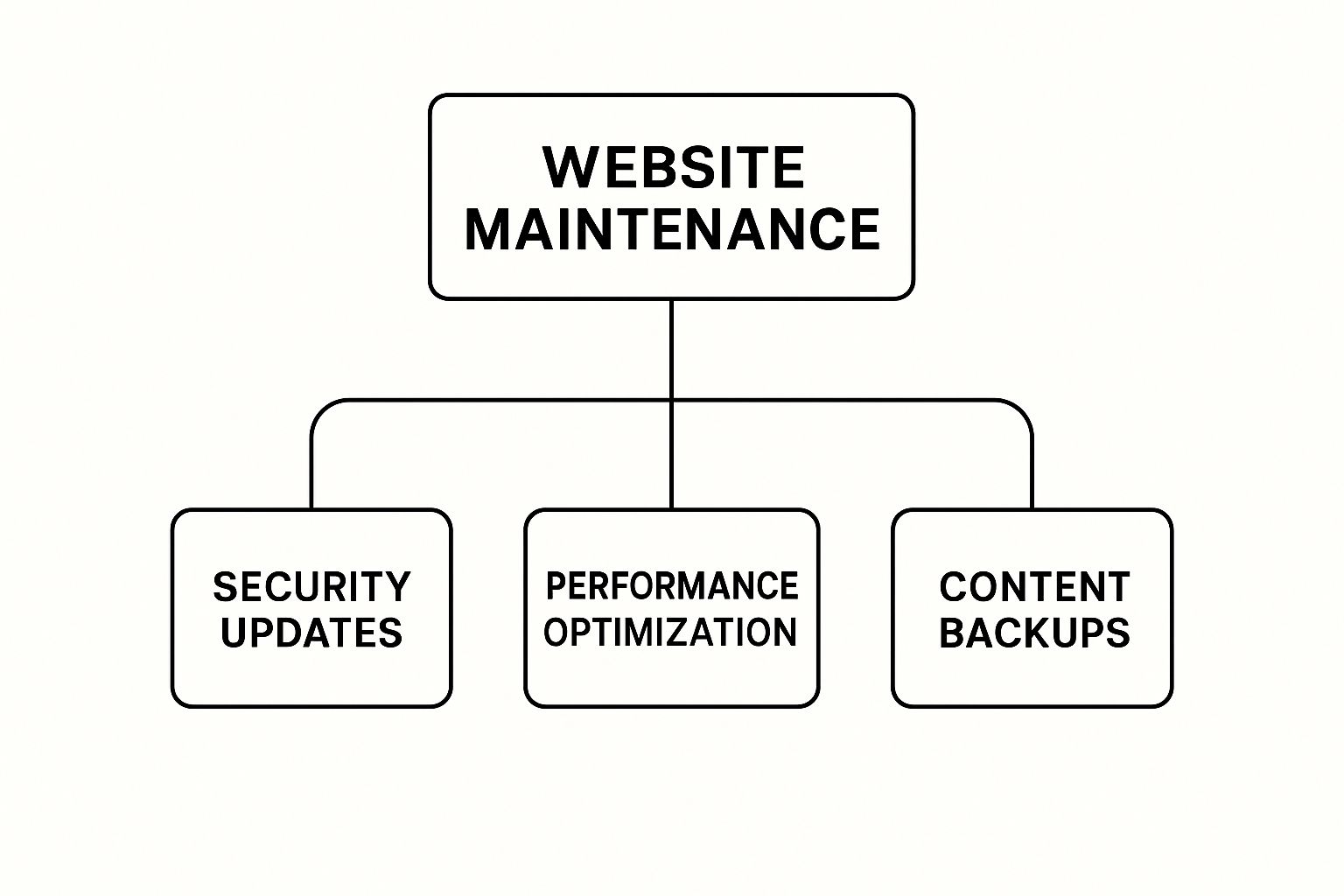
As you can see, a solid plan finds the right balance between security, performance, and recovery. This is what creates a stable and reliable online experience for your visitors.
Let's unpack what each of these services really means for you. This table gives a quick overview of what's typically under the hood.
Breakdown of Core Maintenance Services
| Service Component | What It Involves | Key Business Benefit |
|---|---|---|
| Proactive Security | Constant malware scans, firewall management, and blacklist monitoring. | Protects brand reputation and customer data from breaches. |
| Software Updates | Regular updates to the CMS, plugins, and themes in a safe staging environment. | Closes security holes and prevents compatibility-related crashes. |
| Performance Tuning | Image compression, code minification, and caching implementation. | Improves user experience, reduces bounce rates, and boosts SEO. |
| Backup & Recovery | Scheduled, automated backups of all files and the database, stored off-site. | Provides a safety net to quickly restore your site after a major issue. |
Each of these elements addresses a different risk, but they all work toward the same goal: keeping your digital storefront open for business, 24/7.
Proactive Security Monitoring
Think of your website like a physical store. Proactive security monitoring is your 24/7 security guard. This isn't about reacting after a break-in; it's about actively patrolling, checking for unlocked doors (vulnerabilities), and stopping trouble before it starts.
This includes things like:
- Malware Scanning: Regularly sweeping your site's files for any malicious code that might have snuck in.
- Blacklist Monitoring: Making sure your site hasn't been flagged as unsafe by Google and other search engines.
- Firewall Management: Maintaining a strong digital barrier that filters out suspicious traffic and known threats.
Without this constant vigilance, your site is just a sitting duck. With over 30,000 websites hacked daily, proactive monitoring isn't a luxury—it's an absolute must.
Consistent Software and Plugin Updates
Let's stick with that storefront analogy. Your website's software—its content management system (CMS), plugins, and themes—are like the locks on your doors and windows. Software updates are the equivalent of changing those locks whenever a new type of key (or hacking method) is discovered.
Each update often contains critical security patches that close loopholes discovered by developers or malicious actors. Running on outdated software is like leaving your front door wide open for cybercriminals.
A proper maintenance service handles this for you. They test updates in a safe, separate environment first to make sure they don't cause any conflicts before applying them to your live site. This simple step prevents those frustrating issues that can break features or take your whole website down.
Performance and Speed Optimization
Nobody likes a slow website. Performance optimization is like organizing your store's layout so customers can easily find what they're looking for without getting stuck. A slow, clunky website will drive people away, just like a messy, cluttered shop.
This involves technical tweaks like:
- Image Compression: Shrinking image file sizes without losing visual quality, so they load in a snap.
- Code Minification: Cleaning up your site's code to make it leaner and more efficient for browsers to read.
- Caching Implementation: Storing temporary versions of your site so that when people come back, it loads almost instantly.
These adjustments don't just make for a better user experience. They also give you a nice boost in your SEO rankings, since search engines always favor fast websites.
Reliable Backup and Disaster Recovery
Even with the best security and updates, things can still go sideways. A server can fail, a bad update might slip through, or a determined hacker could cause damage. This is where backup and disaster recovery saves the day.
Think of it as your digital insurance policy. A good plan involves taking regular, full copies of your website's files and database and storing them securely somewhere completely separate. If the worst happens, you can quickly restore a clean, working version of your site. This minimizes downtime and protects you from losing everything you’ve built.
Decoding Different Types of Support Services

While we often lump "maintenance" and "support" together, they play very different roles. Maintenance is all about prevention—the routine check-ups that keep your website running smoothly. Think of it like your car’s regular oil changes and tire rotations.
Support, on the other hand, is about reaction. It’s the mechanic you call when you get a flat tire or hear a weird noise coming from the engine. Both are crucial for a healthy website, but knowing the difference is the first step in choosing the right help for your business.
Not every problem needs the same response, and understanding the types of support available helps you pick a plan that fits your real-world needs and budget. It’s how you build a partnership that lets your business grow, not just stumble through the next digital hiccup.
Technical Support for Everyday Issues
This is your go-to, first line of defense for the daily hiccups a website can have. These are the glitches that aren't quite a full-blown emergency but are definitely messing with your user experience or getting in the way of business.
Think of it as having an expert on call to solve the problems that make you scratch your head.
Common reasons you’d call on technical support include:
- Broken Contact Forms: A customer is trying to reach you, but the "submit" button just spins. Tech support can jump in and fix it so you don’t lose that lead.
- Weird Display Errors: You just updated a plugin, and now your site looks completely broken on smartphones. A support tech can untangle the code and get it looking professional again.
- Plugin Conflicts: You install a cool new feature, but it suddenly breaks something else on your site. Support can pinpoint the conflict and get everything playing nicely together.
This kind of help is usually part of a monthly retainer package, where you get a set number of hours for just these kinds of fixes. It's the peace of mind of knowing a pro is just an email away.
Think of technical support as having a skilled handyman on speed dial. You don’t need them every day, but when a faucet starts leaking or a light fixture flickers, you’re incredibly relieved to have someone who can fix it quickly and correctly.
Emergency Support When Everything Is on Fire
Emergency support is the digital equivalent of calling 911. This is for the worst-case scenarios—the catastrophic issues that knock your business completely offline or create a massive security breach. When disaster strikes, you need someone on it now, not tomorrow morning.
These situations are rare (thankfully!), but they demand a rapid-response team ready to act at a moment's notice.
What counts as a real emergency?
- Your website is completely down and showing an error page to all visitors.
- You've been hacked, and your homepage now features something malicious.
- Core functionality is broken, like your e-commerce checkout failing.
- Your server has crashed, taking your site down with it.
This level of support is defined by its 24/7 availability and guaranteed fast response times. Because it’s so critical, emergency support is usually found in higher-tier website maintenance plans. It's an insurance policy you hope you never use, but you’ll be incredibly grateful for it if you do. Fixing a major outage in minutes instead of hours can save you thousands in lost revenue and protect your brand's reputation.
Content Management and General Assistance
Not every call for help is a technical crisis. Sometimes, you just need an extra pair of hands to keep your website's content fresh and accurate. This is a lifesaver for smaller teams that don't have a dedicated web manager but still want their site to look current.
This type of support is like having an extension of your marketing team, ready to handle the tasks that keep your site feeling alive and active.
Some of the services you'll find here include:
- Updating text on a services page or adding a new team member's bio.
- Uploading and formatting a new blog post you've written.
- Swapping out old promotional banners on your homepage for new ones.
- Adding new products to your online store.
This kind of assistance frees up your team to focus on what they do best, rather than wrestling with the backend of a website. It ensures your content stays up-to-date—a key factor for both your users and your SEO. By offloading these smaller tasks, you can maintain a polished, professional site without needing to become a web developer yourself.
The Hidden Costs of Neglecting Your Website
Trying to save a few bucks by skipping professional website maintenance might seem like a smart move at first. But in reality, it's a classic case of being penny-wise and pound-foolish. The small amount you save now can easily lead to massive, painful expenses down the line. This isn't about small glitches; it's about how neglect quietly builds into serious financial and reputational disasters.
Think of your website like a critical piece of machinery on your business's assembly line. If you skip its regular service, you're not just risking a minor slowdown—you're gambling with a complete breakdown, probably at the worst possible time. The true costs of this neglect often stay hidden until it's far too late.
The Direct Hit from Security Breaches
The most immediate and terrifying cost of neglect is a security failure. An unpatched plugin or an outdated content management system is basically a welcome mat for hackers. Once they get in, the financial bleeding starts, and it adds up fast.
You'll be on the hook for a whole range of direct expenses:
- Emergency Cleanup: Finding and removing malware requires a specialist, and their emergency rates can easily run into thousands of dollars.
- Data Recovery: If your data is stolen or wiped, restoring it from a backup (if you even have a current one) costs time and money.
- Regulatory Fines: If customer data gets compromised, you could be facing huge fines under rules like GDPR or CCPA. GDPR fines, for instance, can be as high as 4% of your annual global turnover.
And that’s before you even get to the cost of notifying customers, paying for credit monitoring, or dealing with lawsuits. The financial fallout from a single breach can vaporize years of "savings" from skipping maintenance.
A hacked website is more than a technical problem; it's a trust catastrophe. It tells every visitor, past and present, that their data may not be safe with you, causing damage that can take years to repair.
Revenue Lost to Downtime and Poor Performance
Every single minute your website is offline is a minute your digital storefront is closed. For an e-commerce site, the math is brutal: zero uptime means zero sales. The average cost of downtime for small businesses is staggering, estimated to be as high as $427 per minute. Even a single hour of an outage can leave a serious dent in your bottom line.
But the losses aren't just from full-blown crashes. A slow, buggy website quietly strangles your revenue every day. When pages take too long to load, potential customers don't wait around—they just click over to a competitor. This slow bleed of lost sales is harder to see, but it's just as damaging in the long run. Neglecting performance is like putting up hurdles in your own doorway.
The Slow Burn of SEO Penalties
Search engines like Google want to send their users to sites that are secure, fast, and reliable. When you let maintenance slide, your site’s performance drops, security risks pop up, and your content gets stale. Google absolutely notices.
This neglect often leads to painful SEO consequences:
- Lower Rankings: Your site will start slipping down the search results, becoming invisible to new customers.
- Security Warnings: If your site is flagged as insecure, Google will warn users before they click, tanking your traffic.
- Lost Traffic: Eventually, your organic traffic—one of your most valuable assets—can dry up completely.
Trying to win back your SEO ranking after being penalized is a long, expensive fight. Investing in proactive website maintenance for small business is a far smarter and cheaper strategy than trying to crawl your way back into Google's good graces. It’s a clear business case for staying ahead of problems instead of reacting to them.
How to Choose the Right Maintenance Partner

Picking a partner to handle your website maintenance isn't just another item on the to-do list. It's a huge decision for your online presence. You're not just hiring a fixer; you're handing over the keys to a critical business asset. The right team acts as a guardian for your digital storefront, keeping it secure, fast, and always open for business.
On the flip side, the wrong choice can trap you in a cycle of recurring technical glitches, security scares, and frustrating communication breakdowns that drain your time and money. To get it right, you need a clear way to evaluate your options. The goal is to find a partner who delivers real, consistent value, not just the cheapest quote.
Vet Their Technical Expertise
First thing's first: do they have the right skills? Your website is built on a specific platform—whether it's WordPress, Shopify, or something else entirely—and your maintenance partner needs to know it inside and out. A team that’s a wizard with WordPress might be completely lost trying to manage a Shopify store.
When you're talking to potential partners, get specific. Ask about their direct experience with your particular setup. Do they have a handle on the plugins, themes, and custom code that make your site tick? A mismatch here can lead to clumsy fixes or, even worse, create new problems.
Beyond the platform, dig into their knowledge of:
- Hosting Environments: Are they comfortable working with your current hosting provider?
- Security Protocols: What's their game plan for getting rid of malware and patching vulnerabilities?
- Performance Optimization: How do they actually make a site run faster? What tools do they use?
A genuinely capable partner will answer these questions with confidence and be able to show you clear examples of their work.
Define Clear Communication and Response Times
When your site breaks, you need to know help is coming—and fast. This is where a Service Level Agreement (SLA) becomes your best friend. This document is a formal promise, outlining exactly how quickly they’ll respond to different types of problems.
Look for a partner who makes communication easy and transparent. You should know exactly who to call, how to log a ticket, and what to expect next. Vague promises like "we'll get back to you soon" are a massive red flag.
A strong maintenance partnership is built on trust and transparency. You should never have to wonder if your request was received or when you'll get a resolution. Clear, consistent reporting on the health and performance of your site is a sign of a professional and accountable partner.
The demand for this kind of reliable service is skyrocketing. The global market for website maintenance is expected to jump from USD 5.565 billion in 2025 to USD 9.82 billion by 2033. Businesses are realizing they need professional, accountable help, making things like clear SLAs more important than ever.
Scrutinize Their Processes and Scope of Work
A great partner doesn't just wing it; they operate with well-defined processes. You need to know exactly what’s included in your plan to avoid surprise bills down the road. To get a better feel for this, looking at some scope of work examples can help you define what you truly need.
Before you sign on the dotted line, make sure you have solid answers to these questions:
- Backup Procedures: How often are backups taken? Where are they stored, and what’s the recovery process like?
- Update Protocol: How do they manage plugin, theme, and core updates? Critically, do they test everything on a staging site first to avoid breaking your live one?
- Reporting: What kind of reports will you get? A good partner sends regular, easy-to-read summaries of maintenance tasks, security scans, and performance checks.
- Security Measures: What are they doing to secure your site beyond just running basic updates?
Finally, check their track record. Ask for case studies or client testimonials that feel relevant to your industry or website. This real-world proof is often the best sign you've found a reliable and effective team. For an even deeper dive, our guide on choosing a website maintenance service can walk you through more of the specifics.
Common Questions About Website Maintenance
Thinking about professional website maintenance and support services? It’s a smart move to protect your online presence, but it’s also normal to have a few questions before you dive in. Let's walk through some of the most common things business owners ask, so you can feel confident you're making the right call.
Getting these basics down will clear up any confusion and show you just how much value you get from having an expert keep your site in top shape.
How Often Does My Website Need Maintenance?
There's no single answer here—it really depends on your website's complexity and how much traffic it gets. Think of it this way: your family car and a long-haul delivery truck both need oil changes, but on very different schedules. Your website is the same.
For most business websites, there's a clear baseline.
- Weekly Checks: At the very least, you should have someone reviewing and updating your site’s plugins, themes, and core software once a week. This is your first line of defense against newly discovered security holes.
- Daily Monitoring: Security scans and full backups need to run every day. No exceptions. A threat can pop up overnight, and a fresh backup from the last 24 hours is the ultimate safety net.
If you’re running a busy e-commerce store or a site with custom features, you’ll need a much more hands-on approach. These sites are like high-performance engines that require constant, real-time monitoring to catch problems the instant they happen. A good maintenance plan will always be crystal clear about these schedules.
Can I Handle Website Maintenance Myself?
Sure, you can try. But going the DIY route is a bit like trying to fix your own plumbing—you might be able to handle a leaky faucet, but you could also end up with a flooded kitchen. It's a gamble with some pretty significant risks.
The biggest issue is the lack of deep technical expertise. A simple plugin update looks easy, but it can create a conflict that breaks your entire checkout process. Without a pro’s eye, you might miss subtle security gaps or set up backups incorrectly, making them totally useless when you actually need them.
Professional maintenance teams use a whole suite of advanced tools for security, monitoring, and performance that just don’t make financial sense for a single business to own. Plus, every hour you spend troubleshooting a technical problem is an hour you’re not spending growing your business.
For almost every business, handing maintenance over to an expert is safer, way more efficient, and ultimately gives you a much better return on your investment.
What Is a Typical Cost for Maintenance Services?
The price for website maintenance isn't a fixed number; it scales with your site's size, technical setup, and how much support you need. For a really detailed look at the numbers, our guide on website maintenance cost breaks it all down.
In general, you'll see pricing fall into a few common tiers:
- Basic Plans ($50 – $150/month): Perfect for small, simple "brochure" style websites. This usually covers the essentials: software updates, daily backups, and security scans.
- Business Plans ($200 – $600/month): A good fit for larger corporate sites or small e-commerce stores. These plans often add in performance optimization and a certain number of support hours each month.
- Premium/Custom Plans ($600+/month): Built for large-scale e-commerce platforms, custom web apps, or any business that needs 24/7 uptime monitoring and a dedicated support team on standby.
Always look closely at what’s actually included. The cheapest plan might catch your eye, but if it doesn't include emergency support or performance checks, you could be left high and dry when you need help the most.
Retainer vs. Ad-Hoc Support: Which Is Better?
This is a key decision. Choosing between a retainer and ad-hoc support comes down to whether you want to be proactive or reactive.
A retainer model means you pay a set monthly fee. In return, you get ongoing maintenance, constant monitoring, and a bucket of support hours for any fixes or changes you need. The whole point is to prevent problems from happening in the first place, giving you predictable costs.
Ad-hoc support is the "pay-as-you-go" option. You only get billed an hourly rate when something breaks and you call for help. This might sound cheaper upfront, but emergency hourly rates are almost always higher, and those costs can skyrocket during a real website crisis.
For long-term stability and peace of mind, a retainer almost always offers better value. It turns website care from an expensive, stressful emergency into an affordable, proactive routine. If you have very specific questions, it can be really helpful to ask experts on dedicated platforms to get advice tailored to your site.
At OneNine, we take the hassle out of website management with clear, effective maintenance and support plans. We handle the technical headaches so you can focus on what you do best. Learn more about our services and let us become your partner in keeping your website healthy and secure.


