

Understanding Website Information Architecture Fundamentals
Navigating a website shouldn't feel like getting lost in a maze. The best websites offer a smooth, intuitive experience, guiding users effortlessly to their desired destination. This seamlessness is a direct result of solid website information architecture (IA). Think of IA as the invisible framework that transforms a chaotic collection of content into a user-friendly experience.
Core Components of Effective IA
Several key components contribute to a well-structured website. Navigation systems, like clear signposts, guide users to different sections. Labeling conventions, when clear and consistent, provide context, helping users understand their location within the site and what information to expect. Well-defined organization schemes categorize and structure content logically, ensuring easy access and retrieval.
The Importance of IA in a Crowded Digital Space
With billions of websites competing for attention, effective IA is more critical than ever. A well-defined IA can distinguish a successful website from the rest. As of 2025, over 2 billion websites exist globally, with approximately 200 million actively maintained. In this crowded digital environment, information architecture is essential for cutting through the noise. WordPress alone powers 40% of all websites worldwide, highlighting the need for robust IA frameworks to manage diverse content effectively within its ecosystem. Clearly, IA is not just a nice-to-have but a must-have in today's competitive online environment. Find more detailed statistics here.
IA and User Experience: A Symbiotic Relationship
Effective IA directly impacts user experience. When users can easily find information, they are more likely to engage with the content, stay on the site longer, and convert. Conversely, a poorly structured website leads to frustration and high bounce rates, effectively driving potential customers away. Investing in IA means investing in user satisfaction and, ultimately, business success. For further inspiration, explore these Top Information Architecture Examples to Inspire Your Design.

The Hidden Cost Of Poor Website Information Architecture

A well-structured website, built on solid information architecture, creates a seamless and intuitive user experience. But what happens when this crucial element is neglected? The consequences go far beyond mere aesthetics, directly impacting a company's bottom line. Imagine a potential customer landing on your site, ready to buy your newest product. If they can't find the product page easily, they'll likely leave without purchasing. This results in lost revenue, a hidden cost often underestimated.
The Impact on Revenue and User Experience
Poor website information architecture frustrates users, leading to quick abandonment. This is reflected in high bounce rates, a clear sign of user dissatisfaction. Confusing navigation makes it difficult for users to find products or services, impacting sales and revenue. Think about the frustration of searching for a specific item on a cluttered website, only to give up empty-handed. This isn't just annoying, it's damaging to businesses.
Website bounce rates reveal how vital information architecture is for user retention and engagement. Research from 2024-2025 indicates that average bounce rates can vary significantly, from 26% to 70%. The highest rates, around 51%, are seen on mobile devices. Poor information architecture makes it hard for users to find what they need, leading to frustration and exit. Learn more about information architecture. Prioritizing website information architecture is not just a best practice; it’s about protecting revenue and building positive user experiences.
The Mobile Effect: Amplified Frustration
Mobile users are especially sensitive to poor website information architecture. Smaller screens and limited navigation space magnify any structural flaws. A confusing mobile experience quickly drives users away to competitors with more user-friendly interfaces. This is especially important with the growing dominance of mobile browsing. Investing in mobile-first IA is key to keeping this expanding user segment.
Recognizing the Warning Signs
Several warning signs indicate your website's information architecture needs attention:
- High bounce rates: Users leaving shortly after arriving.
- Low conversion rates: Fewer users completing desired actions.
- Negative user feedback: Complaints about navigation or finding information.
- Decreased search engine rankings: Search engines penalize sites with poor usability.
Addressing these problems proactively can prevent further damage and enhance website performance. By prioritizing website information architecture, businesses create user-centered online experiences that drive engagement, boost conversions, and contribute to a healthier bottom line.
What's Actually Working In Website Information Architecture

Website information architecture (IA) is constantly changing. Static structures are being replaced with dynamic and adaptable designs. This means businesses must adopt new methods for creating outstanding user experiences.
The Rise of Dynamic and Personalized Structures
One major trend is the use of AI-powered IA. This technology automatically organizes and personalizes website structures based on user behavior. For instance, an e-commerce site using AI can track user preferences and then adjust product recommendations and category listings. This personalized approach makes the experience more engaging and relevant. IA is a core element of web design, especially with increasing UX demands. AI helps make sites dynamic and personalized.
Voice interfaces, sometimes called Zero UI, change how information is structured. They require non-visual navigation for voice commands. Explore this topic further. AI can even predict future user actions, improving navigation and personalization.
Voice Search and the Future of Navigation
Voice interfaces are transforming how we interact with technology. They're causing a reassessment of traditional website navigation. With Zero UI, users navigate with spoken commands instead of clicks and scrolls. Websites must adapt to these non-visual navigation structures. This means IA needs to prioritize semantic understanding and conversational flows.
Semantic Architecture: Enhancing Content Discoverability
Semantic architecture is another impactful development. It organizes information using the connections between content and concepts. This significantly improves content discoverability. For example, a semantic architecture might link related articles or products based on shared ideas, not just keywords. This helps users find related content they might otherwise miss. It creates a better experience and boosts engagement by showing related information.
Balancing Innovation With Usability
While adopting new technologies is important, maintaining usability is key. User experience should always be the priority. Businesses must balance innovation with usability. New technologies should enhance, not hinder, the user experience. This requires careful testing, gathering user feedback, and refining IA. This ongoing improvement ensures the site architecture remains user-focused and effective. It requires clear labels, logical organization, and intuitive navigation.
Building Blocks That Make Website Information Architecture Work
Great website information architecture isn't about magic. It's about understanding the key components and how they work together. These elements create enjoyable experiences for your users, guiding them toward their goals. Check out this helpful resource on website development stages.
Navigation Systems: Guiding the User Journey
Navigation systems are like roadmaps for your website. They come in many forms, from standard top navigation bars to innovative sidebar menus. Each style has its own pros and cons. A key consideration is how these systems affect important metrics like findability and efficiency.
The infographic below compares top and sidebar navigation. It measures average find time, the number of clicks a user takes, and the success rate, both with and without breadcrumbs.
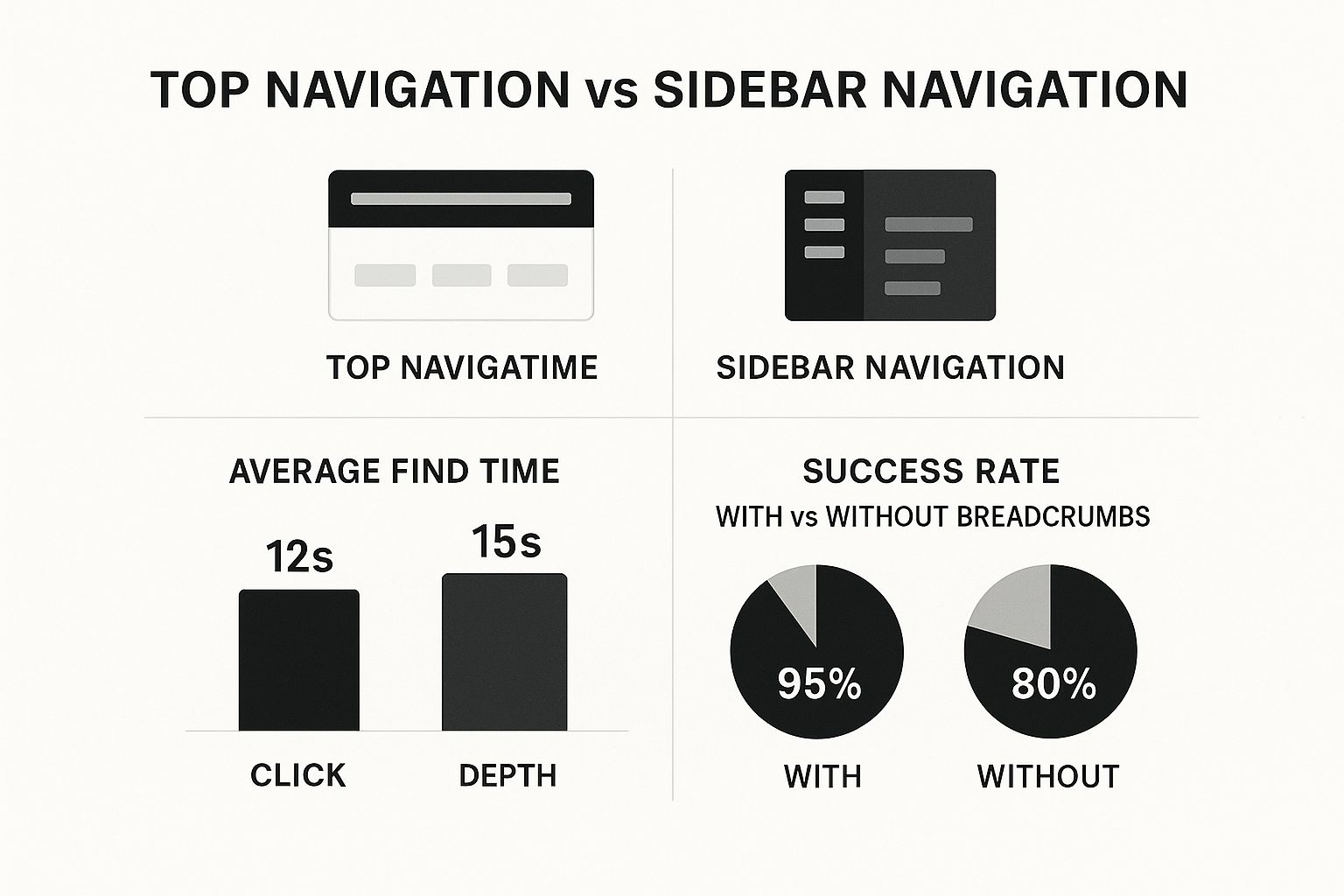
As you can see, top navigation often leads to faster find times (12 seconds versus 15 seconds) and fewer clicks (3 steps versus 4 steps). But adding breadcrumbs significantly improves the success rate of both, boosting sidebar navigation from 80% to 95%.
Labeling Conventions: The Language of Your Website
Labeling conventions are the words you use to talk to your users. Clear, consistent labels are crucial for user understanding. For instance, sticking with "Contact Us" is better than switching between that, "Get in Touch," and "Support." This avoids confusion. One way to enhance this is through efficient management of customer inquiries using HubSpot Jira integration. This contributes to a positive user experience.
Organization Schemes: Structuring for Success
Organization schemes are the backbone of your website's structure. They group and categorize content in a logical way. This could mean organizing products by type, by topic, or even by location.
These schemes directly influence how users browse and find information. A well-thought-out scheme makes navigation easy. Plus, a logical structure helps you expand your website content over time without sacrificing usability.
To further illustrate the importance of these components, let's look at a detailed breakdown in the following table. It explains the role each element plays in creating a strong website structure.
Core Information Architecture Components and Functions: A comprehensive breakdown of essential IA elements and their specific roles in creating effective website structures
| Component | Primary Function | User Impact | Implementation Priority |
|---|---|---|---|
| Navigation Systems | Guides users through the website, allowing them to find information easily. | Directly impacts findability and efficiency. Poor navigation leads to frustration and high bounce rates. | High – A clear and intuitive navigation is fundamental to a positive user experience. |
| Labeling Conventions | Provides a consistent language throughout the website, making it easier for users to understand the purpose of different sections and content. | Affects user comprehension and ability to locate specific information. Inconsistent labeling can create confusion. | High – Clear and consistent labeling should be established early in the design process. |
| Organization Schemes | Structures the website's content logically, ensuring that information is categorized and grouped in a way that makes sense to users. | Impacts browsing behavior and how easily users discover content. A well-defined scheme improves findability. | High – An effective organization scheme is essential for scalability and long-term usability. |
As the table demonstrates, each component of information architecture significantly contributes to a positive user experience. Prioritizing these elements during website development is key to creating a website that is both user-friendly and effective.
From Research To Reality: Planning Website Information Architecture
A deep understanding of website information architecture (IA) principles is key. But putting these principles into practice is what really matters. Careful planning turns abstract ideas into user-friendly designs.
Research: Understanding Your Users
Effective IA begins with understanding your users. This means researching their needs and online behavior, not just guessing what they might want. User research techniques are essential for this. For instance, card sorting exercises show how users group information, offering insights into how they think. This data helps build a structure that matches user expectations.
Creating user personas also helps. These fictional characters represent your target audience. They embody user needs and behaviors, guiding you to design an IA that resonates with your ideal user.
Visualizing the Architecture
Before starting the expensive implementation process, visualize your IA with practical tools. Diagrams, flowcharts, and wireframes are essential for mapping the structure and ensuring a clear hierarchy. Think of a website's IA like a house's blueprint – you wouldn't build without one! These visuals guide development and design decisions.
The Importance of Stakeholder Buy-In
Getting stakeholder buy-in is crucial. A clear, well-researched plan shows the value of IA and explains the need for changes. Highlighting the benefits, such as a better user experience and higher conversion rates, can make all the difference.
Timelines and Pitfalls
Planning your website's IA is a complex undertaking. Setting realistic timelines is vital. The project's size determines how much time you need for research, analysis, and implementation. Smaller websites might take a few weeks, while larger projects could take months.
Knowing common pitfalls saves time and resources. Ignoring user research or failing to visualize the architecture can lead to major problems. Not planning for future content growth can also cause scalability issues. Plan for growth and changing user needs to prevent expensive redesigns.
Tools and Techniques for Implementation
Many tools and techniques simplify IA planning. Optimal Workshop offers specialized tools for card sorting and tree testing. Tools like Justinmind and Figma help create interactive wireframes and prototypes for usability testing. A website agency can guide you, ensuring a smooth transition from research to a user-friendly site. They can tailor the IA to your business goals and user needs, working across various content management systems, from WordPress to custom builds. Remember to align your architecture with your overall social media marketing strategy for consistent messaging.
By using these proven methods and working with experienced professionals, you can transform your website's information architecture from a confusing mess to a streamlined, user-friendly experience.
Tracking What Matters In Website Information Architecture
Building a solid website information architecture (IA) is the first step. The real work begins when you measure and refine it. This section explores how data-driven designers use analytics and user feedback to create effective IA. When planning your website's IA, consider how it aligns with your overall marketing, including your external social media marketing strategy. Understanding social media performance is key.
Identifying Navigation Bottlenecks
Analytics can reveal hidden website problems. Tools like Google Analytics provide data on page views, bounce rates, and time spent on each page. Analyzing this data helps pinpoint navigation bottlenecks where users get stuck or leave quickly. For example, a high bounce rate on a product page might indicate users aren't finding what they need.
Usability Testing for IA Performance
Usability testing is crucial for evaluating IA. This involves observing real users navigating your website to identify pain points. Focus on how they search for information, use menus, and complete tasks. This reveals whether your IA is intuitive. You might find this article helpful: How to master website maintenance.
A/B Testing for Navigation Elements
A/B testing helps optimize navigation. This compares two versions of a navigation menu, label, or other element to see which performs better. For example, test different menu labels to see which gets more clicks. Continual testing refines your IA and maximizes user engagement.
Separating Vanity Metrics From Meaningful Indicators
Distinguish between vanity metrics and meaningful indicators. High page views don't always mean conversions. Focus on metrics that reflect user satisfaction and business goals, like conversion rates, task completion rates, and user error rates.
Predicting Long-Term Success vs. Short-Term Improvements
Some data shows short-term gains, while others predict long-term success. Increased click-through rates might be temporary. Decreased customer support inquiries suggest lasting usability improvements.
Translating User Feedback Into Actionable Improvements
Develop a system for turning user feedback into actionable improvements. This means analyzing user comments, survey results, and usability data to identify patterns. Use this information to make targeted IA changes that drive results. The following table summarizes key metrics and optimization strategies.
To understand how to effectively measure the success of your information architecture, review the key metrics and optimization strategies outlined in the table below. It provides a practical framework for assessing and improving IA performance.
| Metric | What It Measures | Target Range | Optimization Strategy |
|---|---|---|---|
| Task Completion Rate | Percentage of users successfully completing a specific task | 80-95% | Simplify task flows, improve navigation |
| User Error Rate | Number of errors users make while completing a task | < 5% | Clarify instructions, improve labeling |
| Time on Task | Time taken by users to complete a specific task | Minimize | Streamline processes, improve findability |
| Customer Satisfaction (CSAT) Score | User satisfaction with a specific aspect of the website | 4-5 out of 5 | Address user feedback, improve usability |
This table highlights the importance of focusing on specific, measurable metrics. By tracking these key performance indicators (KPIs), you can gain valuable insights into how users interact with your website and identify areas for improvement. Consistently monitoring these metrics and making data-driven decisions helps transform your website information architecture into a driver of user satisfaction and business growth.
Key Takeaways
Your website's information architecture (IA) is its foundation. A robust IA creates a positive user experience, leading to increased engagement and conversions. This section outlines practical steps for IA success, incorporating best practices and proven methods.
Evaluating Your Current Structure
Before implementing changes, assess your current IA. A content inventory and audit reveal what content you have and how well it performs. Metrics like high bounce rates, low conversion rates, and negative user feedback can indicate problem areas. These issues often highlight where users struggle to find information or complete desired actions. Google Analytics can offer data-driven insights. Track important metrics such as task completion rates and user error rates.
- Checklist for Evaluation:
- Are navigation labels clear and consistent?
- Is the site search working effectively?
- Does the organization of information make sense to users?
- Is the mobile experience user-friendly?
- Are breadcrumbs implemented and helpful?
Planning for IA Improvement
Planning for effective IA requires understanding your users. User research, including techniques like card sorting and user interviews, reveals how your users think about information. Developing user personas helps inform design decisions by representing your target audience. Visualizing the planned architecture with diagrams and wireframes is beneficial before implementation. Tools like Optimal Workshop can assist with card sorting and tree testing.
- Framework for Planning:
- Conduct user research.
- Define your website's primary goals.
- Create a detailed sitemap.
- Choose a suitable organization scheme (topical, chronological, etc.).
- Develop clear and consistent labeling.
- Design intuitive and accessible navigation.
Resource Allocation and Maintenance
Allocate resources strategically for maximum effectiveness. Focus on areas that pose the biggest challenges to user experience. Ongoing maintenance is essential. Websites constantly evolve, so regular IA reviews and updates are crucial. This proactive approach prevents structural problems from reoccurring.
- Strategic Approaches for Maintenance:
- Regular content audits.
- Ongoing user testing and feedback.
- Monitoring key performance indicators.
- Adapting the website to changing user needs.
Avoiding Common Mistakes
Overlooking key elements can undermine even the best IA efforts. Ignoring user research or failing to plan for future content growth are common pitfalls. Inconsistency in labeling and navigation can create confusion for users. Failing to prioritize mobile users leads to missed opportunities. Addressing these issues proactively ensures long-term IA effectiveness.
Measuring and Tracking Progress
Track important metrics to measure IA success. Task completion rates, user error rates, and time on task are valuable indicators. Focus on these rather than vanity metrics like page views, which don't always reflect user satisfaction or business outcomes. A/B testing can be used to compare different IA elements and identify what resonates best with your users.
By following these key takeaways, you can build a website information architecture that is not only well-organized but also user-centered, ultimately driving engagement and contributing to your business objectives.
OneNine helps businesses create and maintain effective websites. Our team specializes in website information architecture, ensuring your online presence is both aesthetically pleasing and functional. Learn more about how OneNine can transform your website.


