

Database design principles are essentially the ground rules for building a solid database. Following these rules ensures your data is organized logically, stored efficiently, and remains accurate over time. This helps you dodge common pitfalls like duplicated information and sluggish performance.
Your Data's Blueprint: Why Database Design Matters
Think of your database design as the architectural blueprint for an application. You wouldn't build a skyscraper on a weak foundation, and you shouldn't build software on a poorly structured database. Getting this right from the start is one of the most critical steps in creating software that is reliable and easy to maintain.
Good design is all about being proactive. It's about thinking ahead to prevent future headaches like slow queries, corrupted data, and the inability to scale. When your database is designed well, it becomes a powerful asset that helps your application grow. A bad design, however, creates a mountain of technical debt that only gets bigger and more expensive to fix down the road.
A well-designed database isn't just a place to dump data; it’s a living, logical model of your business. It translates your operational rules and relationships into a structure, making sure the information you store is a true reflection of reality.
To give you a roadmap of what we'll cover, here’s a quick summary of the core principles.
Key Principles of Effective Database Design
This table provides a high-level summary of the core principles we will cover, giving you a quick reference for the foundational concepts of database design.
| Principle | What It Does | Why It Matters |
|---|---|---|
| Normalization | Organizes data to eliminate redundancy and improve data integrity. | Prevents inconsistencies and saves storage space. |
| Relationships | Defines how different pieces of data connect to one another. | Creates a logical structure that mirrors real-world connections. |
| Indexing | Creates shortcuts to speed up data retrieval operations. | Drastically improves query performance, especially in large datasets. |
| Scalability | Ensures the database can handle growth in data and user load. | Prepares your application for future success without needing a total rebuild. |
| Security | Implements controls to protect data from unauthorized access. | Safeguards sensitive information and maintains user trust. |
Each of these principles plays a vital role in creating a robust and efficient system. Now, let's dig into where these ideas came from and what they aim to achieve.
The Origins of Structured Data
The need for formal database design principles isn't a recent development. The groundwork for how we organize data today was laid during a period of incredible innovation in the 1960s and 1970s. In the mid-1960s, Charles Bachman created the Integrated Data Store, the first database management system of its kind, introducing foundational concepts of data structuring.
This was quickly followed by other models, like the network-style CODASYL and the tree-like hierarchical IMS. As businesses started using computers more widely, there was a growing demand for standard, cost-effective ways to handle massive amounts of information. This pushed the industry toward the principles we now consider essential. You can dive deeper into the early history of database systems to see how these ideas evolved.
Core Goals of Database Design
So, what are we trying to accomplish with these principles? The main objective is to build a database that is both resilient and efficient. This boils down to a few key goals:
-
Eliminating Data Redundancy: Storing the same information in multiple places is a recipe for disaster. Good design gives every piece of data a single, authoritative home. This cuts down on storage costs and, more importantly, prevents inconsistencies.
-
Ensuring Data Integrity: This is all about making sure your data is accurate and consistent. You establish rules—like making sure an order can't be created without a customer—to prevent bad data from ever getting into your system.
-
Improving Performance and Scalability: A well-structured database means faster queries. It also means the system can handle more data and more users in the future without needing a complete and painful overhaul.
-
Simplifying Maintenance: When the database structure is logical and clean, it’s much easier for developers to understand, maintain, and expand upon as your application's needs change over time.
By keeping these goals in mind from day one, you build a system that supports you instead of fighting you. This guide will walk you through exactly how to apply these principles to do just that.
The Relational Model Revolution

Before the 1970s, working with databases felt like navigating a tangled web. The systems were rigid, complex, and a nightmare to change. For developers, this complexity was a huge roadblock, making it incredibly difficult to build applications that could adapt and grow.
Then, a computer scientist named E.F. Codd came along in 1970 and introduced the relational model, a completely new way to think about data. The change was profound. Imagine trying to find a specific song in a giant, disorganized pile of cassette tapes. Now, picture that same music collection neatly organized into playlists, with every track labeled by artist, album, and genre. That’s the kind of leap the relational model offered.
This new approach completely changed the game for database design principles. It cleanly separated the logical view of data (how we think about it) from its physical storage (where it lives on a disk). For the first time, developers could work with simple tables without getting bogged down in the hardware details. Early projects like IBM's System R and Ingres quickly proved the concept worked, setting the stage for the query languages we still use today. You can get a deeper dive into these foundational concepts of databases on Wikipedia.
The Core Components: Tables, Rows, and Columns
At its heart, the relational model is built on just a few simple, powerful ideas. Grasping these is your first real step toward designing solid databases.
-
Tables (or Relations): A table is just a container for a collection of related stuff. In a business database, for example, you’d have separate tables for things like
Customers,Products, andOrders. Each table holds information about one specific type of "thing." -
Rows (or Tuples): A row is a single, complete record inside a table. If you look at the
Customerstable, one row would contain all the details for a single customer—their name, email, and maybe their shipping address. -
Columns (or Attributes): A column defines one specific piece of information for every record in that table. For our
Customerstable, the columns might beCustomerID,FirstName,LastName, andEmail. Each column is set to hold a specific type of data, like text, a number, or a date.
This simple structure is what makes the data so consistent and predictable. It’s the bedrock of any well-organized database.
The real power of the relational model is its simplicity. By organizing everything into tables with rows and columns, it creates a universal and logical framework that anyone can understand. This move away from pointer-based chaos was a turning point for the entire industry.
Of course, with a new model came the need for a standard way to talk to it. That’s where SQL (Structured Query Language) came in. It quickly became the go-to language for relational databases, giving you a way to perform all the essential tasks: adding new data, searching for information, updating records, and clearing out old entries.
Visualizing Your Design with ER Models
Okay, so we have tables. But how do you plan how they all connect and work together? That's the job of the Entity-Relationship (ER) model. Introduced by Peter Chen in 1976, an ER model is basically a visual blueprint that helps you map out your entire database before you write a single line of code.
An ER diagram (ERD) helps you clearly identify three things:
- Entities: These are the main "things" you need to store data about, like a
Studentor aCourse. Entities almost always become the tables in your database. - Attributes: These are the properties of an entity, like
StudentNameorCourseTitle. These become the columns in your tables. - Relationships: This is how the entities connect. For example, "a
Studentenrolls in manyCourses." Defining these connections helps you figure out how your tables need to be linked.
Sketching out an ER model is a crucial part of modern database design principles. It forces you to think through your data's logic, clarify business rules, and catch potential problems early on. This visual plan gets everyone on the same page, making the whole development process smoother and far more efficient.
How to Organize Data with Normalization
Normalization might sound like a stuffy, academic term, but it's really just a methodical way to clean up your data. Think of it like organizing a hopelessly messy closet. You wouldn't just shove things onto shelves; you'd group shirts together, pants together, and so on. Normalization provides a set of rules to do the same for your database, making it easier to manage and far less likely to cause headaches down the road.
This structured cleanup is one of the most vital database design principles because it's all about fighting data redundancy. When you store the same piece of information in multiple places—like a customer's address appearing on every single order they've ever placed—you're creating a maintenance nightmare. If that customer moves, you have to hunt down and update every single record. It's a recipe for mistakes.
This is what that process looks like visually, breaking down one big, clunky table into smaller, more efficient ones that work together.
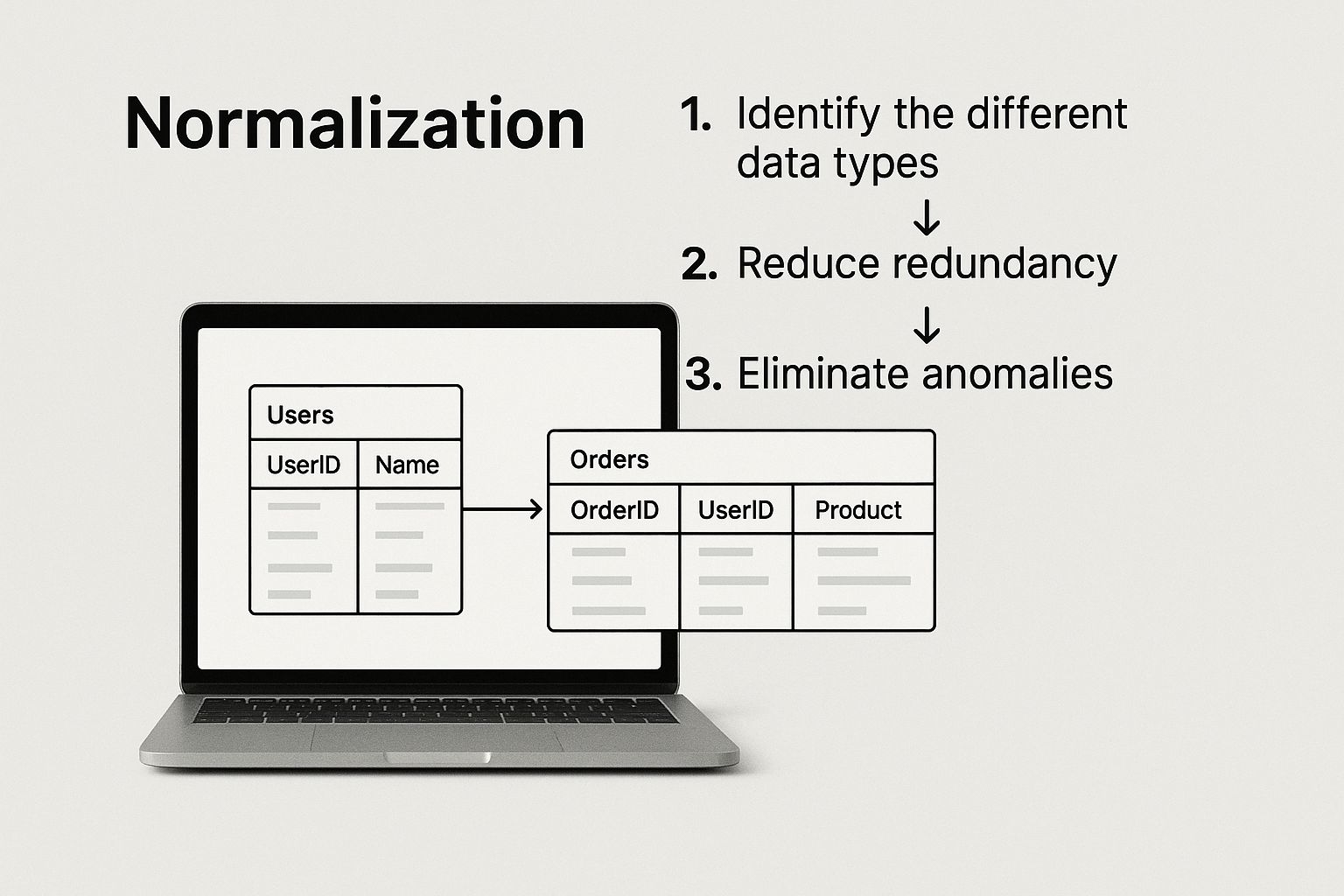
The main goal here is to give every piece of information a single, logical home. To see how this works in practice, let's walk through the most common stages, known as "normal forms," with a real-world example.
First Normal Form (1NF): No More Repeating Groups
The first rule is the simplest: each cell in a table should hold only one value. You can't have lists or repeating groups of columns.
Let's imagine you have an Orders table. Before you've applied any rules, it might look like this, with multiple products crammed into one cell.
Before 1NF: The Products column is a jumbled mess. Trying to find out how many "Bamboo Toothbrushes" you sold is nearly impossible.
| OrderID | CustomerName | CustomerEmail | Products |
|---|---|---|---|
| 101 | Jane Doe | jane@example.com | "Eco-friendly Soap, Bamboo Toothbrush" |
| 102 | John Smith | john@example.com | "Reusable Coffee Cup" |
To get to 1NF, we simply break that list up, giving each product its own row. Now, every cell is "atomic," meaning it can't be broken down further.
After 1NF: This is much better for querying, but look what happened. We've created a new problem: redundant customer data.
| OrderID | CustomerName | CustomerEmail | Product |
|---|---|---|---|
| 101 | Jane Doe | jane@example.com | Eco-friendly Soap |
| 101 | Jane Doe | jane@example.com | Bamboo Toothbrush |
| 102 | John Smith | john@example.com | Reusable Coffee Cup |
Second Normal Form (2NF): Getting Rid of Partial Dependencies
Second Normal Form cleans up the mess we made in 1NF. The rule is that every non-key column must depend on the entire primary key, not just part of it.
In our "After 1NF" table, the primary key has to be a combination of OrderID and Product to be unique. But CustomerName and CustomerEmail only depend on the OrderID part. They have nothing to do with the specific product on that line. This is called a partial dependency, and it’s risky. If Jane Doe updates her email, we might accidentally change it for the soap but not the toothbrush.
To reach 2NF, we split the data into separate tables based on what it describes.
- Orders Table:
OrderID,CustomerName,CustomerEmail - OrderItems Table:
OrderID,Product
Now, the columns in each table are fully dependent on their primary key. Simple.
The goal of 2NF is to make sure every table is about one thing. The
Orderstable is about orders. TheOrderItemstable is about the items in those orders.
Third Normal Form (3NF): Eliminating Transitive Dependencies
For most applications, this is the final and most important step. Third Normal Form gets rid of transitive dependencies. This is when a non-key column depends on another non-key column instead of the primary key.
Take a look at our new Orders table. The CustomerName really depends on the CustomerEmail, which in turn depends on the OrderID. The customer's name isn't directly tied to the order number; it's tied to the person (represented by their email) who placed the order.
This is still a problem. What if two different people, Jane Doe and Jon Doe, share a family email address? The database wouldn't know which name to associate with that email, leading to confusion.
To get to 3NF, we give customers their own dedicated table.
- Customers Table:
CustomerID,CustomerName,CustomerEmail - Orders Table:
OrderID,CustomerID - OrderItems Table:
OrderID,ProductID(let's assume we also created aProductstable with aProductID)
Voilà! Every piece of data now has one, and only one, place to live. Customer details are in the Customers table, order details are in the Orders table, and the connection between them is clean and simple. This is the power of applying these foundational database design principles.
4. Making Connections with Keys and Relationships

So, you’ve done the hard work of normalizing your data into neat, tidy tables. That's a huge step, but right now, all you have are isolated islands of information. The real magic happens when you build bridges between them. This is where keys and relationships come into play—they’re the essential glue that turns separate lists into a powerful, interconnected database.
Think about your phone’s contacts list and calendar. On their own, they're useful. But when you get a meeting invite and your phone automatically pulls up the sender's contact info, that’s when it becomes truly smart. In a database, we create these same kinds of smart connections using keys.
The Dynamic Duo: Primary and Foreign Keys
At the heart of these connections are two types of keys you absolutely need to know: primary keys and foreign keys. They work as a team to create logical, rock-solid links between your tables.
A primary key is the unique identifier for a row in a table. Think of it like a Social Security Number for a person or a VIN for a car—it’s a one-of-a-kind value that guarantees you can pinpoint that exact record without any confusion. A primary key can never be empty (NULL), and it must be unique.
A foreign key, on the other hand, is how you create the actual link. It’s a column in one table that points to the primary key in another table. It essentially says, "Hey, the information in this row is related to a specific row over there."
Let's make this real. Imagine you're building a database for a library. Each book gets a unique
BookID, which is the primary key in theBookstable. When a member checks out a book, thatBookIDis recorded in theCheckoutstable. In theCheckoutstable,BookIDis a foreign key—it points back to the specific book that was borrowed.
This simple yet powerful mechanism allows you to instantly find every book a member has ever checked out, all without duplicating a single piece of information.
Understanding the Three Types of Relationships
Once your keys are in place, you can start defining the relationships between tables, which are really just reflections of real-world rules. There are three main types you'll work with constantly.
-
One-to-One (1:1): This is the least common type. It means one row in a table connects to exactly one row in another. For example, a
Driverstable might have a one-to-one relationship with aDriverLicensestable. Each driver has only one license, and each license belongs to only one driver. -
One-to-Many (1:M): This is the bread and butter of relational databases. It means one row in a table can be linked to many rows in another. Think of a
Customerstable and anOrderstable. One customer can place many orders, but each order belongs to just one customer. -
Many-to-Many (M:N): This relationship pops up when many records in one table can relate to many records in another. The classic example is
StudentsandCourses. A student can enroll in many courses, and a course can have many students.
Solving the Many-to-Many Puzzle
You can't just directly link two tables in a many-to-many relationship—it creates a logical mess. If you put a CourseID in the Students table, each student could only take one course. Flip it around, and each course could only have one student. Neither works.
The solution is surprisingly simple and elegant: the junction table. You might also hear it called a linking or associative table.
This is a third table that sits in the middle and breaks the complex M:N relationship down into two simple 1:M relationships. For our Students and Courses problem, we'd create an Enrollments table.
The Enrollments table would simply contain two columns:
- StudentID (a foreign key pointing to the
Studentstable) - CourseID (a foreign key pointing to the
Coursestable)
Each row in this table represents a single event: one specific student enrolling in one specific course. This setup is clean, efficient, and scalable.
Getting these relationships right from the start is crucial for keeping your data reliable as it grows. If you want to dive deeper into handling these challenges at a larger scale, our guide on common database growth issues and fixes has some great practical advice.
4. Designing for Speed and Growth
https://www.youtube.com/embed/N8xEgSe5RwE
Let's be honest: a perfectly organized database that takes an eternity to respond is useless. We’ve covered how to structure your data logically, but now we need to talk about two equally critical pieces of the puzzle: performance and scalability. This is where your careful planning pays off with a fast, responsive experience for your users.
Even the most elegant, normalized database will crumble under real-world pressure. That's why designing for speed and planning for future growth aren't just bonus features—they're fundamental to building a solid foundation. In fact, poor database design is a notorious culprit, contributing to up to 70% of application performance problems and bloating operational costs by 15-20% from inefficient queries alone.
When you realize that over 90% of all enterprise data lives in systems built on these very principles, the impact of getting this right is massive. You can get a better sense of the scale by reading about the dominance of relational databases and their principles.
Accelerating Queries with Indexing
Think about trying to find a specific topic in a giant textbook. You wouldn't read it from cover to cover, right? You'd flip to the index in the back, find your term, and jump straight to the right page. A database index works in exactly the same way.
An index is essentially a special, super-efficient lookup table. Instead of having to scan every single row to find what it's looking for (a painfully slow process called a "full table scan"), the database can use the index to pinpoint the data's location almost instantly.
But indexes aren't a free lunch. There's a trade-off.
An index is a performance tool with a cost. While it dramatically speeds up read operations (like
SELECTqueries), it slows down write operations (INSERT,UPDATE,DELETE). Each time you change data, the database must also update the index, which adds a bit of overhead.
So, when is it a good idea to create an index? Here are a few solid rules of thumb:
- On foreign key columns: These are used all the time in
JOINoperations to link tables together. Indexing them is almost always a huge win. - On columns in your
WHEREclauses: If you're constantly filtering data by a specific column (like searching for a user by theiremail_address), an index will make those queries fly. - On columns used for sorting: Does your app frequently sort data with an
ORDER BYclause, like listing blog posts bypublication_date? An index can make that process much quicker.
Planning for Scalability from Day One
Scalability is all about your database's ability to handle more work—whether that means more data, more transactions, or more users. The choices you make early on will have a massive impact on how easily your application can grow down the road.
One of the simplest yet most powerful tactics is choosing the right data types from the start. For example, if you're storing someone's age, use a small integer type instead of a large one. It might seem like a tiny detail, but those small savings multiply across millions of rows, cutting down on storage and speeding up queries.
Ultimately, designing for scalability means making smart, forward-thinking decisions. For a much deeper dive, check out our guide on mastering scaling strategies for blazing-fast apps. It's all about building a system that not only works today but is ready for the growth you expect tomorrow.
Building a Blog Database From Scratch
It’s one thing to talk about database design principles in theory, but where the rubber really meets the road is when you apply them to a real project. Let's walk through how to build a database for a simple blog from the ground up. This example will show you how all those fundamental rules we've discussed come together to create something functional and clean.
First things first, we need to figure out the main "things" our blog needs to keep track of. In the database world, we call these entities. For a basic blog, it really boils down to four key parts:
- Users: The people who write and manage the content.
- Posts: The articles themselves.
- Comments: What readers leave on the posts.
- Tags: The keywords used to categorize posts.
These four entities will form the foundation of our database, becoming the main tables we'll build. Now, let's give them some structure.
Defining Tables and Their Columns
The next step is to map out the specific pieces of information—the attributes or columns—for each table. Every table will also need a primary key, which is just a unique ID for each row.
1. The Users Table
This table will hold all the information about our authors. Pretty straightforward.
UserID(Primary Key)UsernameEmailPasswordHash(Never store plain-text passwords!)RegistrationDate
2. The Posts Table
Here's where the actual articles live. Pay close attention to the AuthorID column. This is a foreign key, and it's our first critical link. It connects each post back to a specific user in the Users table.
PostID(Primary Key)AuthorID(Foreign Key toUsers.UserID)TitleContentPublicationDateStatus(e.g., 'Draft', 'Published')
This creates what’s called a one-to-many relationship: one user can write many posts, but each post has only one author. This simple connection is a perfect, real-world example of a core database design principle in action.
Connecting Comments and Tags
Now we can flesh out the rest. The Comments table is simple, as each comment is tied to a single post and left by a single user.
A well-structured database tells a story. Here, the story is that a
Userwrites aPost, and anotherUsercan leave aCommenton thatPost. The relationships we build make this narrative clear and enforceable.
The relationship between Posts and Tags, however, is a bit more interesting. A single post might have several tags (like "technology," "design," "startups"), and one tag can be used on many different posts. This is a classic many-to-many relationship, and the standard way to handle it is with a "junction" or "linking" table.
So, we'll create a simple table called PostTags that does just one job:
PostID(Foreign Key toPosts.PostID)TagID(Foreign Key toTags.TagID)
This little table elegantly solves the problem, allowing us to easily find all posts with a certain tag or all tags for a certain post.
Applying Final Touches
With our core structure defined, the final steps would involve applying normalization rules to prevent data duplication and adding indexes for speed. For example, putting an index on the PublicationDate column in the Posts table would make sorting articles chronologically almost instant.
Of course, building a solid database is only half the battle; protecting it is just as important. It's vital to have a solid data protection plan. You can read more about the best practices for database backup and recovery to make sure your hard work is safe.
These principles aren't just for blogs, either. They apply everywhere. To see how these same ideas work in a different scenario, check out this case study of a training platform database.
Frequently Asked Questions About Database Design
Once you start building databases in the real world, you'll quickly find that theory and practice can be two different things. A few questions tend to pop up again and again. Let's walk through some of the most common ones I hear from developers.
What Is Denormalization and When Should I Actually Use It?
Think of denormalization as intentionally breaking a few normalization rules for a good reason: speed. While normalizing is fantastic for keeping your data clean and avoiding update anomalies, it can lead to some seriously complex queries. Joining five, six, or even more tables just to pull a single report can really slow things down.
So, when is it okay to do this? It's all about making a strategic trade-off. Denormalization shines in read-heavy situations. Imagine a reporting dashboard or a business intelligence tool. In these cases, getting the data out fast is way more important than the small risk of having some redundant information. You're sacrificing a little bit of write-time elegance for lightning-fast read performance.
Do These Principles Even Apply to NoSQL Databases?
Absolutely, though they look a bit different in practice. The core goals behind these principles—data integrity, efficiency, and scalability—are just as crucial in the NoSQL world. You're still trying to build a system that works well and doesn't fall over.
Databases like MongoDB or Cassandra are built for flexibility and massive scale, but that doesn't mean you can just throw data at them without a plan.
With NoSQL, you're not thinking in terms of rigid normalization forms. Instead, you're usually designing your documents or data structures to perfectly match what your application needs to look up most often. The end goal is the same—preventing bottlenecks—but you get there by taking a different path that fits the architecture.
What Are the Most Common Mistakes Beginners Make?
It’s easy to stumble when you're starting out, but knowing the common pitfalls is half the battle. I see a few mistakes all the time.
Here are the big ones to watch out for:
- Picking the wrong data types: This is a classic. Storing a date as a text string or using a massive integer type for a number that will never go above 100 wastes space and makes your queries sluggish.
- Forgetting about indexes: I can't stress this one enough. If you have a column that you're constantly using in
WHEREclauses orJOINsand you don't index it, you're practically asking for a slow application. - Going overboard with normalization: Yes, you can have too much of a good thing. Over-normalizing can create a tangled web of tables and complex joins that are a nightmare to work with and can actually hurt performance.
- Failing to plan for growth: That slick design that works beautifully for 1,000 records might completely grind to a halt at one million. You have to think ahead and consider how the database will handle success.
When in doubt, let your application's needs be your guide. A database is a tool meant to serve a purpose, and designing it with that purpose in mind from the very beginning is the key.
At OneNine, we live and breathe this stuff. We specialize in taking tough technical problems and building simple, rock-solid solutions. If you need a partner to help design and build a high-performance website on a foundation that won't crack under pressure, we'd love to talk. Visit us at https://onenine.com to see how we can help you succeed.


