
Let's get straight to the point: what does a website really cost for a small business? The truth is, there's no single price tag. Asking for the cost of a website is a lot like asking for the cost of a car—a basic sedan is going to be priced very differently than a custom-built truck with all the bells and whistles.
The final bill depends entirely on what you need your website to do. A simple, five-page "digital brochure" to establish your presence will naturally cost less than a full-blown e-commerce store with hundreds of products and custom payment systems. Your investment is a direct reflection of the features and value you expect from it.
So, What's a Realistic Starting Budget?
If you're looking for a professional to build your site, you can generally expect the initial design and launch to fall somewhere between $2,000 and $9,000. Beyond that, you'll want to budget for ongoing maintenance, which typically runs about $1,200 per year to keep everything secure, updated, and running smoothly.
Of course, that's just a ballpark. A starter site might land on the lower end, while a more robust website with 10-20 pages, foundational SEO, and essential software integrations can push the cost toward the $8,000 to $12,000 range. For a deeper dive into the numbers, you can explore more small business website statistics on Wix.com.
To give you a clearer picture, here’s a quick breakdown of what you can generally expect at different budget levels.
Website Design Cost at a Glance for Small Businesses
| Website Tier | Typical Price Range | Best For |
|---|---|---|
| Basic "Brochure" Site | $1,500 – $4,000 | New businesses needing a simple, professional online presence with a few pages (Home, About, Services, Contact). |
| Business-Grade Site | $4,000 – $9,000 | Growing businesses that need lead generation forms, a blog, basic SEO, and integrations with marketing tools. |
| E-commerce Store | $6,000 – $15,000+ | Businesses selling products online, requiring a shopping cart, payment processing, and product management features. |
| Custom Feature-Rich Site | $10,000 – $25,000+ | Businesses needing unique functionality like a custom booking system, membership portal, or complex software integrations. |
Remember, this table is a guide. Your specific needs will ultimately determine the final cost, but this should help you find your starting point.
The Big Three: What Really Drives the Price?
So, what are the main things that move the needle on your quote? It usually boils down to three key factors.
- Design Complexity: Are you happy with a polished, pre-built template, or do you need a completely custom design built from the ground up to perfectly match your brand? Custom work always costs more.
- Features and Functionality: Every special feature adds to the cost. Things like an online store, a customer login area, or an appointment booking system all require extra development time.
- Who Builds It: This is often the biggest variable. Your cost will change dramatically depending on whether you build it yourself, hire a freelancer, or partner with a full-service agency.
Think of the "average" cost as a signpost, not a price tag. Your specific business goals are the roadmap that determines the actual journey—and the final cost. Getting this clear from the start is the best way to avoid sticker shock later on.
The 7 Key Factors That Drive Your Website Cost
Figuring out the average website cost for a small business isn't about finding a single magic number. It's a lot like pricing out a new car—the base model gets you on the road, but every upgrade, from heated seats to a better engine, adds to the final sticker price. Your website is built the same way.
Several core ingredients directly shape your final quote. Once you understand what they are, you can put together a mental checklist of what you actually need. This not only helps you anticipate the real investment but also empowers you to have much smarter conversations with designers and agencies, ensuring your budget aligns with your business goals.
The image below breaks down how design choices, features, and the pros you hire all mix together to determine your final cost.
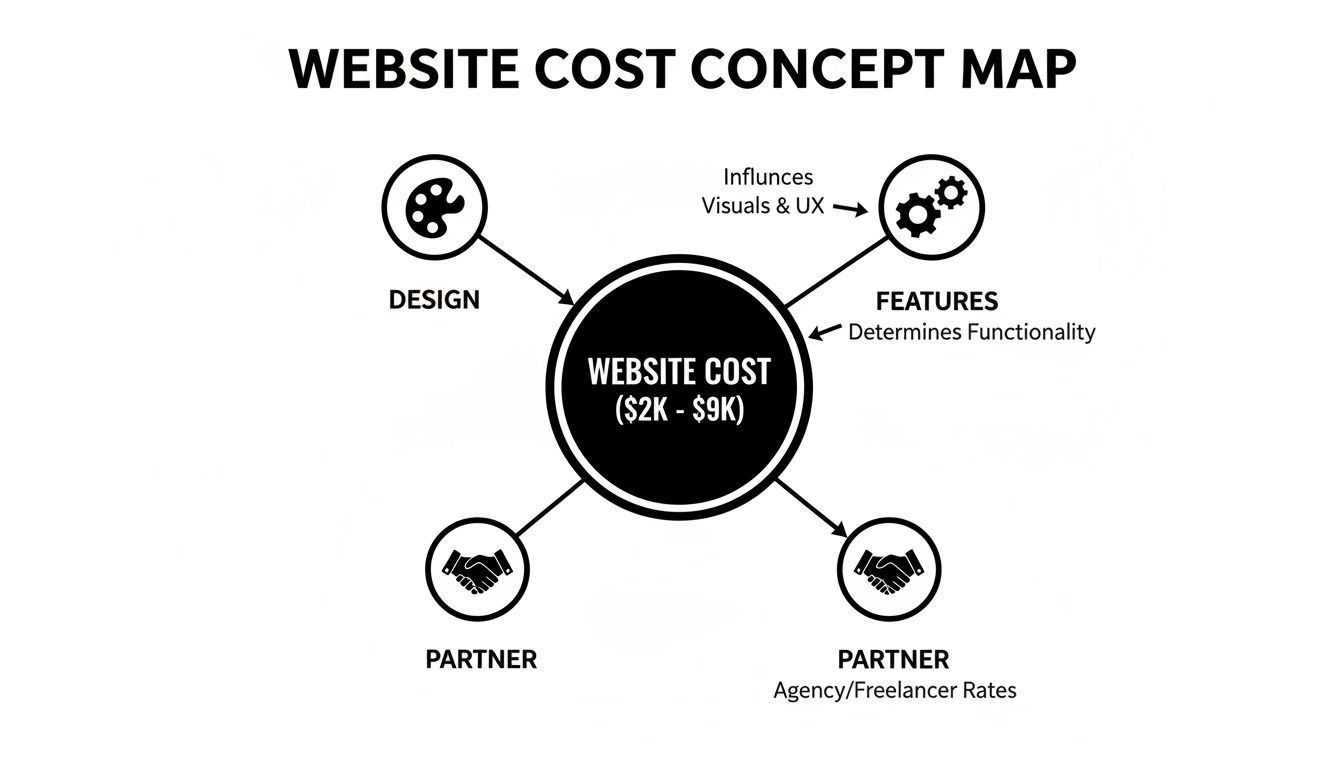
As you can see, the final price tag is a balancing act between these key areas, which is why most small business sites land somewhere in the $2,000 to $9,000 range.
1. Custom Design and Branding
The first thing anyone notices is how your website looks and feels. A custom design—built from the ground up to be a perfect reflection of your brand—is often the biggest single driver of cost. It’s an intensive process involving discovery sessions, wireframes, mockups, and multiple rounds of feedback, all of which take a designer a lot of time.
On the other hand, you could start with a pre-built premium template. This gives you a professional-looking foundation for a fraction of the cost. While it won't be one-of-a-kind, a good designer can still customize it with your logo, colors, and fonts to create a polished site without the bespoke price tag.
2. Website Size and Page Count
This one’s pretty straightforward: bigger websites cost more. A simple five-page brochure site (think Home, About, Services, Blog, Contact) is a far less complicated project than a 50-page site with dozens of service pages, in-depth case studies, and a huge library of resources.
Every single page adds more time to the clock for:
- Design and Layout: Each page needs its own structure to be user-friendly and look good.
- Content Population: Someone has to add all the text, images, and videos.
- On-Page SEO: Every page needs an optimized title, meta description, and content to help it rank.
A larger sitemap means a bigger project scope, which directly translates to more billable hours and a higher price.
3. E-commerce Functionality
If you want to sell products online, you’ll need e-commerce functionality. This is a major cost factor because it adds a whole new layer of complexity. It's much more involved than just adding a "Buy Now" button.
An online store needs several systems working together seamlessly:
- Product Catalogs: Creating individual pages for every item you sell.
- Shopping Carts: Letting customers gather items before checking out.
- Payment Gateways: Securely processing payments through services like Stripe or PayPal.
- Inventory Management: Automatically tracking stock so you don't sell what you don't have.
- Shipping and Tax Rules: Calculating costs based on a customer's location and what they're buying.
A basic shop with a dozen products is one thing; a complex store with thousands of items and advanced search filters is a completely different beast.
4. Special Features and Integrations
Anything beyond standard informational pages or basic e-commerce is considered a special feature, and these custom functionalities will add to your budget. They almost always require specialized development work or tricky integrations with other software to work right.
Common examples include things like:
- Booking and Scheduling Systems: A must-have for salons, consultants, or therapists.
- Membership Portals: Creating private, members-only areas with protected content.
- Custom Calculators or Quoting Tools: Interactive tools that give your visitors instant value.
- CRM Integration: Automatically sending leads from your website forms into a system like HubSpot.
Each one of these adds development hours, pushing the final cost up. Gaining a better sense of who does what can also clarify costs; understanding the roles of web developer vs. web designer is key, as their distinct skills come at different price points.
5. Content Creation and Strategy
Without great content, your website is just an empty box. Some business owners write all their own copy and take their own photos, but many need professional help—and that’s a separate line item on the invoice.
A beautifully designed website with poor content is like a sports car with no engine—it looks impressive but won't get you anywhere. Investing in professional copywriting and photography is essential for actually turning visitors into customers.
This can include writing the copy for every page, producing blog posts, crafting compelling product descriptions, or hiring a photographer to get professional shots of your team or products.
6. SEO Foundations
What good is a new website if no one can find it? Foundational Search Engine Optimization (SEO) is about making sure your site is built from day one to be visible on Google. While an ongoing SEO campaign is a separate marketing cost, the initial technical setup is a critical part of the web design process itself.
This includes things like a proper technical SEO setup, keyword research for your main pages, on-page optimization, and ensuring the site is mobile-friendly and loads fast. All these details contribute to the project's scope and, therefore, its cost.
7. Choice of Platform or CMS
Finally, the technology used to build your website has a big impact on the price. A site built on an all-in-one platform like Shopify or Squarespace might have a lower upfront development cost because they operate in a more controlled, template-driven environment.
In contrast, a site built on a flexible Content Management System (CMS) like WordPress often has a higher initial cost. The trade-off? It offers nearly limitless freedom to customize and scale your site as your business grows. The developer's skill level on any given platform will also factor into the labor cost.
Choosing Your Website Builder: Freelancer vs. Agency vs. DIY
Once you have a good handle on what your website needs to do, the next big question is: who's going to build it? This decision will have the biggest impact on your final cost. It's a lot like renovating a kitchen—you could do it yourself, hire a skilled carpenter (a freelancer), or bring in a full-service general contractor to manage everything (an agency).
Each path comes with its own mix of cost, control, and convenience. There’s no single "right" answer here. The best choice for you really depends on your budget, timeline, technical comfort level, and what you want your website to achieve for your business down the road.
Let's break down what you can expect from each option.
The DIY Approach: Building It Yourself
Going the Do-It-Yourself (DIY) route means using a website builder like Wix, Squarespace, or Shopify. These platforms are made for people who don't code, offering drag-and-drop tools and ready-made templates to get you started. It's easily the cheapest option upfront, but what you save in money, you pay for with your own time.
Think of this as the potluck dinner of website creation. You're responsible for bringing everything to the table—the design, the content, the technical setup, and putting it all together. It's empowering, for sure, but it's also a major time commitment.
- Cost: $300 – $600 per year. This usually covers your platform subscription, domain name, and maybe a premium theme or a couple of paid apps.
- Best For: Brand-new businesses on a shoestring budget, folks who just need a simple brochure-style site, or owners who are pretty tech-savvy and enjoy a hands-on project.
The biggest draw is obviously the low cost. The hidden cost, however, is your time. A project you thought would take a weekend can easily stretch into weeks, pulling you away from actually running your business. Plus, you're ultimately limited by the platform's capabilities and your own eye for design.
Hiring a Freelancer
Hiring a freelance web developer is like bringing in a private chef for a special dinner party. You're hiring a specialist with a specific skillset to create a professional website for you. They bring a level of expertise and focus that’s nearly impossible to match with a DIY template.
For many small businesses, a freelancer is the perfect sweet spot. You get a custom, professional result without the higher costs and bigger process of working with a large agency. For a deeper look, check out our guide on how to find the right website developer for your project.
- Cost: $2,000 – $8,000. This price can swing quite a bit depending on the freelancer's experience, where they're based, and how complex your site is.
- Best For: Businesses that need a polished, professional site but don't require the full strategic support of an agency. It’s a great fit if you have a clear vision and just need an expert to bring it to life.
With a freelancer, you get access to specialized talent, often with more flexibility and a lower price tag than an agency. The main thing to be aware of is that you're relying on one person. If they get sick, overbooked, or go on vacation, your project can hit a pause. That’s why vetting their portfolio and talking to their past clients is so important.
Partnering with an Agency
Working with a web design agency is like hiring a full-service wedding planner. You’re not just getting one person; you’re getting a whole team of specialists—strategists, project managers, designers, developers, copywriters, and SEO experts—all collaborating on your project.
An agency looks at the big picture. They don't just build a website; they build a business asset designed to get you results, whether that’s more leads or more sales. This all-in-one, strategic approach naturally comes with a higher price tag.
- Cost: $8,000 – $25,000+. This range is typical for a professional small business website that includes custom design, strategic planning, content creation, and solid foundational SEO.
- Best For: Established businesses ready to make a serious investment in their online growth. It's the right move when you need a strategic partner to handle everything from start to finish.
The primary advantage of an agency is the sheer depth of expertise and the streamlined process. You have one point of contact, a dedicated team, and a partner who is just as invested in your long-term success as you are.
Of course, the main drawback is the cost. For many new businesses, hiring an agency is more of a future goal than a starting point.
Comparing Your Options at a Glance
So, how do you decide? It really comes down to finding the right balance between your budget, your time, and the quality you're after.
To make it a little easier, here’s a table that lays out the three paths side-by-side.
Comparing Website Builders: Freelancer vs. Agency vs. DIY
| Factor | DIY Builder (e.g., Wix, Squarespace) | Freelancer | Agency (e.g., OneNine) |
|---|---|---|---|
| Typical Cost | $300 – $600 / year | $2,000 – $8,000 | $8,000 – $25,000+ |
| Time Investment | High (Your own time) | Low (On your part) | Very Low (On your part) |
| Technical Skill | Low (Some is helpful) | None (They handle it) | None (The team handles it) |
| Customization | Limited by templates | High | Fully Custom |
| Strategy & Support | None (You do it all) | Varies (Often limited to design) | Comprehensive & Ongoing |
Ultimately, there’s a natural progression here. A brand-new startup might start with a DIY site to get online fast, then hire a freelancer for a professional redesign a year later. As they grow, they might eventually partner with an agency to take their digital strategy to the next level. Knowing where you stand today is the key to making a smart investment for tomorrow.
Putting It All Together: Budget Examples for Real Businesses
Price ranges on a page can feel a bit abstract. It’s one thing to know the parts cost a certain amount, but it’s another thing entirely to see the final price tag for the whole project.
To make these numbers click, let's walk through three common scenarios you might find yourself in. Think of these as blueprints. You can find the one that looks most like your business and get a much clearer picture of what your own investment might look like.

Scenario 1: The Local Service Provider
Let's imagine Alex, a therapist opening a new private practice. Alex isn't trying to build a huge, complex site. The goal is simple: create a professional and welcoming online space where potential clients can learn about the practice, verify credentials, and, most importantly, book a session. It’s all about credibility and making that first connection easy.
The needs here are pretty straightforward:
- A clean, calming design across five core pages (Home, About, Services, FAQ, Contact).
- A simple, secure contact form for new inquiries.
- Integration with a scheduling tool Alex already uses, like Calendly.
- Basic on-page SEO to show up when people search for "therapist in [City Name]."
A project of this size is a perfect match for a talented freelancer. You get a custom, professional website that builds trust without the high overhead costs of a large agency.
Sample Budget Breakdown:
- Web Design & Development: $2,500 – $4,500
- Professional Copywriting: $500 – $1,000
- Stock Photography/Branding Assets: $200 – $500
- Estimated Total Investment: $3,200 – $6,000
Scenario 2: The Boutique E-commerce Shop
Now meet Maria, who makes beautiful handmade jewelry. She’s been selling on Etsy, but she's ready to have her own branded storefront online. She wants full control over the customer experience, the ability to run her own sales, and a way to build a direct relationship with her customers. The primary goal here is driving online sales.
This project is a definite step up in complexity and requires true e-commerce tools:
- A beautiful, visual design that makes her jewelry pop with high-quality photos.
- An online store built to handle 20-30 products, each with its own description and options (like size or material).
- Secure payment processing through services like Stripe or PayPal.
- A back-end system for managing inventory and tracking orders.
- Integration with an email marketing tool to collect emails for a newsletter.
Freelancers are a great fit for small businesses needing a custom site, with costs often falling between $1,500 and $8,000. They bridge the gap between a DIY template and a full-blown agency, with hourly rates typically from $50 to $150. For a site like Maria's, a realistic budget would be $2,000 to $8,000. Investing an extra $1,000 to $3,000 in professional copywriting can pay for itself many times over by improving conversion rates. You can explore more detailed breakdowns with these small business website cost insights.
Sample Budget Breakdown:
- E-commerce Platform Setup & Design (e.g., Shopify, WooCommerce): $5,000 – $9,000
- Product Photography: $1,000 – $2,500
- Payment Gateway & App Integration: $500 – $1,500
- Estimated Total Investment: $6,500 – $13,000
Scenario 3: The B2B Consulting Firm
Finally, let's look at David's small B2B consulting firm. His website needs to be a well-oiled machine for generating high-value leads. It has to do more than just look good; it needs to scream "expert," establish authority, and guide potential corporate clients into his sales pipeline.
This kind of website requires a much more strategic approach and some advanced tools:
- A polished, completely custom design that instills confidence and trust.
- Detailed service pages and compelling case studies that showcase results.
- Advanced contact forms that feed lead information directly into a CRM like HubSpot.
- Gated content, like whitepapers or e-books, that visitors can download in exchange for their email address.
- A dynamic blog to publish articles, establish thought leadership, and attract organic traffic.
For a project this strategic, an agency is usually the right call. They bring a team of experts—designers, developers, and marketers—to the table to execute a cohesive plan.
Sample Budget Breakdown:
- Custom Web Design & Strategy (Agency): $9,000 – $15,000
- CRM Integration & Advanced Forms: $1,500 – $3,000
- Content Strategy & Copywriting: $2,000 – $5,000
- Estimated Total Investment: $12,500 – $23,000
Understanding Ongoing Costs Beyond the Initial Launch
Getting your new website live is a huge win, but the work—and the investment—doesn't stop there. A website isn't a one-and-done project. It’s a dynamic business tool that needs regular care to stay secure, functional, and effective.
Think of it like buying a new car. The sticker price is just the beginning. You still have to budget for gas, insurance, and routine maintenance to keep it running well. Your website is no different. Factoring in these recurring costs from day one is the key to avoiding nasty surprises down the road and making sure your site keeps working for you.
Essential Recurring Website Costs
So, what are we talking about here? While the exact numbers can vary, every small business needs to budget for a few core services that keep their digital front door open and secure. These aren’t optional bells and whistles; they’re the non-negotiable utilities for your website’s health.
Here are the most common recurring fees you should plan for:
- Web Hosting: This is the "rent" you pay for your website's home on the internet. For most small businesses, a good shared hosting plan will run you $10 to $50 per month.
- Domain Name Renewal: This is your website's address (like yourbusiness.com). You have to renew it every year, which usually costs between $15 and $25 per year.
- SSL Certificate: This little certificate encrypts the data shared between your site and your visitors, which is crucial for security and building trust. Many hosting plans include a free one, but if you need a premium certificate, expect to pay $50 to $200 annually.
These three are the absolute basics. Skipping them is like not paying your shop's electric bill—sooner or later, the lights will go out.
Your initial website design cost gets you in the game, but your ongoing maintenance budget is what keeps you competitive. It’s the difference between having a static digital brochure and a dynamic, secure business tool.
Website Maintenance and Support
Beyond the basic utilities, you have to think about upkeep. Just like your car needs oil changes and tune-ups to stay reliable, your website needs consistent attention to perform at its best. Software gets outdated, new security threats pop up constantly, and minor glitches can snowball into major headaches if you ignore them.
This is where website maintenance plans are a lifesaver. These services take care of all the technical heavy lifting so you can focus on running your business. It's helpful to explore the different kinds of website maintenance packages out there to see what makes sense for you.
A good maintenance plan will typically handle:
- Software and Plugin Updates: Keeping your platform (like WordPress) and all its plugins updated is your number one defense against hackers.
- Regular Backups: If your site ever crashes or gets hacked, having a recent backup is the only thing that will save you from a complete disaster.
- Security Monitoring: This involves proactively scanning for malware and sketchy activity to stop threats before they cause real damage.
- Performance Checks: Making sure your site continues to load quickly is critical for keeping visitors happy and for your SEO.
These are tasks that require time and technical expertise. For most small business owners, paying a professional is a smart move. You can learn more about what to expect with a https://onenine.com/website-maintenance-package/ designed to keep your site healthy and humming along.
How to Get an Accurate Quote and Avoid Hidden Fees
Getting a straight, honest quote for your website is the single most important part of managing your budget. If you send a vague request, you're going to get a vague—and usually wrong—price back. The key to preventing scope creep and those dreaded surprise fees is to give designers or agencies a detailed project brief.
Think of it like handing blueprints to a home builder. The more detail you give them upfront, from the number of bedrooms to the kind of kitchen countertops, the more precise their estimate will be. Your website brief is your project’s blueprint. It’s the best tool you have to protect yourself from unexpected charges later on.
Create a Clear Project Brief
A solid brief doesn't need to be a 50-page document, but it does need to spell out your vision and what you absolutely need. This little bit of homework ensures that every designer is quoting the same job, which lets you make a true apples-to-apples comparison.
Your brief should cover these essentials:
- Business Goals: What is the #1 thing this website needs to do? Generate leads? Sell products? Book appointments? Be specific.
- Target Audience: In a sentence or two, describe your perfect customer.
- Must-Have Features: List the things you can't live without, like an e-commerce shop, a booking calendar, or a simple blog.
- Inspiration: Share links to 2-3 websites you love and explain why you love them. Is it the clean layout, the color scheme, or how easy it is to use?
Once you have this ready, you can start talking to potential partners. But remember, not all quotes are built the same. You have to ask the right questions to uncover what’s really included.
Critical Questions to Ask Before Signing
Before you sign on the dotted line, have a list of questions ready for every web designer or agency you talk to. Their answers will tell you a lot about how they work, how transparent they are, and what the project will actually be like.
A detailed quote is a sign of a professional partner. If a price seems too good to be true or shows up as a single line item on an invoice, that’s a massive red flag for hidden costs down the road.
Here are a few questions you absolutely must ask:
- What, specifically, is included in this price? And what would be considered an extra charge?
- How many rounds of design revisions do I get?
- Who will be my main point of contact?
- What are the ongoing costs after we launch? Think maintenance, hosting, and support.
Asking these questions gives you the full financial picture from the start. To get a head start, you can use our handy web page cost calculator for a ballpark estimate based on your project's scope. A little prep work now helps you find a partner who fits both your vision and your budget.
Got Questions? We've Got Answers
Even with the best plan, you're bound to have a few questions. Here are some straightforward answers to the things we hear most often from small business owners trying to figure out their website investment.
How Long Does It Take To Build A Small Business Website?
This really comes down to what you're building. A simple, 5-page "brochure" style website from a freelancer can often be up and running in 2-4 weeks.
If you're looking at a more involved e-commerce store with unique features, you're probably looking at a 6-12 week timeline with an agency. The biggest things that speed up or slow down a project are how quickly you can provide feedback, how many design changes you request, and whether your content is ready to go.
Can I Update The Website Myself After It Is Built?
Yes, absolutely! We'd insist on it. Modern websites are built on platforms called Content Management Systems (CMS) — you’ve probably heard of the big ones like WordPress or Shopify.
These tools are specifically designed so you can log in and easily change text, add new blog posts, or swap out images without ever touching a line of code. Any good developer will walk you through the basics so you feel confident managing your own site.
Think of it this way: a template is like buying a pre-built home. It's fast and affordable, but it looks a lot like the other houses on the block. A custom site is like hiring an architect to design a home just for you, built from the ground up to fit your exact needs and style.
Is A Cheaper Website Always A Bad Investment?
Not necessarily, but you need to be careful. A super low price tag often means corners were cut somewhere—maybe in the initial strategy, the quality of the design, or the technical SEO that helps you get found on Google.
While you save money upfront, a cheap site can cost you more down the road in lost customers or the need for a complete redesign much sooner than you planned. It’s better to view a professional website as an investment in your business’s credibility and future growth.
Ready to build a website that drives real results without all the guesswork? The team at OneNine offers expert design, development, and support to help your business succeed online. Get a clear, transparent quote for your project today!


