
CMS website development is all about building websites using a special kind of software called a Content Management System. At its core, a CMS is a tool that lets you create, manage, and change your website's content without needing to dive into the code.
Think of it like the dashboard of your car. You don't need to be a mechanic to drive; you just use the steering wheel, pedals, and buttons. A CMS is the dashboard for your website, giving you the controls to add blog posts, update pages, and swap out images with a few clicks. It’s an approach that makes having a professional website faster, simpler, and more accessible for everyone.
What Is CMS Website Development
Have you ever wondered how people launch beautiful, complex websites without being coding wizards? The secret is often a Content Management System, or CMS. It's the framework that powers a massive portion of the internet.
Instead of building a house brick by brick (or line by line of code), a CMS gives you a pre-built foundation with rooms you can easily furnish and decorate. This user-friendly interface is called the back-end, and it’s where you’ll do all your work—writing text, uploading images, and organizing pages.
The CMS then takes everything you’ve created and displays it for the world to see on the front-end, which is the live website your visitors interact with. It handles all the technical heavy lifting for you.
This technology is everywhere. As of early 2025, a staggering 64% of all websites globally are built on a CMS. For small and medium-sized businesses, that figure is even higher, hovering around 70%. These numbers show just how essential these platforms have become. You can check out more stats on CMS usage and market share at magecomp.com.
The Core Components of a CMS
So, how does a CMS actually work? It all comes down to two key parts that work in tandem to bring your website to life. Getting a handle on these two components makes it clear how your ideas go from a draft to a live webpage.
- Content Management Application (CMA): This is your creative space. The CMA is the user-friendly dashboard where you write blog posts, add products to your store, or upload photos. No technical skills needed.
- Content Delivery Application (CDA): This is the engine under the hood. The CDA takes everything you put into the CMA, instantly processes it, and serves it up to your visitors on the live website.
A simple analogy is a restaurant. The CMA is the kitchen, where you (the chef) prepare all the ingredients and create the dishes. The CDA is the front-of-house staff that delivers that perfectly plated meal to your customers (your website visitors).
Why CMS Development Matters for Business
Choosing a CMS isn't just a technical decision—it's a smart business move. In a world that moves fast, being able to update your online presence instantly is a huge advantage.
With a CMS, you’re no longer stuck waiting for a developer to make simple updates, like changing a sentence on your homepage or adding a new staff photo. This freedom allows businesses to react quickly to market trends, launch promotions on the fly, and keep their content fresh. That kind of agility is exactly what you need to keep customers engaged and stay on Google's good side.
Choosing the Right CMS Platform for Your Project
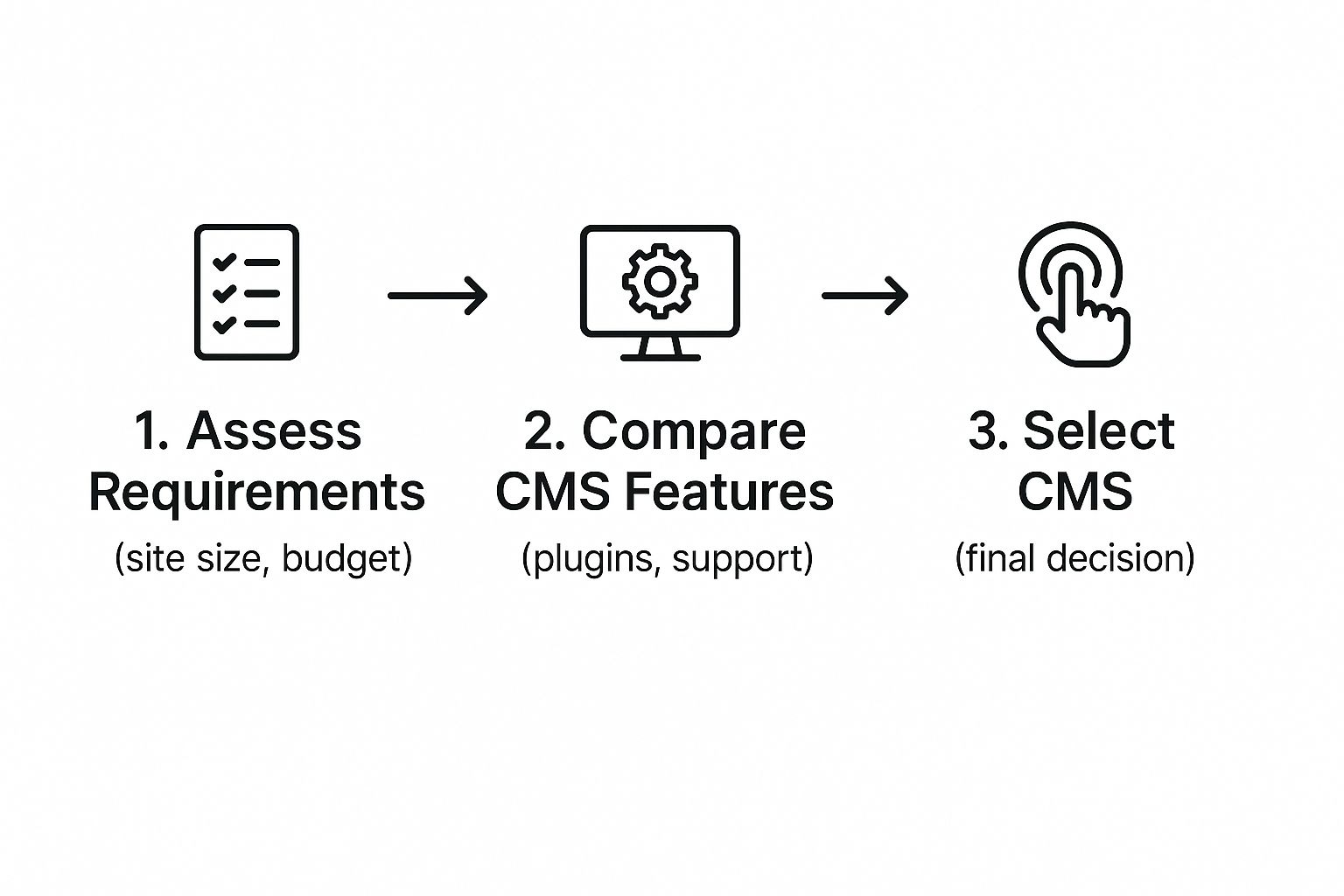
Picking your Content Management System is one of the biggest decisions you'll make in the whole website development process. Think of it like choosing a vehicle for a cross-country trip. A zippy sports car is fun and fast, a minivan is all about comfort and space, and an RV gives you a home on wheels. They're all great, but only for the right kind of journey.
The same goes for your CMS. The "best" one really depends on what you want to achieve, your comfort level with tech, and your budget. What works perfectly for a simple online portfolio will fall flat for a massive e-commerce store. Getting this choice wrong at the start can lead to some major headaches and roadblocks later on.
To help you find the perfect fit, let's break down three of the most popular players on the field: WordPress, Shopify, and Wix. Each one shines in its own way and serves a different type of user and project.
H3 WordPress: The All-Around Powerhouse
WordPress is the undisputed king of the CMS world. It’s an open-source platform, meaning the software itself is free, and it's backed by a giant global community of developers. That translates to incredible flexibility.
This platform is like a professional-grade set of building blocks. You can construct just about anything you can dream up, from a sleek personal blog to a sprawling corporate site or a members-only community. Its real magic is in its massive library of plugins and themes, which let you add almost any feature without needing to write a single line of code.
Of course, all that power comes with a slightly steeper learning curve than some other options. You'll also be in charge of your own web hosting and security, but most modern hosting companies make this part pretty straightforward.
H3 Shopify: The E-Commerce Specialist
If your main goal is selling stuff online, Shopify is your purpose-built machine. It’s a hosted platform, which means it takes care of all the technical heavy lifting for you—everything from hosting and security to payment processing.
Shopify was designed from the ground up to make selling as simple as possible. It gives you a clean, intuitive dashboard for adding products, managing your inventory, and tracking every order. Plus, its built-in payment gateway makes accepting credit cards a breeze.
Shopify is the digital equivalent of leasing a fully-equipped, modern retail storefront. You get to focus on your products and customers, knowing the infrastructure is solid, secure, and built for sales.
While it's a dream for e-commerce, it can feel a bit restrictive for content-heavy sites that aren’t primarily about sales. Customizing your site beyond the basics can also be more limited and pricier than with WordPress.
H3 Wix: The User-Friendly Builder
Wix is all about simplicity and speed. It’s a fantastic choice for beginners, artists, and small businesses who just need to get a professional-looking site online, fast. Its main selling point is an intuitive drag-and-drop editor that lets you build your site visually.
This platform basically removes all the technical hurdles. It’s a fully hosted solution where you pick a template, start dragging elements around, and you’re good to go. For a lot of small projects, this is the quickest way to get from an idea to a live website, a critical factor for any https://onenine.com/website-development-for-small-business/.
The trade-off for that simplicity is less control and scalability. While Wix has gotten much more powerful over the years, it can box you in if you have very specific functional needs or are planning for massive growth.
H3 CMS Platform Feature Comparison
Seeing how these platforms stack up side-by-side can really help clarify which one is right for you. Here’s a quick rundown of their key differences.
| Feature | WordPress | Shopify | Wix |
|---|---|---|---|
| Best For | Blogs, business sites, custom projects | E-commerce and online stores | Portfolios, small business sites |
| Ease of Use | Moderate learning curve | Easy for e-commerce | Very easy, drag-and-drop |
| Flexibility | Extremely high with plugins | High for e-commerce, limited otherwise | Moderate, template-based |
| Cost | Free software, but hosting and plugins vary | Monthly subscription plans | Free plan available, paid plans required for most features |
When you look at the numbers, the dominance of WordPress is undeniable. Among all websites that use a known CMS, WordPress powers a staggering 60.8% of them. Competitors like Shopify and Wix are next in line but at a much smaller 6.7% and 5.5% respectively. This really shows how many people rely on the power and flexibility of WordPress.
As you explore your options, you'll also run into platforms like WordPress.com, which offers a more managed, all-in-one experience that’s a bit different from the self-hosted version we've discussed. It's all about finding the tool that best fits your specific project.
Your Step-by-Step Website Development Workflow
Kicking off a CMS website development project without a clear roadmap is a bit like trying to build a new piece of furniture without the instructions. You might end up with something that stands on its own, but it probably won't be what you had in mind. A solid workflow brings order to the chaos, making sure every move is intentional and every step builds on the last.
This proven five-stage process will guide you from a rough idea to a fully launched website. By following these steps, you’ll sidestep common frustrations, keep the project on track, and build something that genuinely helps your business.
Stage 1: Planning and Discovery
Honestly, this first phase is the most important part of the whole journey. This is where you pour the foundation. If you rush this, you’ll be paying for it later with costly redesigns and a site that just doesn’t hit the mark.
First things first: what is this website actually for? Are you trying to generate leads? Sell products? Build a community? Or is it purely an information hub? Getting razor-sharp clarity on this "why" will guide every single decision you make from here on out.
Next, you have to get inside the heads of your target audience. Who are you trying to connect with? What are their biggest headaches, and how can your website be the solution? Creating a few user personas can be a game-changer here, as they put a face to the anonymous "user" you're building for.
Finally, make a wish list of all the features and functionality the site needs. This could include things like:
- A blog to share your expertise.
- An e-commerce store with a simple checkout.
- Contact forms to capture leads.
- A portfolio or gallery to show off your work.
- An integration with your favorite email marketing tool.
Think of this stage as drawing up the architectural blueprint for your website. A detailed plan here makes the actual build a whole lot smoother.
Stage 2: Design and User Experience
With a solid plan in your back pocket, it's time to think about how your site will look, feel, and work. This stage is all about crafting a visual experience that not only grabs your visitors' attention but also feels true to your brand.
The process usually starts with wireframes—simple, black-and-white layouts that act as a structural map for each page. Wireframes are all about placement and user flow. They answer the basic question, "Where does everything go?" without getting distracted by colors and fonts.
A wireframe is like the skeleton of your webpage. It defines the structure before you add the skin and clothes—the colors, fonts, and images that bring it to life.
Once everyone agrees on the structure, the next step is creating mockups. These are full-color, high-fidelity designs that show you exactly what the final website will look like. This is where your brand's personality shines through with specific typography, color schemes, and imagery.
Throughout this entire stage, the spotlight should always be on the User Experience (UX). How easy is it for someone to find what they need? Is the navigation a no-brainer? A site can be beautiful, but if it's confusing to use, it has failed its most important job.
Stage 3: Development
Now it's time to roll up our sleeves and bring those beautiful designs to life. For a CMS website, this is where you build out the actual site on your chosen platform, whether it’s WordPress, Shopify, or something else. It’s the most technical phase, but a good CMS makes it worlds easier than coding everything from scratch.
The development process typically breaks down into a few key steps:
- Choosing a Theme: You'll start by picking a pre-made theme or template that aligns with your design mockups. This gives you the foundational styling and structure.
- Installing Essential Plugins: Next, you’ll add plugins or apps to handle the special functions you planned for, like SEO tools, contact forms, or payment gateways.
- Building Out Pages: Using the CMS’s editor, you’ll create all the core pages—Homepage, About, Services, Contact—and lay them out according to your wireframes.
This is the magic moment where your static designs become a living, breathing, interactive website.
Stage 4: Content Integration
A website is just an empty box without great content. This stage is all about filling the pages you just built with the text, images, videos, and downloads that will actually speak to your audience.
You’ll be adding blog posts, writing compelling product descriptions, uploading headshots of your team, and maybe embedding a few videos. It's critical that all this content is optimized for both people and search engines. That means writing clear, helpful copy and making sure your images are sized correctly so they don't slow your site to a crawl.
Stage 5: Testing and Launch
You’re in the home stretch! Before you show your new site to the world, you have to put it through its paces to catch any last-minute bugs. This is a non-negotiable step for ensuring a flawless experience for your very first visitors.
Click on every link to make sure none are broken. Fill out every form to see if they work. Check the site’s loading speed. Most importantly, test it on a phone. With over 50% of web traffic now coming from mobile devices, your site absolutely must look and work perfectly on a smaller screen.
Once you’ve triple-checked everything and are confident it’s ready, it’s time for the big moment: launch. This usually involves pointing your domain name to the new site and flipping the switch to make it public. Congratulations, your CMS website is officially live
Making Your Website Truly Your Own
An out-of-the-box website is a starting point, not a destination. A generic site just won’t cut it if you want to make a real impression. The magic of CMS website development is that it gives you a solid foundation to build something that is uniquely yours—a site that truly reflects your brand’s personality and values.
Think of your CMS like a brand new house. It has a strong foundation and sturdy walls, but it’s empty. It only starts to feel like home once you pick out the paint, arrange the furniture, and hang up art. Your website is the same. It needs layers of personalization to connect with your audience and stand out.
Let’s dig into the three key layers of customization: themes, plugins, and custom code.
Themes and Templates: The Visual Foundation
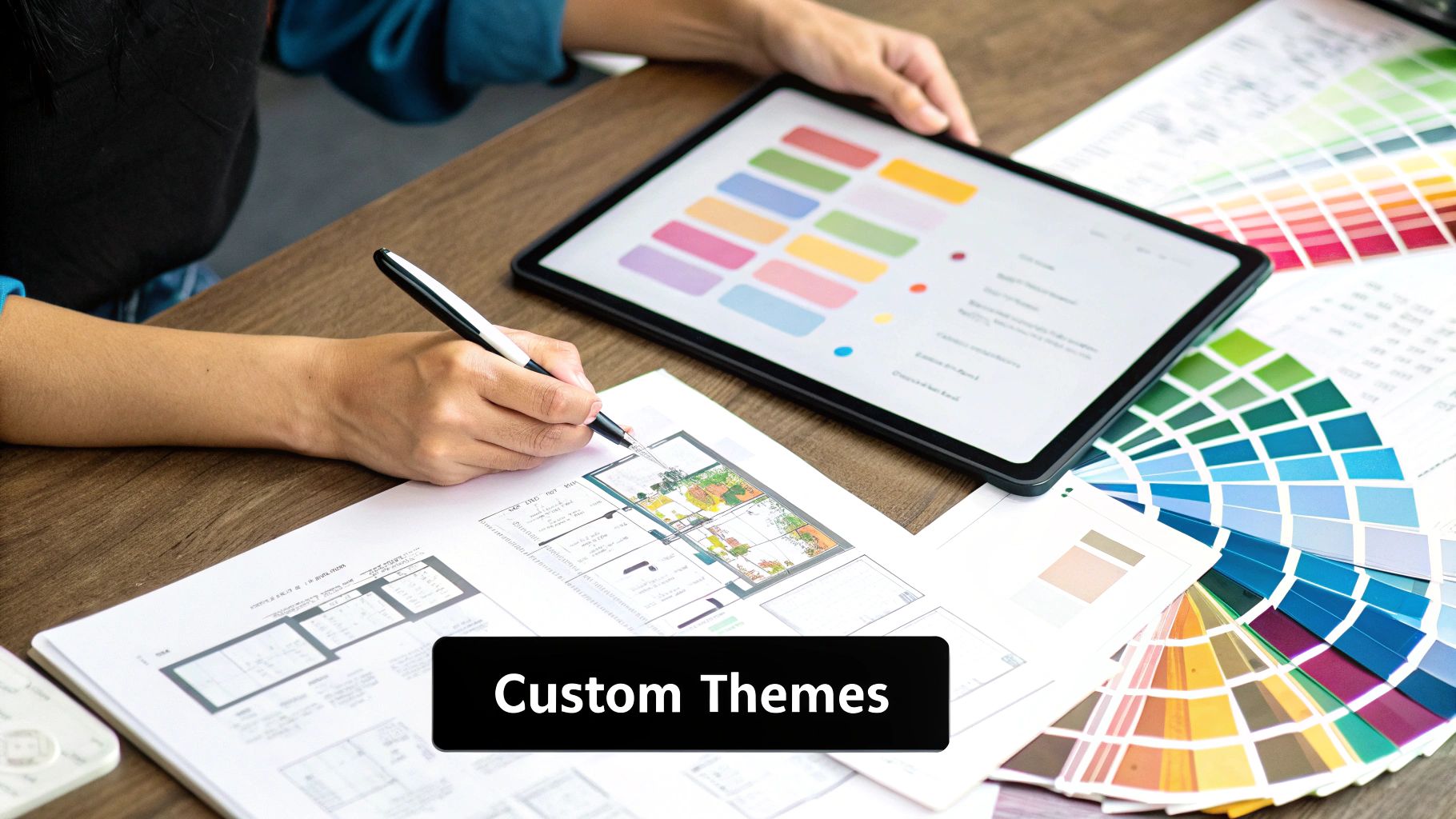
Your website's theme is its visual blueprint. It’s what controls the entire look and feel—from the color palette and fonts to the basic page layouts. Honestly, choosing the right theme is the first and most critical customization decision you'll make.
But a great theme isn't just about looking good. It has to match your brand and help you achieve your business goals. For instance, a photographer's portfolio needs a theme that puts big, beautiful images front and center. A law firm, on the other hand, needs a clean, professional design that immediately builds trust.
Once you’ve picked a theme, you can usually tweak its core elements without ever writing a line of code:
- Color Palettes: Adjust the colors to perfectly match your brand guidelines.
- Typography: Choose fonts that communicate your brand's unique personality.
- Layout Options: Rearrange where the header, footer, and sidebars sit.
Getting this first layer right sets the stage for everything else, giving your site a consistent and polished look from the get-go.
Plugins and Extensions: Adding Powerful Features
If themes are the look of your house, plugins are the appliances and smart-home gadgets. They’re small software add-ons you install to give your site new capabilities, turning it from a simple brochure into a powerful business engine.
The world of plugins is massive. In 2024, the market was buzzing with over 800 different CMS platforms, each with its own app store. But even with all that variety, WordPress is still the giant in the room. It powers around 43.6% of all websites and holds a whopping 61.7% of the CMS market share, thanks in large part to its library of over 60,000 plugins.
Think of plugins as apps for your website. Need to collect leads? There’s a contact form plugin for that. Want to sell products online? An e-commerce plugin can set you up with a storefront.
Plugins can handle everything from SEO and security to social media feeds and faster page loading. By picking just a few high-quality plugins, you can add sophisticated features that would otherwise take a developer weeks to build. Smart website management means keeping these plugins updated and secure.
Custom Code: For Ultimate Control
Every now and then, you'll hit a wall. A theme setting isn't quite right, or you can't find a plugin that does exactly what you need. When you have a unique feature in mind or need a design that’s pixel-perfect, it’s time to roll up your sleeves and get into custom code.
This is the deepest level of customization, and it opens up a world of possibilities.
Now, that doesn't mean you need to become a coding wizard overnight. Sometimes, all it takes is a few lines of CSS to change a button color or fix some awkward spacing. For bigger jobs, like building a custom tool or integrating a third-party service, you might bring in a developer.
Ultimately, custom code is how you break free from the mold of a template. It lets you create a website that's not just functional, but a one-of-a-kind digital experience built specifically for your brand.
Keeping Your Website Healthy and Secure
https://www.youtube.com/embed/Q0htNnhT5Zo
Getting your new website live is a fantastic feeling, but it's not the finish line. It's actually the starting line. A website isn't a "set it and forget it" project; it’s a living part of your business that needs regular care to stay fast, healthy, and safe from online threats.
Think of it like owning a car. You wouldn't drive it for years without changing the oil or checking the tires, right? The same logic applies here. Ongoing maintenance is the essential health and safety plan for your digital investment. Without it, performance grinds to a halt, you become an easy target for hackers, and you risk losing the trust of your visitors.
This proactive mindset is a cornerstone of smart CMS website development. Let's break down the essential tasks that will keep your website in peak condition.
The Foundation of Website Safety
Before we even talk about speed and performance, we have to lock down security. These are the non-negotiable habits that protect your site from the most common attacks and give you a way to bounce back if the worst happens.
- Regular Automated Backups: This is your ultimate safety net. You absolutely need to set up automatic, frequent backups of your entire website—that means all the files and the database. If your site gets hacked or a faulty update crashes everything, a recent backup means you're back online in minutes, not days.
- Consistent Updates: Your CMS core, themes, and plugins are constantly being improved by their developers. These updates aren't just for adding flashy new features; they often contain critical patches for security vulnerabilities. Staying on top of updates is one of the single most effective things you can do to keep your site secure.
- Strong Password Hygiene: A weak password is like leaving the key under the doormat. Enforce strong, unique passwords for every single user, especially anyone with admin access. A good security plugin can help you set and enforce these rules without you having to think about it.
"A website is never 'done.' It's a dynamic asset that requires ongoing attention to security and performance to remain effective. Proactive maintenance isn't a cost; it's an investment in your business's continuity and reputation."
Enhancing Performance and User Experience
A secure website that’s painfully slow is still a problem. Performance is a huge part of your site’s overall health, and it directly affects how happy your users are and how well you rank on Google. A slow site will bleed visitors—studies have shown that many people will simply leave if a page takes more than a few seconds to load.
To keep your site running smoothly, start with these basics:
- Image Optimization: Huge, uncompressed images are one of the biggest culprits of slow websites. Always use a tool or plugin to compress your images before uploading them. This shrinks the file size dramatically, often without any noticeable loss in quality.
- Implementing Caching: Caching is a clever way to speed things up. It creates and saves a static, ready-to-go version of your pages. When someone visits, your server can show them that copy instantly instead of having to build the page from scratch every single time. Most good hosting providers offer easy caching solutions.
- Monitoring and Cleaning: A healthy site is a tidy site. Make a habit of checking for and fixing 404 errors to get rid of broken links that frustrate visitors. It's also smart to periodically clean out your database by removing old post revisions and spam comments that just clog things up.
For a deeper dive into protecting your online presence, check out our guide on website security best practices. This kind of ongoing care ensures your CMS site remains a powerful, reliable, and secure asset for your business.
How to Optimize Your CMS for Search Engines
A beautiful website doesn't mean much if no one can find it. That’s where Search Engine Optimization (SEO) comes into play, and your CMS is your biggest ally in the climb up Google’s rankings. Good cms website development means building a site that's friendly to search engines right from the start.
Think of your CMS as the SEO control panel for your website. It takes a lot of the technical tasks that used to require a developer and puts that power right in your hands. This frees you up to focus on what you do best—creating great content—while the system handles a ton of the grunt work.
Mastering On-Page SEO Fundamentals
The first step in any solid SEO strategy is nailing your on-page elements. This is all about giving search engines clear signals about what your content is about. Thankfully, modern CMS platforms make this incredibly simple, especially when you add a good plugin to the mix.
Tools like Yoast SEO or Rank Math for WordPress, for example, work like a live checklist. As you’re creating a new page or blog post, these plugins walk you through optimizing all the important bits and pieces.
- Page Titles and Meta Descriptions: These are your website’s billboard in the search results. Your CMS editor gives you a dedicated spot to write compelling, keyword-focused titles and descriptions that make people want to click.
- Keyword Integration: The plugin will guide you on how to naturally include your target keywords in your headings, body copy, and even image alt text. This makes it crystal clear to search engines what your page is about.
- Readability Analysis: Many SEO plugins also score your content's readability. They help you write in a clear, engaging way that real people can understand, which is a factor Google cares more and more about.
Optimizing your site isn't just about feeding an algorithm; it's about creating a better, clearer experience for your users. A site that's easy for people to understand is almost always easy for search engines to understand, too.
Streamlining Technical SEO
Beyond the words on the page, a lot of technical stuff happens behind the scenes that can make or break your search visibility. A good CMS automates or drastically simplifies these complex tasks, giving you a massive head start without needing a computer science degree.
Your CMS helps you manage the nitty-gritty technical side by:
- Generating XML Sitemaps: It automatically builds a sitemap—basically a map of all your website's pages—and helps you submit it to search engines. This ensures they can find and index all your important content without missing anything.
- Controlling Indexing: Need to keep a certain page out of search results, like a thank-you page or an internal draft? Your CMS usually lets you do this with a simple click of a checkbox, no code required.
- Managing URL Structures: A clean, logical URL is better for both people and search bots. Your CMS lets you create simple, descriptive URLs that include your keywords (e.g.,
yoursite.com/blog/how-to-do-seoinstead ofyoursite.com/p?id=123).
At the end of the day, high-quality content will always be king. But your CMS is the powerful engine that helps you carry out a winning SEO strategy. By taking advantage of its built-in features and plugins, you can make sure all your hard work gets the visibility it truly deserves.
Got Questions About CMS Development? We Have Answers.
Starting a new website project always brings up a few key questions, especially around the practical stuff like money, time, and the skills you'll need. Let's clear the air and tackle some of the most common things people ask.
How Much Does a CMS Website Actually Cost?
This is the big one, and the honest answer is: it depends. The cost can swing wildly based on what you need.
On one end of the spectrum, you could use a platform like Wix with a pre-built template. For a few hundred dollars a year, you get hosting and some nice features. This is a perfect starting point if you just need a simple online presence and are watching your budget.
But if you're looking for something more powerful, like a custom-built WordPress site with specialized plugins and a one-of-a-kind design, the investment is bigger. These projects can run anywhere from a few thousand to tens of thousands of dollars, all depending on how complex and unique you want it to be.
How Long Will It Take to Build?
Just like the cost, the timeline is all about the project's size and complexity.
Need a straightforward "brochure" website up and running fast? Using a ready-made template, you could be live in a week or two. It’s a great option for getting your essential info online without delay.
For a more involved site—think e-commerce, custom features, and tons of content—you'll need to be more patient. A realistic timeframe for these projects is anywhere from 1 to 4 months. That gives everyone enough time to properly plan, build, add content, and test everything thoroughly.
Remember, rushing a website launch is a recipe for headaches down the road. Investing the right amount of time upfront always pays off with a polished, effective site that works for your business long-term.
Do I Really Need to Know How to Code?
For managing your site day-to-day? Absolutely not. That’s the whole point of a CMS!
Modern platforms are built for regular people, not developers. If you can use a word processor, you can create pages, edit text, and upload photos. The interface is designed to be intuitive.
However, if you want to make deep customizations or add a feature that isn't available in a theme or plugin, that's when coding comes into play. Knowing a little HTML and CSS can be useful for minor tweaks, but for anything major, it's usually smarter to bring in a developer. They can handle the technical heavy lifting while you focus on what you do best—creating great content.
At OneNine, our goal is to make managing your website a breeze. Whether you're starting from scratch, need ongoing maintenance, or just want some expert advice, our team is here to help you grow online. Learn more about our website development services and see how we can help.


