
Trying to pin down the cost of custom software can feel like a guessing game. You might hear numbers ranging from $50,000 for a simple app all the way up to $500,000 or more for a massive, company-wide system.
The truth is, the final price tag depends entirely on what you're building. It's a lot like commissioning a custom home versus buying a pre-built one; you're paying for something designed and constructed from the ground up, just for you.
Decoding Custom Software Development Costs
When you first start exploring custom software, it's normal to feel a bit lost on the cost. It's like asking "how much is a car?" without specifying if you want a basic hatchback or a fully-loaded luxury SUV. A simple tool for your internal team is going to have a very different price than a sophisticated platform for thousands of customers.
That initial uncertainty is okay. The final investment is a mix of several key factors, and we'll walk through them together in this guide.
Breaking Down the General Price Ranges
To give you a better sense of what to expect, we can group projects into a few common tiers. Think of these as ballpark figures to help you start budgeting, not as rigid quotes. What really separates these tiers is the depth of features, the number of other systems it needs to connect with, and how complex the overall user experience is.
Here's a quick look at how that breaks down.
Estimated Custom Software Development Cost by Project Size
| Project Tier | Description & Examples | Typical Cost Range |
|---|---|---|
| Small Project | Simple apps with just a few core features, minimal outside connections, and a straightforward interface. Think internal dashboards, single-purpose mobile apps, or basic inventory trackers. | $50,000 – $125,000 |
| Medium Project | More involved software with several features, connections to third-party tools (like payment processors), and a professional, well-designed user experience. Examples include custom CRM systems or e-commerce websites. | $125,000 – $250,000 |
| Large Project | Enterprise-grade systems with advanced functionality, many complex integrations, and a highly unique design. Think of platforms like multi-sided marketplaces or custom ERP systems. | $250,000+ |
It's important to remember what's baked into these numbers.
These costs aren't just for writing code. They cover the entire journey: initial strategy and planning, UI/UX design, development and testing, and the project management that keeps everything on track.
The demand for custom software is massive for a reason—it gives businesses a real competitive advantage. The market was valued at $41.25 billion in 2024 and is expected to keep growing as more companies realize that off-the-shelf solutions just don't cut it. You can dig into industry reports for more on this trend.
Ultimately, you're building a tool that fits your business like a glove. It's the same principle behind a great website, where every element is designed to meet specific goals. To see how project scope affects pricing in a similar space, check out our guide on website design costs.
The Core Factors Driving Your Project's Budget

Figuring out the cost of custom software is a bit like pricing out a custom-built house. The final number depends entirely on the blueprint and the materials you choose. Every feature, design choice, and technical hook-up adds to the total, but four key areas really move the needle on your budget.
Getting a handle on these drivers lets you make smart trade-offs, so you can pour your resources into what truly matters. It's the difference between building a simple, effective tool and getting bogged down in an overly complex, enterprise-level platform you don't actually need yet.
Project Size and Complexity
This one’s the biggie. The sheer scope of your project is the single largest factor dictating the price. An internal tool with just a couple of screens and straightforward logic is worlds away from a public-facing platform built to juggle thousands of users, intricate business rules, and real-time data.
The more features you want, the more hours it takes to build. Think about something as common as a user login. A basic email and password system is pretty simple. But what if you want to add two-factor authentication, social media logins, and a forgot-password flow? Each of those additions layers on complexity and, you guessed it, cost.
Ask yourself these questions to gauge complexity:
- Number of Features: How many distinct things does this software need to do?
- User Roles: Will you need different views and permissions for admins, managers, and regular users?
- Business Logic: Are there complex calculations, multi-step workflows, or unique algorithms under the hood?
The more "what-if" scenarios and special rules your software needs to account for, the more tangled the development gets, and the higher the final price tag will be.
Intricacy of UI and UX Design
How your software looks and feels is so much more than just window dressing—it's a massive cost driver. A clean interface built from a standard template is far quicker and cheaper to create than a completely custom, animated, and highly interactive user experience (UX).
A truly polished design process isn't just about making things look pretty. It involves deep user research, creating wireframes and prototypes, and running user tests to make sure the end product feels natural and intuitive. It's like the difference between a basic floor plan and a full architectural rendering complete with interior design and a 3D walkthrough.
A great user experience isn't an expense; it's an investment. A well-designed interface can increase user adoption, reduce training time, and improve overall satisfaction, delivering a strong return.
Ultimately, a more sophisticated design demands more time from skilled designers and front-end developers, which adds up. If you're on a tight budget, starting with a clean, standard design is a smart and practical way to keep costs in check.
Third-Party System Integrations
Software rarely lives on an island. Most applications need to "talk" to other systems to do their job—whether that's processing payments, sending emails, or pulling in data from a map. These connections are called third-party integrations, and they can be a sneaky but significant cost.
Some integrations are a breeze. Connecting to a popular payment processor like Stripe, for example, is a well-trodden path. But trying to sync with an old, proprietary system (what we call a "legacy system") can turn into a complex and time-consuming puzzle.
Here are a few common integrations you might need:
- Payment Gateways: Stripe, PayPal, Braintree
- Mapping Services: Google Maps, Mapbox
- Communication APIs: Twilio for SMS, SendGrid for email
- Internal Systems: Hooking into your company's existing CRM or ERP software
Each integration adds another piece to the puzzle, requiring more development and testing, which directly impacts your project's bottom line.
Post-Launch Support and Maintenance
Don't make the mistake of thinking the costs end at launch. Just like a new car, software needs regular tune-ups to stay secure, functional, and effective. This is easily one of the most overlooked expenses when people are creating their initial budget.
Ongoing costs are influenced by the software's complexity, how customized it is, and who is using it. Things like security patches, server hosting fees, and inevitable bug fixes all contribute to the total cost of ownership over the long haul.
When thinking about your budget drivers, remember that your team is your biggest asset and expense. Knowing the ins and outs of hiring remote software developers can make a huge difference in your overall costs. It's also crucial to find the right team for the job; our guide on https://onenine.com/how-to-choose-a-website-developer/ has great advice that's just as relevant for software projects.
Choosing the Right Pricing Model for Your Project
Figuring out how you'll pay for your software project is more than just a line item on a spreadsheet. It's a decision that will shape your budget, your ability to make changes, and the entire working relationship you have with your development team.
Think of it like building a house. You could agree on one fixed price for the whole build, pay your crew by the hour, or hire a dedicated team to work on your property for the long haul. Each approach makes sense in different situations, and picking the right one is your first step toward keeping software development costs under control.
This breakdown shows where the money typically goes. You'll notice that the biggest slice of the pie is the actual development work.
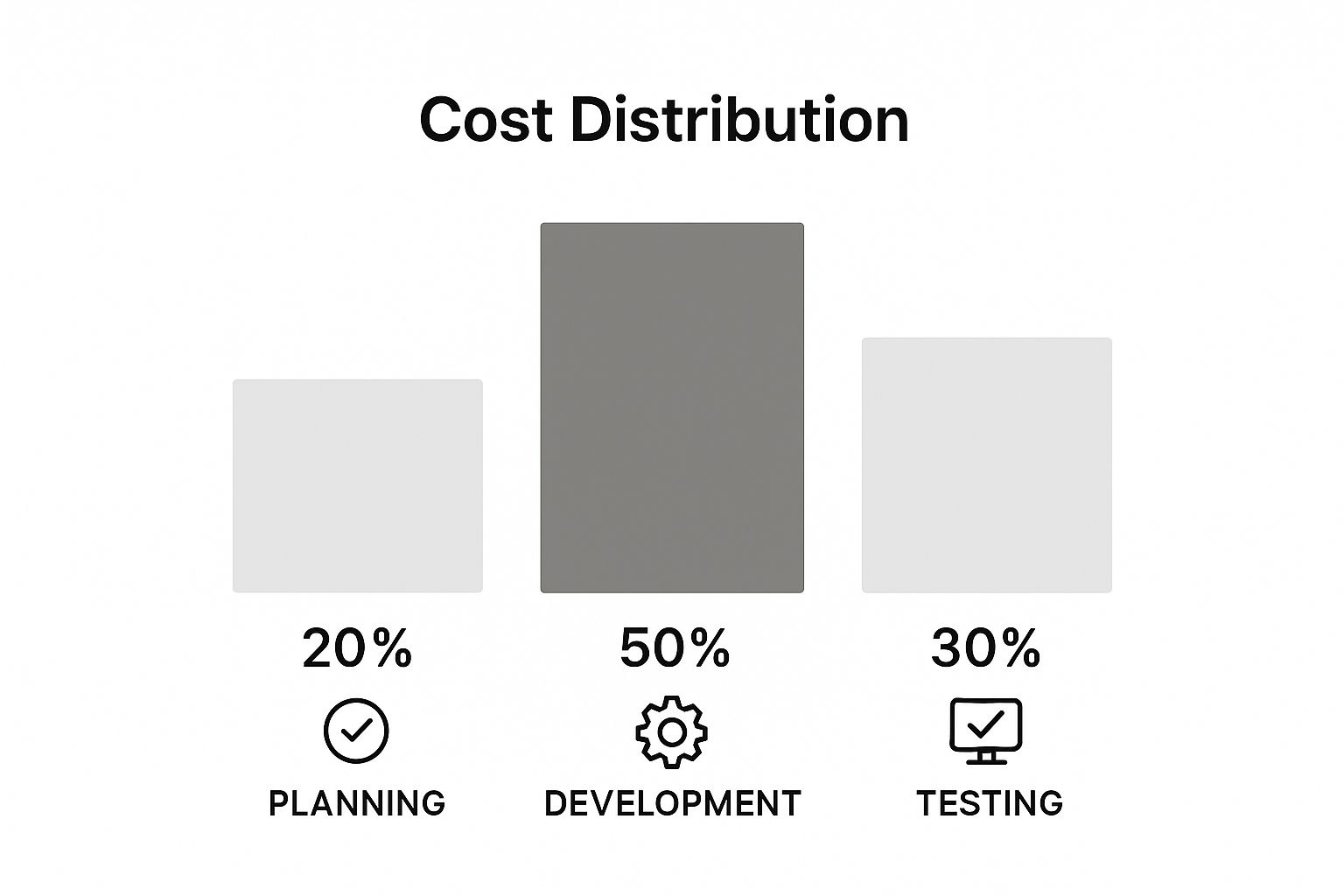
As you can see, coding and implementation eat up about 50% of the budget. The rest is split between planning, design, and testing, which just goes to show how critical a solid strategy and quality control are from day one.
Fixed Price: Predictability Over Flexibility
The Fixed Price model is as straightforward as it gets. You agree on a single price for a very clearly defined scope of work. That's it. This works best for smaller, well-understood projects where you're confident nothing is going to change.
The big win here is budget certainty. You know the final cost before any work begins, which is great for financial planning. The downside? It's rigid. If you suddenly get a brilliant idea for a new feature, you’ll have to go back to the drawing board, renegotiate the scope, and sign a new contract for the extra work.
Key Takeaway: The Fixed Price model gives you a predictable budget but very little wiggle room. It’s perfect for projects with a locked-in scope, but it can get in the way of the agile, iterative approach that modern software development often requires.
Since the development agency takes on all the risk of unforeseen problems, they'll usually bake a contingency buffer into the price. So, while it feels safe, it might not always be the cheapest route.
Time & Materials: Flexibility is King
On the other end of the spectrum is the Time & Materials (T&M) model. Here, you pay for the actual hours your team spends working on the project, plus the cost of any third-party tools or licenses. This is the go-to model when you know the project will evolve or when you don't have every detail mapped out from the start.
This approach is the heart and soul of agile development. It gives you the freedom to pivot, refine features based on user feedback, and adapt to changing market needs without being shackled to an outdated plan.
The trade-off is obvious: you don't know the final cost upfront. This model demands a huge amount of trust and crystal-clear communication with your development partner. To make it work, you need regular updates, transparent time tracking, and frequent budget check-ins to make sure there are no nasty surprises down the road.
Dedicated Team: Your In-House Team, but Remote
For big, complex, or long-term projects, the Dedicated Team model is often the smartest choice. In this setup, you're essentially hiring a full-time, remote crew of developers, designers, and project managers who work exclusively for you.
You get all the benefits of an in-house team—deep product knowledge, consistent collaboration, and a team that understands your company culture—without the headaches and overhead of recruiting, hiring, and HR. It strikes a fantastic balance between cost-efficiency and control for ongoing development.
You pay a predictable monthly fee for the entire team. This gives you budget stability while allowing you to direct their focus wherever it's needed most. It’s the perfect solution for businesses that need to scale their development capabilities for the long haul.
To help you decide, let's look at these models side-by-side.
Comparison of Software Development Pricing Models
A side-by-side look at the most common pricing models to help you choose the right one for your project.
| Pricing Model | Best For | Pros | Cons |
|---|---|---|---|
| Fixed Price | Small, well-defined projects with a clear scope and minimal uncertainty. | • Budget is known upfront • Minimal management overhead |
• Inflexible to changes • Risk of higher cost due to agency "buffer" |
| Time & Materials | Agile projects, complex builds, or projects where the scope is likely to evolve. | • High flexibility • Faster start time • Total control over scope |
• Budget is not fixed • Requires close monitoring and trust |
| Dedicated Team | Long-term projects, startups, or businesses needing to scale development capacity. | • Deep team integration • Predictable monthly cost • High efficiency and commitment |
• Higher overall investment • Requires significant management from your side |
Ultimately, choosing the right model is one of the most important decisions you'll make. It sets the foundation for your project's financial health and its overall chance of success.
How to Create a Realistic Software Development Budget
A solid budget is more than just a number you aim for; it’s the financial blueprint for your entire project. Without a clear plan, you're sailing into a storm of scope creep, blown deadlines, and a final product that just doesn't hit the mark. Nailing down a realistic budget from the get-go is the single most important thing you can do to keep the project on track and get a real return on your investment.
Think of it like building a house. A weak, poorly planned foundation will cause cracks and instability later on. In the same way, an unrealistic budget sets your project up for failure before a single line of code is ever written. So, let’s walk through the practical steps to build a financial plan that keeps surprises to a minimum and sets you up for success.
Define and Prioritize Your Project Scope
First things first: you need to know exactly what you're building. A vague idea like "a new CRM" just won't cut it. You need a detailed project scope that spells out every feature, defines user roles, and lists all the technical requirements. This document is the north star for all your cost estimates.
Once you have a wish list of features, it's time to get real and prioritize them. Not every feature is a must-have, and trying to build everything at once is a classic recipe for blowing your budget. A fantastic way to do this is using the MoSCoW method, which helps you sort features into four simple categories:
- Must-have: These are the absolute, non-negotiable core functions. Without them, the software is basically useless.
- Should-have: These are important features that add a ton of value, but the app can still launch without them.
- Could-have: Think of these as the "nice-to-haves." They're desirable but can be added later if the budget and timeline allow.
- Won't-have: Features that are intentionally left out of this version to keep the project focused.
This simple exercise forces you to make some tough decisions, but it ensures your initial investment goes toward what truly matters.
Get Detailed Estimates from Multiple Partners
With your prioritized scope ready, it's time to start talking to potential development partners. Don't just take the first quote you get. Send your detailed project brief to several different teams. This lets you compare not only the bottom-line price but also how well they grasp your vision and the approach they plan to take.
A good estimate is never just one number. It should be a complete breakdown of the costs.
A partner you can trust will give you a detailed proposal breaking down the estimated hours for each feature, who will be on the team, and a project timeline. This kind of transparency is key to understanding where your money is going and managing the overall custom software development costs effectively.
When you look at a few detailed proposals, you'll get a much better feel for the going market rate and be able to spot any outliers—whether they're suspiciously low or unusually high.
Always Include a Contingency Fund
Here’s a hard truth: no project goes exactly according to plan. Unexpected technical hurdles, a sudden shift in market needs, or a tricky integration you didn't see coming—these things happen. That’s why a contingency fund isn't a luxury; it's an absolute necessity.
This fund is your financial safety net. It gives you the flexibility to handle surprises without derailing the whole project or having to go back to stakeholders, hat in hand, asking for more money.
A good rule of thumb is to set aside 15-20% of your total project budget for contingency. So, if your core development cost is $100,000, you should have another $15,000 to $20,000 tucked away for those "what-if" moments. It's the secret to keeping things moving and launching successfully, even when you hit a few bumps in the road.
Smart Ways to Reduce Costs Without Sacrificing Quality

Making your budget stretch further doesn’t have to mean cutting corners. With the right strategy, you can bring your custom software development costs down significantly and still end up with a high-quality, effective product. It all comes down to being smart about your priorities and putting your money where it counts the most.
The trick is to focus on proving your core idea first. Instead of trying to build every feature you've ever imagined right out of the gate, launch a lean, focused product that solves one primary problem for your users. This approach keeps your initial risk and financial commitment to a minimum.
Start with a Minimum Viable Product
A Minimum Viable Product (MVP) is one of the best tools you have for controlling costs. Think of it like building the essential frame and foundation of a house before you start picking out paint colors and furniture. An MVP has just enough features to be functional and valuable to its first users.
This strategy pays off in several huge ways:
- Lower Upfront Cost: You spend far less to get a functioning product into the hands of real people.
- Quicker Launch: A simpler product gets to market faster, which means you can start learning from your users sooner.
- Smarter Decisions: You can use actual user feedback to guide what you build next, so you don't waste money on features no one actually wants.
By launching an MVP, you get to test your business concept in the real world without betting the entire budget on an unproven idea.
Embrace Phased Development and Open Source
Building on the MVP idea, phased development is all about rolling out new features in manageable chunks over time. Once your initial product is live, you can add more functionality in later updates, guided by user feedback and your evolving business goals. This approach turns a massive one-time cost into a predictable, manageable operational expense.
Another powerful cost-saver is tapping into open-source technologies. Using free, community-backed frameworks, libraries, and databases means you avoid hefty licensing fees. Your development team gets to stand on the shoulders of giants, building on top of solid, pre-existing tools instead of reinventing the wheel.
An MVP combined with phased rollouts creates a sustainable development rhythm. Your product grows along with your user base, ensuring every dollar you spend adds real, proven value.
Choose Your Development Team Location Wisely
Where your developers are located has a direct and significant impact on your budget. Hiring locally in a high-cost area like the U.S. or Western Europe is almost always the most expensive option. For many businesses, nearshore or offshore teams offer the same level of talent for a fraction of the price. If you want to get this right, it helps to understand how to build nearshore development teams without lighting your budget on fire.
These cost-saving principles aren’t just for software; they apply to other digital projects, too. To see how project scope and strategy affect pricing in a similar space, check out our guide to understanding https://onenine.com/website-development-cost/. By making smart choices about your product and your team, you can get incredible results without needing a blank check.
Frequently Asked Questions About Software Costs

Let's be honest: talking about the financial side of a software project can feel a bit daunting. You have a vision, but you also have a budget. Getting clear, straight-to-the-point answers is the only way to make smart decisions.
This section cuts through the noise and addresses the most common questions we hear from clients about custom software development costs. Our goal is to give you the confidence to move forward, knowing what to expect.
How Can I Get an Accurate Cost Estimate?
The single best way to get a number you can trust is to start with a detailed project brief. Don't worry, you don't need to be a technical whiz to write one. You just need to be clear about what you want your software to do.
A solid brief gives a development team a clear map to follow. Here’s what it should cover:
- Your "Why": What's the core business problem you're trying to solve?
- Must-Have Features: What are the non-negotiable functions the software needs to work?
- The User: Who is this for? What do they need to get done with it?
- Inspiration: Are there other apps out there that have a similar look, feel, or function you admire?
When you hand this to a potential partner, it lets them dig in and conduct a proper discovery phase. That initial deep dive is what turns a vague ballpark guess into a reliable, detailed estimate you can actually budget for.
What Are the Potential Hidden Costs?
The initial development price tag is just the beginning of the story. Like owning a car, there are ongoing costs to keep your software running smoothly and securely. Knowing about these from the start helps you plan a realistic long-term budget.
Keep an eye out for these common ongoing expenses:
- Maintenance & Updates: Technology never stands still. You'll need regular updates to fix bugs, patch security holes, and keep up with new operating systems.
- Server Hosting: Your software needs a place to live online. These server costs can be monthly or annual and often grow as your user base does.
- Third-Party Services: Does your app need to process payments or use maps? Services like Stripe or Google Maps Platform often come with their own subscription or usage-based fees.
As a rule of thumb, it's wise to budget an extra 15-25% of the initial development cost each year just for maintenance and support.
Is Custom Software a Better Investment?
It’s true that off-the-shelf software often looks cheaper at first glance. But a custom solution isn't just an expense; it's a strategic investment in your company's future. It's built from the ground up to solve your specific problems, which is where the real competitive advantage lies.
Think of it this way: you get features that perfectly fit your unique workflow, the ability to scale up as your business grows, and complete ownership of the final product. It becomes a true business asset, built to make you more efficient and innovative for years to come.
At OneNine, we build custom digital solutions that are wired directly into your business goals. If you're ready to create a tool that gives you a genuine edge, let's talk about making your vision a reality. Learn more at https://onenine.com.


