

Building Documentation That Teams Actually Use
Let's be honest: most website documentation goes unused. It just sits there gathering digital dust. Why? Often, it's created with the best intentions but lacks practical usability. The key to effective documentation is understanding what makes it valuable to the teams who actually need it. This means focusing on user experience and accessibility.
Creating overly complex, monolithic documentation is a common pitfall. This can easily overwhelm users and make it difficult to find specific information quickly. Instead, structure your documentation into modular, bite-sized chunks. This allows team members to access exactly what they need, when they need it.
For example, instead of one massive document on "Website Functionality," break it down into smaller guides. These could cover specific topics like "User Authentication," "Payment Processing," and "Content Management." This makes finding information much faster and easier.
Consider the diverse learning styles within your team. Some people prefer written instructions, while others learn better with visuals. Incorporating various formats like videos, diagrams, and interactive tutorials can significantly improve comprehension and engagement. Think of it like building a website: you wouldn't create a site with just text. You'd use images and multimedia to make it engaging. The same principle applies to website documentation.
This trend toward digital documentation isn't isolated. The global trend of digital documentation is connected to broader economic shifts. In 2023, digitally deliverable services in global trade grew by over 8%. This highlights the growing importance of accessible digital information. You can explore this further here.
Designing for Discoverability
Beyond the content itself, documentation needs to be easily discoverable. A robust search function is critical. Imagine trying to find a specific function in a codebase without a search bar – it would be a nightmare. Your team needs a way to quickly locate information within the documentation.
Consider integrating your documentation into the existing workflow. If your team primarily uses a project management platform like Asana, link relevant documentation directly to tasks and projects. This minimizes context switching and makes accessing information easier without interrupting their flow.
Fostering a Culture of Documentation
Finally, creating documentation that teams actually use requires fostering a culture of documentation. This means making it easy for team members to contribute, update, and improve the documentation.
Implement a clear review process and provide incentives for contributions. Think of it as a collaborative project, similar to website development itself. When everyone feels ownership, the documentation becomes a living resource that evolves alongside the website.
This not only improves the quality of the documentation, but also promotes knowledge sharing and team cohesion. This investment will ultimately lead to a more efficient and effective team.
Documenting Websites For Global Teams And Users

Website projects today often involve globally distributed teams. This creates challenges for effective website documentation. Successfully documenting a website requires careful consideration of both the technical aspects and the diverse needs of a global team.
Addressing the Challenges of Distributed Teams
A major hurdle is maintaining consistency across different time zones and communication styles. This can result in fragmented and difficult-to-maintain documentation. A practical solution is to use a centralized documentation platform like Confluence or a similar knowledge base accessible to everyone. Using Git or another version control system can also help manage updates and revisions.
Imagine a developer in Japan needing to understand a feature built by a developer in Brazil. Clear, well-maintained documentation bridges this gap, ensuring smooth collaboration and consistent information.
Cultural differences in information structure and presentation also pose a challenge. Some cultures prefer concise instructions, while others prefer detailed explanations. Using a mix of formats like text guides, videos, and interactive tutorials can be helpful in addressing these varying preferences.
Building Documentation That Transcends Language Barriers
Creating documentation for global users adds another layer of complexity. Information must be accessible and understandable to users with diverse language backgrounds. This necessitates understanding global internet behavior and preferences. For example, internet usage differs significantly between regions. Google attracts over 171 million unique monthly visitors in Canada alone, while in India, it receives approximately 14.6 billion visits monthly. This highlights the importance of documentation for user engagement and SEO. Learn more about website statistics here.
One solution is multilingual documentation. However, direct translation isn’t enough. Adapting the content to reflect cultural nuances and user expectations is key. This might involve adjusting tone, style, and examples to resonate with the target audience.
Testing and Refining Documentation for Global Audiences
Testing your documentation with representative user groups from different regions is essential. This helps identify areas of confusion and allows for targeted improvements. Gathering feedback through surveys and user testing can provide valuable insights for enhancing the documentation. This ensures the documentation is user-centered and caters to a global audience.
Creating Engaging Visual Documentation That Works
Static walls of text are a death knell for documentation. Think about the last time you wrestled with a dense, text-heavy manual. Did you read it cover-to-cover? Probably not. Visuals can dramatically improve user engagement and comprehension. This is crucial for website documentation, where complex information needs to be conveyed effectively.
Choosing the Right Visuals
Different types of website documentation benefit from various multimedia formats. A quick reference guide might use a simple flowchart, while a complex technical procedure might benefit from a screen recording. Choosing the right format ensures clarity and efficiency.
- Screenshots: Perfect for highlighting specific interface elements or error messages.
- Diagrams: Great for visualizing system architecture or data flow.
- Flowcharts: Ideal for explaining processes or decision trees.
- Videos: Excellent for demonstrating dynamic interactions or complex workflows.
- Interactive Elements: Boost engagement through hands-on learning.
Creating Visuals Without Design Expertise
You don't need to be a graphic designer to create professional-looking visuals. Many tools and techniques are readily available. Screen recording software can easily capture step-by-step procedures. Similarly, accessible diagramming tools empower non-designers to create clear and informative visuals.
Many platforms offer customizable templates and pre-built components. This allows anyone to create visually appealing documentation, regardless of design experience. For more complex visuals, consider outsourcing to freelancers or using online design platforms like Canva.
Technical Considerations for Multimedia
Hosting multimedia requires attention to technical details. Large image or video files can slow down page load times, negatively impacting user experience. Optimizing media files is critical. This includes compressing images and using web-appropriate video formats.
Mobile responsiveness is also essential. With 99.5% of technicians in field services using mobile devices, documentation must be accessible on different screen sizes. The move towards multimedia documentation is increasingly vital. This trend is projected to continue, with multimedia, driven by technologies like AI and API-driven approaches, surpassing text-based documentation by 2025. The use of videos, diagrams, and images improves user experience, especially for visual learners. More detailed statistics can be found here.

This responsiveness ensures consistency, allowing teams seamless access to documentation on any device. By considering both content and technical aspects, you can create truly effective visual website documentation.
Choosing Documentation Tools That Fit Your Workflow
Finding the right tools for documenting your website can be a daunting task. Marketing jargon and endless feature lists often make it difficult to see what really matters: a platform that works seamlessly with your team. This section offers practical guidance, based on the real-world experiences of teams who have effectively used various documentation platforms. We'll cut through the hype and concentrate on what genuinely works for different team sizes and project types.
Evaluating Platforms Based on Your Needs
The right documentation tool, whether a simple wiki or a comprehensive suite, depends on your project's complexity and your team's size. For small teams with straightforward projects, a lightweight wiki like DokuWiki might be all you need. Larger teams with complex projects, however, may need more powerful platforms like Confluence or specialized documentation generators such as JSDoc.
When evaluating platforms, focus on your particular requirements. Key factors to consider include:
- Ease of use: How quickly can your team learn the platform?
- Collaboration features: Does it offer real-time editing, version control, and commenting?
- Integration options: Does it work with your current tools, like project management software or code repositories?
- Customization: Can you adapt the platform's look and function to your needs?
- Cost: Does the pricing fit your budget and expected use?
Discovering Hidden Costs and Benefits
Look beyond the initial price tag of a documentation platform and consider the hidden costs and benefits. A seemingly cheap platform may need significant customization or lack key integrations, ultimately increasing your time and effort.
A more expensive platform with strong features, on the other hand, could significantly reduce the time spent on documentation, leading to long-term savings. Good documentation can also lessen support requests and boost team efficiency.
To understand this better, let's look at the relationship between total functions, documented functions, and monthly updates. The infographic below shows a scenario with 200 total functions, 150 documented functions, and 4 documentation updates per month.
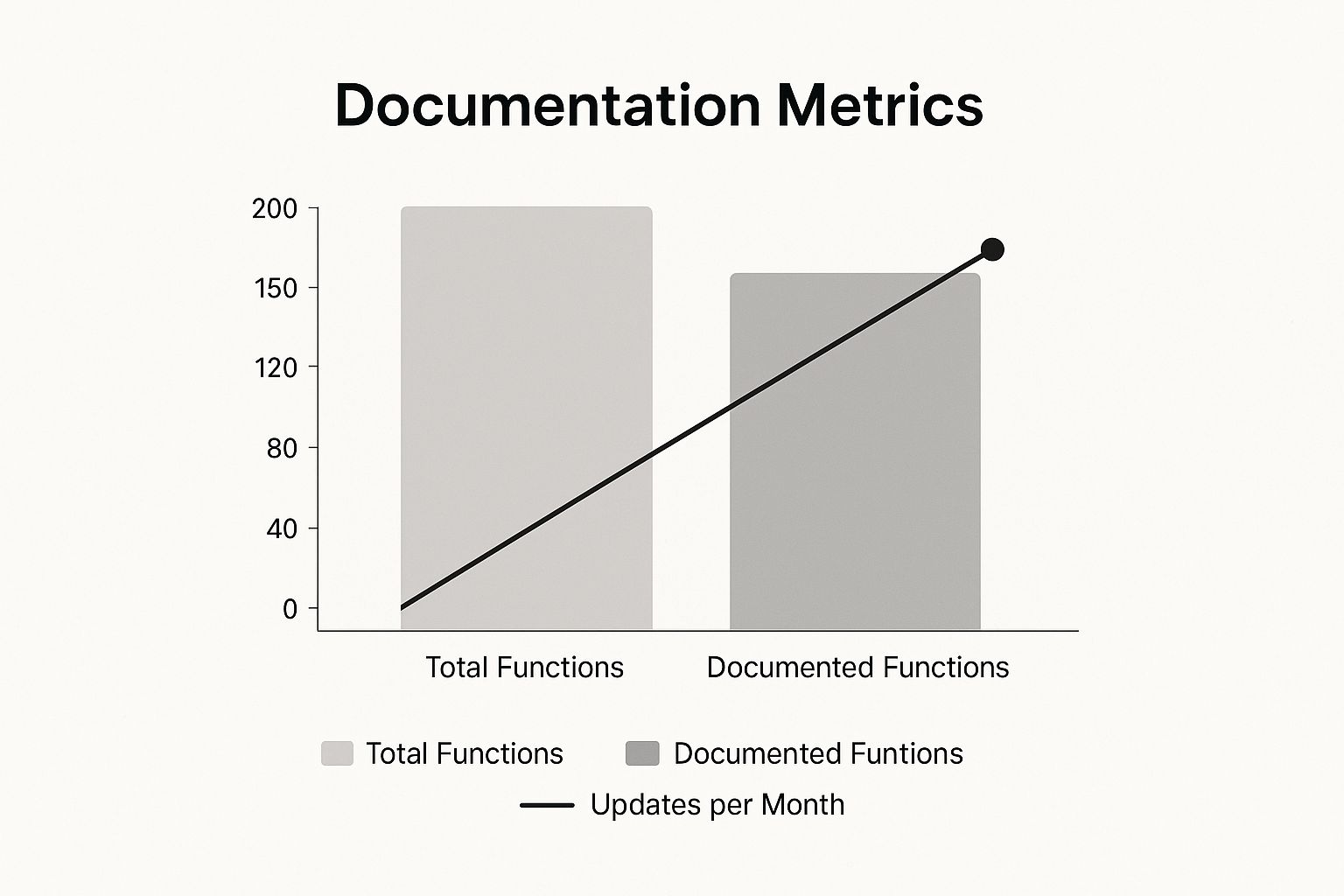
This visual emphasizes the importance of regular documentation updates. Even with a solid foundation, maintaining accurate and current documentation requires ongoing work. For related information on website performance, check out our guide on improving website speed.
Streamlining Your Workflow with Automation
Automation can significantly improve documentation workflows. Tools can automatically create documentation from code comments or monitor code changes to trigger documentation updates. This reduces manual work and keeps documentation in sync with your code. However, automation should simplify, not complicate things. Choose tools that integrate smoothly with your current workflow and don't require complicated setup. Balancing manual and automated processes is essential for efficient and sustainable website documentation.
To help you further, we've compiled a comparison of common documentation tools:
To help you choose the right documentation platform, we've put together a comparison table:
Documentation Tools Comparison: A comprehensive comparison of popular website documentation platforms, including features, pricing, and best use cases.
| Tool Name | Best For | Key Features | Pricing Model | Integration Options |
|---|---|---|---|---|
| DokuWiki | Small teams, simple projects | Simple, easy to use, open-source | Free | Limited |
| Confluence | Larger teams, complex projects | Robust features, collaboration tools | Subscription-based | Extensive |
| JSDoc | Developers, code documentation | Generates documentation from code comments | Free | Integrates with development tools |
This table highlights the key differences and similarities between a simple wiki like DokuWiki, a comprehensive platform like Confluence, and a developer-focused tool like JSDoc. Choosing the correct tool significantly impacts your team's efficiency.
Creating Sustainable Documentation Workflows
Creating website documentation isn't a one-and-done deal. It's an ongoing commitment. All too often, documentation gets neglected and quickly becomes obsolete, landing in a "documentation graveyard." The secret to avoiding this fate is establishing sustainable workflows. This means designing processes that can withstand organizational changes and project deadlines.
Establishing Ownership and Review Cycles
Clearly defined ownership is crucial for sustainable documentation. Each section of documentation should have a designated owner. This person is responsible for keeping their assigned section accurate and up-to-date. This doesn't mean they do all the work themselves. Rather, they serve as the point of contact for questions and updates, much like assigning responsibility for different website sections during development.
Regular review cycles are also essential. Depending on the pace of development, these reviews could be weekly, monthly, or quarterly. These checks ensure the documentation remains current and catches any errors before they become major headaches. This is especially important during fast-paced development when things change quickly.
Integrating Documentation into Development Workflows
Effective documentation isn't an afterthought. It's an integral part of the development process itself. Just as developers regularly commit code changes, they should also update the corresponding documentation. This keeps the documentation aligned with the website's actual functionality.
Using version control for documentation is another key element. Similar to using Git for code, a version control system for documentation allows you to track changes, revert to older versions, and manage contributions from multiple team members. This is especially helpful for managing updates during rapid development cycles.
Creating Incentives for Contributions
Encouraging team-wide contributions to the documentation is vital. There are several ways to incentivize this. Recognize contributions in team meetings or link documentation updates to performance reviews. This cultivates a culture of shared responsibility and ensures the documentation reflects the team's collective knowledge. For more insights on startup website development, check out this helpful resource: How to master website development for startups.
Building sustainable documentation workflows takes planning and dedication. By implementing these strategies, you can create documentation that remains relevant and provides long-term value for your team. This shifts documentation from being a burden to becoming a valuable asset. This proactive approach ensures your documentation remains a helpful resource, even as your website and team evolve.
Measuring And Improving Documentation Success

Simply creating documentation isn't enough. You need to know if it's truly effective. This means looking beyond vanity metrics like simple page views and focusing on deeper insights. This section explores how to truly assess the effectiveness of your website documentation. For more on performance indicators, check out this helpful resource: How to master website performance indicators.
Identifying Actionable Metrics
Not all metrics offer the same value. Some might look good on paper but don't offer much practical guidance. Actionable metrics, however, provide clear direction for improvement. They show you what’s working, what’s not, and where to focus your efforts.
For example, the total number of page views might seem important at first glance. However, it doesn't tell you if users are finding the information they need. Time spent on page is a more useful metric. This tells you if users are actually engaging with the content or leaving quickly.
Tracking search queries within your documentation is also helpful. This can reveal what users are searching for but not finding. This knowledge allows you to identify gaps and improve your documentation's discoverability.
Gathering User Feedback
Direct user feedback is crucial for improving documentation. Make it easy for users to offer feedback by implementing feedback mechanisms directly within your documentation. This allows users to easily report errors, suggest improvements, or ask questions.
Regular surveys can also provide a broader perspective on user satisfaction. They can reveal overall trends and identify areas needing attention. For even deeper insights, consider user interviews. These allow you to understand how users navigate and use the documentation in real-world scenarios. This direct interaction can uncover hidden pain points and identify areas for improvement.
Conducting Effective Documentation Audits
Regular documentation audits are essential for maintaining quality. These audits should focus on identifying systemic issues and areas for improvement, not just minor details. Review the documentation for outdated information, broken links, and unclear instructions.
Consider the user journey. Is it easy for users to find answers? Are there logical pathways through complex topics? An audit can reveal where the structure or navigation can be improved. This proactive approach helps identify real problems, ensuring your documentation stays relevant and helpful.
Understanding User Behavior and Content Priorities
Analyzing user behavior through website analytics, such as Google Analytics, can reveal valuable insights. This includes tracking page views, bounce rates, and popular search queries. This data helps you understand which documentation sections are most used, which are neglected, and what information users are actively seeking.
This information is crucial for prioritizing content updates. Focusing on the areas that matter most to your users ensures your efforts are impactful. Understanding user needs and preferences allows for data-driven decisions about content prioritization. This ensures that your documentation stays relevant and meets the evolving needs of your audience. This user-focused approach creates documentation that truly supports users, leading to increased satisfaction and fewer support requests.
Let's summarize some key metrics for documentation success in the following table:
Documentation Success Metrics: Key performance indicators and measurement strategies for evaluating documentation effectiveness
| Metric Category | Specific Metrics | Measurement Method | Target Ranges | Action Triggers |
|---|---|---|---|---|
| Engagement | Time on page | Website analytics | > 2 minutes | Investigate if < 1 minute |
| Findability | Search queries | Search logs | Low volume of irrelevant queries | Review documentation structure if high volume of irrelevant queries |
| User Satisfaction | Survey responses | User surveys | > 4 out of 5 | Investigate and address issues if < 3 out of 5 |
| Content Relevance | Page views | Website analytics | High traffic on key pages | Review and update low traffic pages |
| Accuracy | Error reports | Feedback mechanisms | Low number of reports | Investigate if sudden increase in reports |
This table highlights some of the most valuable metrics for assessing documentation effectiveness. By tracking these metrics, you can gain a clearer picture of how well your documentation serves its purpose and identify areas for improvement. Regularly reviewing these metrics and taking action based on the data will help ensure your documentation remains a valuable resource for your users.
Preparing Your Documentation For What's Next
Documenting a website isn't a one-time task; it's an ongoing process. Smart documentation anticipates change, rather than reacting to it. This means designing your documentation with the future in mind, considering emerging trends, and creating a flexible architecture.
Embracing the Impact of AI
Artificial intelligence (AI) is changing how users interact with online information. Users now expect instant, personalized answers. For website documentation, this means incorporating features like robust search functionality and possibly even integrating AI-powered chatbots. This can significantly improve the user experience by offering quick access to specific information. This shift requires us to view documentation not as a static collection, but as a dynamic, interactive resource.
Building a Flexible Documentation Architecture
Adapting to new technologies shouldn't require a complete documentation rewrite. Think of your documentation like a well-structured website: it should be modular and scalable. This means breaking down information into smaller, self-contained units. This modular approach simplifies updates and adaptations to new features or technologies. You won’t have to start from scratch every time. This also streamlines repurposing content across various platforms.
For example, a section on "User Authentication" can be easily updated to reflect changes in authentication protocols without affecting other sections. This approach also allows you to combine different sections, like building blocks, to create tutorials. This modularity provides adaptability without significant restructuring.
Staying Ahead of Evolving User Behavior
User behaviors and platform changes are inevitable. To stay ahead, continuous learning and adaptation are key. Regularly review and update your documentation to reflect changes in user preferences and new technology. Just as your website undergoes regular updates, your documentation should also be treated as a dynamic resource.
Forward-thinking teams actively seek user feedback and analyze user behavior. This helps them anticipate emerging trends and adapt their documentation accordingly. This proactive approach ensures the documentation remains relevant and valuable as your website and organization grow.
Actionable Steps for Future-Proofing Your Documentation
Building a documentation system that can handle change requires a proactive and structured approach. Here are some practical steps:
- Modularize Content: Break down your documentation into smaller, easily updated sections.
- Prioritize Search: Implement robust search functionality to meet user expectations for quick answers.
- Gather User Feedback: Regularly solicit feedback to understand changing user needs.
- Embrace New Technologies: Explore how tools like AI can improve the user experience.
- Establish a Review Cycle: Regularly review and update your documentation to stay ahead of changes.
By implementing these strategies, you can create documentation that remains valuable as your organization and technology evolve. This proactive approach transforms documentation from a potential burden into a strategic asset.
OneNine specializes in website management and development, ensuring your website and documentation remains relevant, effective, and future-proof. Explore our services to discover how we can help you build a thriving online presence.


