

Why Speed Actually Matters For Your WordPress Site
WordPress website speed optimization is a critical factor for online success. A slow website can negatively impact user engagement and drive potential customers away. Data reveals the significant impact of speed on key metrics. For instance, websites loading in under 3 seconds experience 32% lower bounce rates compared to 5-second load times.
A mere one-second delay can decrease customer satisfaction by 16%. Furthermore, every second added to load time beyond the 2-second mark can reduce conversion rates by up to 7%. Find more detailed statistics here. These figures highlight the direct correlation between website speed and business outcomes.
To illustrate the impact of page load times on various business metrics, let's examine the following table:
| Load Time | Bounce Rate Impact | Conversion Rate Change | Customer Satisfaction |
|---|---|---|---|
| < 2 seconds | Low (Benchmark) | High (Benchmark) | High (Benchmark) |
| 2-3 seconds | Moderate Increase | Slight Decrease | Moderate Decrease |
| 3-4 seconds | Significant Increase | Noticeable Decrease | Significant Decrease |
| 4-5 seconds | High Increase | Substantial Decrease | High Decrease |
| > 5 seconds | Very High Increase | Major Decrease | Very High Decrease |
This table provides a general overview and specific percentages may vary based on industry and individual website factors. As shown above, faster load times generally correlate with lower bounce rates, higher conversion rates, and greater customer satisfaction.
The Impact of Speed on User Experience
Users today expect websites to load quickly. Slow loading times create a frustrating experience, leading to site abandonment. A fast-loading website, conversely, provides a smooth and engaging experience, encouraging visitors to explore and interact with the content.
Speed and Search Engine Optimization (SEO)
Website speed is also a vital factor for SEO. Search engines like Google prioritize websites that provide a positive user experience, and site speed is a key element of that experience. Faster loading times indicate to search engines that your website is user-friendly, contributing to higher search rankings and increased organic traffic.
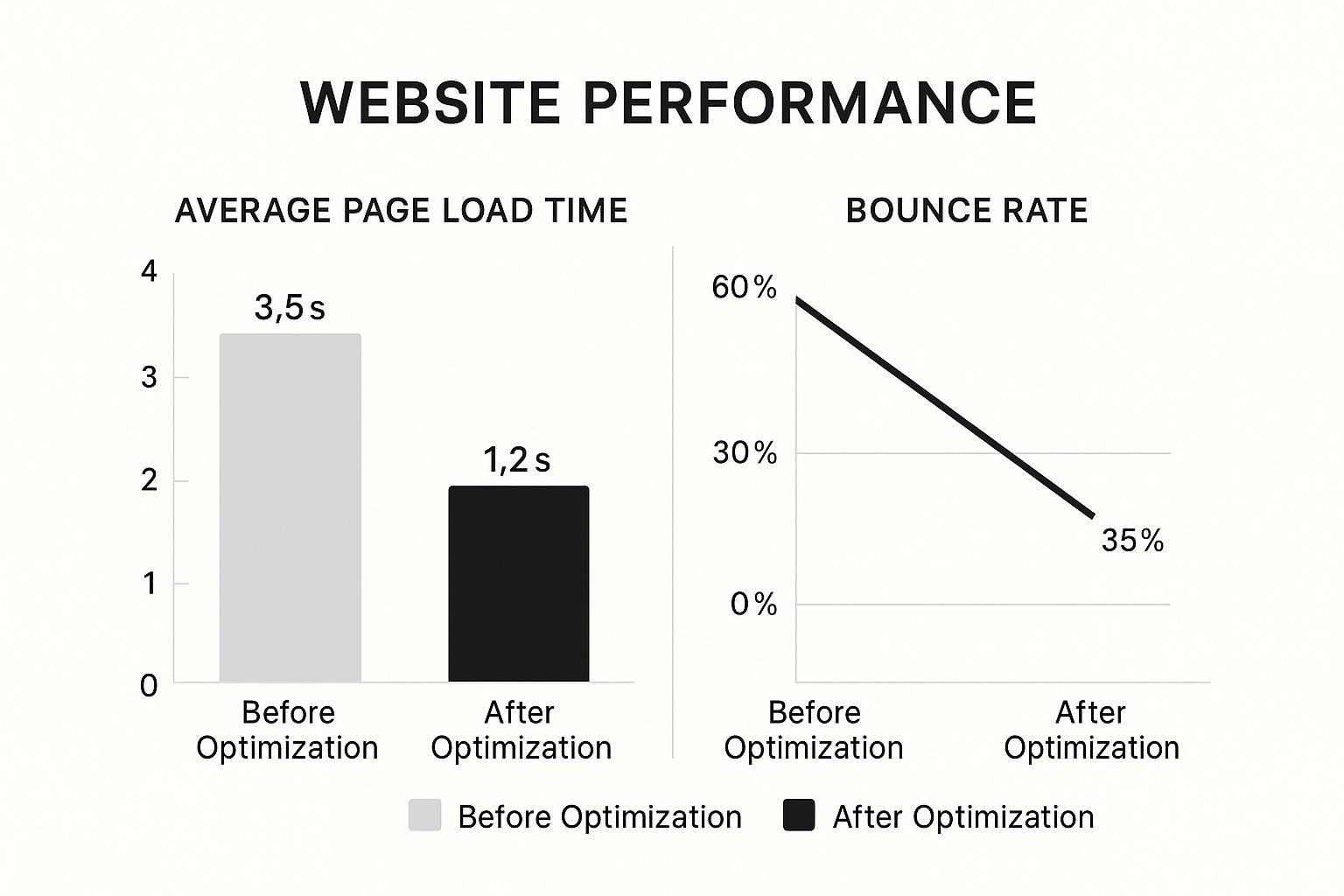
The infographic above shows the positive correlation between WordPress speed optimization, page load times, and bounce rates.
Reducing page load time from 3.5 seconds to 1.2 seconds can significantly decrease the bounce rate from 60% to 35%. This demonstrates how improvements in speed, even seemingly small ones, can substantially improve user engagement and reduce site abandonment. Investing in WordPress speed optimization is a direct investment in your website's success.
Understanding What Slows Down WordPress Sites
A fast-loading WordPress site is crucial for a positive user experience and good SEO. However, several factors can lead to slow loading times. Understanding these common culprits is essential for optimizing your WordPress website's speed.
Common Culprits of Slow WordPress Sites
Bloated themes are a major factor. Themes packed with unnecessary features and complex code can significantly increase page load times. Plugin conflicts also contribute to slowdowns. When multiple plugins compete for resources, performance bottlenecks can occur. For example, if two plugins try to modify the same core WordPress function, it can result in slower processing and increased load times.
Database inefficiencies are another common issue. As your WordPress site grows, the database can become cluttered with revisions, spam comments, and transient data. This buildup slows down database queries, impacting overall site performance. For more insights, check out this helpful resource: How to master website loading speed.
Other common culprits include:
- Unoptimized images: Large image files significantly contribute to slow loading times.
- Excessive HTTP requests: Loading numerous CSS and JavaScript files individually increases overhead.
- Slow hosting: Inadequate hosting infrastructure or server resources can create bottlenecks.
- Lack of caching: Without caching, WordPress rebuilds pages dynamically for each visitor.
Diagnosing Performance Bottlenecks
Analyzing key performance metrics is essential for diagnosing these issues. Time to First Byte (TTFB) measures server responsiveness. A high TTFB often indicates server-side problems. Largest Contentful Paint (LCP) measures how long it takes to load the largest visible element on the page. A slow LCP might point to issues with images, videos, or large text blocks.
Cumulative Layout Shift (CLS) measures visual stability. A high CLS score means elements on the page are shifting unexpectedly during loading, negatively impacting the user experience. By understanding these metrics and using tools like Google PageSpeed Insights, you can identify the specific areas on your WordPress site that need optimization. Focusing your efforts on the most impactful changes will ensure a smoother, faster website for your visitors.
Image Optimization That Makes A Real Difference
Images often constitute the largest files on a WordPress site. This can significantly impact load times and, consequently, user experience. Optimizing your images, however, can drastically improve your WordPress website speed optimization without sacrificing visual quality.
Choosing the Right Image Format
Selecting the appropriate image format is crucial for web performance. JPEG is commonly used for photographs, while PNG is better suited for graphics and images requiring transparency. The WebP format, however, often provides superior compression and quality compared to both JPEG and PNG. This translates to smaller file sizes and faster loading times.
Compression Techniques for Peak Performance
Even after choosing the right format, further compression can significantly reduce file size. Tools like Imagify and ShortPixel automate this process, optimizing images upon upload. This eliminates the need for manual optimization, saving you time and ensuring consistent image compression across your site. How to master image optimization offers more insights.
Lossless compression maintains image quality while reducing file size. Lossy compression, on the other hand, achieves even smaller files by discarding some image data. Choosing the right balance depends on the specific image and your website's performance goals.
Lazy Loading: Delaying Image Load for Faster Initial Page Load
Lazy loading is a powerful technique that defers the loading of images until they are visible in the user's viewport. Images below the fold aren't loaded until the user scrolls down to them. This significantly improves initial page load time, especially on image-heavy pages. The adoption of modern optimization techniques like this has seen a significant rise.
By 2025, 85% of high-traffic WordPress websites were using lazy loading, reducing initial page load time by as much as 40%. Image optimization alone can reduce page weight by 50% or more. Learn more about WordPress speed optimization here. Plugins like a3 Lazy Load and Lazy Load by WP Rocket seamlessly integrate lazy loading into your WordPress site.
Responsive Images: Adapting to Different Screen Sizes
Users access websites from a variety of devices with different screen sizes and resolutions. Serving the same large image to all devices wastes bandwidth and slows down loading, especially on mobile devices. Responsive images address this by providing different image sizes tailored to the user's device.
This ensures users receive appropriately sized images, optimizing load times and improving user experience across all devices. This approach is especially effective for optimizing LCP (Largest Contentful Paint) and improving Core Web Vitals.
Caching Strategies That Work In The Real World
Caching is a cornerstone of WordPress website speed optimization. It acts like a shortcut for delivering your site's content. Instead of generating each page from scratch every single time a visitor arrives, caching creates static versions. These static versions are served instantly, significantly reducing server load and dramatically improving loading times.
Different Types of Caching and Their Benefits
Several different types of caching work together to create a fully optimized WordPress site. Browser caching instructs a visitor's browser to store specific files locally on their device. On return visits, these files are loaded from their computer, not your server.
Page caching creates static HTML versions of your pages. These are served to visitors instead of dynamically generating the page each time.
Object caching, meanwhile, stores the results of database queries. If the same query is made again, the cached result is served instantly. This is particularly useful for dynamic website elements.
For example, if your site displays the latest news articles from a database, object caching drastically reduces the time it takes to retrieve and display them. This layered caching approach dramatically improves performance and contributes to a smoother user experience. You might be interested in: How to master WordPress cache clearing.
Choosing the Right Caching Plugins for WordPress
Many helpful WordPress plugins offer comprehensive caching solutions. WP Rocket is a popular premium plugin known for its ease of use and powerful features. WP Rocket offers a variety of optimization tools.
W3 Total Cache is a free option providing a wide range of caching options, while WP Super Cache is another popular free choice, known for its simplicity. W3 Total Cache is a comprehensive plugin. WP Super Cache provides a simple and effective approach.
When selecting a plugin, consider your specific needs and technical expertise. Some plugins require more manual configuration than others. Properly configured caching plugins are essential for maximizing your WordPress website speed optimization.
Server-Level Caching and CDN Integration
Beyond plugins, server-level caching plays a vital role in overall performance. Many hosting providers offer built-in server-level caching optimized for WordPress. This often removes the need for additional caching plugins and can provide significant speed improvements.
Content Delivery Networks (CDNs) take caching further by distributing your site's static content across a global network of servers. For example, if your server is in the US, but a visitor accesses your site from Europe, a CDN will serve the content from a server closer to them. This reduces latency (delay) and improves load times. CDNs are especially useful for websites with a geographically diverse audience.

Integrating server-level caching and a CDN creates a robust caching system. It delivers content quickly and efficiently to visitors worldwide. This combination is key to achieving optimal WordPress website speed and ensuring a seamless user experience, regardless of location.
Boosting SEO Through WordPress Speed Optimization
Your WordPress website's speed plays a vital role in SEO. Optimizing it is essential for higher search engine rankings and attracting more organic traffic. This connection between speed and SEO has become even more critical with Google's algorithm updates, particularly its focus on Core Web Vitals.
Core Web Vitals and Their Impact on SEO
Core Web Vitals are metrics that measure user experience, focusing on loading performance, interactivity, and visual stability.
- Largest Contentful Paint (LCP): Measures the loading time of the largest visible element.
- First Input Delay (FID): Measures how quickly the page responds to user interaction.
- Cumulative Layout Shift (CLS): Measures visual stability during loading.
Google uses these metrics as ranking factors. Websites performing well on Core Web Vitals are more likely to rank higher. A faster site is also easier for search engine crawlers to navigate, ensuring complete content indexing.
To help you optimize your Core Web Vitals, take a look at the checklist below:
Core Web Vitals Optimization Checklist
| Metric | Target Score | Primary Optimization Method | Impact Level |
|---|---|---|---|
| Largest Contentful Paint (LCP) | Under 2.5 seconds | Optimize images, use a CDN, improve server response time | High |
| First Input Delay (FID) | Under 100 milliseconds | Minimize JavaScript, defer non-critical scripts, use a browser cache | Medium |
| Cumulative Layout Shift (CLS) | Under 0.1 | Specify image and video dimensions, reserve space for ads, avoid inserting content above existing content | Medium |
This checklist provides a starting point for improving your Core Web Vitals. Remember that addressing these metrics can significantly improve your site's user experience and SEO.
Optimizing for Search Engine Crawlers
While user experience is key, optimizing for search engine crawlers is also essential. A clean, well-structured sitemap allows crawlers to easily index your pages. Minimizing redirects and broken links helps crawlers efficiently navigate your site.
WordPress site speed has become a decisive ranking factor, especially with Google's algorithm updates. Sites scoring well on Core Web Vitals are 25% more likely to rank on the first page. Improving site speed from 6 seconds to 3 seconds can increase organic traffic by 45%. Learn more about optimizing WordPress performance.
The Role of Hosting in WordPress Speed Optimization for SEO
Your hosting choice significantly impacts your website's speed and SEO. A slow host can negate other optimization efforts. Even a well-optimized website will struggle on a slow server.
Choosing a quality WordPress host is crucial. Consider server response times, resources, caching, and CDN integration. These factors contribute to a faster, more reliable website, benefiting both user experience and SEO.
User Experience Signals and Their Connection to Search Visibility
User experience signals, like bounce rate, time on page, and pages per session, indicate website engagement. These signals indirectly influence search visibility. Search engines interpret positive user engagement as a sign of quality, leading to higher rankings.
Optimizing website speed improves these signals. Faster loading times reduce bounce rates, increase time on page, and encourage users to explore more pages. This positive cycle enhances SEO and organic traffic.
Advanced Techniques For Maximum Performance

Building on the basics of WordPress optimization, let's explore some advanced techniques to boost your website's speed. These strategies might be a little more technical, but they offer significant improvements.
Database Optimization: Streamlining Your Site's Engine
A well-optimized database is essential for a fast WordPress website. Think of it as the engine of your site. Just like a well-maintained engine, a clean and efficient database ensures smoother and faster operation.
One key technique is database cleanup. Regularly removing unnecessary data, like old post revisions, spam comments, and transient data, can dramatically reduce query times. This keeps your database lean and mean.
Also, optimizing database queries can improve performance. Query Monitor helps identify slow queries, allowing you to optimize them for faster execution. This involves analyzing the queries your site makes and refining them for efficiency.
Minification and Concatenation: Slimming Down Your Code
Minification and concatenation are two effective ways to reduce the size of your CSS and JavaScript files. Minification removes unnecessary characters from your code, like whitespace and comments, without changing its functionality. It's like removing extra packaging – the contents stay the same, but the size decreases.
Concatenation combines multiple CSS or JavaScript files into one. This reduces the number of HTTP requests needed to load your website, resulting in faster load times. Imagine loading one streamlined file instead of ten separate ones.
Server-Level Optimizations: Powering Your WordPress Site
Server-level optimizations can have a huge impact on your site's speed. Implementing HTTP/2 allows multiple assets, like images, CSS, and JavaScript, to download simultaneously over a single connection. This significantly speeds up the rendering process.
Edge computing is another advanced technique. It stores cached copies of your website's content on servers located around the world. This reduces latency, especially for visitors located far from your main server, making their experience much faster. Even newcomers to platforms like YouTube can benefit from server optimizations. A guide like this one on YouTube SEO for Beginners provides helpful SEO tips. These server-side optimizations are crucial for maximizing your WordPress website's speed.
Key Takeaways
Optimizing your WordPress website's speed involves several key strategies. Let's recap these essential points to create a roadmap for ongoing success.
Prioritize the Basics
Start with high-impact, easy-to-implement changes. These include selecting robust hosting, using caching, and optimizing images. These initial steps often yield the biggest speed improvements. For WordPress sites targeting a South African audience, think about solutions optimized for that region, like options for international money transfer from South Africa.
-
Choose the Right Host: A quality host designed for WordPress is crucial. This forms the base for all other optimizations.
-
Implement Caching: Caching dramatically reduces server load, speeding up content delivery. Explore server-side caching and caching plugins like WP Super Cache or W3 Total Cache.
-
Optimize Images: Compress your images, utilize modern formats like WebP, and use lazy loading. These tactics minimize image impact on load times.
Maintain and Monitor Regularly
Website performance optimization isn't a one-time task. It's an ongoing process. Regular monitoring and maintenance prevent performance decline over time. This keeps your site fast as it evolves.
-
Regular Audits: Use tools like Google PageSpeed Insights to monitor key metrics and pinpoint areas for improvement.
-
Performance Budgets: Set target scores for metrics like Largest Contentful Paint (LCP) and Cumulative Layout Shift (CLS). Evaluate any website changes against these targets.
-
Ongoing Optimization: Regularly explore new optimization techniques and refine existing strategies. This helps you maximize website performance.
Advanced Techniques for More Improvement
Once you've covered the basics, consider more advanced techniques. These might involve greater technical expertise but offer significant improvements.
-
Database Optimization: Clean your database regularly and optimize queries for faster database load times. Consider plugins like WP-Optimize.
-
Minification and Concatenation: Minimize and combine CSS and JavaScript files. This reduces the number of HTTP requests. Tools like Autoptimize can help.
-
Server-Level Optimizations: Look into advanced options like HTTP/2, edge computing, and server-level caching.
Focus on Measurable Outcomes
Focus every optimization effort on measurable results. Track key performance indicators (KPIs) like load time, bounce rate, and conversion rates. These metrics demonstrate the actual impact of your work.
The data you collect will guide your decisions about future optimization. By focusing on data-driven improvements, you'll continually improve your WordPress website speed and user experience.
Ready to boost your WordPress website's performance? OneNine specializes in WordPress speed optimization and can help you get the results you want. Visit OneNine to learn more and get started.


