

Unveiling the True Cost of a Website in 2025
Knowing the average cost to build a website is crucial for smart budgeting and successful online ventures. This listicle breaks down the 7 essential cost components for 2025, helping you plan effectively and avoid surprise expenses. From domain registration and hosting to content creation and ongoing maintenance, we'll cover everything you need to consider when calculating the true cost of building a website. This clear cost framework empowers SMBs, entrepreneurs, marketers, and business leaders to make informed decisions about their online presence.
1. Domain Name Registration
Domain name registration is the first step in establishing your online presence. A domain name is your website's address on the internet—it's what people type into their browser to find you. Think of it as your digital storefront's street address. Registration involves purchasing the right to use a specific domain name for a set period, typically one year. This process involves selecting an available domain name and registering it through a domain registrar, a company accredited to sell domain names. How much you pay depends on factors like the Top-Level Domain (TLD) – the extension such as .com, .org, .net, or .io – and the popularity or uniqueness of the name itself.

Domain registration deserves its place at the top of this list because it's fundamental to building any website. Without a domain name, your website simply wouldn't exist on the internet. It's the foundation upon which everything else is built. Features of domain registration include the annual registration fee, options for WHOIS privacy protection (to keep your personal contact information private), and the ability to transfer your domain between different registrars.
Pros:
- Low cost: Standard domain names (.com, .org, .net) are relatively inexpensive, often between $10 and $50 per year, making them a manageable recurring expense for any budget.
- Professionalism: Owning a professional domain name instantly boosts your credibility and makes your business appear more established.
- Branding: A memorable domain name reinforces your brand identity and makes it easier for customers to find and remember you.
Cons:
- Availability: Highly sought-after or short domain names might already be taken or command premium prices.
- Renewal: Domain names require annual renewal to maintain ownership. Failure to renew can lead to losing your domain.
- Premium Costs: Certain newer or specialized TLDs like .io or .app often come with higher registration fees.
Examples: Popular domain registrars like GoDaddy often sell .com domains for $12-$20 per year, while Namecheap offers .org domains for around $10-$15 annually. Google Domains typically charges a flat $12/year for common extensions.
Tips for SMBs, Entrepreneurs, and Marketers:
- Register for multiple years: This can save you money in the long run and prevent the hassle of annual renewals.
- Defensive registrations: Consider registering variations of your primary domain name (e.g., misspellings, different TLDs) to protect your brand and prevent competitors from using similar addresses.
- Shop around: Use reputable domain registrars like Namecheap, Google Domains, or Cloudflare to compare pricing and features before making a purchase.
When and Why to Use This Approach:
Domain name registration is not just a step—it’s a requirement for having a website. Whether you're a startup, a small business, a large corporation, a blogger, or an e-commerce store, you need a domain name. It's the starting point for building your online presence, attracting customers, and establishing your brand in the digital world. This is essential for anyone building a website, from CEOs and CMOs making strategic decisions about online branding to marketing teams implementing specific online campaigns. A well-chosen domain name is a crucial investment in the average cost to build a website, offering a significant return in terms of brand recognition and online visibility.
2. Web Hosting Services
Web hosting is a fundamental part of building a website and significantly contributes to the average cost to build a website. It provides the server space and technology required to store your website's files and make them accessible to visitors when they type in your domain name. Essentially, it's the online real estate where your website lives. Hosting costs can vary dramatically based on factors like performance, reliability, and included features. You'll find different types of hosting catering to various needs, from simple shared hosting to robust dedicated servers and scalable cloud solutions. These offer varying levels of storage, bandwidth (the amount of data that can be transferred), and processing power. Security features, such as SSL certificates for secure connections and malware scanning, are also crucial considerations. Finally, the level of technical support and guaranteed uptime (the percentage of time your website is online) play a vital role in your website's success.
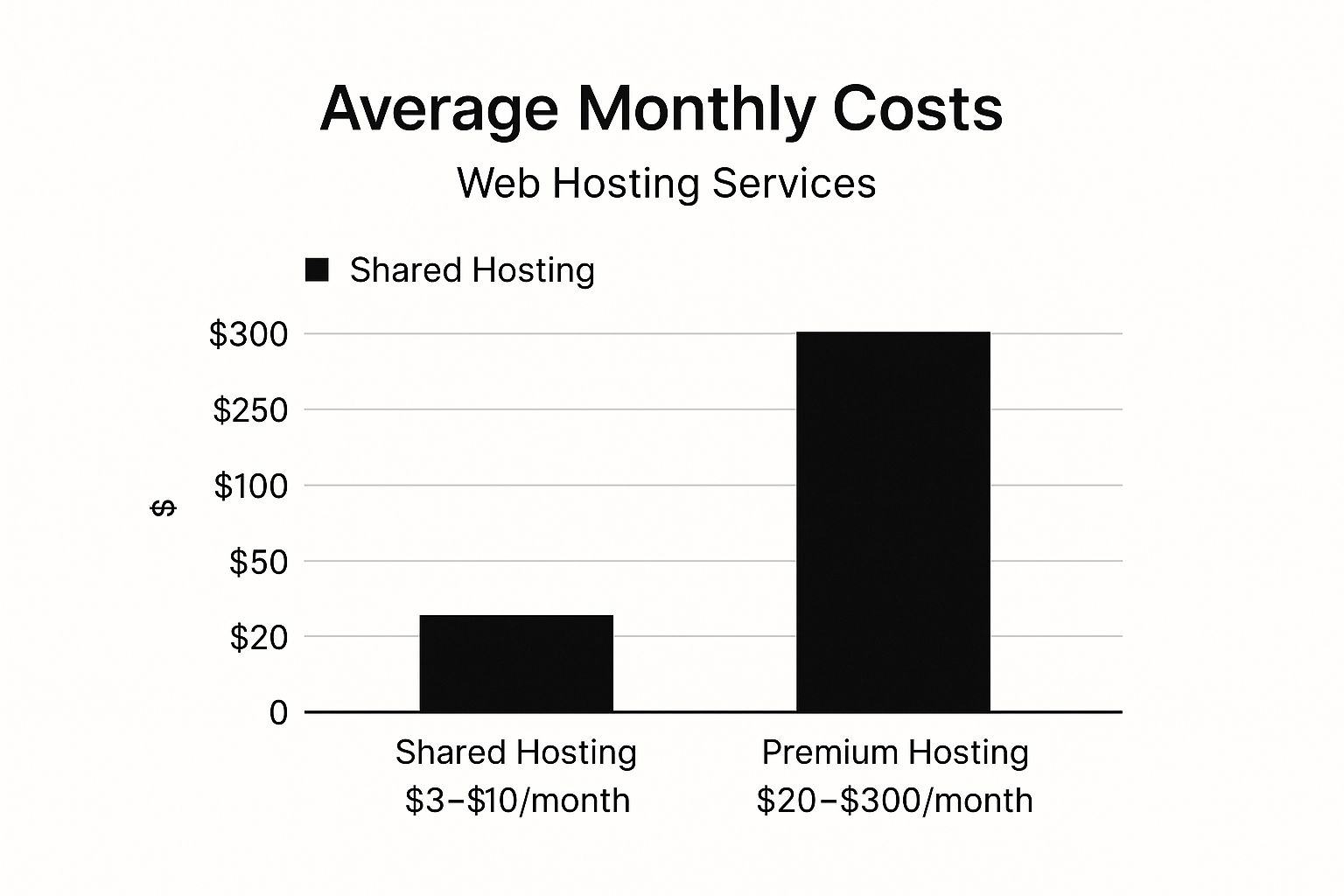
The infographic above visualizes the average monthly costs of different web hosting types, ranging from shared hosting to cloud hosting. As the chart clearly shows, shared hosting offers the most budget-friendly option, while dedicated and cloud hosting cater to larger businesses with higher traffic demands and correspondingly higher costs. The chart also highlights the significant price jumps between the different tiers, emphasizing the importance of choosing the right hosting type for your specific needs and budget when calculating the average cost to build a website.
Web hosting deserves its place on this list because it's a non-negotiable expense for any website. Choosing the right hosting solution impacts not only your website's performance and reliability but also your overall budget. For example, Bluehost, recommended by WordPress.org, offers shared hosting starting at $2.95/month (promotional). WP Engine caters to more demanding users with managed WordPress hosting from $25/month. For ultimate scalability, cloud platforms like AWS or Google Cloud offer solutions ranging from $5 to $500+/month depending on the required resources.
Pros:
- Shared hosting provides affordable entry-level options ($3-$10/month), making it ideal for new websites and blogs.
- Managed hosting services like WP Engine reduce the technical maintenance burden, allowing you to focus on content and marketing.
- Cloud hosting offers scalability to accommodate growing traffic, ensuring your website can handle spikes without performance issues.
Cons:
- Cheap shared hosting can lead to slow loading times, negatively impacting user experience and SEO.
- Higher-quality hosting like VPS or dedicated servers significantly increases monthly costs.
- Lower-tier plans can experience performance issues during traffic spikes, potentially leading to lost revenue and customer frustration.
Tips for Choosing the Right Web Hosting:
- Start small: Begin with shared hosting for small websites with low traffic.
- Scale as needed: Upgrade to VPS or managed hosting as your traffic increases.
- Specialization: Look for hosts specializing in your chosen platform (e.g., WordPress, Shopify).
- Support and Uptime: Consider the value of uptime guarantees and the quality of technical support. Learn more about Web Hosting Services
Choosing the right hosting is a critical step in building a website. Understanding the different options and their associated costs helps you accurately estimate the average cost to build a website and make informed decisions that align with your needs and budget. Companies like SiteGround, known for excellent support and performance, exemplify the benefits of investing in quality hosting. Remember to consider your long-term goals when making your decision.
3. Website Design and User Experience
Website design and user experience (UX) are crucial for the success of any website. This encompasses the overall look and feel of your site, as well as how easy and enjoyable it is for visitors to use. It includes elements like the layout, color schemes, typography, navigation structure, and, importantly, how well it adapts to different devices (responsive design). When considering the average cost to build a website, design and UX are unavoidable factors that significantly influence the total budget.

Design costs can vary significantly based on the level of customization and the expertise of the designer. A simple, template-based design will be much more affordable than a fully custom design crafted by a top-tier agency. This stage often involves visual branding elements like logos, color schemes, and typography, ensuring consistency with your overall brand identity. UX planning, including information architecture, and interface design, focusing on intuitive navigation, buttons, and interactive elements, are also key aspects of this stage.
Examples of Successful Implementation:
- Dribbble: This platform showcases the work of top web designers, providing inspiration and examples of high-quality design.
- Awwwards: A recognition site that highlights innovative and well-executed web design, offering benchmarks for excellence.
- Webflow: This design-focused website builder empowers users to create professional-looking websites with a strong emphasis on visual design and UX.
Pros:
- Creates Strong First Impressions: A well-designed website creates a positive first impression, conveying professionalism and credibility.
- Improves User Engagement and Conversion Rates: Good UX leads to a more enjoyable and intuitive user experience, increasing engagement and the likelihood of conversions.
- Differentiates Your Brand from Competitors: A unique and memorable design helps your brand stand out in a crowded online marketplace.
Cons:
- Professional Custom Design Is Expensive: Custom design work from experienced professionals can range from $3,000 to $10,000+, and even higher for complex projects.
- Requires Ongoing Updates: Web design trends change, so ongoing updates are necessary to keep your site looking fresh and modern.
- May Require Multiple Specialists: Larger projects may require a team of specialists, including UI designers, UX researchers, and front-end developers, adding to the overall cost.
Actionable Tips for Building Your Website:
- Start with a Premium Theme: A premium theme ($50-$200) offers a cost-effective way to achieve a professional look without breaking the bank.
- Customize an Existing Template: Hiring a designer to customize a premium theme can be a good balance between cost and customization.
- Prioritize Mobile Responsiveness: Ensuring your website looks and functions flawlessly on all devices is crucial in today's mobile-first world.
- Invest in Usability Testing: Testing your design with real users can identify areas for improvement and validate your design decisions.
When and Why to Use This Approach:
Investing in professional website design and UX is essential for any business that takes its online presence seriously. It's particularly important for businesses that rely heavily on online sales or lead generation. While DIY options exist, professional design is often worth the investment, especially for businesses operating in competitive markets. A well-designed website is a powerful asset that can drive business growth and enhance your brand image.
This item deserves its place on the list because design and UX are integral components of the average cost to build a website. They significantly influence user engagement, conversion rates, and overall brand perception. Understanding the costs and benefits associated with different design approaches is vital for anyone planning to build or revamp a website.
4. Development and Programming
Development and programming are at the core of building a functional website, and this phase significantly impacts the average cost to build a website. This stage involves translating your website's design and planned functionality into a working online presence. It encompasses everything from writing the code that structures your site's appearance (front-end development) to building the behind-the-scenes logic that powers its features (back-end development).
This process can range from relatively simple implementations using HTML, CSS, and JavaScript for basic websites, to highly complex custom applications involving databases, APIs, and server-side programming languages like PHP, Python, Ruby, or Node.js. The more intricate your website's functionality, the more specialized development expertise you'll require, directly influencing the overall cost.
For instance, a simple website showcasing your business with basic contact information might only require front-end development. However, an e-commerce platform with user accounts, product databases, payment gateways, and inventory management necessitates extensive back-end development and database integration. Similarly, integrating third-party services like social media logins or email marketing platforms requires API development.
Features of Development and Programming:
- Front-end development: Using HTML, CSS, and JavaScript to create the user interface and user experience. This is what visitors see and interact with directly.
- Back-end development: Developing the server-side logic, database interactions, and API integrations that power the website's functionality.
- Database integration and management: Setting up and managing databases to store and retrieve website data, such as user information, product details, and content.
- API development and third-party integrations: Connecting your website with other services to enhance functionality, such as payment gateways, social media platforms, or CRM systems.
- Custom functionality and interactive features: Developing unique features tailored to your specific business needs, providing a competitive edge.
Pros:
- Custom development allows for unique functionality: You're not limited by pre-built templates, allowing for a truly bespoke website.
- Creates competitive advantages through proprietary features: Develop unique features that set your business apart.
- Enables optimization for performance and security: Tailored development allows for optimizing code for speed and security, crucial for a positive user experience.
Cons:
- Significantly higher cost than template-based solutions: Custom development requires specialized skills and more time, leading to higher costs.
- Longer development timelines (weeks to months): Building complex functionalities takes time, impacting project timelines.
- Requires ongoing maintenance and updates: Websites require ongoing maintenance, bug fixes, and updates to stay secure and performant.
Examples of Development Costs:
- WordPress developer rates range from $50-$150/hour.
- Full-stack JavaScript developers charge $75-$200/hour.
- Development agencies charge $75-$300/hour with project minimums.
When considering the average cost to build a website, development is often the most significant expense. The cost of website development can vary widely, depending on the complexity of the project and the specific features required. For a deeper understanding of these varying costs, you might find this resource helpful: how much website development costs from Iconcept ltd.
Tips for Managing Development Costs:
- Use CMS platforms like WordPress or Shopify to reduce custom coding: Leveraging existing platforms can significantly reduce development time and costs.
- Consider offshore development teams for cost savings (with careful vetting): Offshore teams can offer lower hourly rates, but thorough vetting is crucial to ensure quality.
- Implement development in phases to spread costs: Breaking down the development process into phases allows for better budget management and flexibility.
- Ensure proper documentation for future maintenance: Comprehensive documentation simplifies future updates and maintenance, reducing long-term costs.
Popularized By:
- GitHub: Repository hosting for code collaboration.
- Stack Overflow: Knowledge base for development solutions.
- Toptal: Premium marketplace for vetted developers.
Development and programming are essential for bringing your website vision to life. By understanding the different aspects of development and implementing strategic cost-saving measures, you can effectively manage your budget while building a powerful and effective online presence.
5. Content Creation and Copywriting
Content creation and copywriting are crucial for any website, regardless of its size or purpose. When considering the average cost to build a website, this element is often underestimated, yet it plays a vital role in its overall success. It encompasses all the written, visual, and downloadable content that populates your site. While some business owners might be tempted to handle this themselves, professional copywriting focuses on crafting compelling, SEO-optimized text that not only conveys your message effectively but also encourages user action. This can significantly impact your website's effectiveness, contributing directly to conversions and your bottom line.
This element deserves its place in the list because, without compelling and informative content, even the most beautifully designed website will fall flat. It’s the content that engages visitors, builds trust, and ultimately drives conversions. Think of your website as a storefront; the design is the window display, but the content is the merchandise that people actually buy.
Features of Professional Content Creation:
- SEO-optimized page copy and blog content: Content strategically incorporates relevant keywords to improve search engine rankings, making it easier for potential customers to find your site when searching online. This is essential for driving organic traffic and increasing visibility.
- Professional photography and image licensing: High-quality visuals enhance your brand's image and make your website more engaging. This can involve custom photography or carefully selected stock photos.
- Video production and editing: Videos are an increasingly popular medium for conveying information and engaging audiences. Professional video production can create compelling marketing materials, product demos, and more.
- Sales copy for product pages and landing pages: Persuasive copy on these pages is designed to convert visitors into customers.
- Technical writing for documentation: Clear and concise documentation is essential for products or services that require explanation or instruction.
Pros:
- Dramatically improves conversion rates: Compelling content guides visitors towards desired actions, whether it's making a purchase, signing up for a newsletter, or requesting a quote.
- SEO-optimized content improves search visibility: Higher search engine rankings translate to more organic traffic, increasing your website's reach.
- Establishes brand voice and authority in your industry: Well-written content positions your business as a knowledgeable and trustworthy source of information.
Cons:
- Professional copywriting is time-intensive and costly: Creating high-quality content requires skilled writers and editors, which can be an investment.
- Requires regular updates to remain current: Outdated information can hurt your credibility and SEO. Content needs to be refreshed regularly to stay relevant.
- Stock photography may look generic without custom assets: While stock photos can be cost-effective, over-reliance on them can make your website look impersonal.
Examples of Cost:
- Copywriters: $0.10-$1.00+ per word depending on expertise.
- Stock photos: $10-$500 depending on license type.
- Custom photography sessions: $300-$3,000+.
Actionable Tips for SMBs, Entrepreneurs, and Marketers:
- Budget for 500-1,000 words per main page at $0.20-$0.50/word. This provides a good starting point for estimating your content creation costs when factoring in the average cost to build a website.
- Use a mix of stock and custom photography. This helps balance cost-effectiveness with a unique brand image.
- Create a content calendar for blog posts and updates. This helps ensure regular, fresh content for your audience and search engines.
- Consider AI tools like ChatGPT for first drafts, with human editing. This can be a cost-effective way to generate content, but human oversight is essential for quality and accuracy.
- Learn more about Content Creation and Copywriting for practical advice and guidance.
Popularized By:
- ContentFly: Subscription copywriting service.
- Shutterstock and Adobe Stock: Popular stock photo services.
- Jasper.ai: AI-assisted content creation tool.
Investing in professional content creation is essential for maximizing your website's effectiveness. By understanding the associated costs and implementing these tips, you can ensure your website not only looks great but also delivers results.
6. E-commerce and Payment Processing
Adding e-commerce functionality to your website transforms it into a powerful sales engine, allowing you to sell products or services directly to customers online. This is a crucial consideration when calculating the average cost to build a website, as e-commerce features can significantly impact the overall budget. This functionality encompasses everything from showcasing your products in an online catalog to managing inventory, processing orders, and handling payments. Understanding the different options and their associated costs is essential for SMBs, entrepreneurs, marketers, business owners, agency professionals, CEOs, CMOs, and heads of marketing alike.
So, how does it work? E-commerce functionality typically involves integrating several key components:
- Product catalog and inventory management: This system allows you to display your products with descriptions, images, and pricing, while also tracking stock levels and managing product variations.
- Shopping cart and checkout functionality: This enables customers to add items to their cart, review their selections, and proceed through a streamlined checkout process.
- Payment gateway integration: Connecting your website to payment gateways like Stripe, PayPal, or others allows you to securely accept payments from customers via various methods (credit cards, debit cards, etc.).
- Order processing and fulfillment systems: This involves managing orders, tracking shipments, and handling returns, ensuring a smooth customer experience.
- Customer account management: Providing customers with the ability to create accounts allows them to save their information, track orders, and manage their preferences.
Examples of Successful Implementation:
- Shopify: A leading hosted e-commerce platform, Shopify offers a range of plans from $29 to $299 per month, plus transaction fees. It simplifies the process of setting up and managing an online store.
- WooCommerce: This popular WordPress plugin is free to install but requires additional extensions costing between $100 and $300 for full functionality. It's a great option for businesses already using WordPress.
- Custom e-commerce development: For highly specialized needs, custom development offers maximum flexibility but comes at a higher price, starting at $10,000 and potentially exceeding $100,000.
Pros:
- Enables direct sales without physical locations: Reach a wider audience and sell 24/7 without the limitations of a brick-and-mortar store.
- Platforms like Shopify simplify implementation: Get your online store up and running quickly with user-friendly platforms.
- Can be scaled from small to enterprise operations: E-commerce solutions can adapt to your business growth, from small startups to large enterprises.
Cons:
- Transaction fees reduce profit margins (typically 2-3%): Factor these fees into your pricing strategy.
- Advanced features require significant development: Implementing complex functionalities like personalized recommendations or subscription services can add to the development cost.
- Security requirements increase development and maintenance costs: Protecting customer data is paramount, and implementing robust security measures requires ongoing investment.
Actionable Tips:
- Start with established platforms like Shopify or WooCommerce for a quicker and more cost-effective launch.
- Factor in payment processing fees when pricing your products to maintain healthy profit margins.
- Implement security best practices from the start to protect customer data and build trust.
- Consider the total cost of ownership, including transaction fees, maintenance, and any ongoing development costs.
When and Why to Use This Approach:
If your business model involves selling products or services online, e-commerce functionality is a must-have. It's a core component of any online retail business and essential for reaching customers in the digital marketplace. The average cost to build a website with e-commerce capabilities will vary based on your chosen platform and the complexity of your store. Learn more about E-commerce and Payment Processing.
This aspect deserves its place on this list because selling online is a primary goal for many businesses today. Understanding the cost implications of implementing e-commerce functionalities is crucial for effective budgeting and planning. Whether you're a small business just starting out or a large enterprise looking to expand your online presence, choosing the right e-commerce solution is a key factor in your online success.
7. Ongoing Maintenance and Updates
When budgeting for your website, it's crucial to factor in the average cost to build a website and the ongoing costs associated with keeping it running smoothly. This is where maintenance and updates come in. Think of your website like a car – you wouldn't just buy it and never change the oil or rotate the tires. Similarly, your website requires regular maintenance to ensure its longevity, security, and performance. Neglecting this critical aspect can lead to costly problems down the road, negatively impacting your return on investment.
Website maintenance encompasses a range of tasks, including:
- Security updates and vulnerability patching: Regularly updating your website's software and plugins protects against hackers and malware, safeguarding sensitive data like customer information and preventing site crashes.
- Performance optimization and speed improvements: Optimizing your site's speed ensures a positive user experience, reduces bounce rates, and improves search engine rankings.
- Content updates and additions: Keeping your website content fresh and relevant engages visitors, boosts SEO, and reflects the current state of your business.
- Backup creation and management: Regular backups protect your website data from accidental loss or corruption, allowing for quick restoration in case of emergencies.
- Technical troubleshooting and bug fixes: Addressing technical issues promptly prevents minor glitches from escalating into major problems that could disrupt your online presence.
Pros:
- Prevents security breaches and data loss: A well-maintained website is significantly less vulnerable to cyberattacks, protecting your business reputation and valuable data.
- Maintains optimal site performance and user experience: Regular optimization ensures fast loading speeds and smooth functionality, enhancing user satisfaction and encouraging conversions.
- Reduces the need for costly emergency fixes: Proactive maintenance prevents small issues from snowballing into expensive emergencies, saving you money in the long run.
Cons:
- Recurring cost often overlooked in initial budgeting: It's easy to forget about ongoing maintenance when focused on the initial website development cost. However, failing to budget for it can lead to unexpected expenses later.
- Complex sites require more extensive maintenance: Websites with advanced features and integrations typically require more specialized maintenance, potentially increasing costs.
- Technical debt can increase maintenance costs over time: Poorly written code or outdated technologies can make maintenance more complex and costly in the long run.
Examples of Maintenance Costs:
- WordPress maintenance packages: These can range from $50-$500/month, depending on the features included. Services like WP Buffs specialize in this area.
- Website care plans from agencies: Agencies typically offer comprehensive maintenance plans ranging from $100-$2,000/month, catering to various business needs. Maintainn is an example of a company providing these types of plans.
- Enterprise support contracts: For large organizations with complex websites, enterprise-level support contracts can exceed $5,000/month.
Tips for Managing Maintenance Costs:
- Budget 15-25% of initial development cost annually for maintenance: This provides a good starting point for estimating ongoing expenses.
- Implement automated backups and monitoring: Automated tools can simplify maintenance tasks and reduce the risk of human error.
- Establish a regular update schedule for content and software: Regular updates are essential for security and performance.
- Consider maintenance retainers with your developer for priority support: Having a pre-existing agreement with a developer ensures quick access to support when needed. Agencies like GoWP offer white-label maintenance solutions that developers can leverage for their clients.
This recurring investment in website maintenance is essential for any business serious about its online presence. While it adds to the average cost to build a website, it is a necessary expense that ultimately protects your investment and ensures your website continues to deliver results. Ignoring maintenance is like neglecting the foundation of your online house – eventually, cracks will appear and the whole structure could crumble.
7 Key Cost Factors Comparison
| Cost Factor | Implementation Complexity 🔄 | Resource Requirements 💡 | Expected Outcomes 📊 | Ideal Use Cases 💡 | Key Advantages ⭐ |
|---|---|---|---|---|---|
| Domain Name Registration | Low 🔄 | Minimal: yearly fee, privacy options | Essential for web presence and branding 📊 | Any website needing a unique, memorable web address | Low recurring cost, transferable, brandable ⭐ |
| Web Hosting Services | Medium to High 🔄 | Server resources, technical support | Website accessibility, uptime, scalability 📊 | Small blogs to enterprise sites with varying traffic | Scalable options, managed hosting support ⚡ |
| Website Design and UX | Medium to High 🔄 | Designers, UX researchers, tools | Strong first impression, user engagement 📊 | New or redesigning sites aiming to improve UX and branding | Enhances engagement and conversion rates ⭐ |
| Development and Programming | High 🔄 | Skilled developers, longer timelines | Custom functionality and competitive edge 📊 | Custom web apps, complex sites needing specific features | Unique features, optimized performance ⭐ |
| Content Creation and Copywriting | Medium 🔄 | Writers, photographers, editors | Improved SEO, conversion, brand authority 📊 | Content-heavy sites, marketing-focused web presence | Boosts visibility and user trust ⭐ |
| E-commerce and Payment Processing | High 🔄 | Developers, payment gateways, security measures | Online sales capability, transaction handling 📊 | Online stores from small shops to large enterprises | Enables direct sales, scalable platform use ⭐ |
| Ongoing Maintenance and Updates | Medium 🔄 | Technical support, content updates | Security, performance, longevity 📊 | All operational websites needing security and updates | Prevents breaches, ensures reliability ⭐ |
Partnering with OneNine for Website Success
Understanding the average cost to build a website involves considering various factors, from domain registration and hosting to design, development, content creation, e-commerce integration, and ongoing maintenance. As we've explored, each element contributes to the overall investment and requires careful planning to stay within budget and achieve your online goals. Mastering these concepts empowers you to make informed decisions, allocate resources effectively, and ultimately, build a website that delivers a strong return on investment. A well-planned website is more than just an online presence; it's a powerful tool for growth, connecting with your audience, and achieving your business objectives.
Knowing the average cost to build a website is just the first step. Bringing your vision to life requires expertise and a dedicated partner. OneNine simplifies the complexities of website development, offering transparent pricing and a commitment to quality that ensures your investment translates into tangible results. We handle everything from initial design and development to ongoing maintenance and updates, allowing you to focus on what you do best – running your business. Contact us today for a personalized consultation to discuss your web project goals, budget, and how OneNine can help you navigate the average cost to build a website while maximizing your online potential. OneNine can help you understand the true cost and build a website that delivers exceptional value.


