

The Anatomy of Successful Website Development Workflows

Building a successful website involves more than just a few steps. It's a structured process designed for efficiency, quality, and happy clients. This process takes initial ideas and turns them into functional, high-performing websites. Think of it like building a house: a strong foundation is essential. In web development, that foundation is a well-defined workflow.
Key Stages in a Website Development Workflow
Most web development workflows, no matter the specific approach, share these core stages:
-
Planning: This stage gathers requirements, defines the project's scope, and sets clear objectives. It's like creating a blueprint, making sure everyone is on the same page.
-
Design: This is where the website's visual aspects come to life. Designers create wireframes, mockups, and prototypes, transforming the plan into a tangible design.
-
Development: This stage involves writing the code, building the functionality, and integrating the different parts of the website. This is the actual construction phase.
-
Testing: Thorough testing ensures the website works as expected across various devices and browsers, much like a quality control inspection.
-
Deployment: This final stage launches the website, making it live for the public. It's like the grand opening, welcoming visitors to experience the finished product.
Choosing the Right Workflow Methodology
Different workflow methodologies exist, each with its pros and cons. The Waterfall method, a linear approach, provides predictability but less flexibility. Agile, an iterative methodology, adapts well to changes but may lack the structure some projects need. Many teams now use hybrid approaches, combining the best of both worlds. This flexibility can optimize delivery timelines and project management.
For instance, a team might use Waterfall for the initial planning phase and switch to Agile during development to handle changing client needs. Choosing the right methodology depends on the project's size, complexity, and client expectations.
The web design and development process involves various stages, from initial concept to final deployment. Interestingly, 42% of web design work is handled in-house. This shows that many companies value direct involvement in the design process for greater control and alignment with company goals. Basic website design costs can vary from $6,500 to $15,000, depending on the project's complexity and scope. Learn more here.
Ultimately, successful web development workflows prioritize communication, collaboration, and a structured approach. Even with tight deadlines, avoiding the temptation to cut corners ensures a higher-quality product and builds client trust. A well-built website, like a well-constructed building, will stand the test of time and provide long-term value.
Strategic Planning: Setting Your Project Up For Success

A successful website development workflow starts with careful planning. This critical first step sets the stage for the entire project. Think of it as the architect's blueprint before building begins. A well-defined plan is essential for a positive outcome.
Discovery Sessions: Uncovering True Client Needs
Effective planning starts with truly understanding the client's goals. This goes beyond surface-level requests to uncover underlying needs. Discovery sessions are one effective method. These collaborative meetings allow web development teams to explore the client's core business objectives. For example, a client may request a redesign, but the real need could be improving lead generation.
Defining Concrete Website Requirements
After identifying the client's true needs, the next step translates these needs into tangible requirements. This process shapes vague ideas into concrete specifications. This is where the website development workflow begins to solidify. Defining requirements upfront also prevents scope creep, which can impact timelines and budgets.
Understanding Your Audience: Building Personas
Developing audience personas is crucial for effective design choices. These personas represent the ideal website user. They offer insight into user demographics, behavior, and motivations. This allows design choices to be tailored for the intended audience. For example, a website for young adults will differ visually from one designed for senior citizens.
Content Strategy: Aligning With Measurable Goals
A well-defined content strategy is essential for website success. Content should align with the client’s business objectives and target audience. The strategy should also include measurable goals to monitor progress and demonstrate ROI. A clear content strategy ensures the website is valuable to both the client and the user.
Project Roadmaps and Communication Protocols
Creating a realistic project roadmap with defined milestones is key. This roadmap should also account for potential revisions and feedback. Clear communication protocols are just as important. This keeps everyone aligned and minimizes misunderstandings. Regular progress updates and dedicated feedback channels, for instance, can prevent costly rework.
Tracking and Managing The Project
Implementing tracking systems helps identify potential problems early. This gives the team time to address issues before they escalate. Using project management software like Asana, for example, can help monitor progress, track budgets, and manage resources. This oversight contributes to a smooth website development workflow and helps keep the project on track.
From Concept to Visual Reality: Mastering the Design Phase

After the strategic planning stage, the website development workflow enters the crucial design phase. This is where the project’s abstract blueprint transforms into a tangible visual representation. It requires a careful balance of creative vision and practical functionality. Securing a domain name is often one of the first steps. For a helpful resource on this topic, check out this guide on checking domain availability.
Wireframing: Building a Solid Structure
Successful design teams understand the importance of wireframes. These skeletal frameworks map out the website’s structure and layout before any visual details are added. Wireframes provide a clear picture of how elements like navigation, content areas, and calls to action will be arranged. This allows stakeholders to concentrate on functionality and user flow without being distracted by aesthetic elements. Think of a wireframe as the architect's blueprint – essential before construction begins.
Design Systems: Ensuring Consistency and Cohesion
A design system is crucial for maintaining a consistent look and feel. This system acts as a style guide, defining the website’s typography, color palettes, imagery, and other visual components. A well-defined design system ensures a cohesive user experience across the entire website. It's similar to how a conductor guides an orchestra to create a harmonious sound.
Prototyping: Bringing the Design to Life
Interactive prototypes are invaluable for user experience evaluation. These dynamic mockups allow users to interact with the design, uncovering potential usability problems early on. This process prevents costly revisions later in the development workflow. Think of it like a test drive before buying a car—it’s a chance to identify any issues beforehand.
Responsive Design: Optimizing for All Devices
Responsive design is about much more than simply resizing elements. It requires a deep understanding of user behavior across different devices. Designers must consider how users interact with the website on desktops, tablets, and smartphones. This means adjusting layouts, font sizes, and image dimensions to ensure a smooth and enjoyable experience, no matter the screen size.
Visual Hierarchy: Guiding the User’s Eye
Effective visual hierarchy directs users’ attention to the most important information. Designers use size, color, contrast, and strategic placement to achieve this. Just as a painter uses light and shadow to create depth, web designers guide the user’s eye to key elements, improving user engagement.
Collaboration and Feedback: Refining the Design
Open communication between designers and developers is paramount. Clear collaboration protocols prevent misinterpretations and guarantee a seamless handoff. Structured feedback sessions allow clients to provide valuable input. This collaborative environment ultimately results in a refined final design that meets everyone’s expectations.
Building the Website: Development Best Practices That Work
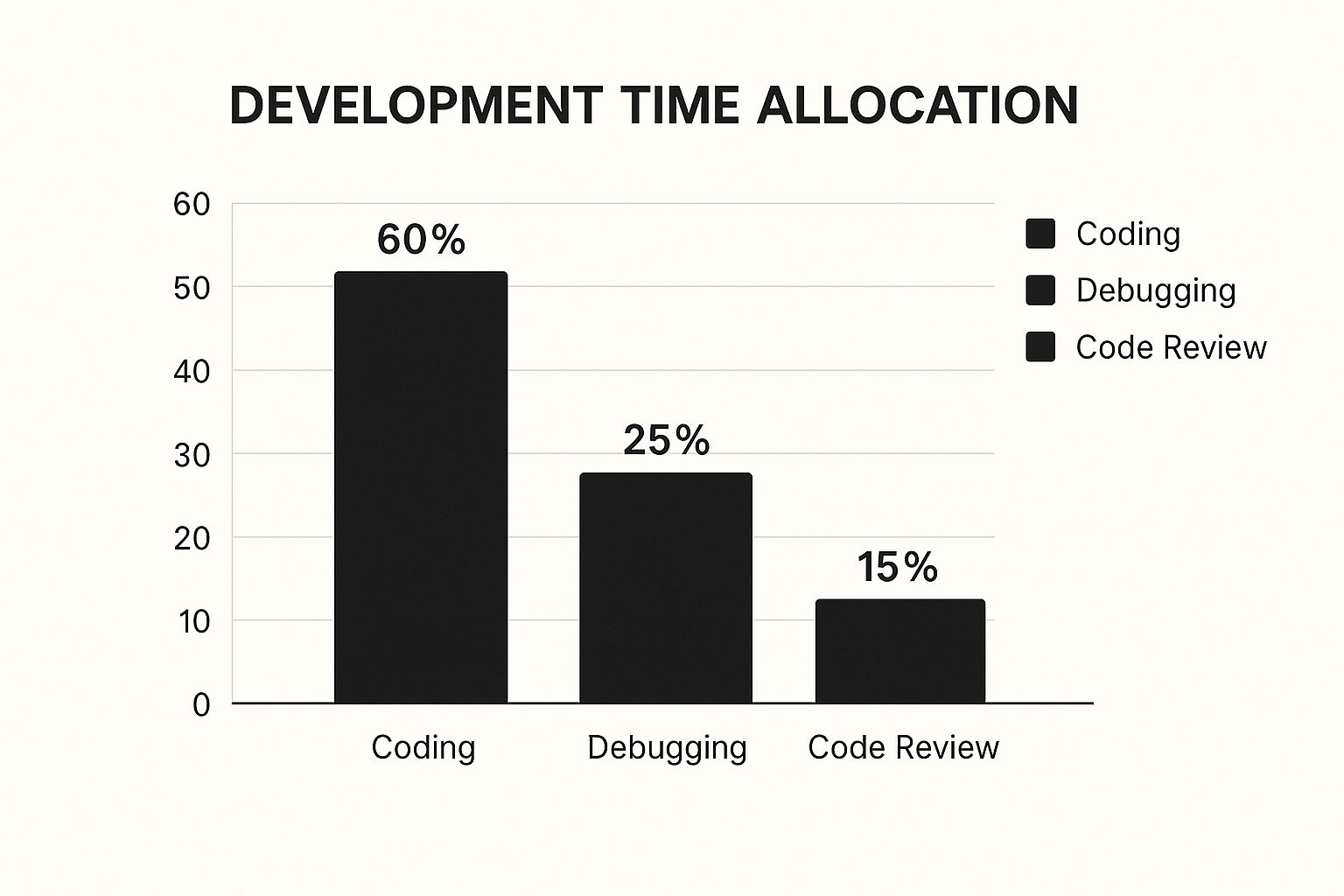
The chart above shows how development time breaks down. It’s split into coding, debugging, and code review. A large chunk, 60%, is spent writing code. But debugging takes up a significant 25%. This shows how important clean coding is in the website development workflow. The remaining 15% goes to code review. This highlights the value of teamwork and quality checks.
This stage brings approved designs to life as a working website. Visual mockups transform into a real online experience. This demands careful attention to detail and following best practices.
Structuring Project Files and Version Control
Organized project files are a priority for the best development teams. This makes the project easier to manage and update. It's like a well-organized toolbox. Everything is in its place, so it’s easy to find.
Version control is also essential. Systems like Git let developers track changes. They can work together smoothly and go back to older versions if needed. This avoids major problems and keeps the workflow efficient.
Development Environments: Mirroring Production
It’s critical to create a development environment that matches the live website. This ensures the site works the same way on different platforms. It's like a dress rehearsal. It helps find and fix problems before launch. This avoids unexpected issues when the website goes live.
Coding Standards and Front-End Development
Consistent coding standards are key for team projects. These standards ensure the code is easy to read and maintain. It doesn’t matter who wrote it, everyone can understand it. This helps prevent issues arising from inconsistent code formatting.
For example, a team might decide on naming conventions and indentation styles. Front-end development focuses on good visuals and fast performance. Image optimization and lazy loading improve loading times without sacrificing how the website looks.
Fast loading is crucial for a good user experience. A 1-second delay can lead to a 7% drop in conversions. 53% of mobile users will leave a site that takes longer than 3 seconds to load. This highlights the need for performance optimization, like image optimization and using Content Delivery Networks (CDNs). You can find more detailed statistics here.
To help summarize different performance optimization techniques, let's look at the table below:
Website Performance Optimization Techniques
| Optimization Technique | Implementation Difficulty | Average Speed Improvement | Cost Considerations |
|---|---|---|---|
| Image Optimization | Easy | 20-50% | Low (free tools available) |
| Lazy Loading | Medium | 10-30% | Low to Medium (depending on implementation) |
| Content Delivery Network (CDN) | Medium | 30-70% | Medium to High (subscription-based services) |
| Caching | Medium | 20-40% | Low to Medium (server configuration and plugins) |
| Code Minification | Easy | 5-10% | Low (free tools and plugins available) |
This table shows how various optimization techniques can impact speed and how easy they are to implement. Choosing the right combination of techniques depends on project needs and budget.
Back-End Development and Accessibility
Back-end development builds the behind-the-scenes logic and database interactions. This might involve programming languages like Python and PHP for things like user logins and data management.
Building in accessibility from the start is another best practice. This makes the website usable for everyone, including people with disabilities. Designing for accessibility is more efficient than adding it later.
Security and Performance Optimization
Security is paramount throughout development. This protects users and the client from online threats. For example, input validation and data encryption help prevent attacks.
Performance optimization is an ongoing process. Tools like Google PageSpeed Insights help find areas for improvement and speed up loading times. This ensures the website is fast and smooth for all users, and it's good for SEO.
Quality Assurance: Beyond Finding Bugs to Ensuring Excellence
After the website development phase, quality assurance (QA) takes center stage. QA ensures the website functions smoothly, providing a positive user experience. Thorough testing elevates a good website to an excellent one, fostering client trust and satisfaction.
Multi-Layered Testing Protocols: Catching Issues Early
Top development teams understand the importance of multi-layered testing protocols. These protocols aim to identify and resolve problems before they impact the client. This proactive approach saves time and resources, leading to a more polished end product.
Types of Testing in Website Development
Various types of testing are crucial for website quality assurance:
-
Functional Testing: This verifies that every feature operates as expected. Tests on forms, links, and other interactive elements confirm they perform correctly. For instance, a contact form should successfully send messages, and links should lead to the intended pages.
-
Cross-Browser Compatibility Testing: This addresses browser-specific problems. The website should display and function correctly across browsers like Chrome, Firefox, Safari, and Edge. This ensures a consistent user experience regardless of browser choice.
-
Responsive Design Testing: This confirms the website functions flawlessly on different devices like desktops, tablets, and smartphones. The layout adapts to varying screen sizes for optimal viewing.
-
Performance Testing: This evaluates website speed and identifies slowdowns. Optimized performance delivers fast loading times, crucial for user experience and search engine optimization.
-
Accessibility Testing: This ensures website accessibility for everyone, including people with disabilities. This involves elements like alternative text for images and keyboard navigation.
-
Security Testing: This protects sensitive data by identifying vulnerabilities and mitigating potential threats. Checks are done for exploits like SQL injection and cross-site scripting.
To simplify the development process, consider using an AI Website Builder.
Bug Tracking and Client Testing: Streamlining Feedback
Effective teams use bug tracking systems. These systems prioritize issues by impact and simplify debugging. They also promote clear communication between testers and developers.
Client testing phases provide valuable feedback. Giving clients a structured testing environment allows them to offer specific insights. This ensures the website meets their expectations.
Documentation: Maintaining Consistent Quality
Documenting testing processes is vital for consistent quality across projects. Detailed documentation serves as a reference for future testing and helps establish best practices. This builds client confidence and reinforces the team's commitment to quality. This transforms QA from a potential obstacle into a strategic advantage.
Launch Day Confidence: Deployment Strategies That Deliver
Deploying a website can be a complex undertaking. Expert teams, however, treat this crucial phase of the website development workflow as a controlled, strategic process. This involves careful planning, thorough testing, and a commitment to best practices.
Pre-Launch Checklists: Preventing Costly Oversights
Before a website goes live, a comprehensive pre-launch checklist is essential. This checklist helps ensure everything is working correctly, much like making sure the power is on before a performance. Key areas covered by these checklists include:
- Content verification: Is all text, image, and video content in place and displaying as intended?
- Functionality testing: Are core features like contact forms and e-commerce functions working seamlessly?
- SEO checks: Are metadata, sitemaps, and the robots.txt file optimized for search engines like Google?
Staging Environments: Safeguarding Live Websites
A staging environment is a copy of your website on a separate server. This allows developers to test deployment procedures and identify potential issues without affecting the live site. It's like a dress rehearsal before the main event.
Deployment Automation: Minimizing Human Error
Automating the deployment process minimizes the risk of human error, especially for complex websites. Automated tools handle tasks such as file transfers, database updates, and server configurations. This ensures consistent and reliable execution.
Server Configuration and DNS Management: Optimizing Performance
Server configuration is critical for website performance. Factors like server response times and caching strategies impact loading speeds. Optimization ensures the website performs well under real-world traffic.
DNS management is essential for a smooth transition. Correct DNS configuration minimizes downtime when switching to the new server, preventing interruptions for users.
Backup Protocols: Ensuring Data Integrity
Regular backups are vital for disaster recovery. They provide a safety net, enabling quick restoration to a previous stable version in case of unexpected problems.
Post-Launch Monitoring: Catching Unexpected Issues
The website development workflow continues after launch. Post-launch monitoring identifies and addresses unexpected issues. This involves monitoring server performance, error logs, and user feedback.
Before we talk more about post-launch activities, let's look at a helpful checklist to ensure a smooth website launch.
Here’s a table outlining essential pre-launch tasks:
Website Launch Checklist: Essential tasks that must be completed before taking a website live
| Category | Task Description | Responsibility | Priority Level | Verification Method |
|---|---|---|---|---|
| Content | Verify all text and images are displayed correctly | Content Editor | High | Visual inspection, browser compatibility testing |
| Functionality | Test all forms (contact, newsletter signup) | Developer | High | Manual testing, automated testing tools |
| SEO | Check metadata and sitemap submission | SEO Specialist | High | Google Search Console, other SEO tools |
| Security | Implement SSL certificate | System Administrator | High | Browser check, security scanner |
| Performance | Optimize images and code for fast loading times | Developer | High | Website speed test tools |
| Backup | Create a full website backup | System Administrator | High | Backup verification process |
This checklist helps ensure all critical aspects are addressed before launch. By using this checklist, you significantly reduce the risk of problems after your site goes live.
After addressing these key pre-launch considerations, we can shift focus to important ongoing activities.
By implementing these methodical deployment strategies, teams can launch websites with confidence, ensuring a smooth transition and paving the way for ongoing success.
Beyond Launch: Creating Websites That Keep Delivering Value
Launching a website isn't the end of the journey; it's just the beginning. The most successful website development strategies recognize that websites require ongoing attention to flourish in the constantly evolving digital realm. This involves creating a solid post-launch plan for maintenance, security, performance optimization, and content updates.
Maintenance Partnerships: Providing Ongoing Support
Leading agencies understand that website maintenance involves more than simply fixing problems. They form maintenance partnerships with clients, offering continuous support and proactive improvements. This provides consistent value and fosters long-term relationships. Think of it like maintaining a car: regular check-ups prevent breakdowns and ensure optimal performance.
Security Update Protocols: Protecting Your Site
Websites face constant exposure to evolving security threats. Implementing practical security update protocols is crucial for protection. This involves regularly updating software, plugins, and themes to patch vulnerabilities. Educating clients about security best practices is also vital to prevent common mistakes.
Performance Monitoring: Ensuring a Smooth User Experience
Website performance directly impacts user experience and search engine rankings. Effective performance monitoring identifies and addresses bottlenecks before they affect users. Tools like Google PageSpeed Insights provide valuable data on loading speeds and suggest improvements. Regular monitoring allows quick responses to emerging performance issues.
Content Refresh Strategies: Staying Relevant
Fresh, relevant content is essential for attracting and engaging visitors. This requires a content refresh strategy aligned with the client's goals and target audience. Regularly updating blog posts, adding new case studies, and reviewing existing content keeps the website informative and dynamic.
Analytics and Measurement: Tracking Real Results
Implementing analytics goes beyond collecting vanity metrics. It involves establishing measurement benchmarks that track real business impact. Focus on data aligned with client objectives, such as lead generation or sales conversions. This data-driven approach helps identify what's working, what's not, and guides future website improvements.
Documentation and Training: Empowering Your Clients
Successful teams create comprehensive documentation that empowers clients to manage routine updates. This documentation serves as a website user manual, guiding clients through simple tasks and reducing their reliance on the agency for minor changes. Combined with training programs, this builds client confidence and facilitates a smooth transition to self-sufficiency.
Scalability Planning: Planning for the Future
Websites should be built to accommodate future growth. This means incorporating scalability planning during the initial development phase. Choosing a flexible platform, designing modular content structures, and anticipating increasing traffic ensures the website can adapt to evolving client needs without a complete rebuild. This forward-thinking approach avoids costly and time-consuming overhauls later on.
OneNine provides expert website management and development services to help businesses establish and maintain a robust online presence. We offer comprehensive website development workflows, including post-launch maintenance, security, performance optimization, and content updates. Learn more about how OneNine can help your website succeed.


