

Understanding What You're Really Up Against
Let's face it, website security can feel overwhelming. You hear about these super-sophisticated hackers and worry about complex attacks, but the truth is, most website breaches exploit simple weaknesses. It's like a burglar choosing an unlocked window over picking a high-security lock. Focusing on the basics makes a huge difference.
The Most Common Website Threats
I've talked to plenty of developers and business owners who've dealt with the aftermath of security breaches, and a common theme keeps popping up: most security advice misses the mark. While everyone's worried about elite hackers, the reality is 90% of attacks exploit basic vulnerabilities. Focusing on foundational security is the most effective approach.
Outdated plugins, for example, are a massive vulnerability. Hackers use automated bots to scan for sites running old software – like opportunistic thieves checking car doors. They're not targeting you specifically, they're just looking for easy targets. Weak passwords are another prime example, easily cracked by automated tools.
Small businesses are often even more appealing targets than large corporations. Large companies typically have dedicated security teams and robust systems, while smaller sites are often seen as easier pickings. This makes solid basic security absolutely crucial for small business owners.
To give you some perspective, in 2024 alone, there was a cybersecurity breach every 39 seconds, resulting in over 2,244 cyberattacks daily. Around 30,000 websites are compromised every single day, leading to data breaches, reputational damage, and serious financial losses. Want to learn more about these worrying stats? Learn more about cyberattack statistics
Before we dive into solutions, let's take a look at common threats and their potential impact so you can prioritize your efforts effectively.
Understanding the real threats is the first step to protecting your site. By focusing on common vulnerabilities and implementing simple security measures, you can significantly reduce your risk.
Common Website Threats and Their Impact
| Threat Type | Frequency | Typical Impact | Prevention Difficulty |
|---|---|---|---|
| Outdated Plugins | High | Website compromise, data breaches, malware injection | Easy |
| Weak Passwords | High | Unauthorized access, data theft | Easy |
| Unpatched Software | Medium | System vulnerabilities, data breaches | Medium |
| Brute-Force Attacks | Medium | Unauthorized access | Medium |
| Denial-of-Service (DoS) | Low | Website downtime, disruption of services | Medium |
This table gives you a good overview of where to focus your initial security efforts. As you can see, tackling easy-to-prevent, high-frequency threats like outdated plugins and weak passwords should be your top priority.
The Hidden Costs of a Breach
The damage from a breach goes way beyond the immediate financial hit. Imagine the impact on your reputation if customer data is stolen. Rebuilding that trust can take years. You might be interested in: our website security best practices guide. Think, too, about the time and resources needed to clean up after an attack. Restoring your site, patching vulnerabilities, and notifying affected users is a huge undertaking.
The bottom line? Understanding the real threats you face is the first step to securing your website. By addressing common vulnerabilities and implementing basic security measures, you can dramatically reduce your risk and protect your business. This builds a secure foundation without getting lost in complex or unnecessary "security theater."
Setting Up Your Security Foundation Right
Before diving into advanced security tools and complex systems, let’s cover the basics. Think of it like building a house: a solid foundation is essential. I've worked with numerous hosting providers and security consultants, and I can tell you, these fundamentals are what separate the secure sites from the vulnerable ones.
Choosing the Right Hosting Provider
Your hosting provider plays a bigger role in security than you might realize. They manage the servers and infrastructure that your site runs on. A provider with weak security practices is a liability, no matter how much effort you put in yourself. Don't just go for flashy marketing; look for providers who are open about their security measures. Ask about things like server hardening, intrusion detection systems, and their incident response protocol. A reputable provider will gladly discuss these details.
The SSL Certificate: Beyond the Padlock
That little padlock in your browser shows you have an SSL certificate, which encrypts the connection between a visitor’s browser and your server. But just having one isn’t enough. You need to make sure it's implemented correctly. For instance, ensure all resources on your site – images, scripts, everything – loads over HTTPS. This avoids those pesky mixed content warnings and guarantees full encryption. SSL affects everything from search engine rankings (Google loves HTTPS) to building trust with your users. Cloudflare, for example, offers various SSL options: This screenshot demonstrates the different SSL tiers, each with its own set of features and levels of protection. The right choice for you depends on your specific requirements and the sensitivity of the data you handle.
Backups, Backups, Backups!
Losing all your website data is a disaster. Regular backups are your lifeline. They let you restore your site quickly if you're hacked, experience server failure, or even accidentally delete something. Automate your backups and store them securely offsite. And here’s a crucial tip: test those backups frequently. You don't want to find out they’re not working when you actually need them. Knowing the current security risks is key to protecting your website; for more on threats and mitigation, check out this article on common breaches in healthcare: Healthcare Data Security: Your Complete Protection Guide
Auditing Your Vulnerabilities
Regular security audits are like health checkups for your website, allowing you to find weak points before hackers do. There are plenty of free and paid tools for scanning your site. Don't shy away from potential problems – identifying vulnerabilities is the first step towards fixing them. Focus on patching the critical ones first, based on the level of risk they pose.
By prioritizing these foundational elements, you’re building a rock-solid base for your website's security. It's the difference between a castle on solid rock versus one built on shifting sand. And remember, security isn't a one-and-done deal. It's an ongoing process. Focus on the fundamentals, and you'll be setting yourself up for success in the long run.
Preventing The Biggest Security Risk: Human Mistakes
Let's be honest, the biggest security risk for your website isn't some elite hacker in a dark room. It's everyday human error. I've seen it firsthand. I once worked with a client whose entire site was compromised because an employee clicked a phishing link. They thought they were updating their login, but nope, they were handing over their credentials to the bad guys. We've all been there, right?
Real-World Scenarios: When Good Intentions Go Wrong
Picture this: you find a "must-have" plugin promising to skyrocket your SEO. It looks legit, has glowing (but probably fake) reviews, and someone even recommended it in a forum. You install it, and suddenly, your traffic plummets. Turns out, it was injecting malicious code. Or maybe someone on your team downloads a seemingly harmless file, unleashing malware onto your entire system.
These aren't just stories; they're everyday occurrences. A staggering 74% of security breaches involve human error or interaction. And guess what? 46% of all cyberattacks globally target businesses with under 1,000 employees. Smaller organizations are particularly vulnerable. These stats from Segura really highlight why focusing on human-centric security practices is as crucial as having robust technical defenses.
Building a Security Culture: From Paranoia to Proactive
So, how do you protect your website from human error? You can't eliminate mistakes entirely, but you can minimize the damage. The key is to create security practices that are easy to follow and fit seamlessly into daily workflows. Ditch the complex procedures everyone ignores when deadlines loom. For example, setting up SSL certificates and automating their renewal is fundamental. Check out Certificate Automation for some useful tips.
Practical Tips for Minimizing Human Error
Here’s what I recommend to strengthen your "human firewall":
- Password Management: Use a password manager like LastPass or 1Password. It takes the headache out of remembering strong, unique passwords for everyone on your team.
- Secure File Sharing: Set clear rules for file sharing and storage. Stick to trusted platforms like ShareFile or Egnyte and encrypt sensitive data. This article on Preventing Malware on Websites has some great tips.
- Security Awareness Training: Train your team to spot phishing scams, social engineering tactics, and other common threats. Make it engaging and interactive, not just a boring compliance module.
- Two-Factor Authentication: Turn on two-factor authentication (2FA) everywhere you can. It adds an extra layer of protection, even if passwords are compromised.
By focusing on the human element, you’re building a much stronger defense against the most common—and often most overlooked—security risks. Remember, security is a team sport. Everyone has a role to play in keeping your website safe.
Choosing Security Tools That Actually Work
Forget wading through endless lists of security plugins. Let's talk about the tools that really make a difference, protecting your site without breaking the bank or locking out your visitors. I've spent a good amount of time testing different security solutions, and talking with site owners who've been through the wringer. This experience helps me separate the wheat from the chaff – finding the tools that offer genuine protection, not just a false sense of security.
Web Application Firewalls (WAFs): Your First Line of Defense
A Web Application Firewall (WAF) is like having a bodyguard for your website. It filters out malicious traffic before it even gets close to your server. Imagine a tough bouncer at a club, stopping trouble before it starts. Some WAFs are worth their weight in gold, while others are expensive and ineffective. A quality WAF will defend against common attacks like SQL injection and cross-site scripting (XSS), without impacting your site's performance.
Here’s a look at Sucuri, a popular WAF provider:
Sucuri's interface highlights its comprehensive approach to website security, going beyond just a basic WAF. This is a perfect example of a layered defense strategy, addressing several potential vulnerabilities.
Malware Scanners: Finding the Hidden Threats
Even with a robust WAF, regular malware scans are crucial. These tools act like digital detectives, combing through your website's files to uncover hidden malicious code. Think of it as a routine checkup to catch any infections early. A good malware scanner will identify issues before your visitors do, preventing wider spread and safeguarding your reputation.
Security Monitoring: Staying Ahead of the Game
Monitoring tools are your 24/7 security guards, constantly watching for unusual activity and alerting you to potential problems. The trick is finding a tool that’s effective at catching genuine threats without bombarding you with false positives. Good monitoring allows you to react quickly to incidents, limiting damage and ensuring your site stays safe. For sites built with older technology, securing against SQL injection is especially important. Consider reading up on securing legacy code.
Password Strength: A Critical Factor
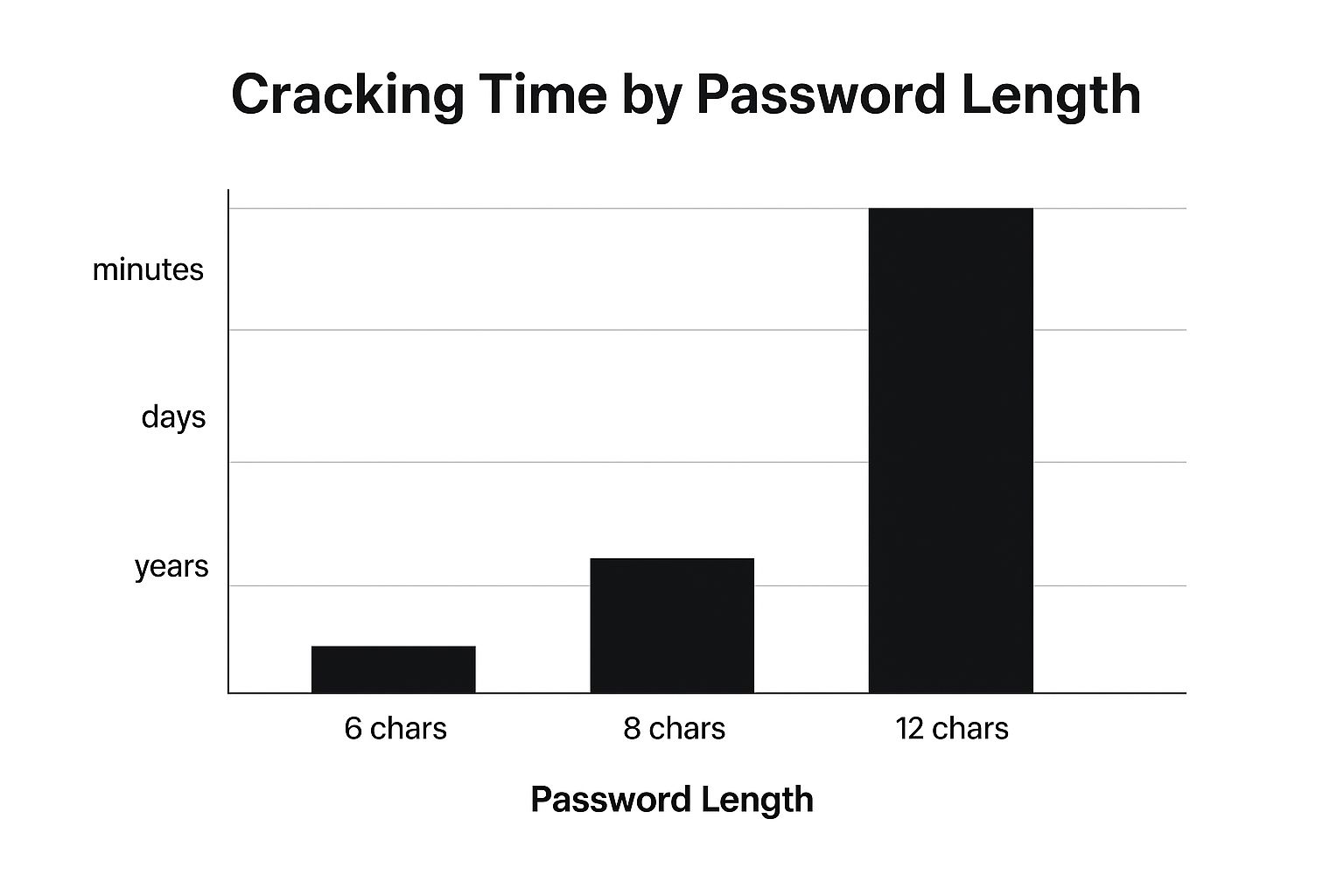
Something that often gets overlooked is password strength. But it’s a fundamental part of website security. The image below shows just how much difference password length makes when it comes to cracking time:
As you can see, even adding a few characters dramatically increases the time it takes to crack a password. Combining strong passwords with two-factor authentication creates another layer of protection, making unauthorized access far more difficult.
To help you choose the right tools for your needs, I’ve put together this comparison table:
Security Tools Comparison Matrix
Side-by-side comparison of essential security tools including features, pricing, and suitability for different website types
| Tool Category | Free Options | Premium Features | Best For | Setup Complexity |
|---|---|---|---|---|
| Web Application Firewall (WAF) | Cloudflare, Wordfence | Advanced rule sets, DDoS protection, managed services | All websites | Varies, Cloudflare is generally easy, Wordfence moderate |
| Malware Scanner | WPScan, Sucuri SiteCheck | Deeper scans, automatic cleanup, scheduled scans | WordPress sites, any website | Easy to moderate |
| Security Monitoring | Uptime Robot, Google Search Console | Detailed analytics, custom alerts, integration with other security tools | All websites | Easy to moderate |
This table summarizes the key features and considerations for each category of tools. Choosing the right tools and using them effectively is the key to a secure website. Remember, website security is an ongoing process, not a one-time fix. By staying alert and actively addressing potential vulnerabilities, you can protect your site and your business.
Advanced Protection Without The Complexity
Okay, so you've got the basics covered – excellent! Now, let's talk about taking your website security to the next level. Don't worry, this isn't about getting lost in a maze of technical jargon. It's about adding those extra layers of protection that make a real difference, like adding a top-notch security system to your home after you’ve locked all the doors and windows.
Multi-Factor Authentication: Double Locking Your Most Important Doors
Multi-factor authentication (MFA) is essential. Think of it as a double lock on the doors to your most valuable possessions. Even if someone manages to guess your password, they'll still need that second key – maybe a code from your phone – to get in. I use MFA for everything, and honestly, the peace of mind is worth any minor inconvenience. Yes, it adds an extra step, but it dramatically reduces the risk of someone gaining unauthorized access. And the best part? There are tons of different MFA options out there. You can find one that strikes the right balance between security and ease of use. For my admin accounts, I use a time-based code generator, but I keep things a bit simpler for regular users.
Security Headers and Content Security Policies: Simple Yet Powerful Protection
Security headers and Content Security Policies (CSP) are like setting the ground rules for how your website interacts with browsers. Think of them as bouncers at a club, only allowing in the good stuff. They tell browsers exactly which resources are allowed to load, preventing malicious scripts from sneaking in and causing havoc. I know they sound technical, but don't let that scare you. Many hosting providers, like SiteGround, offer simple ways to configure these. It's a surprisingly effortless way to give your website's security a serious boost.
Hardening Your Server and Database: Protecting the Foundation
Website security isn't just about what users see; it's about protecting the underlying infrastructure too. This includes hardening your server and putting robust database protections in place. Now, before you panic, this doesn't require a degree in computer science! Many hosting providers actually offer server hardening services. These services usually involve closing off unnecessary ports and fine-tuning your system settings for optimal security. Similarly, sticking to database security best practices, like using strong, unique passwords and limiting access, makes a huge difference.
The Open Web Application Security Project (OWASP) is a fantastic resource. They have a ton of valuable information on website security. This screenshot of their homepage really highlights their dedication to web application security. They offer free tools, documentation, and a supportive community, which I've found incredibly helpful.
Monitoring and Incident Response: Staying Alert Without the Overwhelm
Securing your website isn't just about prevention. It's about being prepared for those "what if" scenarios. Effective monitoring is like having a security camera for your website. It alerts you to any suspicious activity, but you don't want to be bombarded with constant false alarms. The key is choosing monitoring tools that focus on real threats and filter out the noise so you avoid alert fatigue. Equally important is developing an incident response plan. What happens if, despite your best efforts, you do get hacked? Having a clear plan of action can significantly limit the damage.
By implementing these advanced measures, you're building a layered defense system for your website. Think of it like a castle with multiple walls and moats. If one layer fails, the others are there to back it up. And remember, true security is about finding the sweet spot between protection and usability. You want your site to be a fortress, but not one that’s impossible for legitimate users to access and enjoy.
Keeping Your Security Strong Over Time

Website security isn't a one-and-done deal. It's an ongoing process, more like tending a garden than building a brick wall. You wouldn't plant seeds and just walk away, hoping for the best. You need to nurture those plants, pull out the weeds, and adjust your approach as the seasons change. This section is about building those long-term security habits that protect your website without taking over your life.
Establishing Maintenance Routines
Think of regular website maintenance like getting your car serviced. You wouldn't wait for the engine to seize up before changing the oil, would you? The same applies to your website. Create a regular schedule for essential checks—things like plugin updates, software patches, and verifying your backups are working. Personally, I set reminders every two weeks to check for plugin updates. It's a simple system that prevents things from falling through the cracks and keeps my sites secure and running smoothly.
Updating Strategies: Balancing Security and Stability
Updates are vital, but they can sometimes cause problems if you’re not careful. I learned this the hard way when a plugin update once completely broke a client’s website. Trust me, that was not a fun day. Now, I always test updates on a staging site first, before they go live. It’s like trying on clothes before you buy them – you want to make sure they fit and don’t clash, right? This staging site approach lets you get the security benefits of updates without the risk of instability.
Monitoring and Early Detection
Monitoring your website security is like having a burglar alarm. It’s not going to stop someone from trying to break in, but it will alert you if something’s happening so you can take action fast. Find a good monitoring tool that notifies you about suspicious activity, but isn’t constantly sending you false alarms. You want a guard dog that barks at real threats, not every squirrel that runs by. Early detection can save you a world of pain later.
Staying Informed (Without the Overload)
Website security is always evolving. New threats emerge constantly, and it’s easy to get overwhelmed by the never-ending stream of news and vendor hype. My advice? Stick to reliable, trusted sources like the National Institute of Standards and Technology (NIST) and the SANS Institute. They give you practical advice without all the drama. This focused approach lets you stay informed without drowning in information overload.
Planning for Growth and Change
As your website grows, your security needs will change too. It’s like adding rooms to your house – you might need stronger locks or even a whole security system. Anticipate those changes and plan ahead. For example, if you’re thinking of expanding your e-commerce features, consider stronger payment security before you launch. This proactive approach makes sure your security grows along with your website. Building relationships with security professionals and keeping good documentation of your security measures can also provide valuable support and ensure continuity.
Your Website Security Action Plan
Alright, let's get practical and talk about securing your website. Think of this less as a recap and more as your personalized security game plan. We’ll walk through how to check your current security, figure out what to tackle first, and build a plan that works for you and your resources.
Assessing Your Current Security Posture
Before we dive into making changes, you need to know where you stand. It's like a doctor's check-up before starting a new workout routine. Consider your current setup:
- Hosting: Are you using a reliable hosting provider that prioritizes security? I've had good experiences with SiteGround and A2 Hosting, for instance. Both take security seriously, which saves you a lot of headaches.
- Software: Is everything up-to-date? This includes your Content Management System (CMS), plugins, and themes. Outdated software is a magnet for hackers.
- Passwords: Are you using strong, unique passwords? Is two-factor authentication (2FA) enabled wherever possible? I use a password manager like LastPass – it’s a lifesaver.
- Backups: Do you have automated backups that are stored securely offsite? This is your safety net if things go wrong.
Honestly evaluating these areas helps pinpoint your weak spots. If you’re still using “password123”, well, you know where to start!
Prioritizing Your Actions: Focus on the Fundamentals
Don’t try to do everything at once. Start with the core elements, like building a house – you need a solid foundation. Focus on:
- Strong Passwords and 2FA: This is the easiest win and has a huge impact.
- Updating Software: Regular updates patch security holes before hackers can exploit them.
- Secure Hosting: A good provider handles much of the heavy lifting on the security front.
- Regular Backups: This protects your data in case of a disaster, a hack, or even a simple mistake.
Once these basics are in place, you can move on to more advanced security measures. It’s like adding layers of protection.
Creating Your Implementation Schedule
A realistic timeline is crucial. Security is a marathon, not a sprint. Break down your plan into smaller, manageable steps. One week, focus on updating plugins. The next week, tackle password management. This steady approach is way more sustainable. Plus, it helps you build good security habits.
Troubleshooting and Monitoring Your Progress
Sometimes, implementing security measures can cause unexpected issues. Maybe a plugin update clashes with your theme. Don’t panic! Have a troubleshooting plan. Join a relevant online forum or Facebook group – there are tons of helpful communities out there.
Also, keep an eye on your progress. Are you seeing fewer spam comments? Is your site loading faster? These small wins tell you you're on the right path.
Emergency Response and Recovery Strategies
Even with the best security, incidents can happen. Prepare for the worst. Have a clear plan for emergencies. Who do you contact? How do you restore your site from backups? How do you communicate with your users? Being prepared minimizes downtime and data loss, letting you bounce back quickly.
By following this plan, you’re taking charge of your website’s security. You’re moving from reacting to problems to preventing them, protecting both your site and your business. Remember, website security is a journey, not a destination.
Ready to simplify your website management and boost your security? Partner with OneNine today for comprehensive website solutions tailored to your business needs.


