

Building a secure website means layering your defenses. It all starts with two absolute must-haves: an SSL/TLS certificate to encrypt data and a Web Application Firewall (WAF) to filter out the bad guys. Getting these two right is the foundation for everything else, protecting your users' information and stopping common cyberattacks in their tracks.
Your Essential Website Security Layers
Before you get lost in the weeds of advanced security, you need to get the basics locked down. Think of it like securing a house—you don't install a fancy alarm system before you have strong walls and a deadbolt on the front door.
For your website, that solid foundation comes down to two non-negotiable components: SSL/TLS certificates and a Web Application Firewall (WAF). These aren't just nice-to-haves; they're the absolute starting point for any site that takes security seriously.
Let's break down what they do and why they're so critical. One secures data as it travels, and the other acts as a bouncer, inspecting everyone who tries to get in.
Encrypt Everything with SSL/TLS
Ever notice that little padlock icon next to a website's address in your browser? That’s the work of an SSL/TLS certificate. At its heart, an SSL/TLS certificate creates a secure, encrypted tunnel between a visitor's browser and your server.
Without that tunnel, any information they send—passwords, credit card numbers, even just their name and email—is transmitted in plain text. It’s like sending a postcard through the mail; anyone who intercepts it can read it. This is especially risky for users on public Wi-Fi.
Key Takeaway: An SSL certificate is more than just a security feature; it's a huge trust signal. A staggering 85% of online shoppers will bounce from an unencrypted website. That’s a direct hit to your sales and your reputation.
Getting SSL/TLS set up is easier than you think. Many quality web hosts, including us at OneNine, provide free certificates from services like Let's Encrypt. On most platforms, you can flick it on with a single click. It's a simple move that secures every conversation on your site.
Your Digital Gatekeeper: The Web Application Firewall
While SSL protects data on its journey, a Web Application Firewall (WAF) protects your website itself. It’s a shield that sits between your website and all incoming internet traffic, actively inspecting every single request. A WAF is programmed to spot and block the most common web attacks before they can even touch your server.
This kind of proactive defense is essential for stopping threats like:
- SQL Injection: Attackers trying to trick your database into spilling sensitive customer data.
- Cross-Site Scripting (XSS): Hackers injecting malicious code to hijack your visitors' sessions.
- Brute-Force Attacks: Automated bots hammering your login page with thousands of password guesses.
Think of your WAF as a highly trained security guard who knows every trick in the book. If it sees a request that looks like a classic SQL injection attempt, it blocks it instantly. This automated filtering is a game-changer, dramatically cutting down your exposure to the constant barrage of bots and hackers looking for easy targets.
Services like Cloudflare or Sucuri offer powerful WAFs that are surprisingly easy to set up, giving even small businesses the kind of protection that was once only available to big corporations.
Securing Your Website Platform
Your website’s platform—whether it's WordPress, Shopify, Webflow, or a custom-coded solution—is the foundation of its security. Each one is built differently, which means they all have their own unique weak spots. You can't just apply a generic security checklist; you have to tailor your approach to the tech you're actually using.
Think of it this way: what works for a self-hosted WordPress site is worlds away from what a SaaS e-commerce platform like Shopify needs. The first step to a truly secure website is knowing your platform's specific pressure points.
WordPress Security Best Practices
As the engine behind over 43% of all websites, WordPress is a huge target for automated attacks. Because of its popularity, hackers are constantly looking for easy ways in. True security is about more than just installing a plugin and hoping for the best.
You need to be proactive, and that starts with choosing your tools wisely. Every theme and plugin you add is a potential door into your site, so you have to be the gatekeeper.
- Check for recent updates: If a plugin hasn't been updated in over a year, that’s a major red flag. It's likely abandoned.
- Look at active installations and reviews: A large, happy user base usually means the developer is actively maintaining the tool.
- Source from reputable marketplaces: Stick to the official WordPress repository or well-known premium developers. Avoid random free theme sites.
Once you’ve chosen your tools, ongoing maintenance is non-negotiable. Outdated software is the most common vulnerability hackers exploit. Always keep your WordPress core, themes, and plugins updated.
Shopify and SaaS Platform Security
When you use a platform like Shopify or Webflow, a lot of the heavy lifting is done for you. You're not responsible for server patching or updating the core software—the platform handles that. It's a massive benefit, but it doesn't mean you can set it and forget it.
Your responsibility shifts from managing servers to managing your accounts and apps. Each third-party app you install can introduce new risks if you're not careful.
A word of caution: Just because an app is listed in the official Shopify App Store doesn't automatically mean it's 100% secure. Always review the permissions an app requests and ask yourself if it really needs that level of access to your store's data.
The other piece of the puzzle is user access. Always follow the principle of least privilege. This just means giving team members only the permissions they absolutely need to do their jobs. It’s a simple but powerful way to limit the damage if a staff account is ever compromised.
Custom-Coded Websites and Dependencies
With a custom-built site, you have total control—which is both a gift and a curse. You aren’t tied to a platform's rules, but you're also completely on the hook for every single line of code and every third-party library you use.
This is where managing dependencies—the external code packages your site relies on—becomes absolutely critical. A single vulnerability in one of those packages can create a backdoor into your entire application. You have to regularly scan your dependencies for known issues and update them immediately.
This isn't just a theoretical threat. Attackers love to target public-facing applications. In fact, in Europe, exploiting these kinds of applications was the main entry point in 36% of security incidents. Your custom site is exactly that kind of target, making dependency management a top priority.
Platform Security Action Plan
To put all this into perspective, here’s a quick-reference guide comparing the top security priorities for the most common platforms. It’s a simple way to focus on what matters most for your specific setup. While getting an SSL certificate is a universal first step for everyone, the day-to-day priorities look very different from there. If you need a refresher on that, feel free to check out our guide on how to configure an SSL certificate.
| Platform | Priority 1 Action | Priority 2 Action | Priority 3 Action |
|---|---|---|---|
| WordPress | Diligently update plugins, themes, and core files to patch vulnerabilities. | Vet all third-party extensions before installation for quality and security. | Implement a Web Application Firewall (WAF) to block common exploits. |
| Shopify | Secure third-party app connections and regularly review their permissions. | Enforce strict staff permissions using the principle of least privilege. | Enable Two-Factor Authentication (2FA) for all staff and admin accounts. |
| Webflow | Configure user roles and permissions carefully for editors and collaborators. | Manage API keys and third-party integrations securely. | Regularly audit custom code embeds for potential security risks. |
This table should give you a clear, actionable starting point. By focusing on the right priorities for your platform, you can build a much stronger defense against common threats.
Mastering User Access and Authentication

All the firewalls and encryption in the world won't help if someone simply walks through the front door with a stolen key. That's what happens when you neglect user access. Your team, your contractors, your partners—the human element—can be the most unpredictable part of your website's security.
This is why managing who can access your site and how they prove their identity is a critical layer of defense. A single compromised account can give an attacker a direct line to your data, bypassing many of your best technical safeguards. Getting this right isn't just an IT chore; it's fundamental to your business's security.
Adopt the Principle of Least Privilege
I’ve seen this simple concept prevent major disasters. It’s called the principle of least privilege (PoLP), and it means you give people the absolute minimum level of access they need to do their job. Nothing more.
For example, you hire a freelance writer to add blog posts to your WordPress site. Do they need to touch your e-commerce settings or theme files? Of course not. You'd give them an "Author" or "Contributor" role. This way, they can write and submit posts without ever having the ability to make site-wide changes.
This one move drastically shrinks your attack surface. If that writer’s account is ever compromised, the damage is contained. The attacker is stuck in a small, non-critical corner of your website.
Strengthen Your Front Door with Multi-Factor Authentication
If there's one thing you do after reading this guide, make it this: turn on multi-factor authentication (MFA) for every single user, especially your admins. Think of it as needing both a key and a PIN code to open a safe.
MFA forces users to provide at least two different pieces of evidence to prove they are who they say they are. It usually combines:
- Something you know: Like a password.
- Something you have: A code from an app like Google Authenticator or a physical security key.
- Something you are: A fingerprint or face scan.
Even if a hacker steals a password, they’re stopped cold without that second factor. It’s one of the most effective ways to shut down unauthorized access attempts.
With sophisticated phishing attacks on the rise, passwords alone are no longer enough. Consider that 42% of organizations have been hit by phishing or social engineering. Stolen credentials are the second most common way attackers get in, making a layered defense like MFA non-negotiable.
Create Clear Offboarding Procedures
What happens when an employee or contractor leaves? You need a rock-solid process to revoke their access. Immediately. It’s a step I see businesses forget all the time, and it’s a huge risk.
Leaving an ex-employee’s admin account active is like leaving a key to your office under the mat. Your offboarding checklist must include deactivating their CMS account, removing them from the hosting panel, and cutting off access to any connected third-party tools.
For those with high-security needs, it’s also worth looking into advanced methods like Blockchain-Based Identity Verification for Secure Access. Properly managing these user lifecycles is a huge part of account security, and you can find more tips in our guide on mastering customer account management.
Creating a Resilient Backup and Recovery Plan
Think of it this way: real security isn’t just about building higher walls. It's about knowing that someday, someone might find a way through. When that day comes, your ability to recover is what separates a minor headache from a full-blown business disaster. That’s where a solid backup and recovery plan becomes your ultimate safety net.
This plan is your lifeline against everything from a simple "oops" moment, like an employee deleting a critical page, to a catastrophic server meltdown. More importantly, it’s your best defense against ransomware, where attackers don't just steal your data—they hold it hostage.
And make no mistake, the ransomware threat is very real. It now shows up in 44% of all data breaches. The speed is just as jarring, with 56.5% of incidents being discovered within a week, usually because the attacker makes their presence known with a ransom note. You can get more insights into this evolving landscape in NordLayer's 2025 cybersecurity report.
Embracing the 3-2-1 Backup Rule
When it comes to protecting your data, the 3-2-1 backup rule is the gold standard. It’s a simple, proven framework that ensures you always have a working copy of your data, no matter what happens. It might sound basic, but its effectiveness is why pros have relied on it for years.
Here’s how it works:
- Three total copies of your data. This is your live site (the original) plus at least two backups.
- Two different types of media. Don't keep all your eggs in one basket. Store one backup on your web server and another on a completely different medium, like cloud storage (Amazon S3, Google Drive) or even a physical external drive.
- One copy stored off-site. This is the clincher. If a fire, flood, or major outage hits your server's data center, your local backups are gone, too. Keeping one copy geographically separate—ideally in the cloud—is non-negotiable.
This strategy protects you from just about every conceivable failure point, from a fried hard drive to a natural disaster, giving you a clear path back to business as usual.
Automate and Test Your Backups
A backup you have to remember to run is a backup that will eventually be forgotten. People get busy, and things get missed. That’s why automation is an absolute must.
Almost every modern web host and backup plugin offers scheduling. Set it up to run automatically at least once a day. If you run a busy e-commerce store, you might even need more frequent snapshots.
But here’s the part where so many people drop the ball: having backups isn't enough. You have to know they actually work.
Key Insight: An untested backup isn't a plan; it's a prayer. You need to regularly test your restores—at least once a quarter—to a staging or development environment. This is the only way to know for sure that your files aren't corrupted.
Going through this process means that when a real emergency hits and the pressure is on, you won't be crossing your fingers hoping the backup file works. You’ll know it does.
Monitor and Scan Proactively
Backups are your recovery mechanism, but proactive monitoring can help you spot trouble long before you need to use them. This is about shifting from a reactive stance to a prepared one. Instead of waiting for an angry customer to tell you your site is down or defaced, you should be the first to know.
Put systems in place to watch for suspicious activity:
- File Integrity Monitoring: Get an alert the moment a core website file (like a WordPress or theme file) is changed without your knowledge.
- Login Alerts: Receive a notification for every successful admin login, especially if it comes from a new IP address you don’t recognize.
- Regular Malware Scans: Run automated daily scans to hunt for malicious code, hidden backdoors, or other signs of a compromise.
Many security plugins and services can handle all of this for you, sending instant alerts to your email or Slack. This early-warning system can mean the difference between stopping an attack in its tracks and dealing with a major breach.
To get into the nitty-gritty, you can also explore our detailed guide on setting up effective website backups. By pairing a rock-solid backup strategy with vigilant monitoring, you build a truly resilient foundation for your website.
Taking Your Security to the Next Level
Once you've got the essentials locked down, it's time to add some more sophisticated defenses to your website. This is where we go beyond the basics and start building a real fortress. We'll get into things like HTTP security headers and Content Delivery Networks (CDNs), which might sound technical, but they're incredibly effective and easier to set up than you think.
These next steps are all about hardening your site against a broader spectrum of attacks. You're essentially closing off the clever loopholes and backdoors that experienced hackers love to find. Think of it as installing a professional-grade security system that works 24/7 to make your website an unattractive and difficult target.
Tell Browsers How to Protect Your Site with HTTP Security Headers
One of the smartest things you can do for your site's security is to give visiting browsers a set of strict rules to follow. That’s precisely what HTTP security headers are for. They are simple instructions your server sends along with your website content, telling the user's browser to enforce specific security policies. It's like handing a bouncer a list of who is and isn't allowed in.
By implementing these headers, you can shut down common attacks like cross-site scripting (XSS), where someone tries to inject malicious code, and clickjacking, a sneaky trick where users are fooled into clicking on something they can't see.
Here are the heavy hitters you should put in place:
- Content Security Policy (CSP): This is a big one. A CSP gives you granular control over exactly what resources—scripts, images, fonts, you name it—a browser can load on your pages. It’s one of your strongest defenses against code injection attacks.
- HTTP Strict Transport Security (HSTS): This header is non-negotiable for any site using SSL/TLS. It commands browsers to only ever communicate with your site over a secure HTTPS connection. After a browser sees this header once, it will flat-out refuse to connect over insecure HTTP, stopping man-in-the-middle attacks cold.
- X-Frame-Options: A beautifully simple header that does one job perfectly: it stops other websites from embedding your site in an
<iframe>. This is your go-to defense against clickjacking.
Depending on your setup, you can add these headers in your web server's configuration file (like .htaccess for Apache) or often with a dedicated plugin if you're on a CMS like WordPress.
Using a Content Delivery Network for More Than Just Speed
Most people think of a Content Delivery Network (CDN) as a tool for making a website load faster, and they're right. By caching your content on servers all over the globe, a CDN can deliver it to visitors from a location nearby, slashing load times. But a modern CDN from a provider like Cloudflare or Akamai is also a security powerhouse.
A CDN sits between your visitors and your actual server, acting as a reverse proxy. This means every single request has to pass through its massive, intelligent network before it gets anywhere near your website's origin server. This unique position allows it to filter out a huge amount of malicious traffic automatically.
Expert Insight: A CDN's superpower is absorbing huge Distributed Denial-of-Service (DDoS) attacks. These brute-force attacks try to flood your server with so much junk traffic that it crashes. A CDN’s global network can handle that flood of traffic without breaking a sweat, keeping your site online for real customers while the attack gets soaked up at the edge.
On top of DDoS protection, most quality CDNs bundle in a Web Application Firewall (WAF), sophisticated bot detection, and other critical security services. It essentially becomes a comprehensive shield for your entire online presence.
Finally, a holistic security strategy extends beyond your live site. When you decommission old hardware, ensure all data is permanently erased. Using certified hard drive destruction services that follow standards like NIST is crucial for preventing data leaks from retired assets. By taking these advanced steps, you're not just securing your website—you're securing your business.
Building Your Incident Response Checklist
When you think your site's been hacked, the last thing you want to do is panic. But that's exactly what happens without a plan. Having a clear, pre-written incident response checklist is the difference between a controlled situation and a complete catastrophe.
Think of it this way: when the adrenaline is pumping, you won't be thinking straight. A good plan takes the guesswork out of the equation. It guides you through the essential steps, from stopping the attack to figuring out what to tell your customers. I’ve seen it happen—in the rush to get a site back online, people often erase the very evidence needed to figure out how the breach happened in the first place.
Your First Moves When You Suspect a Breach
The second you spot something weird—a defaced homepage, a scary email from your host, or files you don't recognize—the clock starts ticking. Your first job isn't to fix the site; it's to stop the bleeding and preserve the crime scene.
You have to think like a digital forensics expert. Before you start deleting things, you need a snapshot of exactly what went wrong.
- Isolate the Website: The quickest way to contain the damage is to take the site offline. Put up a simple maintenance page. This pulls the plug on the attacker, preventing them from digging deeper or stealing more data. It also protects your visitors from malware or other nastiness.
- Preserve the Evidence: Before you change a single thing, take a full backup or snapshot of the site as it is. This compromised version is your single most important piece of evidence. Without it, you’ll never be sure how they got in, what they took, or if they left a backdoor for later.
- Change Every Single Credential: Now, go on a password-changing spree. Hosting panel, CMS admin logins, database users, FTP accounts—everything. You have to assume every password you have is now in their hands.
This decision tree gives you a good visual of how proactive security measures, like a CDN or a WAF, can help you avoid getting to this point.
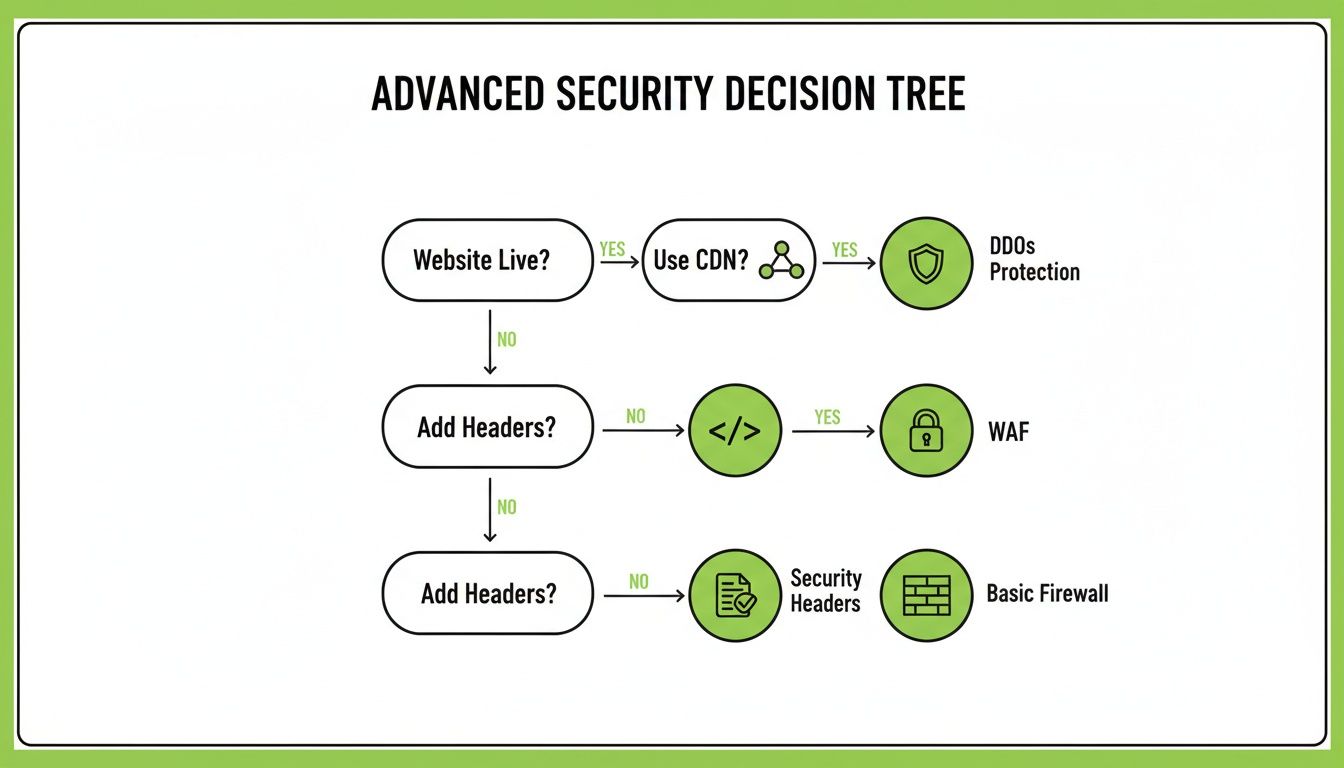
It’s a great reminder that strong security is built in layers, not with a single magic bullet.
Analysis, Communication, and Recovery
With the immediate threat handled, it's time to shift gears. You need to understand what happened and start the cleanup process. This is where that compromised backup you took becomes invaluable. Your goal is to pinpoint the entry point—was it an outdated WordPress plugin? A weak password? A server vulnerability?
If you don't find and fix the original hole, you're just inviting them back in. Malware scanners are a good start for finding bad files, but for a deep dive, you might need to call in a security pro.
A word of advice from experience: How you communicate the problem is just as important as how you fix it. If customer data was exposed, you need to be transparent. Trying to hide a breach almost always causes more long-term damage to your reputation than the breach itself.
Once you know what you're dealing with, your recovery should be methodical.
- Scrub the Site: Using your analysis, get rid of every malicious file, bit of injected code, and hidden backdoor.
- Restore from a Clean Backup: Go back to your archives and restore the site from a backup you know is clean from before the incident.
- Patch the Vulnerability: This is the most important part. If it was a plugin, update or replace it. If it was a weak password, enforce stronger policies. Close the door they walked through.
- Stay Vigilant: Once the site is back online, watch it like a hawk. Monitor logs and user activity for any signs that the attacker is trying to get back in.
Having this checklist ready before you need it turns a moment of pure panic into a series of manageable steps. It’s one of the smartest things you can do to protect your website and your business.
Your Website Security Questions, Answered
Let's tackle some of the most common questions business owners have about locking down their websites. These are the things people ask us all the time, so we've put together some straightforward answers to get you on the right path.
How Often Should I Run a Security Scan on My Website?
For most business websites, a weekly automated scan is a solid baseline. It's frequent enough to catch new threats and outdated plugins before they become a real problem.
However, if you're running an e-commerce site or handling any kind of sensitive customer information (like in a portal or membership site), you really should be scanning it daily. The risk is just that much higher.
Beyond those automated checks, it’s a really good idea to have a human expert perform a manual security audit or penetration test at least once a year. Automated scanners are great, but they can miss the more complex, nuanced vulnerabilities that a seasoned pro will spot.
Can I Handle Website Security Myself, or Do I Need to Hire Someone?
Honestly, you can do a lot of the foundational work yourself. Things like enforcing strong passwords across the board, setting up two-factor authentication for all users, and just staying on top of your software updates—these are huge wins that anyone can manage.
Where you might want to bring in a professional is for the more technical stuff. This includes things like:
- Advanced server-level configurations
- In-depth security audits
- Most importantly, cleaning up after an actual security breach
When you’re under attack, trying to fix it yourself can often make things worse. Calling in an expert is a smart investment to make sure it's handled right the first time.
If you do only one thing from this guide, make it this: enable multi-factor authentication (MFA) everywhere you can. The vast majority of security breaches start with a stolen password. MFA is the single best way to stop those attacks in their tracks, even if someone gets their hands on your login details. It's the biggest security upgrade you can make for the least amount of effort.
At OneNine, we take the complexity out of website security and management, letting you get back to what you do best. Whether you need regular maintenance or a complete security overhaul, our team is here to help you succeed online. Find out more about how we can help at https://onenine.com.


