
When we talk about web accessibility, we’re talking about a simple, powerful idea: building websites that everyone can use. It’s the practice of designing and developing your site so people with disabilities—whether they have vision, hearing, motor, or cognitive impairments—can easily perceive, understand, navigate, and interact with everything you’ve created.
What Web Accessibility Looks Like in Practice
Think of your website as a physical store. If the only entrance has a steep flight of stairs, you’ve just told every person in a wheelchair that they’re not welcome. An inaccessible website does the exact same thing online, effectively shutting out a huge portion of the population.
This isn't about tacking on a few features at the last minute. Real accessibility is woven into the very fabric of good design. It means making sure your content works for everyone, no matter how they access the internet—including people who rely on assistive technologies to get around.
Who Actually Benefits from an Accessible Web?
While we often start the conversation with users who have disabilities, the truth is that a more accessible website creates a better experience for all your visitors.
It's a surprisingly broad group:
- Users with permanent disabilities, like blindness, deafness, or limited mobility.
- People with temporary impairments, like someone trying to navigate with a broken arm.
- Anyone in a limiting situation, such as a new parent holding a baby or someone watching a video in a loud office without headphones.
- Older users who are dealing with natural changes in their vision, hearing, or motor skills.
To really get a feel for this, it helps to know about the tools people use, like those covered in this guide to understanding speech-to-text technology. These technologies are what make the digital world usable for millions of people.
Web accessibility is fundamentally about ensuring that people with disabilities can perceive, understand, navigate, and interact with websites. It is about removing barriers that prevent access.
This isn’t a niche issue. At least 1 billion people worldwide live with some form of disability. And yet, the internet is still largely closed off to them. A recent report found that a staggering 94% of top homepages had clear accessibility failures when checked against the Web Content Accessibility Guidelines (WCAG).
Failing at accessibility means you’re not just excluding a massive market; you're also ignoring their significant spending power. Building an accessible website isn't just a box to check for compliance—it's a business imperative for reaching the widest possible audience.
Why Accessibility Is a Business Imperative
So, we know what web accessibility is. But the real question every business owner asks is, why should I care? The answer is simple and direct: accessibility isn't just a compliance box to tick or a feel-good gesture. It's a powerhouse for business growth. Treating it as an afterthought means you're actively leaving money on the table, pushing potential customers away, and letting competitors who get it pull ahead.
When you put accessibility first, you're making a conscious decision to open your digital front door to everyone. This isn't a cost; it's an investment—one with clear, measurable returns that ripple across your entire company. Honestly, it's one of the smartest business moves you can make today.
This infographic lays out some staggering numbers that paint a picture of just how widespread web accessibility failures are, highlighting the huge population affected, their collective economic power, and how many websites are still getting it wrong.
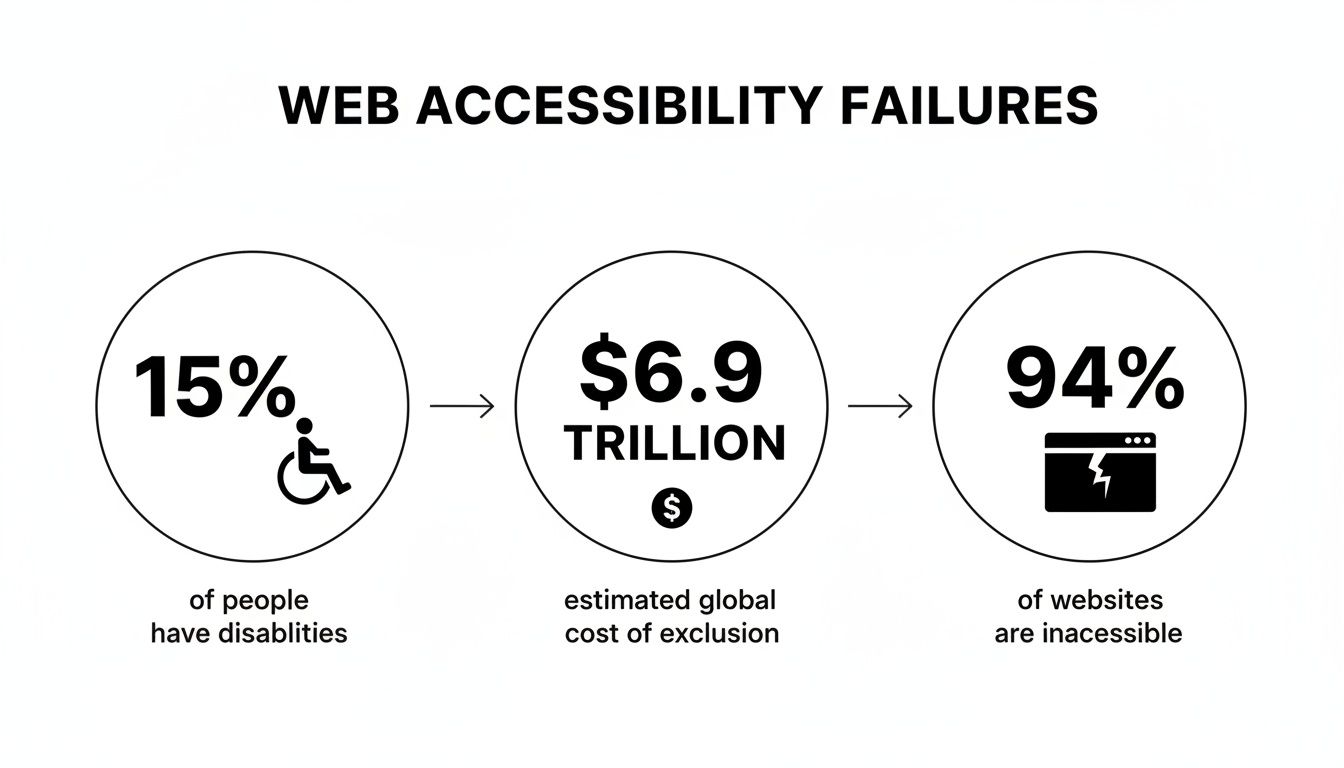
These figures tell a clear story: there's a massive, underserved market out there being actively turned away by businesses with inaccessible online platforms.
Tap Into a Massive, Untapped Market
One of the most compelling reasons to go all-in on accessibility is the sheer size of the market it unlocks. We're talking about more than one billion people globally who live with some form of disability. That group, along with their friends and family, wields serious economic power.
The numbers don't lie. One analysis shows that businesses are collectively losing around $2.5 billion per month simply by failing to meet the needs of customers with disabilities. For online retailers, that's an annual loss of roughly $14.8 billion. On top of that, consumer-facing companies lose out on an estimated $6.9 billion in revenue each year because frustrating digital experiences send people straight to their competitors. You can dig deeper into these numbers and learn more about web accessibility statistics.
Ignoring this audience is like closing your shop one day a week. It’s a direct hit to your bottom line and a huge missed opportunity to build loyalty with a valuable customer base.
"The power of the Web is in its universality. Access by everyone regardless of disability is an essential aspect."
– Tim Berners-Lee, Inventor of the World Wide Web
This quote gets to the heart of it. Excluding users isn't just a technical slip-up; it goes against the very spirit of what the internet was meant to be.
Build a Stronger, More Inclusive Brand
Your brand is so much more than a logo. It’s a reflection of your company's values. When you commit to accessibility, you're sending a powerful signal that your business cares about inclusivity, social responsibility, and every single person who interacts with you.
This isn't just about good PR; it has real, tangible benefits:
- A better public image: Companies known for being accessible are seen in a much more positive light.
- Fierce customer loyalty: When users with disabilities have a great experience on your site, they don’t just come back—they become your biggest advocates.
- Attracting top talent: An inclusive digital presence hints at an inclusive workplace, helping you attract a diverse and skilled team.
In a crowded market, a reputation for being truly inclusive can be the very thing that makes you stand out.
Improve User Experience for Everyone
Here’s something that many people miss about web accessibility: the changes you make for users with disabilities end up creating a better experience for all your users. This is often called the curb-cut effect. Think about it—those sloped curbs on sidewalks were designed for wheelchair users, but they also help parents with strollers, travelers with luggage, and workers with delivery carts.
The same principle applies online.
- Clear Captions: Videos with captions are a must for users who are deaf or hard of hearing. But they’re also perfect for someone watching your video in a noisy coffee shop or a quiet library.
- Good Color Contrast: High contrast between text and the background is crucial for people with low vision, but it also makes your content much easier to read for anyone browsing on their phone in the bright sun.
- Logical Navigation: A site that’s easy to navigate with just a keyboard is essential for users with motor impairments. It also happens to create a more intuitive and streamlined flow for every single visitor.
By focusing on accessibility, you are fundamentally investing in better usability. That leads directly to higher engagement, lower bounce rates, and better conversion rates from everyone who visits your site.
Navigating Accessibility Standards and Legal Risks
So, we've covered what web accessibility is and why it's a big deal. Now, let's get into the nitty-gritty: the actual rules of the road. This isn’t just about dodging legal headaches; it’s about having a reliable roadmap to build a better, more inclusive website for everyone who visits.
Think of these standards as a universal blueprint for accessible design. They give developers, designers, and business owners a shared language, so an "accessible" website in one part of the world means the same thing somewhere else. Without them, we’d all just be guessing, and that leads to confusion and frustration for users.
The Global Standard: WCAG
The single most important set of guidelines you need to know is the Web Content Accessibility Guidelines (WCAG). Developed by the World Wide Web Consortium (W3C), WCAG is the international gold standard. It's not a law in itself, but governments and courts worldwide point to it as the benchmark for what "accessible" really means.
WCAG is broken down into three levels of conformance, with each level building on the one before it:
- Level A: This is the baseline. Hitting these criteria knocks out the most common and severe roadblocks for users with disabilities. It's the absolute minimum.
- Level AA: This level tackles more of the significant and common barriers people face. For most businesses, this is the sweet spot. Level AA is the standard most often cited in legal cases and should be your target.
- Level AAA: This is the highest level you can achieve, making your content accessible to the widest possible audience. While it's a great goal, getting full AAA compliance across an entire site can be tough and isn't always practical.
For most businesses, the goal is clear: achieve WCAG 2.1 or 2.2 Level AA compliance. This gives you a strong defense against legal action and, more importantly, ensures a genuinely usable experience for the vast majority of your visitors.
"True accessibility compliance is proactive, not reactive. It’s about building a solid foundation based on established standards, rather than waiting for a legal complaint to force your hand."
Being proactive is key because accessibility laws are spreading and getting more specific. As of 2025, over 180 countries have disability rights legislation, and at least 78 of them explicitly include digital accessibility. In the European Union, the European Accessibility Act (EAA) became fully enforceable in June 2025, impacting an estimated 500,000 businesses. Find out more about global web accessibility laws and their impact.
Key Laws and Your Legal Risks
While WCAG gives you the "how," various laws provide the "why." In the United States, the big one is the Americans with Disabilities Act (ADA). Even though the ADA was written long before the internet became a core part of our lives, U.S. courts have consistently ruled that websites qualify as "places of public accommodation" and must be accessible.
What does that mean for you? If your business website isn't accessible, you could face a federal lawsuit. These lawsuits have exploded in recent years, targeting everyone from small local shops to massive corporations. You can read more about ensuring ADA compliance for your website in our detailed guide.
And it's not just an American issue. Other major regulations include:
- Section 508 of the Rehabilitation Act: A U.S. law requiring federal agencies and their contractors to make their technology accessible.
- European Accessibility Act (EAA): A directive that requires many products and services sold in the EU—including e-commerce sites and banking services—to be accessible.
The message is impossible to ignore: the legal risk is real, and it’s growing. But by aligning your website with WCAG 2.2 Level AA, you can meet your obligations under these laws and—more importantly—create a site that genuinely serves every single customer.
Common Accessibility Barriers You Can Spot Yourself
The best way to really get web accessibility is to see the roadblocks for yourself. You don't need to be a developer to spot many of the most common issues—a lot of them are hiding in plain sight.
For a person with a disability, these barriers can quickly turn a simple visit into a dead end. Once you learn how to recognize them, you'll start seeing your own site through a new lens. It's the first step toward having a meaningful conversation with your team about making things right.
Missing Image Descriptions
Images make a website feel alive, but for someone using a screen reader, a picture without a description is just a blank space. That description, called alternative text (or alt text), is a short, simple summary of what's in the image. Assistive technology reads it aloud, filling in a crucial gap.
Without it, a user might just hear their screen reader announce "image" or "graphic," leaving them to guess what they're missing. This is especially damaging when the image contains key information, like a chart, an infographic, or a product photo.
It’s the difference between hearing "Image: a chart showing Q3 sales growth" versus "Graphic 12345.jpg." One is useful; the other is not.
Unusable Keyboard Navigation
Think about it: not everyone uses a mouse. Many people with motor disabilities navigate the web using only their keyboard, hitting the Tab key to jump between links, buttons, and form fields.
Give it a try on your own site. As you press Tab, can you always see where you are on the page? A visible outline, or "focus indicator," should appear around every element you land on. If it doesn't, a keyboard user is essentially clicking in the dark.
A website that can't be fully operated with a keyboard is fundamentally broken for a significant portion of users. It’s the digital equivalent of a building with no ramps or elevators.
Worse yet is a "keyboard trap," where you can tab into a section of the page but can't tab back out. The only way to escape is to close the browser tab entirely—a surefire way to lose a visitor for good.
Videos Without Captions
Video is a fantastic tool, but its message vanishes for users who are deaf or hard of hearing if there are no captions. Captions aren't just a transcript; they provide a text version of all audio, including spoken words and important sounds like "door slams" or "music playing."
While auto-generated captions from YouTube are a start, they are notoriously full of errors and lack punctuation, making them a chore to read. To provide an equal experience, you need accurate, human-reviewed captions.
It’s worth noting that captions help everyone. Think of people in loud coffee shops, quiet offices, or those who just process information better by reading. In fact, studies show a staggering 85% of social media videos are watched with the sound off.
Confusing or Missing Form Labels
Online forms are where business gets done—from contact requests to sales checkouts. For a form to work for everyone, every single input field needs a clear, programmatically linked label. This label is what a screen reader announces to tell the user what to type, like "First Name" or "Email Address."
When those labels are missing or aren't properly connected, a screen reader user has no idea what information goes where. It turns a simple form into an impossible guessing game, leading directly to abandoned carts and lost opportunities. Finding and fixing these issues is a core part of the process we cover in this ultimate guide to web accessibility audits.
A Practical Roadmap to an Accessible Website
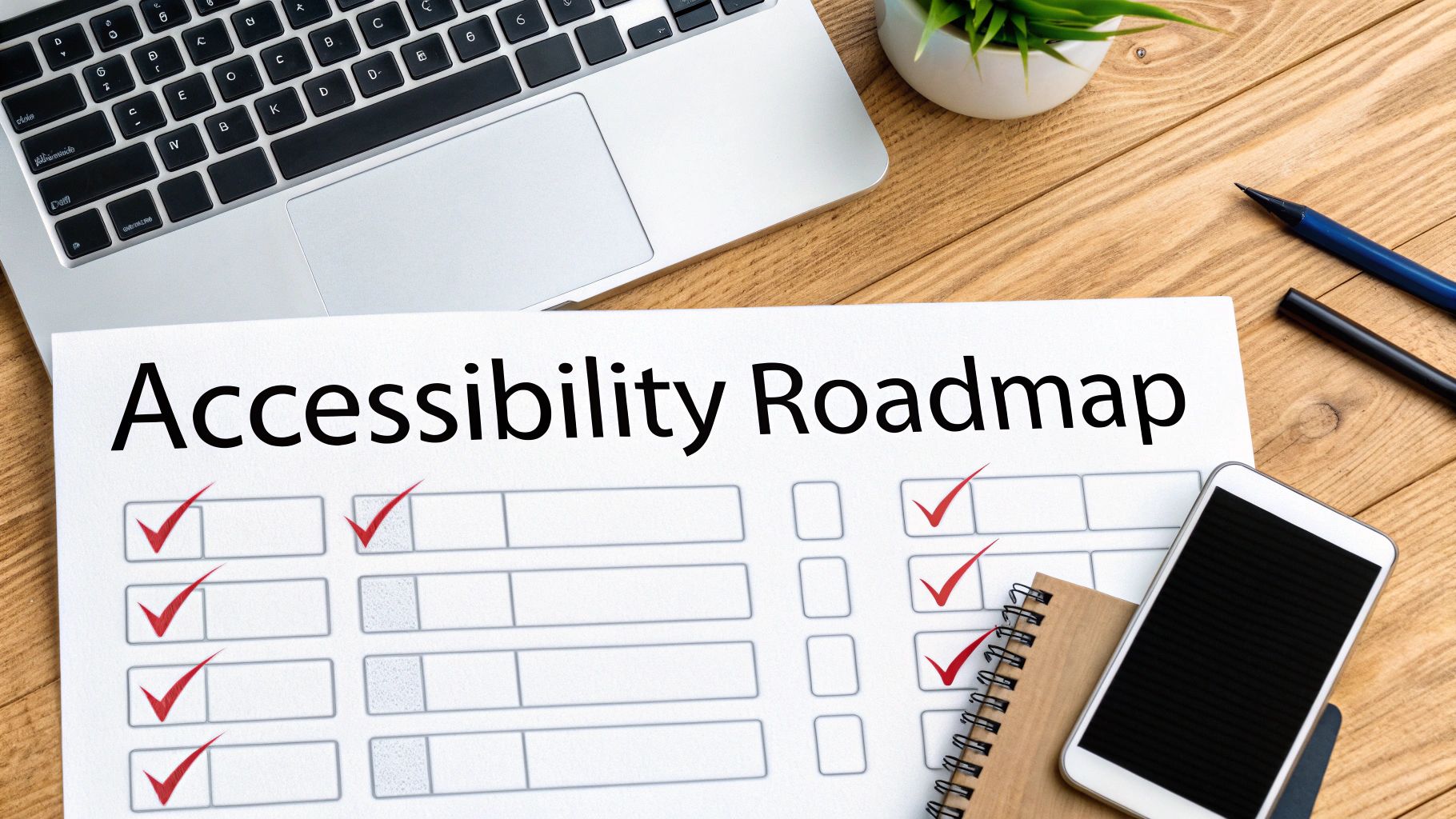
Knowing the "why" behind web accessibility is one thing, but turning that understanding into action is where the real work begins. Getting your website accessible isn't a one-and-done project. Think of it as an ongoing commitment to keeping your digital doors open to everyone.
This simple, phased approach gives you a clear path forward. It breaks the journey down into manageable steps, helping you build accessibility into the very fabric of how you operate.
Phase 1: Audit Your Current Website
You can't fix what you don't know is broken. The first, most critical step is to get a clear picture of your site's current accessibility health with a thorough audit. This isn't just about running an automated scanner; it involves a mix of those tools and, just as importantly, manual testing by real people.
This initial review will uncover everything from missing alt text on images to complex keyboard navigation traps that software often misses. The goal is to create a detailed inventory of every single barrier, giving you a data-driven foundation for everything that comes next.
Phase 2: Prioritize and Remediate
Once you have a full audit report, it’s easy to feel overwhelmed. The secret is to prioritize strategically. Not all issues have the same impact. A smart remediation plan focuses on fixing the most critical barriers first—the ones that completely block users or carry the biggest legal risks.
This might mean focusing on:
- Fixing site navigation: Making sure every menu and link works perfectly with just a keyboard.
- Addressing form errors: Ensuring all fields have proper labels so people can actually fill out your contact or checkout forms.
- Adding video captions: Opening up your multimedia content to people with hearing impairments.
By tackling these high-impact fixes first, you deliver a much better user experience right away and build momentum for the rest of the work.
True accessibility isn’t achieved with a single sprint; it's a marathon. A phased approach ensures you're building a sustainable practice that serves your users for the long haul.
This methodical process stops you from wasting time and makes sure your resources go where they’ll make the most difference.
Phase 3: Integrate Accessibility Into Your Workflow
Constantly reacting to problems is expensive and inefficient. The most effective way to keep your website accessible is to build it into your team's day-to-day work. It needs to be a standard consideration from the very beginning, not an afterthought right before launch.
Designers should be thinking about color contrast and logical layouts from the first wireframe. Developers need to write clean, semantic code that plays nicely with assistive technologies. Even your content creators should be trained to write descriptive alt text and use proper heading structures. A great place to start is our comprehensive website accessibility checklist, which breaks down the key requirements for your team.
Phase 4: Train Your Team and Maintain Compliance
Finally, getting your site accessible is one thing, but keeping it that way is the real challenge. Your success hinges on empowering your team with the right knowledge and tools. Regular training ensures everyone understands their role in creating an inclusive experience.
Periodic check-ins and mini-audits are also essential. They help you catch new issues before they become major problems, especially as your site grows with new features and content. For more practical steps, the ultimate website accessibility checklist is another excellent resource for ongoing guidance.
Helpful Accessibility Tools for Your Team
Getting started with auditing doesn't have to be intimidating. There are many fantastic tools, both free and paid, that can help your team identify and fix common issues. Here are a few popular options to get you on the right track.
| Tool Name | What It Is Best For | Tool Type |
|---|---|---|
| WAVE Web Accessibility Evaluation Tool | Quick, visual feedback on a single page | Free Browser Extension |
| axe DevTools | Automated testing within the developer console | Free & Paid |
| Lighthouse | Built-in audits in Chrome DevTools (includes accessibility) | Free (built-in) |
| SortSite | Comprehensive site-wide scans for accessibility and SEO | Paid Desktop Software |
| NVDA Screen Reader | Manual testing to experience the site as a screen reader user | Free Desktop App |
These tools are a great starting point, but remember they are most effective when combined with manual testing to catch the nuances that automated scanners can miss.
Still Have Questions? Let's Clear Things Up.
Once you get the basics of web accessibility, the "what ifs" and "how to's" start popping up. That's a good thing. It means you're moving from theory to practice, and that’s where real progress happens.
Let's dig into a few of the most common questions business owners ask. These aren't just technical details; they’re about your budget, legal responsibilities, and overall strategy.
What’s the Price Tag on Making a Website Accessible?
There’s no one-size-fits-all answer here. The cost really depends on the size and complexity of your website and how much work is needed. A simple five-page site might just need a few tweaks, but a sprawling e-commerce store with complex features is a much bigger project.
But here’s the most important thing to remember: building accessibility in from day one is always cheaper than trying to fix it later. Think of it less as a cost and more as an investment. You're investing in a bigger audience, a better brand reputation, and essential legal protection. That’s an investment that pays for itself over and over again.
Does My Small Business Website Really Need to Be ADA Compliant?
Yes. Full stop. The Americans with Disabilities Act (ADA) doesn’t give websites a neat little checklist to follow, but U.S. courts have consistently ruled that commercial websites are "places of public accommodation." This means they fall under the ADA's requirements.
And that ruling applies to everyone. There are no exceptions for small businesses. The only way to truly serve all your customers and protect your business from legal trouble is to be proactive. Ignoring accessibility is a gamble you can't afford to take, no matter how small your team is.
"Relying on quick-fix overlays is like putting a ramp over a flight of stairs but forgetting to add a door. It might look like a solution from a distance, but it doesn't actually grant access."
This gets to the heart of a common, but deeply flawed, shortcut.
Can’t I Just Use an Accessibility Plugin or Overlay?
It’s tempting, isn't it? A single line of code that promises to make all your accessibility problems disappear. Unfortunately, these automated plugins and overlays just don't work as advertised.
They might catch a few simple things, but they miss the complex issues that require a human touch and real-world testing. Even worse, these tools can sometimes clash with the very assistive technologies people use, creating a more frustrating experience. The verdict from accessibility experts is clear: do not rely solely on overlays. True accessibility comes from a thoughtful audit, manual testing, and smart code fixes.
Ready to stop guessing and start building an inclusive website that welcomes every visitor? The team at OneNine specializes in expert accessibility audits, strategic remediation, and accessible design from the ground up. Let's build a better web together.


