
Let's break down website hosting and management. They’re the two essential services that keep your site live, safe, and running like a well-oiled machine. Hosting is the physical server space where all your website’s files are stored, while management is the ongoing technical work—think updates, security checks, and backups.
It helps to think of it like running a physical retail shop. Hosting is like leasing the commercial space, and management is like paying for utilities, security, and maintenance to keep the doors open and customers safe.
The Foundation of Your Digital Presence

A common mistake business owners make is thinking the work is over once a website goes live. But launching the site is just step one. Hosting and management together are the operational backbone that makes sure your digital storefront is always open, fast, and secure for every single visitor.
Let’s stick with that physical store analogy to make it crystal clear.
- Website Hosting: This is your plot of land and the building itself. It's the server—a high-powered computer that holds all your website's files, from the text and images to the code that makes it all work. Without a host, your website simply has no place to "live" online.
- Website Management: This is everything else you need to keep your shop running smoothly and safely. It’s the security system, the cleaning crew, the regular maintenance checks. For a website, this means vital tasks like software updates, security monitoring to fend off hackers, routine data backups, and fine-tuning performance.
You can't have one without the other. Great hosting on a site with zero management is like a gorgeous storefront with unlocked doors and no one watching the register—it's a sitting duck. On the flip side, top-notch management on a slow, unreliable server is like having an all-star team working in a building with a shaky foundation. You’re just not going to get good results.
Why This Matters for Your Business
The need for a solid digital infrastructure is bigger than ever. The global web hosting market jumped from $130.1 billion in 2023 to nearly $160 billion in 2024. Projections show it rocketing to an incredible $355.8 billion by 2029. This isn't just a trend; it's proof that a stable online presence is non-negotiable for any business today. You can learn more about the rapid expansion of the web hosting market and what it means for companies.
Taking hosting and management seriously has a direct impact on your revenue. A website that’s slow or down will send potential customers straight to your competitors. Even worse, a single security breach can shatter the trust you’ve worked so hard to build.
A well-hosted and managed website isn't just an IT expense; it's a core business asset. It creates a great user experience, protects your company's data, and fuels your growth.
When you invest in a solid foundation, your website becomes a reliable engine for generating leads, making sales, and keeping customers happy. This isn't just about technology—it's a fundamental part of your business strategy.
Finding the Right Home for Your Website
Choosing a web host is a lot like picking a physical location for your business. Are you looking for a shared co-working space, a private office suite, or your very own custom-built headquarters? Where you "live" online directly affects how fast your website runs, how secure it is, and how much room you have to grow.
Let’s walk through the main types of website hosting using this simple analogy. By the end, you'll have a much clearer idea of which digital "home" is the right fit for your business.
Shared Hosting: The Apartment Rental
Shared hosting is the most common starting point for new websites, blogs, and small businesses. It's affordable and straightforward. Think of it like renting an apartment in a large building—you get your own space, but you share the building's core resources like water, power, and bandwidth with all the other tenants.
In the digital world, this means your website shares a single server and its resources (CPU power, memory, storage) with hundreds or even thousands of others.
- Pros: It's incredibly cheap and easy to get started with. The hosting company handles all the technical maintenance, so you don't have to.
- Cons: Your website's performance can be shaky. If a neighboring site suddenly gets a huge spike in traffic (a "noisy neighbor"), your site can slow to a crawl. You also get very little control over the server settings.
This is a perfect, low-cost option when you're just getting off the ground, but you’ll likely outgrow it as your traffic picks up.
VPS Hosting: The Condo Ownership
A Virtual Private Server, or VPS, is the next logical step up. This is like owning a condo. You're still in a shared building, but your unit is completely your own. You have your own dedicated, partitioned space with guaranteed resources. Your neighbors can't hog your parking spot or use your utilities.
A VPS works by splitting one powerful physical server into multiple, isolated virtual machines. Each one acts like its own private server, giving you a serious boost in power and control without the hefty price tag of a dedicated machine.
A key benefit of VPS hosting is predictable performance. Because your resources are reserved just for you, your website's speed and reliability won't be dragged down by other sites on the same hardware.
This middle-ground solution strikes a great balance between cost, performance, and control. It’s ideal for growing businesses, e-commerce stores, and any website that’s starting to see a steady stream of traffic.
Dedicated Hosting: Your Own Private House
Dedicated hosting is the top of the line—it's the equivalent of owning a standalone house. The entire property is yours, giving you complete control over everything. You can renovate, customize, and secure it exactly how you see fit.
With dedicated hosting, you rent an entire physical server exclusively for your website. All of its processing power, memory, and storage belong to you and you alone. This delivers maximum performance and security.
- Best For: High-traffic websites, large-scale e-commerce stores, and any business with strict security or compliance needs.
- Drawback: It's the most expensive option and usually requires deep technical know-how to manage properly (unless you pay extra for a management service).
Cloud Hosting: The Scalable Utility
Cloud hosting is a more modern approach that breaks away from the traditional real estate model. Instead of a single building, picture your website being powered by an entire city's utility grid. If one power station has an issue, another one instantly takes over. If you need a massive surge of power for a big event, you can get it on demand.
Here, your site runs on a vast network of connected servers. This setup offers incredible flexibility and reliability. If one server fails, another seamlessly picks up the load. Better yet, you can scale your resources up or down in real-time to handle traffic spikes, and you only pay for what you actually use. This makes it a fantastic choice for businesses with unpredictable traffic.
The market certainly reflects these choices. While shared hosting remains a popular entry point, more and more businesses are moving toward robust, managed solutions that can grow with them. In fact, while the shared hosting market is projected to reach $113 billion by 2030, the managed hosting sector is expected to hit a staggering $406.73 billion by 2031. This trend makes it clear: businesses are willing to invest in outsourcing the complexities of scaling and security.
To help you get a clearer picture, here’s a quick breakdown of how these options stack up for a typical small business.
Hosting Type Comparison for Small Businesses
This table provides a quick glance at the most common hosting types, helping you match your business needs with the right solution.
| Hosting Type | Best For | Average Cost | Performance | Technical Skill Needed |
|---|---|---|---|---|
| Shared | New websites, blogs, portfolios, businesses on a tight budget. | $3 – $15 / month | Lower, can be inconsistent. | Beginner |
| VPS | Growing businesses, e-commerce stores, sites with moderate traffic. | $20 – $80 / month | Good & reliable. | Intermediate |
| Dedicated | High-traffic sites, large e-commerce, strict security needs. | $80 – $300+ / month | Excellent & consistent. | Advanced |
| Cloud | Businesses with fluctuating traffic, apps needing high uptime. | Varies (Pay-as-you-go) | Excellent & scalable. | Intermediate to Advanced |
Ultimately, the best choice really boils down to your specific budget, traffic, and technical comfort level. To see how these concepts play out in the real world, check out our in-depth comparison of the best website hosting providers for a detailed breakdown of today's top options.
The Daily Grind of Website Management
Getting your website live is a fantastic feeling, but it’s really just the starting line. Think of it like buying a brand-new car. You don’t just drive it off the lot and hope for the best, right? To keep it running smoothly and safely, you have to do the regular maintenance—the oil changes, tire rotations, and check-ups. Website management is pretty much the digital version of that essential upkeep.
Without this ongoing care, your website—one of your most important business assets—is left exposed. Performance starts to lag, security risks pop up everywhere, and you could end up losing customer data and the trust you've worked so hard to build. Good website hosting and management isn't a "set it and forget it" task; it's a series of crucial, hands-on jobs that protect your investment and make sure it keeps working for you.
Securing Your Digital Front Door
By far, the most critical part of website management is keeping it safe from threats. Just like your office needs locks and an alarm system, your website needs layers of defense to keep bad actors out and your data secure.
This breaks down into a few key activities:
- Regular Security Scans: These are like automated security guards patrolling your site, constantly checking for malware, viruses, and other weak spots. Finding a threat early on is the best way to stop it from turning into a major data breach.
- Software and Plugin Updates: Out-of-date software is the number one reason websites get hacked. Developers are always releasing patches for security holes, and applying those updates right away is like locking a door you didn't know was open.
- Firewall Management: A web application firewall (WAF) acts as a bouncer for your website, filtering out sketchy traffic before it even gets a chance to cause trouble.
Skipping these tasks is asking for trouble. A single security breach can lead to devastating data loss, wreck your brand’s reputation, and cost you a fortune in downtime.
Keeping Your Data Safe and Sound
Even with top-notch security, things can still go wrong. A buggy update, a simple human error, or a server hiccup could crash your site or corrupt your files. This is where backups and monitoring become your absolute, non-negotiable safety net.
Backups are your website's insurance policy. They are the single most important thing you have to prevent permanent data loss. If your site gets hacked or something breaks, a recent backup lets you hit the "undo" button and get back online fast.
For most businesses, daily backups are the bare minimum. If you run an e-commerce site that’s taking orders 24/7, you might even need real-time backups to avoid losing crucial sales data. And these backups should always be stored somewhere else—not on the same server—so they’re safe even if the main server has a complete meltdown. For a deeper dive into what this proactive care looks like, our guide on what website maintenance includes breaks down all the essential services.
Hitting Peak Performance
Okay, so your site is secure and backed up. That’s a great start, but it also has to be fast and dependable for your visitors. Performance management is all about keeping your site running at full speed and making sure it's always available when people need it.
This chart helps show how different hosting options—a huge factor in performance—fit different business needs based on budget, control, and power.
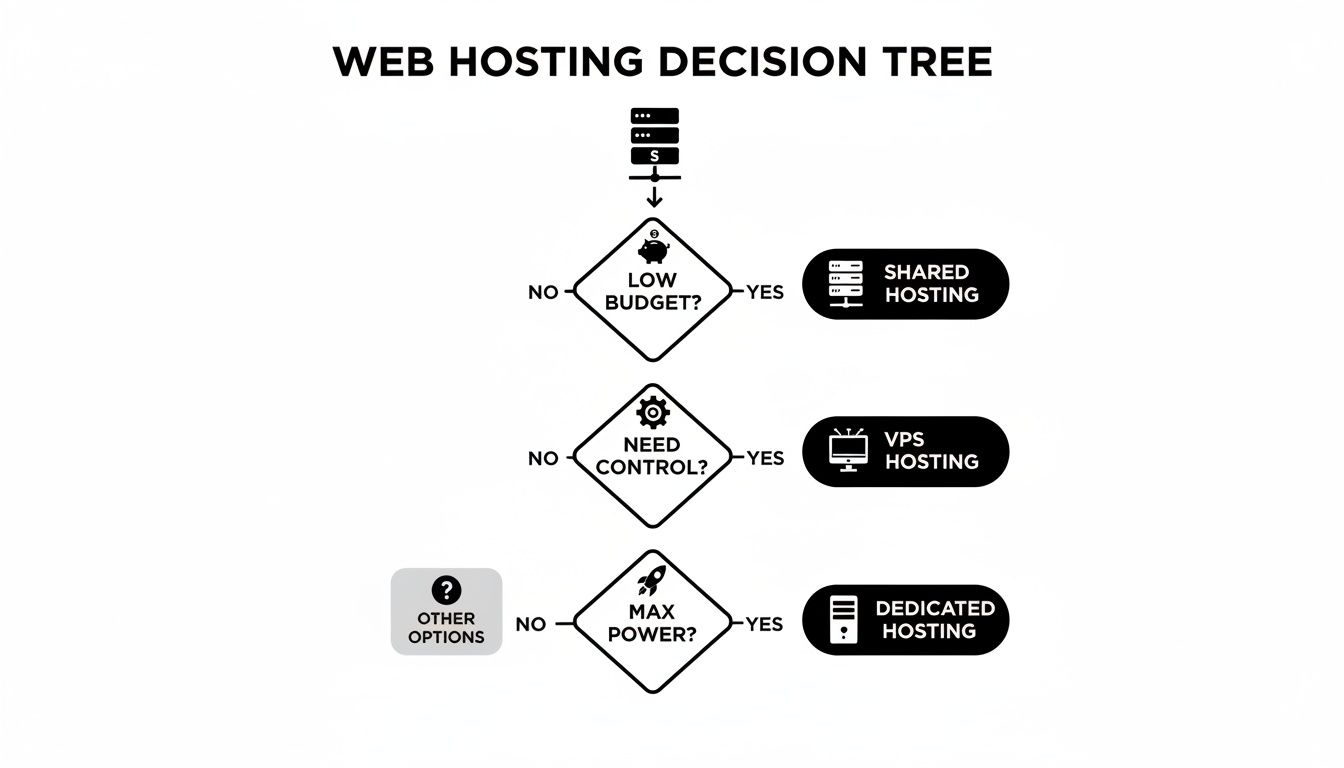
As you can see, once your need for control and power grows, you have to move up from Shared to VPS or Dedicated hosting to keep things running smoothly.
Two key tasks really drive this effort:
- Uptime Monitoring: This is an automated service that pings your website 24/7 to make sure it's online. If it ever goes down, your management team gets an alert instantly so they can fix the problem—often before your customers even notice something is wrong. Even 99% uptime means your site could be down for over 7 hours a month, which shows why you can't take your eye off the ball.
- Performance Optimization: This involves regularly checking your site's speed and making tweaks to improve it. That could mean compressing images, cleaning up code, or using caching to deliver content faster. A slow website doesn't just annoy users; it tanks your search engine rankings and directly hurts your business.
At the end of the day, all these management tasks work together. They create a digital experience that's secure, reliable, and fast, turning your website from a simple online brochure into a tough, high-performing tool for your business.
How Your Website Platform Affects Management
Think of your website platform—your Content Management System (CMS)—like the engine in your car. A vintage muscle car with a V8 requires a totally different kind of care and expertise than a modern, sealed-unit electric vehicle. The engine you choose dictates everything that follows, from daily operation to long-term maintenance.
It’s the same with your website. The platform it’s built on is the single biggest factor determining how much time, money, and technical skill you'll need to keep it running smoothly and securely. Getting this right from the start saves a world of headaches down the road.
WordPress: The Hands-On Powerhouse
WordPress is the undisputed king of the internet, running over 43% of all websites. Its popularity comes from its incredible flexibility. Thanks to a massive library of plugins and themes, you can build just about anything you can imagine.
But here’s the trade-off: that flexibility comes with responsibility. Every single plugin and theme is a separate piece of software, and you’re the one in charge of keeping it all updated and playing nicely together.
- Constant Updates: Out-of-date plugins are the number one reason WordPress sites get hacked. You have to stay on top of updates for the core software, your theme, and every plugin you’ve installed.
- Troubleshooting Conflicts: Ever update one app on your phone, only to have it break another? The same thing happens with WordPress. Figuring out why a new plugin update crashed your contact form requires real technical skill.
- Active Security: While the core WordPress software is quite secure, every plugin you add is another potential door for an attacker to sneak through. You have to be proactive about locking things down.
A WordPress site gives you total control, but it's not a "set it and forget it" solution. It demands consistent, hands-on maintenance to stay safe and performant.
All-in-One Builders: The Guided Experience
Platforms like Shopify, Wix, and Squarespace take a completely different approach. They are "hosted" platforms, which is a bit like leasing a fully serviced car. The dealership handles the engine, the security system, and all the mechanical upkeep for you.
With these builders, your job shifts from being a mechanic to just being the driver. You stop worrying about the technical guts of the website and focus on what matters for your business.
On an all-in-one platform, the hosting, security patches, and core software updates are all done for you. Your main responsibility is managing your own content, products, and marketing.
This approach dramatically lowers the technical barrier to entry. It's a fantastic choice for business owners who would rather spend their time on sales and customers than on server settings. You give up some deep-level customization in exchange for simplicity and peace of mind.
For a detailed breakdown of how these platforms stack up, check out our complete CMS comparison guide.
Custom-Built Websites: The High-Performance Machine
If a standard platform is a production car, a custom-built website is a Formula 1 race car. It’s precision-engineered for one specific purpose—to deliver blistering performance and a completely unique experience. And just like a race car, it requires a dedicated pit crew.
With a custom site, there are no one-click updates or community forums to help you out. Every single line of code, from security fixes to new features, has to be managed by the professional developers who built it.
- Intensive Maintenance: All code has to be updated and tested manually.
- Specialized Expertise: You need access to developers who are experts in the specific programming languages and frameworks your site was built with.
- Higher Costs: This level of specialized, hands-on work naturally costs more than managing a site built on a popular, off-the-shelf platform.
Custom websites offer the ultimate in performance and control, but they also come with the most demanding and expensive management needs. Your choice of platform truly sets the stage for everything else, defining your role and responsibilities for years to come.
Choosing the Right Hosting and Management Provider

Picking a company to host and manage your website isn't like buying a product off a shelf. It’s more like hiring a critical business partner. This is the team you're trusting to keep your digital storefront open, secure, and running smoothly.
To get it right, you have to look past the flashy ads and dig into the details that actually impact your business's uptime and growth. It's about creating a checklist to vet potential partners, which means poring over their service agreements, testing their support, and truly understanding their security posture. The goal is to find a provider that lines up perfectly with your tech needs, your budget, and where your business is headed.
Decoding the Service Level Agreement
The Service Level Agreement (SLA) is easily the most important document you’ll read. It’s the formal contract that lays out exactly what the provider promises in terms of performance and reliability. Don't just skim this—it's where the guarantees are written in black and white.
The most critical number in any SLA is the uptime guarantee. This is the percentage of time your website is promised to be online. While 99.9% uptime sounds great, that still allows for almost nine hours of downtime over a year. That’s a lot of lost business. The best providers will promise 99.99% or even higher.
But the percentage is only half the story. Look for the "what if" clause. A solid SLA will spell out exactly what you get if they fail to meet that uptime promise. Usually, this means service credits, and the terms tell you how much faith a provider has in their own network.
Evaluating Customer Support and Expertise
When your site breaks at 2 a.m., an email confirming they got your ticket and will respond in 24 hours is completely useless. Great customer support isn't a "nice-to-have"; it's a deal-breaker, and you need to kick the tires on it before you sign anything.
Here’s what to look for:
- 24/7/365 Availability: Problems don’t work 9-to-5. You need to be able to reach a real person—whether by phone, live chat, or ticket—any time of day or night.
- Human-Powered Support: A chatbot might handle simple FAQs, but for a real technical crisis, you need a skilled human on the other end who can actually troubleshoot the problem.
- Response Time Guarantees: Check the SLA for their guaranteed response and resolution times. This tells you how quickly they’re contractually obligated to start working on your issue.
Think of a provider's support team as an extension of your own. Their speed, knowledge, and willingness to help will make or break your experience during a crisis. Pick a partner you can count on when things go wrong.
Assessing Security and Proactive Measures
A provider's security philosophy should be proactive, not reactive. They shouldn't just be cleaning up messes; they should be actively preventing them from ever happening. This is a cornerstone of any good website hosting and management service.
Your evaluation should cover a few key areas:
- Firewall and Malware Scanning: Do they provide and manage a Web Application Firewall (WAF) to filter out bad traffic? How often are they scanning for malware?
- Automated Backups: Make sure they offer daily, automated backups and—this is crucial—that those backups are stored somewhere off-site. You should also ask how their restoration process works.
- Software Updates: For systems like WordPress, a managed provider should be handling all core, theme, and plugin updates. Out-of-date software is the number one way attackers get in.
Understanding Pricing Models and Hidden Costs
Hosting and management pricing can feel like a maze. Many providers lure you in with a low introductory rate, only for it to double or triple when it’s time to renew. It's a crowded market—with over 1.88 billion websites hosted by some 330,000 different companies, providers will do a lot to get your business. Industry giants like AWS win by offering rock-solid reliability, which is why major companies pay them for constant management and security. You can find more stats on web hosting competition here.
To avoid any nasty surprises, look closely at the entire pricing structure. Hunt for hidden fees for things like site migrations, SSL certificates, or for going over your storage limits. A transparent provider will offer clear, tiered packages that show exactly what you get for your money, so you can pick a plan that fits your budget without worrying about surprise charges down the road.
To give you a better idea of what to expect, here are a few sample packages tailored for small to medium-sized businesses.
Sample Monthly SMB Management Packages
| Package Tier | Core Features | Ideal For | Estimated Monthly Cost |
|---|---|---|---|
| Basic | Daily Backups, Core Updates, Uptime Monitoring, Basic Security Scans | Small blogs, portfolios, or businesses with a simple "brochure" website. | $50 – $150 |
| Business | All Basic features + Plugin/Theme Updates, Staging Environment, Performance Caching, WAF | Growing businesses, small e-commerce sites, or lead generation websites. | $150 – $400 |
| Pro | All Business features + Advanced Security, Priority Support, Performance Optimization, CDN | Established e-commerce stores, high-traffic sites, and mission-critical applications. | $400 – $1,000+ |
These tiers show how services scale with your needs. As your website becomes more critical to your operations, the investment in more robust management, security, and performance features pays for itself.
Common Questions About Website Hosting and Management
When you're wading into the world of website hosting, it's natural to have questions. In fact, most business owners we talk to ask the same handful of things right at the start. Getting straight answers is the first step toward making a smart decision for your business.
Let's cut through the technical jargon and tackle those questions head-on. My goal here is to clear up any confusion you might have about costs, responsibilities, and some of the fundamental concepts.
Can I Just Manage My Own Business Website?
You technically can, but the real question is, should you? For a busy business owner, going the DIY route is often a trap. Properly managing a website isn't a "set it and forget it" task; it demands a real time commitment and a solid grasp of things like server administration, cybersecurity, and software updates.
Think about it this way: every hour you spend figuring out a server error or fixing a broken plugin is an hour you’re not spending on sales, talking to customers, or growing your business. For most companies, handing these tasks over to an expert is a no-brainer. It ends up being more cost-effective and a whole lot safer in the long run.
What’s the Difference Between a Domain and Hosting?
This is easily the most common point of confusion, but a simple analogy clears it right up.
Imagine your website is a house. Your domain name (like YourBusiness.com) is the street address people type in to find you. Your web hosting is the actual plot of land where the house is built and all your stuff (your website's files) is stored.
You can't have one without the other. The domain points people to the right place, and the hosting is the place itself. They work together to get your site online for the world to see.
How Much Should I Budget for Hosting and Management?
This is where you'll see a huge range. You might see ads for shared hosting that costs just a few dollars a month, but that rock-bottom price usually means you get zero management, shaky support, and performance that can be all over the place.
For a small business that needs a reliable online presence, a realistic budget for quality managed hosting usually starts in the $30 to $100 per month range. If you want a more hands-off service that covers all your updates, security monitoring, and performance tweaks, you should plan to budget anywhere from $100 to over $500 monthly, depending on how complex your site is. It’s better to think of this as an investment in your site’s security and uptime, not just another bill.
How Often Does My Website Need to Be Backed Up?
For pretty much any active business website, daily backups are the bare minimum. If you have a simple site that you never, ever update, you might get away with weekly backups, but that's incredibly rare. Any site that takes customer info, sells products, or gets updated with new content needs a daily backup to protect against disaster.
Here’s what a good, basic maintenance rhythm looks like:
- Backups: A full backup should run every 24 hours, and those backups need to be stored somewhere safe, away from the server itself.
- Core Software Updates: These are often for security, so they should be applied as soon as they’re available.
- Plugin and Theme Updates: These also need to be done quickly, but it’s smart to test them on a staging site first to make sure they don’t break anything.
This constant cycle of updates and checks is exactly why so many businesses partner with a management service. A good partner automates this whole process, so your site stays protected without you ever having to worry about it.
At OneNine, our whole job is to take the complexity out of website hosting and management. We handle the security, the backups, and the performance tuning, so your site is always fast, secure, and ready for business. Get a partner in your digital success with OneNine today.


