
When we talk about writing project requirements, we’re really talking about defining the specific needs, features, and constraints that will make a project a success. It’s the critical process of turning what stakeholders want into a clear set of instructions your team can actually build.
Think of it as the blueprint for a house. You wouldn't start building without one, right?
Why Clear Requirements Are Your Project's Foundation
Before we get into the "how," let's quickly cover the "why." Why is this so important? Imagine asking a contractor to build "a nice house with a few rooms." You’d be lucky to get four walls and a roof, let alone something that matches the picture in your head. The same is true for any project, whether it’s a new software feature or a marketing campaign.
Well-defined requirements are your best defense against the things that sink projects: scope creep, endless revisions, and confused stakeholders.
The Real Cost of Vague Requirements
Fuzzy requirements aren't just a headache; they hit the bottom line, hard. Globally, it’s estimated that 9.9% of every project dollar is wasted due to poor project performance, and a huge chunk of that comes from ambiguous requirements. For more eye-opening stats, check out these project management statistics on globaltechstack.com.
That financial drain comes from building features no one asked for, missing critical functions, or constantly redoing work because the initial ask was unclear.
A well-defined requirement becomes the single source of truth for everyone involved. It aligns the project sponsor, the designer, and the developer on exactly what "done" looks like. Without it, you’re just guessing.
Understanding the Three Core Requirement Types
To build a solid foundation, it helps to know that not all requirements are created equal. They fit into three main categories. Let's break it down with a simple scenario: building a mobile app for a local coffee shop to boost customer loyalty.
First, you have the Business Requirements. These are the big-picture goals. What does the business want to achieve?
- Example: "Increase repeat customer visits by 15% within six months."
Next are the User Requirements (sometimes called Stakeholder Requirements). These describe what a person needs to be able to do to help meet that business goal.
- Example: "As a customer, I want to collect loyalty points with each purchase so I can earn free drinks."
Finally, we get to the Functional Requirements. This is where you detail exactly what the system must do to make the user requirement possible.
- Example: "The system must automatically add one loyalty point to a user's account for every dollar spent."
Here’s a quick table to keep these straight:
The Three Core Types of Project Requirements
| Requirement Type | What It Answers | Simple Example (Coffee Shop App) |
|---|---|---|
| Business | Why are we doing this project? | Increase repeat customer visits by 15% in six months. |
| User | What does the user need to be able to do? | As a customer, I want to collect loyalty points. |
| Functional | What does the system need to do? | The system will add one point for every dollar spent. |
Understanding this hierarchy is key. It stops you from getting lost in the weeds and ensures that every technical detail you define ultimately connects back to a real business objective.
Uncovering Needs with Smart Gathering Techniques

Great project requirements aren’t just written down; they're discovered through genuine, meaningful conversations. Think of yourself as a detective. Your job is to ask the right questions to pull crucial information from stakeholders, turning their vague ideas into solid, actionable goals.
The stakes during this discovery phase are incredibly high. The quality of your requirements is one of the biggest factors determining if a project succeeds or fails. Globally, about 50% of projects don't hit their targets, and it's often because the requirements were fuzzy from the get-go.
Simply put, the techniques you use to gather information will directly shape the project's final outcome.
Choosing the Right Tool for the Job
You wouldn't use a hammer to turn a screw. The same logic applies here. You need a versatile toolkit to adapt to different stakeholders and project complexities. Running a huge workshop for a simple request from a single person is overkill. On the flip side, a one-on-one chat won’t cut it for a complex system that impacts multiple departments.
Here are the three core techniques you'll find yourself turning to again and again:
- Structured Interviews: These are your go-to for deep dives with key people. Use one-on-one sessions to really understand the specific pain points, workflows, and needs of a subject matter expert or the project sponsor.
- Interactive Workshops: Perfect for building consensus and getting creative. When you need to get multiple stakeholders in a room (virtual or physical) to collaborate, hash out conflicting views, and prioritize features together, a workshop is your best bet.
- Surveys and Questionnaires: When you need to gather feedback from a large user base, surveys are invaluable. This approach helps you collect quantitative data and spot trends you might otherwise miss in smaller group settings.
Imagine you're building a new e-commerce feature. You'd start by interviewing the head of sales to understand the revenue goals. Next, you’d run a workshop with marketing, customer support, and IT to map out the entire user journey. Finally, you could send a survey to existing customers to see if your assumptions are on the right track.
Running Effective Stakeholder Interviews
A great interview feels less like an interrogation and more like a guided conversation. Your ultimate goal is to uncover the "why" behind every single request. Don't just ask, "What do you want?" That's a dead end. Instead, use open-ended questions that get to the root of the problem.
Pro Tip: Steer clear of leading questions that push your own solutions. Instead of asking, "Would a dashboard with real-time analytics help?" try something like, "How do you currently track performance, and what information do you feel is missing?"
Capturing every detail in these meetings is absolutely vital. This is where exploring different effective note-taking methods can be a game-changer, ensuring no critical insights get lost. The ideas you collect here often become the foundation for the entire project.
If you’re kicking off a new website, these early conversations are the first step toward a comprehensive brief. For a bit of structure, this fantastic https://onenine.com/website-brief-template/ can really help you organize your thoughts and make sure you're asking the right questions from the start.
How to Document Requirements for Absolute Clarity
You've done the hard work of gathering all that valuable information from stakeholders. Now what? The next challenge is turning those notes, interviews, and workshop outputs into a document that your team will actually read and use.
This isn't just a box-checking exercise. You're creating the single source of truth that will guide every decision from here on out. A well-structured requirements document is what stops those dreaded "I thought you meant…" conversations from derailing your project weeks or months down the line.
Your document's structure is your first line of defense against ambiguity. It needs to tell a clear, logical story, starting with the big-picture "why" and drilling down into the specific "what" and "how."
The Essential Components of a Requirements Document
Think of your requirements doc as having different layers, each one adding more detail and clarity. A rock-solid document usually has a few key sections that work together to give everyone—from the CEO to the junior developer—a complete picture.
- Executive Summary: This is the 30,000-foot view. In just a few paragraphs, explain the project's goals, what problem it solves, and the high-level scope. It’s for the stakeholders who need to know the why without getting lost in the weeds.
- Scope and Assumptions: Be crystal clear about what is in-scope and, just as importantly, what is out-of-scope. Listing what you're not doing is one of the most powerful ways to manage expectations and prevent scope creep before it even starts.
- Functional Requirements: This is the real meat of the document. It details exactly what the system or product has to do. What features will it have? What actions can users take?
- Non-Functional Requirements: These describe how the system should perform its functions. This covers everything from performance (how fast does the page load?) and security to reliability and accessibility.
This infographic does a great job of breaking down how these core elements—boundaries, assumptions, and deliverables—fit together.
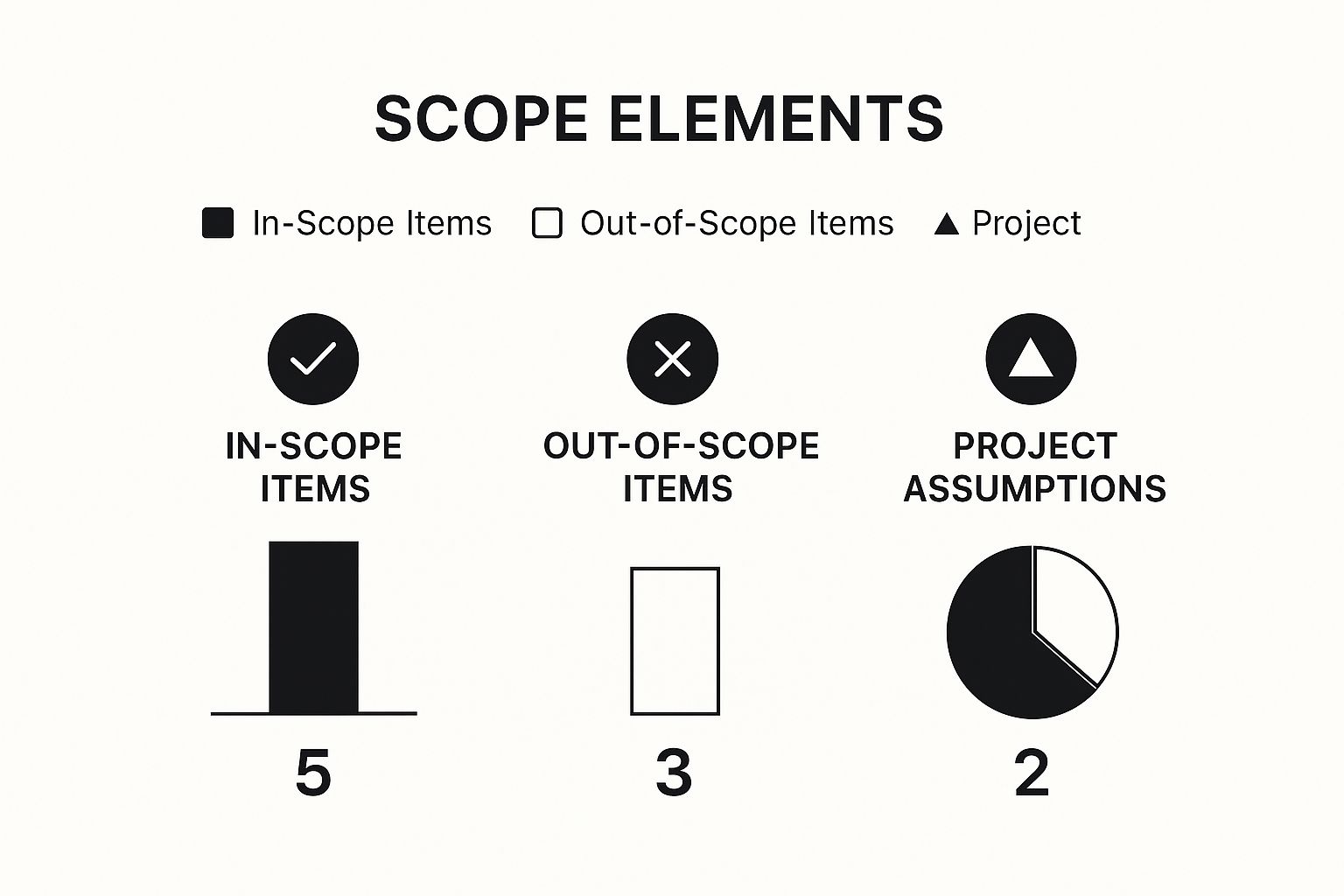
When you visualize the scope like this, it helps stakeholders quickly grasp the project's boundaries, which cuts down on misunderstandings from day one. If you want a great framework for this, our project scope document template is an excellent starting point.
Choosing Between User Stories and Use Cases
Once you get into the functional requirements, you'll need to decide how to describe what the system needs to do. Two of the most common formats are User Stories and Use Cases. They aren't mutually exclusive, but knowing when to use each is a key skill for writing effective requirements.
User Stories are short, simple descriptions of a feature from the perspective of the person who wants it. They typically follow this simple template:
"As a [type of user], I want [some goal] so that [some reason]."
For example: "As a logged-in customer, I want to save items to a wishlist so that I can purchase them later."
They are perfect for Agile development teams because they’re concise, keep the focus on user value, and are designed to spark a conversation rather than prescribe every last detail upfront.
Use Cases, on the other hand, are much more formal and detailed. A use case describes the step-by-step interaction between a user (often called an "actor") and the system to achieve a specific goal. They often include preconditions, triggers, and multiple paths, like a primary success scenario and various error scenarios.
So, how do you choose? It really depends on your project's complexity and your team's workflow.
User Stories vs Use Cases Which to Choose
This table breaks down the key differences to help you decide which approach is the right fit.
| Aspect | User Stories | Use Cases |
|---|---|---|
| Focus | The "who, what, and why" from a user's perspective. | The detailed "how" of a user-system interaction. |
| Best For | Agile teams, prioritizing work, and focusing on user value. | Complex systems, documenting all possible scenarios, and detailed test planning. |
| Length | Just one or two sentences. | Often several pages with diagrams and detailed steps. |
My take from years in the trenches? You don't have to pick just one. I often start with User Stories to build out the product backlog and keep the entire team laser-focused on what the user actually needs. Then, for particularly complex or high-risk features, we might flesh out a more detailed Use Case to make sure every interaction, edge case, and exception has been thought through.
The ability to master this kind of clear documentation is becoming more and more valuable. In Europe alone, there's a 20% annual growth in project management job openings. This is especially true in sectors like IT, where precise requirements are critical for complying with regulations like GDPR. For more on this, check out the latest project management trends at projectmanagertemplate.com.
Getting Everyone on the Same Page

Writing down your project requirements is a huge milestone, but it's only half the job. The most detailed document in the world is useless if your stakeholders haven't read it, understood it, and actually agreed to it. This next phase—validation and formal sign-off—is where the real magic happens.
This is the moment you transform that document from a simple draft into a shared commitment. The goal is to get a unified understanding that acts as your project's North Star, protecting your team from the misinterpretations and last-minute changes that can throw everything off track.
Making Abstract Ideas Tangible
Let's be honest: reading a dense requirements document can be a slog, especially for non-technical stakeholders. They might skim over critical details or struggle to picture how a list of functions translates into a real-world experience. Your job is to bring those ideas to life.
One of the best ways I’ve found to do this is by running requirements walkthrough sessions. This isn’t about just emailing the document and hoping for the best. It's a hands-on meeting where you guide everyone through the requirements, section by section, and answer questions as they come up.
Another incredibly powerful technique is to build a simple prototype or mockup. This doesn't have to be fancy. It could be a few wireframes sketched on a whiteboard or a clickable prototype you put together with a tool like Figma or Balsamiq.
When you show stakeholders a visual, even a basic one, the conversation immediately shifts from, "I think this is what you mean," to, "Oh, I see it now. But what if we did this instead?" That tiny shift is absolutely vital for catching misunderstandings before they become expensive problems.
Facilitating Productive Review Meetings
Leading a requirements review is a bit of an art form. You have to be confident in the work you've done while staying completely open to constructive feedback. How you manage this dynamic is the difference between a productive session and a defensive, frustrating one.
Here are a few tips that have always worked for me:
- Set the Agenda Clearly: Start the meeting by stating the goal: to review, clarify, and approve the current requirements. Gently remind everyone that this isn't the time to brainstorm brand-new features.
- Manage Feedback Systematically: Conversations can easily get sidetracked. I like to use a "parking lot" (a corner of the whiteboard or a separate notes section) for great ideas that are out of scope. Make sure to document all feedback and action items as you go.
- Negotiate Priorities with Purpose: When stakeholders have competing demands—and they always do—bring the discussion back to the core business objectives. Ask questions like, "Which of these requests gets us closer to our goal of increasing user retention by 10%?"
Securing Formal Sign-Off
The final piece of the puzzle is getting that formal approval. This isn't just a bureaucratic step; it’s a critical project milestone that officially locks in the agreed-upon scope of work. A formal sign-off becomes your single source of truth if questions or disputes pop up later on.
This approval needs to be documented. It could be a clear email confirmation from key stakeholders or a formal signature page in your project management software. This final step ensures everyone acknowledges their agreement and understands that any future changes will have to go through a proper change control process.
By getting everyone on the same page now, you're building a foundation of clarity and consensus that will support the entire project.
Managing Requirements When Things Change
Let's be honest: no project plan ever survives first contact with reality. Change isn't a sign that you've failed; it’s just a natural part of building something worthwhile. The real secret to success isn't trying to prevent change altogether, but having a smart way to manage it so your project doesn't go off the rails.
When a stakeholder asks for a "small tweak," it can send ripples across the entire project, affecting your timeline, budget, and even other features you've already planned. This is precisely why having a formal change control process is your best friend. It’s not about shutting down new ideas, but about making sure you evaluate each one with your eyes wide open. Putting a robust change management process in place is the key to handling these shifts gracefully.
A simple, clear process keeps chaos at bay and helps everyone see the true cost of a change before you say yes.
Establishing a Simple Change Control Process
You don't need some complex, expensive software to get this right. A solid change control process really just boils down to a few logical steps that make sure every request is handled the same way, every time. This kind of structure is your best defense against the dreaded scope creep that can sink an otherwise healthy project.
Here’s a practical workflow that I've seen work time and again:
- Submit a Formal Request: No more hallway conversations or drive-by requests. Every single change, no matter how small it seems, needs to be submitted through a standard form or ticket. This captures the essential "who, what, and why."
- Do a Quick Impact Check: The project manager or product owner takes the first look. Their job is to quickly assess how the request might affect the project's scope, budget, resources, and timeline.
- Get a Decision from Stakeholders: Armed with the impact analysis, the request is presented to the key decision-makers. They have the final say: approve, deny, or maybe just put it on the back burner for later.
- Update Everything: If a change gets the green light, the work isn't done. You have to update the requirements document, the project plan, and any other relevant documentation. This ensures the entire team is always working from the latest blueprint.
This process creates a crucial buffer. It moves the conversation from an impulsive "Can we just add this?" to a strategic "What is the trade-off if we add this?" That shift in mindset is absolutely fundamental to keeping your project on track.
The Power of Traceability
Beyond just handling new requests, you have to keep tabs on the requirements you already have. This is where requirements traceability comes in. It's simply the practice of linking each requirement back to its original business goal and then following it through the entire project lifecycle—from design and development all the way to testing.
It might sound a bit technical, but the value is incredibly practical. Imagine a business goal changes halfway through the project. With good traceability, you can instantly see every single requirement, feature, and task connected to it. That clarity makes it so much easier to pivot without creating mass confusion. If you want to dive deeper, we have a whole guide on how to prevent scope creep.
Whether you use a simple spreadsheet or a dedicated tool like Jira or Perforce Helix ALM, tracking the journey of each requirement keeps your team perfectly aligned from start to finish.
Common Questions About Writing Requirements

Even with a solid game plan, you're bound to run into some tricky questions when you're deep in the weeds of writing project requirements. It happens to everyone.
Let’s walk through a few of the most common ones I've seen pop up for project managers and their teams. Having these answers handy can save you a lot of headaches.
How Detailed Should Project Requirements Be?
This is the classic "it depends" question, but the answer really hinges on your team's development style. There's no single right answer, just a right answer for your project.
- If you're running an Agile project, you'll probably start with high-level user stories. You don't need every last detail right away; instead, the team will hash out the specifics in conversations right before a sprint kicks off.
- If you're using a traditional Waterfall model, you have to be way more detailed from the get-go. The entire point is to document every single possibility before the first line of code gets written.
My rule of thumb? Provide enough detail for a developer to build the feature and for a tester to confirm it works as expected. Always focus on what the system needs to do, not the technical how of getting it done.
What Is the Biggest Mistake to Avoid?
I’ve seen this one sink more projects than any other: assuming you know what the user wants without ever talking to them. It’s the number one cause of features that look great on paper but that no one actually uses. This mistake is a direct flight to a wasted budget and frustrated stakeholders.
A close second is using vague, subjective words. Terms like "fast," "modern," or "user-friendly" are totally meaningless because they can be interpreted in a dozen different ways.
Always, always be specific and measurable.
- Avoid this: "The page should load quickly."
- Write this instead: "The product page must fully render in under 2 seconds on a standard 4G connection."
That small change makes all the difference. It takes the guesswork out of the equation and gives your team a concrete goal to aim for.
Functional vs Non Functional Requirements
You absolutely have to get your head around this distinction to write solid requirements. A project needs both to succeed—it's not an either/or situation.
Functional requirements are all about what the system does. They’re the specific features, the buttons you can click, and the actions you can take.
- For example: "A user must be able to reset their password using their registered email address."
Non-functional requirements describe how the system performs. They cover the qualities, constraints, and general behavior of the system.
- For example: "The password reset link sent via email must expire after 24 hours."
Here’s an easy way to think about it: functional requirements are the nouns and verbs of your project. Non-functional requirements are the adjectives and adverbs that bring it to life.


