

Having a website for your small business isn't just about ticking a box. It's about building a real, valuable asset that establishes your credibility and fuels your growth. Think of it as your digital flagship store—a place where you have total control over your story and how you connect with customers. That’s something a social media profile just can’t replicate.
Why a Great Website Is Non-Negotiable
It’s easy to see a website as just another expense, but that's a mistake. Your website is the central hub for every single one of your marketing efforts. Every social post, every email newsletter, every business card you hand out should point people right back to the one online space you truly own.
Social media platforms are great, but their algorithms and rules can change without warning. Your website, on the other hand, is your own property. You call the shots on the design, the content, and the entire user experience. That ownership is fundamental for building a lasting brand and genuine customer relationships.
Building Trust and a Solid Reputation
First impressions matter, and your website is often the very first place potential customers will interact with your brand. A professional, well-designed site instantly tells them you're a serious, legitimate business. A clunky, outdated, or broken site? That sends people running straight to your competition.
Your website is your best salesperson. It works 24/7, answering questions, showing off what you do best, and bringing in leads while you’re busy running your business—or even sleeping.
The numbers don't lie. By 2025, a whopping 83% of small businesses worldwide will have their own websites. That’s a massive leap from just 64% in 2018. This isn't a coincidence; it's because the tools to build a great site are more accessible than ever. If you want to dig into the data, Clutch.co offers some great insights on small business website trends.
The Foundation for Smart Growth
A great website does more than just look good; it’s a powerful engine for growing your business. It becomes the home base for all your digital marketing, giving you critical data and a platform to launch new initiatives.
Here’s what that really means for you:
- You own your data. With tools like Google Analytics, you can see exactly how people find you and what they do on your site. This lets you make smart, data-backed decisions instead of just guessing.
- Total marketing freedom. Your site is the perfect place for a blog to draw in new customers, dedicated landing pages for your ad campaigns, and lead-gen forms to build your email list. It all works together seamlessly.
- A direct line to your customers. You get to speak directly to your audience through contact forms and email sign-ups—no third-party platform getting in the way or filtering your message.
Planning Your Website with a Clear Purpose

Before you even think about picking a color scheme or writing a single line of code, every great website development for a small business starts with one simple question: "What do I actually want this website to do?"
A website without a clear goal is just a digital brochure. It might look nice, but it's not going anywhere useful. Your site’s primary purpose is the foundation for every other decision you'll make.
For example, are you a local bakery that needs customers to place online orders? Or are you a business consultant whose main goal is to get people to book discovery calls? Those are two completely different objectives, and they demand different features and paths for your visitors.
Nailing this down from the start saves you from a world of headaches and wasted money later. It’s what turns your site from a simple online presence into a real, hard-working tool for your business.
Defining Your Website Goals
You need to get really specific about what a "win" looks like. A vague goal like "get more customers" isn't going to cut it. Instead, you want to set clear, measurable objectives that directly tie into how your business makes money.
Here are a few examples of what focused goals look like:
- Generate qualified leads through a "Request a Quote" form.
- Increase direct sales for your handmade jewelry with an e-commerce shop.
- Showcase your portfolio of design work to attract bigger corporate clients.
- Cut down on admin time by building out an FAQ page and a client portal.
This kind of clarity makes everything else fall into place. A lead-generation site needs a big, bold contact form and strong case studies right on the homepage. An e-commerce site, on the other hand, needs to be all about high-quality product photos and a dead-simple checkout process.
Think of your website's main goal as its North Star. Every single page, button, and image should guide visitors toward that one specific action. If something on your site doesn't serve that purpose, it’s probably just clutter.
Understanding Who You Are Building For
Okay, you’ve got your goal. Now, who are you talking to? You're not building this website for yourself—you're building it for your ideal customer. A website that clicks with a 25-year-old tech founder is going to feel totally different from one designed for a 60-year-old retiree looking for financial advice.
Start by sketching out a quick customer persona. Just ask yourself a few simple questions:
- What’s their biggest problem that I can solve?
- What information do they absolutely need before they'll trust me?
- Are they comfortable with technology, or do they need a super simple, step-by-step experience?
Let's get practical. A plumber's website needs the phone number and an "Emergency Service" button front and center for a homeowner in a panic. But a B2B software company's site should have detailed whitepapers and demo request forms for a manager who is deep in research mode.
Making sure the experience fits your user's needs is non-negotiable. This groundwork ensures your small business website is built on a solid strategy from day one.
2. Choosing Your Path: DIY vs. Hiring a Pro
This is the big fork in the road for most small business owners. Do you roll up your sleeves and build the website yourself, or do you bring in a professional? There’s no single right answer here—both paths have their merits and drawbacks. Your decision really boils down to three things: your budget, your timeline, and how comfortable you are with technology.
The do-it-yourself route, using website builders like Squarespace or Wix, can be incredibly appealing at first glance. Their ads make it look like a snap, and the initial costs seem low. But before you dive in, it’s worth looking at the whole picture.
There's a reason the global website builder market is set to hit $2.3 billion in 2025. These platforms provide a straightforward way for businesses to get online, and it works for many. Just look at Wix—they host nearly 8 million live sites. They've successfully tapped into the need for a simple, accessible online presence.
This visual gives you a good idea of how user context should shape your design choices, whether you build it yourself or hire someone.
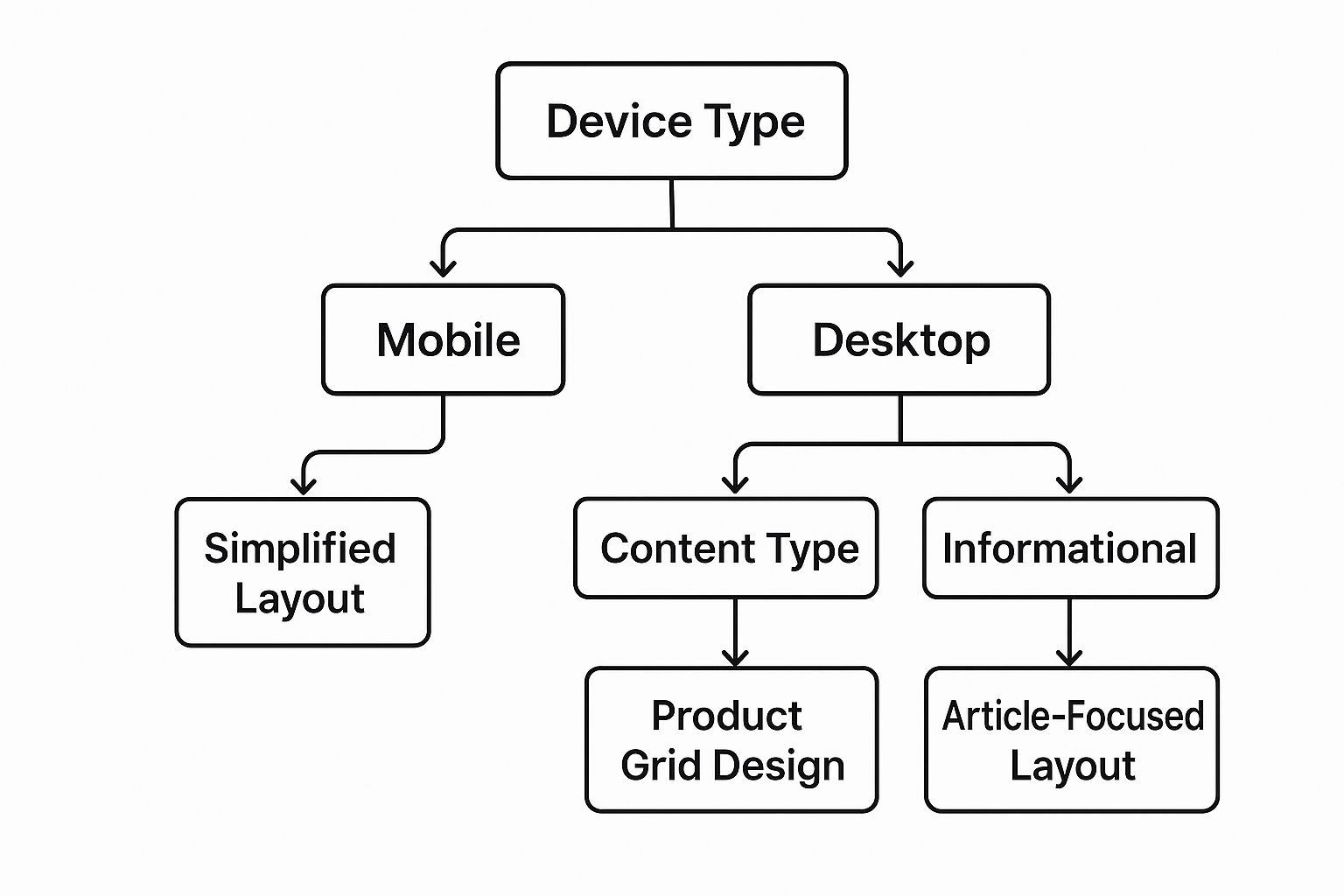
As you can see, what a visitor is trying to do and the device they're using should directly influence the layout and features. Getting this right from the start is key.
The DIY Website Builder Route
Website builders are genuinely great for simple sites. Think of them as perfect for a digital brochure or a basic portfolio. If all you need is a place to list your services, show off a few photos, and post your contact information, this could be a solid, cost-effective option. You get full control and can make changes on your own schedule.
But it's crucial to be realistic about the "hidden" costs. That low monthly fee you see advertised often doesn't cover things like a custom domain, a professional email address, or the e-commerce tools you might need down the line.
Even more important is the cost of your own time. What you think will be a quick weekend project can easily morph into weeks of wrestling with layouts, troubleshooting plugins, and getting stuck on technical details.
A DIY builder gives you all the creative freedom, but it also makes you the sole person responsible for everything. Security, updates, SEO, and performance—if something goes wrong, the buck stops with you.
Hiring a Professional: Freelancer or Agency
If your website is the engine of your business—driving leads, making sales, or establishing your brand as a premium player—hiring a pro isn't just a cost, it's an investment. This is the path for business owners who need a custom website that’s built to achieve specific goals and who'd rather focus on their business than on learning to code.
So, the next question becomes: a freelancer or an agency?
- Freelancers can be more budget-friendly and are often a fantastic choice for smaller projects with a clear scope. You get a personal, one-on-one relationship, but their availability might be limited, and they usually specialize in a few key areas.
- Agencies bring an entire team to the project—strategists, designers, developers, and project managers. This means you get a comprehensive, well-rounded service, which is ideal for more complex websites that require ongoing support and a broad range of skills.
To help you weigh these options, here's a quick comparison:
Website Development Options for Your Small Business
| Factor | DIY Website Builder | Hiring a Freelancer | Hiring an Agency |
|---|---|---|---|
| Cost | Lowest initial cost, but can add up with premium features. | Mid-range, usually a project-based or hourly fee. | Highest upfront investment, often on a retainer or project basis. |
| Time Commitment | Very high. You do all the work, from design to content. | Low to moderate. You provide feedback and content. | Low. The agency manages the entire process for you. |
| Customization | Limited to the platform's templates and tools. | High. Can build custom features and unique designs. | Very high. Fully custom solutions tailored to your business goals. |
| Expertise | Relies entirely on your own skills and ability to learn. | Specialized expertise in specific areas (e.g., design or code). | A full team of specialists in strategy, design, SEO, and development. |
| Support & Maintenance | You're on your own, relying on community forums or help docs. | Varies. May offer support for an additional fee. | Comprehensive, with ongoing support and maintenance plans available. |
| Best For | New businesses with tight budgets, simple "brochure" sites. | Small to medium projects with a clear scope and defined needs. | Complex projects, e-commerce, and businesses seeking long-term growth. |
Ultimately, choosing the right partner is a major decision. If you decide that going with a professional is the best move for your business, make sure you vet them properly. Arm yourself with the right questions to ask a website design and development agency before you sign any contracts.
This choice sets the foundation for your entire online presence. For more detailed advice, our guide on how to choose a website developer can walk you through the process of finding the perfect fit for your specific needs.
Designing a Website That People Actually Use

It doesn't matter how beautiful your website is if no one can figure out how to use it. A visually stunning site that confuses visitors is, frankly, a failure. Great design is less about flashy graphics and more about creating a smooth, intuitive path that guides people where they need to go.
Think of it this way: when someone walks through your door, you greet them and point them in the right direction. Your website should do the same. If a potential customer lands on your homepage and has to spend more than a few seconds hunting for your services or contact info, they're gone.
And they don't come back. In fact, a whopping 73% of people will leave a website simply because it’s hard to use. This isn't just about aesthetics; it's a fundamental part of building a site that actually helps your business grow.
Building an Intuitive User Experience
A user-friendly design always puts the visitor first. It’s about anticipating what they need and making it dead simple for them to find it. This is where your business goals meet your customer’s reality.
A few things can make or break the experience:
- Simple Navigation: Keep your main menu clean and logical. Someone should be able to guess what’s on a page before they even click. For a local bakery, that means clear labels like “Our Breads,” “Cakes & Pastries,” and “Find Us.” No clever or confusing names.
- Readable Text: Choose fonts that are easy to scan on a phone or a desktop. Pair them with a color scheme that has plenty of contrast. Light gray text on an off-white background is a classic mistake that sends people running.
- Good Images: Professional photos and graphics immediately build trust. Grainy, poorly lit, or generic stock photos can make even a fantastic business look amateurish.
A great website answers questions before the visitor even thinks to ask them. The whole experience feels effortless because every element was placed with purpose, guiding them from A to B without any friction.
Guiding Visitors with Strong Calls-to-Action
Every single page on your website should have a purpose. Usually, that purpose is to get the visitor to do something specific, and that’s where a Call-to-Action (CTA) comes in. A CTA is just a button or link that tells the user what to do next.
Vague CTAs like "Click Here" or "Learn More" are weak. Be specific. Be direct.
Instead of a generic prompt, use action-oriented language that tells people exactly what they're getting. For example, "Download Your Free Guide" is much more compelling than "Submit." "Shop the Spring Collection" tells a clear story.
Place these CTAs where they make sense—right after a glowing testimonial or at the end of a compelling service description. This turns your website from a passive brochure into an active tool that drives real results. For more hands-on advice, you can dig deeper into our complete guide to website design for small business.
Making Sure Customers Can Find You on Google
So, you've built a fantastic website. That's a huge step, but the work isn't quite done. Now, you have to make sure people can actually find it. This is where search engine optimization, or SEO, comes in. Think of it as making your site irresistible to search engines like Google, so you pop up the moment a potential customer starts looking for what you sell.
Building a website for your small business doesn't end the day it goes live; you need a plan to get seen. The good news is you don’t need to be an SEO wizard to see real results. By focusing on a couple of core areas, you can dramatically improve your odds of showing up in search results.
It really boils down to two key things: site performance (how fast your site runs) and on-page SEO (the words and structure you use on your pages). When you nail both, you’re not only creating a better experience for your visitors, but you're also sending all the right signals to Google that your site is a quality result worth showing off.
The Critical Role of Website Speed
Let's be honest, nobody likes to wait. If your website feels sluggish, people will click away before they even get a chance to see your amazing products or services. This isn’t just a hunch; it's a fact that can directly hit your wallet.
The numbers don't lie. Just a 1-second delay in your site's load time can slash conversions by 7%. Even worse, a whopping 53% of mobile users will bounce if a site takes more than three seconds to appear. As a small business owner, every visitor counts, and you can't afford to lose them over something you can fix. You can discover more about these web development statistics to get the full story.
So, what’s the fix? A great place to start is with your images.
- Shrink your images. Large photo files are a common speed-killer. Use free online tools to compress your images, reducing their file size without making them look blurry.
- Pick the right format. JPEGs are usually best for photographs, while PNGs are great for logos or graphics that need a transparent background. Newer formats like WebP are even better for speed.
- Load images on demand. Implement "lazy loading," a clever trick that only loads images when a user actually scrolls down to them. This makes the initial page load much faster.
Think of a slow website like a store with a locked door during business hours. You might have the best products inside, but if people can’t get in quickly, they'll just go somewhere else.
Foundational On-Page SEO Tactics
On-page SEO is all about optimizing the content that's right there on your website. It’s how you tell Google exactly what each page is about, using the same language your customers use when they search.
Your page titles and meta descriptions are the perfect place to start. These are the first things people see in the Google search results.
- Page Titles: Every page needs a unique, descriptive title that includes your main keyword. If you're a plumber in Denver, a great title would be something like "Emergency Plumbing Services in Denver | Mile High Plumbing." It’s clear and tells Google exactly what you do and where.
- Meta Descriptions: This is your 160-character elevator pitch. Write something compelling that includes your keyword and a reason for someone to click, like "Call now for a free estimate."
Local SEO is another game-changer. If you have a physical location or serve a specific area, make sure your business name, address, and phone number are displayed consistently on your site. Don't forget to create a Google Business Profile—it's free and absolutely essential for showing up in local map searches. These simple tweaks are your ticket to connecting with customers right in your own backyard.
Your Launch and Long-Term Success Plan

Hitting that "go live" button is an incredible feeling. It’s a huge milestone, but it's really the starting line, not the finish line. A great launch isn’t just about flipping a switch; it’s about making sure your new site is polished and ready to perform for every single visitor from day one.
Before you share the URL with anyone, you need to do a final quality check.
Think of it like the final walkthrough before you open a new retail shop. You'd double-check the lights, make sure the registers work, and see that the doors lock properly. Your website is no different. This final check can be the difference between a great first impression and an embarrassing one—like a broken contact form that loses you your first big lead.
Your Pre-Launch Checklist
So, before you pop the champagne, take a deep breath and run through a few critical last-minute checks. This simple process helps you start strong and sidestep those common little issues that can trip up a new site.
- Test Every Single Link and Form: Seriously, click everything. Every button, every menu item, every social media icon. Fill out every contact form and newsletter signup to make absolutely sure the messages land in your inbox.
- Check Across Different Devices: Your site probably looks amazing on your big monitor, but what about on an iPhone or an Android tablet? Grab your phone and ask a friend to check on theirs. Pay close attention to how the text reads, if the buttons are easy to tap, and whether the images load correctly.
- Proofread It All One Last Time: Nothing undermines your credibility faster than typos. Read every headline, paragraph, and product description out loud—it’s a surprisingly effective trick for catching mistakes your eyes might skim over.
Launching is just the first step. The real value of your website comes from consistent care and attention over time. A well-maintained site is a secure, high-performing asset that supports your business goals month after month.
Planning for Ongoing Maintenance
Once your website is out in the world, your job shifts from building to maintaining. A website is a lot like a car; it needs regular tune-ups to stay secure and run at its best. So many small business owners make the mistake of launching their site and then forgetting about it, which can lead to slow load times, security holes, or even a complete site crash.
A simple, repeatable maintenance schedule is your best friend here. It protects the investment you just made and ensures your site remains a reliable part of your business.
Here’s a basic schedule you can start with:
- Weekly Tasks: Check for and install any software or plugin updates. This is crucial for security. Also, run a full backup of your website files and database.
- Monthly Tasks: Run a security scan to look for any malware or weird activity. It's also a good time to check your site's speed with a tool like Google PageSpeed Insights.
- Quarterly Tasks: Dive into your analytics to see what pages and posts are getting traffic. Check for broken links and review your main pages (like your About and Services pages) to see if any information needs updating.
This kind of proactive care keeps your digital storefront in fantastic shape. For a more detailed breakdown, our guide on website maintenance for small business has a complete checklist to help you keep your site secure and running smoothly. This simple plan is your key to making sure your website works for you long-term.


