

Why Website Maintenance For Small Business Cannot Be Ignored

Many small business owners feel a sense of accomplishment once their website is launched, thinking the biggest task is complete. However, getting your online shop or site live is just the first step in a much longer process. Without regular attention, that new website can quickly become less effective, changing from a helpful tool into a source of problems.
This decline isn't usually sudden; it often happens gradually with outdated software, broken links, and slow performance. Overlooking website maintenance for small business isn't a way to save money. Instead, it opens the door to issues that can be much more costly to resolve later. Think of it like owning a car – if you skip regular oil changes and check-ups, you'll eventually face bigger, more expensive repairs, affecting its reliability and how long it lasts.
The Pillars of Proactive Website Care
To see why this ongoing care is so important, let's look at the main areas that proactive website maintenance supports. These help keep your online presence strong and working well.
Protecting Your Digital Assets and Customer Trust
First, consistent maintenance is your primary way to defend against security threats. This isn't just about keeping running costs low; it's key to protecting your website's stability and how well it works. New developments like automation, AI-assisted tools, mobile-first design, and eco-friendly hosting are becoming common in website upkeep. Not keeping up can lead to significant issues, especially since 43% of cyberattacks target small businesses through weaknesses in their websites. It's vital to stay on top of security updates and monitoring to protect sensitive information. Discover more insights about website security trends.
Enhancing User Experience and Engagement
Beyond security, regular maintenance greatly affects the user experience (UX) your website offers. Visitors don't have much tolerance for pages that load slowly, old information, or features that don't work. A well-kept site runs smoothly, making sure visitors can easily find what they need. This keeps them interested and more likely to become customers. A good experience also leads to return visits and recommendations.
Boosting Search Engine Rankings and Brand Reputation
This smooth user experience has a direct effect on your search engine rankings. Search engines like Google prefer websites that are fast, secure, and provide high-quality, current content. If you neglect maintenance, it can result in technical problems that lead to penalties. This can push your site lower in search results, making it harder for potential customers to find you. Also, a website that performs poorly or is insecure can seriously harm your brand's reputation, reducing trust with both current and future clients.
From Static Page to Dynamic Growth Engine
So, how does regular upkeep change your online presence from a basic information page into something more effective?
Consistent website maintenance for small business changes your site from a fixed online leaflet into an active tool for expansion. By regularly updating content, making sure it performs well, and keeping security strong, your website is always working for you. It becomes a system that can effectively find leads, develop potential customer relationships, and increase income, even while you concentrate on other parts of your business. Website maintenance is an ongoing task. You might consider professional services for comprehensive support maintenance to keep this system running smoothly and ensure your online investment keeps providing returns.
Understanding True Website Maintenance Costs For Small Business
For any small business, careful financial management is a cornerstone of growth. A key part of this is understanding the real expenses involved in website maintenance for small business. These aren't fixed amounts; they change based on things like how complex your site is and the amount of support you need. It's important to plan beyond the initial website launch and set aside a budget for the continuing health of your online presence.
The truth is, website maintenance expenses can vary quite a bit. For example, the average cost to maintain a small business website using a website builder is around $10 per month, which is a manageable starting figure for many. However, this cost can rise, with more advanced sites built using these tools potentially reaching up to $50 per month, depending on the features and services required. Find more detailed statistics on WebFX. This shows why it's good to know what influences these costs.
Decoding Maintenance Expenses: What Are You Paying For?
When you pay for website maintenance, you're investing in the smooth, ongoing operation of your online business and your own peace of mind. Common website maintenance services usually cover several important tasks. These often include:
- Security Monitoring and Updates: Keeping an eye out for security weaknesses and applying necessary patches.
- Software Updates: Making sure your Content Management System (CMS), plugins, and themes are up to date.
- Website Backups: Regularly saving copies of your website's files and database.
- Performance Checks: Ensuring your site loads quickly and works as it should.
- Technical Support: Having access to assistance when problems come up.
Without these services, your site might perform poorly or, even worse, suffer security breaches. Fixing such issues can cost much more than regular maintenance. So, these ongoing fees are like preventative care for your website, protecting your investment.
Budgeting Strategies for Small Business Website Maintenance
Smart budgeting for website maintenance for small business means looking at what your site needs and what your budget allows. Some businesses might choose a DIY approach, especially if their website is simple and they have some technical skills. This can be the most cost-effective route at first.
However, as a business expands or if the website becomes more complicated (like an e-commerce shop), professional maintenance services become a more practical choice. These services provide expertise and free up your valuable time. The goal is to find the right balance: investing enough to keep your site secure and running well, but not overspending on features you don't currently use. Many small businesses find a good middle ground with plans that cover the basics, with options to add more services as their online needs grow.
To give you a clearer picture of how these costs can vary, the following table breaks down typical monthly maintenance expenses.
Website Maintenance Cost Comparison by Business Type
Here's a look at how costs can differ based on the type and complexity of a website.
Website Maintenance Cost Comparison by Business Type
Detailed breakdown of monthly maintenance costs across different website types and complexity levels
| Website Type | Monthly Cost Range | Key Features Included | Best For |
|---|---|---|---|
| Basic Informational / Blog | $10 – $150 | Hosting, CMS updates, basic security monitoring, occasional support | Solopreneurs, freelancers, very small businesses with static content |
| Standard Small Business Website | $75 – $750 | Regular backups, security patching, plugin updates, tech support, performance checks | Most small to medium-sized businesses, service providers, local companies |
| E-commerce Store (Small to Medium) | $150 – $1,500+ | All standard features plus SSL certificate management, payment gateway integration checks, enhanced security for transactions | Businesses selling products online |
| Custom Web Application / Large Site | $500 – $5,000+ | Dedicated support, advanced security protocols, custom feature updates, uptime monitoring, staging environments | Businesses with unique functionalities, high traffic, or complex integrations |
This comparison shows that costs can range widely. The main takeaway is that more complex websites, or those more critical to your business operations, generally require a larger maintenance investment.
It's important to look beyond just the initial price. Choosing the cheapest option might save money in the short term but could lead to hidden expenses later. For instance, if you skip updates, your site could get hacked. Fixing that and recovering lost business would cost much more than regular maintenance fees. Quality maintenance, however, is an investment that pays off by ensuring your site stays online, protecting your reputation, and helping your site attract and convert customers.
DIY Versus Professional Maintenance: Making The Smart Choice
Once you figure out what it takes to keep your website running smoothly, a big question pops up: should you manage website maintenance for small business tasks yourself, or is it better to hire professionals? This isn't always an easy call. It really depends on your situation, how comfortable you are with tech stuff, and what you want your business to achieve. Getting this right can make a huge difference to your website's success and your own stress levels.
Weighing The DIY Path
Going the Do-It-Yourself (DIY) route can look good at first, especially if you're trying to save money. You get full control and can learn a lot about how your website works from the inside out. But, this path needs a real commitment of your time and a decent amount of technical skill.
Doing your own maintenance well means more than just logging in now and then. You'll have to regularly:
- Update your website’s main software, themes, and plugins.
- Make frequent backups of your site’s information and database.
- Keep an eye out for security weak spots and apply fixes.
- Fix small problems that pop up.
If you’re okay with these jobs and have the time to spare, DIY can work, especially for more basic websites.
To get a clearer picture of how businesses handle things like security updates, take a look at this decision guide:
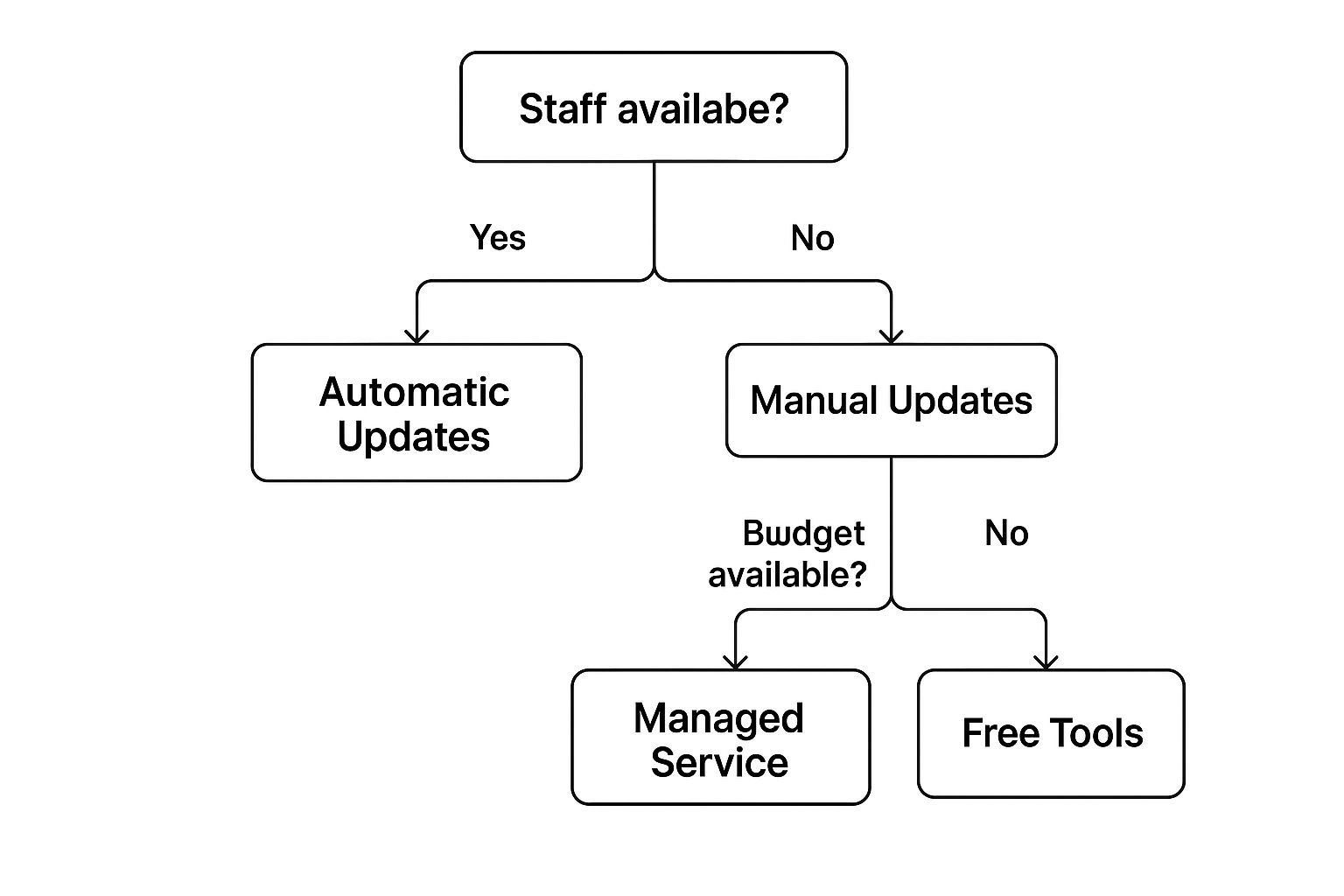
This shows that having people and money available internally are big factors when choosing a security update plan, whether that’s using automatic systems, managed services, or free tools. Similar choices come up for general website upkeep.
When To Call In The Pros
However, lots of small business owners realize their time is better spent on growing their business, not on fiddling with website tech. This is where professional maintenance services really shine. Experts have special knowledge, work efficiently, and use advanced tools to keep your website in top shape.
Deciding whether to look after your website yourself or pay a digital agency is a key choice for small businesses. While pros take care of the tricky bits, this service does have a price. For example, in 2025, website maintenance costs can change a lot depending on the website type. Personal sites might cost between $5 to $25 per month, while professional blogs could be $25 to $75 monthly. Websites for small to medium-sized businesses can expect costs from $35 to $500 per month, showing the wide range of services available. You can explore this topic further to understand cost variations. Choosing professional help often means avoiding expensive mistakes that could hurt your business down the road.
To help you weigh your options more clearly, here's a table comparing the DIY approach with professional maintenance services. It looks at the time, cost, skills needed, and who each approach is best for.
DIY vs Professional Maintenance Decision Matrix
Clear comparison of pros, cons, costs, and ideal scenarios for each maintenance approach
| Approach | Time Investment | Cost Range | Technical Skills Required | Best For |
|---|---|---|---|---|
| DIY (Do-It-Yourself) | Significant & ongoing (e.g., 1-2+ hours/week) | Low monetary cost; high time cost | Basic to moderate (updates, backups, basic troubleshooting) | Simple websites, tech-savvy owners, very tight budgets, learning interest |
| Professional Service | Minimal for business owner | $5 – $500+/month (varies by site complexity) | None for business owner (experts handle) | Complex sites, busy owners, desire for expert management, growth focus |
As the table shows, the main trade-off is between your time and technical effort versus a monetary investment for expert handling. Your specific needs will guide which column feels like a better fit.
Key Considerations For Your Decision
So, how do you make the call? Think about these points:
- Your Budget: Can you set aside money for professional services, or is DIY your main choice for now?
- Technical Comfort: Are you ready and able to pick up new tech skills, or does that idea stress you out?
- Time Availability: Do you honestly have the regular time needed for DIY upkeep? Even 1-2 hours a week can be a lot.
- Website Complexity: A simple information site is much easier to manage than a big e-commerce store with many features.
- Business Goals: If growing quickly and being able to scale up are important, professional management can support this better.
Clear warning signs that you need professional help include your website often having errors, loading too slowly (and you can't fix it), security problems or scares, or just realizing you're not doing maintenance because you're too busy. Ignoring these signs can lead to bigger, more expensive problems later on.
Ultimately, the best way to handle website maintenance for small business fits your money, skills, and what you want to achieve. Whether you choose DIY or go with a professional, the aim is to have a secure, well-performing website that helps your business succeed.
Essential Security Measures Every Small Business Website Needs
It’s a common thought that cybercriminals only chase after big companies. The truth is, small businesses are often seen as easier targets because they might have fewer security measures in place. This makes strong security a must-have for your website maintenance for small business strategy. Good news is, you don’t need a huge budget or to be a tech wizard to protect your site; just knowing the risks is the first big step to making your online space safer.
Common Security Threats Lurking Online
Several common dangers are out there waiting for small business websites. These include malware, which can mess up your site or steal information, and phishing attacks, designed to trick people into giving away their login details. Another big problem comes from outdated software; plugins or themes that haven’t been updated can have known weak spots that attackers love to exploit. Understanding these common issues helps you protect your website better.
These aren't just theoretical dangers; they affect businesses every day. A security breach can lead to lost data, financial hits, and a damaged reputation. Being proactive about defense is key.
Core Security Practices for Your Website
Some basic security steps can really boost your website's defenses. Always create strong, unique passwords for every part of your website that needs a login. It’s also smart to manage user access control carefully, meaning people should only have the permissions they absolutely need to do their jobs. This simple habit can go a long way in stopping unauthorized people from getting in.
Keeping all your website software up-to-date is also very important. This means you should regularly update your:
- Content Management System (CMS)
- Your installed themes
- Any plugins or apps you use
These updates often contain important security patches that fix newly found weak points. Additionally, good security plugins can add another defense layer, offering features like firewalls to stop bad traffic and malware scanners to find harmful code.
The Underrated Power of Website Backups
Think of regular website backups as your ultimate safety net. If your site gets hacked, has server problems, or someone makes a mistake, having a backup means you can get your site back online quickly. Imagine the peace of mind! A solid backup plan should include:
- Automated regular backups (daily is great for busy sites, weekly might be enough for sites that don't change much).
- Off-site storage (like cloud storage, keeping your backups away from your main web server).
- Testing your backups from time to time to make sure you can actually restore them if needed.
This careful approach is a fundamental part of good website maintenance for small business. It can save you from what could be a terrible loss of data.
Simple Habits and Essential Protections
Developing good security habits adds even more protection. Make it a routine to check your site for any strange activity or changes you didn’t make. Also, ensure your website uses HTTPS (which needs an SSL certificate). This encrypts the data shared between your site and its visitors, which also helps them trust you more. It's a sign of professionalism and shows you care about user data.
Taking these proactive steps is vital for protecting your customer's information and your business's reputation. The fallout from a security breach—think expensive recovery efforts, lost sales, and damaged trust—really highlights why consistent security upkeep is so important. For more details, you can read our article about website security best practices to protect your business online. Careful website maintenance for small business is truly your best shield against these online dangers.
Performance Optimization That Actually Drives Results
While strong security protects your website from online dangers, its speed and how quickly it responds are what truly grab and keep your audience's attention. This is a very important part of effective website maintenance for small business. A website that loads slowly doesn't just annoy visitors; it directly hurts your chances of turning them into customers and can lower your site in search engine results. This means fewer potential customers, reduced sales, and a lost chance to make a positive first impression.
The speed of your website has a big effect on how users behave. For example, studies show that when a page's load time increases from one second to three seconds, the chance of a visitor leaving goes up by 32%. This figure jumps to a staggering 90% if the load time hits five seconds. So, making your site faster isn't just a technical chore; it's a direct way to improve your customer's experience and help your business grow. Making speed improvements a priority in your website maintenance for small business plan can bring great results.
Finding Common Reasons Your Site Is Slow
Before you can make a slow website faster, you need to figure out what’s causing the delay. Often, the issues are common ones that you can fix with a little understanding. These frequently include image files that are too large and take a long time to download, or poorly written code from website themes and plugins that make your pages heavy.
Other typical things that slow down performance are sluggish web hosting services that can't handle your visitor numbers, or just too many separate items (like scripts and style files) that your visitors' web browsers have to ask for and load. Using online tools to check your site’s performance can help find these specific slowdowns, giving you a clear path for your improvement efforts. These details are very useful for focused website maintenance for small business.
Effective Ways to Speed Up Your Site
Once you know where the slowdowns are, you can use several powerful methods that don’t need a lot of technical skill.
Making Your Images Load Faster
Images are often the biggest culprits when it comes to page size. Optimizing images is a really important step:
- Compress images: Use tools to make image files smaller without making them look noticeably worse.
- Choose correct formats: Use JPEGs for photos. WebP is great for a good mix of quality and size where browsers support it. PNGs are best for graphics that need a transparent background.
- Resize images: Make sure your images are sized correctly for how they’ll appear on your site, instead of making browsers shrink down huge original files.
Using Caching for a Quicker Website
Website caching is like giving your website a temporary memory. It saves parts of your site so that people who come back, or even those just moving from one page to another, don’t have to load everything all over again.
- Browser caching lets a visitor's web browser save fixed parts of your site on their own computer.
- Server-side caching helps your web server send out content faster by preparing pages ahead of time.
Many web hosting companies and content management systems (CMS) like WordPress offer simple ways to turn on caching.
Tidying Up Code and Delivery
Making your website's code smaller and improving how it’s sent to visitors can also give you a clear speed boost.
- Minify CSS, JavaScript, and HTML: This process strips out unneeded characters from code (like spaces and comments) without changing how it works, making the files smaller.
- Consider a Content Delivery Network (CDN): A CDN keeps copies of your website on different servers located all over the world. It then sends content from the server that's closest to the visitor, which greatly reduces load times for people visiting from different geographic locations.
If you're searching for more ideas to make your site faster without getting into complex coding, take a look at our guide on How to Improve Website Loading Speed Without Coding.
Checking Your Progress
After you've made these improvements, it's important to monitor your website's performance. Keep an eye on numbers like how long your site takes to load, how many people leave quickly (bounce rate), and how many visitors complete desired actions (conversion rates). Seeing these numbers get better is a strong sign that your speed-up efforts are working and helping your business.
Making your website fast is a vital part of website maintenance for small business, but always remember that speed and security go hand in hand. A quick site that has security weaknesses isn't truly well-maintained, as security problems can badly affect all your hard work. One of the most critical elements of website upkeep is security. Make sure you avoid these common Cybersecurity Mistakes to keep your online presence healthy and running well.
Building A Sustainable Maintenance Routine That Actually Works
More than just making sure your site is secure and performs well, the secret to good website maintenance for small business is all about being consistent. The best plan isn't crammed with every task you can think of. Instead, it's one you can actually stick to week after week without it feeling like too much work. This steady way of doing things changes website care from a task you avoid into a normal part of running your business, making sure your website keeps working well for you.
Structuring Your Maintenance: Frequency and Focus
To help website maintenance for small business seem easier, it’s useful to sort tasks by how often they need to be done. Not every part of your site needs attention every day. Some things can be handled weekly, monthly, or even less often. This helps you use your time well and ensures important jobs get done.
Here's a sample way to group tasks by how often you do them, just to give you an idea:
-
Daily/Weekly Tasks (The Quick Checks):
- Check that your automatic backups worked (if not daily, then doing manual backups each week is very important).
- Look for and reply to comments or questions.
- Quickly look over important pages for any clear mistakes or broken parts.
- Review any security messages or alerts.
- For e-commerce sites, test the checkout process every week.
-
Monthly Tasks (The Regular Tune-Up):
- Update your Content Management System (CMS), themes, and plugins. Test your site after updates to make sure everything still works together.
- Do thorough security checks.
- Check how fast your website loads and look into why if it’s much slower.
- Look at your website data to see how people are finding and using your site.
- Use a tool to find broken links and repair them.
-
Quarterly Tasks (The Deeper Dive):
- Check and freshen up old articles or posts so they are correct and still useful.
- Make sure your site works well on different web browsers and on phones and computers.
- Test all your contact forms and buttons that ask people to do something.
- Look at how well your site is doing in search engines and if your keywords are working.
-
Annual Tasks (The Big Picture Review):
- Check the general look and feel of your site and how easy it is for people to use.
- Make a note of when your website address and SSL security certificate need to be renewed.
- Check if your current website hosting package is still right for you.
- Do a complete check of all your content to see what’s good and what’s missing.
- Try out your entire plan for getting your site back online if something bad happens.
This list gives you a good starting point. You can then adjust it for your own site and business needs.
Time-Saving Strategies for Efficient Upkeep
Having a schedule is one part of the puzzle; fitting it into a busy schedule is another. The good news is that a few methods can help you do website maintenance for small business more quickly. Using checklists is an easy but very effective method to stay on track. A checklist, whether on your computer or printed out, makes sure you do things the same way each time and helps you give tasks to others if you have help.
Also, automation can save you a lot of time. Lots of important jobs, like daily backups, security monitoring, and even checks to see if your site is online, can be set up to run on their own through your hosting company or special plugins. This lets you spend your time on other important parts of your business. It's also smart to focus on the maintenance jobs that make the biggest difference. Things like security updates and making your site faster should always be top priorities because they directly impact how well your site works and whether people trust it.
Setting up these ways of working helps make website care a regular part of your routine, instead of something you only think about last minute. It’s about building habits you can keep up. For more helpful tips and templates, you might find our guide on How to Create an Effective Website Maintenance Plan Today useful.
Staying Alert: Warning Signs and Emergency Preparedness
Even with a solid maintenance schedule, it's important to keep an eye out for clues that something isn't right. Finding problems early can stop them from turning into big headaches that cause trouble for your business.
Watch out for these common warning signs:
- Pages loading much slower than usual.
- Links that don’t work, images not showing up, or parts of your site looking messy.
- Error messages popping up often.
- A sudden drop in visitors or your site not showing up as high in search results.
- More spam comments or messages through your forms.
- Warnings about security from web browsers or your security tools.
- People telling you they’re having trouble with your site.
Spotting these signs quickly means you can fix things faster. This is why it’s also a good idea to have a simple emergency plan. This plan doesn't have to be complex; it could just be knowing who to call for help—like your hosting support, a web developer you trust, or your maintenance service. Most importantly, make sure you know how to get to your backups and use them to get your site back. Having dependable backups and understanding how to restore them are your best protection when things suddenly go wrong.
This well-planned and organized way of handling website maintenance for small business not only keeps your website in good shape but also gives you confidence, so you can focus on making your business bigger.
Want to make website maintenance less stressful? At OneNine, we’re experts at making sure your small business website is safe, quick, and works smoothly, so you can put your energy into your main work. Learn more about our website management services and let us create a maintenance plan for you that you can easily manage.


