

Why Exceptional Website Design Transforms Small Businesses
A website is no longer a luxury for small businesses; it's a necessity. It's the virtual storefront, a 24/7 sales representative, and often the first impression for potential customers. Investing in website design isn't just about aesthetics; it's a strategic investment in growth and long-term success. A well-designed website significantly impacts customer perception, interaction, and ultimately, purchasing decisions.
First Impressions Matter: Building Trust and Credibility
Imagine a physical store that's cluttered, dimly lit, and hard to navigate. You'd probably leave quickly. The same applies online. A poorly designed website can erode customer trust and damage your brand’s credibility. A professional, user-friendly website, however, creates a positive first impression and fosters confidence. Key elements include clear navigation, high-quality visuals, and a mobile-responsive design.
Enhancing User Experience: Guiding Customers to Conversion
Think of your website as a roadmap. Every page, button, and piece of content should guide visitors toward a desired action: a purchase, booking, or contact request. Website design involves creating a seamless user experience that encourages conversions. This means strategically placing calls-to-action, optimizing page layouts for readability, and ensuring a smooth checkout process for e-commerce businesses. For businesses considering a website, understanding the development process is crucial. Check out this helpful resource: Majas Lapu Izstrade.
Leveling the Playing Field: Competing With Larger Companies
Small businesses often face the challenge of competing with larger corporations with greater resources. A strategically designed website can help level the playing field. By focusing on a niche market and providing a superior online experience, small businesses can attract customers who value personalized service and unique offerings. A website becomes the platform for showcasing expertise, building community, and creating a distinct brand identity.
The Growing Importance of Online Presence
The shift towards online interaction continues to grow. In 2023, 73% of small businesses in the United States already had a website, recognizing its vital role in business growth. Another 23.5% planned to create one soon. This highlights the growing understanding of websites as essential business tools. However, 27% still felt their industry didn't need a website, indicating a need for greater awareness of online opportunities. Find more detailed statistics here. You might also be interested in: How to build a business website. Investing in professional website design is an investment in future success.
The Core Elements That Make Small Business Websites Convert
A beautiful website is a great start, but it's not enough. To turn visitors into paying customers, your small business website needs to be designed with conversion in mind. This means understanding how users interact with your site and optimizing each element to guide them towards specific actions. Let's explore the essential components of a high-converting website.
Navigation: Guiding Your Visitors Seamlessly
Imagine a physical store with confusing layouts and no signs. Frustrating, right? Your website navigation is like the signage in your store. It guides visitors through your content and services. Effective navigation should be intuitive and user-friendly, allowing visitors to find what they need quickly.
Here's what effective navigation looks like:
- Clear menu structure: Organize pages logically into categories and subcategories.
- Prominent search bar: A search bar is essential, especially for larger websites, enabling quick access to specific information.
- Breadcrumbs: These show users their current location on the site and make it easy to navigate back to previous pages.
Streamlined navigation enhances the user experience and keeps visitors engaged, leading to higher conversion rates.
Content Hierarchy: Prioritizing Key Information
Just as a well-organized store displays its key products prominently, your website should prioritize key information. Content hierarchy involves structuring content to highlight what's most important and guide visitors through a logical flow.
How do you achieve effective content hierarchy?
- Using headings and subheadings (H1-H6): These elements break up content, making it easy to scan and digest.
- Bulleted and numbered lists: These formats present information concisely, improving readability.
- Visual cues: Use images, videos, and whitespace strategically to draw attention to key elements and calls to action.
Effective content structure ensures visitors easily find and absorb the information they need to make informed purchase decisions.
Call to Action (CTA): Prompting the Next Step
A call to action (CTA) prompts visitors to take the next step, such as making a purchase, signing up for a newsletter, or requesting a quote. Effective CTAs are clear, concise, and visually appealing.
Here's what makes a compelling CTA:
- Action-oriented language: Use verbs that encourage action, like "Shop Now," "Get Started," or "Learn More."
- Visual prominence: Make your CTAs stand out with contrasting colors, larger fonts, or eye-catching button designs.
- Strategic placement: Position CTAs strategically throughout your website, especially on important pages like the homepage and product pages.
Well-designed and strategically placed CTAs can significantly boost conversion rates by simplifying the process for visitors to take desired actions. Website design isn't just about aesthetics; it's about functionality and user experience. These elements have a direct impact on consumer behavior and online business success. Research indicates that 94% of online users prioritize easy navigation, and 83% value an attractive, up-to-date site. Explore this topic further. This emphasizes the importance of user-friendly design for small businesses.
Essential Website Pages
Every small business website needs a core set of pages to provide vital information and drive conversions. These pages form the backbone of a successful online presence. The following table provides a breakdown of these crucial pages:
To help illustrate this point, here's a breakdown of the essential pages:
Essential Website Pages for Small Businesses: Breakdown of critical pages every small business website should include with their primary purpose and conversion potential
| Page Type | Purpose | Must-Have Elements | Conversion Potential |
|---|---|---|---|
| Homepage | Introduce your business and key offerings | Clear headline, compelling visuals, strong CTA | High |
| About Us | Tell your story and build brand trust | Company mission, team bios, customer testimonials | Medium |
| Products/Services | Showcase what you offer | Detailed descriptions, high-quality images, pricing | High |
| Contact Us | Provide ways for visitors to reach you | Contact form, email address, phone number | Medium |
This table highlights the key pages and their role in converting visitors into customers. Each page serves a unique purpose and contributes to the overall effectiveness of your website.
By focusing on these core elements, small businesses can build websites that are both visually appealing and effective at converting visitors into loyal customers. This ultimately fuels business growth and establishes a solid online presence.
Mastering Mobile-First Design for Local Customer Acquisition

With most web traffic now coming from mobile devices, a strong mobile presence is essential for small businesses. This section explores how prioritizing mobile-first design can significantly impact local customer acquisition. A seamless mobile experience is vital for reaching today's on-the-go consumers.
Thumb-Friendly Navigation: Designing for Mobile Users
Mobile users interact with websites differently than desktop users. They often have smaller screens, use their thumbs for navigation, and are frequently on the move. This means website design for small businesses needs to prioritize intuitive, thumb-friendly navigation.
What does this look like in practice?
- Large, tappable buttons: Small buttons are hard to accurately tap on a touchscreen. Make sure your buttons are large enough for easy thumb use.
- Simplified menus: Avoid complex, multi-layered menus. Choose clear, concise menus that are easy to navigate one-handed.
- Intuitive gestures: Use common mobile gestures like swiping and pinching to make the site more interactive.
This streamlined approach helps customers quickly find information, even when multitasking. It keeps them engaged with your site, no matter where they are.
Content Prioritization: Adapting to Mobile Behavior
Mobile users often have different goals and shorter attention spans than desktop users. Prioritize your content effectively. Present the most crucial information upfront and make it easy to digest.
For example, a restaurant's mobile site should immediately show its menu, location, and contact info. Mobile users want quick access to key details, not a lengthy blog post.
Use concise text, impactful visuals, and clear headings to make your content scannable and engaging. A well-structured mobile site encourages interaction and keeps users engaged, leading to higher conversions.
Location-Based Features: Driving Foot Traffic
Mobile-first design presents unique opportunities for local businesses to increase foot traffic. Integrating location-based features can significantly impact customer acquisition, especially for businesses offering services or relying on in-person visits.
Consider these key location-based features:
- Store locator: Let customers easily find your physical location using their phone's GPS.
- Click-to-call buttons: Enable one-tap calling directly from your site.
- Mobile-exclusive offers: Encourage in-store visits with special discounts for mobile users.
These features make it easier for customers to connect with your business, turning online interest into in-store visits. This directly increases conversions and sales.
Mobile website design is crucial for small businesses, reflecting the global shift to mobile internet use. 57% of people won't recommend a business with a poorly designed mobile website. Over 80% of consumers research online, often on their phones, before buying. Discover more insights about mobile website statistics. How to master mobile-first design can provide further valuable information. By embracing mobile-first design principles, small businesses create a positive user experience that caters to their mobile audience and enhances local customer acquisition.
Website Solutions That Deliver Results Without Breaking the Bank
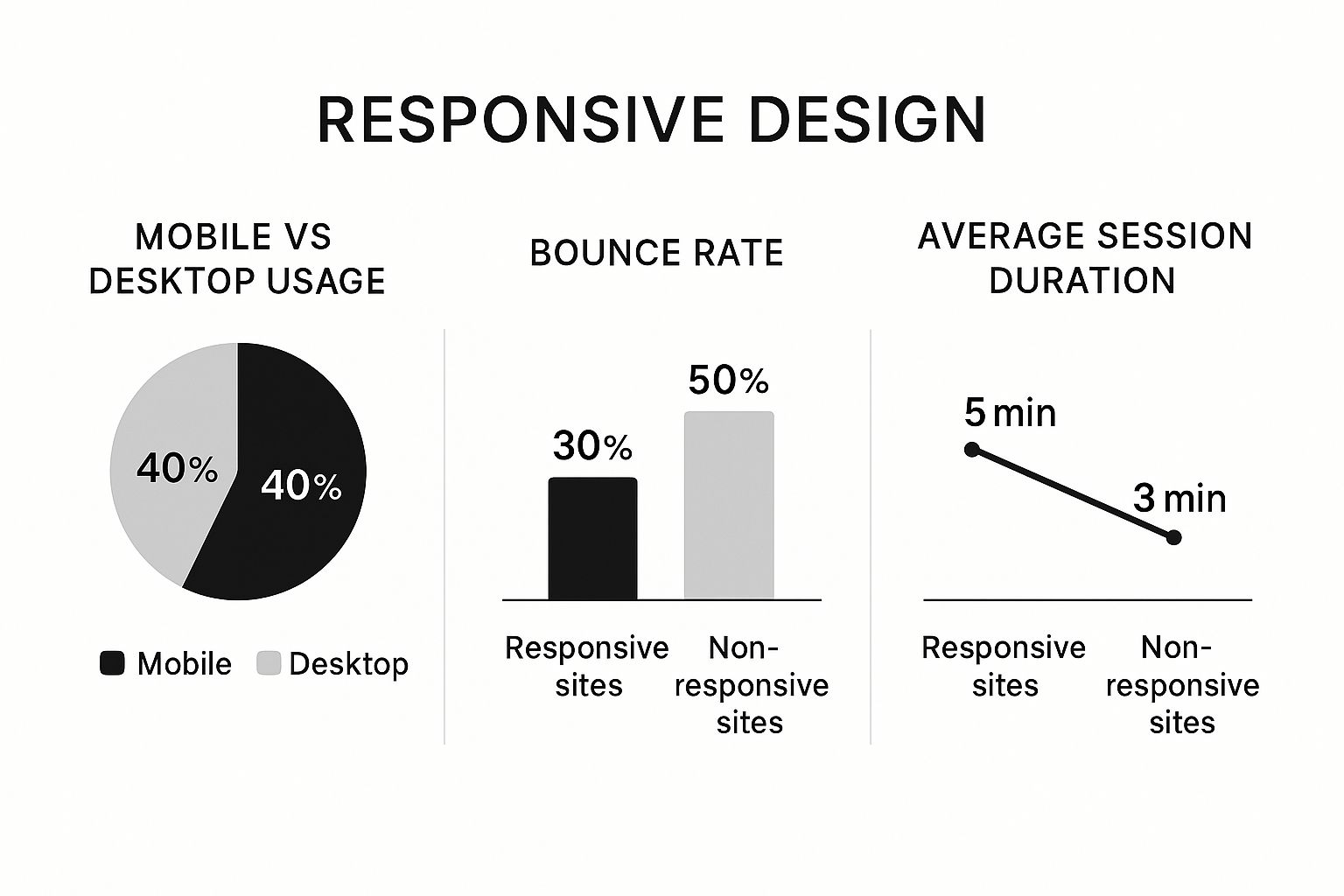
The infographic above highlights the importance of responsive design. It compares mobile and desktop usage, bounce rates, and average session durations. The data shows responsive design leads to lower bounce rates and longer session durations, catering to the dominant mobile user base. Making sure your website adapts to different screen sizes is key. For further insights, check out these tips on responsive design best practices.
Balancing Cost And Value: Choosing The Right Approach
Finding the right balance between cost and value is crucial for small business website design. Different approaches offer varying levels of investment and control, each with pros and cons. Understanding these options helps small business owners make smart decisions that align with their budget and goals. A startup with limited resources might opt for a DIY website builder, for instance, because of its affordability and ease of use. This lets them get online quickly without a big upfront cost.
DIY Website Builders: Pros, Cons, And Hidden Costs
DIY platforms offer an easy starting point for businesses with tight budgets. However, be aware of hidden costs like premium themes, plugins, and transaction fees. Also, limited customization options can restrict branding and design flexibility as your business expands. This can result in a generic website, potentially impacting your brand identity.
Professional Website Design: Investing In Long-Term Success
Investing in professional website design has numerous benefits. A professionally designed website offers a unique, customized design reflecting your brand, enhanced functionality tailored to your needs, and optimized performance for search engines and conversions. This investment can lead to a higher return on investment (ROI) through a better customer experience, lead generation, and brand perception. However, the initial cost is typically higher than DIY options. This means carefully considering the long-term benefits against the upfront investment. Designing a small business website can cost between $2,000 and $9,000, depending on complexity. Monthly expenses can be as low as $16 for simpler sites, while complex, professionally designed sites can exceed $10,000 upfront. Learn more about website design costs here.
Hybrid Approach: Blending DIY And Professional Services
A hybrid approach combines DIY platforms with professional design expertise. This could involve using a DIY builder initially and then hiring a professional for specific tasks like custom design, advanced features, or SEO optimization. This offers a flexible, cost-effective way to get a professional website without overspending.
Scalability: Planning For Future Growth
No matter which approach you choose, consider scalability. Can your website adapt as your business grows? A professionally designed website often provides a more scalable foundation, allowing for easier expansion and integration of new features. This avoids expensive redesigns later. Choosing the right website solution requires careful thought about your budget, business goals, and long-term vision. Understanding the different options helps you make a strategic investment that sets your small business up for success.
To help visualize the different approaches, here’s a comparison table:
Website Design Options Comparison: Comparison of different website creation approaches for small businesses by cost, complexity and control
| Solution Type | Cost Range | Expertise Required | Time Investment | Customization Level | Best For |
|---|---|---|---|---|---|
| DIY Website Builders | $10 – $50/month | Low | Low | Limited | Businesses with very tight budgets and basic needs |
| Hybrid Approach | $50 – $200/month + project fees | Medium | Medium | Moderate | Businesses wanting a balance of cost and customization |
| Professional Website Design | $2,000 – $10,000+ | High | High | Extensive | Businesses prioritizing branding, functionality and scalability |
This table summarizes the key differences between DIY website builders, the Hybrid Approach, and Professional Website Design. DIY solutions are the most affordable, but offer limited customization. The hybrid approach offers a middle ground. Professional design provides the most customization and scalability, but comes at a higher cost.
Choosing the best option depends on your individual business needs and resources. Consider your budget, technical skills, and long-term goals to make the most informed decision.
Visual Design Elements That Turn Visitors Into Customers
Having a professional online presence is essential for any small business. But beyond just looking good, specific visual design elements can significantly impact a website's ability to convert visitors into paying customers. Let’s explore some key visual techniques that can influence purchasing decisions and elevate your website design for small business success.
The Power of Color Psychology
Color has a powerful impact on our emotions and perceptions. Choosing the right color palette is a crucial step in effective website design, especially for small businesses. Different colors communicate different messages. For instance, green is often associated with growth and health, making it a popular choice for environmentally conscious brands.
Blue conveys trust and stability, often used by financial institutions and professional services. Red, a more energetic color, symbolizes excitement and urgency, frequently used by restaurants and entertainment venues. Selecting colors that align with your brand and resonate with your target audience is essential for creating a cohesive and impactful visual experience. This connection strengthens brand recognition and encourages customer loyalty.
Your color scheme deeply affects user engagement. In fact, nearly 40% of visitors are more influenced by color than any other visual element. Strategically using color can boost trust and create excitement, depending on your industry. Learn more about the impact of website statistics.
Call to Action Design: Prompting Conversions
Effective calls to action (CTAs) are crucial for driving conversions. They should be visually prominent and clearly communicate the desired action you want visitors to take. A well-designed CTA button uses action-oriented language, such as “Get a Free Quote” or “Shop Now.” Coupled with a contrasting color, the CTA button stands out from the surrounding elements, grabbing the visitor's attention.
The strategic placement of CTAs is equally important. Placing them at key points throughout your website, particularly after presenting valuable information or highlighting a product’s benefits, can significantly improve click-through rates.
Typography: Balancing Readability and Brand Identity
Typography plays a crucial role in website readability and brand perception. Font choices should be easy to read while also reflecting your brand’s unique personality. A modern, minimalist font might suit a tech startup, while a more traditional serif font might be appropriate for a law firm.
Maintaining consistent typography across your website strengthens brand identity and creates a cohesive user experience. Using appropriate font sizes and line heights ensures comfortable reading across various devices.
Visual Hierarchy: Guiding the User’s Eye
Visual hierarchy helps visitors quickly absorb the most important information. By using visual cues like size, color, and contrast, you can direct the user’s eye to key elements such as your main headline, CTA, or featured products. This allows for easy navigation and quick understanding of your core message.
For example, making your headline the largest text element on the page immediately draws attention. This clear prioritization guides the user journey and ensures they focus on the most critical content.
Text and Imagery: Finding the Right Balance
The right balance of text and imagery depends on the type of business. A photography website will naturally be more image-heavy. However, all websites benefit from high-quality images that complement and enhance the written content.
Images have the power to evoke emotion, tell a story, and break up large text blocks, making the website more engaging and less intimidating. Visuals are key for capturing and holding audience attention.
Building Trust Through Design
Subtle design elements can build trust with potential customers. Displaying security badges, trust seals, or customer testimonials can reassure visitors, especially on e-commerce websites. A clean, professional design contributes to credibility.
Avoid cluttered layouts, broken links, and outdated information, as these negatively impact user trust. By carefully considering these visual design elements, small businesses can create websites that not only attract visitors but also effectively convert them into loyal customers, driving growth and success.
SEO Strategies That Help Local Customers Find You First
Having a visually appealing website is only half the battle. It’s just as important to make sure customers can actually find it. This means optimizing your website design for small business success with local SEO strategies. Let's explore how to connect with local customers online and drive them to your brick-and-mortar store.
Keyword Research: Understanding Local Search Intent
Understanding your local customers’ online search habits is crucial. Keyword research involves identifying the terms people use when searching for businesses like yours in your specific area. For example, a bakery in Austin, Texas might target keywords like "best bakery Austin," "custom cakes Austin," or "wedding cakes Austin TX." Google Keyword Planner can help you discover relevant keywords with high search volume and low competition. This focused approach ensures you're targeting the right phrases to attract potential customers.
On-Page Optimization: Aligning Content With Search and Customer Needs
Once you've identified your target keywords, strategically incorporate them into your website content. On-page optimization involves refining various on-site elements to improve search result rankings. This includes using keywords in page titles, headings, meta descriptions, and image alt text. Avoid keyword stuffing, which can negatively impact your SEO. Focus on crafting high-quality, informative content that naturally incorporates keywords and addresses customer needs. This strategy benefits both search engines and potential customers by providing a positive user experience.
Location-Based SEO: Dominating Local Search Results
Location-based SEO is paramount for local businesses. Claim and optimize your Google My Business profile, ensuring consistent NAP (Name, Address, Phone number) information across all online platforms. Encourage customer reviews, too. Your Google My Business profile acts as your digital storefront, providing essential information and helping customers locate your physical store. Positive reviews build trust and credibility, influencing potential customer decisions.
Content Structure: Engaging Both Search Engines and Customers
Effective content structure enhances both SEO and user experience. Use headings (H1-H6) to organize content into digestible sections, making it easier for search engines and users to understand the page's topic. Bulleted and numbered lists improve readability and highlight key information. Like a well-organized store, a well-structured website presents information clearly and logically, guiding visitors seamlessly. Creating separate service pages with detailed descriptions and relevant keywords benefits both users and search engines.
Measuring SEO Success: Tracking Your Progress
Monitoring your website's search performance is essential to evaluating your SEO efforts. Tools like Google Search Console and Google Analytics provide valuable insights into website ranking, traffic sources, and user behavior. This data helps you identify successful strategies and areas for improvement. For instance, high traffic from a specific keyword suggests creating more related content. A high bounce rate signals a need for content optimization to improve user engagement.
By implementing these SEO strategies, small businesses can enhance local search visibility, attract more customers, and boost business growth. Combining these techniques with a well-designed website creates a powerful online presence, connecting you with local customers and differentiating your business from competitors.
Turning Website Data Into Business Growth Opportunities
Your website is a goldmine of information, offering valuable business intelligence. But are you truly harnessing its potential? This section explores how small businesses can use website data to uncover growth opportunities and boost overall performance. Understanding how visitors interact with your site offers crucial insights for strategic decisions. This data-driven approach to website design for small business helps optimize conversions and achieve sustainable growth.
Identifying Key Metrics: Focusing on What Matters
Not all website metrics are equally valuable. Vanity metrics, such as total website visits, can be deceptive. They may look impressive but don't always translate into tangible business results. Instead, concentrate on actionable metrics that offer insights into user behavior and conversion patterns.
Here are some essential metrics to monitor:
-
Conversion rate: The percentage of visitors who complete a desired action (e.g., making a purchase, subscribing to a newsletter). This metric directly reflects your website's effectiveness in achieving business goals.
-
Bounce rate: The percentage of visitors who leave your website after viewing only one page. A high bounce rate could signal problems with website design, content relevance, or user experience.
-
Average session duration: The average time visitors spend on your website. Longer durations often indicate higher engagement and increased conversion potential.
-
Pages per session: The average number of pages viewed per visit. This metric helps pinpoint popular content and understand user navigation patterns.
By focusing on these key metrics, you'll gain a deeper understanding of visitor interaction and identify areas for improvement. This data-driven approach helps optimize your website for conversions and achieve sustainable growth.
Setting Up Simple Tracking Systems: Actionable Insights Without Overwhelm
Tracking website data doesn't need to be complex. Tools like Google Analytics offer comprehensive data without requiring advanced technical skills. By setting clear goals and tracking conversions, you can measure website effectiveness and identify areas for improvement.
For example, tracking form submissions can reveal which lead generation tactics are most successful. E-commerce businesses can track purchases to identify potential bottlenecks in the checkout process. This targeted approach ensures you're gathering data that directly impacts your bottom line.
Using Visitor Behavior to Identify New Opportunities
Analyzing website data reveals how visitors interact with your site, offering valuable insights into their needs and preferences. Use this data to identify new business opportunities and refine existing products or services.
For instance, high traffic but low conversion rates on a product page might indicate a need for better product descriptions or clearer calls to action. If visitors frequently abandon their carts at a specific checkout step, it suggests a potential usability issue that needs addressing. Check out our guide on How to master website conversion rate optimization strategies for business growth. Understanding visitor behavior allows you to identify areas where your website can better serve customer needs and drive business growth.
Creating Measurement Routines for Busy Entrepreneurs
Regularly reviewing your website data is essential for continuous improvement. Schedule regular checks to track progress, identify trends, and make informed decisions. Even a small amount of time each week can yield valuable insights.
This consistent approach keeps you informed about website performance and allows you to adjust strategies as needed. By effectively using website data, small businesses can gain a competitive edge, improve customer experiences, and unlock new growth opportunities. Turning data into actionable insights is key for long-term success.
Ready to enhance your online presence? Contact OneNine today to learn how our website management and development services can help your small business thrive. We specialize in creating custom websites that are visually appealing and strategically designed to convert visitors into customers.


