

Why User Testing For Websites Changes Everything

We often assume we know what our website users want. But this can be a costly mistake. The disconnect between what designers think users want and what they actually need can significantly impact a business's bottom line. This section explores why user testing is now essential for online success.
Bridging The Gap Between Assumptions and Reality
Businesses invest heavily in website development, striving for engaging and user-friendly designs. But without user testing, these efforts can miss the mark. Imagine building a bridge without considering the terrain – it might look impressive, but it won't be functional. A website designed without user input risks missing its audience's needs and preferences.
This can lead to lower conversion rates, increased bounce rates, and lost revenue. After implementing changes based on testing, it's important to monitor their impact. Explore strategies for Keeping Your Audience Engaged.
The Real Cost of Guesswork
Skipping user testing can have several negative consequences:
- Poor User Experience: A confusing website drives users away.
- Low Conversion Rates: If users can't find what they need or complete desired actions, sales will suffer.
- Increased Support Costs: Difficult navigation leads to more calls and emails from frustrated users.
- Damaged Brand Reputation: Negative experiences can lead to bad reviews and harm your brand's image.
By investing in user testing, businesses can avoid these problems and build websites that truly serve their users. Implementing user feedback often leads to significant improvements in customer satisfaction and retention.
In fact, 85% of respondents reported that user research improved their product's usability. 58% saw increased customer satisfaction, and 44% experienced increased customer engagement after conducting user research. Learn more about UX statistics and trends here.
From Frustrated Visitors To Loyal Customers
User testing lets businesses identify and address pain points in the user journey. Observing real users interacting with their websites provides valuable insights into what works and what doesn't. This information can then be used to:
- Improve Website Navigation: Make it easier for users to find information.
- Optimize Content and Calls to Action: Improve conversions and engagement.
- Enhance Overall Usability: Create a seamless and enjoyable experience.
Through user testing, businesses can turn frustrated visitors into satisfied customers, boosting their bottom line and achieving their business goals.
Finding Your Perfect User Testing Method Mix
Choosing the right user testing method is critical for gathering valuable insights and maximizing your return on investment (ROI). Understanding the strengths and weaknesses of each technique, and how to combine them, will give you a comprehensive understanding of user behavior on your website.
Moderated Vs. Unmoderated Testing
Moderated testing involves a facilitator guiding participants through tasks. This method provides rich qualitative data by exploring user motivations and pain points through direct interaction and follow-up questions. Unmoderated testing, where participants complete tasks independently, delivers larger datasets and quantitative insights at a lower cost. It’s ideal for identifying widespread usability issues and measuring the effectiveness of design changes.
Remote Vs. In-Person Testing
Remote testing, conducted online, offers convenience and access to a diverse participant pool. This method is particularly useful for observing user behavior in natural environments. When considering remote testing, be mindful of potential security risks like Website Phishing. In-person testing, though more resource-intensive, allows close observation of body language and nuanced reactions. This is invaluable when testing complex interactions or emotionally charged aspects of a website.
Combining Methods for Comprehensive Insights
Combining methods often yields the most powerful results. For instance, begin with unmoderated testing to pinpoint major usability issues. Then, conduct moderated sessions to explore the reasons behind those struggles. This blended approach provides breadth and depth of understanding, informing targeted design improvements.
To help you choose the right testing methods, we've compiled a comparison table:
To help you choose the right method for your needs, the table below summarizes key differences between common user testing methods:
Comparison of User Testing Methods
This table compares different user testing methodologies across key factors including cost, time requirements, participant needs, and types of insights generated.
| Testing Method | Cost Level | Time Required | Number of Participants | Best For | Limitations |
|---|---|---|---|---|---|
| Moderated Remote Testing | Medium | Medium | 5-10 | Deep qualitative insights, understanding user motivations | Can be expensive, requires experienced moderators |
| Unmoderated Remote Testing | Low | Short | Large sample size (20+) | Identifying widespread usability issues, quantitative data | Less in-depth qualitative insights |
| Moderated In-Person Testing | High | Long | Small sample size (5-8) | Complex interactions, observing body language | Resource-intensive, geographically limited |
This table highlights the trade-offs between different methods. While in-person moderated testing offers rich qualitative data, it's also the most expensive and time-consuming. Unmoderated remote testing is the most cost-effective but offers less depth of insight.
Participant Recruitment Channels
Choosing the right recruitment channels is vital for reaching your target audience. The infographic below shows participant recruitment numbers across three common channels.
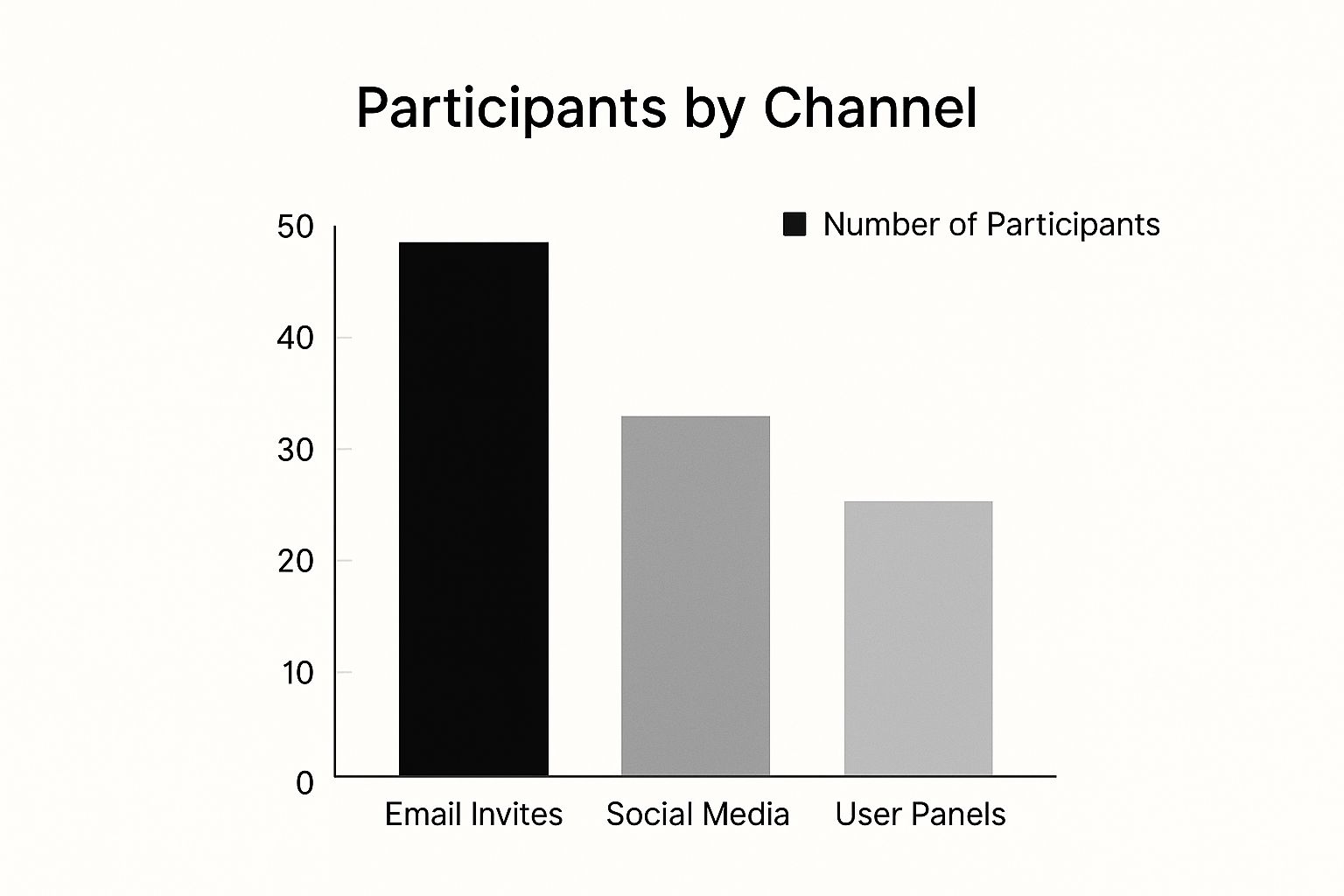
Email invites generated the highest number of participants, followed by social media and user panels. This demonstrates the effectiveness of engaging your existing user base and leveraging social platforms. However, using multiple channels ensures a diverse and representative sample for more reliable results.
Adapting Methods to Your Needs
The ideal method mix depends on your goals, resources, and target audience. A startup with a limited budget might choose remote unmoderated testing. A large enterprise launching a complex web application might invest in a combination of remote and in-person moderated sessions. Consider your team’s experience, project timelines, and the type of insights you need to make informed decisions. By understanding each user testing method and tailoring your approach, you can gather invaluable user insights to drive website success.
Building a User Testing Program That Actually Works

This section offers a practical guide to setting up a user testing program that delivers valuable insights for your website. We'll cover defining objectives, designing realistic scenarios, and finding the right participants for effective feedback.
Defining Clear Objectives
Before starting user testing, clearly define your goals. These objectives should match your overall business strategy.
For example, if you're aiming to boost sales, your testing objective could be finding and fixing issues in the checkout process. This focus makes sure your user testing directly supports your business success.
Crafting Realistic User Scenarios
To receive genuine feedback, create realistic scenarios reflecting how users typically interact with your website. Present participants with specific tasks instead of generic questions.
This task-based approach, much like prototyping testing questions, helps you see natural user behavior and pinpoint areas for improvement.
Developing Effective Test Questions
Your questions should reveal pain points without leading participants to specific answers. Ask open-ended questions that encourage detailed responses about their thoughts and feelings.
For instance, instead of "Did you find the navigation easy to use?", try "How did you feel about the website navigation?". This yields more valuable insights.
Recruiting the Right Participants
Finding participants who represent your target audience is essential. Consider demographics, technical skills, and previous experience with similar websites.
This ensures relevant feedback, helping you build a more effective website for your users.
Determining Sample Size
A larger sample size can give you more data, but balance is important. A good starting point is 5-8 participants for moderated testing and 20+ participants for unmoderated testing. This approach allows you to gather useful information efficiently.
Creating a Reliable Testing Environment
Whether testing in person or remotely, create a distraction-free environment. Give clear instructions and make sure participants feel comfortable giving honest feedback.
A comfortable environment encourages open communication and leads to more reliable results. It allows users to freely explore and share their genuine experience with your website. This sets the stage for a user testing program that consistently provides valuable insights, helping you continually improve your website and achieve greater business success.
Mobile Testing Techniques the Experts Actually Use
Mobile devices are now the primary way people access the internet. This shift requires a new approach to website user testing. Resizing a desktop browser isn't enough anymore. Mobile experiences present unique challenges that demand specialized testing techniques.
Contextual Inquiry: Understanding Real-World Usage
Contextual inquiry involves observing users interacting with your website in their typical environment. This method is particularly valuable for mobile testing. It reveals how factors like physical location, distractions, and available technology influence the user experience.
For example, testing a retail website while someone commutes on a train can highlight usability problems related to internet connectivity and one-handed navigation. This information is vital for optimizing mobile design for real-world scenarios.
Mobile Journey Mapping: Visualizing the User Flow
Mobile journey mapping takes basic user flows a step further. It visualizes the complete user experience on mobile. This includes not only the steps on your website but also the surrounding context. Where are they? What are they doing? How do they feel at each point in the process?
Mapping this journey helps you identify specific friction points unique to the mobile experience. Think about the frustration of typing credit card details on a small screen or navigating a website in bright sunlight.
Touch Pattern Analysis: Uncovering Hidden Usability Issues
Touch pattern analysis reveals hidden usability problems by examining how users interact with touchscreens. This technique helps identify areas where users frequently tap the wrong button or have trouble scrolling and zooming. It also reveals where they might accidentally activate unwanted functions. These findings inform interface improvements, creating a better touchscreen experience.
Historically, user testing has changed dramatically, especially with the rise of mobile. Over 65% of digital media consumption now happens on mobile devices. Furthermore, 98.1% of internet users aged 16 to 64 access the internet via mobile phone. Despite this, 96% of consumers report encountering websites that aren't optimized well for mobile. Find more detailed statistics here. This highlights the increasing need for robust mobile testing.
Environmental Factors: Lighting, Connectivity, and Distractions
Mobile users rarely browse websites in controlled environments. Testing must consider these real-world variables. This means evaluating screen readability in different lighting. It also means assessing how fluctuating network connectivity affects loading times and overall website function. Finally, it involves understanding how distractions like notifications and background noise influence user behavior.
Mobile Testing Tools: Choosing the Right Technology
Choosing the right mobile testing tools is essential. Some tools excel at recording screens and touch interactions, while others focus on performance analysis or cross-device compatibility testing. Selecting the right tools, aligned with your specific goals, provides the most useful insights.
Ultimately, effective mobile testing blends these specialized techniques with a user-centered design. This approach helps website owners improve usability and user satisfaction, leading to better business results. It guarantees a positive user experience no matter what device is used.
Turning Raw Testing Data Into Actionable Insights

After conducting user testing for websites, the next crucial step is analyzing the data. We need to transform this raw data into actionable insights. This section outlines practical strategies to process this data and translate it into meaningful website improvements.
Identifying Patterns and Trends
The first step in analysis is identifying recurring patterns and trends. This involves carefully reviewing recordings, transcripts, and survey responses. Look for common user behaviors, pain points, and preferences.
For example, if multiple users struggle to find the checkout button, this highlights a usability issue. Identifying these patterns gives a clear picture of a website's strengths and weaknesses.
Distinguishing Between Critical Issues and Minor Preferences
All feedback is valuable. However, it's important to distinguish between critical usability barriers and minor preferences. A critical issue significantly impacts a user's ability to complete a task. A minor preference, on the other hand, is a subjective desire that doesn't necessarily hinder functionality.
This distinction ensures that resources are focused on the most impactful issues first. Prioritizing changes based on this analysis leads to more effective improvements.
Prioritizing Findings Based on Impact and Effort
Once you’ve identified the key issues, prioritize them based on their potential impact and the effort required for implementation. An impact-effort matrix is a helpful tool for this.
It allows teams to visually plot the potential benefit of addressing an issue against the resources needed to fix it. This helps focus on high-impact, low-effort changes. These "quick wins" can build momentum and demonstrate the value of user testing.
Visualizing Data for Effective Communication
Effectively communicating insights is vital for securing stakeholder buy-in. This means translating complex data into clear visuals. Charts, graphs, and heatmaps can visually represent key findings, making them easier to understand.
A heatmap showing where users click most frequently can highlight areas needing attention. Visuals help everyone understand the user experience and the need for improvement.
Overcoming Analysis Challenges
Common challenges arise when analyzing user testing data. Confirmation bias, the tendency to favor information that confirms pre-existing beliefs, can cause teams to overlook valuable, contradictory insights.
Contradictory feedback can also complicate analysis. For example, one user might dislike a feature while another praises it. Resolving this requires deeper investigation to understand the underlying reasons for these differences. Exploring these diverse perspectives can lead to a richer understanding.
A Practical Framework for Data Analysis
The following table provides a structured approach to analyzing user testing data, from initial observations to prioritized recommendations.
User Testing Data Analysis Framework: This table presents a structured approach to analyzing user testing data, from initial observation to prioritized recommendations.
| Analysis Stage | Key Activities | Tools/Methods | Expected Outcomes |
|---|---|---|---|
| Data Collection | Gather data from various sources like user testing sessions, surveys, and website analytics. | Recording software, surveys, observation notes, website analytics platforms | Raw data sets (e.g., recordings, transcripts, survey responses, analytics data) |
| Data Organization | Transcribe recordings, compile survey responses, and organize data into a usable format. | Spreadsheet software, qualitative data analysis tools | Structured data ready for analysis |
| Pattern Identification | Identify recurring themes, behaviors, and pain points across users. | Affinity diagrams, thematic analysis | Key insights and trends related to user behavior and website usability |
| Prioritization | Rank findings based on their potential impact on users and the level of effort required to implement changes. | Impact-effort matrix | Prioritized list of recommendations for website improvements |
| Visualization | Create charts, graphs, and reports to communicate findings effectively to stakeholders. | Data visualization software | Clear and compelling communication of findings, facilitating stakeholder buy-in |
This framework helps transform raw data into actionable website improvements. By following these steps, organizations can maximize the value of their user testing and create a better online experience.
From Insights to Impact: Making Changes That Matter
Translating user testing insights into tangible website improvements is where the real magic happens. This section explores how to prioritize those changes, secure stakeholder buy-in, and manage the implementation process for maximum impact. It's about creating solutions that truly resonate with users and drive your business goals.
Prioritizing Changes With Impact-Effort Matrices
Not all changes are created equal. Some offer significant improvements with minimal effort, while others demand extensive resources for a smaller return. That's why smart companies use impact-effort matrices to prioritize changes strategically. This visual tool helps teams balance the potential benefits of a change against the resources required.
For example, fixing a broken checkout button likely has high impact and low effort. Redesigning the entire website, however, requires much higher effort, with the potential for high impact. This matrix approach ensures that resources are focused on the "quick wins" that deliver immediate value.
Securing Stakeholder Buy-in With Data Narratives
Getting stakeholders on board is essential for implementing changes. Dry data rarely convinces anyone. Instead, create compelling data narratives that showcase the user experience and the potential impact of proposed improvements.
Imagine showcasing a video clip of a user struggling to navigate your website. Now, combine that with quantitative data on cart abandonment rates. Suddenly, the urgency and importance of proposed changes become crystal clear. This humanizes the data, making it relatable and persuasive.
Managing Implementation for User-Centered Design
Implementation requires careful management to preserve the user-centered design intent. It's easy for the original vision to get lost during development, especially when technical limitations or conflicting priorities emerge.
Maintaining constant communication between the UX team, developers, and stakeholders ensures the final product reflects user needs and business objectives. This collaborative approach prevents costly rework and delivers a truly user-friendly final product.
Validating Changes and Establishing Continuous Improvement
After implementing changes, follow-up testing is crucial to validate their effectiveness. User testing for websites is an iterative process. It's not a one-time activity, but an ongoing cycle of testing, analysis, and refinement.
Regular testing helps identify any unintended consequences of changes and measures the actual impact on user behavior. Establishing this continuous improvement cycle, even after initial improvements, prevents regression and ensures ongoing optimization. Much like tending a garden, ongoing attention to user experience is essential for sustained online success.
Measuring the Business Impact and Overcoming Roadblocks
Demonstrating the business impact of UX improvements strengthens the case for future testing. Tracking key metrics like conversion rates, bounce rates, and customer satisfaction provides quantifiable evidence of the value of user testing. This data justifies continued investment in user-centered design and helps secure resources for UX research.
Challenges inevitably arise during implementation. Conflicting user feedback, technical limitations, and budget constraints can all create roadblocks. Successful organizations address these challenges head-on. They foster open communication, explore creative solutions, and remain committed to the user-centered design principles that guided the initial testing. These roadblocks, while challenging, often present opportunities for innovation and further refinement of the user experience.
Looking to enhance your website's user experience and drive better business results? OneNine's expertise in user-centered design and development can help. We offer comprehensive services from user research and testing to website design and implementation. Visit OneNine to learn more.


